2009 VOLKSWAGEN PASSAT Range
[x] Cancel search: RangePage 14 of 392
Outside temperature display
At outside temperatures below about +39 °F (+4 °C), a “snowflake symbol” (icy road warning) appears in the display. The symbol flashes at first, then stays on until the outside temperature rises above
+43 °F (+6 °C) ⇒ .
When the vehicle is not moving or when you are driving at very low speeds, the temperature displayed may be slightly higher than the actual outside temperature.
The measurement range is from -40 °F (-40 °C) to +122 °F (+50 °C).
Compass display (if applicable)
On vehicles equipped with compass display, the current compass direction is indicated in the instru-ment cluster display when the ignition and navigation system are switched on, Compass.
Selector lever positions
The selector lever position is shown both on the side of the selector lever and in the instrument cluster display. The respective gear may also be shown in the instrument cluster display in Drive D and Sport Drive S, as well as in Tiptronic® mode.
WARNING
Failure to heed warning lights and instrument cluster text messages can cause the vehicle to break down in traffic and result in a collision and serious personal injury.
x Never ignore warning lights or text WARNINGS.
x Always stop the vehicle as soon as it is safe to do so.
x Park the vehicle at a safe distance from moving traffic and where no part of the hot cata-lytic converter and exhaust system can come into contact with flammable materials under the vehicle, such as dry grass, brush, spilled fuel, etc.
x A broken down vehicle presents a high accident risk for itself and others. Switch on emergency flashers and set up a warning triangle to warn oncoming traffic.
WARNING
Roads and bridges may be dangerously icy even if the outside air temperature is above freez-ing.
x If you use the outside temperature display to tell you about frost conditions, remember that roads can even ice over at temperatures above +39 °F (+4 °C). Always remember: even if the “snowflake symbol” (icy road warning) is not displayed, there could still be black ice on the road.
x Never rely exclusively on the outside temperature display.
NOTICE
Failure to heed warning lights or text WARNINGS can result in vehicle damage.
The instrument cluster displays and their arrangement may vary depending on the vehicle model and engine. For displays without warning and information messages, malfunctions are only signaled with indicator lights.
If there are multiple warning messages, the symbols are displayed for several seconds in order of importance. The symbols are displayed until the cause has been corrected.
Page 23 of 392

Vehicle status, Main menus: Premium version
Settings, Settings menu
▪ Language
▪ MFI data
– Travel time
– Curr. consum. (current fuel consumption)
– Av. consum. (average fuel consumption)
– Range
– Route
– Av. speed
– Digit. speed (digital speed display)
– Oil temp. (oil temperature; 3.6 liter engine only)
– Speed warn. (speed warning)
– Back
▪ Convenience, Convenience submenu
– ATA confirm
– Central locking
Auto unlock
Unlock doors
Back
– Window op. (window operation)
Off
All
Driver
Back
– Mirror down (vehicles with memory seats)
– Mirror adjust
Individually
Both mirrors
Factory setting
Back
▪ Lights & Vision, Lights & Vision submenu
– Coming home
– Leaving home
– Conv. turn sig. (convenience turn signal)
– Factory setting
– Back
▪ Time
– Hours
– Minutes
– 24 hr. mode
– Daylight save
– Back
▪ Snow tires (winter tires)
– On
– + 5 mph
– - 5 mph
Page 25 of 392

To display the distance driven on trips 1 and 2, select the Route item in the MFI menu (MFI >
Route). Press the OK button (⇒ fig. 16) to toggle between Route 1 and Route 2 (trip 1 and trip 2).
Push and hold the OK button to manually reset a trip memory to zero.
1 Single trip memory
The memory accumulates and stores information about distance driven and fuel used from the time the ignition was switched on until the time it was switched off. If the ignition stays off for 2 hours or more, stored information is automatically deleted. If the trip is continued within 2 hours after the ignition was switched off, the new values are added.
2 Total trip memory
The memory displays and stores the accumulated driving and fuel consumption data of any number of single trips up to a total driving time of 99 hours and 59 minutes, and up to a total distance of 9,999 miles (9,999 km), depending on the instrument cluster version. If one of the maximum values is exceeded, then the memory is automatically cleared and starts again from 0.
Possible MFI menu displays
The following displays can be accessed in the MFI menu if enabled under Settings > MFI data. Displays that are not enabled will not appear.
Display Function
Travel time Driving time in hours (h) and minutes (min) corresponding to trip memories 1 and 2 (toggle).
Consumption --.- mpg Current fuel consumption in miles per gallon (l/100 km) while driving. When units are set to miles, dashes appear instead of a number when the engine is running and the vehicle is standing still. When units are set to kilometers, the display shows liters consumed per hour when the engine is running and the vehicle is standing still.
Consumption --.- l/100 km
Av. consumption --.- mpg Average fuel consumption in miles per gallon (l/100 km) on trips per trip memories 1 and 2 (toggle) is displayed once the vehicle has been driven about 330 feet (100 m). Until then, dashes appear instead of a number. The value displayed is updated every 5 seconds. Av. consumption --.- l/100 km
Range Estimated distance in miles (km) that the vehicle can go with the fuel left in the tank the way you are currently driving. Takes account of the current fuel consumption, among other things.
Range b Diesel engines only: Estimated distance in miles (km) that the vehicle can go with the AdBlue left in the tank. Visible only when the AdBlue range has fallen to less than 1500 mi or 2400 km.
Route Distance driven in miles (km) per trip memories 1 and 2 (toggle).
Average speed
Average speed on trips per trip memories 1 and 2 (toggle). Displayed once the vehicle has been once the vehicle has been driven about 300 feet (100 m). Until then, dashes appear instead of a number. The value displayed is updated every 5 seconds.
0 speed Digital display of current vehicle speed.
Oil temp. Current engine oil temperature (digital display; 3.6 liter engine only).
Speed warning --- mph When the set speed (from 20–155 mph or 30–250 km/h) is exceeded, an acoustic warning sounds, and a visual message may also appear in the
Page 38 of 392

Replacement vehicle keys
The vehicle identification number is required to get a replacement key or an additional remote control vehicle key.
Up to 8 vehicle keys, each of which must be properly cut, coded, programmed, and synchronized, can be used with your vehicle.
Each new vehicle key contains a microchip and must be coded with the data from the vehicle's electronic immobilizer. A vehicle key will not work if it does not contain a microchip or contains a chip that is not coded, even if the key bit was cut correctly.
You can obtain additional or duplicate remote control vehicle keys from authorized Volkswagen dealers, authorized Volkswagen Service Facilities, and from certain independent repair facilities and locksmiths which are qualified to make remote control vehicle keys.
Each vehicle key must be programmed by an authorized Volkswagen dealer, an authorized Volkswagen Service Facility in order for it to work with your vehicle.
To find the nearest qualified independent repair facility, locksmith, or Volkswagen dealer which can cut and code replacement vehicle keys, call the VW Customer Care Hotline at 1-800-822-8987 or visit http://www.vw.com and search for “replacement keys.”
Canadian customers can contact an authorized Volkswagen dealer or Volkswagen Service Facility or call the Volkswagen Canada Customer CARE Center at (1-800-822-8987).
NOTICE
The remote control vehicle keys contain electrical components. Protect them from damage, moisture and rough handling.
Do not press the buttons on the remote control vehicle key unless you actually want to use the function in question. Since terrain and conditions vary, pressing a button on the remote control vehicle key when it is not necessary may unlock the vehicle or set off the panic alarm, even if you think you are out of range.
Remote control vehicle key functions can be temporarily disrupted by interference from transmitters near the vehicle that use the same frequency range (such as radio equipment or mobile phones).
Things between the remote control vehicle key and vehicle, bad weather, as well as a weak battery can reduce the operating range.
If the remote control vehicle key buttons, Vehicle key set or the power locking buttons, Unlocking and locking the vehicle from the inside are pushed repeatedly in quick succession, the power locking system is switched off for a brief period to help keep it from being overloaded. The vehicle is then unlocked for about 30 seconds. Unless a door or the luggage compartment lid is opened in this span of time, the vehicle is automatically locked afterwards.
Page 48 of 392
Unlocking and locking vehicles with Keyless Access
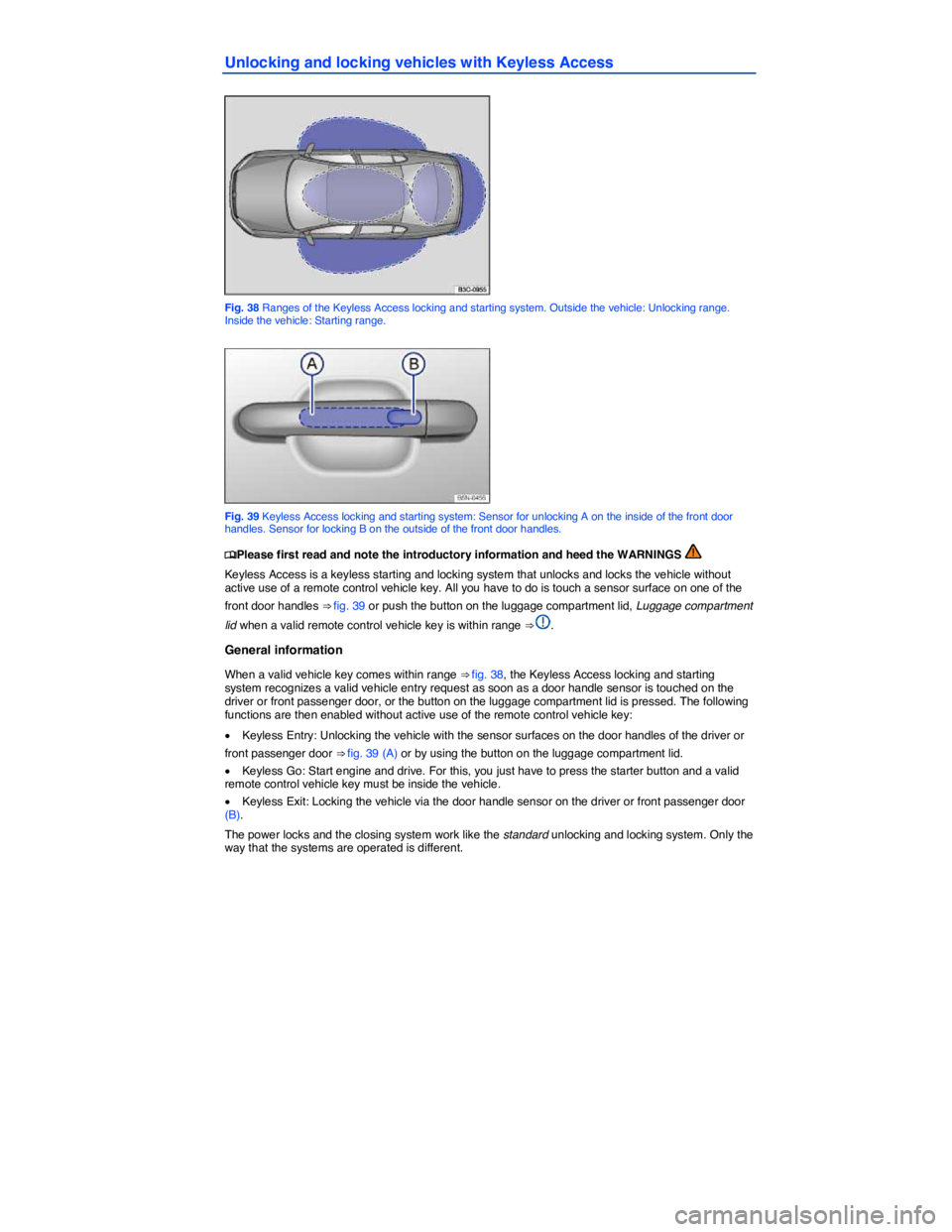
Fig. 38 Ranges of the Keyless Access locking and starting system. Outside the vehicle: Unlocking range. Inside the vehicle: Starting range.
Fig. 39 Keyless Access locking and starting system: Sensor for unlocking A on the inside of the front door handles. Sensor for locking B on the outside of the front door handles.
Page 49 of 392

All turn signals flash twice to confirm that the vehicle has been unlocked and once to confirm that it has been locked.
If the vehicle was unlocked and within the next few seconds no door or the luggage compartment lid has been opened, the vehicle is automatically locked again.
Unlocking and opening doors (Keyless Entry)
x Grasp the door handle of the driver or front passenger door so that you touch the unlocking sensor surface (A).
x Open the door.
Closing and locking doors (Keyless Exit)
x Close the driver door.
x Touch the sensor surface in the door handle on the driver or front passenger door (B). The vehicle is locked. The door being locked must be closed.
Unlocking and locking the luggage compartment lid
If the vehicle is locked and a valid remote control vehicle key is within range ⇒ fig. 38 of the luggage compartment lid, it unlocks automatically when opened.
x Open and close the luggage compartment lid as you would a standard luggage compartment lid, Luggage compartment lid.
The luggage compartment lid locks automatically when it is closed except in the following situations:
x The vehicle is completely unlocked.
x When an authorized remote control vehicle key is inside the vehicle.
Locking with a second vehicle key
If a remote control vehicle key is inside the passenger compartment, the vehicle can be locked from the outside only if a second valid remote control vehicle key is within range.
When the vehicle is locked from the outside, the keyless go (starting) function of any keys left in the passenger compartment will be deactivated. All other functions (remote central locking and unlocking as well as emergency starting) remain active and unchanged.
A key that was inside the vehicle when it was locked from the outside is reactivated:
x by pressing a button on the deactivated key.
x by pressing a door handle sensor when the deactivated key is outside of the vehicle, but within range.
x by starting the engine with the starter button on the center console (but not by starting the engine with the remote start button on a key that is outside of the vehicle, Remote start feature).
Automatic deactivation of sensors
If the vehicle has not been unlocked or locked for a longer period of time, the proximity sensors in the passenger door are automatically deactivated.
If a sensor on the door handle of a locked vehicle is activated too often, for instance by a bush or hedge that rubs against the vehicle, the sensors in the door handle on that side of the vehicle are switched off for about 30 minutes.
The door handle sensors become active again if one of the following events occurs:
x 30 minutes have passed.
x OR: The vehicle is unlocked using the 0 button in the remote control vehicle key.
x OR: The luggage compartment lid is opened.
x OR: The vehicle is mechanically unlocked with the vehicle key.
Page 51 of 392

Preparation for the anti-theft alarm system
If the vehicle is pre-equipped for installation of the anti-theft alarm system, the alarm system can be retrofitted by an authorized Volkswagen dealer or an authorized Volkswagen Service Facility.
The anti-theft alarm system makes it more difficult for someone to break into or steal the vehicle.
The anti-theft alarm system is automatically activated when the vehicle is locked by pressing the lock button on the remote control vehicle key.
When is the alarm triggered?
The anti-theft alarm system sounds for about 30 seconds and the turn signals flash for up to 5 minutes if the following occurs with respect to the locked vehicle:
x Opening a door that has been mechanically unlocked without switching on the ignition within about 15 seconds.
x Forcibly opening a door.
x Forcibly opening the engine hood.
x Forcibly opening the luggage compartment lid.
x Switching on the ignition with an invalid key.
x Disconnecting the vehicle battery.
Deactivating the alarm
Unlock the vehicle with the unlock button on the remote control vehicle key and switch on the ignition with a valid vehicle key.
For vehicles with Keyless Access, the alarm can be deactivated by grasping one of the door handles when a valid remote control vehicle key is in range or by holding the remote control vehicle key to the right of the steering column trim and pressing the starter button, Unlocking and locking vehicles with Keyless Access.
After the alarm has stopped and the vehicle is opened again in the same or a different area that is protected by the alarm, the alarm is triggered again. For example, the alarm will sound again if the luggage compartment lid is opened after one of the doors has been opened.
The anti-theft alarm system is not activated when the vehicle is locked with the power lock switch 1 on the inside of the driver or front passenger doors.
If the driver door is mechanically unlocked using the vehicle key bit, only the driver door is unlocked, but not the entire vehicle. Switching on the ignition deactivates the anti-theft alarm system and activates the central locking button. To unlock the doors, use the central locking button or remote control vehicle key.
If the vehicle battery is dead or weak, the anti-theft alarm system will not work properly.
Page 173 of 392

Section width
The linear distance between the exteriors of the sidewalls of an inflated tire, excluding elevations due to labeling decoration, or protective bands.
Sidewall
The portion of a tire between the bead and the tread.
Sidewall separation
The parting of the rubber compound from the cord material in the sidewall.
Speed rating (letter code)
A standardized letter code indicating the maximum speed at which a tire is designed to be driven for extended periods of time. The ratings range from 93 mph or 150 km/h (“P”) to 186 mph or (300 km/h) “Y”.
The speed rating letter code, where applicable, is molded on the tire sidewall, Tire labeling. You may not find this information on all tires because it is not required by law.
Tire Pressure Monitoring System
A system that detects when at least one of a vehicle's tires is underinflated and illuminates a low tire-pressure warning light.
Tread
The portion of a tire that normally touches the road.
Tread rib
A tread section running circumferentially around a tire.
Tread separation
Tire failure caused by the tread pulling away from the tire carcass.
Tread wear indicators (TWI)
Raised areas within the main tread grooves that show, visually, when tires are worn and near the end of their useful life, Tread depth and tread wear indicators.
Uniform Tire Quality Grading (UTQG)
A tire information system developed by the U.S. National Highway Traffic Safety Administration (NHTSA) that is designed to help buyers compare tires. UTQG is not a safety rating, nor is it a guarantee that a tire will last for a certain number of miles or perform a certain way. It gives tire buyers more information to compare with factors such as price, brand loyalty and dealer recommendations. Under UTQG, tires are graded by the tire manufacturers in 3 areas: tread wear, traction and temperature resistance. UTQG information is molded into the tire sidewalls.
U.S. DOT Tire Identification Number (TIN)
A tire's serial number. It begins with the letters “DOT” (“Department of Transportation”) and indicates that the tire meets all federal standards. The next two numbers or letters indicate the plant where the tire was manufactured. The last four numbers represent the week and year of manufacture.
For example, the numbers 1709 mean that the tire was produced in the 17th week of 2009. Any other numbers are marketing codes used by the tire manufacturer. This information is used to help identify affected consumers if a tire defect requires a recall.
Vehicle capacity weight
The total rated cargo, luggage and passenger load. Passenger load is 150 lbs (68 kilograms) times the vehicle's total seating capacity (as listed on the label inside the driver door).