Page 169 of 392
169
2-5. Driving information
2
When driving
Trailer towing tips
Your vehicle will handle differently when towing a trailer. The three
main causes of vehicle-trailer ac cidents are driver error, excessive
speed and improper trailer loading. Keep these in mind when towing.
● Before starting out, check the trailer’s light and the vehicle-trailer
connections. Recheck after driving a short distance.
● Practice turning, stopping and reve rsing with the trailer attached in
an area away from traffic until you become accustomed to the feel
of the vehicle.
NOTICE
■ When installing a trailer hitch
Use only the position recommended by your Toyota dealer. Do not install the
trailer hitch on the bumper; this may cause body damage.
■ Brakes
Toyota recommends trailers with brakes that conform to any applicable fed-
eral and state/provincial regulations.
■ Safety chain
A safety chain must always be used between the towing vehicle and the
trailer. Leave sufficient slack in the chain for turns. The chain should cross
under the trailer tongue to prevent the tongue from dropping to the ground in
the case that it becomes damaged or separated. For the correct safety chain
installation procedure, ask your Toyota dealer.
■ Do not directly splice trailer lights
Directly splicing may damage your vehicle’s electrical system and cause a
malfunction.
Page 177 of 392
Interior features3
177
3-1. Using the air conditioning system and defogger
Air conditioning system .... 178
Rear window and outside rear view mirror
defoggers ....................... 185
3-2. Using the audio system Audio system type............ 187
Using the radio ................. 189
Using the CD player ......... 195
Playing back MP3 and WMA discs ..................... 200
Optimal use of the audio system ........................... 207
Using the AUX adapter .... 209
3-3. Using the interior lights Interior lights list ............... 210
• Interior light .................... 211
• Personal lights ............... 211 3-4. Using the storage features
List of storage features .... 212
• Glove boxes ................... 212
• Cup holders ................... 214
• Bottle holders ................. 215
• Auxiliary boxes ............... 217
3-5. Other interior features Sun visors ........................ 219
Vanity mirrors ................... 220
Clock ................................ 221
Power outlet ..................... 223
Floor mat .......................... 224
Luggage compartment features .......................... 225
Page 185 of 392
185
3-1. Using the air conditioning system and defogger
3
Interior features
Rear window and outside rear view mirror defoggers (if equipped)
■The rear window and outside rear vi ew mirror defoggers can be oper-
ated when
The engine switch is in the ON position.
■ Outside rear view mirror defoggers (vehicles with outside rear view
mirror defoggers)
Turning the rear window defogger on will turn the outside rear view mirror
defoggers on.
CAUTION
■ When the outside rear view mirror defoggers are on (vehicles with out-
side rear view mirror defoggers)
Do not touch the rear view mirror surfaces, as they can become very hot and
burn you.
These features are used to defog the rear window, and to remove
raindrops, dew and frost from the outside rear view mirrors.
On/off
Press the button to turn on the
rear window defogger. The
indicator light will come on.
Pressing the button again also
turns the defoggers off.
Vehicles with timer: The defog-
gers will automatically turn off
after approximately 15 min-
utes.
Page 199 of 392
199
3-2. Using the audio system
3
Interior features
NOTICE
■
CD player precautions
Failure to follow the precautions below may result in serious damage to the
CDs or the player itself.
●Do not insert anything other than CDs into the CD slot.
● Do not apply oil to the CD player.
● Store CDs away from direct sunlight.
● Never try to disassemble any part of the CD player.
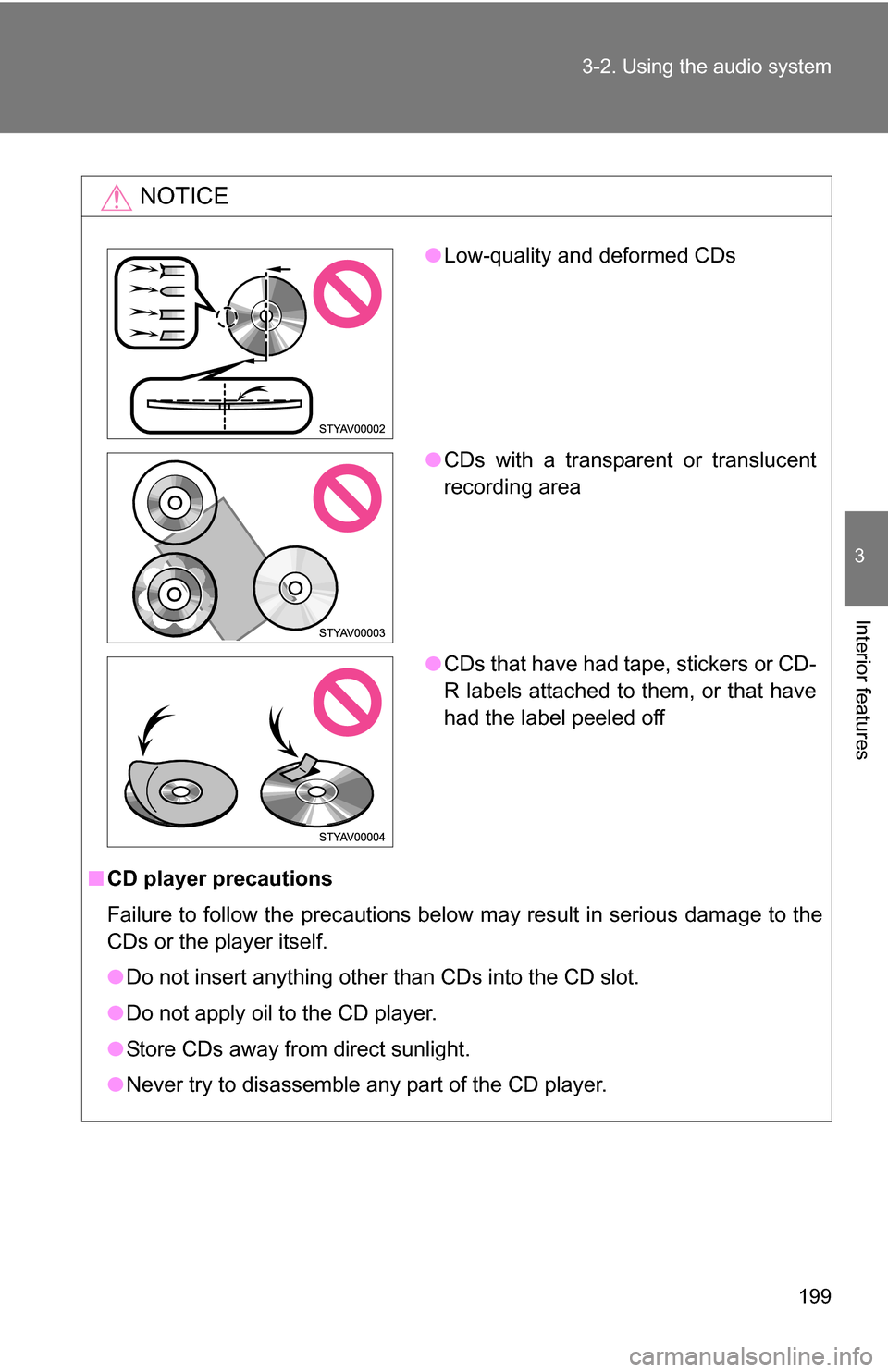
●Low-quality and deformed CDs
● CDs with a transparent or translucent
recording area
● CDs that have had tape, stickers or CD-
R labels attached to them, or that have
had the label peeled off
Page 210 of 392
210
3-3. Using the interior lights
Interior lights list
■Illuminated entry system (if equipped)
When the interior light switch is in the DOOR position, the interior light auto-
matically turns on/off according to whether the doors are locked/unlocked
and whether the doors are open/closed and the engine switch position.
■ To prevent the battery from being discharged
If the interior light remains on when the door is not fully closed and the inte-
rior light switch is in the DOOR position, the light will go off automatically
after 20 minutes.
■ Customization that can be co nfigured at Toyota dealer
Settings (e.g. The time elapsed before lights turn off) can be changed.
(Customizable features P. 369)
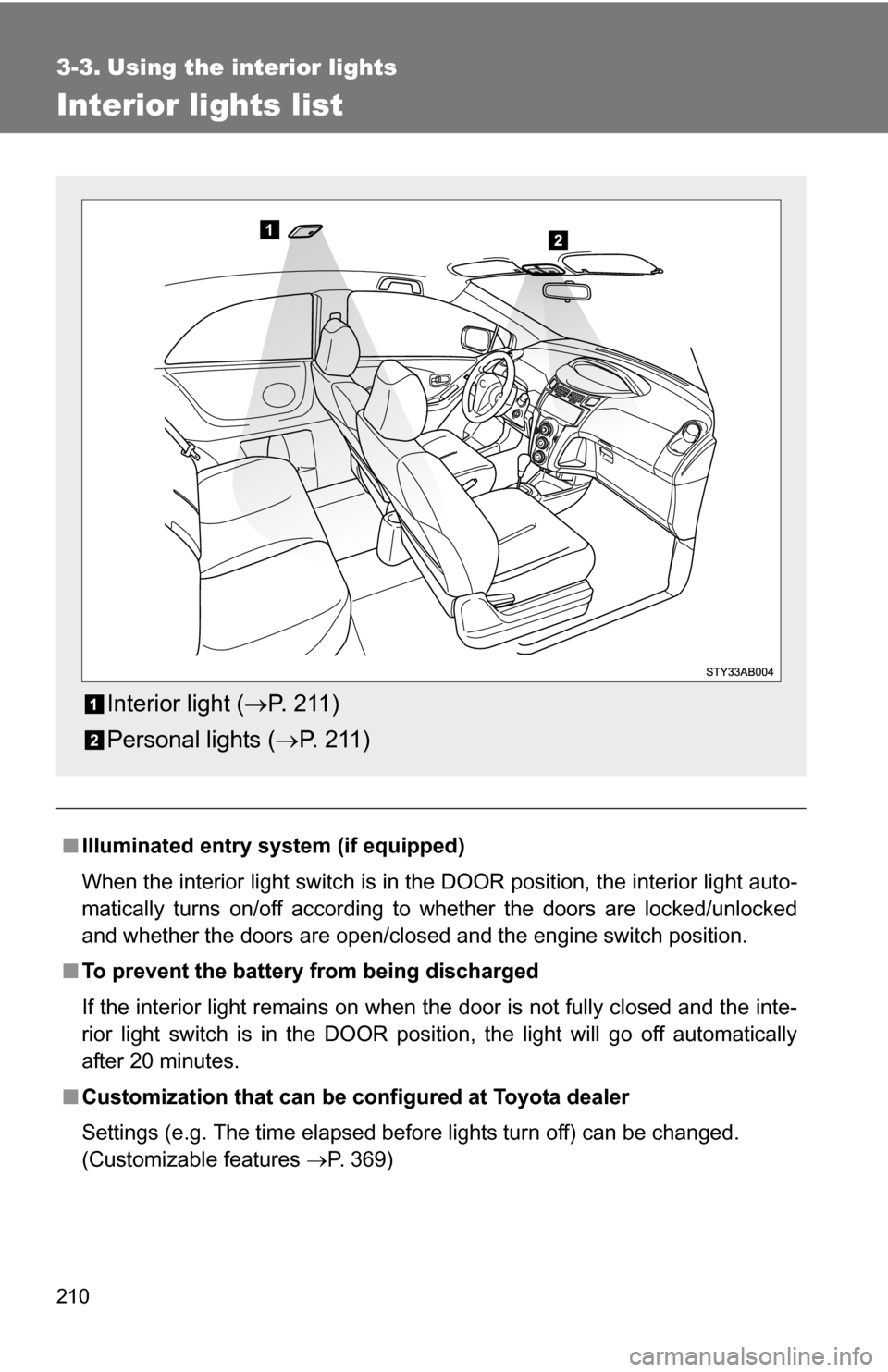
Interior light (P. 2 11 )
Personal lights ( P. 2 1 1 )
Page 211 of 392
211
3-3. Using the interior lights
3
Interior features
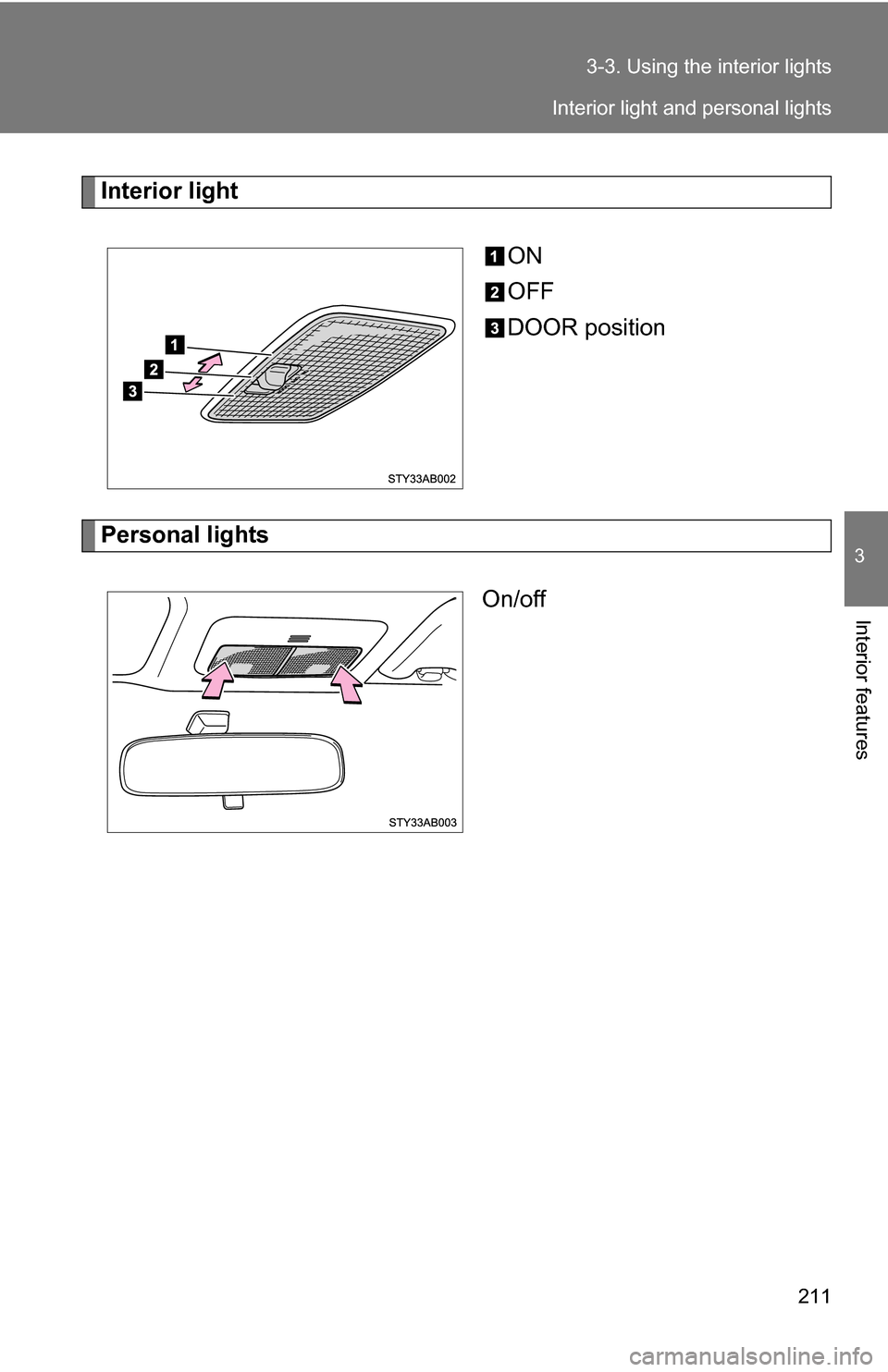
Interior light
ON
OFF
DOOR position
Personal lightsOn/off
Interior light and personal lights
Page 213 of 392
213
3-4. Using the
storage features
3
Interior features
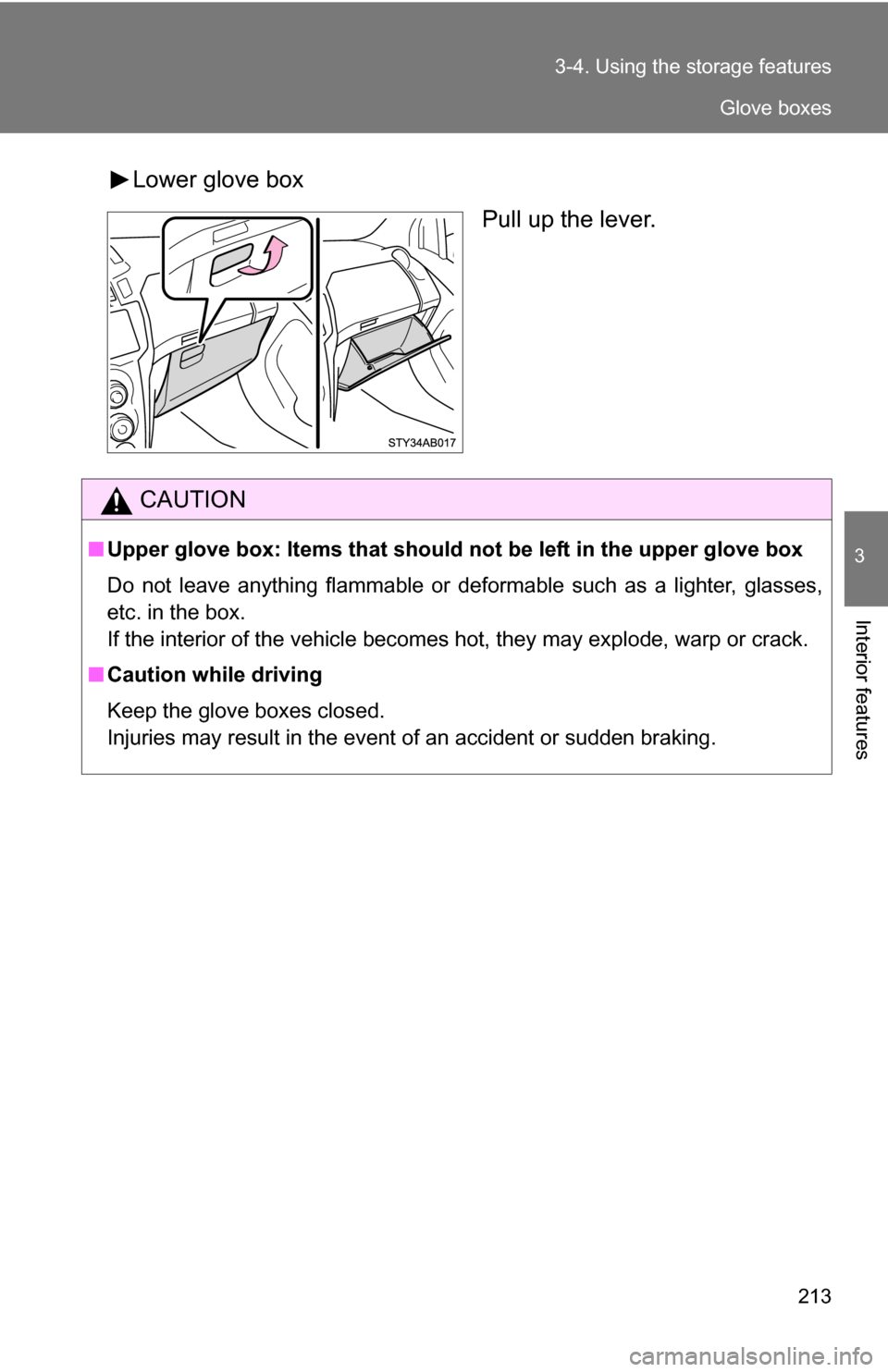
Lower glove box
Pull up the lever.
CAUTION
■Upper glove box: Items that should not be left in the upper glove box
Do not leave anything flammable or deformable such as a lighter, glasses,
etc. in the box.
If the interior of the vehicle becomes hot, they may explode, warp or crack.
■ Caution while driving
Keep the glove boxes closed.
Injuries may result in the event of an accident or sudden braking.
Glove boxes
Page 218 of 392
218 3-4. Using the storage features
CAUTION
■Type A: Items that should not be left in the auxiliary box
Do not leave anything flammable or deformable such as a lighter, glasses,
etc. in the box.
If the interior of the vehicle becomes hot, they may explode, warp or crack.
■ Caution while driving
Keep the auxiliary box closed.
Injuries may result in the event of an accident or sudden braking.
Auxiliary boxes