14
FEATURES/OPERATIONS
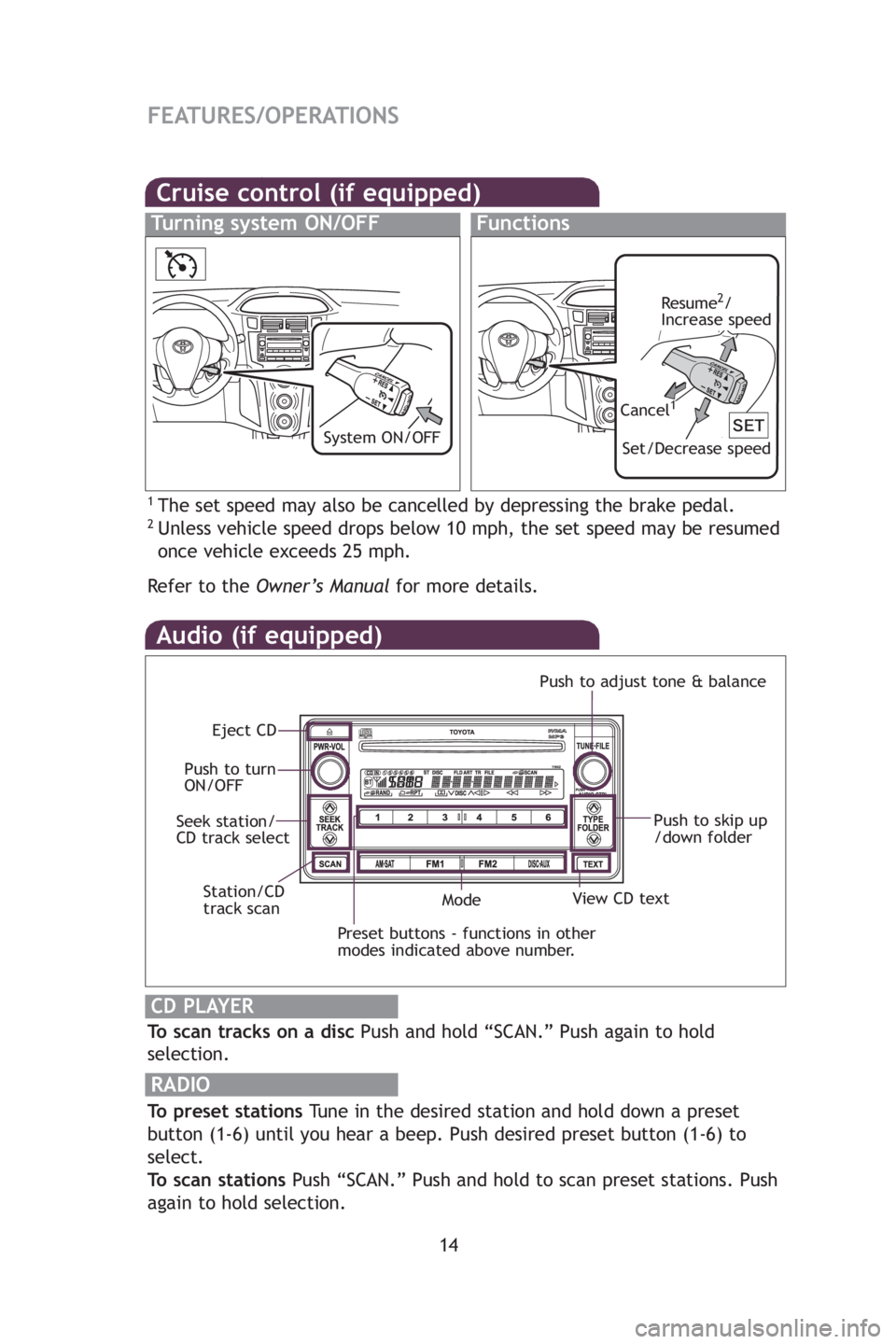
Audio (if equipped)
To scan tracks on a discPush and hold “SCAN.” Push again to hold
selection.
RADIO
To preset stations Tune in the desired station and hold down a preset
button (1-6) until you hear a beep. Push desired preset button (1-6) to
select.
To scan stations Push “SCAN.” Push and hold to scan preset stations. Push
again to hold selection.
CD PLAYER
Preset buttons - functions in other
modes indicated above number.
View CD text
Push to skip up
/down folder
Eject CD
Push to turn
ON/OFF Push to adjust tone & balance
Mode
Seek station/
CD track select
Station/CD
track scan
By in
AUX
thro
u
AUX
Lu
Ope
Cruise control (if equipped)
1The set speed may also be cancelled by depressing the brake pedal.2Unless vehicle speed drops below 10 mph, the set speed may be resumed
once vehicle exceeds 25 mph.
Refertothe Owner’s Manual for more details.
Turning system ON/OFFFunctions
Resume2/
Increase speed
Set/Decrease speed
Cancel1
System ON/OFFClo
Press
adju
Refe
Pow
Desig
posit
412782M2.qxd:_412782M2 8/18/08 2:08 PM Page 14