2009 TOYOTA SIENNA radio
[x] Cancel search: radioPage 3 of 592

1
2
3
4
5
6
7
3
Windshield wipers and washer .............................. 191
Rear window wiper and washer .............................. 193
2-4. Using other driving systems ........................... 194
Cruise control ...................... 194
Dynamic laser cruise control ............................... 197
Intuitive parking assist......... 209
Driving assist systems ........ 215
2-5. Driving information ........... 219 Cargo and luggage ............. 219
Vehicle load limits ............... 225
Winter driving tips ............... 226
Trailer towing ...................... 229
Dinghy towing ..................... 237
3-1. Using the air conditioning system and defogger...... 240
Front manual air conditioning system .......... 240
Front automatic air conditioning system .......... 246
Rear manual air conditioning system .......... 253
Rear automatic air conditioning system .......... 256
Rear window and outside rear view mirror defoggers,
and windshield wiper
de-icer ............................... 260 3-2. Using the audio system ... 262
Audio system types ............ 262
Using the radio ................... 265
Using the CD player ........... 271
Playing back MP3 and WMA discs ....................... 279
Optimal use of the audio system .............................. 287
Using the AUX adapter....... 291
Using the steering wheel audio switches.................. 292
3-3. Using the rear audio system ............................. 296
Rear seat entertainment system features ................ 296
Using the DVD player (DVD video)...................... 303
Using the DVD player (video CD) ........................ 312
Using the DVD player (audio CD/CD text) ........... 315
Using the DVD player (MP3 discs) ...................... 316
Using the video mode......... 318
Changing the initial setting............................... 320
3-4. Using the hands-free phone system
(for cellular phone)......... 327
Hands-free phone system (for cellular phone)
features ............................ 327
Using the hands-free phone system
(for cellular phone) ........... 331
Making a phone call ........... 339
Setting a cellular phone ...... 345
3Interior features
Page 20 of 592
20
For your information
Main Owner’s Manual
Please note that this manual covers all models and all equipment, including
options. Therefore, you may find some explanations for equipment not
installed on your vehicle.
All specifications provided in this manual are current at the time of printing.
However, because of the Toyota policy of continual product improvement, we
reserve the right to make changes at any time without notice.
Depending on specifications, the vehicle shown in the illustrations may differ
from your vehicle in terms of equipment.
Accessories, spare parts and modification of your Toyota
A wide variety of non-genuine spare parts and accessories for Toyota
vehicles are currently available on the market. You should know that these
parts are not covered by Toyota warranty and that Toyota is not responsible
for their performance, repair, or replacement, or for any damage they may
cause to, or adverse effect they may have on, your Toyota vehicle.
This vehicle should not be modified with non-genuine Toyota products.
Modification with non-genuine Toyota products could affect its performance,
safety or durability, and may even violate governmental regulations. In
addition, damage or performance problems resulting from the modification
may not be covered under warranty.
Installation of a mobile two-way radio system
As the installation of a mobile two-way radio system in your vehicle may
affect electronic systems such as the multi-port fuel injection system/sequen-
tial multi-port fuel injection system, cruise control system, anti-lock brake
system, SRS airbag system or seat belt pretensioner system, be sure to
check with your Toyota dealer for precautionary measures or special instruc-
tions regarding installation.
Page 30 of 592
30 1-2. Opening, closing and locking the doors
■Conditions affecting operation
The wireless remote control function may not operate normally in the follow-
ing situations.
●Near a TV tower, radio station, electr ic power plant, airport or other facil-
ity that generates strong radio waves
● When carrying a portable radio, cell ular phone or other wireless commu-
nication devices
● When multiple wireless remote control are in the vicinity
● When the wireless remote control is in contact with, or is covered by, a
metallic object
● When a wireless remote control (that emits radio waves) is being used
nearby
● When the wireless remote control has been left near an electrical appli-
ance such as a personal computer
● If window tint with a metallic content or metallic objects is attached to the
rear window
■ Customization that can be co nfigured at Toyota dealer
Settings (e.g. operation signal) can be changed.
(Customizable features P. 565)
Page 31 of 592
31
1-2. Opening, closing and locking the doors
1
Before driving
■
Certification for wireless remote control
For vehicles sold in the U.S.A.
NOTE:
This device complies with Part 15 of the FCC Rules. Operation is subject to
the following two conditions: (1) this device may not cause harmful interfer-
ence, and (2) this device must accept any interference received, including
interference that may cause undesired operation.
NOTICE:
This equipment has been tested and found to comply with the limits for a
Class B digital device, pursuant to Part 15 of the FCC Rules. These limits
are designed to provide reasonable protection against harmful interference
in a residential installation. This equipment generates, uses and can radiate
radio frequency energy and, if not installed and used in accordance with the
instructions, may cause harmful interference to radio communications. How-
ever, there is no guarantee that interference will not occur in a particular
installation. If this equipment does cause harmful interference to radio or
television reception, which can be determined by turning the equipment off
and on, the user is encouraged to try to correct the interference by one or
more of the following measures:
● Reorient or relocate the receiving antenna.
● Increase the separation between the equipment and receiver.
● Connect the equipment into an outlet on a circuit different from that to
which the receiver is connected.
● Consult the dealer or an experienced radio/TV technician for help.
FCC WARNING:
Changes or modifications not expressly approved by the party responsible
for compliance could void the user's authority to operate the equipment. For vehicles sold in Canada
NOTE:
Operation is subject to the following two conditions: (1) this device may not
cause interference, and (2) this device must accept any interference, includ-
ing interference that may cause undesired operation of the device.
Page 128 of 592
128 1-7. Safety information
CAUTION
■SRS airbag precautions
●Do not touch any of the component parts immediately after the SRS air-
bags have deployed (inflated) as they may be hot.
● If breathing becomes difficult after the SRS airbag has deployed, open a
door or window to allow fresh air in, or leave the vehicle if it is safe to do
so. Wash off any residue as soon as possible to prevent skin irritation.
● If the areas where the SRS airbags are stored, such as the steering wheel
pad and front and rear pillar garnishes, are damaged or cracked, have
them replaced by your Toyota dealer.
■ Modification and disposal of SRS airbag system components
Do not dispose of your vehicle or perform any of the following modifications
without consulting your Toyota dealer.
The SRS airbags may malfunction or deploy (inflate) accidentally, causing
death or serious injury.
● Installation, removal, disassembly and repair of the SRS airbags.
● Repairs, modifications, removal or replacement of the steering wheel,
instrument panel, dashboard, seats or seat upholstery, front, side and rear
pillars or roof side rails.
● Repairs or modifications of the front fender, front bumper, or side of the
occupant compartment.
● Installation of snow plows, winches, etc. to the front grille (bull bars, kan-
garoo bar etc.).
● Modifications to the vehicle's suspension system.
● Installation of electronic devices such as mobile two-way radios or CD
players.
● Modifications to your vehicle for a person with a physical disability.
Page 213 of 592
213
2-4. Using other
driving systems
2
When driving
■Sensor detection information
●Certain vehicle conditions and the surrounding environment may affect
the ability of the sensor to correctly detect obstacles. Particular instances
where this may occur are listed below.
• There is dirt, snow or ice on the sensor.
• The sensor is frozen.
• The sensor is covered in any way.
• The vehicle is leaning considerably to one side.
• On an extremely bumpy road, on an incline, on gravel, or on grass
• The vicinity of the vehicle is noisy due to vehicle horns, motorcycle
engines, air brakes of large vehicles, or other loud noises producing
ultrasonic waves.
• There is another vehicle equipped with parking assist sensors in the vicinity.
• The sensor is coated with a sheet of spray or heavy rain.
• The vehicle is equipped with a fender pole or wireless antenna.
• The bumper or sensor receives a strong impact.
• The vehicle is approaching a tall or curved curb.
• In harsh sunlight or intense cold weather
In addition to the examples above, there are instances in which, because of
their shapes, signs and other objects may be judged by the sensor to be
closer than they are.
● The shape of the obstacle may prevent the sensor from detecting it. Pay
particular attention to the following obstacles:
• Wires, fences, ropes etc.
• Cotton, snow and other materials that absorb radio waves
• Sharply-angled objects
• Low obstacles
• Tall obstacles with upper sections projecting outwards in the direction
of your vehicle
• Objects just under the bumper
• Objects very close to your vehicle
• A person near the vehicle (depending on the type of clothes worn)
Page 238 of 592
238
3-1. Using the air conditioning system
and defogger ................ 240
Front manual air conditioning system ....... 240
Front automatic air conditioning system ....... 246
Rear manual air conditioning system ....... 253
Rear automatic air conditioning system ....... 256
Rear window and outside rear view mirror defoggers,
and windshield wiper
de-icer ............................ 260
3-2. Using the audio system .......................... 262
Audio system types .......... 262
Using the radio ................. 265
Using the CD player ......... 271
Playing back MP3 and WMA discs ..................... 279
Optimal use of the audio system ........................... 287
Using the AUX adapter .... 291
Using the steering wheel audio switches ............... 292 3-3. Using the rear audio
system .......................... 296
Rear seat entertainment system features ............. 296
Using the DVD player (DVD video) ................... 303
Using the DVD player (video CD)...................... 312
Using the DVD player (audio CD/CD text) ........ 315
Using the DVD player (MP3 discs) .................... 316
Using the video mode ...... 318
Changing the initial setting ............................ 320
3-4. Using the hands-free phone system
(for cellular phone) ...... 327
Hands-free phone system (for cellular phone)
features .......................... 327
Using the hands-free phone system
(for cellular phone) ......... 331
Making a phone call ......... 339
Setting a cellular phone ... 345
Security and system setup .............................. 350
Interior features3
Page 262 of 592
262
3-2. Using the audio system
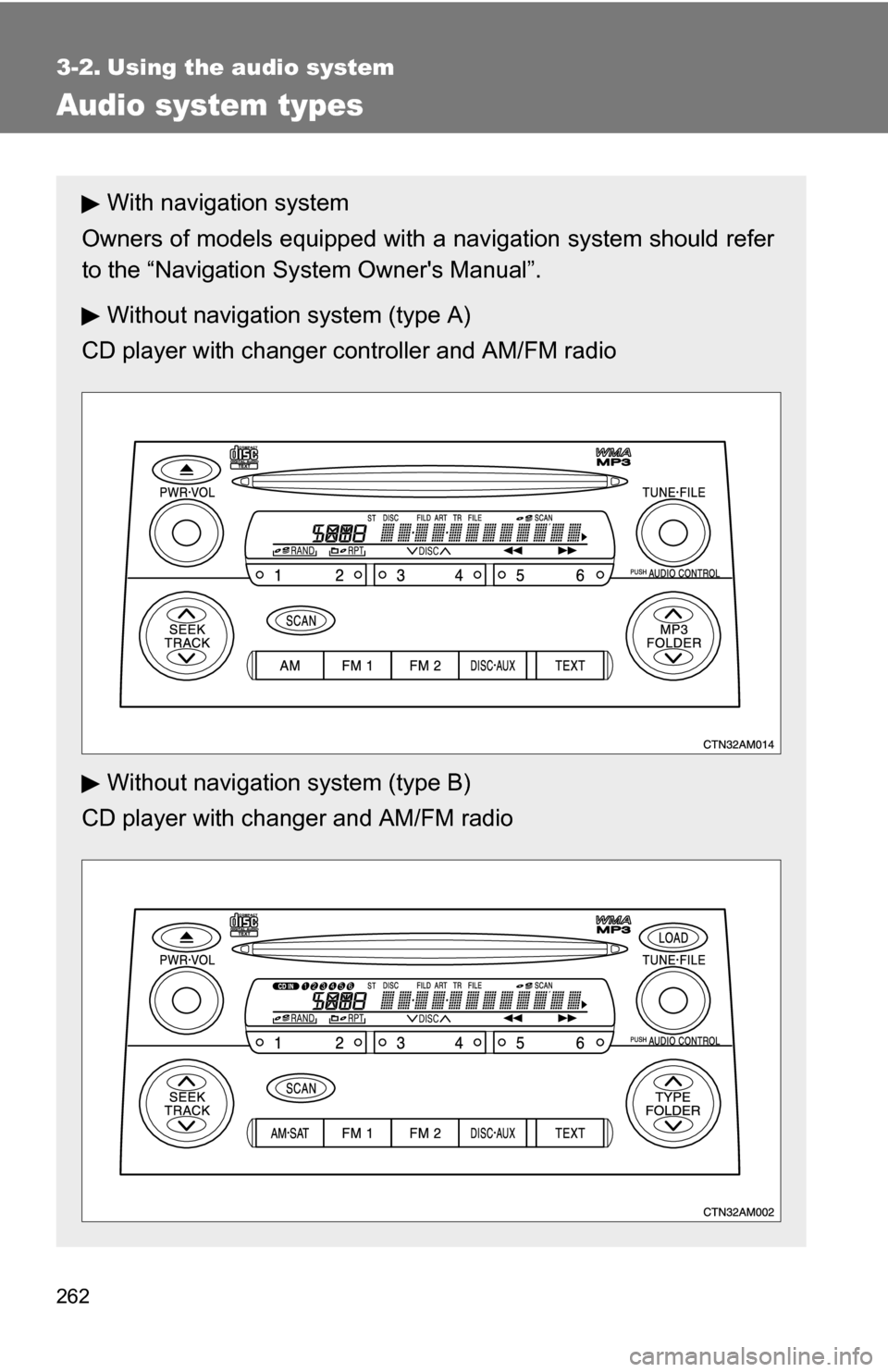
Audio system types
With navigation system
Owners of models equipped with a navigation system should refer
to the “Navigation Sy stem Owner's Manual”.
Without navigation system (type A)
CD player with changer controller and AM/FM radio
Without navigation system (type B)
CD player with changer and AM/FM radio