Page 2 of 592

TABLE OF CONTENTSIndex
2
1-1. Key information .................. 26Keys ..................................... 26
1-2. Opening, closing and
locking the doors ............. 27
Wireless remote control ....... 27
Front doors ........................... 33
Sliding doors ........................ 37
Back door ............................. 47
1-3. Adjustable components
(seats, mirrors,
steering wheel) ................. 56
Front seats ........................... 56
Second seats ....................... 59
Third seats ........................... 61
Seating configurations.......... 63
Driving position memory....... 80
Head restraints ..................... 82
Seat belts ............................. 84
Steering wheel ..................... 93
Anti-glare inside rear view mirror .................................. 94
Outside rear view mirrors ..... 96
1-4. Opening a nd closing the
window s ............................ 99
Power windows .................... 99
Quarter windows ................ 101
Moon roof ........................... 103
1-5. Refueling ........................... 106 Opening the fuel tank cap ................................... 106 1-6. Theft deterrent system ..... 110
Engine immobilizer system .............................. 110
Alarm .................................. 112
Theft prevention labels (for U.S.A.) ....................... 114
1-7. Safety information ............ 115 Correct driving posture ....... 115
SRS airbags ....................... 117
Front passenger occupant classification system ......... 129
Child restraint systems ....... 135
Installing child restraints ..... 139
2-1. Driving procedures........... 158 Driving the vehicle .............. 158
Engine (ignition) switch....... 167
Automatic transmission ...... 170
Turn signal lever ................. 172
Parking brake ..................... 173
2-2. Instrument cl uster and
information display ........ 174
Gauges and meters ............ 174
Indicators and warning lights ................................. 177
Trip information display ...... 181
2-3. Operating the li ghts and
wipers .............................. 185
Headlight switch ................. 185
Fog light switch ................... 190
1Before driving
2When driving
Page 25 of 592
Before driving1
25
1-1. Key information................ 26Keys ................................... 26
1-2. Opening, closing and locking the doors ........... 27
Wireless remote control ..... 27
Front doors......................... 33
Sliding doors ...................... 37
Back door ........................... 47
1-3. Adjustable components (seats, mirrors,
steering wheel)............... 56
Front seats ......................... 56
Second seats ..................... 59
Third seats ......................... 61
Seating configurations ....... 63
Driving position memory .... 80
Head restraints................... 82
Seat belts ........................... 84
Steering wheel ................... 93
Anti-glare inside rear view mirror ............................... 94
Outside rear view mirrors ... 96 1-4. Opening and closing the
windows.......................... 99
Power windows .................. 99
Quarter windows .............. 101
Moon roof ......................... 103
1-5. Refueling......................... 106 Opening the fuel tank cap ................................. 106
1-6. Theft deterrent system .......................... 110
Engine immobilizer system ........................... 110
Alarm................................ 112
Theft prevention labels (for U.S.A.) ..................... 114
1-7. Safety information ......... 115 Correct driving posture..... 115
SRS airbags ..................... 117
Front passenger occupant classification system ...... 129
Child restraint systems..... 135
Installing child restraints ........................ 139
Page 27 of 592
27
1
Before driving
1-2. Opening, closing and locking the doors
Wireless remote control
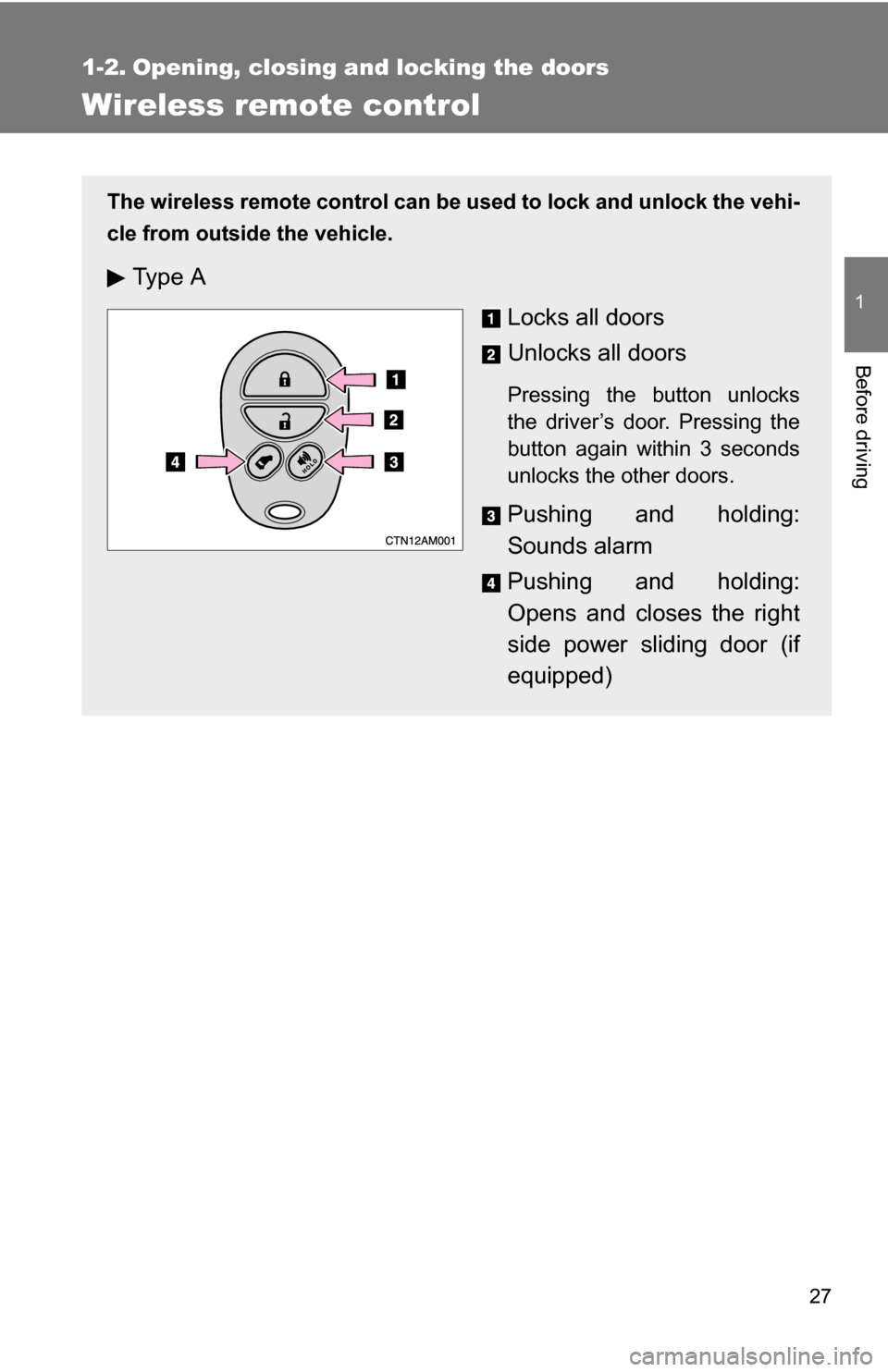
The wireless remote control can be used to lock and unlock the vehi-
cle from outside the vehicle.
Ty p e A
Locks all doors
Unlocks all doors
Pressing the button unlocks
the driver’s door. Pressing the
button again within 3 seconds
unlocks the other doors.
Pushing and holding:
Sounds alarm
Pushing and holding:
Opens and closes the right
side power sliding door (if
equipped)
Page 28 of 592
28 1-2. Opening, closing and locking the doors
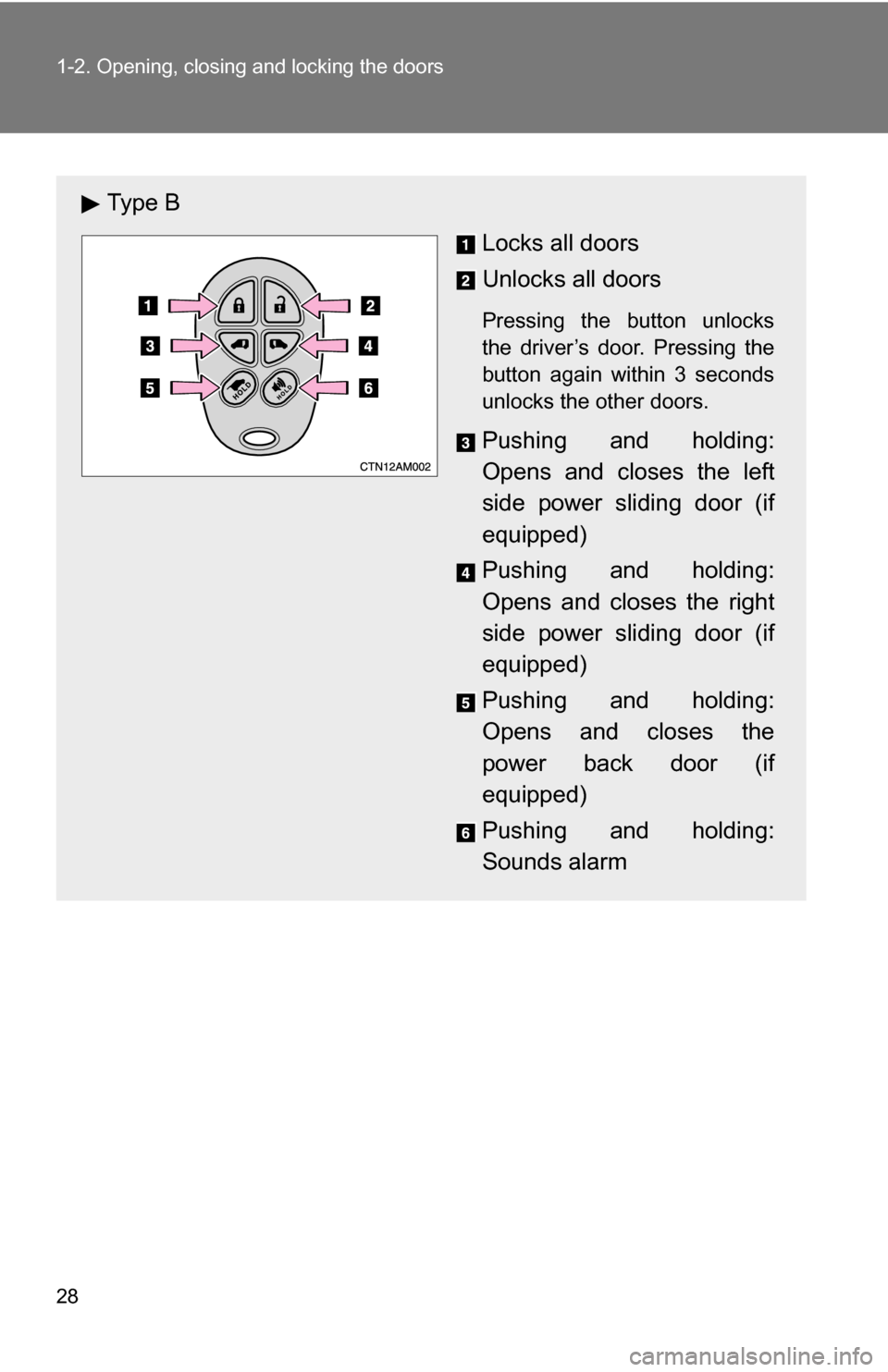
Ty p e BLocks all doors
Unlocks all doors
Pressing the button unlocks
the driver’s door. Pressing the
button again within 3 seconds
unlocks the other doors.
Pushing and holding:
Opens and closes the left
side power sliding door (if
equipped)
Pushing and holding:
Opens and closes the right
side power sliding door (if
equipped)
Pushing and holding:
Opens and closes the
power back door (if
equipped)
Pushing and holding:
Sounds alarm
Page 29 of 592
29
1-2. Opening, closing and locking the doors
1
Before driving
■
Operation signals
Doors: A buzzer sounds and the emergency flashers flash to indicate that
the doors have been locked/unlocked. (Locked: Once; Unlocked:
Twice)
Back door (type B only): A buzzer sounds and the emergency flashers flash twice to indicate that the back door has been
opened/closed.
■ Door lock buzzer
If a door is not fully closed, a buzzer sounds continuously for 10 seconds if
an attempt to lock the door is made. Fully close the door to stop the buzzer,
and lock the vehicle once more.
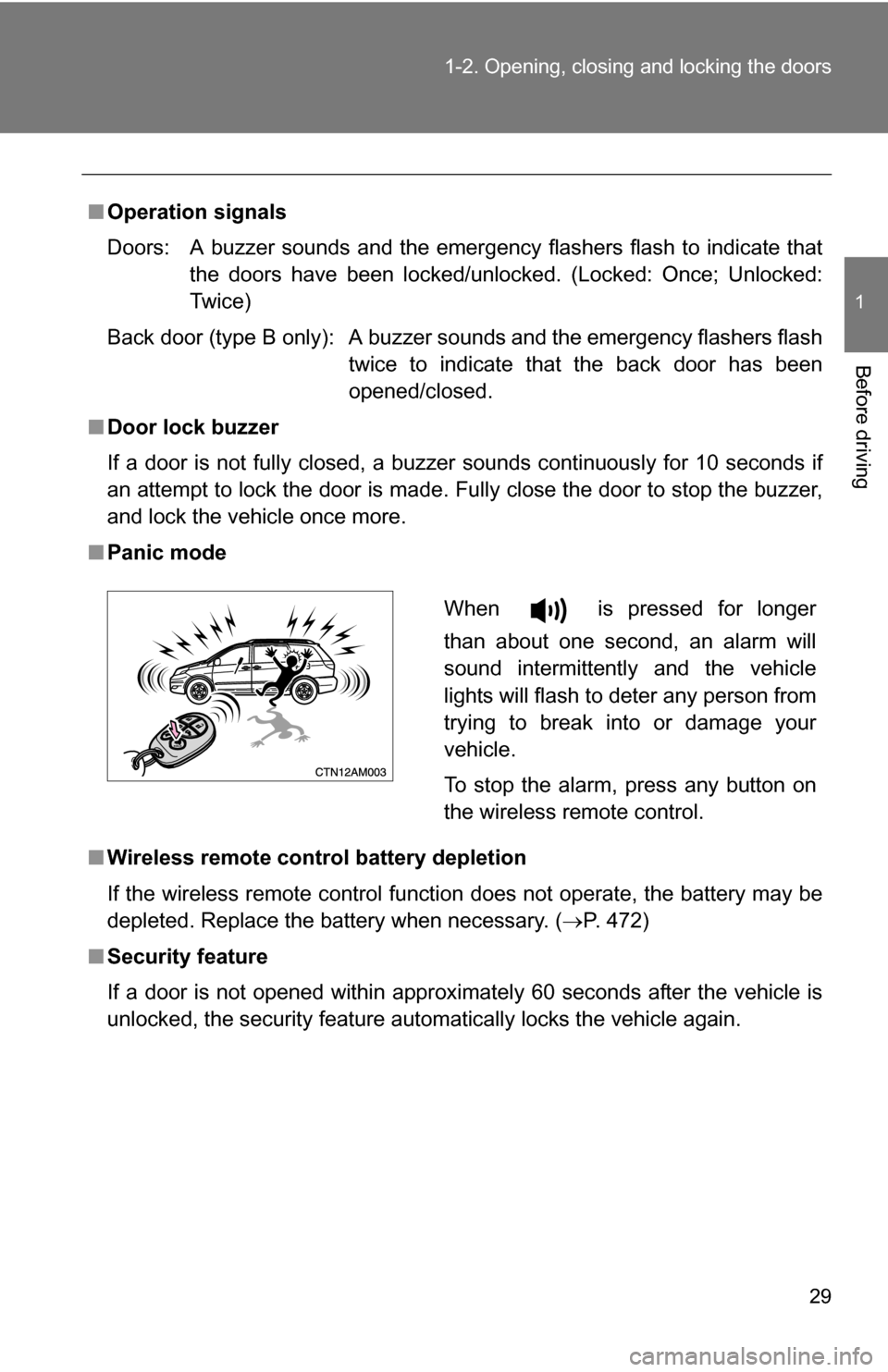
■ Panic mode
■ Wireless remote control battery depletion
If the wireless remote control function does not operate, the battery may be
depleted. Replace the battery when necessary. ( P. 472)
■ Security feature
If a door is not opened within approximately 60 seconds after the vehicle is
unlocked, the security feature automatically locks the vehicle again.
When is pressed for longer
than about one second, an alarm will
sound intermittently and the vehicle
lights will flash to deter any person from
trying to break into or damage your
vehicle.
To stop the alarm, press any button on
the wireless remote control.
Page 112 of 592
112
1-6. Theft deterrent system
Alarm (if equipped)
The system sounds the alarm and flashes the lights when forcible
entry is detected.
■Triggering of the alarm
The alarm is triggered in the following situations.
●A locked door is unlocked or opened without the key or wire-
less remote control.
● The hood is opened while t he vehicle is locked.
● The battery is reconnected.
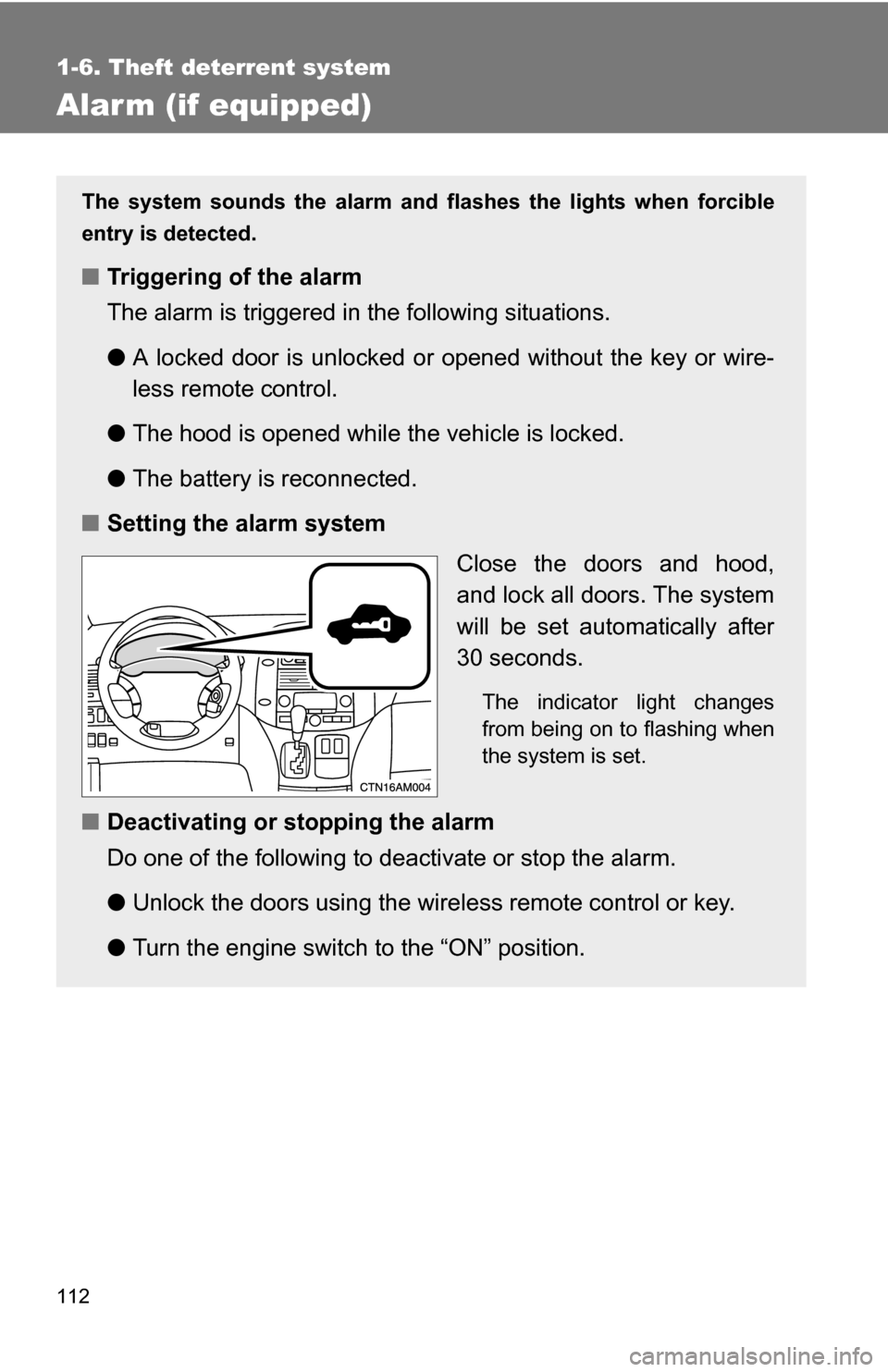
■ Setting the alarm system
Close the doors and hood,
and lock all doors. The system
will be set automatically after
30 seconds.
The indicator light changes
from being on to flashing when
the system is set.
■Deactivating or stopping the alarm
Do one of the following to deactivate or stop the alarm.
●Unlock the doors using the wire less remote control or key.
● Turn the engine switch to the “ON” position.
Page 113 of 592
113
1-6. Theft deterrent system
1
Before driving
■
Items to check before locking the vehicle
To prevent unexpected triggering of the alarm and vehicle theft, make sure
of the following.
●Nobody is in the vehicle.
● The windows and moon roof are closed before the alarm is set.
● No valuables or other personal items are left in the vehicle.
■ Triggering of the alarm
The alarm may be triggered in the following situations.
(Stopping the alarm deactivates the system.)
●A person inside the vehicle opens a door or hood.
● The battery is recharged or replaced when the vehicle is locked.
■ When the battery is disconnected
Be sure to deactivate the alarm system.
If the battery is disconnected before deactivating the alarm system, the
alarm may be triggered when the battery is reconnected.
Page 208 of 592
208 2-4. Using other driving systems
CAUTION
■When the laser radar sensor may not be correctly detecting the vehicle
ahead
Apply the brakes as necessary when any of the following types of vehicles
are in front of you.
As the sensor may not be able to correctly detect these types of vehicles,
the proximity alarm ( P. 204) will not be activated, and an accident may
result.
● Vehicles that cut in suddenly
● Vehicles traveling at low speeds
● Vehicles that are not moving
● Vehicles with small rear ends (trailers with no load on board etc.)
● Motorcycles traveling in the same lane
■ Conditions under which the vehicle -to-vehicle distance control may
not function correctly
Apply the brakes as necessary in the following conditions as the laser radar
sensor may not be able to correctly detect vehicles ahead, and an accident
may result.
● When water or snow thrown up by the surrounding vehicles hinders the
functioning of the sensor
● When your vehicle is pointing upwards (caused by a heavy load in the lug-
gage compartment, etc.)
● When the road curves or when the lanes are narrow
● When steering wheel operation or your position in the lane is unstable
■ To ensure the laser rada r sensor functions correctly
Do not do the following to the sensor as doing so may cause the sensor not
to function correctly and could result in an accident.
● Stick or attach anything to it
● Leave it dirty
● Disassemble, subject it to strong shocks
● Modify or paint it
● Replace it with non-genuine parts