Page 151 of 612
151
2-1. Driving procedures
2
When driving
Engine (ignition) switch
■Engine switch
LOCK
The steering wheel is locked
and the key can be removed.
ACC
Some electrical components
such as the audio system can
be used.
ON
All electrical components can
be used.
START
For starting the engine.
■Starting the engine
Check that the parking brake is set.
Check that the shift lever is set in P.
Sit in the driver’s seat and firmly depress the brake pedal.
Turn the engine switch to the START position and start the
engine.
The engine will crank until it starts or for up to 25 seconds, which-
ever is less. If you turn the engine switch, the engine will keep
cranking for about 30 seconds maximum.
Continue depressing the brake pedal until the engine is com-
pletely started.
Page 152 of 612
152 2-1. Driving procedures
■Turning the key from ACC to LOCK
■ Steering lock release
■ If the engine does not start
The engine immobilizer system may not have been deactivated. ( P. 100)
■ Key reminder function
A buzzer sounds if the driver’s door is opened, while the engine switch is in
the ACC or LOCK position to remind you to remove the key.
CAUTION
■When starting the engine
Always start the engine while sitting in the driver’s seat. Do not depress the
accelerator while starting the engine under any circumstances.
Doing so may cause an accident resulting in death or serious injury.
Shift the shift lever to P.
(P. 154)
Push in the key and turn to the
LOCK position.
When starting the engine, the engine
switch may seem stuck in the LOCK posi-
tion. To free it, turn the key while turning
the steering wheel slightly in either direc-
tion.
Page 160 of 612
160
2-1. Driving procedures
Hor n
■After adjusting the steering wheel (veh icles with manual tilt and tele-
scopic steering)
Make sure that the steering wheel is securely locked.
The horn may not sound if the steering wheel is not securely locked.
( P. 77)
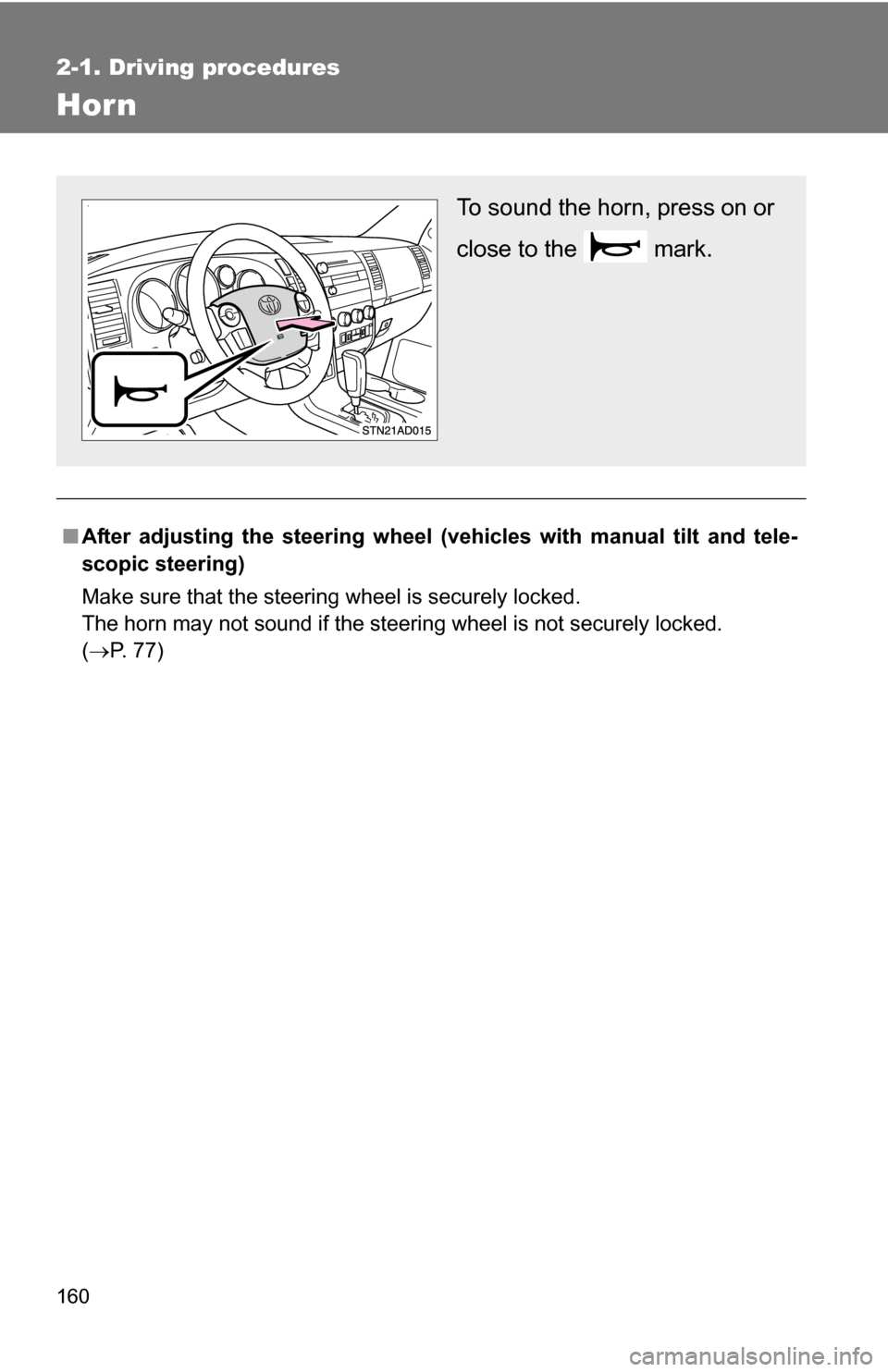
To sound the horn, press on or
close to the mark.
Page 190 of 612
190 2-4. Using other driving systems
■Automatic cruise control cancellation
The set speed is automatically canceled in any of the following situations.
●Actual vehicle speed falls more than 10 mph (16 km/h) below the preset
vehicle speed.
At this time, the memorized set speed is not retained.
● Actual vehicle speed is below 25 mph (40 km/h).
● VSC is activated.
● The operation cannot be switched for 5 seconds or more after operating
the front wheel drive control switch or the center differential lock switch.
■ If the cruise control indicator flashes
Press the ON-OFF button to turn the cruise control off, and then reactivate
the system.
If the cruise control speed cannot be set or if the cruise control cancels
immediately after being activated, there may be a malfunction in the cruise
control system. Have the vehicle inspected by your Toyota dealer.
CAUTION
■To avoid operating the cruise control by mistake
Keep the ON-OFF button off when not in use.
■ Situations unsuitable for cruise control
Do not use cruise control in any of the following situations.
Doing so may result in control of the vehicle being lost and could cause seri-
ous or fatal accident.
●In heavy traffic
● On roads with sharp bends
● On winding roads
● On slippery roads, such as those covered with rain, ice or snow
● On steep hills
Page 197 of 612
197
2-4. Using other
driving systems
2
When driving
■Automatically canceling vehicle-to-vehicle distance control
Vehicle-to-vehicle distance control driving is automatically canceled in the
following situations.
●Vehicle speed falls below 25 mph (40 km/h)
● VSC is activated
● The sensor cannot operate correctly because it is covered in some way.
*
●The windshield wipers are operating at high or low speed.*
●The operation cannot be switched for 5 seconds or more after operating
the front wheel drive control switch or the center differential lock switch.
*: Vehicle-to-vehicle distance control driving must be reset by pressing the
ON-OFF button again.
If vehicle-to-vehicle distance control driving is automatically canceled for any
other reason, there may be a malfunction in the system. Contact your Toyota
dealer.
■ Automatically canceling constant speed control
The set speed is automatically canceled in the following situations.
●Actual vehicle speed is more than 10 mph (16 km/h) below the preset
vehicle speed
At this time, the memorized set speed is not retained.
● Vehicle speed falls below 25 mph (40 km/h)
● VSC is activated
● The operation cannot be switched for 5 seconds or more after operating
the front wheel drive control switch or the center differential lock switch.
■ Vehicle-to-vehicle distance settings
Select a distance from the table below. Note that the distances shown corre-
spond to a vehicle speed of 55 mph (90 km/h). Vehicle-to-vehicle distance
increases/decreases in accordance with vehicle speed.
Distance optionsVehicle-to-vehicle distance
Long Approximately 245 ft. (75 m)
Medium Approximately 165 ft. (50 m) Short Approximately 100 ft. (30 m)
Page 200 of 612
200 2-4. Using other driving systems
CAUTION
■When the laser radar sensor may not be correctly detecting the vehicle
ahead
● The vehicle ahead has higher ground clearance, which means that the
placement of the reflectors is in a higher position.
● The rear section of the vehicle ahead is extremely dirty.
● The vehicle ahead or other vehicles around you are flinging up water or
snow.
● Excessive exhaust gas (black smoke) is coming from the vehicle ahead or
other vehicles around you, obscuring your front view.
● There is an obstruction (protective film, sticker, etc.) on the reflectors on
the vehicle ahead, or reflectors are not installed on the vehicle ahead or
are damaged.
● Heavy luggage in the luggage compartment or rear seats is causing the
nose of your vehicle to tilt up.
● Vehicles that cut in suddenly
● Vehicles traveling at low speeds
● Vehicles that are not moving
● Vehicles with small rear ends (trailers with no load on board etc.)
● Motorcycles traveling in the same lane
■ Conditions under which the vehicle -to-vehicle distance control may
not function correctly
Apply the brakes as necessary in the following conditions as the laser radar
sensor may not be able to correctly detect vehicles ahead, and an accident
may result.
● When water or snow thrown up by the surrounding vehicles hinders the
functioning of the sensor
● When your vehicle is pointing upwards (caused by a heavy load in the lug-
gage compartment, etc.)
● When the road curves or when the lanes are narrow
● When steering wheel operation or your position in the lane is unstable
● When towing a trailer
Page 213 of 612
213
2-4. Using other driving systems
2
When driving
AVS (Adaptive Variable Suspension System) (if equipped)
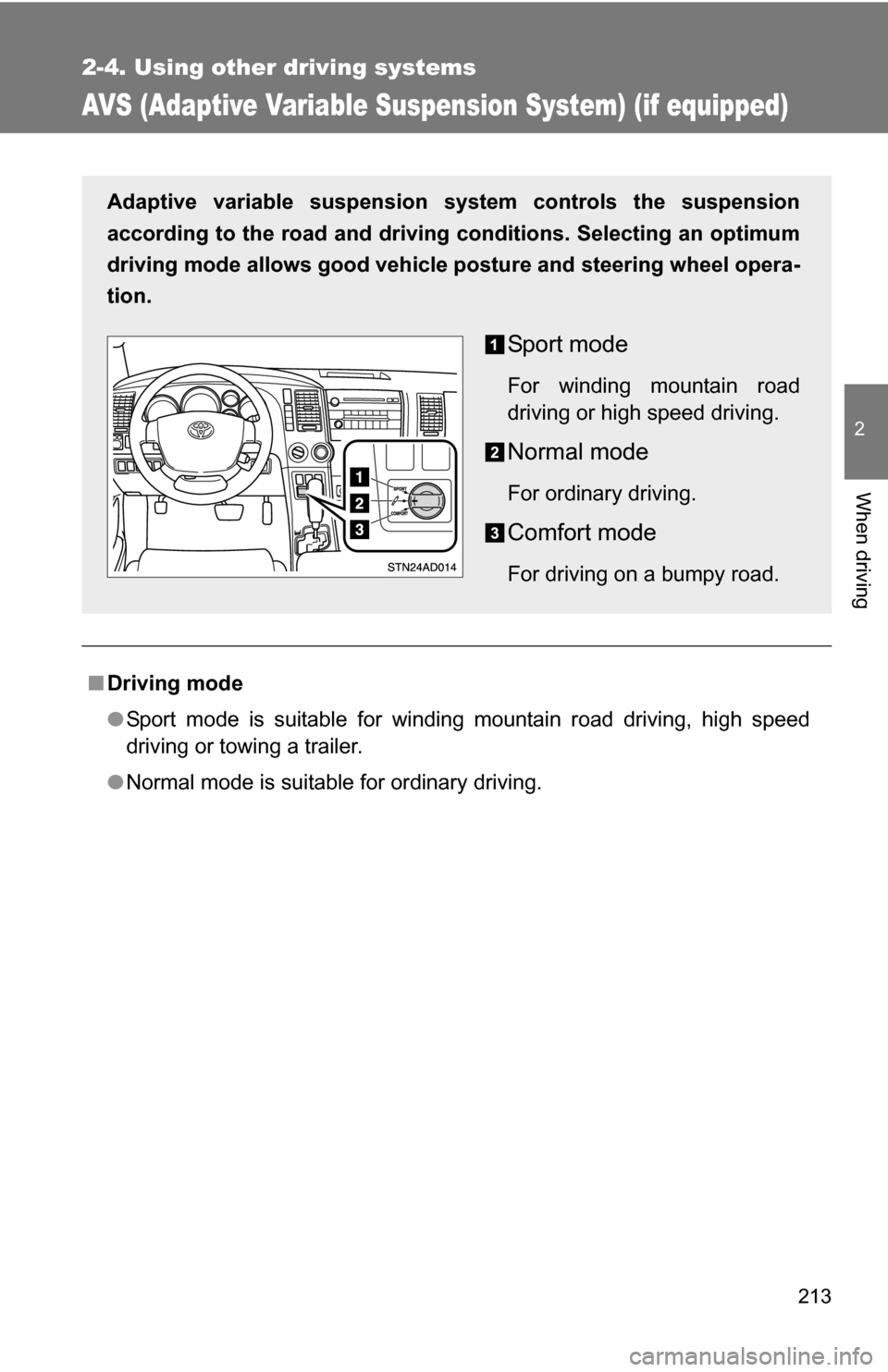
■Driving mode
●Sport mode is suitable for winding mountain road driving, high speed
driving or towing a trailer.
● Normal mode is suitable for ordinary driving.
Adaptive variable suspension system controls the suspension
according to the road and driving conditions. Selecting an optimum
driving mode allows good vehicle posture and steering wheel opera-
tion.
Sport mode
For winding mountain road
driving or high speed driving.
Normal mode
For ordinary driving.
Comfort mode
For driving on a bumpy road.
Page 214 of 612
214
2-4. Using other driving systems
Four-wheel drive system (if equipped)
Use the front wheel drive control switch to select the following trans-
fer modes.
*1: Vehicles with multi-information display
*2: Vehicles without multi-information display
2WD (high speed position, two-wheel drive)
Normal driving.
4H (high speed position, four-wheel drive)
Greater traction than two wheel drive.
When you experience a loss of power, such as wheel slipping.
The 4HI indicator comes on.
4L (low speed position, four-wheel drive)
Driving requiring maximum power and traction such as climbing or
descending steep hills, off-road driving and hard pulling in sand or mud,
etc.
The 4LO indicator comes on.
*2*1