Page 273 of 612
273
3-1. Using the air conditioning system and defogger
3
Interior features
Windshield wiper de-icer (if equipped)
■The de-icer can be operated when
The engine switch is in the ON position.
CAUTION
■When the windshield wiper de-icer is on
Do not touch the glass at the lower part of the windshield or to the side of the
front pillars as the surfaces can become very hot and burn you.
This feature is used to prevent ice from building up on the wind-
shield and wiper blades.
On/off
Press the button to turn on the
windshield wiper de-icer. The
indicator will come on. The
windshield wiper de-icer will
automatically turn off after
approximately 15 minutes.
Page 274 of 612
274
3-1. Using the air conditioning system and defogger
Using the steering wheel climate remote control switches (if equipped)
Using the automatic modePress .
The air conditioning system will operate, and air outlets and
fan speed will be set automatically.
Press “ ” on to increase the temperature and “ ” to
decrease the temperature.
Adjusting the temperature setting
Press “ ” on to increase the temperature and “ ” to decrease
the temperature.
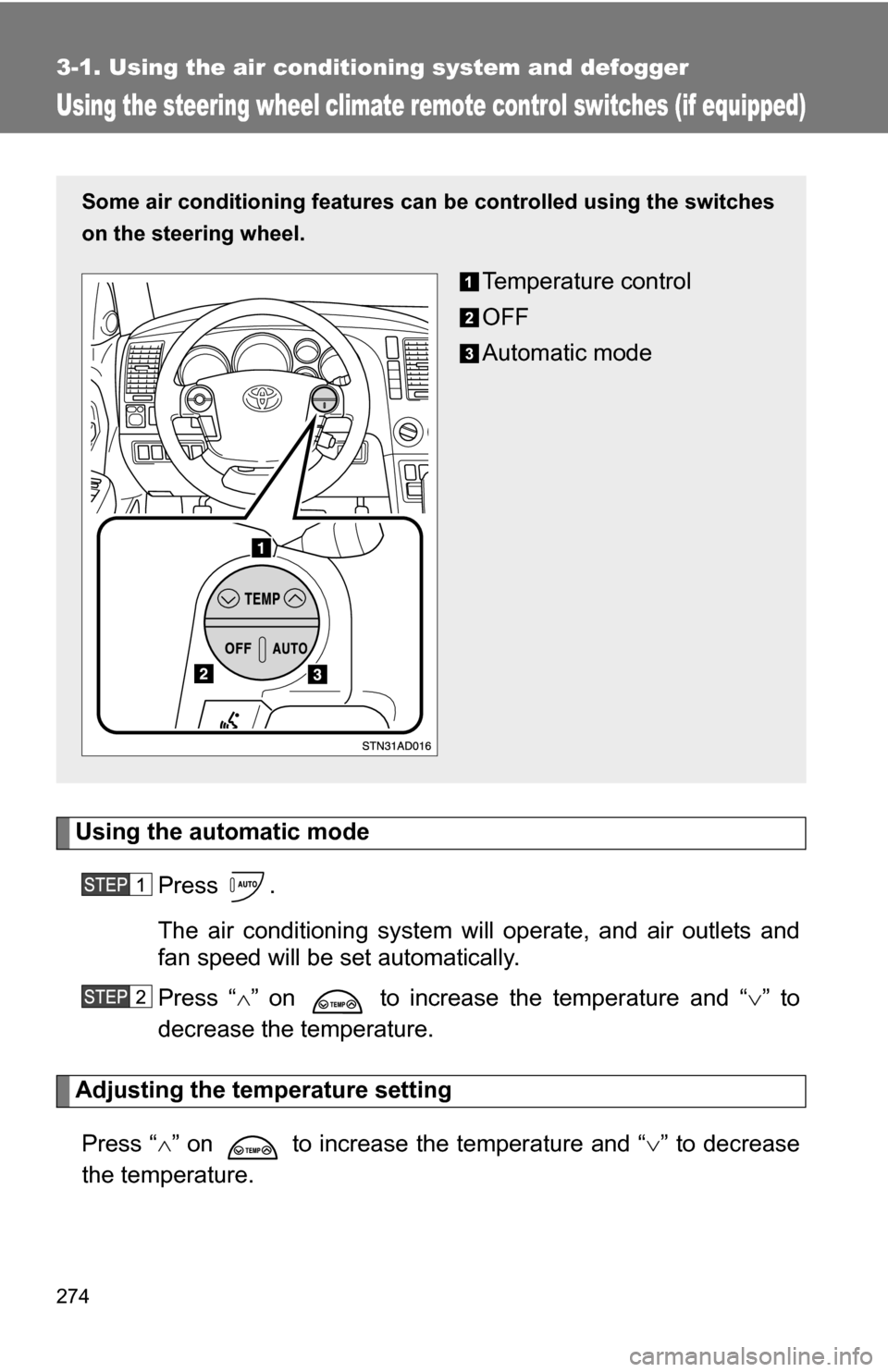
Some air conditioning features can be controlled using the switches
on the steering wheel.
Temperature control
OFF
Automatic mode
Page 275 of 612
275
3-1. Using the air conditioning system
and defogger
3
Interior features
Turning off the fan
Press .
Page 338 of 612

338
3-4. Using the hands-free phone system (for cellular phone)
Hands-free phone system (for cellular phone) (if equipped)
■When using the hands-free system
●The audio system and voice guidance are muted when making a call.
● If both parties speak at the same time it may be difficult to hear.
● If the received call volume is overly loud, an echo may be heard.
● Try to face toward the microphone as much as possible when speaking.
● In the following circumstances it may be difficult to hear the other party:
• If driving on unpaved roads
• If driving at high speeds
• If a window is open
• If the air conditioning is blowing directly on the microphone
• If the air conditioning fan speed is set to high
This system supports Bluetooth®, which allows you connect a cellu-
lar phone without using cables a nd to make or receive calls without
operating the cellular phone buttons.
Owners of models equipped with a navigation system should refer to
the “Navigation System Owner’s Manual”.
TitlePage
Using the hands-free phone system P. 342
Making a phone call P. 351
Setting a cellular phone P. 356
Security and system setup P. 361
Using the phone book P. 364
Page 350 of 612
350 3-4. Using the hands-free phone system (for cellular phone)
■Automatic adjustment of volume
When vehicle speed is 50 mph (80 km/h) or more, the volume automatically
increases. The volume returns to the previous volume setting when vehicle
speed drops to 43 mph (70 km/h) or less.
■ When using a voice command
●For numbers, speak a combination of single digits from zero to nine, #
(pound), (star), and + (plus).
● Speak the command correctly and clearly.
■ The system may not recognize your voice in the following situations:
●When driving on a rough road
● When driving at high speeds
● When air is blowing out of the vents onto the microphone
● When the air conditioning fan emits a loud noise
■ The following cannot be performed while driving:
●Operating the system with
● Registering a cellular phone to the system
■ Changing the passkey
P. 359
Page 407 of 612
407
3-7. Other interior features
3
Interior features
NOTICE
■
Appliances that may not ope rate properly (115V AC)
The following 115V AC appliances may not operate even if their power con-
sumption is under 100 W.
● Appliances with high initial peak wattage
● Measuring devices that process precise data
● Other appliances that require an extremely stable power supply
■ To prevent the battery from being discharged
Turn off all the vehicle’s electronic equipment and accessories, such as the
headlights and air conditioning, when electrical appliances that consume in
excess of 100W are used continuously for long periods of time.
■ To prevent any damage caused by heat
●Do not use any electrical appliances that give off intense heat such as
toasters, in any locations including the internal or external trim, seats and
deck.
● Do not use any electrical appliances, which are easily affected by vibration
or heat, inside the vehicle.
Vibration while driving, or the heat of the sun while parking, may result in
damage to those electrical appliances.
■ If any electrical appliances ar e to be used while driving
Securely fasten both the appliances and their cables to prevent them from
falling or getting caught any of the power train components.
■ If the power outlet is loose when an electrical appliance plug is con-
nected
Replace the outlet.
Contact a Toyota dealer for any necessary replacements.
■ If the power outlet gets dirty
Turn the main switch off and use a soft, clean cloth to wipe it gently.
Do not use any cleansing materials, such as organic solvents, wax, or com-
pound cleaners, as these may damage the power outlet or cause it to mal-
function.
Page 433 of 612
Maintenance and care4
433
4-1. Maintenance and care ... 434Cleaning and protecting the vehicle exterior......... 434
Cleaning and protecting the vehicle interior.......... 436
4-2. Maintenance ................... 439 Maintenance requirements .................. 439
General maintenance....... 441
Emission inspection and maintenance (I/M)
programs........................ 444 4-3. Do-it-yourself
maintenance ................. 445
Do-it-yourself service precautions .................... 445
Hood ................................ 449
Engine compartment ........ 450
Tires ................................. 466
Tire inflation pressure ...... 473
Wheels ............................. 477
Air conditioning filter......... 479
Wireless remote control battery ............................ 482
Checking and replacing fuses .............................. 484
Light bulbs........................ 495
Page 447 of 612

447
4-3. Do-it-yourself maintenance
4
Maintenance and care
CAUTION
The engine compartment contains many mechanisms and fluids that may
move suddenly, become hot, or become electrically energized. To avoid death
or serious injury observe the following precautions.
■
When working on the engine compartment
●Keep hands, clothing, and tools away from the moving fan and engine
drive belt.
● Be careful not to touch the engine, radiator, exhaust manifold, etc. right
after driving as they may be hot. Oil and other fluids may also be hot.
● Do not leave anything that may burn easily, such as paper or rags, in the
engine compartment.
● Do not smoke, cause sparks or expose an open flame to fuel or the bat-
tery. Fuel and battery fumes are flammable.
● Be extremely cautious when working on the battery. It contains poisonous
and corrosive sulfuric acid.
● Take care because brake fluid can harm your hands or eyes and damage
painted surfaces.
If fluid gets on your hands or in your eyes, flush the affected area with
clean water immediately.
If you still experience discomfort, see a doctor.
■ When working near the cooling fan or radiator grille
Be sure the engine switch is off.
With the engine switch on, the cooling fan may automatically start to run if
the air conditioning is on and/or the coolant temperature is high.
■ Safety glasses
Wear safety glasses to prevent flying or falling material, fluid spray, etc. from
getting in the eyes.