Page 311 of 612
311
3-3. Using the rear audio/video system
3
Interior features
■
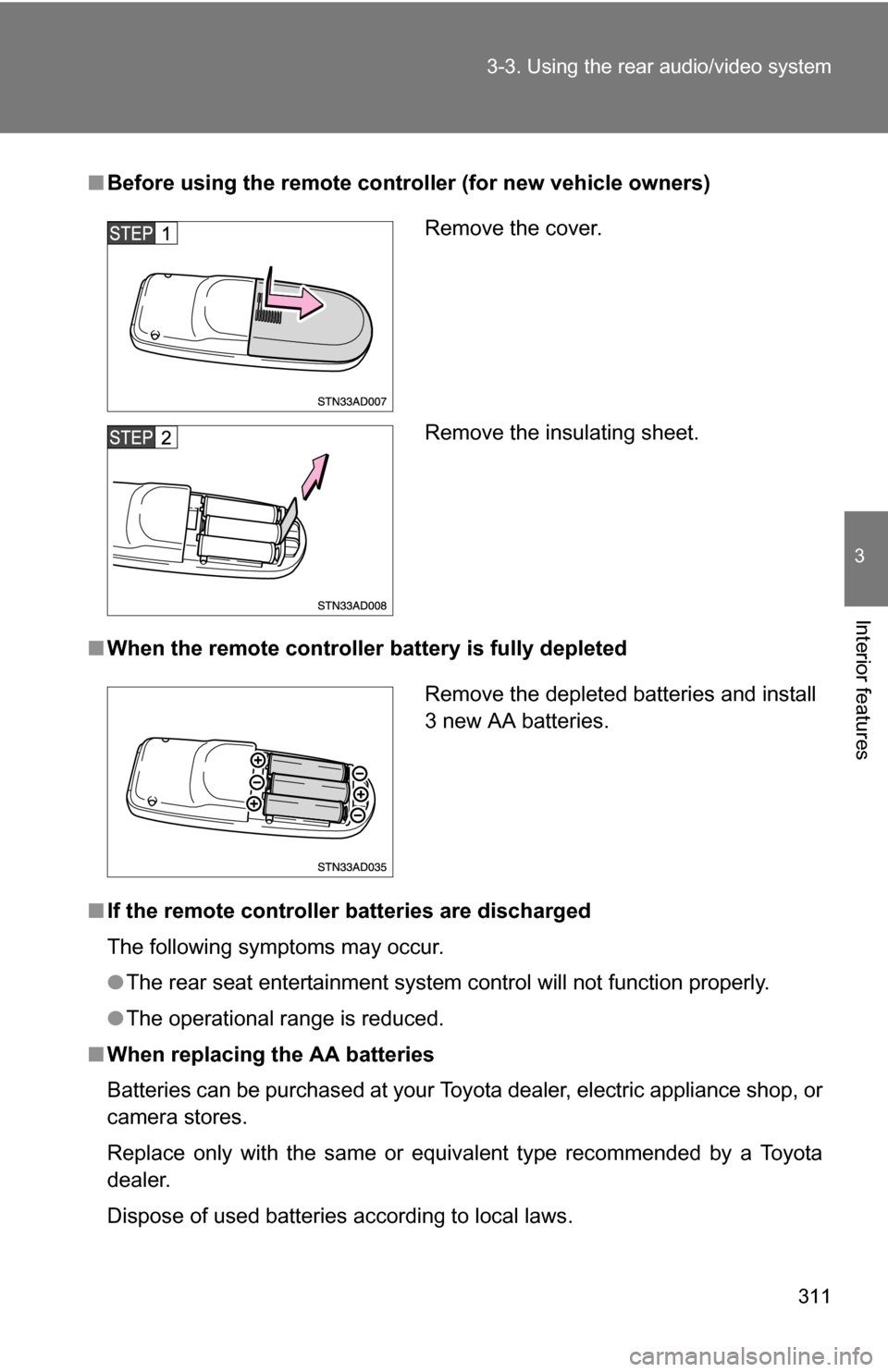
Before using the remote controller (for new vehicle owners)
■ When the remote controller battery is fully depleted
■ If the remote controller batteries are discharged
The following symptoms may occur.
●The rear seat entertainment system control will not function properly.
● The operational range is reduced.
■ When replacing the AA batteries
Batteries can be purchased at your Toyota dealer, electric appliance shop, or
camera stores.
Replace only with the same or equivalent type recommended by a Toyota
dealer.
Dispose of used batteries according to local laws.
Remove the cover.
Remove the insulating sheet.
Remove the depleted batteries and install
3 new AA batteries.
Page 313 of 612
313
3-3. Using the rear audio/video system
3
Interior features
NOTICE
■
For normal operation after replacing the batteries
Observe the following precautions to prevent accidents.
●Always work with dry hands.
Moisture may cause the battery to rust.
● Do not touch or move any other components inside the remote controller.
● Do not bend any of the battery terminals.
Page 339 of 612

339
3-4. Using the hand
s-free phone system (for cellular phone)
3
Interior features
■Conditions under which th e system will not operate
● If using a cellular phone that does not support Bluetooth
®
●If the cellular phone is switched off
● If you are outside service range
● If the cellular phone is not connected
● If the cellular phone’s battery is low
■ Bluetooth
® antenna
The antenna is built into the display. If the cellular phone is behind the seat
or in the console box, or touching or covered by metal objects, connection
status may deteriorate.
■ Signal status
This display may not correspond exactly with the cellular phone itself.
■ About Bluetooth
®
■Compatible models
Compatible with HFP (Hands Free Profile) Ver. 1.0 and OPP (Object Push
Profile) Ver. 1.1.
If your cellular phone does not support HFP, you cannot enter the Blue-
tooth
® phone. If your cellular phone supports OPP alone, you cannot use
the Bluetooth® phone.
Bluetooth is a registered trademark of
Bluetooth SIG, Inc.
Page 372 of 612
372 3-5. Using the interior lights
Personal/interior light main switchON
The personal/interior lights can-
not be individually turned off.
DOOR position
The personal/interior lights come
on when a door is opened. They
turn off when the doors are
closed.
OFF
The personal/interior lights and
interior light can be individually
turned on or off.
■
To prevent the battery from being discharged
If the lights remain on when the door is not fully closed and the personal/inte-
rior light main switch is in door position, the lights will go off automatically
after 20 minutes.
■ Customization
●That can be configured at Toyota dealer (vehicles without multi-informa-
tion display)
Settings (e.g. The time elapsed before lights turn off) can be changed.
(Customizable features P. 584)
● It is possible to change the settings (vehicles with multi-information dis-
play) (Feature customization P. 173)
Personal/interior light main switch
Page 396 of 612
396
3-7. Other interior features
Clock
■For quicker adjustment of the clock
Hold down the M or H button continuously. This allows faster advancement
of the minutes and hours.
■ The clock is displayed when
The engine switch is in the ACC or ON position.
■ When disconnecting and reco nnecting battery terminals
The time display will automatically be set to 1:00.
Adjusts the hours.
Adjusts the minutes.
Page 398 of 612
398 3-7. Other interior features
■When – –°C or – –°F is displayed
The system may be malfunctioning. Take your vehicle to your Toyota dealer.
■ The outside air temperature is displayed when
The engine switch is in the ON position.
■ When disconnecting and reco nnecting battery terminals
The display will automatically be set to the initial mode.
■ Display
In the following situations, the correct outside temperature may not be dis-
played, or the display may take longer than normal to change.
●When stopped, or driving at low speeds (less than 16 mph [25 km/h])
● When the outside temperature has changed suddenly (at the entrance/
exit of a garage, tunnel, etc.)
Page 407 of 612
407
3-7. Other interior features
3
Interior features
NOTICE
■
Appliances that may not ope rate properly (115V AC)
The following 115V AC appliances may not operate even if their power con-
sumption is under 100 W.
● Appliances with high initial peak wattage
● Measuring devices that process precise data
● Other appliances that require an extremely stable power supply
■ To prevent the battery from being discharged
Turn off all the vehicle’s electronic equipment and accessories, such as the
headlights and air conditioning, when electrical appliances that consume in
excess of 100W are used continuously for long periods of time.
■ To prevent any damage caused by heat
●Do not use any electrical appliances that give off intense heat such as
toasters, in any locations including the internal or external trim, seats and
deck.
● Do not use any electrical appliances, which are easily affected by vibration
or heat, inside the vehicle.
Vibration while driving, or the heat of the sun while parking, may result in
damage to those electrical appliances.
■ If any electrical appliances ar e to be used while driving
Securely fasten both the appliances and their cables to prevent them from
falling or getting caught any of the power train components.
■ If the power outlet is loose when an electrical appliance plug is con-
nected
Replace the outlet.
Contact a Toyota dealer for any necessary replacements.
■ If the power outlet gets dirty
Turn the main switch off and use a soft, clean cloth to wipe it gently.
Do not use any cleansing materials, such as organic solvents, wax, or com-
pound cleaners, as these may damage the power outlet or cause it to mal-
function.
Page 410 of 612
410 3-7. Other interior features
CAUTION
■Burns
●Use caution when seating the following persons in a seat with the seat
heater on to avoid the possibility of burns:
• Babies, small children, the elderly, the sick and the disabled
• Persons with sensitive skin
• Persons who are fatigued
• Persons who have taken alcohol or drugs that induce sleep (sleeping
drugs, cold remedies, etc.)
● Do not cover the seat with anything when using the seat heater.
Using the seat heater with a blanket or cushion increases the temperature
of the seat and may lead to overheating.
NOTICE
■To prevent seat heater damage
Do not put unevenly weighted objects on the seat and do not stick sharp
objects (needles, nails, etc.) into the seat.
■ To prevent battery discharge
Turn the switches off when the engine is not running.