Page 277 of 612
277
3-2. Using the audio system
3
Interior features
■
Using cellular phones
Interference may be heard through the audio system’s speakers if a cellular
phone is being used inside or close to the vehicle while the audio syste\
m is
operating.
Ty p e C
TitlePage
Using the radioP. 279
Using the CD playerP. 285
Playing back MP3 and WMA discsP. 292
Optimal use of the audio systemP. 301
Using the AUX adapterP. 303
Using the steering wheel audio switchesP. 305
Page 305 of 612
305
3-2. Using the audio system
3
Interior features
Using the steering wheel audio switches (if equipped)
Turning on the powerPress when the audio system is turned off.
The audio system can be turned off by holding the switch down until the
system turns off.
Changing the audio sourcePress when the audio system is turned on. The audio source
changes as follows, each time is pressed.
CD player without changer:
FM1 FM2 CD AUX AM
CD player with changer:
FM1 FM2 CD changer AUX AMSAT1* SAT2* SAT3*
*
: Type B and C
Some audio features can be cont rolled using the switches on the
steering wheel.
Vo l u m e
Radio: Select radio stations
CD: Select tracks, files
(MP3 and WMA) and discs
Power on, select audio
source
Page 306 of 612
306 3-2. Using the audio system
Adjusting the volumePress “+” on to increase the volume and “–” to decrease the
volume.
Press and hold “+” or “–” on to continue increasing or decreasing
the volume.
Selecting a radio station Press to select the radio mode.
Press “” or “ ” on to select a preset station.
To scan for receivable stations, press and hold the switch until you
hear a beep.
Selecting a track/file
Press to select the CD mode.
Press “” or “ ” on to select the desired track/file.
Selecting a disc in the CD player (CD player with changer only)
Press to select the CD mode.
Press and hold “ ” or “ ” on until you want to listen to is
set.
CAUTION
■ To reduce the risk of an accident
Exercise care when operating the audio switches on the steering wheel.
Page 343 of 612
343
3-4. Using the hand
s-free phone system (for cellular phone)
3
Interior features
■Steering wheel telephone switches
Ty p e A
Vo l u m e
The voice guidance volume
cannot be adjusted by using
this switch.
Hands-free phone system
off/ends a call/refuses a call
Hands-free phone system
on/starts a call
Press: Voice command sys-
tem on
Press and hold: Voice com-
mand system off
Page 441 of 612
441
4-2. Maintenance
4
Maintenance and care
General maintenance
Engine compartment
ItemsCheck points
Battery Maintenance-free. ( P. 461)
Brake fluid At the correct level? ( P. 458)
Engine coolant At the correct level? ( P. 457)
Engine oil At the correct level? ( P. 452)
Exhaust system No fumes or strange sounds?
Power steering fluid At the correct level? ( P. 460)
Radiator/condenser/hoses Not blocked with foreign matter?
(
P. 458)
Washer fluid At the correct level? ( P. 464)
Listed below are the general maintenance items that should be per-
formed at the intervals specified in the “Scheduled Maintenance
Guide” or “Owner’s Manual Supp lement”. It is recommended that
any problem you notice should be brought to the attention of your
Toyota dealer or qualified service shop for advice.
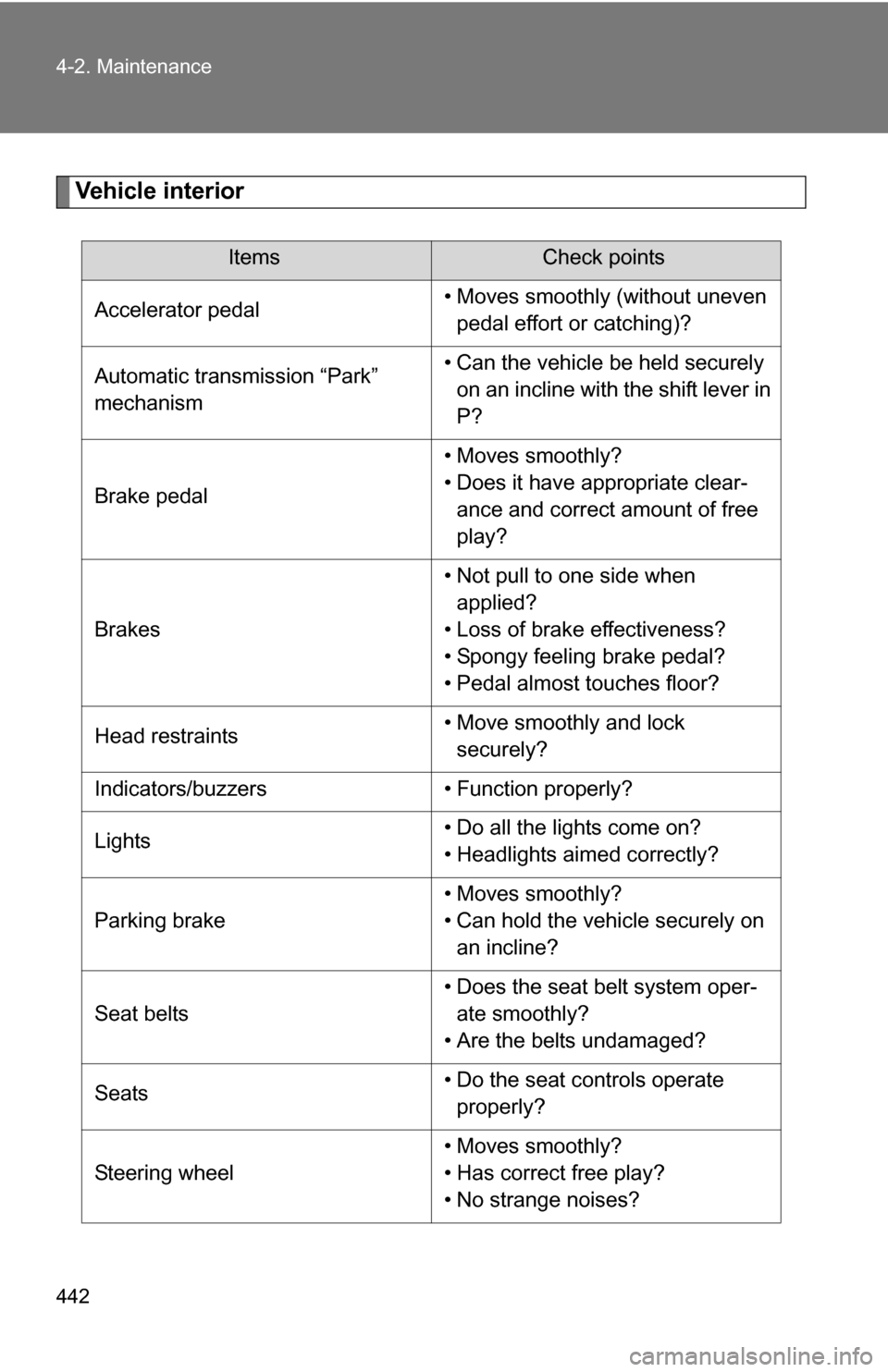
Page 442 of 612
442 4-2. Maintenance
Vehicle interior
ItemsCheck points
Accelerator pedal • Moves smoothly (without uneven
pedal effort or catching)?
Automatic transmission “Park”
mechanism • Can the vehicle be held securely
on an incline with the shift lever in
P?
Brake pedal • Moves smoothly?
• Does it have appropriate clear-
ance and correct amount of free
play?
Brakes • Not pull to one side when
applied?
• Loss of brake effectiveness?
• Spongy feeling brake pedal?
• Pedal almost touches floor?
Head restraints • Move smoothly and lock
securely?
Indicators/buzzers • Function properly?
Lights • Do all the lights come on?
• Headlights aimed correctly?
Parking brake • Moves smoothly?
• Can hold the vehicle securely on
an incline?
Seat belts • Does the seat belt system oper-
ate smoothly?
• Are the belts undamaged?
Seats • Do the seat controls operate
properly?
Steering wheel • Moves smoothly?
• Has correct free play?
• No strange noises?
Page 446 of 612
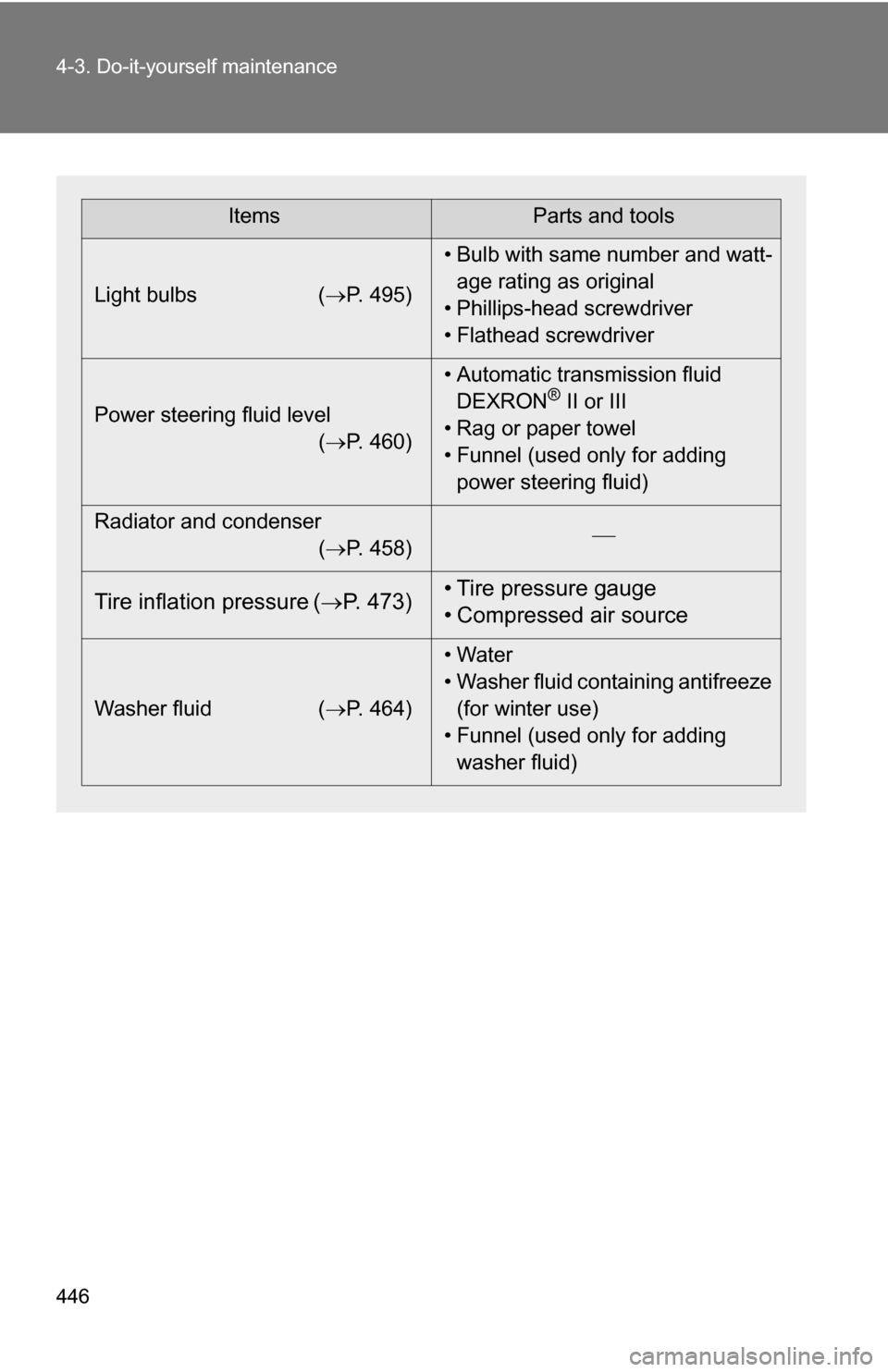
446 4-3. Do-it-yourself maintenance
ItemsParts and tools
Light bulbs ( P. 495)• Bulb with same number and watt-
age rating as original
• Phillips-head screwdriver
• Flathead screwdriver
Power steering fluid level (P. 460) • Automatic transmission fluid
DEXRON
® II or III
• Rag or paper towel
• Funnel (used only for adding power steering fluid)
Radiator and condenser (P. 458)
Tire inflation pressure (
P. 473) • Tire pressure gauge
• Compressed air source
Washer fluid
(P. 464) • Water
• Washer fluid containing antifreeze
(for winter use)
• Funnel (used only for adding washer fluid)
Page 450 of 612
450
4-3. Do-it-yourself maintenance
Engine compar tment
4.7 L V8 (2UZ-FE) engine
Washer fluid tank (P. 464)
Engine oil level dipstick ( P. 452)
Engine coolant reservoir ( P. 457)
Engine oil filler cap ( P. 453)Brake fluid reservoir
( P. 458)
Fuse box ( P. 484)
Battery ( P. 461)
Radiator ( P. 458)
Condenser ( P. 458)
Power steering fluid reservoir ( P. 460)