Page 129 of 508
129
2-1. Driving procedures
2
When driving
PRIUS_U_(OM47614U)
CAUTION
■
When taking a nap in the vehicle
Always turn the hybrid system off. Otherwise, you may accidentally move the
shift lever or depress the accelerator pedal, which could cause an accident
or fire due to hybrid system overheating. Additionally, if the vehicle is parked
in a poorly ventilated area, exhaust gases may collect and enter the vehicle,
leading to death or a serious health hazard.
■ When braking the vehicle
● When the brakes are wet, drive more cautiously. Braking distance
increases when the brakes are wet, and may cause one side of the vehicle
to brake differently than the other side. Also the parking brake may not
securely hold the vehicle.
● If the power brake assist function does not operate, do not follow other
vehicles closely and avoid downhill or sharp turns that require braking.
In this case, braking is still possible, but it will require more force on the
pedal than usual. Braking distance may also increase.
● Do not pump the brake pedal if the hybrid system stalls.
Each push on the pedal uses up your reserved brake fluid pressure.
● The brake system consists of 3 individual hydraulic systems: if one of the
systems fails, the other will still operate. In this case, the brake pedal
should be depressed more firmly than usual and braking distance
becomes longer.
Do not drive your vehicle with only a single brake system. Have your
brakes fixed immediately.
Page 144 of 508
144
2-1. Driving procedures
PRIUS_U_(OM47614U)
Hor n
■After adjusting the steering wheel
Mark sure that the steering wheel is securely locked.
The horn may not sound if the steering wheel is not securely locked.
(P. 71)
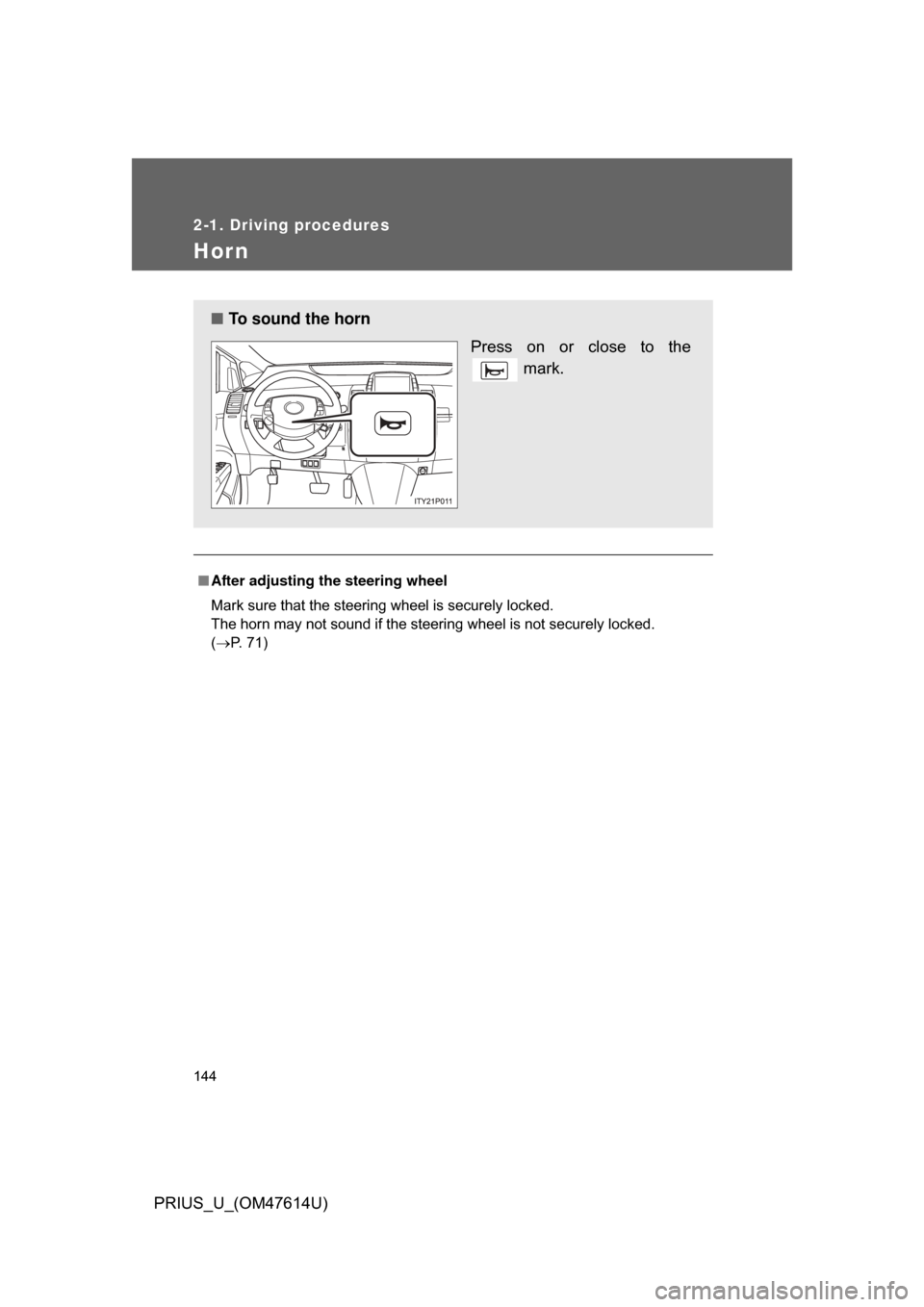
■ To sound the horn
Press on or close to the mark.
Page 164 of 508
164 2-4. Using other driving systems
PRIUS_U_(OM47614U)
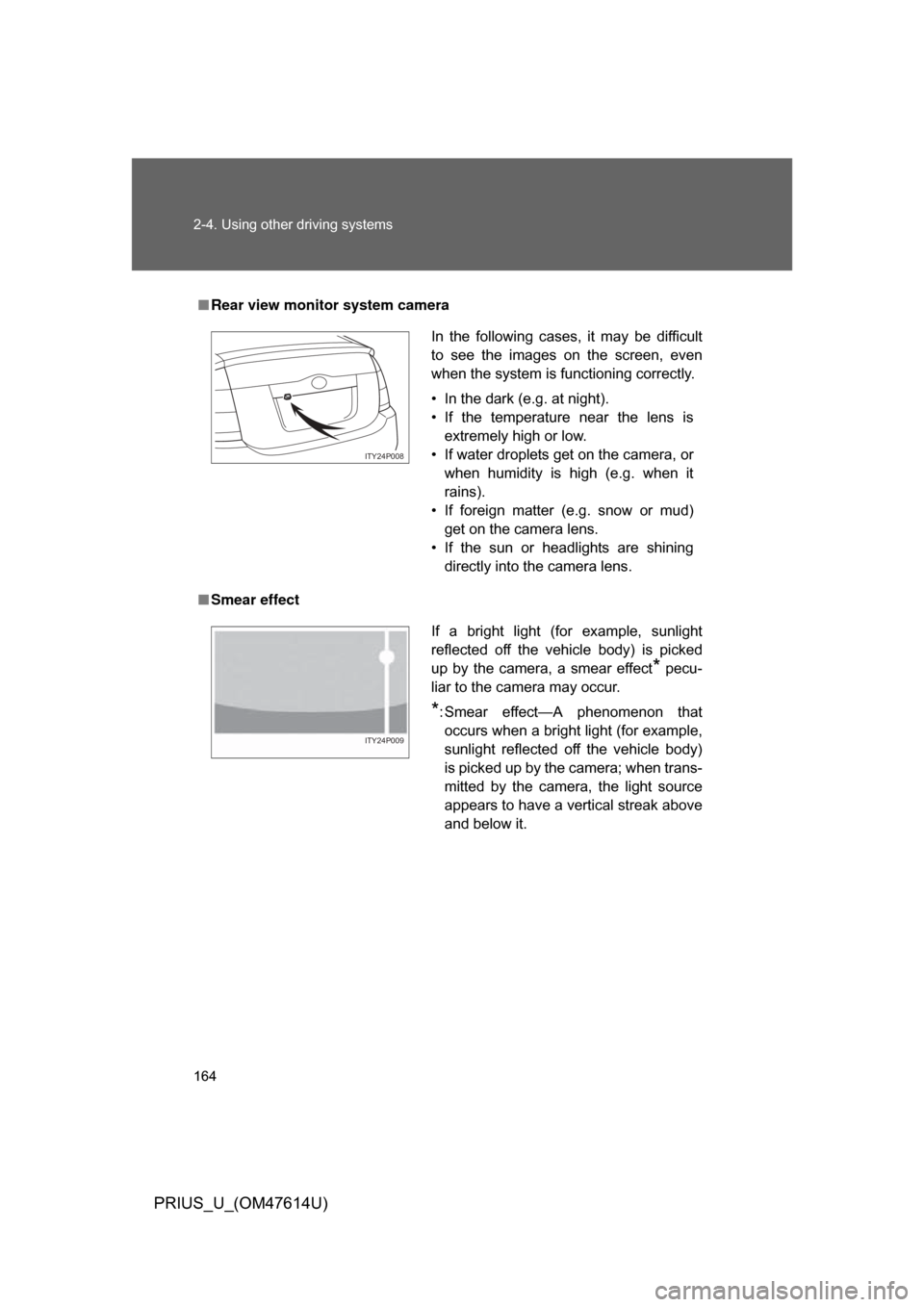
■Rear view monitor system camera
■ Smear effect
In the following cases, it may be difficult
to see the images on the screen, even
when the system is functioning correctly.
• In the dark (e.g. at night).
• If the temperature near the lens is
extremely high or low.
• If water droplets get on the camera, or when humidity is high (e.g. when it
rains).
• If foreign matter (e.g. snow or mud) get on the camera lens.
• If the sun or headlights are shining directly into the camera lens.
ITY24P008
If a bright light (for example, sunlight
reflected off the vehicle body) is picked
up by the camera, a smear effect
* pecu-
liar to the camera may occur.
*: Smear effect—A phenomenon that occurs when a bright light (for example,
sunlight reflected off the vehicle body)
is picked up by the camera; when trans-
mitted by the camera, the light source
appears to have a vertical streak above
and below it.
ITY24P009
Page 169 of 508
169
2
When driving
PRIUS_U_(OM47614U)
2-5. Driving information
Cargo and luggage
Capacity and distributionCargo capacity depends on the total weight of the occupants.
(Cargo capacity) = (Total load capa city) — (Total weight of occupants)
Steps for Determining Correct Load Limit—
(1) Locate the statement “The co mbined weight of occupants and
cargo should never exceed XXX kg or XXX lbs.” on your vehi-
cle’s placard.
(2) Determine the combined weight of the driver and passengers that will be riding in your vehicle.
(3) Subtract the combined weight of the driver and passengers from
XXX kg or XXX lbs.
(4) The resulting figure equals the available amount of cargo and luggage load capacity.
For example, if the “XXX” amount equals 1400 lbs. and there will
be five 150 lb passengers in your vehicle, the amount of avail-
able cargo and luggage load capacity is 650 lbs. (1400 - 750 (5
150) = 650 lbs.)
(5) Determine the combined weight of luggage and cargo being loaded on the vehicle.
That weight may not safely ex ceed the available cargo and lug-
gage load capacity calculated in Step 4.
Take notice of the following information about storage precau-
tions, cargo capacity and load.
● Stow cargo and luggage in the luggage compartment when-
ever possible. Be sure all items are secured in place.
● Be careful to keep the vehicle le vel. Placing the weight as far
forward as possible helps maintain vehicle balance.
● For better fuel economy, do no t carry unnecessary weight.
Page 171 of 508
171
2-5. Driving information
2
When driving
PRIUS_U_(OM47614U)
CAUTION
■Storage precautions
●Do not stack anything in the luggage compartment higher than the
seatbacks.
Such items may be thrown about and possibly injure people in the
vehicle during sudden braking or in an accident.
●Do not place anything on the luggage cover.
Such items may be thrown about and possibly injure people in the
vehicle during sudden braking or in an accident.
●Do not drive with objects on top of the instrument panel.
They may interfere with the driver’s field of view or move during sharp
acceleration or turning, thus impairing the driver’s control of the vehi-
cle. In an accident they may injure the vehicle occupants.
●Secure all items in the occupant compartment, as they may shift and
injure someone during an accident or sudden braking.
●Never allow anyone to ride in the luggage compartment. It is not
designed for passengers. They should ride in their seats with their seat
belts properly fastened. Otherwise,
they are much more likely to suffer
death or serious injury, in the event of sudden braking or a collision.
■Weight of the load
●Improper loading may cause deterioration of steering or braking con-
trol resulting in an accident which may cause death or serious injury.
●Do not exceed the maximum axle weight rating or the total vehicle
weight rating.
●Even if the total load of occupant’s weight and the cargo load is less
than the total load capacity, do no t apply the load unevenly. Improper
loading may cause deterioration of st eering or braking control which
may cause death or serious injury.
Page 190 of 508
190 3-1. Using the touch screen
PRIUS_U_(OM47614U)
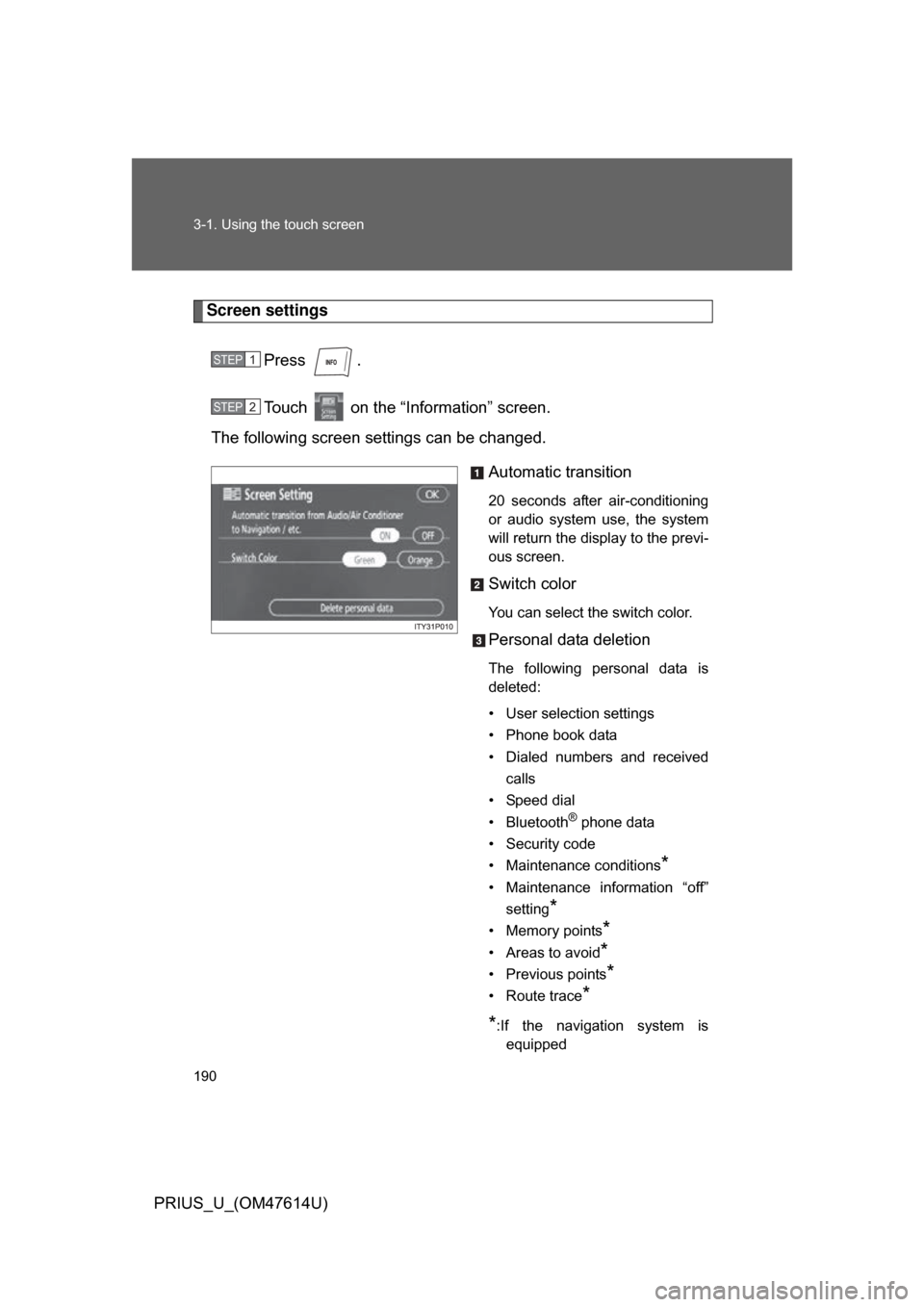
Screen settingsPress .
Touch on the “Information” screen.
The following screen settings can be changed.
Automatic transition
20 seconds after air-conditioning
or audio system use, the system
will return the display to the previ-
ous screen.
Switch color
You can select the switch color.
Personal data deletion
The following personal data is
deleted:
• User selection settings
• Phone book data
• Dialed numbers and receivedcalls
• Speed dial
• Bluetooth
® phone data
• Security code
• Maintenance conditions
*
• Maintenance information “off” setting
*
• Memory points*
• Areas to avoid*
• Previous points*
• Route trace*
*
:If the navigation system is equipped
STEP1
STEP2
Page 228 of 508
228 3-3. Using the audio system
PRIUS_U_(OM47614U)
■If the satellite radio does not operate normally
If a problem occurs with the XM
® tuner, a message will appear on the
screen. Refer to the table below to identify the problem, and take the sug-
gested corrective action.
ANTENNA
The XM® antenna is not connected. Check
whether the XM® antenna cable is attached
securely.
There is a short-circuit in the antenna or the sur-
rounding antenna cable. See a Toyota certified
dealer.
UPDATING You have not subscribed to XM
® satellite radio.
The radio is being updated with the latest encryp-
tion code. Contact XM
® satellite radio for subscrip-
tion information. When a contract is canceled, you
can choose “CH000” and all free-to-air channels.
The premium channel you selected is not autho-
rized. Wait for about 2 seconds until the radio
returns to the previous channel or “CH001”. If it
does not change automatically, select another
channel. If you want to listen to the premium chan-
nel, contact XM
® satellite radio.
NO SIGNAL The XM
® signal is too weak at the current location.
Wait until your vehicle reaches a location with a
stronger signal.
LOADING The unit is acquiring audio or program information.
Wait until the unit has received the information.
OFF AIRThe channel you selected is not broadcasting any
programming. Select another channel.
-----There is no song/program title or artist name/fea-
ture associated with the channel at that time. No
action needed.
Page 308 of 508
308 3-4. Using the hands-free system (for cellular phone)
PRIUS_U_(OM47614U)
Changing the security settingsYou can disable certain hands-free system functions. Use the secu-
rity settings when you do not wish other people to see the registered
data, for example when having the vehicle valet parked at a hotel.
To enable or disable security, the security code (4 digits) is required.
The default code is “0000”. Be sure to change the security code
before use.
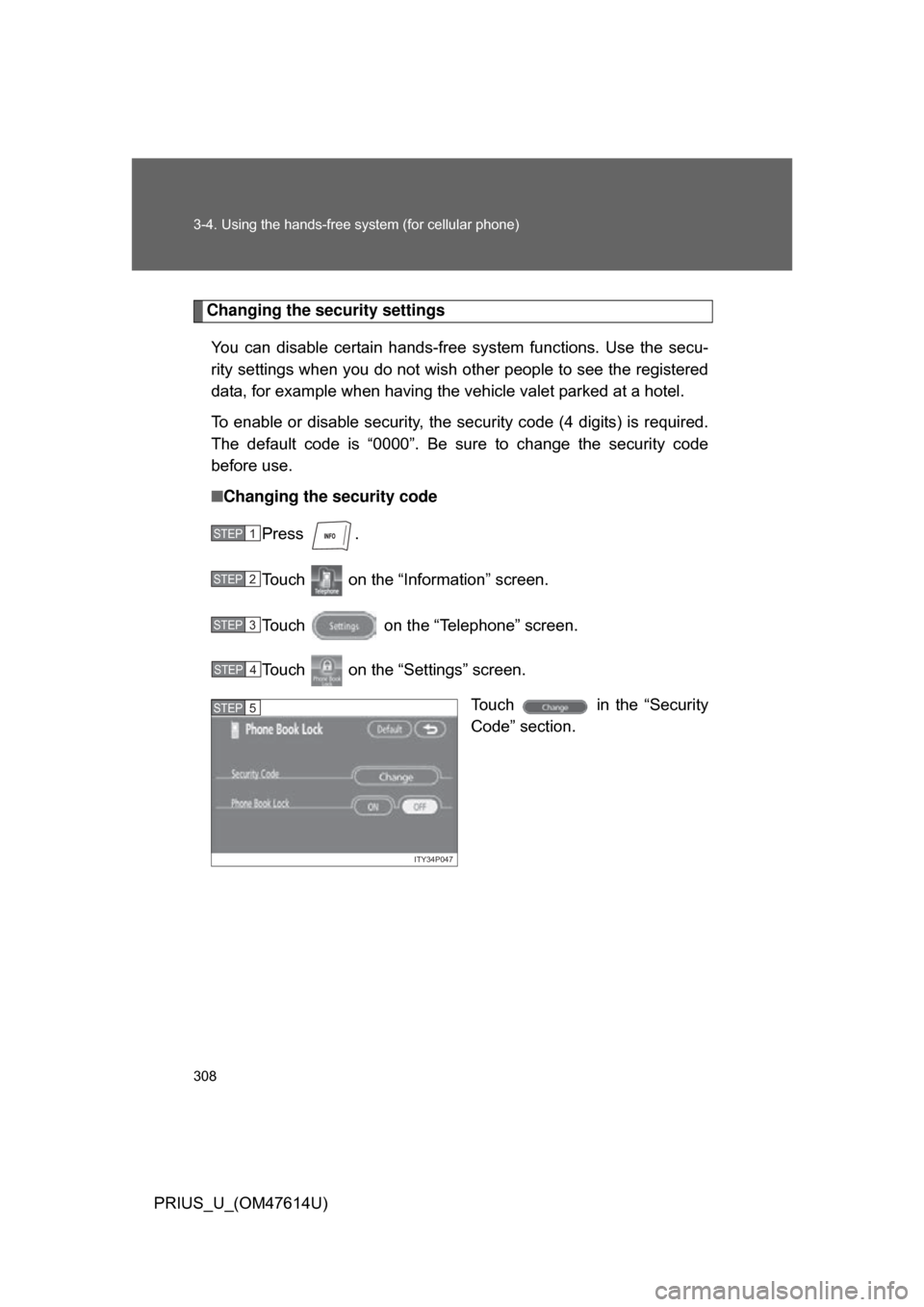
■ Changing the security code
Press .
Touch on the “Inf ormation” screen.
Touch on the “Telephone” screen.
Touch on the “Settings” screen. Touch in the “Security
Code” section.
STEP1
STEP2
STEP3
STEP4
ITY34P047
STEP5