Page 44 of 508

44 1-3. Opening, closing and locking the doors and back door
PRIUS_U_(OM47614U)
■Battery-saving function
In the following circumstances, the entry function is disabled in order to pre-
vent the vehicle and electronic key batteries from discharging.
● When the entry function has not been used for 2 weeks or more
● When the electronic key has been left within approximately 3 ft. (1 m) of
the vehicle for 10 minutes or more
The system will resume operation when...
● The vehicle is locked using the door handle lock switch
● The vehicle is locked/unlocked using the wireless remote control function
(P. 49) or the mechanical key ( P. 448)
■ Electronic key battery depletion
● The standard battery life is 1 to 3 years. (The battery becomes depleted
even if the electronic key is not used.) If the smart key system or the
wireless remote control function does not operate, or the detection area
becomes smaller, the battery may be depleted. Replace the battery when
necessary. ( P. 392)
● To avoid serious deterioration, do not leave the electronic key within 3 ft.
(1 m) of the following electrical appliance that produce a magnetic field.
•TVs
• Personal computers
• Recharging cellular phones or cordless phones
• Table lamps
■ To operate the system properly
Make sure to carry the electronic key when operating the system. Do not get
the electronic key too close to the vehicle when operating the system from
the outside of the vehicle.
Depending on the position and holding condition of the electronic key, the
key may not be detected correctly and the system may not operate properly.
(The alarm may go off accidentally, or the door lock prevention may not func-
tion.)
Page 45 of 508

45
1-3. Opening, closing and locking the doors and back door
1
Before driving
PRIUS_U_(OM47614U)
■
Note for the smart key system
● Even when the electronic key is within the effective range (detection
areas), the system may not operate properly in the following cases.
• The electronic key is too close to the window or outside door handle,
near the ground, or in a high place when the doors are locked or
unlocked.
• The electronic key is on the instrument panel, luggage cover, floor or in the glove box when the engine is started or engine switch modes are
changed.
● The doors may unlock if a large amount of water splashes on the door
handle, such as in the rain or in a car wash. (The doors will automatically
be locked after approximately 60 seconds if the doors are not opened
and closed.)
● Gripping the door handle when wearing a glove may not unlock the door.
● If the wireless remote control is used to lock the doors when the elec-
tronic key is near the vehicle, there is a possibility that the door may not
be unlocked by the entry function. (Use the wireless remote control to
unlock the doors.)
■ When the vehicle is not dr iven for extended periods
To prevent theft of the vehicle, do not leave the electronic key within 6 ft. (2
m) of the vehicle.
■ Security feature
If a door is not opened within approximately 60 seconds after the vehicle is
unlocked, the theft deterrent system automatically locks the vehicle again.
Page 49 of 508
49
1
1-3. Opening, closing and locking the doors and back door
Before driving
PRIUS_U_(OM47614U)
Wireless remote control
■Operation indicator
A buzzer sounds and the emergency flashers flash to indicate that the doors
have been locked/unlocked. (Locked: Once; Unlocked: Twice)
■ Door lock buzzer
If a door is not fully closed, a buzzer sounds continuously if an attempt to
lock the door is made. Fully close the door to stop the buzzer, and lock the
vehicle once more.
■ Security feature
P. 4 5
■ When the electronic key battery is fully depleted
P. 392
The wireless remote control can be used to lock and unlock the vehi-
cle and the back door fr om outside the vehicle.
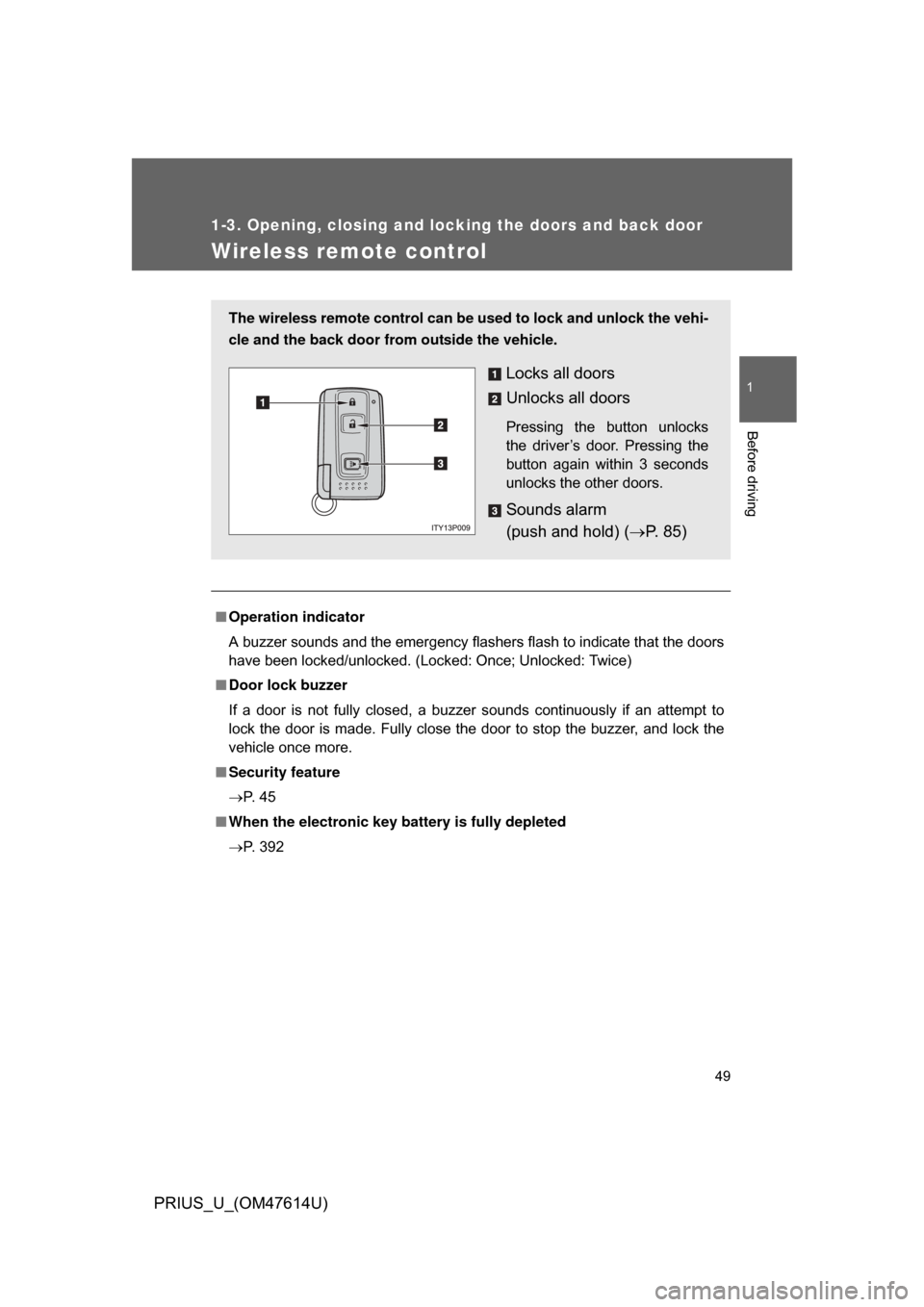
Locks all doors
Unlocks all doors
Pressing the button unlocks
the driver’s door. Pressing the
button again within 3 seconds
unlocks the other doors.
Sounds alarm
(push and hold) (P. 8 5 )
Page 50 of 508

50 1-3. Opening, closing and locking the doors and back door
PRIUS_U_(OM47614U)
■Conditions affecting operation
P. 4 2
■ Low battery
If the wireless remote control does not function or if it only operates very
close to the vehicle, the battery may be low. ( P. 392)
■ Customization that can be co nfigured at Toyota dealer
Settings (e.g. 2-step unlocking function) can be changed.
(Customizable features P. 486)
■ Certification for wir eless remote control
For vehicles sold in the U.S.A.
NOTE:
This device complies with Part 15 of the FCC Rules. Operation is subject to
the following two conditions: (1) this device may not cause harmful interfer-
ence, and (2) this device must accept any interference received, including
interference that may cause undesired operation.
FCC WARNING:
Changes or modifications not expressly approved by the party responsible
for compliance could void the user’s authority to operate the equipment. For vehicles sold in the Canada
NOTE:
This device complies with RSS-210 of Industry Canada.
Operation is subject to the following two conditions: (1) this device may not
cause interference, and (2) this device must accept any interference, includ-
ing interference that may cause undesired operation of the device.
FCC ID: MOZB21TG
MADE IN JAPAN
FCC ID: MOZB21RG
MADE IN JAPAN
Page 51 of 508
51
1
1-3. Opening, closing and locking the doors and back door
Before driving
PRIUS_U_(OM47614U)
Side doors
The vehicle can be locked and unlocked using the entry function,
wireless remote control or door lock switch.
■Smart key system
P. 3 7
■ Wireless remote control
P. 4 9
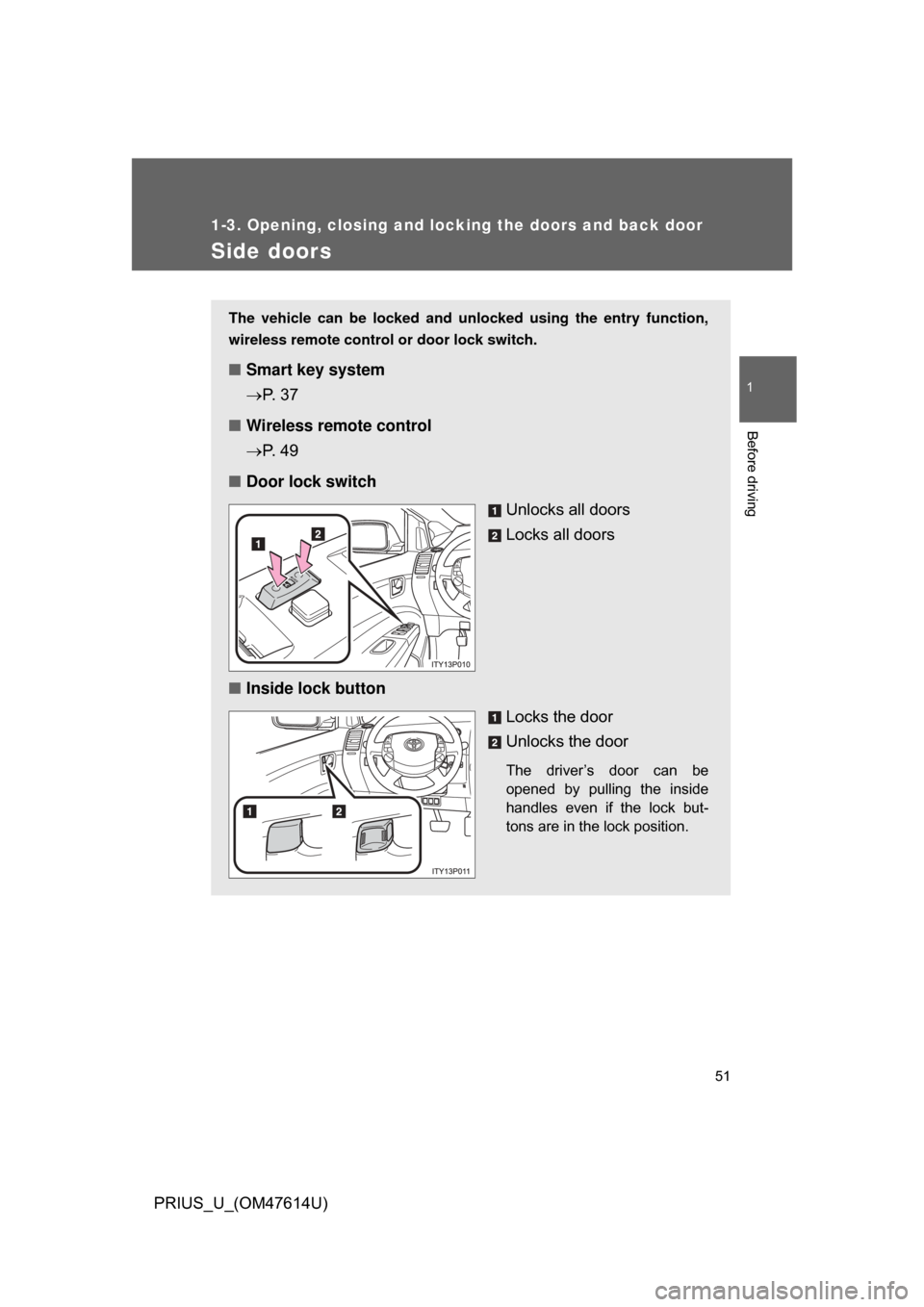
■ Door lock switch
Unlocks all doors
Locks all doors
■ Inside lock button
Locks the door
Unlocks the door
The driver’s door can be
opened by pulling the inside
handles even if the lock but-
tons are in the lock position.
Page 85 of 508
85
1-7. Theft deterrent system
1
Before driving
PRIUS_U_(OM47614U)
■
Items to check before locking the vehicle
To prevent unexpected triggering of the alarm and vehicle theft, make sure
of the following
● Nobody is in the vehicle.
● The windows are closed before the alarm is set.
● No valuables or other personal items are left in the vehicle.
■ Triggering of the alarm
The alarm may be triggered in the following situations.
(Stopping the alarm deactivates the alarm system.)
● A person inside the vehicle opens a door, the back door or hood.
● The 12 volt battery is recharged or replaced when the vehicle is locked.
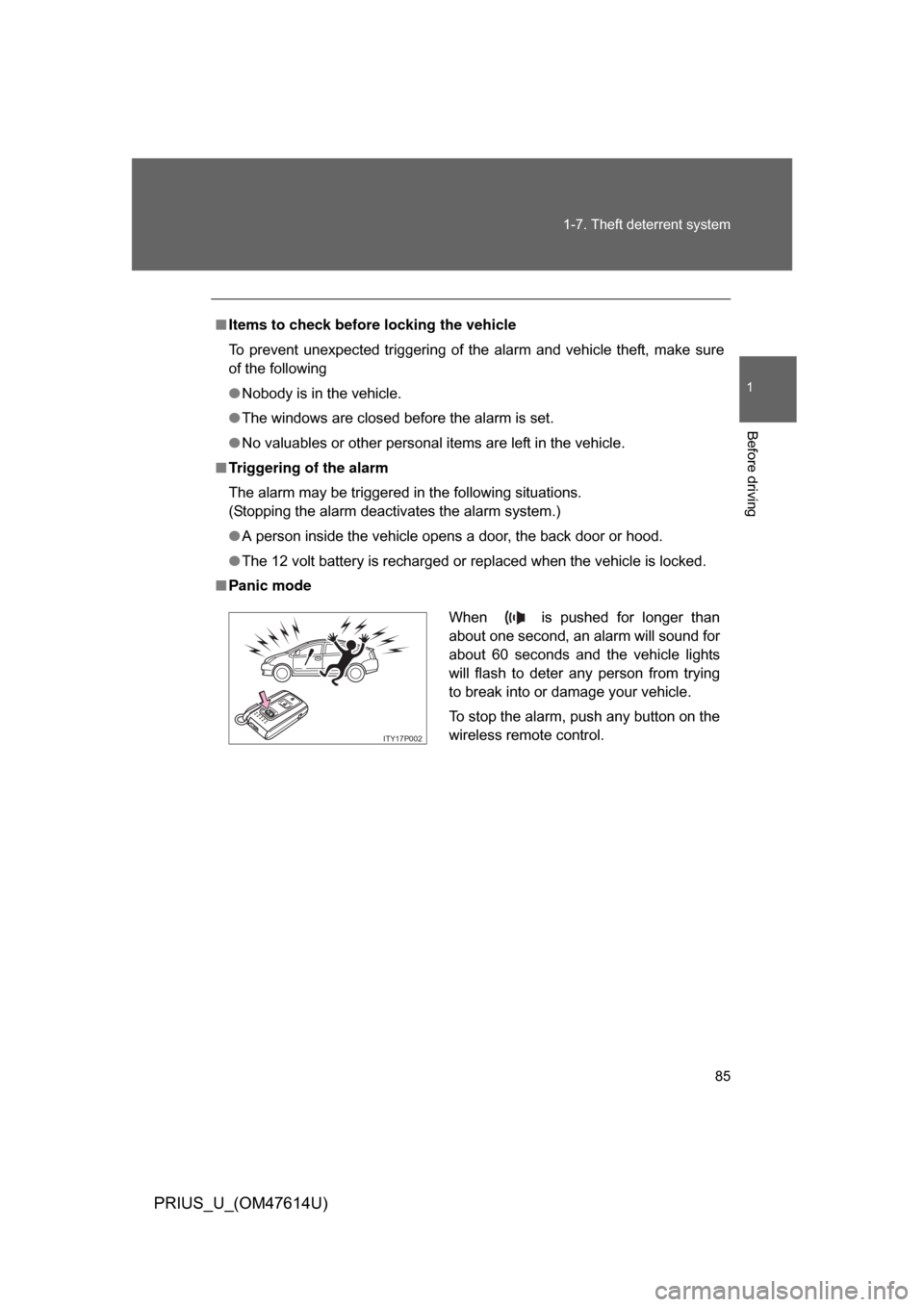
■ Panic mode
When is pushed for longer than
about one second, an alarm will sound for
about 60 seconds and the vehicle lights
will flash to deter any person from trying
to break into or damage your vehicle.
To stop the alarm, push any button on the
wireless remote control.
ITY17P002
Page 180 of 508
180
PRIUS_U_(OM47614U)
3-1. Using the touch screenTouch screen ................... 182
Setting the touch screen (Vehicles with AUX
adapter) ......................... 187
Setting the touch screen (Vehicles without AUX
adapter) ......................... 192
3-2. Using the air conditioning system and defogger
Automatic air conditioning system (Vehicles with
AUX adapter) ................. 197
Automatic air conditioning system (Vehicles without
AUX adapter) ................. 204
Using the steering wheel climate remote control
switches ......................... 211
Rear window and outside rear view mirror
defoggers ....................... 213
Page 211 of 508
211
3-2. Using the air conditioning system and defogger
3
Interior features
PRIUS_U_(OM47614U)
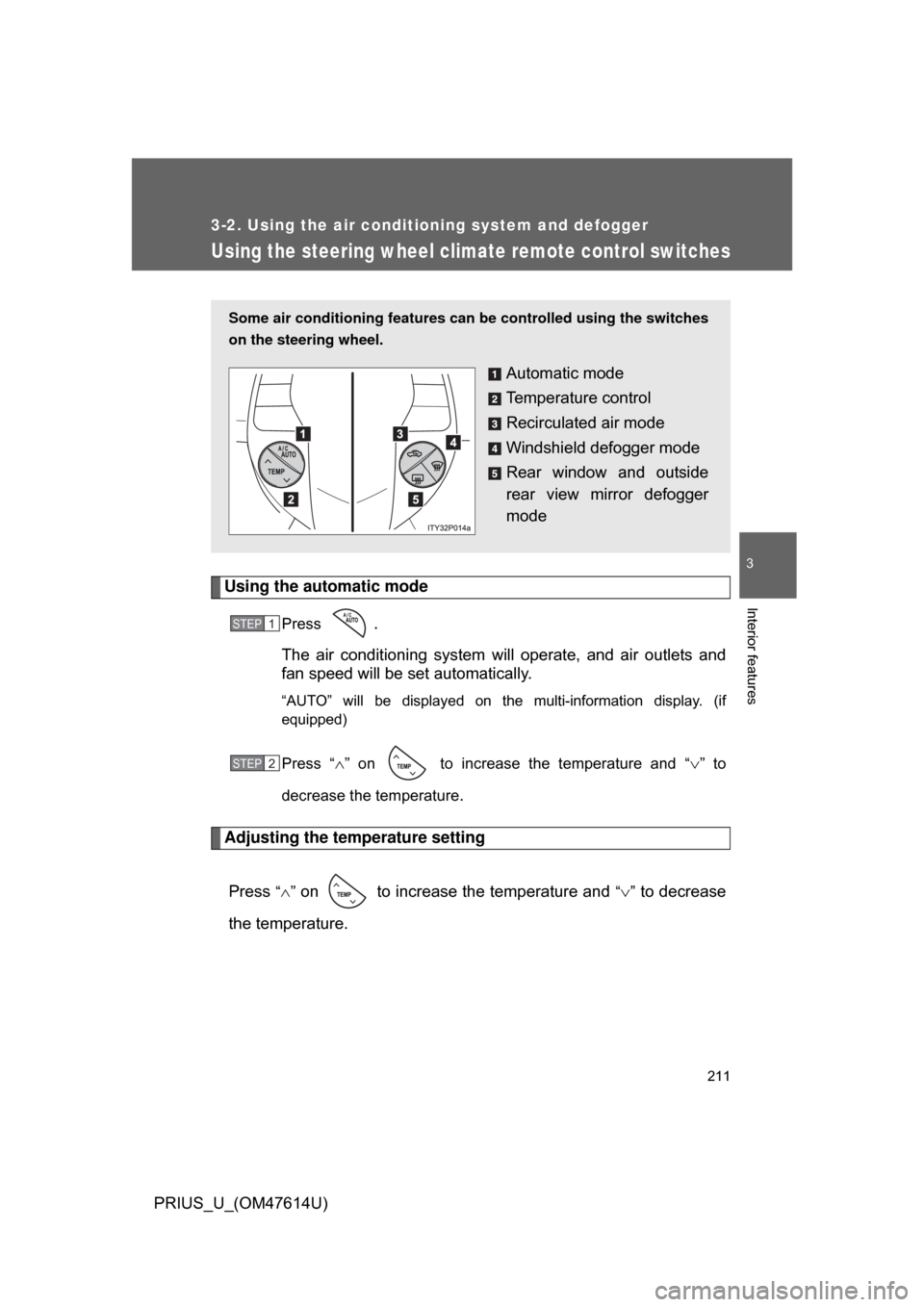
Using the steering wheel climate remote control switches
Using the automatic mode
Press .
The air conditioning system will operate, and air outlets and
fan speed will be set automatically.
“AUTO” will be displayed on the multi-information display. (if
equipped)
Press “” on to increase the temperature and “” to
decrease the temperature
.
Adjusting the temperature setting
Press
“” on to increase the temperature and “” to decrease
the temperature.
Some air conditioning features can be controlled using the switches
on the steering wheel.
Automatic mode
Temperature control
Recirculated air mode
Windshield defogger mode
Rear window and outside
rear view mirror defogger
mode
STEP1
STEP2