Page 59 of 556
59
1-3. Adjustable components (s
eats, mirrors, steering wheel)
1
Before driving
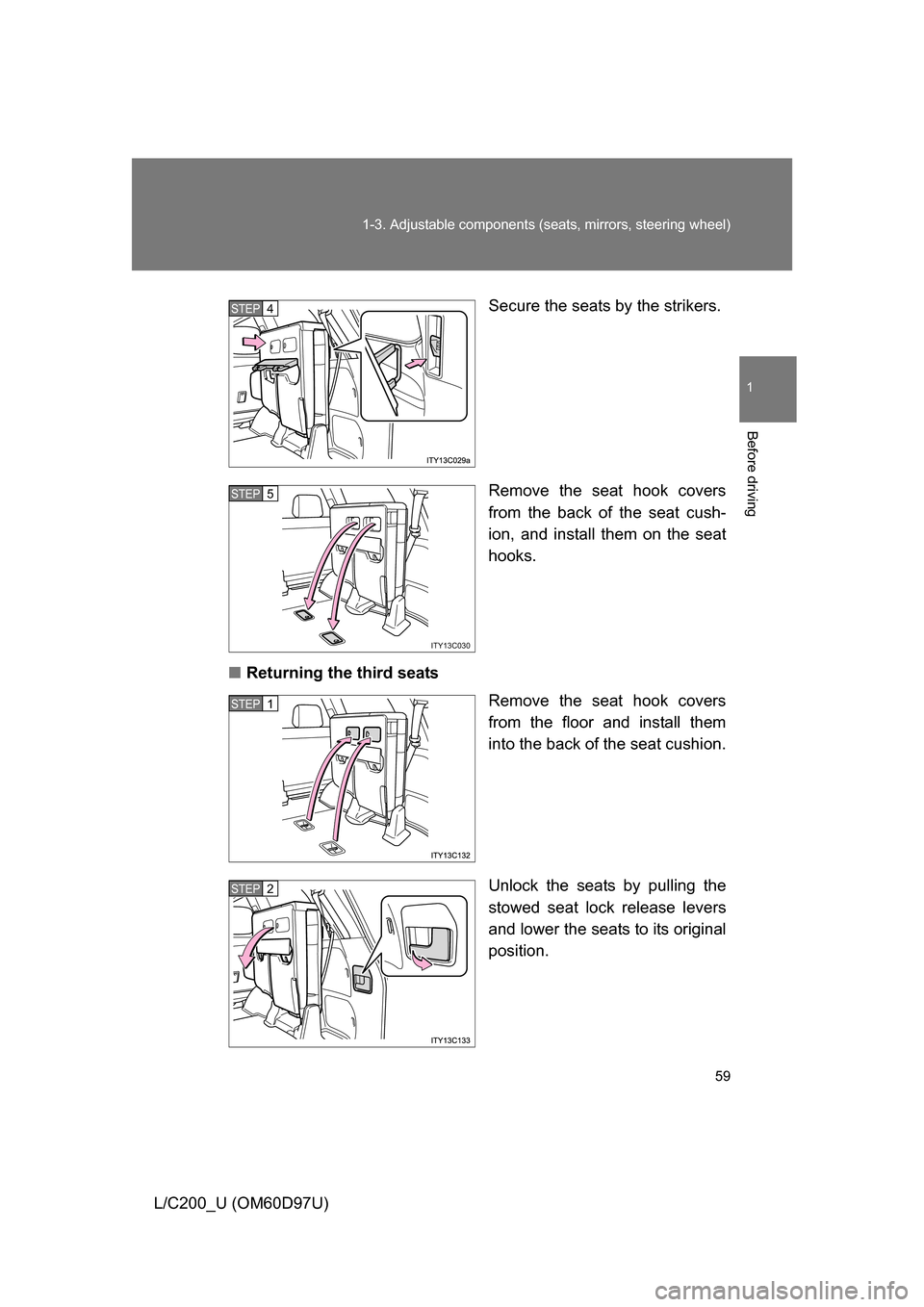
L/C200_U (OM60D97U) Secure the seats by the strikers.
Remove the seat hook covers
from the back of the seat cush-
ion, and install them on the seat
hooks.
■ Returning the third seats
Remove the seat hook covers
from the floor and install them
into the back of the seat cushion.
Unlock the seats by pulling the
stowed seat lock release levers
and lower the seats to its original
position.
STEP4
ITY13C030
STEP5
STEP1
STEP2
Page 60 of 556
60 1-3. Adjustable components (seats, mirrors, steering wheel)
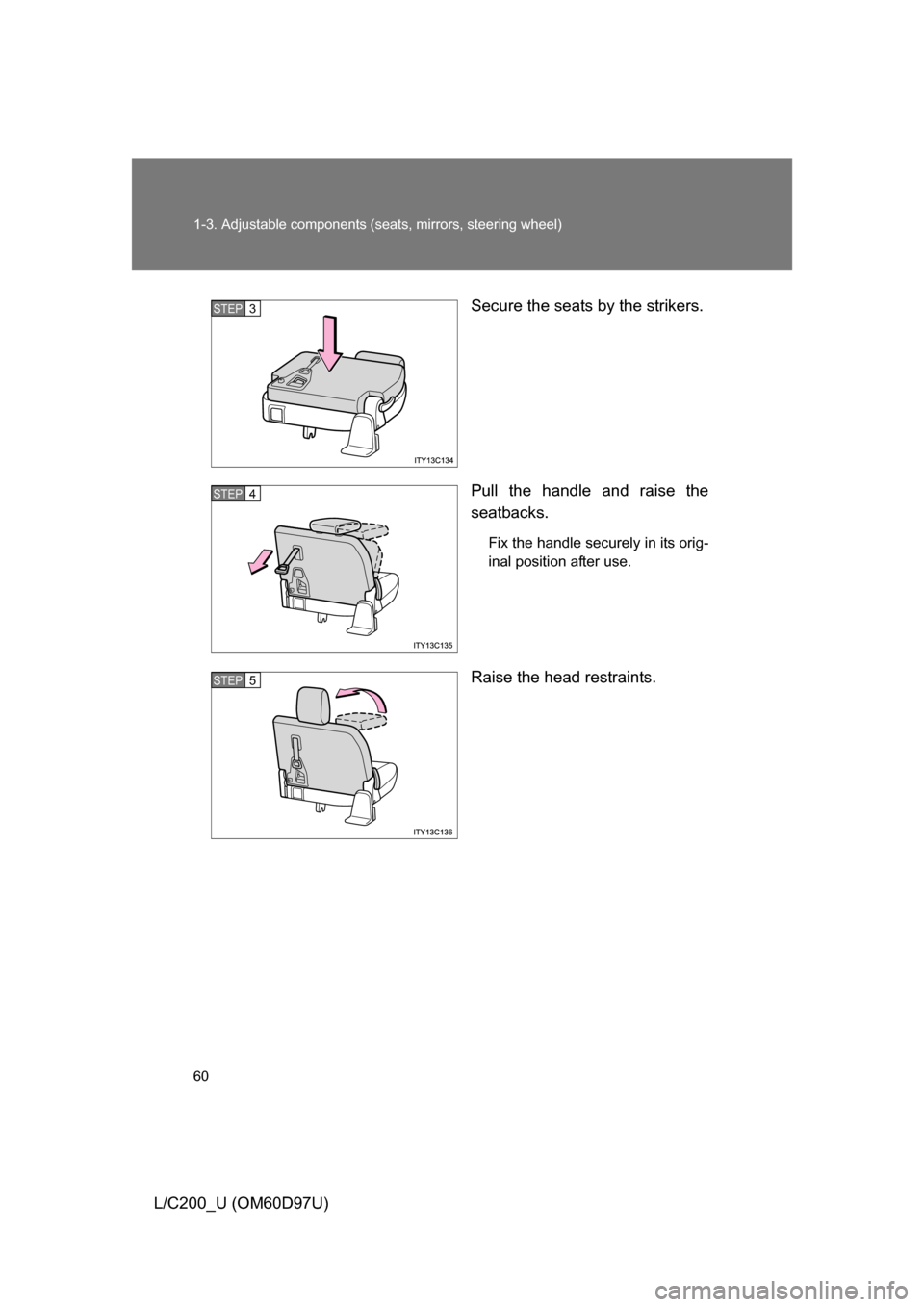
L/C200_U (OM60D97U) Secure the seats by the strikers.
Pull the handle and raise the
seatbacks.
Fix the handle securely in its orig-
inal position after use.
Raise the head restraints.
STEP3
STEP4
STEP5
Page 61 of 556
61
1-3. Adjustable components (s
eats, mirrors, steering wheel)
1
Before driving
L/C200_U (OM60D97U)
CAUTION
■Seat adjustment
Do not recline the seat more than necessary when the vehicle is in motion,
to reduce the risk of sliding under the lap belt.
If the seat is too reclined, during an accident the lap belt may slide past the
hips and apply restraint forces directly to the abdomen or your neck may
contact the shoulder belt, increasing the risk of death or serious injury.
■ When the seatback is folded
● Do not sit on or place anything on the seatback while driving.
● Be sure to install the seat hook covers on the seat hooks, or you may get
burned when they become hot.
■ When returning the seatbacks to their original position
Observe the following precautions. Failure to do so may result in death or
serious injury.
● Be careful not to get your hands or feet pinched in the seat.
● Make sure the seats are securely locked. Failure to do so will prevent the
seat belt from operating properly.
● Check that the seat belts are not twisted or caught under the seat.
● Arrange the seat belts in the proper positions for ready use.
■ Avoiding damage to seat components
Do not hang or attach anything on the seatback striker.
NOTICE
■Before tumbling, folding up the seats
The seat belts and buckles must be stowed.
■ After returning the third seat
Make sure that the handle on the rear of the seatback has been secured.
Page 62 of 556
62
1-3. Adjustable components (seats, mirrors, steering wheel)
L/C200_U (OM60D97U)
Driving position memor y system
Your preferred driving position (the position of the driver’s seat,
steering wheel and outside rear view mirrors) can be entered into the
computer’s memory and recalled with the touch of a button. It is also
possible to set this function to activate automatically when the
doors are unlocked.
Three different driving positions can be entered into memory.
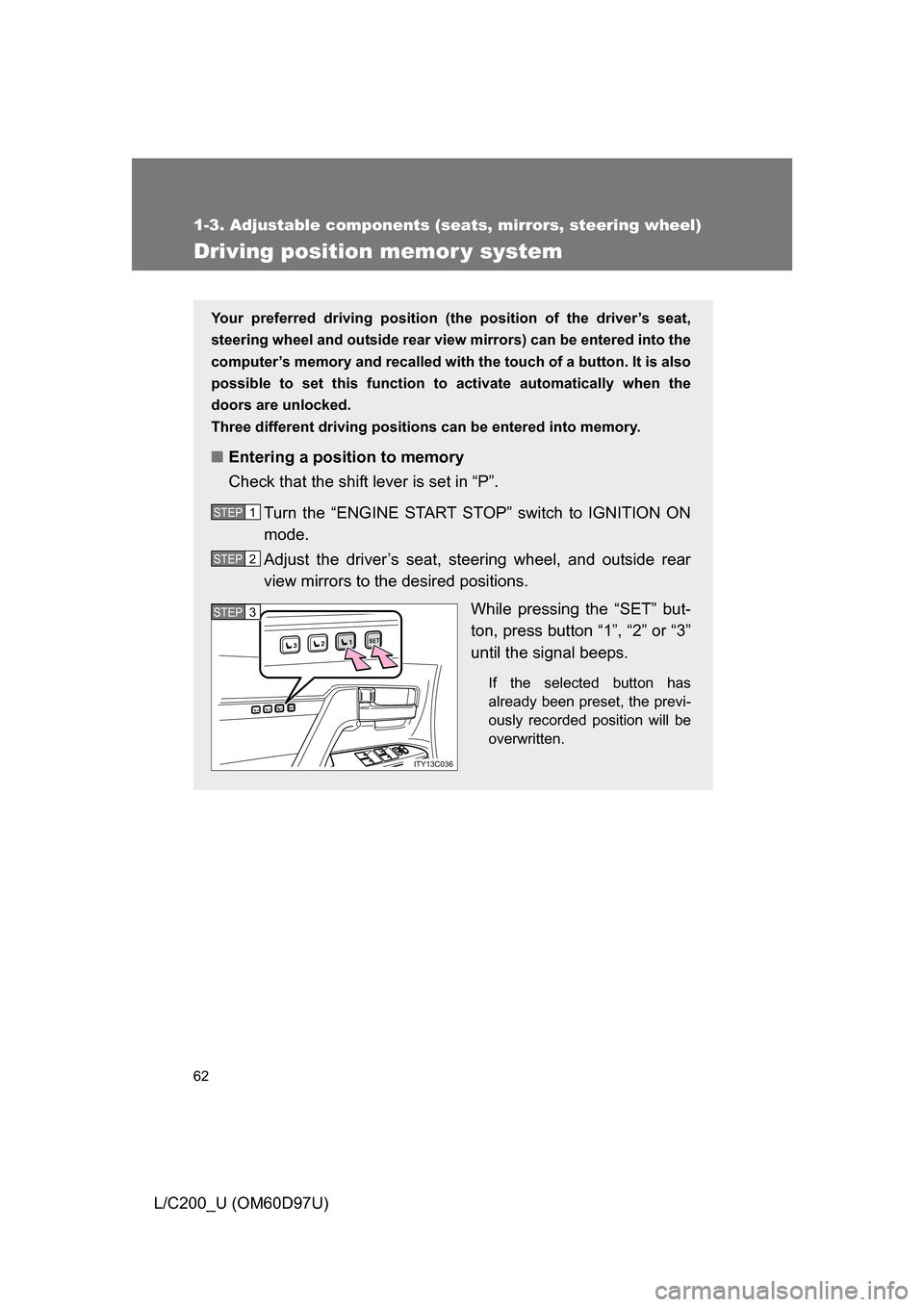
■ Entering a position to memory
Check that the shift lever is set in “P”.
Turn the “ENGINE START STOP” switch to IGNITION ON
mode.
Adjust the driver’s seat, steering wheel, and outside rear
view mirrors to the desired positions. While pressing the “SET” but-
ton, press button “1”, “2” or “3”
until the signal beeps.
If the selected button has
already been preset, the previ-
ously recorded position will be
overwritten.
STEP1
STEP2
1SET23
1SET23
ITY13C036
STEP3STEP3
Page 63 of 556
63
1-3. Adjustable components (s
eats, mirrors, steering wheel)
1
Before driving
L/C200_U (OM60D97U)
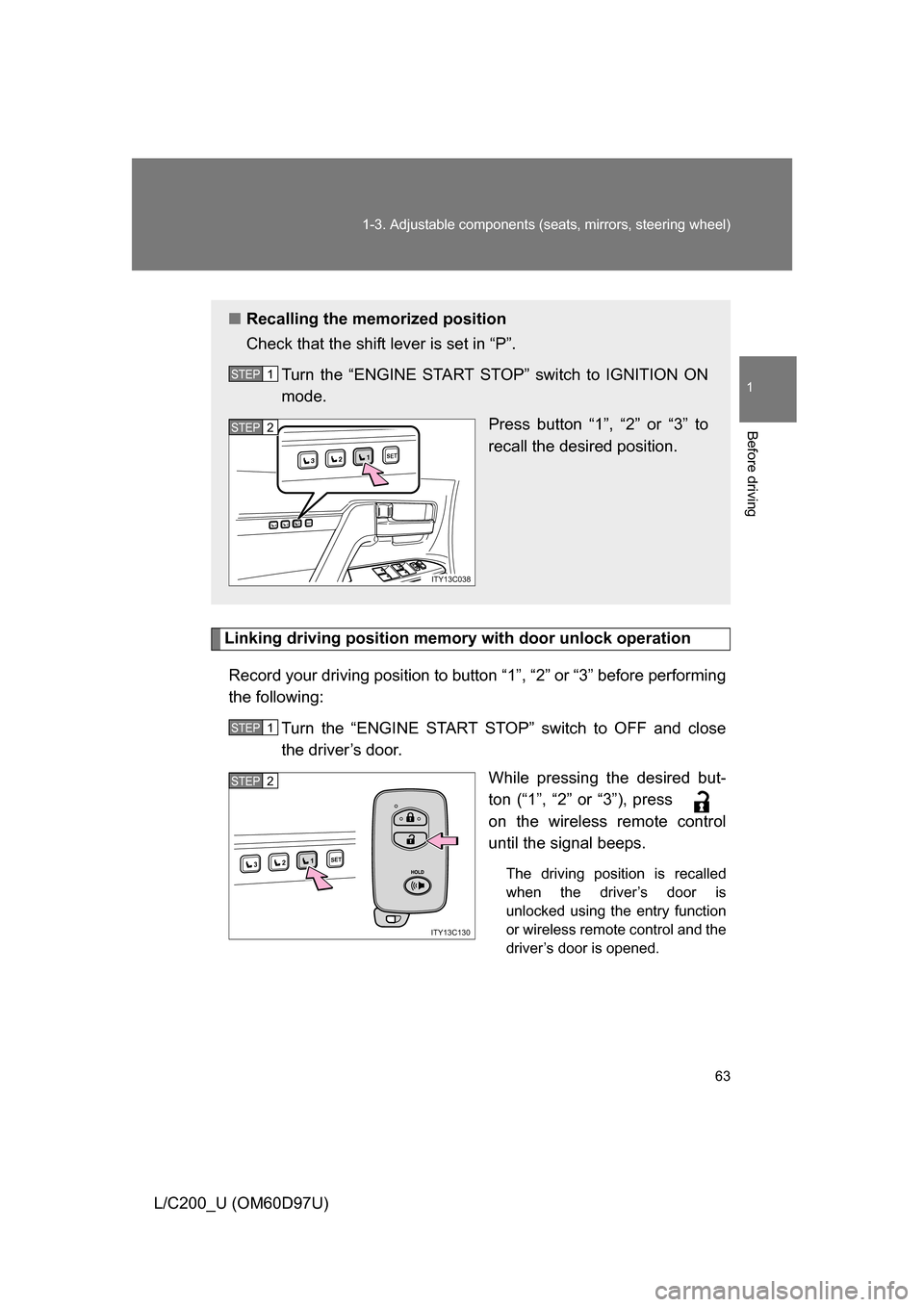
Linking driving position memory with door unlock operation
Record your driving position to button “1”, “2” or “3” before performing
the following: Turn the “ENGINE START STOP” switch to OFF and close
the driver’s door. While pressing the desired but-
ton (“1”, “2” or “3”), press
on the wireless remote control
until the signal beeps.
The driving position is recalled
when the driver’s door is
unlocked using the entry function
or wireless remote control and the
driver’s door is opened.
■Recalling the memorized position
Check that the shift lever is set in “P”.
Turn the “ENGINE START STOP” switch to IGNITION ON
mode. Press button “1”, “2” or “3” to
recall the desired position.
STEP1
1SET23
1SET23
ITY13C038
STEP2
STEP1
1SET23
ITY13C130
STEP2
Page 64 of 556
64 1-3. Adjustable components (seats, mirrors, steering wheel)
L/C200_U (OM60D97U)Open one of the doors.
If a door is not opened within 30 seconds after is pressed, the
doors will be locked again and the alarm will automatically be set. In
case that the alarm is triggered, immediately stop the alarm.
(
P. 97)
■ Canceling the linked door unlock operation
Turn the “ENGINE START STOP” switch to OFF and close the
driver’s door.
While pressing “SET” button, press button on the wireless
remote control until the signal beeps.
■ Retained accessory power
Each memorized position (except for the steering wheel position) can be
activated within 30 seconds after the driver’s door is opened, even if the
“ENGINE START STOP” switch turns off.
■ To cancel seat position recall
Perform any one of the following operations.
● Press the “SET” button
● Press button “1”, “2” or “3”.
● Adjust the seat using the switches (only cancels seat position recall)
■ If the battery is disconnected
The memorized positions must be reset because the computer’s memory is
erased when the battery is disconnected.
STEP3
STEP1
STEP2
Page 65 of 556
65
1-3. Adjustable components (s
eats, mirrors, steering wheel)
1
Before driving
L/C200_U (OM60D97U)
CAUTION
■Seat adjustment caution
Take care during seat adjustment that the seat does not strike the rear pas-
senger or squeeze your body against the steering wheel.
Page 66 of 556
66
1-3. Adjustable components (seats, mirrors, steering wheel)
L/C200_U (OM60D97U)
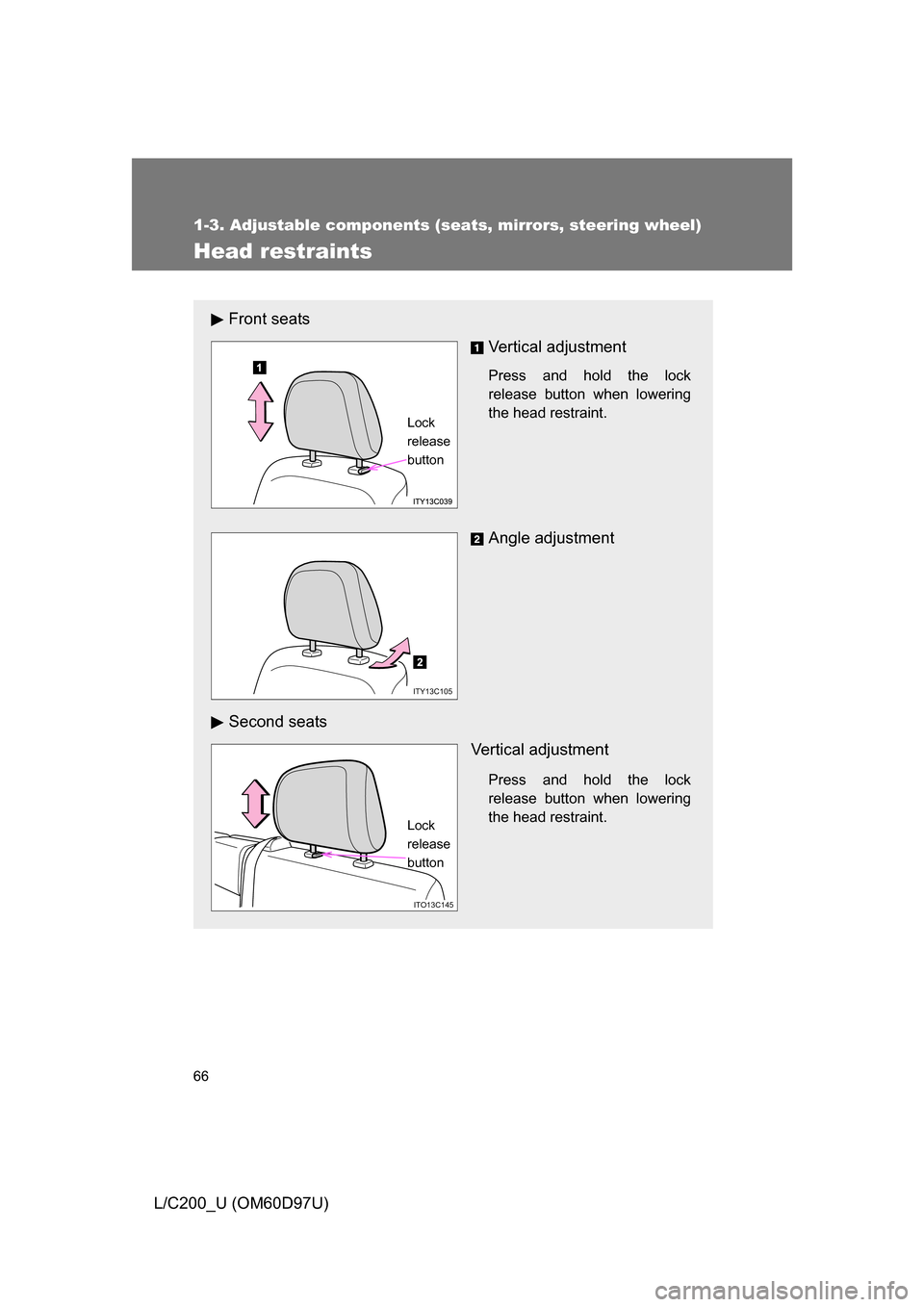
Head restraints
Front seatsVertical adjustment
Press and hold the lock
release button when lowering
the head restraint.
Angle adjustment
Second seats Vertical adjustment
Press and hold the lock
release button when lowering
the head restraint.
Lock
release
button
ITY13C105
ITO13C145
Lock
release
button