2009 SKODA YETI steering
[x] Cancel search: steeringPage 58 of 271

Lights and Visibility
57
Using the system
Safety
Driving Tips
General Maintenance
Breakdown assistance
Technical Data
Switching on the fog lights– First of all turn the light switch into position
or ⇒page 56, fig. 46
.
– Pull the light switch into position . The rear fog light warning light
⇒page 29 lights up in the instrument cluster when
the fog light is switched off.Fog lights with the function “Corner”* The fog lights with the function “Corner” improve the illumination of areas close to the vehicle when turning, parking etc.The fog lights with the function “Corner” ar
e regulated according to the steering angle
or after switching on the turn signal light
8) in the following circumstances:
•
the vehicle is stationary and the engine
is running or it moves with a speed of
maximum 40 km/h;•
the daylight driving lights are not switched on;
•
the low beam is switched on or th
e light switch is
in the position
and the
intensity of the ambient light causes the low beam to be switched on;•
the fog lights are not switched on;
•
no reverse gear is engaged.Note
If you engage the reverse gear during the
active function “Corne
r”, both fog lights
illuminate.Rear fog light
Switching on the rear fog light– First of all turn the light switch into position
or ⇒page 56, fig. 46
.
– Pull the switch into position .
The rear fog light warning light
⇒page 29 lights up in the instrument cluster when
the fog light is switched off. Only the rear fog light of the trailer lights
up automatically when you are towing a trailer
using a factory-fitted towing device
which is fitted with the rear fog light.
The rear fog light is located in the rear light array on the driver's side.
Caution
The rear fog light should only be switched on
if visibility is partic
ularly poor (conform
with any varying legal provisions) to avoi
d dazzling vehicles behind your vehicle.
Instrument lighting*
You can adjust the brightness of the instrument lighting.Instrument lighting– Switch on the light. – Turn the control dial
⇒fig. 47
to the desired intensity of the instrument lighting.
For the information display*
⇒page 24 the intensity of the lighting is automatically
set. It is only possible to adjust the instrume
nt lighting with the co
ntrol dial if the light
intensity drops below the set value of the light sensor.
8)If both switch on versions are conflicting, for ex
ample if the steering wheel is turned to the left
and the right turn signal light is switched on, the turn signal light has the higher priority.
A1
A2
Fig. 47 Dash panel:
Instrument lighting
sgg.6.book Page 57 Thursday, September 24, 2009 2:32 PM
Page 60 of 271
Lights and Visibility
59
Using the system
Safety
Driving Tips
General Maintenance
Breakdown assistance
Technical Data
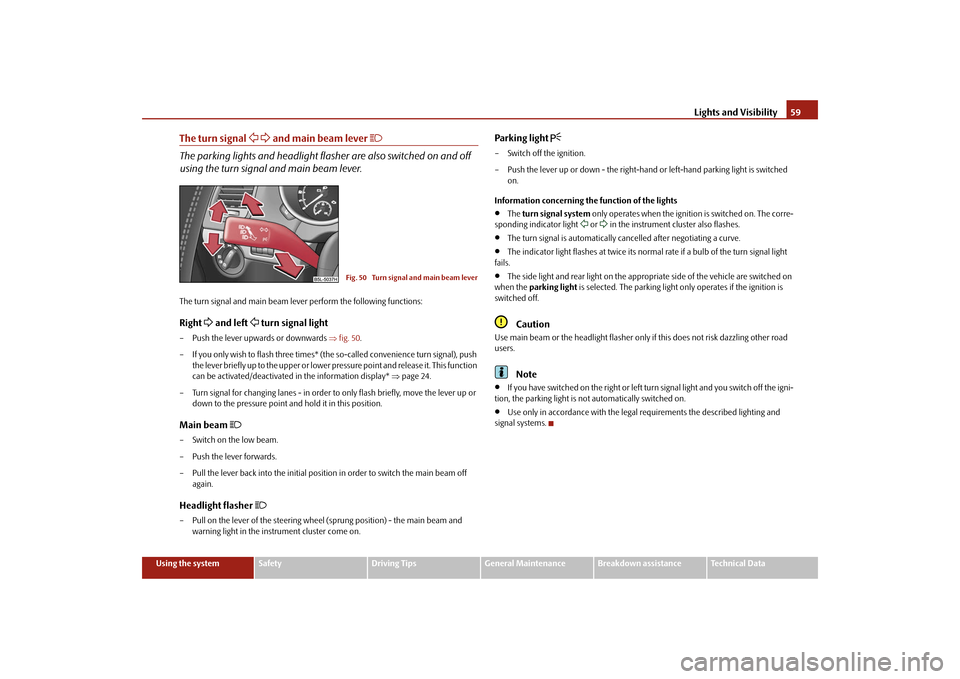
The turn signal
and main beam lever
The parking lights and headlight flas
her are also switched on and off
using the turn signal and main beam lever.The turn signal and main beam le
ver perform the following functions:
Right
and left
turn signal light
– Push the lever upwards or downwards
⇒fig. 50
.
– If you only wish to flash three times* (the
so-called convenience turn signal), push
the lever briefly up to the upper or lower pr
essure point and release it. This function
can be activated/deactivated in the information display*
⇒page 24.
– Turn signal for changing lanes - in order to
only flash briefly, move the lever up or
down to the pressure point and hold it in this position.
Main beam
– Switch on the low beam. – Push the lever forwards.– Pull the lever back into the initial positi
on in order to switch the main beam off
again.
Headlight flasher
– Pull on the lever of the steering whee
l (sprung position) -
the main beam and
warning light in the instrument cluster come on.
Parking light
– Switch off the ignition. – Push the lever up or down - the right-hand
or left-hand parking light is switched
on.
Information concerning the function of the lights•
The
turn signal system
only operates when the ignition is switched on. The corre-
sponding indicator light
or in the instrument cluster also flashes.
•
The turn signal is automatically cancelled after negotiating a curve.
•
The indicator light flashes at twice its normal
rate if a bulb of the turn signal light
fails.•
The side light and rear light on the appropriate side of the vehicle are switched on
when the
parking light
is selected. The parking light only operates if the ignition is
switched off.
Caution
Use main beam or the headlight flasher only
if this does not risk dazzling other road
users.
Note
•
If you have switched on the right or left turn signal light and you switch off the igni-
tion, the parking light is not automatically switched on.•
Use only in accordance with the legal
requirements the described lighting and
signal systems.
Fig. 50 Turn signal and main beam lever
sgg.6.book Page 59 Thursday, September 24, 2009 2:32 PM
Page 64 of 271

Lights and Visibility
63
Using the system
Safety
Driving Tips
General Maintenance
Breakdown assistance
Technical Data
Windshield wiper and wash systemWindshield wiper You can operate the windscreen wipers and automatic wipe/wash using the windscreen wiper lever.The windscreen wiper lever
⇒fig. 57
has the following positions:
Finger-operated wiping– If you wish to wipe the windscreen only
briefly
, push the lever into the sprung
position . If you hold the lever in the lo
wer position for more than 1 second, the
wiper wipes faster.
Intermittent wiping– Position the lever up into position . – Set with the switch the desired brea
k between the individual wiper strokes.
Slow wipe– Position the lever up into position .Fast wipe– Position the lever up into position .
Automatic wipe/wash for windscreen– Pull the lever towards the steering wheel into sprung position , the wash system
sprays immediately, the windscreen wiper starts wiping a little later. The wash system and the windscreen wiper operate simultaneously at a speed of more than 120 km/h.
– Release the lever. The windscreen wash system stops and the wiper continues for
another 3 - 4 wiper strokes (depending on
the period of spraying of the wind-
screen). At a speed of more than 2 km/h, the wiper wipes once again* 5 seconds after the last wiper stroke in order to wipe the last drops from the windscreen. This function can be activated/deacti
vated by a specialist garage.
Rain sensor*– Move the lever into position . – You can set the sensitivity of the sensor individually with switch .Wiping the rear window pane– Push the lever away from the steering wheel into position - the widescreen
wiper will operate every 6 seconds.
Automatic wipe/wash for the rear window pane*– Press the lever from the steering wheel forward into the sprung position , the
wash system sprays immediately, the windscreen wiper starts wiping a little later. A s l o n g a s y o u h o l d t h e l e v e r i n t h i s p o s i t i o n, th e w i p e r o p e ra t e s a s w e l l a s t h e w a s h system.
– Letting go of the lever will cause the windscreen wash system to stop and the wiper
to continue for another 2 - 3 wiper strokes
(depending on the period of spraying of
the windscreen).
The lever will stay in position after releasing it
.
Switching windscreen wipers off– Move the lever back into
its home position .
After the windscreen wiper switches off each
time or the ignition switches off for the
third time, the position of the windscreen wiper changes, this counteracts an early fatigue of the wiper rubbers.
Fig. 57 Windscreen wiper lever
A4
A1
AA
A2A3
A5
A1
AA
A6
A7
A6
A0
sgg.6.book Page 63 Thursday, September 24, 2009 2:32 PM
Page 70 of 271

Seats and Stowage
69
Using the system
Safety
Driving Tips
General Maintenance
Breakdown assistance
Technical Data
Seats and StowageFront seatsBasic informationThe front seats have a wide range of differ
ent settings and can thus be matched to the
physical characteristics of the driver and
front passenger. Correct adjustment of the
seats is particularly important for:•
safely and quickly reaching the controls;
•
a relaxed, fatigue-free body position;
•
achieving the maximum protection offered by the seat belts and the airbag
system.
WARNING
•
Never transport more occupants than the maximum seating in the vehicle.
•
Each occupant must correctly fasten the seat belt belonging to the seat.
Children must be fastened
⇒page 156, “Transporting children safely” with a
suitable restraint system.•
The front seats and the head restraints must always be adjusted to match
the body size of the seat occupant as well as the seat belts must always be correctly fastened in order to provide an optimal protection for you and your occupants.•
Always keep your feet in the footwell
when the vehicle is being driven -
never place your feet on the instrument panel, out of the window or on the surfaces of the seats. This is particular
ly important for the front seat passenger.
You will be exposed to increased risk of
injury if it becomes necessary to apply
the brake or in the event of an accident.
If an airbag is deployed, you may suffer
fatal injuries when adopting an incorrect seated position!•
It is important for the driver and front
passenger to maintain
a distance of at
least 25 cm from the steering wheel or
dash panel. Not maintaining this
minimum distance will mean that the airbag
system will not be able to properly
protect you - hazard! The front seats and the head restraints must always also be correctly adjusted to match the body size of the occupant.
•
Ensure that there are no objects in
the footwell as any objects may get
behind the pedals during a driving or braking manoeuvre. You would then no longer be able to operate the clutch, to brake or accelerate.•
Do not transport any objects on the front passenger seat except those
provided for this purpose (e.g. child safety seat) - risk of accident!Adjusting the front seatsAdjusting a seat in a forward/back direction–Pull the lever
⇒fig. 62
up and push the seat into the desired position.
– Release the lever and push the seat further until the lock is heard to engage.Adjusting height of seat– Lift the seat if required by pulling or pumping lever upwards.– Lower the seat if required by pushing or pumping lever downwards.Adjust the angle of the seat backrest– Relieve any pressure on the seat backrest (do not lean on it) and turn the hand-
wheel
⇒fig. 62
to adjust the desired angle of the backrest.
WARNING (continued)
Fig. 62 Controls at seat
A1A1
A2A2
A3
sgg.6.book Page 69 Thursday, September 24, 2009 2:32 PM
Page 71 of 271

Seats and Stowage
70 Adjusting lumbar support*– Pull on the lever until you have set th
e most comfortable curvature of the seat
upholstery in the area of your spine.
The driver's seat should be adjusted in such a way that the pedals can be fully pressed to the floor with slightly bent legs. The seat backrest on the driver's seat should
be adjusted in such a way that the upper
point of the steering wheel can be easi
ly reached with slightly bent arms.
WARNING
•
Only adjust the driver seat when the vehicle is stationary - risk of injury!
•
Take care when adjusting the seat! Adjusting the seat without care can lead
to bruises or injuries.•
The seat backrests must not be angled too far back when driving otherwise
this will affect proper operation of the se
at belts and of the airbag system - risk
of injury!Adjusting front seats electrically*Adjusting seatsFig. 63 Side view: Controls for adju
sting the seat / seat setting switch
Adopt the correct seated position before setting
⇒page 69.
Adjusting a seat in a forward/back direction– Press the switch
⇒fig. 63
forwards or backwards
⇒fig. 63
.
Set the height of the seat cushion– Press the switch
⇒fig. 63
upwards or downwards.
Adjust the angle of the seat cushion– Press the switch at the front
⇒fig. 63
or at the back
⇒fig. 63
.
Adjusting the seat backrest– Press the switch
⇒fig. 63
in the direction of the desired setting.
Adjusting lumbar support– Press the switch front
⇒fig. 63
in order to enlarge the curvature of the lumbar
support.
– Press the switch rear in order to reduce the curvature of the lumbar support. – Press the switch top in order to adjust the curvature of the lumbar support
higher.
– Press the switch bottom in order to adjust the curvature of the lumbar support
lower.
Switch is operated in order to move
the seat up/down and forward/back, while
switch is operated in order to move the backrest forward or back.
WARNING
•
Only adjust the driver seat when the ve
hicle is stationary - risk of injury!
•
Caution when adjusting the seat! You ma
y suffer injuries or bruises as a
result of adjusting the seat without paying proper attention.•
In view of the fact that the seats can also be adjusted when the ignition is
switched off (even when ignition key withdrawn), you should never leave chil-dren unattended in the vehicle.
A4
AB
A1
ABAB
A2
A3
ACAAAAAAAA
ABAC
sgg.6.book Page 70 Thursday, September 24, 2009 2:32 PM
Page 110 of 271

Starting-off and Driving
109
Using the system
Safety
Driving Tips
General Maintenance
Breakdown assistance
Technical Data
Starting-off and DrivingSetting steering wheel positionFig. 113 Adjustable steering wheel: Lever below
steering column / safe
distance to steering
wheelYou can set the height and the forward/back
position of the steering wheel to the
desired position. – Adjust the driver seat
⇒page 12.
– Pull the lever below the steering column
⇒fig. 113
down
⇒
.
– Set the steering wheel to the desired position (concerning height and forward/back
position).
– Push the lever upwards as far as the stop.
WARNING
•
You must not adjust the steering wheel when the vehicle is moving!
•
The driver must maintain a distance of
at least 25 cm to
the steering wheel
⇒ fig. 113
. Not maintaining this minimum distance will mean that the airbag
system will not be able to properly protect you - hazard!•
For safety reasons the lever must always be firmly pushed up to avoid the
steering wheel altering its po
sition unintentionally when driving - risk of acci-
dent!
•
If you adjust the steering wheel furthe
r towards the head, you will reduce
the protection offered by the driver airbag in the event of an accident. Check that the steering wheel is
aligned to the chest.
•
When driving, hold the steering wheel
with both hands firmly on the outer
edge in the 9 o'clock and 3 o'clock po
sition. Never hold the steering wheel
firmly in the 12 o'clock position or in another way (e.g. in the middle of the steering wheel or at the inne
r steering wheel edge). In such
cases, injuries to the
arms, the hands and the head can occur
when the driver airbag is deployed.
Ignition lockPetrol engines - ignition switched off, engine
off, the steering can be locked
- ignition switched on - start engine Diesel engines - interruption of fuel supply, ignition swit
ched off, engine off, the steering can be
locked - heating glow plugs on, ignition switched onWARNING (continued)
Fig. 114 Ignition lock positions
A1A2A3A1A2
sgg.6.book Page 109 Thursday, September 24, 2009 2:32 PM
Page 111 of 271

Starting-off and Driving
110
•
You should not switch on any major elec
trical components during the heating
period otherwise
the vehicle battery will
be drained unnecessarily.
- start engine Applies to all models: Position
To lock the steering
, with the ignition key withdrawn, turn the steering wheel until the
steering locking pin is heard to
engage. You should always lock the steering as a general
rule if you leave your vehicle. This acts as
a deterrent against possible theft of your
vehicle
⇒
.
Position
Move the steering wheel back and forward a little if the ignition key cannot, or cannot easily be turned into this position, in order to release the steering lock. Position
The engine is started in this position. At the same time, major electrical components are switched off for short periods. The igni
tion key moves back into position when
one releases the key. The ignition key must be turned back into
position each time before starting the
engine again. The starter repeat lock in th
e ignition lock prevents the starter being
engaged when the engine is r
unning and thus getting damaged.
Ignition key withdrawal lock (automatic gearbox) You can only withdraw the ignition key after switching off the ignition if the selector lever is in position
P.
WARNING
•
When driving, the ignition key must always be in the position (ignition
switched on) without the engine running. This position is indicated by the warning lights coming on. If this is not the case, it could result in unexpected locking of the steering wh
eel - risk of accident!
•
Only remove the ignition key from the ignition lock when the vehicle has
come to a standstill (by applying the handbrake or moving the selector lever into the position P). The
steering lock can engage imme
diately - risk of acci-
dent!
•
Always withdraw the ignition key if yo
u are going to leave the vehicle, even
for a short time. This is particularly important if children are left in the vehicle. The children might otherwise start the engi
ne or switch on el
ectrical equipment
(e.g. power windows) - risk of accident or injury!Starting the engineGeneral You can only start the engine only using an original ignition key.•
Place the gearshift lever into neutral (or
place the selector lever to the position
P or
N in the case of an automatic gearbox) and put on the handbrake firmly before starting the engine.•
The clutch pedal should be fully depressed when starting the engine - the starter
then only has to crank the engine.•
Let go of the key as soon as the engine starts otherwise there may be damage to
the starter. The engine running noises may louder at first be louder for a short time after starting the cold engine until oil pressure can be
built up in the hydraulic valve clearance
compensation. This is quite normal and is not an operating problem. If the engine does not start ... You can use the battery of anothe
r vehicle as a jump-start aid
⇒page 229.
It is only possible to tow-start vehicles fi
tted with a manual gearbox. The tow-starting
distance must not be more than 50 metres
⇒page 231.
WARNING
•
Never run the engine in non ventilated
or enclosed areas. The exhaust gases
of the engine contain besides the odorless and colourless carbon monoxide a poisonous gas - hazard! Carbon mono
xide can cause unconsciousness and
death.
A3
A1A2A3
A2
A1
A2
WARNING (continued)
sgg.6.book Page 110 Thursday, September 24, 2009 2:32 PM
Page 116 of 271

Starting-off and Driving
115
Using the system
Safety
Driving Tips
General Maintenance
Breakdown assistance
Technical Data
set so that the play function volume decr
eases when activating the parking aid, see
Owner's Manual radio* or na
vigation system*. This impr
oves the audibility of the
parking aid. Activating The parking aid is activated when the
reverse gear
is engaged and the ignition is
turned on or by pressing the button
⇒page 114, fig. 118
- the symbol lights up in
the button. The activation is confirme
d by a brief acknowledgement signal.
Deactivating The parking aid is deactivated after pressing the button°
⇒page 114, fig. 118
or at
a speed of more than 10 km/h - the symbol
in the button is no longer illuminated.
WARNING
•
The parking aid is not a substitute for the driver paying proper attention and
it is always the driver's responsibility to
take care when reversing the vehicle or
carrying out similar manoeuvres.•
You should therefore satisfy yourself, befo
re reversing, that there is no small
obstacle, such as a rock, thin post, trailer drawbar etc., in front or behind your vehicle. Such an obstacle might not be
within the range dete
cted by the sensors.
•
Under certain circumstances, surfaces
of certain objects and types of
clothing cannot reflect the signal of th
e parking aid. Thus, these objects or
people who wear such clothing are not re
cognised by the sensors of the parking
aid.
Note
•
Only the front parking aid operates if yo
u are towing a trailer (applies only to
models which feature a factory-fitted towing device*).•
If a warning signal sounds for about 3 seco
nds after activating the system and there
is no obstacle close to your
vehicle, this indicates a system fault. The fault is confirmed
additionally when the symbol flashes in the button
⇒page 114, fig. 118
. Have the
fault rectified by a specialist workshop.•
The sensors must be kept clean and free of ice to enable the parking aid to operate
properly.
•
If the parking aid is activated and the sele
ctor lever of the automatic gearbox is in
the position , warning signal indicates inte
rruption (vehicle can no longer move).
Park Assist*Description and important informationThe park assist assists you when parking in a suitable parallel parking space between two vehicles or
behind a vehicle.
The park assist automatically searches for
suitable parking spaces
after switching on
the ignition and when driving up to 30 km/h. During the parking procedure the park assist only takes over the steering movements, the pedals continue to be operated by the driver. Function of the system is based on:•
Length and depth measurement of the parking spaces when driving
•
Evaluation of the size of the parking space
•
Definition of the correct position of the vehicle for parking
•
Calculating the line on which the vehicle drives backwards into the parking space
•
Actuation of the steering force assistance, automatic spinning of the wheels of the
front axle when parking.
WARNING
The park assist does not take away the responsability from the driver when parking.•
Pay particular attention to small children and animals as they would not be
recognised by the sensors of the parking aid.•
Under certain circumstances, surfaces of certain objects and types of
clothing cannot reflect the signal of the park assist or the parking aid. Thus, these objects or people who wear such clothing are not recognised by the sensors of the parking aid.
AP
sgg.6.book Page 115 Thursday, September 24, 2009 2:32 PM