2009 SKODA SUPERB brake
[x] Cancel search: brakePage 130 of 294

Starting-off and Driving
129
Using the system
Safety
Driving Tips
General Maintenance
Breakdown assistance
Technical Data
After you have released the rocker button out of the position
SET
, the speed you
have just stored is maintained at a cons
tant speed without having to depress the
accelerator. Yo u c a n
increase
the speed by depressi
ng the accelerator. Releasing the acceler-
ator will cause the speed to
drop
again to the set speed.
This does not apply, however, if you drive at a speed which is more than 10 km/h higher than the set speed for a period of longer than 5 minutes. The stored speed will be cancelled in the memory. You th
en have to re-store the desired speed.
One can
reduce
the speed in the usual manner. The system is switched off tempo-
rarily by actuating the brake or clutch pedal
⇒page 129.
WARNING
First ensure that it is not too high for the traffic conditions which exist at that moment before resuming the stored speed.Changing a stored speed You can also change the speed of
the vehicle without depressing the
accelerator.Fa s t e r –You can
increase
the stored speed without depressing the acceler-
ator, by pressing the rocker button
⇒
page 128, fig. 145
in the
RES
position.
– The speed of the car will increase
continuously if you hold the rocker
button pressed in the
RES
position. Once the car has reached the
desired speed, release the rocker button. The set speed is then stored in the memory.
Slower – You can
decrease
the stored speed by pressing the rocker button
in the
SET
position.
– Holding down the rocker button pressed in the
SET
position will cause
the speed of the vehicle to reduce continuously. Once the car has reached the desired speed, release the rocker button. The set speed is then stored in the memory.
– If you release the rocker button when
the car is travelling at a speed of
less than 30 km/h, the speed is not stored, the memory is erased. It is then necessary to again store the sp
eed with the rocker button in
the position
SET
after an increase in speed of the vehicle to more than
30 km/hour.
Switching off the cruise control system temporarily–You can
switch off
the cruise control system temporarily by
depressing
the brake pedal or clutch pedal, on models with auto-
matic gearbox and only with brake pedal.
– You can switch off temporarily the cruise control system, if you press
the switch in the middle position.
The set speed remains stored in the memory. The
Resumption
of the stored speed is achieved by releasing the brake or clutch
pedal, on vehicles fitted with automatic gearbox only after releasing the brake pedal and after shortly pressing the rocker button
⇒page 128, fig. 145
into the posi-
tion
RES
.WARNING
First ensure that it is not too high for the traffic conditions which exist at that moment before resuming the stored speed.
ABAB
AB
AB
AA
AB
s2dk.1.book Page 129 Wednesday, April 8, 2009 12:23 PM
Page 132 of 294
Automatic gearbox DSG*
131
Using the system
Safety
Driving Tips
General Maintenance
Breakdown assistance
Technical Data
Automatic gearbox DSG*Automatic gearbox DSG*IntroductionYour car is equipped with an automatic
gearbox DSG. The abbr
eviation DSG means
Direct shift gearbox (Direct shift gearbox). Two independent clutches are needed for the power transmission between the engine and the gearbox. These replace the torque converter of the conventional automatic gearbox. Their shifting is matched in such a way that there are no jerks when shifting the gear and the power transmission of the engine to the front wheels is not interrupted.Information for driving with the automatic gearbox DSG Shifting up and down through the gears is performed automatically.You can also, however, switch
the gearbox over into the
Tiptronic mode
.
This mode makes it possible for
you to also shift gears manually
⇒
page 134.
Starting-off and Driving – Depress the brake pedal and hold it depressed. – Press the Shiftlock button (button
in handle of the selector lever),
move the selector lever into the desired position, e.g.
D ⇒
page 132,
and then release the Shiftlock button.
– Release the brake pedal and depress the accelerator
⇒
.
Stopping for a short time – The selector lever position
N does not have to be selected when stop-
ping just for a short time, such as at a
cross roads. It is sufficient to hold
the vehicle stationary using the foot
brake. The engine can, however,
be allowed just to idle.
Parking – Depress the brake pedal and hold it depressed. – Apply the handbrake firmly. – Press and Shiftlock button in the
selector lever, move the selector
lever to
P and then release the Shiftlock button.
The engine can only be
started
when the selector lever is in position
P or N
⇒ page 119. At temperatures below -10 °C the engine can only be started in the selector lever position
P.
It is sufficient to engage
selector lever position
P when parking on a flat surface.
When parking on a slope you should first apply the handbrake firmly and then move the selector le
ver into position
P. This is to ensure that there is no excessive
pressure acting on the lock mechanism and
that it is easier to subsequently move
the selector lever out of position
P.
If the selector lever position
N is selected by accident while driving it is first neces-
sary to release pressure on the accelerato
r pedal and wait for idling speed of the
engine to be reached before engaging a drive position in the selector lever.
WARNING
•
Do not depress the accelerator when changing the position of the
selector lever if the car is stationary an
d the engine is running - risk of acci-
dent!•
Never move the selector lever into position R or P when driving - risk of
an accident!
s2dk.1.book Page 131 Wednesday, April 8, 2009 12:23 PM
Page 133 of 294
Automatic gearbox DSG*
132
•
If you are stopping at a hill (downhill section), never try to hold the car
stationary with the gear engaged by me
ans of the “accelerator”, this means
by letting the clutch slip. This can lead
to overheating of the
clutch. If there is
a risk of overheating of the clutch due
to overload, the clut
ch is opened auto-
matically and the vehicle rolls backward - risk of accident!•
If you must stop at a slope, depress
and hold the brake pedal, so that you
can prevent the vehicle from rolling back.
Caution
•
The double clutch on the automatic gear
box DSG is equipped with an overload
protection. If you make use of the uphill func
tion on a vehicle which is stationary or
driving slowly uphill, it will result in an
increase of thermal stress of the clutches.
•
An overheating of the clutches can be de
tected by the flashing of the selector
level indicator and the “jerk” of the clut
ches, finally the clutches are opened. The
power transmission from the engine to the front wheels is interrupted and as a result of this the vehicle can no longer be
driven. If the clutch opens automatically,
depress the brake pedal, wait a few se
conds and only then continue driving.
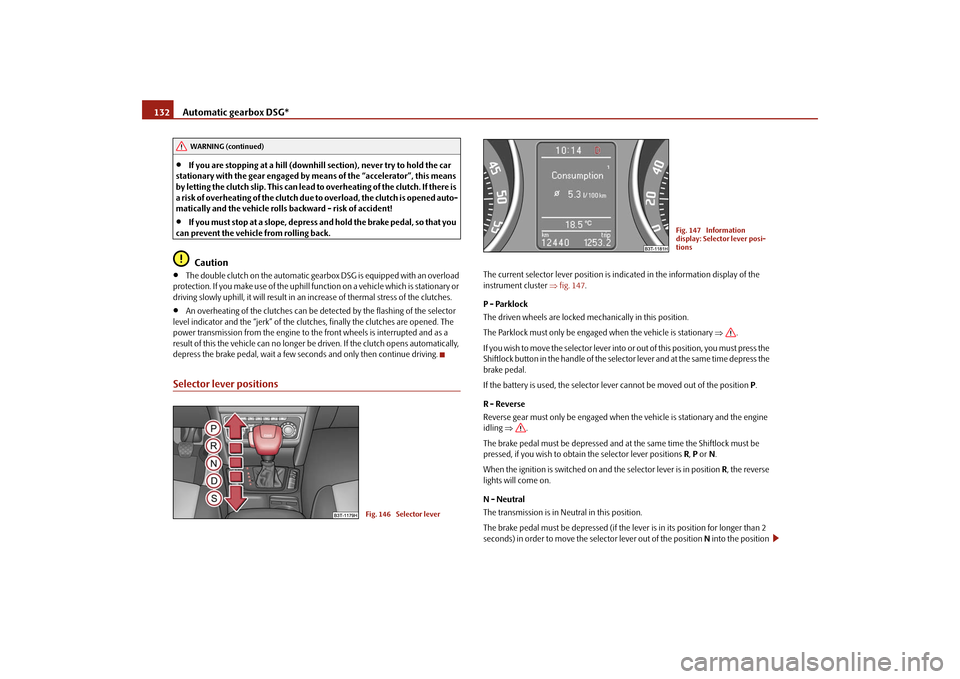
Selector lever positions
The current selector lever position is indicated in the information display of the instrument cluster
⇒fig. 147
.
P - Parklock The driven wheels are locked mechanically in this position. The Parklock must only be engage
d when the vehicle is stationary
⇒
.
I f y o u w i s h t o m o v e t h e s e l e c t o r l e v e r i n to
or out of this position, you must press the
Shiftlock button in the handle of the selector lever and at the same time depress the brake pedal. If the battery is used, the selector leve
r cannot be moved out of the position
P.
R - Reverse Reverse gear must only be engaged when
the vehicle is stationary and the engine
idling
⇒
.
The brake pedal must be depressed and at the same time the Shiftlock must be pressed, if you wish to obtain the selector lever positions
R, P or N.
When the ignition is switched on and the selector lever is in position
R, the reverse
lights will come on. N - Neutral The transmission is in Neutral in this position. The brake pedal must be depressed (if the lever is in its position for longer than 2 seconds) in order to move the selector lever out of the position
N into the position
WARNING (continued)
Fig. 146 Selector lever
Fig. 147 Information display: Selector lever posi-tions
s2dk.1.book Page 132 Wednesday, April 8, 2009 12:23 PM
Page 134 of 294

Automatic gearbox DSG*
133
Using the system
Safety
Driving Tips
General Maintenance
Breakdown assistance
Technical Data
D , with the ignition switched on, on a vehicle travelling at less than 5 km/hour or on a stationary vehicle. The brake pedal must be depressed (if the le
ver is in its position for longer than 2
seconds) in order to move the selector lever out of the position
N into the position
R , with the ignition switched on, on a vehicl
e travelling at less than 5 km/hour or on
a stationary vehicle. D - Drive, position for driving forward When the selector lever is in this position, the forward gears are shifted up and down automatically in line with engine
load, vehicle speed and the dynamic shift
programme. You must depress the brake pedal if
you wish to move into position
D from
N when
the vehicle is travelling at less than 5 km/hour or is stationary
⇒
.
In certain circumstances (e.g. when driving
in mountainous regions or when towing
a trailer) it may be beneficial to select
the manual shift programme for a short time
in order to adapt the gearbox ratios
manually to the driving situations.
S - Position for sporty style of driving Shifting up later into a higher gear makes it possible to fully exploit the power potential of the engine. The gearbox also then shifts down at higher engine speeds as in the position
D.
The Shiftlock on the selector lever grip must be pressed when moving the selector lever out of the position
D into the position
S.
WARNING
•
Never move the selector lever into position R or P when driving - risk of
an accident!•
When the engine is running and the vehicle is stationary, it is necessary
to hold the car with the brake pedal in all the positions of the selector lever (except P and N) since the power transmission is never completely inter- rupted, also not when the engine
is idling - the vehicle "creeps".
•
You must on no account unintentionally operate the throttle (e.g. by
hand from the engine compartment) if
a drive position is engaged when the
car is stationary. The vehicle would ot
herwise immediately start off - also
when the handbrake is firmly applied - risk of an accident!•
You must move the selector lever into position P and firmly apply the
handbrake first before you or any othe
r person opens the
bonnet and starts
working on the engine when it is runn
ing - risk of accident! Pay particular
attention to the warning instructions.Selector lever lockAutomatic selector lever lock
With the ignition on, the selector lever is locked when it is in the positions
P and
N.
You must first of all depress the brake pedal in order to move the selector lever out of this position. The warning light
⇒page 33 lights up in the instrument cluster
as a reminder for the driver when the selector lever is in position
P and
N.
A time delay element ensures that the sele
ctor lever is not blocked when rapidly
switching over the position
N (e.g. from
R to D). This does, for example, allow one
to seesaw out a stuck vehicle. The selector
lever lock will click into place if the lever
is in the
N position for more than 2 seconds
without the brake pedal being pressed.
The selector lever lock is only active if th
e vehicle is stationary
or moving at speed
of less than 5 km/hour. The lock is switched off automatically into position
N when
the car is travelling at a higher speed. Shiftlock button The Shiftlock button in the handle of select
or lever prevents certain selector lever
positions being engaged inadvertently. The
selector lever lock is cancelled when
you press the Shiftlock button. Keylock - Ignition key withdrawal lock You can only withdraw the ignition key after switching off the ignition if the selector lever is in position
P. If the ignition key is withdrawn, the selector lever is blocked in
position
P.
WARNING (continued)
s2dk.1.book Page 133 Wednesday, April 8, 2009 12:23 PM
Page 135 of 294

Automatic gearbox DSG*
134
Kickdown function The kickdown function provides you with maximum acceleration power.Depressing the accelerator pedal allows th
e kickdown function
to be activated in
the desired driving program. This function has precedence over the driving programme and serves for maximum accelera
tion of the vehicle when exploiting
the maximum power potential of the engi
ne without taking into account the
current selector lever position (
D, S or Tiptronic
). The gearbox shifts down to one
or several gears in line with the driving state and the vehicle accelerates. The gearbox does not shift up into the highes
t gear until the engine has reached its
maximum revolutions for this gear range.
WARNING
Please note that using the kickdown fu
nction can result in the driven wheels
spinning on a smooth or slippery road surface - risk of skidding!Dynamic shift programmeThe automatic gearbox of your
vehicle is controlled electronically. Shifting up and
down through the gears is performed auto
matically on the basis of pre-defined
driving programmes. Adopting a
moderate style of driving
will cause the gearbox to select the most
economical driving programme. Shifting up into a higher gear as soon as possible and shifting down as late as possible will
have a favourable effect on your fuel
consumption. Adopting a
sporty style of driving
with rapid movements of the accelerator pedal
combined with sharp acceleration and freq
uent changes in speed, exploiting the
top speed of the car or depressing the a
ccelerator pedal (kickdown function), will
cause the gearbox to switch over to this style of driving and shift down earlier with frequent changes in gears in comparison to the moderate style of driving. Selecting the most appropriate driving programme for the particular style of driving is a continuous process. Irrespective of this
it is, however, possible to switch or shift
down into a dynamic shift programme by
depressing the accelerator rapidly. The
gearbox shifts down into a lower gear matching the speed of the car and this allows you to accelerate rapidly (e.g. when overtaking) without having to depress the accelerator pedal fully into the kickdown
range. The original programme will be
reactivated to match your particular style
of driving once the gearbox has shifted up
again. When driving in hilly regions, the gears are selected to match uphill and downhill sections. This avoids the gearbox frequently
shifting up and down when negotiating
an uphill stretch. When driving downhill, it is possible to shift down into the Tiptronic position, in order to
exploit the engine brake torque.
Tiptronic The Tiptronic allows the driver to also shift gears manually.
Fig. 148 Selector lever: Manual shifting of gears
s2dk.1.book Page 134 Wednesday, April 8, 2009 12:23 PM
Page 137 of 294

Automatic gearbox DSG*
136
– If the rocker switches or are not pressed for some time, the
manual shifting switches off. You can also switch off the temporary switch over to manual shifting by
pressing the right rocker switch
for more than 1 second.
Emergency programme An emergency programme exists in the event of a fault in the system.The gearbox operates in a corresponding emergency programme if there are func- tional faults in the gearbox electronics. This
is indicated by all of the segments in the
display lighting up or going out. A functional fault can ha
ve the following effect:
•
The gearbox only shifts into certain gears.
•
The reverse gear
R cannot be used.
•
The manual shift programme (Tiptronic) is switched off in the emergency mode.
If the gearbox has switched over to
emergency mode, drive to the nearest
specialist garage in order to
have the fault rectified.
Selector lever-emergency unlocking (DSG)
In case of interruption of the power
supply (e.g. flat vehicle battery, defec-
tive fuse) or defect of the selector
lever lock, the sele
ctor lever can no
longer be shifted from the position
P in the normal way and the vehicle
can no longer be moved. The selector lever must be unlocked in case of emergency. – Apply the handbrake firmly. – Carefully pull up the front left and right cover.– Pull up rear cover. – Press with a narrow object (e.g. ignition key) the yellow plastic hoop
⇒
fig. 151
to the left.
– Simultaneously press the shiftlock bu
tton in the handle of the selector
lever in the position
N10).
Tow-starting and towing vehicle Tow-starting a vehicle It is not possible to tow-start vehi
cles fitted with automatic gearbox
⇒page 252.
you can use jump-start cables connected
to the battery of another vehicle for
starting your car if the vehicle battery is flat
⇒page 250.
Towing a vehicle Please pay attention to the following info
rmation if it comes necessary to tow-in
your car
⇒page 252.
-
+
+
Fig. 151 Selector lever- emergency unlocking
10)If the selector lever is moved again into the position
P, it is once again blocked.
s2dk.1.book Page 136 Wednesday, April 8, 2009 12:23 PM
Page 166 of 294

Passive Safety
165
Using the system
Safety
Driving Tips
General Maintenance
Breakdown assistance
Technical Data
For your own safety and to reduce the risk of injury in the event of an accident, we recommend the following setting.•
Adjust the steering wheel so that the distance between the steering wheel and
your chest is at least 25 cm
⇒page 164, fig. 160
.
•
Position the driver seat in the forward/back direction so that you are able to
press the pedals with your
legs at a slight angle .
•
Adjust the backrest so that you are able
to reach the highest point of the steering
wheel with your arms at a slight angle.•
Adjust the head restraint so that the top edge of the head restraint is at the same
level as the upper part of your head
⇒fig. 161
.
•
Fasten the seat belt correctly
⇒page 170, “How are seat belts correctly
fastened?”. Manual driver seat adjustment
⇒page 78, “Adjusting the front seats”.
Electrical driver seat adjustment
⇒page 79, “Adjusting front seats electrically*”.
WARNING
•
The front seats and the head restraints must always be adjusted to match
the body size of the seat occupant as well as the seat belts must always be correctly fastened in order to provide an optimal protection for you and your occupants.
•
The driver must maintain a distance of at least 25 cm to the steering
wheel
⇒page 164, fig. 160
. Not maintaining this minimum distance will
mean that the airbag system will not be able to properly protect you - hazard!•
When driving, hold the steering wheel
with both hands firmly on the
outer edge in the 9 o'clock and 3 o'clock position. Never hold the steering wheel firmly in the 12 o'clock position or in another way (e.g. in the middle of the steering wheel or
at the inner steering wheel edge). In such cases,
injuries to the arms, the hands and
the head can occur when the driver
airbag is deployed.•
The backrests must not be angled to
o far back when driving otherwise
this will affect proper operation of the seat belts and of the airbag system - risk of injury!•
Ensure that there are no objects in the footwell as any objects may get
behind the pedals during a driving or
braking manoeuvre. You would then
no longer be able to operate the clutch, to brake or accelerate.Correct seated position for the front passenger The front passenger must maintain a distance of at least 25 cm from the dash panel so that the airbag offers the greatest possible safety when an airbag is deployed.For the safety of the front passenger and to
reduce the risk of injury in the event of
an accident, we recommend the following setting.•
Adjust the front passenger seat as far as possible to the rear.
•
Adjust the head restraint so that the top edge of the head restraint is at the same
level as the upper part of your head
⇒fig. 161
.
•
Fasten the seat belt correctly
⇒page 170, “How are seat belts correctly
fastened?”. In exceptional cases the front pass
enger airbag can be deactivated
⇒page 182,
“Deactivating an airbag”.
Fig. 161 The correct head restraint adjustment for the driver
WARNING (continued)
s2dk.1.book Page 165 Wednesday, April 8, 2009 12:23 PM
Page 167 of 294

Passive Safety
166
Manual front passenger adjustment
⇒page 78, “Adjusting the front seats”.
Electrical front passenger seat adjustment
⇒page 79, “Adjusting front seats electri-
cally*”.
WARNING
•
The front seats and the head restraints must always be adjusted to match
the body size of the seat occupant as well as the seat belts must always be correctly fastened in order to provide an optimal protection for you and your occupants.•
The front passenger must maintain a distance of at least 25 cm to the
dash panel. Not maintaining this minimum distance will mean that the airbag system will not be able
to properly protect you - hazard!
•
Always keep your feet in the footwell
when the car is being driven - never
place your feet on the instrument panel, out of the window or on the surfaces of the seats. You will be exposed to increased risk of injury if it becomes necessary to apply the brake or in the event of an accident. If an airbag is deployed, you may suffer fata
l injuries when adopting an incorrect
seated position!•
The backrests must not be angled too far back when driving otherwise
this will affect proper operation of th
e seat belts and of the airbag system -
risk of injury!Correct seated position for the occupants on the rear seats Occupants on the rear seats must sit upright, keep the feet in the footwell and must have their se
at belts correctly fastened.
To reduce the risk of injury in the event of a sudden braking manoeuvre or an acci- dent, the occupants on the rear seats must observe the following.•
Adjust the head restraints so that the top edge of the head restraints are at the
same level as the upper part of your head
⇒page 165, fig. 161
.
•
Fasten the seat belt correctly
⇒page 170, “How are seat belts correctly
fastened?”.
•
If you are transporting
⇒page 185, “Transporting children safely” children in
the vehicle, please use a suitable child restraint system.
WARNING
•
The head restraints must always be adjusted to match the body size, in
order to offer an optimal protection for you and your occupants.•
Always keep your feet in the footwell
when the car is being driven - never
put your feet out of the window or on the surfaces of the seats. You will be exposed to increased risk of injury if it becomes necessary to apply the brake or in the event of an accident. If an airbag is deployed, you may suffer fatal injuries when adopting an incorrect seated position!•
If the occupants on the rear seats are not sitting upright, the risk of injury
is increased due to incorrec
t routing of the seat belt.
Examples of an incorrect seated position An incorrect seated position can lead to severe injuries or death for the occupants.Seat belts offer their optimum protection on
ly if the webbing of the seat belts is
properly routed. Incorrect seated positio
ns considerably reduce the protective
functions of the seat belts and therefore incr
ease the risk of injury due to an incor-
rect routing of the seat belt. The driver is fully responsible for himself and the occu-pants, in particular for the children. Do
not permit an occupant to adopt an incor-
rect seated position when the car is moving. The following list contains
the examples of seated positions which are dangerous
for the occupants. This list is not comple
te, however we would like you to get inter-
ested in this subject. Therefore, while the car is moving never:•
stand up in the vehicle,
•
stand up on the seats,
•
kneel onto the seats,
•
tilt the backrest fully to the back,
s2dk.1.book Page 166 Wednesday, April 8, 2009 12:23 PM