2009 SKODA OCTAVIA buttons
[x] Cancel search: buttonsPage 147 of 304

Communication
146
Operation of the telephone on the multifunction steering wheel*
The driver can set the basic functions of
the telephone by simply operating the
buttons located on the steering wheel so that he can concentrate on the traffic situ- ation without being distracted as little
as possible by operating the telephone
⇒ fig. 163
.
This applies only if your vehicle has be
en equipped with the telephone preinstalla-
tion at the factory. If the side lights are switched on, the bu
ttons on the multifunc
tion steering wheel
are illuminated. Overview of the different functions in contrast to the multifunction steering wheel without mobile phone operation
⇒page 139.
Fig. 163 Multifunction steering wheel: Control buttons for the telephone
Button
Action
Operation
press briefly
Activation and deactivation of the voice control°
(Button PTT - Push to talk)
turn upwards
Increase volume
turn downwards
Decrease volume
press briefly
Accept call, terminate call, entry in the main
menu of the telephone, list of selected numbers
press button for a long
time
Reject call, entry in the main menu of
the telephone, list of selected numbers
press briefly
Reach one level higher in the menu (accordi
ng to the current position in the menu)
press button for a long
time
Return in the main menu of the information display
press briefly
Confirm menu selection
press button for a long
period of time
Confirming the selected menu point, the fo
llowing initial letters in the telephone book
turn upwards
The last chosen me
nu selection, name
turn downwards
The next menu selection, name
A1A1A1A2A2A3A3A4A4A4A4
se0.1.book Page 146 Frida
y, April 10, 2009 3:19 PM
Page 148 of 304

Communication
147
Using the system
Safety
Driving Tips
General Maintenance
Breakdown assistance
Technical Data
The buttons operate the functions for
the operating mode of the current
telephone.Operate the telephone via the information display* On vehicles which are factory-fitted with a navigation system* with voice control, it is only possible
to operate the voice control via the
navigation system*. The descript
ion on how to operate the voice
control can be found in the operatin
g instructions of your navigation
system*.If you select the menu point
Te l e p h o n e
on the information display with the aid of
the handwheel , you can chan
ge to the following menus:
„
Phone book
„
Last calls
„
Received calls
„
Missed calls
Phone book In the menu point
Phone book
is the list of the loaded contacts from the telephone
memory and the SIM card of the mobile
phone. In the phone phonebook there are
1500 free memory locations available.
Note
The display of texts in the menu
Te l e p h o n e
is only possible in German, English,
French, Italian, Spanish and Czech.
Voice commandsVoice commands for mobile phone operation Voice commands for operating the phone phone book
A4
Voice command
Activity
ENTER PIN/PIN CODE
After this command the PIN code of the mobile phone can be entered
⇒page 148.
DIAL NUMBER
After this command a telephone number can be entered which establishes a connection to the requested partner
⇒page 148.
REDIAL
After this command the last selected telephone number is selected again
⇒page 149.
Voice command
Activity
SAVE/STORE
NAMES/NAME/NUMBE
R
After this command a name with its telephone number can be stored in the phone phone book ⇒ page 149.
SELECT NAMES/NAME
After this command a telephone number which was stored under its given name in the phone phone book can be selected
⇒page 150.
DELETE NAMES/NAME
After this command a name in the phone phone book can be erased
⇒page 150.
LISTEN TO/PLAY PHONEBOOK
After this command you ca
n listen-in to the phone
phone book
⇒page 151.
DELETE PHONEBOOK
After this command the co
mplete phone book or a
name can be erased
⇒page 151.
se0.1.book Page 147 Frida
y, April 10, 2009 3:19 PM
Page 155 of 304
Communication
154
Note
•
In the memory of the control unit, up to
three users can be stored, whereby the
handsfree-system can only communicate ac
tively with one user. In the case of
mutual connection with a fourth mobile phone, you must erase one user.•
Not valid for all mobile phones which
enable a communication via Bluetooth
®.
You can ask at an authorised Škoda Service
Partner if your telephone is compatible
with the universal teleph
one preinstallation GSM II.
•
If the telephone book of the mobile ph
one contains more than 1 000 entries,
the system announces a
failure while loading the telephone book
.
•
When connecting to the control unit, follow the instructions on your mobile
phone.•
Note that the range of the Bluetooth
® connection to the handsfree-system is
optimized in the vehicle interior. The rang
e is dependent on local factors, e.g.
obstacles between the devices and interferences with other devices.
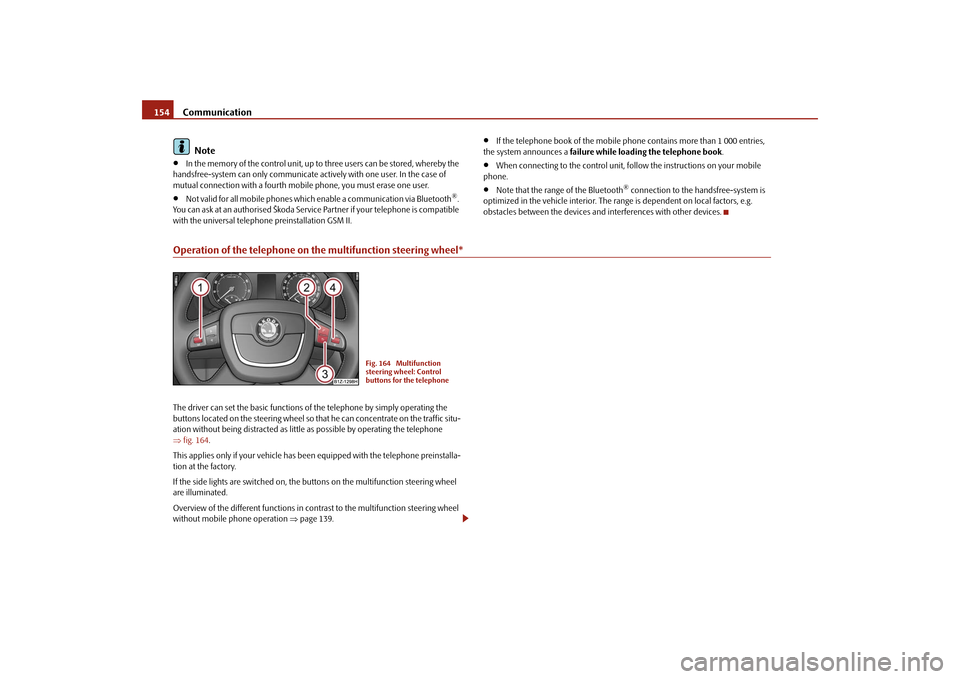
Operation of the telephone on the multifunction steering wheel*The driver can set the basic functions of the telephone by simply operating the buttons located on the steering wheel so th
at he can concentrate on the traffic situ-
ation without being distracted as little
as possible by operating the telephone
⇒ fig. 164
.
This applies only if your vehicle has been
equipped with the telephone preinstalla-
tion at the factory. If the side lights are switched on, the buttons on the multifunction steering wheel are illuminated. Overview of the different functions in cont
rast to the multifunction steering wheel
without mobile phone operation
⇒page 139.
Fig. 164 Multifunction steering wheel: Control buttons for the telephone
se0.1.book Page 154 Frida
y, April 10, 2009 3:19 PM
Page 156 of 304

Communication
155
Using the system
Safety
Driving Tips
General Maintenance
Breakdown assistance
Technical Data
The buttons operate the functions for
the operating mode of the current
telephone.
Button
Action
Operation
press briefly
Activation and deactivation of the voice control°
(Button PTT - Push to talk)
press button for a long
period of time
turn upwards
Increase volume
turn downwards
Decrease volume
press briefly
Accept call, terminate call, entry in the main me
nu of the telephone, list of selected numbers
press button for a long
time
Reject call, list of the last calls, entry in the ma
in menu of the telephone, list of selected numbers
press briefly
Reach one level higher in the menu (according to the current position in the menu)
press button for a long
time
Return in the main menu of the information display
press briefly
Confirm menu selection
press button for a long
period of time
turn upwards
The last chosen menu selection, name
turn downwards
The next menu selection, name
quickly turn upwards
To the previous initial letter in the telephone book
quickly turn downwards
To the next initial letter in the telephone book
A1A1A1A1A2A2A3A3A4A4A4A4A4A4
se0.1.book Page 155 Frida
y, April 10, 2009 3:19 PM
Page 161 of 304

Communication
160
Inputs AUX-IN* and MDI*The input AUX-IN is located below the armr
est* of the front seats and is marked
with
.
The input MDI is located in the storage compartment on the front passenger side.The inputs AUX-IN and MDI connect the ex
ternal audio sources (e.g. iPod or mp3
player) and record music from these device
s via your radio* or navigation system*
installed in the factory. The description of the operation can be
found in the relevant Owner's Manual of
your radio* or your navigation*.
Note
•
The loudspeakers in the vehicle are matched to a power output of the radio and
navigation system of 4x 20°W.•
For the equipment sound system*, the loudspeakers are matched to a power
output of the amplifier of 4x40°W + 6x20 W.CD changer*The CD changer for the radio and navigation system is located in the right side compartment of the luggage compartment.
Loading a CD – Touch the button and guide the
CD (compact disc) into the CD-
case . The CD is automatically loaded onto the next free position in the CD-changer. The LED in the corresponding button stops flashing.
Load CDs – Hold the button pressed and guide the CDs one after the other
(maximum 6 CDs) into the CD case
. The LEDs in the buttons
are no longer flashing.
Loading a CD to one definite position – Touch button . The LEDs in the buttons light up at the memory
spaces, which are already assigned and flash in the case of free memory spaces.
– Touch the desired button and guide the CD into the CD-case . Ejecting a CD – Touch the button , in order to eject a CD. For assigned memory
spaces, now the LEDs light up in the buttons .
– Touch the corresponding button . The CD is ejected. Ejecting all CDs – Hold the button pressed for more th
an 2 seconds, in order to eject
the CDs. All CDs in the CD-changer are ejected consecutively. Note
•
Always guide the CD into the CD-cas
e with the printed side pointing
upwards.•
Never push the CD with force into the CD-case as the insertion is performed
automatically.
Fig. 166 The CD changer
AC
AB
AD
AC
AB
AD
AC
AD
AD
AB
AA
AD
AD
AA
AB
se0.1.book Page 160 Frida
y, April 10, 2009 3:19 PM
Page 296 of 304

Index295
Using the system
Safety
Driving Tips
General Maintenance
Breakdown assistance
Technical Data
Index
AAbroad . . . . . . . . . . . . . . . . . . . . . . . . . . . . . . . . . . . . . 206
ABS . . . . . . . . . . . . . . . . . . . . . . . . . . . . . . . . . . . . . . . . . 197
Warning light . . . . . . . . . . . . . . . . . . . . . . . . . . . . . 38
Accessories . . . . . . . . . . . . . . . . . . . . . . . . . . . . . . . . . 244
Active driver-steering recommendation . . . . . . . 195
Adjusting seats . . . . . . . . . . . . . . . . . . . . . . . . . . . 75, 164
electrically . . . . . . . . . . . . . . . . . . . . . . . . . . . . . . . . 76
Adjusting the steering wheel . . . . . . . . . . . . . . . . . . 122
Air conditioning system . . . . . . . . . . . . . . . . . . . . . . 111
Air outlet vents . . . . . . . . . . . . . . . . . . . . . . . . . . . 108
Recirculated air mode . . . . . . . . . . . . . . . . . . . . 114
Airbag . . . . . . . . . . . . . . . . . . . . . . . . . . . . . . . . . . . . . . 174
Deployment . . . . . . . . . . . . . . . . . . . . . . . . . . . . . 175
Front airbag . . . . . . . . . . . . . . . . . . . . . . . . . . . . . 175
Head airbag . . . . . . . . . . . . . . . . . . . . . . . . . . . . . 180
Side airbag . . . . . . . . . . . . . . . . . . . . . . . . . . . . . . 178
Warning light . . . . . . . . . . . . . . . . . . . . . . . . . . . . . 34
Airbag system . . . . . . . . . . . . . . . . . . . . . . . . . . . . . . . 174
Warning light . . . . . . . . . . . . . . . . . . . . . . . . . . . . . 34
Airbags . . . . . . . . . . . . . . . . . . . . . . . . . . . . . . . . . . . . . 174
Alarm . . . . . . . . . . . . . . . . . . . . . . . . . . . . . . . . . . . . . . . . 51
Alternator
Warning light . . . . . . . . . . . . . . . . . . . . . . . . . . . . . 40
Antilock brake system . . . . . . . . . . . . . . . . . . . . . . . . 197
Antilock brake system (ABS)
Warning light . . . . . . . . . . . . . . . . . . . . . . . . . . . . . 38Anti-theft alarm system . . . . . . . . . . . . . . . . . . . . . . . 51
Ashtray . . . . . . . . . . . . . . . . . . . . . . . . . . . . . . . . . . . . . . 96
Auto Check Control . . . . . . . . . . . . . . . . . . . . . . . . . . . 28
Auto Computer . . . . . . . . . . . . . . . . . . . . . . . . . . . . . . 21
Automatic gearbox . . . . . . . . . . . . . . . . . . . . . . . . . . 132
Emergency programme . . . . . . . . . . . . . . . . . . 137
Kickdown . . . . . . . . . . . . . . . . . . . . . . . . . . . . . . . 135
Selector lever-emergency unlocking . . . . . . . 138
Tiptronic . . . . . . . . . . . . . . . . . . . . . . . . . . . . . . . . 136
Automatic light control . . . . . . . . . . . . . . . . . . . . . . . . 59
Automatic seat adjustment . . . . . . . . . . . . . . . . . . . . 77
Automatic vehicle wash systems . . . . . . . . . . . . . . 212
Automatic wiper/washer system . . . . . . . . . . . . . . . 69
AUX-IN . . . . . . . . . . . . . . . . . . . . . . . . . . . . . . . . . . . . . 160
Avoiding damage to your vehicle . . . . . . . . . . . . . 207
BBattery . . . . . . . . . . . . . . . . . . . . . . . . . . . . . . . . . . 40, 232
change . . . . . . . . . . . . . . . . . . . . . . . . . . . . . . . . . . 236
Charge . . . . . . . . . . . . . . . . . . . . . . . . . . . . . . . . . . 235
Inspecting the electrolyte level . . . . . . . . . . . . 235
Operation in winter . . . . . . . . . . . . . . . . . . . . . . 235
Before setting off . . . . . . . . . . . . . . . . . . . . . . . . . . . . 164
Belt
Warning light . . . . . . . . . . . . . . . . . . . . . . . . . . . . . 39
Belt tensioners . . . . . . . . . . . . . . . . . . . . . . . . . . . . . . 172
Belts . . . . . . . . . . . . . . . . . . . . . . . . . . . . . . . . . . . . . . . . 168Bluetooth . . . . . . . . . . . . . . . . . . . . . . . . . . . . . . . 143, 153
Bonnet . . . . . . . . . . . . . . . . . . . . . . . . . . . . . . . . . . 15, 224
Warning light . . . . . . . . . . . . . . . . . . . . . . . . . . . . . 38
Boot lid . . . . . . . . . . . . . . . . . . . . . . . . . . . . . . . . . . . . . . 48
Warning light . . . . . . . . . . . . . . . . . . . . . . . . . . . . . 39
Brake
Handbrake . . . . . . . . . . . . . . . . . . . . . . . . . . . . . . 126
Warning light . . . . . . . . . . . . . . . . . . . . . . . . . . . . . 40
Brake Assist . . . . . . . . . . . . . . . . . . . . . . . . . . . . . . . . . 198
Brake booster . . . . . . . . . . . . . . . . . . . . . . . . . . . . . . . 197
Brake fluid . . . . . . . . . . . . . . . . . . . . . . . . . . . . . . . . . . 231
Brake pads
Warning light . . . . . . . . . . . . . . . . . . . . . . . . . . . . . 39
Brakes . . . . . . . . . . . . . . . . . . . . . . . . . . . . . . . . . . . . . . 196
Button for the central locking system . . . . . . . . . . . 46
Buttons on the driver's door
Power windows . . . . . . . . . . . . . . . . . . . . . . . . . . . 52
CCar state . . . . . . . . . . . . . . . . . . . . . . . . . . . . . . . . . . . . . 28
Catalytic converter . . . . . . . . . . . . . . . . . . . . . . . . . . 202
CD changer . . . . . . . . . . . . . . . . . . . . . . . . . . . . . . . . . 160
Central locking system . . . . . . . . . . . . . . . . . . . . . . . . 44
lock . . . . . . . . . . . . . . . . . . . . . . . . . . . . . . . . . . . . . . 46
unlock . . . . . . . . . . . . . . . . . . . . . . . . . . . . . . . . . . . 46
Changing a wheel . . . . . . . . . . . . . . . . . . . . . . . . . . . 247
Changing bulbs . . . . . . . . . . . . . . . . . . . . . . . . . . . . . 261
se0.1.book Page 295 Friday, April 10, 2009 3:19 PM
Page 300 of 304

Index299
Using the system
Safety
Driving Tips
General Maintenance
Breakdown assistance
Technical Data Power window . . . . . . . . . . . . . . . . . . . . . . . . . . . . . . . . 52
Power windows
Button in front passenger door and in rear doors
53
Buttons on the driver's door . . . . . . . . . . . . . . . . 52
Central locking system . . . . . . . . . . . . . . . . . . . . . 54
RRadiator fan . . . . . . . . . . . . . . . . . . . . . . . . . . . . . . . . 231
Rear armrest . . . . . . . . . . . . . . . . . . . . . . . . . . . . . 83, 104
Rear fog light . . . . . . . . . . . . . . . . . . . . . . . . . . . . . . . . . . 62
Warning light . . . . . . . . . . . . . . . . . . . . . . . . . . . . . . 33
Rear window
heater . . . . . . . . . . . . . . . . . . . . . . . . . . . . . . . . . . . . 67
Rear window heater . . . . . . . . . . . . . . . . . . . . . . . . . . . 67
Rear-view mirror
Exterior mirror . . . . . . . . . . . . . . . . . . . . . . . . . . . . . 73
Interior mirror . . . . . . . . . . . . . . . . . . . . . . . . . . . . . 72
Recharge battery . . . . . . . . . . . . . . . . . . . . . . . . . . . . 235
Refuelling . . . . . . . . . . . . . . . . . . . . . . . . . . . . . . . . . . . 222
Remote control . . . . . . . . . . . . . . . . . . . . . . . . . . . . . . . 49
Synchronisation . . . . . . . . . . . . . . . . . . . . . . . . . . . 50
Replacing fuses . . . . . . . . . . . . . . . . . . . . . . . . . . . . . 258
Replacing the wiper blades . . . . . . . . . . . . . . . . . . . . . 71
Roof aerial . . . . . . . . . . . . . . . . . . . . . . . . . . . . . . . . . . 212
Running in the car . . . . . . . . . . . . . . . . . . . . . . . . . . . 201SSafe securing . . . . . . . . . . . . . . . . . . . . . . . . . . . . . . . . . 45
Safety . . . . . . . . . . . . . . . . . . . . . . . . . . . . . . . . . . . . . . 163Safety information
Engine compartment . . . . . . . . . . . . . . . . . . . . . 225
Safety wheel bolts . . . . . . . . . . . . . . . . . . . . . . . . . . . . 251
Saving electrical energy . . . . . . . . . . . . . . . . . . . . . . . 202
Seat belt height adjuster . . . . . . . . . . . . . . . . . . . . . . 171
Seat belt warning light . . . . . . . . . . . . . . . . . . . . . . . . 170
Seat belts . . . . . . . . . . . . . . . . . . . . . . . . . . . . . . . 168, 172
Belt tensioners . . . . . . . . . . . . . . . . . . . . . . . . . . . 172
Cleaning . . . . . . . . . . . . . . . . . . . . . . . . . . . . . . . . . 217
fastening . . . . . . . . . . . . . . . . . . . . . . . . . . . . . . . . 170
Height adjustment . . . . . . . . . . . . . . . . . . . . . . . . 171
Safety information . . . . . . . . . . . . . . . . . . . . . . . . 169
taking off . . . . . . . . . . . . . . . . . . . . . . . . . . . . . . . . 172
Warning light . . . . . . . . . . . . . . . . . . . . . . . . . . . . . . 39
Seat heaters . . . . . . . . . . . . . . . . . . . . . . . . . . . . . . . . . . 83
Selector lever . . . . . . . . . . . . . . . . . . . . . . . . . . . . . . . . 134
Selector lever lock
Warning light . . . . . . . . . . . . . . . . . . . . . . . . . . . . . . 37
Selector lever positions . . . . . . . . . . . . . . . . . . . . . . . 134
Selector lever-emergency unlocking . . . . . . . . . . . 138
Service Display . . . . . . . . . . . . . . . . . . . . . . . . . . . . . . . 20
Service Interval Display . . . . . . . . . . . . . . . . . . . . . . . . 20
Setting temperature
Heating . . . . . . . . . . . . . . . . . . . . . . . . . . . . . . . . . . 109
Setting the clock . . . . . . . . . . . . . . . . . . . . . . . . . . . . . . 21
Shifting . . . . . . . . . . . . . . . . . . . . . . . . . . . . . . . . . . . . . . 125
Side airbag . . . . . . . . . . . . . . . . . . . . . . . . . . . . . . . . . . 178
Side lights . . . . . . . . . . . . . . . . . . . . . . . . . . . . . . . . . . . . 58
Snow chains . . . . . . . . . . . . . . . . . . . . . . . . . . . . . . . . . 243
Spare wheel . . . . . . . . . . . . . . . . . . . . . . . . . . . . . . . . . 247
Speedometer . . . . . . . . . . . . . . . . . . . . . . . . . . . . . . . . . 18
Stability system . . . . . . . . . . . . . . . . . . . . . . . . . . . . . . 193Starting the engine . . . . . . . . . . . . . . . . . . . . . . . . . . . 124
after fuel tank has run empty . . . . . . . . . . . . . . 125
Diesel engines . . . . . . . . . . . . . . . . . . . . . . . . . . . 124
Petrol engines . . . . . . . . . . . . . . . . . . . . . . . . . . . 124
Steering
active driver-steering recommendation . . . . 195
Steering force assistance . . . . . . . . . . . . . . . . . . . . . 198
Storage compartment
Lighting . . . . . . . . . . . . . . . . . . . . . . . . . . . . . . . . . . 66
Storage compartments . . . . . . . . . . . . . . . . . . . . . . . . 99
Storage facilities . . . . . . . . . . . . . . . . . . . . . . . . . . . . . . 99
Sun . . . . . . . . . . . . . . . . . . . . . . . . . . . . . . . . . . . . . . . . . . 67
Sun screen . . . . . . . . . . . . . . . . . . . . . . . . . . . . . . . . . . . 68
Switching lights on and off . . . . . . . . . . . . . . . . . . . . 58
Switching off the engine . . . . . . . . . . . . . . . . . . . . . . 125
TTaking care of your vehicle . . . . . . . . . . . . . . . . . . . 211
TCS . . . . . . . . . . . . . . . . . . . . . . . . . . . . . . . . . . . . . . . . . 195
Warning light . . . . . . . . . . . . . . . . . . . . . . . . . . . . . 37
Telephone . . . . . . . . . . . . . . . . . . . . . . . . . . . . . . 142, 152
Temperature
outside . . . . . . . . . . . . . . . . . . . . . . . . . . . . . . . . . . . 23
the first 1 500 kilometres . . . . . . . . . . . . . . . . . . . . . 201
The roof luggage rack system . . . . . . . . . . . . . . . . . . 93
Thickness of brake pads
Warning light . . . . . . . . . . . . . . . . . . . . . . . . . . . . . 39
Tilting roof . . . . . . . . . . . . . . . . . . . . . . . . . . . . . . . . . . . 55
Tiptronic . . . . . . . . . . . . . . . . . . . . . . . . . . . . . . . . . . . . 132
Tool . . . . . . . . . . . . . . . . . . . . . . . . . . . . . . . . . . . . . . . . 246
Top Tether . . . . . . . . . . . . . . . . . . . . . . . . . . . . . . . . . . 191
se0.1.book Page 299 Friday, April 10, 2009 3:19 PM