2009 SKODA OCTAVIA buttons
[x] Cancel search: buttonsPage 53 of 304

Unlocking and locking
52
Switch off the interior monitor and towing protection monitoring – Switch off the ignition. – Open the driver door. – Press the button
at the centre column on the driver side
⇒
page 51, fig. 48
, the symbol
which lights up in the button
changes from red to orange.
– Lock the vehicle within 30 seconds.The interior monitor and the towing protec
tion monitoring are switched on again
automatically the next ti
me the car is locked.
Note
•
You can switch the interior monitor and th
e towing protection monitoring off if
there is a possibility that movements from (e.g. children or animals) inside the vehicle interior or if the vehicle must be transported (e.g. by train or ship) or towed, might trigger the alarm.•
The opened storage compartment for spectacles reduces the effectiveness of
the interior monitor. In order to ensure the function of the interior monitor to be fully operational, always close the stor
age compartment for spectacles before
locking the vehicle.
Power windows*Buttons on the driver's doorThe power windows operate only when ignition is switched on. Opening a window – A window is opened by pressing lightly on the respective button in the
door. The process stops when one releases the button.
– Additionally you can open the window automatically (fully opened) by
pressing the button up to the stop. Renewed pressing of the button causes the window to stop immediately.
Closing a window – A window is closed through pulling lightly on the respective button in
the door. The closing process stops when one releases the button.
– Additionally you can close the window automatically (fully closed) by
pulling the button up to the stop. Renewed pulling of the button causes the window to stop immediately.
The buttons for the individual windows are located in the armrest of the driver's door
⇒fig. 49
, front passenger door and in the rear doors*
⇒page 53.
Fig. 49 Buttons on the driver's door
se0.1.book Page 52 Friday, April 10, 2009 3:19 PM
Page 54 of 304

Unlocking and locking
53
Using the system
Safety
Driving Tips
General Maintenance
Breakdown assistance
Technical Data
Buttons for the power windows in the armrest for the driver Button for the power window in the driver's door Button for the power window in the front passenger's door Button for the power window in the rear door on the right* Button for the power window in the rear door on the left* Safety pushbutton* Safety pushbutton* You can deactivate the switches for power
windows at rear door
s by pressing the
safety pushbutton
⇒page 52, fig. 49
. The buttons for power windows at rear
doors are activated again by pressing the safety pushbutton again. If the buttons for the rear doors are deactivated, the indicator light
in the safety
switch lights up.
WARNING
•
If you lock the vehicle from the outside, do not leave any person in the
vehicle since it is no long
er possible to open the windows from the inside in
an emergency.•
The system is fitted with a force limiter
⇒page 54. If there is an obstacle,
the closing process is stopped and the
window goes down by several centim-
eters. You should then take particular care when closing the windows! You may otherwise suffer severe injuries
as a result of getting an arm, for
example, jammed in the window!•
It is recommended to deactivate
the electrically operated power
windows in the rear doors (safety pushbutton)
⇒page 52, fig. 49
when
children are being transported on the rear seats.
Note
•
After switching the ignition off, it is still possible to open or close the windows
for a further 10 minutes. During this time the automatic closing and opening func-tions of the window will operate. The po
wer windows are switched off completely
once you open the driver or front passenger door.
•
When driving always use the existing he
ating, air conditioning and ventilation
system for ventilating the interior of the vehicle. If the windows are opened, dust as well as other dirt can get into the vehicle and in addition the wind noise is more at certain speeds.Button in front passenger door and in rear doorsA button for the relevant window is provided in these doors. Opening a window – Lightly press the appropriate switch
down
and hold it until the
window has moved into the desired position.
– Additionally you can open the window
automatically (fully opened) by
pressing the switch
down
up to the stop. Renewed pressing of the
button causes the window to stop immediately.
Closing a window – Lightly press the appropriate switch
up and hold it until the window
has moved into the desired position.
AAABACADAS
AS
AS
AS
AS
Fig. 50 Position of button in front passenger door
se0.1.book Page 53 Friday, April 10, 2009 3:19 PM
Page 78 of 304

Seats and Stowage
77
Using the system
Safety
Driving Tips
General Maintenance
Breakdown assistance
Technical Data
Adjust the angle of the seat – Press the switch at the front
⇒
page 76, fig. 75
or at the back
⇒
page 76, fig. 75
.
Adjusting the seat backrest – Press the switch
⇒
page 76, fig. 74
in the direction of the desired
setting.
Adjusting lumbar support – Press the switch front
⇒
page 76, fig. 74
in order to enlarge the
curvature of the lumbar support.
– Press the switch rear in order to reduce the curvature of the lumbar
support.
– Press the switch top in order to adjust the curvature of the lumbar
support higher.
– Press the switch bottom in order to adjust the curvature of the
lumbar support lower.
Switch is operated in order to move the seat up/down and forward/back, while switch is operated in order to move the seat backrest forward or back.
WARNING
•
Only adjust the driver seat when the ve
hicle is stationary - risk of injury!
•
Caution when adjusting the seat! You ma
y suffer injuries or bruises as a
result of adjusting the seat without paying proper attention.•
In view of the fact that the seats can
also be adjusted when the ignition is
switched off (even when ignition key withdrawn), you should never leave children unattended in the vehicle.•
The seat backrests must not be angled too far back when driving other-
wise this will affect proper operation of the seat belts and of the airbag system - risk of injury!
Note
If the movement of the seat is inadverten
tly interrupted during an adjustment, once
again press the switch in th
e appropriate direction and
continue with the adjust-
ment of the seat to the end.Storing settingStoring seat and exterior mirror settings for driving forward – Switch on the ignition. – Adjust the seat
⇒
page 76.
– Adjust both exterior mirrors
⇒
page 73.
–Press button
SET
⇒
fig. 76
.
– Press one of the memory buttons within 10 seconds after pressing
the button
SET
- an acknowledgement signal confirms that the seat
setting is stored.
Storing exterior mirror setting for reversing* – Switch on the ignition. – Turn the exterior mirror control to position
⇒
page 73.
AA
A2
A3
ABACACACAC
AAAB
Fig. 76 Driver seat: Memory buttons and SET button
AA
AB
se0.1.book Page 77 Friday, April 10, 2009 3:19 PM
Page 79 of 304

Seats and Stowage
78
– Engage the reverse gear. – Move the right exterior mirror into the desired position
⇒
page 73.
– Take the vehicle out of gear. The set position of the exterior mirror is
stored.
Memory buttons Memory for the seat offers the possibility to store the individual driver seat and external mirror position. An individual posi
tion can be allocated to each of the three
memory buttons
⇒page 77, fig. 76
, that is three in total. After pressing the
corresponding memory button , the seat
and the exterior mirror are automati-
cally moved into the positions which
have been allocated to this button
⇒page 78.
Emergency Off You can interrupt the setting operation at an
y time, if you operate any button of the
driver seat.
Note
•
When storing settings with the memory buttons, we recommend that you begin
with the front button and assign a memory button to each additional driver.•
Each new setting stored with the same button erases the previous setting.
•
Each time you store the seat and exterior mirror settings for driving forward you
also have to re-store the individual settin
g of the exterior mirror on the passenger
side for reversing.Assigning remote control to the memory buttonsAfter storing the settings of the seat and exterior mirrors, you have 10 seconds in order to assign the radio remote control to the appropriate memory button. – Withdraw the ignition key. – Press the unlock button
⇒
page 50. The setting is stored with the
memory button which you have selected.
If you wish to be able to retrieve the settings which are stored in the memory by also using the radio remote control, you have
to assign the radio remote control to a
memory button in each case. If you wish, you can obtain an additional
remote control key from an authorised
Škoda Service partner and then assign the remote control key to another memory button.
Note
•
If the radio remote control had previous
ly been assigned to another memory
button, this setting is then erased by the new assignment.•
If you assign the radio remote contro
l to a memory button which has already
been assigned to a radio remote control,
the old assignment is also replaced by a
new assignment in this case.•
The assignment of the radio remote control to a memory button is retained,
however, after reassigning the seats and exterior mirrors.Retrieving settings of the seat and mirrors You can retrieve the stored settings
either with the memory buttons
or with the remote control*.Retrieving settings with memory buttons – In order to retrieve the stored
setting, you have two possibilities:
–
One-touch automatic memory:
Briefly press the desired memory
button
⇒
page 77, fig. 76
. The seat and exterior mirror are moved
automatically into the stored positions (this applies only if the ignition is switched on and the speed is less than 5 km/h).
–
Memory keying
: Press and hold the desired memory button
pressed long enough until the seat and the exterior mirror are moved into the stored positions.
AB
AB
AB
AB
se0.1.book Page 78 Friday, April 10, 2009 3:19 PM
Page 117 of 304

Heating and air conditioning system
116
WARNING
•
For your own safety and that of other road users, ensure that all the
windows are free of ice, snow and mistin
g. Please familiarize yourself about
how to correctly operate th
e heating and ventilation systems, how to demist
and defrost the windows, as well as with the cooling mode.•
You should not leave recirculated air mode on over a longer period of
time, as “stale” air may result in fatigue in the driver and occupants, divert your attention and also cause the windows to mist up. The risk of having an accident increases. Switch recirculated air mode off as soon as the windows begin misting up.
Note
•
If the cooling system has not been switched on for a lengthy period, odours may
be produced at the evaporator because of
deposits. Switch the cooling system on
at least once a month for approximately 5 mi
nutes at the highest blower stage - also
during the cold season of the year - in order to remove such odours. Also open a window for a short time.•
We recommend that you do not smoke in the vehicle when the recirculating air
mode is operating since the smoke which is drawn at the evaporator from the inte-rior of the vehicle forms deposits in the
evaporator of the air
conditioning system.
This produces a permanent odour when the air conditioning system is operating which can only be eliminated through considerable effort and expense (replace-ment of compressor).•
The used air streams out through the air removal openings in the luggage
compartment.•
On vehicles equipped with a factory-fitted radio* or navigation*, the informa-
tion of the Climatronic is also shown on th
e display. This function can be switched
off, see operating instructions of th
e radio* or the navigation system*.
•
Using the cooling economically
⇒page 114.
•
Operational problems
⇒page 115.
Overview of the control elements The controls enable a separate setting of the temperature for the left and right side.Fig. 141 Climatronic: Control elementsThe buttons
Defrost windscreen intensively Air flow to the windows Air flow to head Air flow in the footwell Recirculated air mode with air quality sensor Rear window heater
Buttons / control dial
Setting of the temperature for the left side, operation of the seat heating of the left front seat* Automatic mode Switching off Climatronic Setting the blower speed Button for direct switching on/off of auxiliary heating (auxiliary heating)* ⇒ page 119 Switching on/off of the temperature setting in dual mode
A1
A2
A3
A4
A5
A6
A7A8
AUTO
A9
OFF
A10
A11
A12
DUAL
se0.1.book Page 116 Frida
y, April 10, 2009 3:19 PM
Page 118 of 304

Heating and air conditioning system
117
Using the system
Safety
Driving Tips
General Maintenance
Breakdown assistance
Technical Data
Switching cooling on and off Setting of the temperature for the right side, operation of the seat heating of the right front seat*Note
Below the top row of buttons is located the interior temperature sensor. Do not glue or cover over the sensor, otherwise it could have an unfavourable effect on the Climatronic.Automatic mode The automatic mode is used in orde
r to maintain a constant temper-
ature and to demist the windows in the interior of the car.Switching automatic mode on – Set a temperature between +18 °C and +26 °C. – Move the air outlet vents
3 and
4 ⇒
page 108, fig. 137
, so that the air
flow is directed slightly upwards.
– Press the button . In the right or left top corner a warning light
lights up, depending on which unit was last selected.
If the warning light in the top right corner of the button lights up, the Climatronic operates in “HIGH” mode. The “HIGH” mode is the standard setting of the Climatronic. When pressing again the button , the Climatronic changes into the “LOW” mode and the warning light in the top left
corner lights up. The Climatronic uses
only in this mode the lower blower speed.
However taking into
account the noise
level, this is more comfortable, yet be aw
are that the effectiveness of the air condi-
tioning system is reduced particularly
if the vehicle is fully occupied.
By pressing again the button , yo
u change into the “HIGH” mode.
The automatic mode is switched off by pr
essing the button for the air distribution
or increasing or decreasing the blower speed. The temperature is nevertheless regulated.
switching cooling on and offswitching cooling on and off – Press the button
⇒
page 116, fig. 141
. The warning light lights up
in the button.
– When you again press the switch , the cooling system is switched
off. The warning light in the button
goes out. Only the function of the
ventilation remains active when
no lower temperature than the
outside temperature can be reached.
Setting temperatureYou can separate the interior temperature for the left and right side sepa-rately. – You can set the temperature for both sides after switching on the igni-
tion with the control dial .
– If you wish to set the temperature for the right side, turn the control
dial . The warning light in the bu
tton lights up, this indicates
that differing temperatures for the left and right side can be set.
If the warning light in the button lights up, the temperature for both sides cannot be set with the control dial . You
can reinitiate this function by pressing
the button . The warning light in the bu
tton which indicates the possibility to
set differing temperatures for the left and right side, goes out. You can set the interior temperature be
tween +18°C and +26°C. The interior
temperature is regulated automatically within this range. If you chose a tempera- ture lower than +18°C, a blue symbol lights
up at the start of the numerical scale. If
you chose a temperature higher than +26°C,
a red symbol lights up at the end of
the numerical scale. In both limit positi
ons the Climatronic operates at maximum
cooling or heating capacity, respectively.
The temperature is not controlled in this
case.
A13
AC
A14
AUTO
AUTO
AUTO
AUTO
AC
AC
A7
A14
DUAL
DUALA7
DUAL
se0.1.book Page 117 Frida
y, April 10, 2009 3:19 PM
Page 140 of 304
Communication
139
Using the system
Safety
Driving Tips
General Maintenance
Breakdown assistance
Technical Data
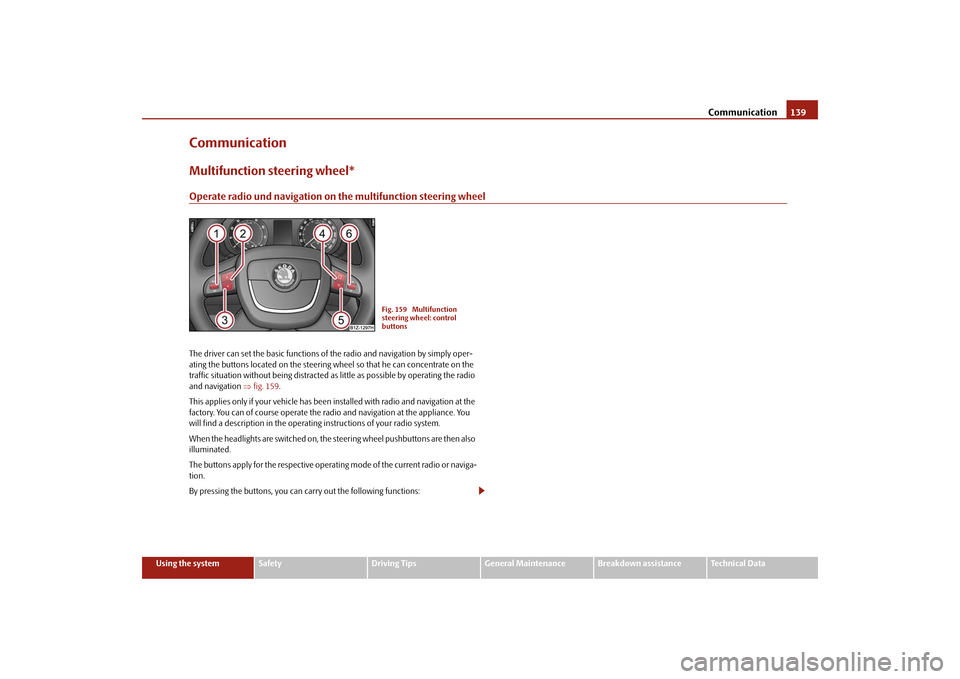
CommunicationMultifunction steering wheel*Operate radio und navigation on the multifunction steering wheelThe driver can set the basic functions of
the radio and navigation by simply oper-
ating the buttons located on the steering wheel so that he can concentrate on the traffic situation without being distracted as little as possible by operating the radio and navigation
⇒fig. 159
.
This applies only if your vehicle has been installed with radio and navigation at the factory. You can of course operate the radio and navigation at the appliance. You will find a description in the operating instructions of your radio system. When the headlights are switched on, the
steering wheel pushbuttons are then also
illuminated. The buttons apply for the respective operating mode of the current radio or naviga- tion. By pressing the buttons, you can
carry out the following functions:
Fig. 159 Multifunction steering wheel: control buttons
se0.1.book Page 139 Frida
y, April 10, 2009 3:19 PM
Page 143 of 304

Communication
142
Mobile phones and two-way radio systemsThe installation of a mobile phone and two-way radio system in a vehicle should only be carried out by an authorised Škoda Service Partner. Škoda Auto permits the operation of mobile phones and two-way radio systems with a professionally installed external aerial and a maximum transmission power of up to 10 watts. It is essential that you inform a specialist garage about the possibilites to assemble and operate mobile phones and two-way radio sets which have a power output of more than 10 W. They will inform you which technical possibilities exist for retrofit- ting mobile telephones and radio transmitters. Operation of mobile phones or two-way radio systems may interfere with func- tioning of the electronic systems of your vehicle. The reasons for this may be:•
no external aerial,
•
external aerial incorrectly installed,
•
transmission power gr
eater than 10 watts.
You should also be aware of
the fact that only an
external
aerial makes it possible
to achieve the optimal range of such equipment.
WARNING
•
If a mobile phone or a two-way radio system is operated in the vehicle
without using a special external aerial
or an external aerial which has been
incorrectly installed, this can increase the strength of the electromagnetic field in the interior of the vehicle.•
Please concentrate fully at all times on your driving!
•
You must not install two-way radio systems, mobile phones or mounts
on the covers of the airbags or within the immediate deployment range of airbags. This might result in injuries to the occupants in the event of an acci- dent.
Note
Please also refer to the operating instru
ctions of the mobile phones and two-way
radio systems.Universal telephone preinstallation GSM II*IntroductionThis enables you to make full use of the
advantages of a norm
al carphone (“hands-
free system - Hands Free” using a micropho
ne integrated in the vehicle, optimal
transmission of signals using an external aerial
14) etc.). The equipment includes
also the voice control. The telephone is connected by means of the Bluetooth
®
technology
⇒page 143, “Bluetooth®”. On vehicl
es fitted with a telephone
mount*, it is also possible to establis
h the connection via the interface of the
adapter
15) ⇒page 145, “Operating telephone calls with the aid of the adapter*.”.
A phone phonebook is part of the mobile
phone preinstallation with voice control.
In the phone phonebook there are 1500 free
memory locations available. This
phone phonebook is independent of the appliance used for the mobile phone. Furthermore the volume can be changed indi
vidually during the call at any time
with the button for setting the radio* or
on vehicles fitted with multifunction
steering wheel* with function buttons on the steering wheel. If the system answers with the voice response “
Telephone is not ready
”, please
check the operating state of
the telephone as follows:
•
Is the telephone switched on?
•
Is the PIN code entered?
Dialogue The period, in which the telephone system is ready to receive voice commands and carry out the voice commands, is called DIALOGUE. The system gives audible feed-back and guides you if necessary through
the relevant functions. You can start or
14)Valid for telephone used with adapter* in the telephone mount.15)Not valid for adapter “Bluetooth only”
⇒page 145.
se0.1.book Page 142 Frida
y, April 10, 2009 3:19 PM