2009 Seat Exeo ST fuel
[x] Cancel search: fuelPage 87 of 316

Cockpit85
Safety First
Controls and equipment
Practical tips
Technical Data
On-board computerIntroduction
The on-board computer provides you with useful information
during a journey, including average and current fuel
consumption, average speed, fuel range, driving time and
distance covered.Press RESET button ⇒page 86, fig. 60 to switch back and forward
between the functions of on-board computers 1 and 2.
The numbers in the display ⇒fig. 59 indicates which of the two memories is
currently in use. The figure 1 means that the display is showing the informa-
tion in the single journey memory (on-board computer 1). The figure 2 means
that the display is showing the information in the total journey memory (on-
board computer 2). Single-journey memory (on-board computer 1)
The single-journey memory processes the information on a journey from the
time the ignition is switched on until it is switched off. If the journey is
resumed
within two hours after the ignition is switched off, the new figures
are automatically included in the calculation. If the journey is interrupted for
more than two hours t h e s t o r e d i n f o r m a t i o n i s a u t o m a t i ca l l y e r a s e d w h e n y o u
resume your journey.
Total-journey memory (on-board computer 2)
Unlike the single-journey memory, the total-journey memory is not erased
automatically. Hence, you can determine the period for which you wish the
on-board computer to supply figures.
Fuel range
The estimated fuel range is displayed in km. The fuel range is displayed in
increments of 10 km.
Average fuel consumption
This mode shows the average fuel consumption since the memory was last
cancelled in litres/100 km.
Instantaneous fuel consumption
The display shows the instantaneous fuel consumption in litres/100 km.
When the vehicle is stationary, the computer will display the last value in the
memory.
Average speed
This mode shows the average speed driven since the memory was last
cancelled (in km/h).
Driving time
This display shows the period of time which has elapsed since the memory
was last cancelled. The longest possible period it can cover is 999 hours and
59 minutes.
Fig. 59 On-board
computer: memory 1
AB
ExeoST_EN.book Seite 85 Donnerstag, 3. September 2009 12:24 12
Page 88 of 316

Cockpit
86Driving time warning
After 2 hours of continuous driving, the display automatically switches over
to the driving time display of 2:00 . At the same time the driving time display
starts flashing. This is to remind the driver to take a break.
The driving time warning can be switched off by briefly pressing the function
selector switch or the button ⇒fig. 60 .
If you continue driving or take a break for less than 10 minutes, the driving
time warning will switch on once again when the total driving time is 4:00
hours, 6:00 h o u r s , e t c . H o w e v e r, i f yo u ta ke a b r e a k f o r m o r e t ha n 1 0 m i n u te s ,
the driving time warning clock will be erased.
Distance covered
This display shows the distance you have covered since the memory was last
cancelled. The longest possible distance which can be recorded is
9999.9 km.
Note
•The displays for fuel consumption (average and instantaneous), fuel
range and speed are shown in metric units.•The information in the memory is lost if the battery is disconnected.
Operating
The on-board computer is controlled by means of two
switches on the windscreen wiper lever.Enabling the on-board computer
– Press the reset button repeatedly until the on-board computer (memory 1 or 2) ⇒page 85, fig. 59 is displayed.
Selecting the function
– Press the top or bottom of the function selector switch ⇒fig. 60 . This displays the functions of the on-board computer
in sequence.
Resetting to zero
– Press and hold the Reset button for at least two seconds.The following values can be reset to zero using the Reset button:
Reset
Fig. 60 Windscreen wiper
lever: On-board computer
controls
AB
AA
AB
ExeoST_EN.book Seite 86 Donnerstag, 3. September 2009 12:24 12
Page 89 of 316

Cockpit87
Safety First
Controls and equipment
Practical tips
Technical Data
•Journey duration•Distance covered•Average fuel consumption•Average speed
The on-board computer can only be operated when the ignition is switched
on. When the ignition is switched on, the display shows the function that was
last selected.
As well as the figures from the on-board computer (computer 1 or 2), the
display can also show information from the navigation system*. Press the
Reset button briefly to switch back and forward between these displays.Note
•If you keep the Reset button pressed for longer than two seconds, it will
reset the currently displayed figure to zero (for instance average fuel
consumption).•Faults detected by the auto-check control will be displayed even if the
display is off.•The information in the memory is lost if the battery is disconnected.
Menu displayIntroduction
AB
Fig. 61 Windscreen wiper
lever: Menu selection
buttonFig. 62 Display: Main
menu
ExeoST_EN.book Seite 87 Donnerstag, 3. September 2009 12:24 12
Page 90 of 316
Cockpit
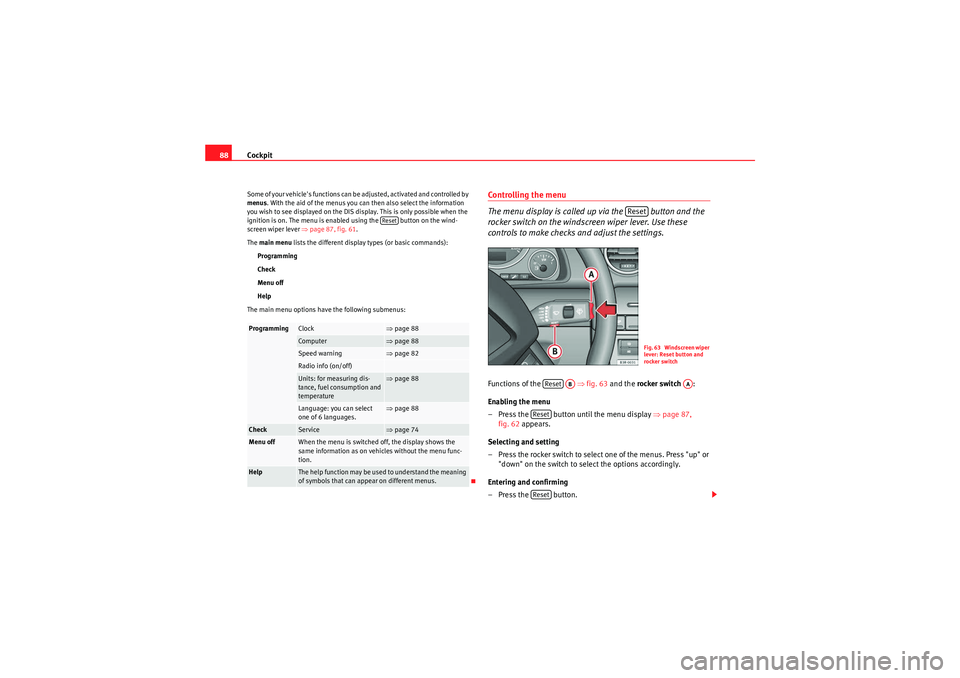
88Some of your vehicle's functions can be adjusted, activated and controlled by
menus . With the aid of the menus you can then also select the information
you wish to see displayed on the DIS display. This is only possible when the
ignition is on. The menu is enabled using the button on the wind-
screen wiper lever ⇒ page 87, fig. 61.
The main menu lists the different display types (or basic commands):
Programming
Check
Menu off
Help
The main menu options have the following submenus:
Controlling the menu
The menu display is called up via the button and the
rocker switch on the windscreen wiper lever. Use these
controls to make checks and adjust the settings.Functions of the ⇒fig. 63 and the rocker switch :
Enabling the menu
– Press the button until the menu display ⇒page 87,
fig. 62 appears.
Selecting and setting
– Press the rocker switch to select one of the menus. Press "up" or "down" on the switch to select the options accordingly.
Entering and confirming
–Press the button.
Programming
Clock
⇒ page 88
Computer
⇒page 88
Speed warning
⇒page 82
Radio info (on/off)Units: for measuring dis-
tance, fuel consumption and
temperature
⇒page 88
Language: you can select
one of 6 languages.
⇒page 88
Check
Service
⇒page 74
Menu off
When the menu is switched off, the display shows the
same information as on vehicles without the menu func-
tion.
Help
The help function may be used to understand the meaning
of symbols that can appear on different menus.
Reset
Reset
Fig. 63 Windscreen wiper
lever: Reset button and
rocker switch
Reset
AB
AA
ResetReset
ExeoST_EN.book Seite 88 Donnerstag, 3. September 2009 12:24 12
Page 91 of 316

Cockpit89
Safety First
Controls and equipment
Practical tips
Technical Data
Use the rocker switch to select the menus and adjust various values. The
selected values are highlighted on a red background.
By pressing the button, you can confirm the option you have selected
or the value you have set. Selected functions are marked with a tick.
The following symbols are used:
Tyre pressure monitoring*Introduction
The tyre pressure monitoring system constantly checks the
pressure of the tyres.The system warns the driver in the event of a loss of pressure by means of
symbols and messages in the instrument panel display. The system works
with the help of the ABS sensors in the wheels.
Please bear in mind that the tyre inflation pressure is also influenced by the
temperature of the tyre. Tyre pressure increases about 0.1 bar for each 10°C
in tyre temperature increase. The tyre heats up while the vehicle is being
driven and the tyre pressure will rise accordingly. Therefore, you should only
adjust the tyre pressures when they are
cold (i.e. approximately at ambient
temperature).
To ensure that the tyre pressure monitoring system works reliably, you should
check and, if necessary, adjust the tyre pressures at regular intervals and
store the correct pressures (reference values) in the system.
A tyre pr essure i nfor ma ti on lab e l is a tta che d to t he insi de o f the fu el ta nk f lap.
WARNING
•Never adjust tyre pressure when the tyres are hot. This may damage or
even burst the tyres. Risk of accident!•An insufficiently inflated tyre flexes a lot more at high speeds and
causes significant heating of the tyre. Under these conditions, the tyre
bead may be released or the tyre may burst. Risk of accident!For the sake of the environment
Under-inflated tyres lead to increased fuel consumption and tyre wear.
Note
•Responsibility for ensuring that the tyres are correctly inflated remains
with the driver; the system can only provide assistance.•Pressure can only be adjusted when the tyres are at ambient
temperature.
Cursor
Function selected
Red background (active
function)
Tick
Selected
Box
Not selected
Triangle pointing upwards
Previous page
Triangle pointing down-
wards
Next page
Reset
ExeoST_EN.book Seite 89 Donnerstag, 3. September 2009 12:24 12
Page 100 of 316

Unlocking and locking
98
– Remove the used battery from the cover.
– Insert the new battery. Make sure that the “+” symbol on the battery is facing downwards. The co rrect polarity is indicated on
the cover.
– After inserting the battery, align the cover and key and press the two parts together.
For the sake of the environmentUsed batteries must be disposed of appropriately and must not be discarded
with ordinary household waste.
Note
•The system must be re-synchronised after each battery replacement to be
able to lock and unlock the car using the remote control ⇒page 107.•The new battery must be of the same type as the original.Electronic immobiliser
The electronic immobiliser is designed to prevent unauthor-
ised persons from starting up the vehicle.There is an electronic chip inside the key which automatically deactivates the
immobiliser when the key is inserted into the ignition lock. The electronic
immobiliser is enabled automatically when the ignition key is removed from
the ignition lock after coming to a stop.
If an uncoded key is used, the message SAFE will appear in the trip recorder
display.
Note
•The engine can only be started using an original SEAT key with the correct
code.•It may not be possible to start the engine with the key if there is another
ignition key from a different make of vehicle on the same key tab.Central lockingDescription
The central locking system enables you to lock and unlock all
the doors, the tailgate and the tank flap together.The central locking system on your vehicle locks and unlocks all the doors
and the tank flap simultaneously. The tailgate is unlocked when the vehicle
is opened. However, the handle must be used to open it. The vehicle can be
locked and unlocked using the remote control ⇒ page 105 or by turning the
key in the lock in the driver's door.
The windows can also be centrally opened or closed using the central locking
system ⇒page 111. The sun roof* can be closed but not opened using the
central locking system.
The central locking system is combined with an anti-theft security system. If
the vehicle is locked with the key from the outside, the interior opening levers
stop working, which prevents unauthorised persons from entering the
vehicle.
Should the central locking system fail to work, you can still normally enable
all the locks individually. The fuel tank flap can be released manually if neces-
sary. For manual release of the tank flap ⇒page 223.
ExeoST_EN.book Seite 98 Donnerstag, 3. September 2009 12:24 12
Page 129 of 316

Lights and visibility127
Safety First
Controls and equipment
Practical tips
Technical Data
VisibilityHeated rear window
The rear window heating clears the rear window of condensa-
tion.– Press button to switch the rear window heating on or off
⇒fig. 98.The rear window heating only works when the ignition is switched on. An indi-
cator lamp in the button lights up when the rear window heater is switched
on.
The heated rear window switches off automatically after about 10 minutes if
the outside temperature is above 0°C.
Depending on the outside temperature, the wing mirrors are also heated
while the heated rear window is turned on.
For the sake of the environment
Switch of the heated rear window as soon as the rear window has demisted.
By saving electrical power you can also save fuel.Sun visors
The sun visors can improve visibility and contribute to safety.The sun visors for the driver and the front passenger can be pulled out of
their mountings in the centre of the vehicle and turned towards the doors
⇒fig. 99 .
The make-up mirrors in the sun visors have covers. On opening the cover ,
the mirror light* located in the headli ner is automatically switched on. The
light switches itself off when the cover is closed and when the sun visor is
pushed back up.
Fig. 98 Switch for heated
rear window
Fig. 99 Sun visor
A1
A2
ExeoST_EN.book Seite 127 Donnerstag, 3. September 2009 12:24 12
Page 154 of 316

Seats and stowage
152Attachment points
The roof carrier must be attached at the marked points only.The cross-bars must be fitted exactly between the points marked on the roof
railings ⇒fig. 130 . The markings are visible on the inside of the railings.
Caution
A roof carrier unit must not be used if the vehicle is not equipped with roof
rails (basic support).Roof load
Loads carried on the roof must be securely attached. The car's
handling is affected whenever you carry loads on the vehicle.The authorised load on the roof of your vehicle is 75 kg. Use the weight of the
roof carrier system and that of the load as a basis to calculate the roof load. If less resistant systems are used, the roof carrier must not be loaded to the
maximum weight permitted. If less resistant systems are used, these must
only be loaded to the maximum weight permitted indicated in the assembly
instructions.
WARNING
•Loads carried on the roof must be securely attached. Failure to do so
could result in an accident.•Do not exceed the maximum roof load for the vehicle, the maximum
axle loads or the maximum gross vehicle weight. Failure to do so could
result in an accident.•When transporting heavy or bulky loads on the roof, bear in mind that
t h e ca r ' s ha n d l i ng is a f fe c te d by t h e e x t ra w e i g h t o n t h e ro o f a n d a p os s ibl e
susceptibility to cross winds. Adjust your speed and driving style accord-
ingly to avoid accidents.Caution
Please take extra care not to let the tailgate strike the roof load when open.
For the sake of the environment
Roof carriers are often left attached for convenience, even when they are not
being used. However, the increased air resistance means that the vehicle
uses more fuel. For this reason you should always take off the roof carrier
when it is not in use.
Fig. 130 Attachment
points for cross bars
ExeoST_EN.book Seite 152 Donnerstag, 3. September 2009 12:24 12