2009 PORSCHE PANAMERA ignition
[x] Cancel search: ignitionPage 117 of 343

Instrument Panel and Multi-Function Display
115
Operating the Multi-Function
Display in the Instrument PanelOn the multi-function display, you can view
information relating to the relevant vehicle
equipment, operate the audio source (radio, CD,
iPod, etc.), check the oil level, check the tire
pressure, use the stopwatch or operate the
navigation system.
You can also modify different vehicle settings in
the Vehicle menu.
It is not possible to desc ribe all details of the
functions in this Owner’s Manual. The examples
clearly demonstrate the functional principle and
clarify the menu structure.
Warning!
There is a risk of accident if you set or
operate the multi-funct ion display, radio,
navigation system, telephone or other
equipment while driving. Operating these
devices while driving could distract you from
traffic and cause you to lose control of the
vehicle.
f Operate the equipment while driving only if the
traffic situation allows you to do so safely.
f Carry out any complicated operating or setting procedures only when the vehicle is stationary.
Multi-function displayNote on operation
The multi-function display is only active when the
ignition is on.
Certain menus are only available when the vehicle
has stopped e.g. the adjustment menu for tire
pressure monitoring.
Operating principle on vehicles with
multi-function steering wheelThe multi-function display is operated using the
rotary knob A , the Back button B and the MFS
button C, which can be assigned as required.
Selecting menu, function, setting option
f Turn rotary knob A upwards or downwards.
Confirming selection (Enter)
f Press rotary knob A .
Moving back one or several selection levels
f Press button B (Back button).
Page 123 of 343

Instrument Panel and Multi-Function Display
121
Oil level
Display and measurement of the engine oil
level
Caution!
Risk of engine damage.
f Regularly check the oil level each time before
refuelling.
f Do not allow the oil level to fall below the minimum mark.
Prerequisites for the oil-level gauge:
– Ignition is switched on or
Engine is running while the vehicle is stationary
or in motion.
– After opening the hood, the oil level can only be measured after driving for at least 6 miles
(10 km).
Activate the “Oil level” function on the
multi-function display
f Please see the chapter “OVERVIEW OF
WARNING MESSAGES” on page 152. Measured oil level
The oil level reading is
shown on the segment
display in the oil level menu.
If the segments are filled in up to the top line,
the oil level has reached the maximum mark.
f Under no circumstances add engine oil.
If the bottom segment is filled in, the oil level has
reached the minimum mark.
The message “Check Minimum reached” appears
on the multi-function display.
f Add engine oil immediately. If the bottom segment is red, the oil level has
dropped below the minimum mark.
The message “Oil level below minimum” appears
on the multi-function display.
f
Add engine oil immediately.
Top-up quantity
The difference between the minimum and
maximum marks on the segment display is
approx. 1 litre.
One segment of the display corresponds to
a top-up quantity of approx. 0.26 US quarts
(0.25 liters).
f Never add more engine oil than required to
reach the maximum mark.
1.Select
> “Vehicle ”
> “Oil level” and confirm.
Page 128 of 343
126
Instrument Panel and Multi-Function Display
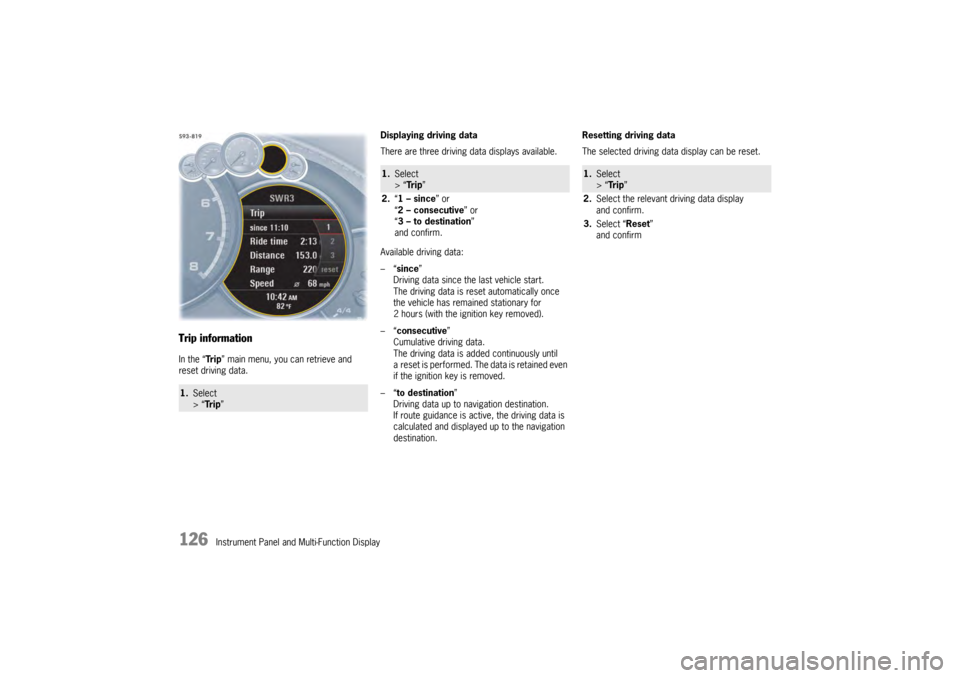
Trip informationIn the “Tr i p” main menu, you can retrieve and
reset driving data. Displaying driving data
There are three driving data displays available.
Available driving data:
–“
since ”
Driving data since the last vehicle start.
The driving data is reset automatically once
the vehicle has remained stationary for
2 hours (with the ignition key removed).
–“ consecutive ”
Cumulative driving data.
The driving data is added continuously until
a reset is performed. The data is retained even
if the ignition key is removed.
–“ to destination ”
Driving data up to navigation destination.
If route guidance is active, the driving data is
calculated and displayed up to the navigation
destination. Resetting driving data
The selected driving data display can be reset.1.
Select
> “Tr i p ”
1.Select
> “Tr i p ”
2. “1 – since ” or
“ 2 – consecutive ” or
“ 3 – to destination ”
and confirm.
1. Select
> “Tr i p ”
2. Select the relevant driving data display
and confirm.
3. Select “Reset ”
and confirm
Page 132 of 343
130
Instrument Panel and Multi-Function Display
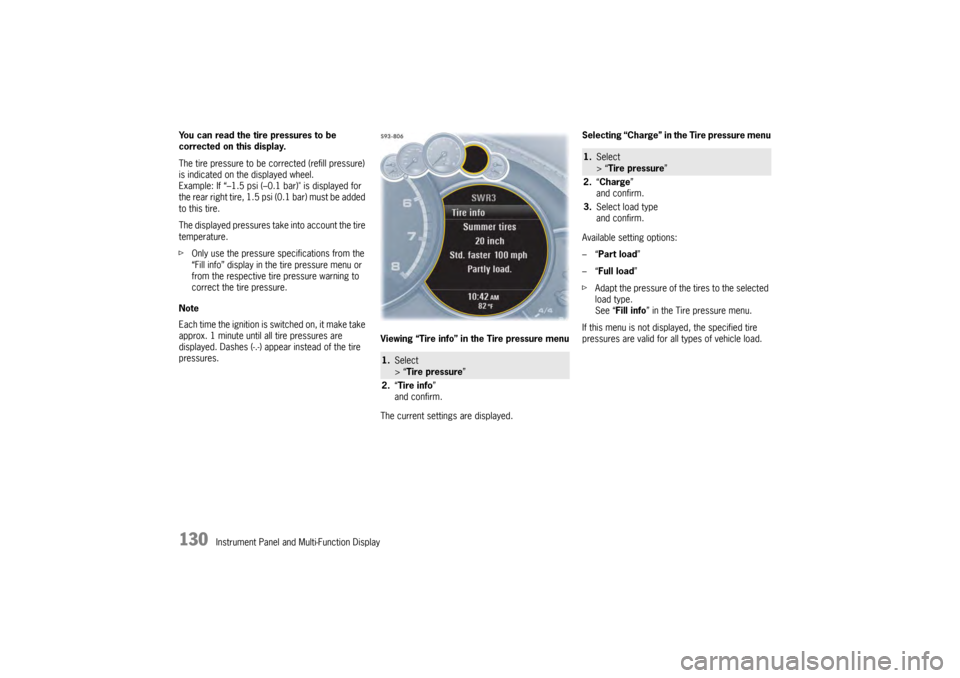
You can read the tire pressures to be
corrected on this display.
The tire pressure to be corrected (refill pressure)
is indicated on the displayed wheel.
Example: If “–1.5 psi (–0.
1 bar)" is displayed for
the rear right tire, 1.5 psi (0.1 bar) must be added
to this tire.
The displayed pressures take into account the tire
temperature.
f Only use the pressure specifications from the
“Fill info” display in the tire pressure menu or
from the respective tire pressure warning to
correct the tire pressure.
Note
Each time the ignition is switched on, it make take
approx. 1 minute until all tire pressures are
displayed. Dashes (-.-) appear instead of the tire
pressures. Viewing “Tire info” in the Tire pressure menu
The current settings are displayed.Selecting “Charge” in the Tire pressure menu
Available setting options:
–“
Part load ”
–“ Full load ”
f Adapt the pressure of the tires to the selected
load type.
See “ Fill info ” in the Tire pressure menu.
If this menu is not displayed, the specified tire
pressures are valid for al l types of vehicle load.
1.Select
> “Tire pressure ”
2. “Tire info ”
and confirm.
1. Select
> “Tire pressure ”
2. “Charge”
and confirm.
3. Select load type
and confirm.
Page 135 of 343
Instrument Panel and Multi-Function Display
133
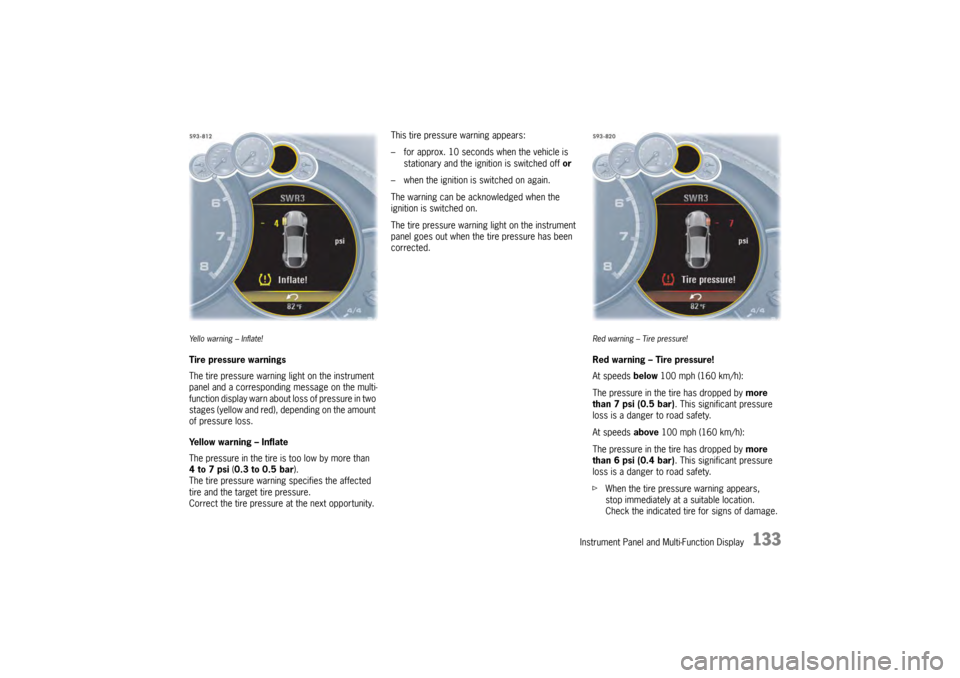
Ye l l o w a r n i n g – I n f l a t e !Tire pressure warnings
The tire pressure warning light on the instrument
panel and a corresponding message on the multi-
function display warn about loss of pressure in two
stages (yellow and red), depending on the amount
of pressure loss.
Yellow warning – Inflate
The pressure in the tire is too low by more than
4to7psi (0.3 to 0.5 bar ).
The tire pressure warning specifies the affected
tire and the target tire pressure.
Correct the tire pressure at the next opportunity. This tire pressure warning appears:
– for approx. 10 seconds when the vehicle is
stationary and the ignition is switched off or
– when the ignition is switched on again.
The warning can be acknowledged when the
ignition is switched on.
The tire pressure warning light on the instrument
panel goes out when the tire pressure has been
corrected.
Red warning – Tire pressure!Red warning – Tire pressure!
At speeds below 100 mph (160 km/h):
The pressure in the tire has dropped by more
than 7 psi (0.5 bar). This significant pressure
loss is a danger to road safety.
At speeds above 100 mph (160 km/h):
The pressure in the tire has dropped by more
than 6 psi (0.4 bar). This significant pressure
loss is a danger to road safety.
f When the tire pressure warning appears,
stop immediately at a suitable location.
Check the indicated tire for signs of damage.
Page 136 of 343

134
Instrument Panel and Multi-Function Display
If necessary, fill in ti
re sealant and set the
correct tire pressure.
This tire pressure warning also appears when
driving and can be acknowledged.
The tire pressure warning light on the instrument
panel goes out only when the tire pressure has
been corrected.
System learningTire Pressure Monitoring begins to “learn” the
wheels after a wheel change, wheel transmitter
replacement or update of the tire settings . During
this process, Tire Pressu re Monitoring recognizes
the wheels and their locations.
The following message appears on the multi-
function display (example):
“No monitoring, system is learning”.
The wheel learning process takes place
exclusively when the vehicle is being driven
(vehicle speed above 16 mph (25 km/h)).
Tire Pressure Monitoring requires a certain
amount of time to learn the wheels. During this
time, the current tire pressures are not available
on the multi-function display:
– The tire pressure warning light remains lit until all wheels have been learned.
– Lines (-.-) appear on the display of the “Tire pressure” function. – The required pressures for cold tires (68 °F
(20 °C)) are indicated under “Fill info” in the tire
pressure menu.
Position and pressure information is displayed as
soon as Tire Pressure Monitoring has assigned
the wheels recognized as belonging to the vehicle
to the correct wheel positions.
f Check the tire pressure for all wheels under
“Fill info ”.
f Correct the tire pressure to the required
pressure if necessary.
Changing a wheel and replacing tiresfNew wheels must be fitted with radio
transmitters for Tire Pressure Monitoring.
Before tires are changed, the battery charge
condition of the wheel transmitters should be
checked.
Please contact a qualified specialist workshop.
We recommend that you have an authorized
Porsche dealer to do this work as they have
trained workshop personnel and the necessary
parts and tools.
f Switch off the ignition when changing a wheel.
The tire settings on the mu lti-function display must
be updated after changing a wheel.
If the tire settings are not updated, the message
“Tire change? Update settings!” is displayed on the
multi-function display.
f Update the multi-function display settings the
next time the vehicle is stationary.
Pressure increase as the result of
temperature increaseIn accordance with physical principles, the tire
pressure changes as the temperature
changes.The tire pressure increases or decreases
by 0.1 bar (1.5 psi) for
every 18 °F (10 °C) change in temperature.Partial monitoringMonitoring of the other wheels is continued if there
is a fault in one or two wheel transmitters.
– The tire pressure warning light lights up.
– The message “Restricted monitoring” appears
on the multi-function display.
– No tire pressures are displayed on the multi-function display for wheels with faulty
wheel transmitters.
Page 138 of 343
136
Instrument Panel and Multi-Function Display
Sport Chrono on multi-function display
All stopwatch displays are started and stopped in
the “Chrono” menu on the multi-function display.
For instructions on using the multi-function
display:
f
Please see the chapter “OPERATING THE
MULTI-FUNCTION DISPLAY IN THE
INSTRUMENT PANEL” on page 115.
Notes on operation
If you exit the “Chrono ” menu while the stopwatch
is running, measurement will continue.
The stopwatch stops after the ignition is switched
off. If the ignition is switched on again within
approximately 4 minutes, the stopwatch will
continue to run.
The only way to reset th e stopwatch to zero is
by selecting “ Reset” in the “ Chrono” menu.
For information on re setting the stopwatch:
f Please see the chapter “RESETTING THE
STOPWATCH TIME” on page 137.
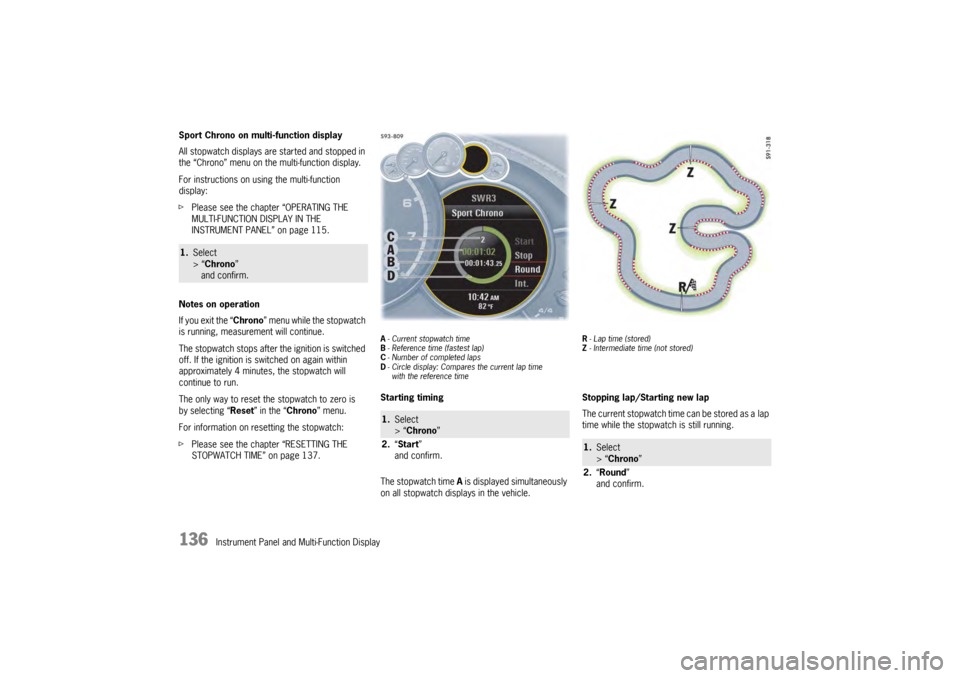
A- Current stopwatch time
B - Reference time (fastest lap)
C - Number of completed laps
D - Circle display: Compares the current lap time
with the reference timeStarting timing
The stopwatch time A is displayed simultaneously
on all stopwatch displays in the vehicle.
R - Lap time (stored)
Z - Intermediate time (not stored)Stopping lap/Starting new lap
The current stopwatch time can be stored as a lap
time while the stopwatch is still running.
1. Select
> “Chrono”
and confirm.
1. Select
> “Chrono”
2. “Start”
and confirm.
1. Select
> “Chrono ”
2. “Round ”
and confirm.
Page 145 of 343

Instrument Panel and Multi-Function Display
143
Adjusting brightness of orientation lighting
The brightness of the orientation lighting can be
adapted individually.
Setting interior lighting off delay
The off delay for the lighting in the passenger
compartment after closing the vehicle doors can
be adapted individually.Setting wiper operation
You have the option of adjusting the activation
mode of the rain sensor and the rear wiper.
Setting rain sensor activation
Activation of the rain sensor for the windshield
wipers on the windshield in wiper stalk position
1
can be adjusted.
For information on the front wipers:
f Please see the chapter “FRONT WIPER AND
HEADLIGHT WASHER SYSTEM” on page 102. Available setting options:
–“
Automatic ”
The rain sensor is activa ted automatically if the
wiper stalk is in position 1 when the ignition is
switched on.
–“ Manual ”
The rain sensor remains deactivated if the
wiper stalk is in position 1 when the ignition is
switched on.
Setting activation of the rear wiper when
reverse gear is engaged
You can configure the rear wiper to automatically
perform a series of wipes when it is raining when
reverse gear is engaged.1. Select
> “Vehicle ”
> “ Settings ”
> “Light/Visibility ”
> “Interior lights ”
2. “Amb. light ”
and confirm.
3. Adjust to the desired brightness
and confirm.1.Select
> “Vehicle ”
> “ Settings ”
> “Light/Visibility ”
> “Interior lights ”
2. “Fade-out ”
and confirm.
3. Set desired off delay
and confirm.
1.Select
> “Vehicle ”
> “Settings ”
> “ Light/Visibility ”
> “ Wiper ”
and confirm.1. Select
> “Vehicle ”
> “Settings ”
> “ Light/Visibility ”
> “ Wiper ”
2. “Rain sensor ”
and confirm.
3. Select desired setting
and confirm.
1.Select
> “Vehicle ”
> “ Settings ”
> “Light/Visibility ”
> “Wiper ”
2. “Rear wiper ”
and confirm.
3. Select desired setting
and confirm.