2009 PORSCHE PANAMERA buttons
[x] Cancel search: buttonsPage 195 of 343
Driving and Driving Safety
193
Porsche Doppelkupplung (PDK)Porsche Doppelkupplung (PDK) is a seven-speed
transmission with an “automatic” and a “manual”
selection mode.
In automatic selection mode (selector-lever
position D), gear changing is automatic.
You can change temporarily from automatic to
manual mode using the shift buttons on the
steering wheel.
In manual selection mode (selector-lever
position M ), you change gear using the shift
buttons on the steering wheel or with the PDK
selector lever.
You can change between selector-lever
positions D and M as you wish while driving.
Note
f Take care not to operate the shift buttons on
the steering wheel in advertently in either
automatic or manual mode, thereby triggering
undesired gear changes.
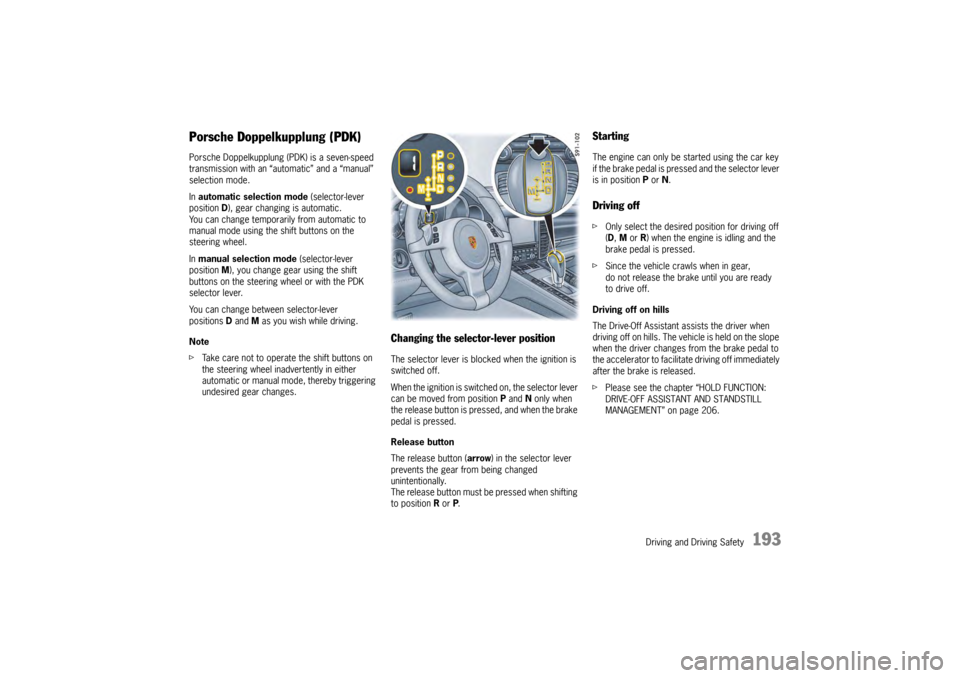
Changing the selector-lever positionThe selector lever is blocked when the ignition is
switched off.
When the ignition is switch ed on, the selector lever
can be moved from position P and N only when
the release button is pressed, and when the brake
pedal is pressed.
Release button
The release button ( arrow) in the selector lever
prevents the gear from being changed
unintentionally.
The release button must be pressed when shifting
to position R or P.
StartingThe engine can only be started using the car key
if the brake pedal is pressed and the selector lever
is in position P or N.Driving offf Only select the desired position for driving off
(D, M or R) when the engine is idling and the
brake pedal is pressed.
f Since the vehicle crawls when in gear,
do not release the brake until you are ready
to drive off.
Driving off on hills
The Drive-Off Assistant assists the driver when
driving off on hills. The vehicle is held on the slope
when the driver changes from the brake pedal to
the accelerator to facilitate driving off immediately
after the brake is released.
f Please see the chapter “HOLD FUNCTION:
DRIVE-OFF ASSISTANT AND STANDSTILL
MANAGEMENT” on page 206.
Page 198 of 343

196
Driving and Driving Safety
Driving off with Launch Control
Launch Control allows you to achieve maximum
acceleration from standstill.
Warning!
There is a risk of endangering other road
users if you use this Control in an improper
location or in a situation where other persons
might need to take evas ive action due to the
rapid acceleration that this technology
permits.
Launch Control is designed to be used in a
controlled environment on closed circuit driving
courses where no vehicle cross traffic or
pedestrian traffic is present.
f Use Launch Control only if conditions permit it
to be applied in a safe manner.
f Do not use Launch Control if there is a
possibility it could endanger other persons.
Such a possibility exists if you cannot see that
you have a clear road with no possibility of
cross traffic in your intended direction of driving.
Caution!
Stress on components increases
dramatically when starting with maximum
acceleration in comparison with “normal”
driving off. Use of Launch Control will
inevitably reduce the life of the engaged
engine and transmission components.
Preconditions:
– Launch Control should on ly be used when the
engine has reached operating temperature.
– “Sport Plus” mode must be switched on (indicator light on the button comes on and
“SPORT PLUS” appears on the multi-function
display).
1. Press the brake with your left foot.
2. Quickly press the accelerator down fully (kickdown activated) and hold it.
The engine speed will level off at
around 5,000 rpm on the Panamera S,
around 5,500 rpm on the Panamera 4S,
around 4,550 rpm on the Panamera Turbo.
“Launch Control active” appears on the
multi-function display.
3. Release the brake within a few seconds. Remaining stationary for a long time with
“Launch Control active” can lead to
overloading of the transmission.
To protect the transmi ssion, the engine power
is then reduced and the “Launch Control
active” process is cancelled. Shifting gears on the steering wheel
With the shift buttons on the steering wheel, you
can change temporarily from automatic selection
mode D to manual mode
M.
For example:
– Shifting down before bends and on entering built-up areas.
– Shifting down on downward slopes (engine braking).
– Shifting down for brief spurts of acceleration.
The manual selection mode remains engaged:
– For cornering (depending on the lateral acceleration) and overrunning.
– When the vehicle is stationary (e.g. at a junction).
The system leaves manual selection mode:
– automatically after around 8 seconds (unless cornering or overrunning),
– after driving off.
Page 199 of 343
Driving and Driving Safety
197
Kickdown
The kickdown function is active in selector-lever
positions D and M.
f For optimum acceleration, e.g. when
overtaking, press the accelerator pedal
beyond the full-throttle point (kickdown).
The transmission shifts down depending on
the speed of travel and engine speed.
Upshifts occur at the highest possible engine
speeds.
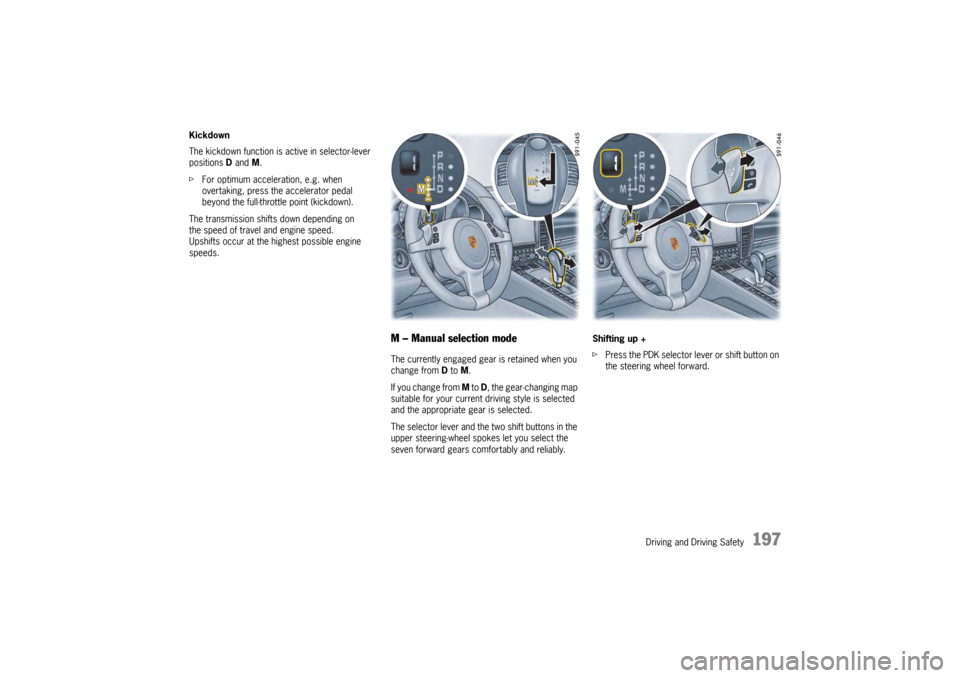
M – Manual selection modeThe currently engaged gear is retained when you
change from D to M.
If you change from M to D, the gear-changing map
suitable for your current driving style is selected
and the appropriate gear is selected.
The selector lever and the two shift buttons in the
upper steering-wheel spokes let you select the
seven forward gears comfortably and reliably. Shifting up +
f
Press the PDK selector lever or shift button on
the steering wheel forward.
Page 200 of 343

198
Driving and Driving Safety
Upshift prompt for fuel-economy-optimised
driving
The consumption-oriente
d upshift indicator A in
the tachometer at the ri ght beside the digital
speed display helps you to develop a fuel-saving
driving style.
The upshift indicator lights up - prompting you to
shift up to the next-higher gear - depending on the
selected gear, engine speed and accelerator
pedal position.
The upshift indicator is only active when “Sport” or
“Sport Plus” mode is switched off.
f Change to the next-higher gear when the
upshift indicator lights up. Shifting down –
f
Pull the PDK selector lever or shift button on
the steering wheel back.
You can shift up or down by the corresponding
number of gears by quickly pressing or pulling the
shift buttons or selector lever several times in
succession.
The transmission can be shifted up or down by
several gears in succession by continuously
operating the selector lever or shift buttons.
You can shift up or down at any time depending
on driving speed and engine speed.
Gear changes that would exceed the upper or
lower engine-speed limit are not executed by the
control unit.
There is no automatic upshift at the upper engine-
speed limit in selector-lever position M. Upshift
suppression can be cancelled by kickdown
operation. If, for example, the engine-speed limit
is reached during overtaking and an automatic
upshift does not occur, the transmission shifts up
in this case as a result of kickdown operation.
f Select an appropriately low gear on upward
and downward slopes.
This will ensure optimum use of engine power
and engine braking. To shift up automatically
at the upper engine-
speed limit:
f Press the accelerator pedal beyond the full-
throttle point (kickdown).
Failure of the selector lever display on the
instrument panel
The warning “Gearbox emergency operation”
appears in red on the multi-function display.
Effect:
– No selector-lever position is displayed on the instrument panel.
Vehicle can be driven only until it comes to
astop.
Action required:
f It is not possible to continue driving. Stop the
vehicle immediately in a suitable place. Have
the vehicle towed to a qualified specialist
workshop.
f Please see the chapter “TOWING” on
page 316.
Page 228 of 343
226
Storage, Luggage Compartment and Roof Transport System
Refrigerated box in the rear of the
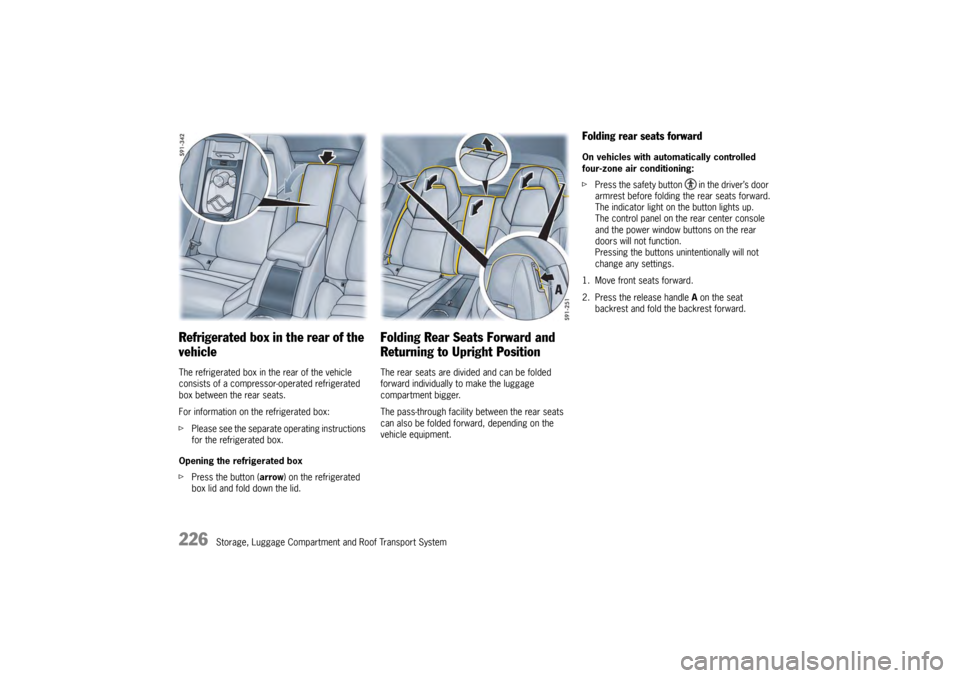
vehicleThe refrigerated box in the rear of the vehicle
consists of a compressor-operated refrigerated
box between the rear seats.
For information on the refrigerated box:
fPlease see the separate operating instructions
for the refrigerated box.
Opening the refrigerated box
f Press the button (arrow ) on the refrigerated
box lid and fold down the lid.
Folding Rear Seats Forward and
Returning to Upright PositionThe rear seats are divided and can be folded
forward individually to make the luggage
compartment bigger.
The pass-through facility between the rear seats
can also be folded forward, depending on the
vehicle equipment.
Folding rear seats forwardOn vehicles with auto matically controlled
four-zone air conditioning:
f Press the safety button in the driver’s door
armrest before folding the rear seats forward.
The indicator light on the button lights up.
The control panel on the rear center console
and the power window buttons on the rear
doors will not function.
Pressing the buttons unintentionally will not
change any settings.
1. Move front seats forward.
2. Press the release handle A on the seat
backrest and fold the backrest forward.
Page 231 of 343
Storage, Luggage Compartment and Roof Transport System
229
Luggage Compartment Cover
Warning!
Risk of injury. In the event of braking,
direction changes or in an accident, objects
can slide into the passenger compartment
and endanger the occupants.
f Do not place objects on the retractable
luggage compartment cover or on the fixed luggage compartment cover.
Retractable luggage compartment coverLuggage can be protected against prying eyes
with the retractable luggage compartment cover.
fAlways pull out the retractable luggage
compartment cover when transporting objects
in the luggage compartment.
The retractable luggage compartment cover is
not designed to carry objects.
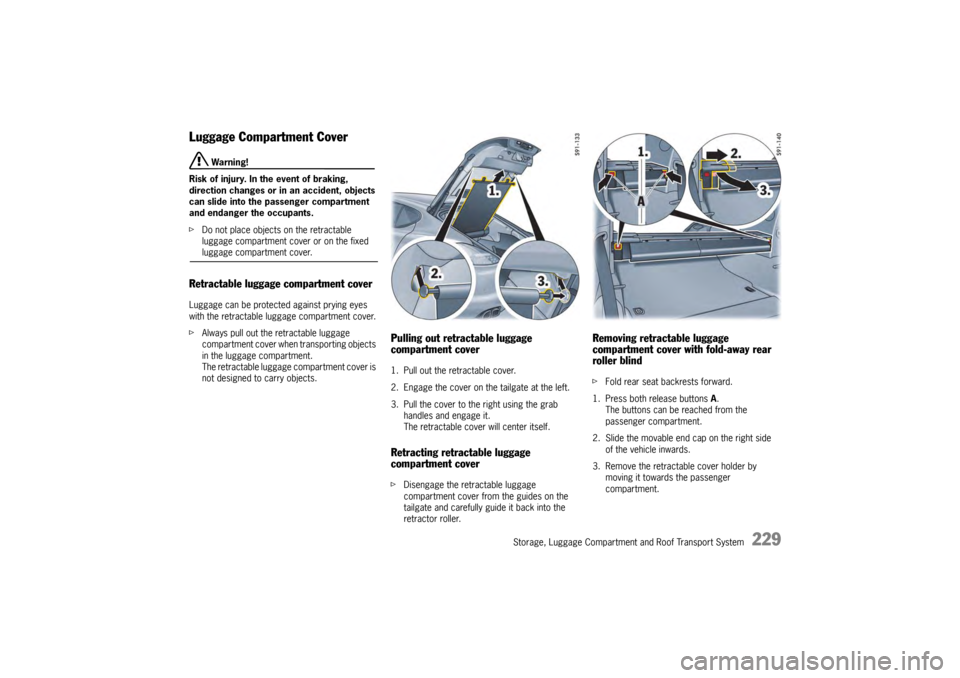
Pulling out retractable luggage
compartment cover1. Pull out the retractable cover.
2. Engage the cover on the tailgate at the left.
3. Pull the cover to the right using the grab
handles and engage it.
The retractable cove r will center itself.Retracting retractable luggage
compartment coverfDisengage the retractable luggage
compartment cover from the guides on the
tailgate and carefully guide it back into the
retractor roller.
Removing retractable luggage
compartment cover with fold-away rear
roller blindf Fold rear seat backrests forward.
1. Press both release buttons A.
The buttons can be reached from the
passenger compartment.
2. Slide the movable end cap on the right side of the vehicle inwards.
3. Remove the retractable cover holder by moving it towards the passenger
compartment.
Page 232 of 343
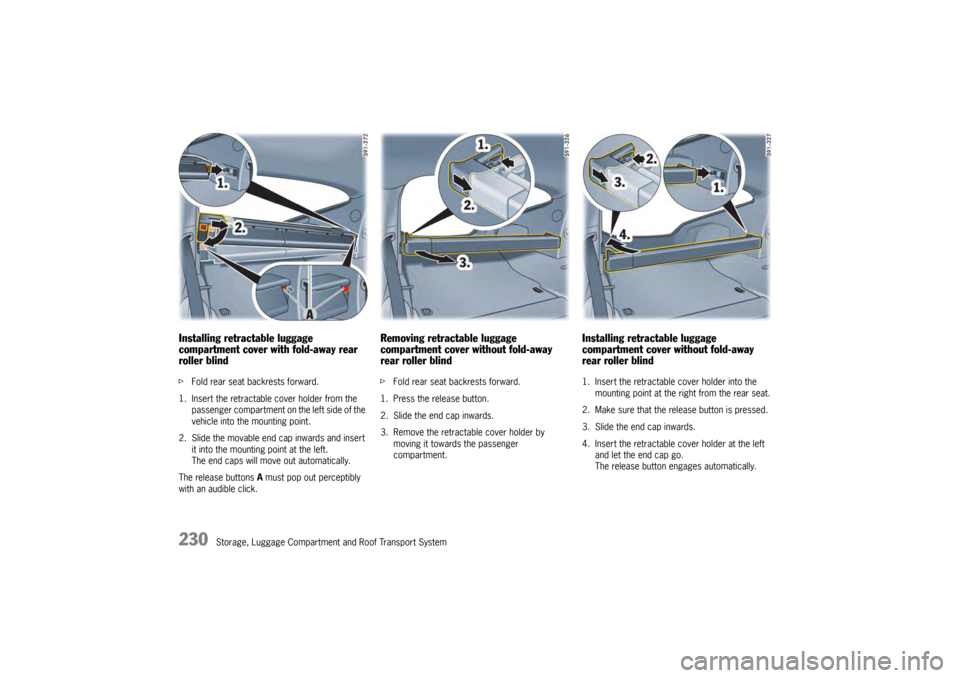
230
Storage, Luggage Compartment and Roof Transport System
Installing retractable luggage
compartment cover with fold-away rear
roller blindfFold rear seat backrests forward.
1. Insert the retractable cover holder from the passenger compartment on the left side of the
vehicle into the mounting point.
2. Slide the movable end cap inwards and insert it into the mounting point at the left.
The end caps will move out automatically.
The release buttons A must pop out perceptibly
with an audible click.
Removing retractable luggage
compartment cover without fold-away
rear roller blindf Fold rear seat backrests forward.
1. Press the release button.
2. Slide the end cap inwards.
3. Remove the retractable cover holder by moving it towards the passenger
compartment.
Installing retractable luggage
compartment cover without fold-away
rear roller blind1. Insert the retractable cover holder into the mounting point at the right from the rear seat.
2. Make sure that the release button is pressed.
3. Slide the end cap inwards.
4. Insert the retractable cover holder at the left and let the end cap go.
The release button engages automatically.
Page 338 of 343

336
Index
LLATCH system .............................................................. 56
Fastening ....................... ..................................... 56
Installing a child seat ... ......................................... 56
Prescribed installation dire ction of child seat.......... 53
Launch Control .................. .......................................... 196
Leather, care instructions .................................... ........ 275
Level control Overview ............. ...................................... ........ 209
Warning message on the mult i-function display ..... 210
Light Headlight flasher......... ......................................... 96
Switching on Welcome Home function ................... 95
Switching on when entering the vehicle.................. 95
Light switch AUTO function ................ ..................................... 92
Overview ............. ...................................... .......... 92
Switching on AUTO positi on .................................. 92
Lights Care instructions ........ ....................................... 274
Replacing Bulbs .............. ................................... 308
Switching front reading lig ht on/off ....................... 98
Switching front reading light s on/off automatically.. 99
Switching on when entering the vehicle.................. 95
Switching on when leaving the vehicle ................... 95
Load Disengaging luggage comp artment cover ............ 231
General information on lo ading............................ 228
Loading and securing ski bag ............................. 231
Position of tie-down ri ngs ................................... 227
Removing/installing retractable luggage
compartment cover ........ ................................... 229
Retractable luggage compartment cover,
pulling out/retracting .. ....................................... 229
Loading Disengaging luggage comp artment cover ............ 231
General information..... ....................................... 228
Loading and securing ski bag ............................. 231
Position of tie-down ri ngs ................................... 227
Removing/installing retractable luggage
compartment cover ........ ................................... 229
Retractable luggage compartment cover,
pulling out/retracting .. ....................................... 229
Loading information ........... .......................................... 236 Loadspace
Open
ing and closing the floor................ .............. 227
Overview .............. ............................................. 227
Position of tie-down ring s .................................... 227
Lock, child lock
Enabling/disabling opening rear doors from
inside ................ ...................................... ............ 32
Enabling/disabling power windows switches in
the rear doors .............. ....................................... 88
Switching rear control pa nel on/off........................ 80
Locking Emergency operation in th e event of a fault............ 35
Locking the tailgate ....... ....................................... 26
Locking vehicle door from inside ........................... 31
Locking vehicle door with car key
(remote control) ............ ....................................... 24
Locking vehicle door with Porsche Entry & Drive .... 24
Persons/animals remaining in the vehicle ............... 24
Tailgate ............. ...................................... ............ 26
Vehicle door with car key (remote control) ............. 24
Vehicle door with Porsche Entry & Drive (keyless) ... 24
Low beam Installing headlights ....... ..................................... 309
Removing headlights ......... ................................. 309
Switching on/off ........... ....................................... 92
Luggage General information on lo ading ............................ 228
Loading and securing ski bag ............................. 231
Position of tie-down ring s .................................... 227
Retractable luggage compartment cover,
pulling out/retracting ..... ..................................... 229
Luggage compartment Closing the tailgate ....... ....................................... 26
Opening and closing the floor................ .............. 227
Opening the tailgate ...... ....................................... 25
Overview .............. ............................................. 227
Position of tie-down ring s .................................... 227
Luggage compartment cover Disengaging ...... ................................................ 231MMaintenance work
Adding washer fluid ....... ..................................... 259
Changing air cleaner ..... ..................................... 261
Changing particle filter ....................................... 261 Checking engine-oil leve
l .................................... 254
Checking the coolant level and adding coolant ..... 257
Notes on maintenance ..... .................................. 252
Topping up engine oil .. ...................................... 255
Malfunctions
Emergency operation of ignition key in ignition
lock.................... .............................................. 166
Emergency operation of slid e/tilt roof ................... 89
Emergency operation of ta ilgate ........................... 35
Emergency unlocking of the filler flap.................. 267
Overview of warning me ssages .......................... 152
ParkAssist .......... .............................................. 241
Power windows ................... ................................ 88
Powerlift tailgate ......... ........................................ 30
When opening and closin g.................................... 35
Memory ................... .................................................... 40
Retrieving seat settings ....................................... 41
Retrieving vehicle settin gs.................................... 41
Storing seat settings ... ........................................ 41
Storing vehicle settings ........................................ 41
Memory buttons..... .......................................... ............. 41
Minor repairs In the event of a flat ti re ..................................... 293
Storage location of warnin g triangle.................... 279
Mirrors Adjusting exterior mirror s..................................... 58
Adjusting exterior mirrors as parking aid ............... 60
Folding in exterior mirr ors .................................... 59
Folding out exterior mirr ors .................................. 59
Storing exterior mirror sett ings (memory).............. 59
Switching automatic anti-dazzle function on
and off ............... ................................................ 60
Vanity mirror ................... .................................... 64
MONO button Air-conditioning system ........................................ 74
Motion sensor (int er
ior surveillance)
Switching off with bu tton in door handle
(Porsche Entry & Drive) ...................................... 248
Switching off with car ke y .................................. 247
Multi-function display Activating functions, opening menus and
viewing options ............... .................................. 117
Browsing through long li sts ................................ 117
Checking oil level ........ ...................................... 121
Display areas .................. .................................. 116
Menu overview .................... .............................. 117