2009 PORSCHE PANAMERA buttons
[x] Cancel search: buttonsPage 61 of 343

Seats, Mirrors and Steering Wheel
59
If the electrical adjustment facility fails
f Adjust the mirror by pressing on the
mirror face.Folding in exterior mirrorsfPress button D.
Both exterior mirrors fold in automatically.
If the electrical adjustment facility fails
f Fold in mirrors manually.Folding out exterior mirrorsfPress button D.
Both exterior mirrors unfold automatically.
Folding exterior mirrors in and out
automaticallyThe exterior-mirrors can be folded in automatically
after the vehicle is locked.
Folding exterior mirrors in automatically
f Press and hold the button on the car key for
at least 1 second.
or
On vehicles with Porsche Entry & Drive, press
and hold the locking button in the handle on the
driver’s door for at least 1 second.
The exterior mirrors fold in.
Folding exterior mirr ors out automatically
f Switch on ignition.
The exterior mirrors fold out.
Note
The exterior mirrors do not fold out automatically
after the ignition is switch ed on if they were folded
in manually using the button D.
If the electrical adj ustment facility fails
f Unfold mirrors manually.
Storing exterior mirror settingsOn vehicles with driver or comfort memory,
individual exterior mirror settings can be stored on
the person buttons on the driver’s side and on the
car key.
For further information on retrieving and storing
vehicle settings:
f Please see the chapter “STORING VEHICLE
SETTINGS” on page 40.Exterior mirror heatingThe exterior mirror heating is activated
automatically when the heated rear window is
switched on while the engine is running.
For information on switch ing on the heated rear
window:
f Please see the chapter “HEATED REAR
WINDOW/EXTERIOR MIRROR HEATING” on
page 84.
Page 63 of 343

Seats, Mirrors and Steering Wheel
61
Steering WheelPDK shift buttonsPorsche Doppelkupplung (PDK) is a seven-speed
transmission with an “automatic” and a “manual”
selection mode.
You can change temporarily to manual mode or
shift gear in manual mode with the shift buttons A
on the steering wheel. For more information on shifting with the
Porsche Doppelkupplung (PDK):
f
Please see the chapter “PORSCHE
DOPPELKUPPLUNG (PDK)” on page 193.
Horn fPress button B to operate the horn.Air bag unitThe air bag unit C is located behind the padded
steering wheel boss.
In conjunction with the seat belts, the air bag is
a safety system designed to provide the driver
with maximum protection from injury in an
accident.
For information on the air bag system:
f Please see the chapter “AIR BAG SYSTEMS” on
page 47.
Heated steering wheelThe steering wheel heatin g can be switched on
and off with the button on the rear of the steering
wheel when the ignition is switched on.Switching steering wheel heating on/offf Press button.
The message “Steering wheel heating
switched on” or “Steering wheel heating
switched off” appears on the multi-function
display for 2 seconds.
Page 65 of 343

Seats, Mirrors and Steering Wheel
63
Multi-Function Steering Wheel
Warning!
There is a risk of accident if you set or
operate the multi-funct ion display, radio,
navigation system, telephone or other
equipment while driving.
Operating these devices while driving could
distract you from traffic and cause you to
lose control of the vehicle.
f Operate the equipment while driving only if the
traffic situation allows you to do so safely.
f Carry out any complicated operating or setting procedures only when the vehicle is stationary.
Depending on the equipment in your vehicle, you
can use the function keys of the multi-function
steering wheel to operate the following Porsche
communication systems:
– Telephone
–PCM
– Multi-function display in the instrument panel
Readiness for operation of the
multi-function steering wheel– With ignition switched on
f Please observe the operating instructions
supplied for the Porsche communication
systems before operating the function keys.
Note on operation
The Porsche communication systems cannot be
switched on and off using the multi-function
steering wheel.
Function buttons on the multi-function
steering wheelThe rotary buttons at the top left and right of the
steering wheel can also be pressed.
Turn volume control
Upwards – increase volume
Downwards – decrease volume
Press volume control
Switch volume/mute on and off.
Turn rotary knob
Select/highlight the main menu or menu
item on the multi-function display by
turning the rotary knob upward or
downward.
Press rotary knob
Go to submenu or activate selected
function.
Press MFS button
Call up the stored function.
The button can be assigned the desired
function in the multi-fu nction display on the
instrument panel.
Press Back button
Return to the menu.
Press Handset Pickup button
Accept a telephone call.
Press Handset Hangup button
End or refuse a telephone call.
Page 67 of 343
Seats, Mirrors and Steering Wheel
65
Roll-Up Sunblinds, Rear Side
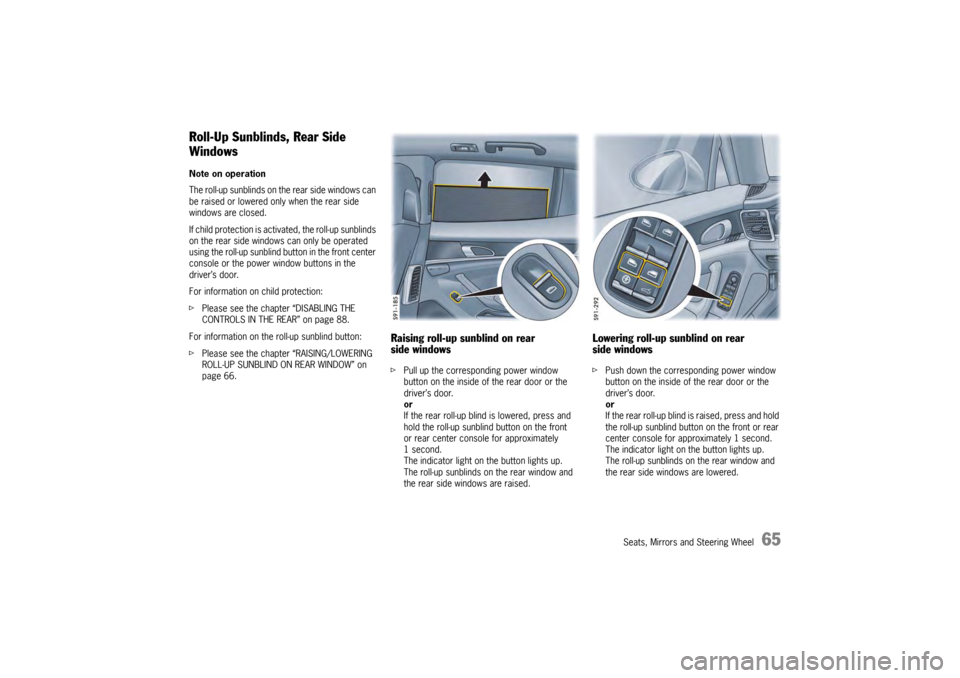
WindowsNote on operation
The roll-up sunblinds on the rear side windows can
be raised or lowered only when the rear side
windows are closed.
If child protection is activated, the roll-up sunblinds
on the rear side windows can only be operated
using the roll-up sunblind button in the front center
console or the power window buttons in the
driver’s door.
For information on child protection:
f Please see the chapter “DISABLING THE
CONTROLS IN THE REAR” on page 88.
For information on the roll-up sunblind button:
f Please see the chapter “RAISING/LOWERING
ROLL-UP SUNBLIND ON REAR WINDOW” on
page 66.
Raising roll-up sunblind on rear
side windowsfPull up the corresponding power window
button on the inside of the rear door or the
driver’s door.
or
If the rear roll-up blind is lowered, press and
hold the roll-up sunblind button on the front
or rear center console for approximately
1second.
The indicator light on the button lights up.
The roll-up sunblinds on the rear window and
the rear side windows are raised.
Lowering roll-up sunblind on rear
side windowsf Push down the corresponding power window
button on the inside of the rear door or the
driver’s door.
or
If the rear roll-up blind is raised, press and hold
the roll-up sunblind button on the front or rear
center console for approximately 1 second.
The indicator light on the button lights up.
The roll-up sunblinds on the rear window and
the rear side windows are lowered.
Page 82 of 343
80
Air Conditioning
Cancelling manual air distributionfPress the relevant air distribution button again.
The indicator light on the button goes out.
or
Press button for the relevant
air-conditioned area.
The indicator light on the button lights up.
Air quantity and distribution are controlled
automatically and variations are compensated.
Air distribution in the rear air-conditioned
areas when MONO or REAR mode is
activated (4-zone air conditioning)If the button or is pressed on the front
control panel, air flows from the central and side
vents in the rear of the vehicle.
If the button is pressed on the front control
panel, air flows into the footwells in the rear of
the vehicle.
For information on MONO mode:
fPlease see the chapter “ACCEPTING
SETTINGS FOR DRIVER’S SIDE FOR THE
ENTIRE VEHICLE” on page 74.
For information on REAR mode:
f Please see the chapter “ADJUSTING REAR AIR-
CONDITIONED AREAS WITH THE FRONT
CONTROL PANEL – REAR MODE (4-ZONE AIR
CONDITIONING)” on page 81.
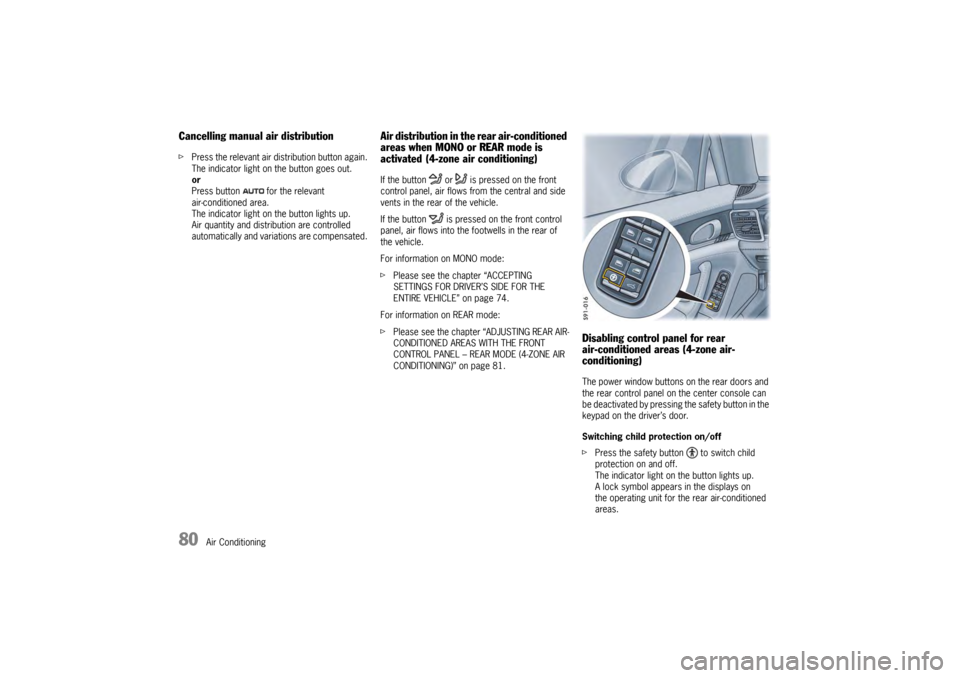
Disabling control panel for rear
air-conditioned areas (4-zone air-
conditioning)The power window buttons on the rear doors and
the rear control panel on the center console can
be deactivated by pressing the safety button in the
keypad on the driver’s door.
Switching child protection on/off
fPress the safety button to switch child
protection on and off.
The indicator light on the button lights up.
A lock symbol appears in the displays on
the operating unit for the rear air-conditioned
areas.
Page 90 of 343
88
Windows and Slide/Tilt Roof
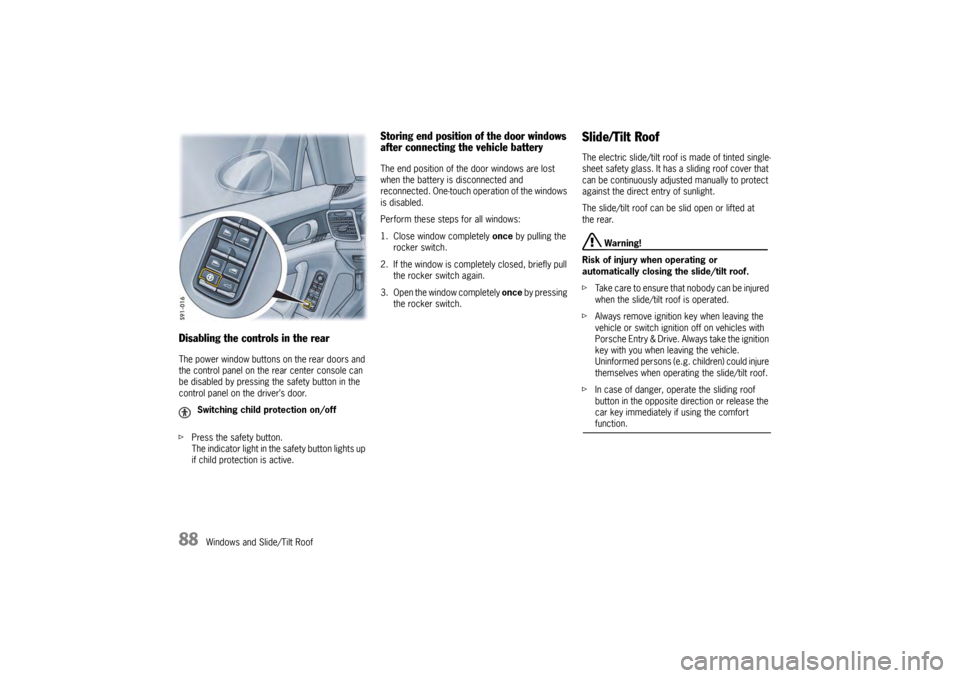
Disabling the controls in the rearThe power window buttons on the rear doors and
the control panel on the rear center console can
be disabled by pressing the safety button in the
control panel on the driver’s door.
fPress the safety button.
The indicator light in the safety button lights up
if child protection is active.
Storing end position of the door windows
after connecting the vehicle batteryThe end position of the door windows are lost
when the battery is disconnected and
reconnected. One-touch operation of the windows
is disabled.
Perform these steps for all windows:
1. Close window completely once by pulling the
rocker switch.
2. If the window is comple tely closed, briefly pull
the rocker switch again.
3. Open the window completely once by pressing
the rocker switch.
Slide/Tilt RoofThe electric slide/tilt roof is made of tinted single-
sheet safety glass. It has a sliding roof cover that
can be continuously adjusted manually to protect
against the direct entry of sunlight.
The slide/tilt roof can be slid open or lifted at
the rear.
Warning!
Risk of injury when operating or
automatically closing the slide/tilt roof.
f Take care to ensure that nobody can be injured
when the slide/tilt roof is operated.
f Always remove ignition key when leaving the
vehicle or switch ignition off on vehicles with
Porsche Entry & Drive. Always take the ignition
key with you when leaving the vehicle.
Uninformed persons (e.g. children) could injure
themselves when operating the slide/tilt roof.
f In case of danger, operate the sliding roof
button in the opposite di rection or release the
car key immediately if using the comfort function.
Switching child protection on/off
Page 140 of 343

138
Instrument Panel and Multi-Function Display
Vehicle Settings on the Multi-
Function DisplayDifferent settings can be adjusted in the
multi-function display on the instrument panel
depending on the vehicle equipment.
On vehicles with comfort memory, the settings are
stored on the car key or the person buttons in the
driver’s door.
For information on the comfort memory:
fPlease see the chapter “COMFORT MEMORY”
on page 40.
Selecting settings menu
Setting optionsThe following vehicle functions can be adapted
individually:
–“ Display ”
Adapt the appearance of the multi-function
display, see page 139.
–“ Light/Visibility ”
Adjust the vehicle lighting, wipers and
reversing options, see page 142.
–“ Locking ”
Adjust the locking settings, see page 145.
–“ Air conditioning ”
Adapt the air conditioning, see page 146.
–“ Date/time ”
Set the date and time, see page 147.
–“ Units ”
Set the units of measurement on the
instruments and display, see page 149.
–“ Language”
Set the language of the multi-function display
and the instrument panel, see page 150. –“
Volume ”
Adjust the volume of the warning and
information tones, see page 150.
–“ Steering wheel operation”
Change the MFS button assignment on the
multi-function steering wheel, see page 151.
–“ Reset ”
Reset to factory settings, see page 139.
Selecting setting options or activating
vehicle functionsA symbol positioned in front of a setting option
indicates whether the option is selected or
a vehicle function is activated.
Selecting one of several options
Option is selected.
Option is not selected.
Activating and deactivating functions Function is activated.
Function is deactivated.
1.Select
> “Vehicle ”
> “ Settings ”
and confirm.
Page 183 of 343
Driving and Driving Safety
181
Adaptive cruise control displayAll important information, messages and warnings
are displayed on the multi-function display in the
instrument panel.
“ACC” main menu
The adaptive cruise control display on the multi-
function display can be selected permanently
using the buttons on the multifunction steering
wheel or the control stalk at the bottom right of
the steering wheel.
For information on using the multi-function display:
f Please see the chapter “OPERATING THE
MULTI-FUNCTION DISPLAY IN THE
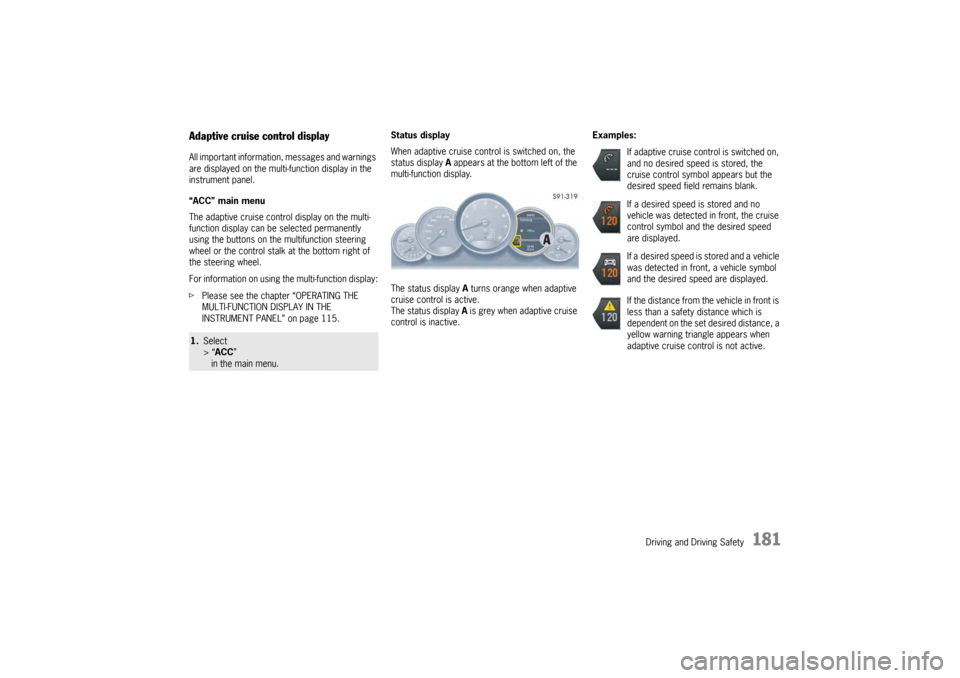
INSTRUMENT PANEL” on page 115. Status display
When adaptive cruise control is switched on, the
status display
A appears at the bottom left of the
multi-function display.
The status display A turns orange when adaptive
cruise control is active.
The status display A is grey when adaptive cruise
control is inactive. Examples:1.
Select
> “ACC ”
in the main menu.
If adaptive cruise control is switched on,
and no desired speed is stored, the
cruise control symbol appears but the
desired speed field remains blank.
If a desired speed is stored and no
vehicle was detected in front, the cruise
control symbol and the desired speed
are displayed.
If a desired speed is stored and a vehicle
was detected in front, a vehicle symbol
and the desired speed are displayed.
If the distance from the vehicle in front is
less than a safety distance which is
dependent on the set desired distance, a
yellow warning triangle appears when
adaptive cruise control is not active.