2009 PONTIAC G8 turn signal
[x] Cancel search: turn signalPage 123 of 356

Radio with Six-Disc CD Player
u(Volume/Mute):Turn to adjust
the volume. Press to immediately
stop the volume. While the volume
is off, MUTED displays.
To cancel Mute, do one of the
following:
Pressu.
Increase the radio volume.
Turn the radio off and on.
Finding a Station
BAND:Press BAND to select
between FM1, FM2, AM, XM1, XM2.
If the radio is in ASM (Auto Station
Memory) mode ASM appears on the
display and FM ASM, and AM ASM
can be selected.
r[(Tune):Press to tune the
radio frequency down or up. When
the XM Category setting is ON, only
stations in the chosen category can
be selected.
gl(Seek):Press to seek to the
previous or next station, or to select
the previous or next XM Category.
The radio can seek stations with a
weak or strong signal within the
selected band. Limit the automatic
seek from nding stations with a
weak or a strong signal by using
the Auto/Local/Distance feature.
See Auto/Local/Distance Selection,
for more information.
Auto/Local/Distant Selection:
The LO (Local) option reduces the
radio’s automatic seek tuning
sensitivity in FM and AM modes.
LO only allows the radio to seek
stations with a strong signal.
If a strong station cannot be found,
switch the radio to DX (Distant) so
that stations with weaker signals can
be found. The Auto (Automatic)
option will search for local stations
rst. If no stations can be found, the
radio searches for all stations.The Local/Distant feature has no
effect when the ASM search feature
is being used.
This feature does not function with
the XM radio stations.
To use Local/Distant on the radio
with a single CD player:
1. Press the volume knob to enter
the Option Menu.
2. Turn the volume knob until
SEEK SENS (seek sensitivity)
highlights.
3. Press the volume knob to enter
the SEEK SENS setting.
4. Turn the volume knob and
highlight either LO, DX, or AUTO.
5. Press the volume knob to
save and exit the setting.
6. Select the BACK option or wait
eight seconds to exit the menu.
Infotainment 6-5
Page 125 of 356

Setting Preset Stations
Up to 42 stations (six FM1, six FM2,
six AM, six FM ASM, six AM ASM,
six XM1, and six XM2), can be
programmed.
1. Press BAND to select FM1, FM2,
AM,XM1,orXM2.
2. Tune to a station.
3. For the radio with a single CD
player, press and hold one of
the six numbered pushbuttons
until the selected station displays
and a beep sounds.
4. For the radio with a six-disc CD
player, press and hold one of
the six softkeys until the selected
preset number displays and a
beep sounds.
5. Repeat the steps to store the
other presets.
6. Repeat the steps for the other
radio bands.ASM (Automatic Station Memory):
ASM searches and stores six FM
and six AM stations with the
strongest signal. To use ASM:
1. Press BAND to select FM or AM.
2. Press ASM for at least
two seconds until a beep
sounds. SEARCH displays
on the radio, followed by the
number of stations found.
3. The radio will automatically store
the six strongest stations found
as ASM presets.
Press the ASM button to alternate
between the ASM radio stations and
preset radio stations.
ASM displays on the radio when
using the ASM presets.
ASM does not delete previously
stored stations in FM1, FM2, or AM.
ASM does not function with XM
radio stations.
Setting the Tone (Bass/Treble)
The tone can be set independently
for each source: FM, AM, and CD.
The source must be active to set
the tone.
Bass and Treble can be adjusted
between−6 through +6.
To adjust the bass and treble on the
radio with a single CD player:
1. Press the volume knob to enter
the Option Menu, AUDIO is
highlighted.
2. Press the volume knob to enter
the AUDIO Menu.
3. Turn the volume knob until BASS
or TREBLE highlights.
4. Press the volume knob to enter
the BASS or TREBLE settings.
5. Turn the volume knob to adjust
the BASS or TREBLE setting.
6. Press the volume knob to save
and exit the setting.
7. Select the BACK option or wait
eight seconds to exit the menu.
Infotainment 6-7
Page 142 of 356
l(Forward):Press to go to the
next track or press
lmultiple times
until the desired track is reached.
g(Reverse):Press to go back to
the start of the current track or
press
gmultiple times until
the desired track is reached.
XM Radio Messages
XL (Explicit Language Channels):
These channels, or any others, can
be blocked at a customer’s request,
by calling 1-800-852-XMXM (9696).
XM Updating:The encryption code
in the receiver is being updated,
and no action is required. This
process should take no longer
than 30 seconds.
No XM Signal:The system is
functioning correctly, but the vehicle
is in a location that is blocking
the XM™ signal. When the vehicle
is moved into an open area, the
signal should return.Loading XM:The audio system is
acquiring and processing audio and
text data. No action is needed. This
message should disappear shortly.
Channel Off Air:This channel is
not currently in service. Tune
in to another channel.
Channel Unauth:This channel is
blocked or cannot be received
with your XM Subscription package.
Channel Unavail:This previously
assigned channel is no longer
assigned. Tune to another station.
If this station was one of the presets,
choose another station for that
preset button.
No Artist Info:No artist information
is available at this time on this
channel. The system is working
properly.
No Title Info:No song title
information is available at this time
on this channel. The system is
working properly.No CAT Info:No category
information is available at this time
on this channel. The system is
working properly.
No Information:No text or
informational messages are
available at this time on this
channel. The system is working
properly.
CAT Not Found:There are no
channels available for the selected
category. The system is working
properly.
XM Theftlocked:The XM™
receiver in your vehicle could have
previously been in another vehicle.
For security purposes, XM™
receivers cannot be swapped
between vehicles. If this message is
received after having your vehicle
serviced, check with your
dealer/retailer.
6-24 Infotainment
Page 154 of 356

Audio Steering Wheel
Controls
The vehicle has audio steering
wheel controls.
Some audio controls can be
adjusted at the steering wheel.
SRCE (Source):Press to select
between FM1, FM2, AM, CD, Front
AUX (auxiliary), or Rear AUX.
QR(Scroll Wheel Control):
Push to select the next disc in the
changer.
Turn the scroll wheel up or down to:
Select the next or previous
preset radio station.
Select the next or previous track.
%(Voice Recognition):For
vehicles with OnStar®or Bluetooth®
systems, press to interact with
those systems. SeeOnStar®
System on page 4-35and
Bluetooth®on page 6-25in this
manual for more information.
{(Call End):Press to end an
OnStar or Bluetooth phone call.
+−(Scroll Wheel Control):Turn
the scroll wheel control up or
down to increase or decrease the
volume. Press to mute the audio
system, press again to turn the
sound back on.
Radio Reception
Frequency interference and static
can occur during normal radio
reception if items such as cell phone
chargers, vehicle convenience
accessories, and external electronic
devices are plugged into the
accessory power outlet. If there is
interference or static, unplug the item
from the accessory power outlet.
AM
The range for most AM stations is
greater than for FM, especially at
night. The longer range can cause
station frequencies to interfere
with each other. For better radio
reception, most AM radio stations
boost the power levels during the
day, and then reduce these levels
during the night. Static can also
occur when things like storms and
power lines interfere with radio
reception. When this happens, try
reducing the treble on the radio.
FM Stereo
FM signals only reach about
10 to 40 miles (16 to 65 km).
Although the radio has a built-in
electronic circuit that automatically
works to reduce interference,
some static can occur, especially
around tall buildings or hills, causing
the sound to fade in and out.
6-36 Infotainment
Page 155 of 356
XM Satellite Radio Service
XM Satellite Radio Service gives
digital radio reception from
coast-to-coast in the 48 contiguous
United States, and in Canada.
Just as with FM, tall buildings or hills
can interfere with satellite radio
signals, causing the sound to fade
in and out. In addition, traveling
or standing under heavy foliage,
bridges, garages, or tunnels may
cause loss of the XM signal for
a period of time.
Cellular Phone Usage
Cellular phone usage may cause
interference with the vehicle’s radio.
This interference may occur when
making or receiving phone calls,
charging the phone’s battery, or
simply having the phone on.
This interference causes an
increased level of static while
listening to the radio. If static is
received while listening to the radio,
unplug the cellular phone and
turn it off.
Fixed Mast Antenna
The AM-FM antenna is located on
the roof of the vehicle.
Driving through an automatic car
wash without removing the antenna
could damage it.
To remove the antenna, turn it
counterclockwise. To replace the
antenna, turn it clockwise until hand
tightened.
XM™ Satellite Radio
Antenna System
The XM Satellite Radio antenna is
located on the roof or the rear of the
vehicle. Keep the antenna clear of
obstructions for clear radio reception.
Infotainment 6-37
Page 205 of 356

Vehicle Service
and Care
Service
Service...............................9-2
Accessories and
Modications.....................9-3
California Proposition 65
Warning............................9-3
California Perchlorate
Materials Requirements.....9-3
Doing Your Own
Service Work....................9-4
Adding Equipment to the
Outside of the Vehicle......9-4
Owner Checks
Owner Checks....................9-5
Hood Release.....................9-5
Engine Compartment
Overview...........................9-6
Engine Oil..........................9-8
Engine Oil Life System.....9-10
Engine Air Cleaner/Filter. . . .9-11
Cooling System.................9-13
Engine Coolant.................9-15
Pressure Cap....................9-19
Engine Overheating...........9-20
Power Steering Fluid.........9-21
Windshield Washer Fluid. . . .9-23
Windshield Wiper Blade
Replacement...................9-24
Brakes..............................9-25
Battery..............................9-28
Headlamp Aiming
Headlamp Aiming..............9-28
Bulb Replacement
Bulb Replacement.............9-31
Halogen Bulbs..................9-31
Headlamps and Parking
Lamps.............................9-31
Front Turn Signal Lamps. . .9-33
Taillamps..........................9-34
License Plate Lamp..........9-35
Replacement Bulbs...........9-35
Electrical System
Add-On Electrical
Equipment.......................9-36
Headlamp Wiring..............9-36
Windshield Wiper Fuses. . . .9-36
Power Windows and
Other Power Options.......9-36
Instrument Panel
Fuse Block......................9-36
Engine Compartment
Fuse Block......................9-38
Rear Compartment
Fuse Block......................9-41
Tires
Tires.................................9-42
Tire Sidewall Labeling.......9-42
Tire Terminology and
Denitions.......................9-46
Ination - Tire Pressure. . . .9-49
High-Speed Operation.......9-51
Tire Pressure Monitor
System............................9-52
Tire Pressure Monitor
Operation........................9-54
Tire Inspection and
Rotation..........................9-57
When It Is Time for
New Tires.......................9-59
Buying New Tires.............9-59
Different Size Tires
and Wheels.....................9-61
Vehicle Service and Care 9-1
Page 235 of 356

Bulb Replacement
For the proper type of replacement
bulbs, seeReplacement Bulbs
on page 9-35.
For any bulb changing procedure
not listed in this section, contact
your dealer/retailer.
Halogen Bulbs
{CAUTION
Halogen bulbs have pressurized
gas inside and can burst if you
drop or scratch the bulb. You or
others could be injured. Be sure
to read and follow the instructions
on the bulb package.
Headlamps and
Parking Lamps
To replace one of these bulbs:
If the front turn signal lamp
or parking lamp needs to be
changed, see your dealer/retailer.
A. Front Turn Signal Lamp/
Parking Lamp
B. Low Beam Headlamp
C. High Beam Headlamp1. Open the hood. SeeHood
Release on page 9-5.
2. Remove the radiator support
by turning the head screws
counterclockwise and then
pulling them straight out.
3. For the passenger side pull up
on the coolant bottle ller neck
to remove it and place it to
one side.
Let the ller neck drain before
pulling it all the way out. Place a
clean towel over the opening
of the coolant bottle after
removing it.
Vehicle Service and Care 9-31
Page 237 of 356
10. Reconnect the wiring harness
to the bulb socket.
11. Push the bulb socket into the
lamp assembly and turn it
clockwise to lock it into place.
12. Turn the dust cap clockwise to
lock it into place.
13. For the driver side reinstall the
air cleaner/lter cover.
14. For the passenger side reinstall
the coolant bottle ller neck.
15. Reinstall the radiator support
screws.Front Turn Signal Lamps
Front Turn Signal Lamps
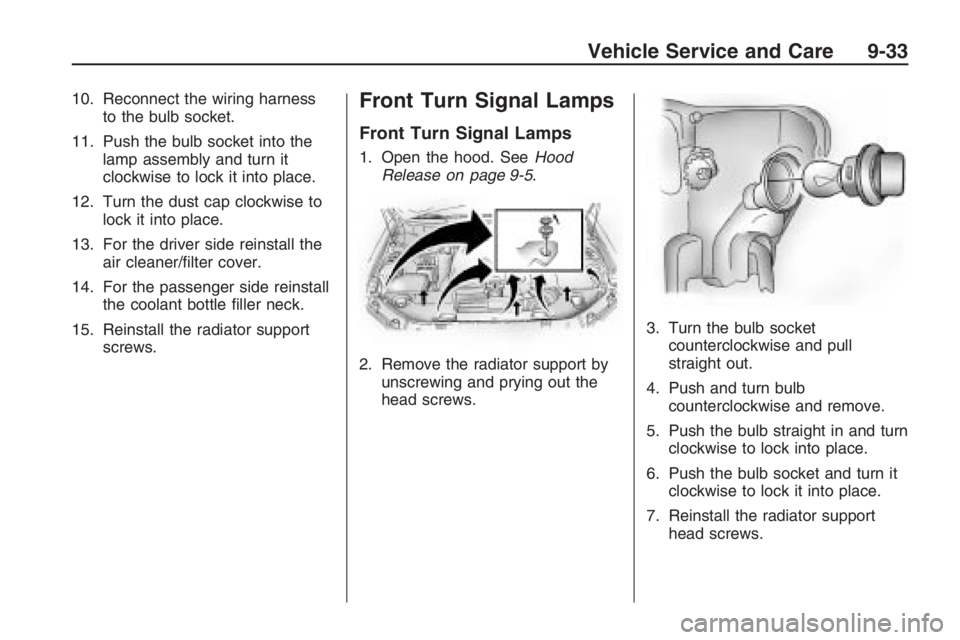
1. Open the hood. SeeHood
Release on page 9-5.
2. Remove the radiator support by
unscrewing and prying out the
head screws.3. Turn the bulb socket
counterclockwise and pull
straight out.
4. Push and turn bulb
counterclockwise and remove.
5. Push the bulb straight in and turn
clockwise to lock into place.
6. Push the bulb socket and turn it
clockwise to lock it into place.
7. Reinstall the radiator support
head screws.
Vehicle Service and Care 9-33