2009 PONTIAC G6 DIC
[x] Cancel search: DICPage 179 of 410

CHECK TIRE PRESS (Pressure)
On vehicles with the Tire Pressure Monitor System
(TPMS), this message displays when the pressure in
one or more of the vehicle’s tires needs to be checked.
If a tire pressure message appears on the DIC, stop
as soon as you can. Have the tire pressures checked
and set to those shown on the Tire Loading Information
label. SeeTires on page 5-59,Loading the Vehicle
on page 4-20, andInflation - Tire Pressure on
page 5-67. The DIC also shows the tire pressure
values. SeeDIC Operation and Displays on page 3-43.
If the tire pressure is low, the low tire pressure
warning light comes on. SeeTire Pressure Light on
page 3-37.
DOOR AJAR
This message displays if one or more of the vehicle’s
doors are not closed properly. Make sure that the
door(s) are closed completely.
ENGINE DISABLED
This message displays if the starting of the engine is
disabled. Have your vehicle serviced by your
dealer/retailer immediately.
ENG (Engine) PWR (Power) REDUCED
This message displays to inform you that the vehicle
has reduced engine power to avoid damaging the
engine. Reduced engine power can affect the vehicle’s
ability to accelerate. If this message is on, but there
is no reduction in performance, proceed to your
destination. The performance may be reduced the next
time the vehicle is driven. The vehicle may be driven
at a reduced speed while this message is on, but
acceleration and speed may be reduced. Anytime this
message stays on, the vehicle should be taken to
your dealer/retailer for service as soon as possible.
ICE POSSIBLE
This message displays when the outside air temperature
is cold enough to create icy road conditions. Adjust
your driving accordingly.
KEY FOB BATT (Battery) LOW
This message displays if the Remote Keyless Entry
(RKE) transmitter battery is low. Replace the battery in
the transmitter. See “Battery Replacement” under
Remote Keyless Entry (RKE) System Operation on
page 2-4.
3-47
Page 182 of 410

TOP TOO COLD
If your vehicle has a retractable hardtop, this message
displays when the retractable hardtop button is
pressed and the hardtop pump motor temperature is
too cold. Wait for the hardtop pump motor to warm up
before using the retractable hardtop. SeeLowering
the Retractable Hardtop on page 2-44andRaising the
Retractable Hardtop on page 2-47for more information.
TRUNK AJAR
This message displays when the trunk is not closed
completely. Make sure that the trunk is closed
completely. SeeTrunk on page 2-12for more
information.
DIC Vehicle Personalization
The following personalization options may appear on your
vehicle’s audio display by pressing the MENU button.
The default settings for the features were set when your
vehicle left the factory, but may have been changed
from their default state since that time.
OIL LIFE RESET:When this option is displayed, you
can reset the engine oil life system. To reset the system,
seeEngine Oil Life System on page 5-24.UNITS:When UNITS appears on the display, press the
enter button to move between METRIC (default in
Canada) or ENGLISH (default in United States).
When you have made your choice, press the MENU
button to record your selection.
If you choose English, all information will be displayed
in English units.
If you choose metric, all information will be displayed in
metric units.
The unit measurement will also change the trip odometer,
temperature, and average fuel economy displays.
TIRE LEARN?:This option is available on vehicles
without the Remote Keyless Entry (RKE) system.
After rotating the tires or after replacing a tire or sensor,
the Tire Pressure Monitor System (TPMS) must
re-learn the tire positions. To re-learn the tire positions,
seeTire Pressure Monitor System on page 5-69.
SeeTire Inspection and Rotation on page 5-76and
DIC Warnings and Messages on page 3-46for more
information.
REMOTE START:If your vehicle has this feature,
the remote start option can be enabled or disabled.
When REMOTE START appears on the display, press
the enter button to move between OFF and ON
(default). When you have made your choice, press the
MENU button to record your selection.
3-50
Page 184 of 410

EXT (Exterior) LIGHTS:If your vehicle has Remote
Keyless Entry (RKE), this option, which allows the
vehicle’s exterior perimeter lighting to turn on each time
the unlock button on the RKE transmitter is pressed,
can be enabled or disabled. When EXT LIGHTS appears
on the display, press the enter button to move between
ON (default) and OFF. When you have made your
choice, press the MENU button to record your selection.
LANGUAGE:To select your choice of language,
press the enter button to move between the optional
languages.
The languages are ENGLISH (default), FRENCH,
SPANISH, and GERMAN.
Choosing a language will display all of the information
on the DIC in the desired language.
When you have made your choice, press the MENU
button for at least one second to record your selection.Audio System(s)
Determine which radio the vehicle has and read the
following pages to become familiar with its features.
{CAUTION:
Taking your eyes off the road for extended periods
could cause a crash resulting in injury or death to
you or others. Do not give extended attention to
entertainment tasks while driving.
This system provides access to many audio and non
audio listings.
3-52
Page 197 of 410

After a track has been deleted, the remaining tracks are
moved up the list. When another track is added to
the song list, the track is added to the end of the list.
To delete the entire song list, perform the following steps:
1. Turn the CD player on.
2. Press the
Rbutton to turn song list on.
S-LIST displays.
3. Press and hold this button for more than
four seconds. A beep sounds, followed by
two beeps after two seconds, and a nal beep
sounds after four seconds. SONG LIST EMPTY
displays indicating that the song list has been
deleted.
If a CD is ejected, and the song list contains saved
tracks from that CD, those tracks are automatically
deleted from the song list. Any additional tracks saved
to the song list are added to the bottom of the list.
To end song list mode, press the song list button.
One beep sounds and S-LIST disappears from the
display.
CD Messages
CHECK CD:If this message displays and/or the CD
comes out, it could be for one of the following reasons:
It is very hot. When the temperature returns to
normal, the CD should play.
You are driving on a very rough road. When the
road becomes smoother, the CD should play.
The CD is dirty, scratched, wet, or upside down.
The air is very humid. If so, wait about an hour and
try again.
There could have been a problem while burning
the CD.
The label could be caught in the CD player.
If the CD is not playing correctly, for any other reason,
try a known good CD.
If any error occurs repeatedly or if an error cannot be
corrected, contact your dealer/retailer. If the radio
displays an error message, write it down and provide it
to your dealer/retailer when reporting the problem.
3-65
Page 205 of 410

Drunk Driving
{CAUTION:
Drinking and then driving is very dangerous. Your
reexes, perceptions, attentiveness, and judgment
can be affected by even a small amount of alcohol.
You can have a serious — or even fatal — collision
if you drive after drinking. Do not drink and drive or
ride with a driver who has been drinking. Ride home
in a cab; or if you are with a group, designate a
driver who will not drink.
Death and injury associated with drinking and driving is
a global tragedy.
Alcohol affects four things that anyone needs to drive a
vehicle: judgment, muscular coordination, vision, and
attentiveness.
Police records show that almost 40 percent of all motor
vehicle-related deaths involve alcohol. In most cases,
these deaths are the result of someone who was drinking
and driving. In recent years, more than 17,000 annual
motor vehicle-related deaths have been associated with
the use of alcohol, with about 250,000 people injured.For persons under 21, it is against the law in every
U.S. state to drink alcohol. There are good medical,
psychological, and developmental reasons for
these laws.
The obvious way to eliminate the leading highway
safety problem is for people never to drink alcohol
and then drive.
Medical research shows that alcohol in a person’s
system can make crash injuries worse, especially
injuries to the brain, spinal cord, or heart. This means
that when anyone who has been drinking — driver
or passenger — is in a crash, that person’s chance of
being killed or permanently disabled is higher than if the
person had not been drinking.
Control of a Vehicle
The following three systems help to control the vehicle
while driving — brakes, steering, and accelerator.
At times, as when driving on snow or ice, it is easy to
ask more of those control systems than the tires
and road can provide. Meaning, you can lose control of
the vehicle. SeeTraction Control System (TCS) on
page 4-7andStabiliTrak
®System on page 4-6.
Adding non-dealer/non-retailer accessories can affect
vehicle performance. SeeAccessories and Modifications
on page 5-4.
4-3
Page 211 of 410

Steering
Electric Power Steering
If the vehicle has the electric power steering system and
the engine stalls while driving, the power steering assist
system will continue to operate until you are able to stop
the vehicle. If power steering assist is lost because the
electric power steering system is not functioning, the
vehicle can be steered but it will take more effort.
If you turn the steering wheel in either direction several
times until it stops, or hold the steering wheel in the
stopped position for an extended amount of time, you
may notice a reduced amount of power steering assist.
The normal amount of power steering assist should return
shortly after a few normal steering movements.
The electric power steering system does not require
regular maintenance. If you suspect steering system
problems, contact your dealer/retailer for service repairs.
SeeDIC Warnings and Messages on page 3-46.
Hydraulic Power Steering
If the vehicle has the hydraulic power steering system
and power steering assist is lost because the engine
stops or the power steering system is not functioning,
the vehicle can be steered but it will take more effort.
Steering Tips
It is important to take curves at a reasonable speed.
Traction in a curve depends on the condition of the tires
and the road surface, the angle at which the curve is
banked, and vehicle speed. While in a curve, speed is
the one factor that can be controlled.
If there is a need to reduce speed, do it before entering
the curve, while the front wheels are straight.
Try to adjust the speed so you can drive through the
curve. Maintain a reasonable, steady speed. Wait
to accelerate until out of the curve, and then accelerate
gently into the straightaway.
4-9
Page 213 of 410
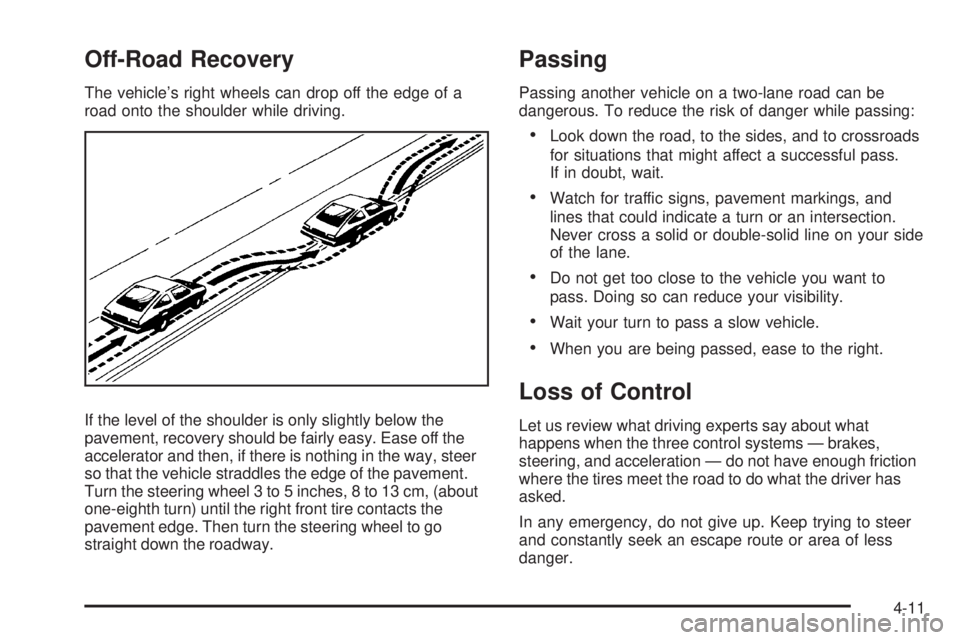
Off-Road Recovery
The vehicle’s right wheels can drop off the edge of a
road onto the shoulder while driving.
If the level of the shoulder is only slightly below the
pavement, recovery should be fairly easy. Ease off the
accelerator and then, if there is nothing in the way, steer
so that the vehicle straddles the edge of the pavement.
Turn the steering wheel 3 to 5 inches, 8 to 13 cm, (about
one-eighth turn) until the right front tire contacts the
pavement edge. Then turn the steering wheel to go
straight down the roadway.
Passing
Passing another vehicle on a two-lane road can be
dangerous. To reduce the risk of danger while passing:
Look down the road, to the sides, and to crossroads
for situations that might affect a successful pass.
If in doubt, wait.
Watch for traffic signs, pavement markings, and
lines that could indicate a turn or an intersection.
Never cross a solid or double-solid line on your side
of the lane.
Do not get too close to the vehicle you want to
pass. Doing so can reduce your visibility.
Wait your turn to pass a slow vehicle.
When you are being passed, ease to the right.
Loss of Control
Let us review what driving experts say about what
happens when the three control systems — brakes,
steering, and acceleration — do not have enough friction
where the tires meet the road to do what the driver has
asked.
In any emergency, do not give up. Keep trying to steer
and constantly seek an escape route or area of less
danger.
4-11
Page 238 of 410

Leaving After Parking on a Hill
1. Apply and hold the brake pedal while you:
start the engine,
shift into a gear, and
release the parking brake.
2. Let up on the brake pedal.
3. Drive slowly until the trailer is clear of the chocks.
4. Stop and have someone pick up and store the
chocks.
Maintenance When Trailer Towing
The vehicle needs service more often when pulling a
trailer. SeeScheduled Maintenance on page 6-4for more
information. Things that are especially important in traileroperation are automatic transmission uid, engine oil,
belts, cooling system and brake system. It is a good
idea to inspect these before and during the trip.
Check periodically to see that all hitch nuts and bolts
are tight.
Engine Cooling When Trailer Towing
The cooling system may temporarily overheat during
severe operating conditions. SeeEngine Overheating on
page 5-37.
Changing a Tire When Trailer Towing
If the vehicle gets a at tire while towing a trailer,
be sure to secure the trailer and disconnect it from the
vehicle before changing the tire.
4-36