2009 PEUGEOT 4007 ESP
[x] Cancel search: ESPPage 180 of 230
11
AUDIO EQUIPMENT and TELEMATICS
CD PLAYER CD PLAYER
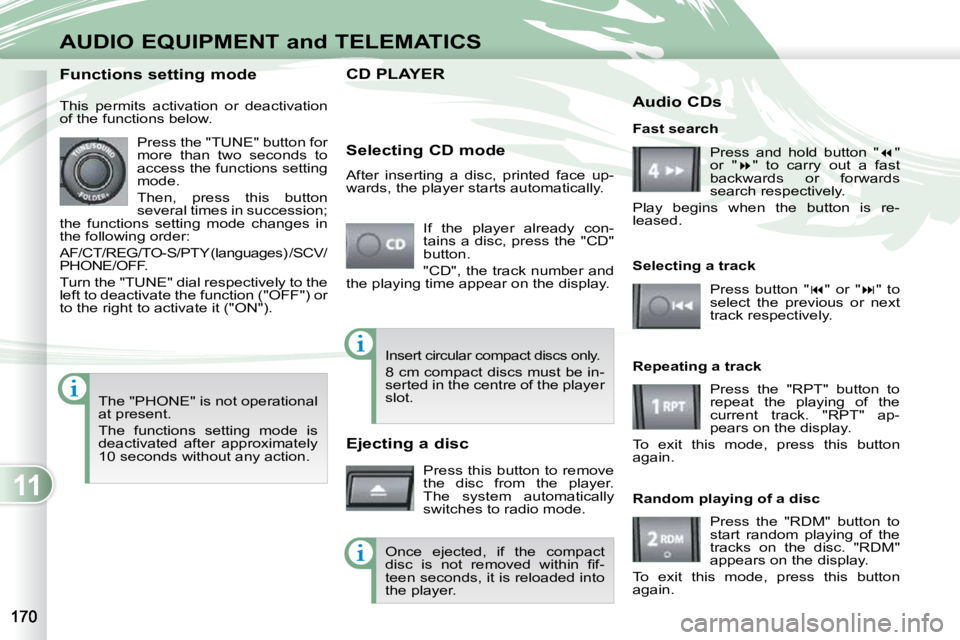
If the player already con-
tains a disc, press the "CD"
button.
"CD", the track number and
the playing time appear on the display.
Functions setting mode
This permits activation or deactivation
of the functions below.
Press the "TUNE" button for
more than two seconds to
access the functions setting
mode.
Then, press this button
several times in succession;
the functions setting mode changes in
the following order:
AF/CT/REG/TO-S/PTY (languages) /SCV/
PHONE/OFF.
Turn the "TUNE" dial respectively to the
left to deactivate the function ("OFF") or
to the right to activate it ("ON").
The "PHONE" is not operational
at present.
The functions setting mode is
deactivated after approximately
10 seconds without any action. Selecting CD mode
After inserting a disc, printed face up-
wards, the player starts automatically.
Ejecting a disc
Press this button to remove
the disc from the player.
The system automatically
switches to radio mode. Fast search
Press and hold button " "
or " " to carry out a fast
backwards or forwards
search respectively.
Play begins when the button is re-
leased.
Selecting a track
Press button " " or " " to
select the previous or next
track respectively.
Repeating a track Press the "RPT" button to
repeat the playing of the
current track. "RPT" ap-
pears on the display.
To exit this mode, press this button
again.
Random playing of a disc
Press the "RDM" button to
start random playing of the
tracks on the disc. "RDM"
appears on the display.
To exit this mode, press this button
again.
Insert circular compact discs only.
8 cm compact discs must be in-
serted in the centre of the player
slot.
Once ejected, if the compact
disc is not removed within fi f-
teen seconds, it is reloaded into
the player. Audio CDs
Page 181 of 230
11
AUDIO EQUIPMENT and TELEMATICS
CD PLAYER CD PLAYER
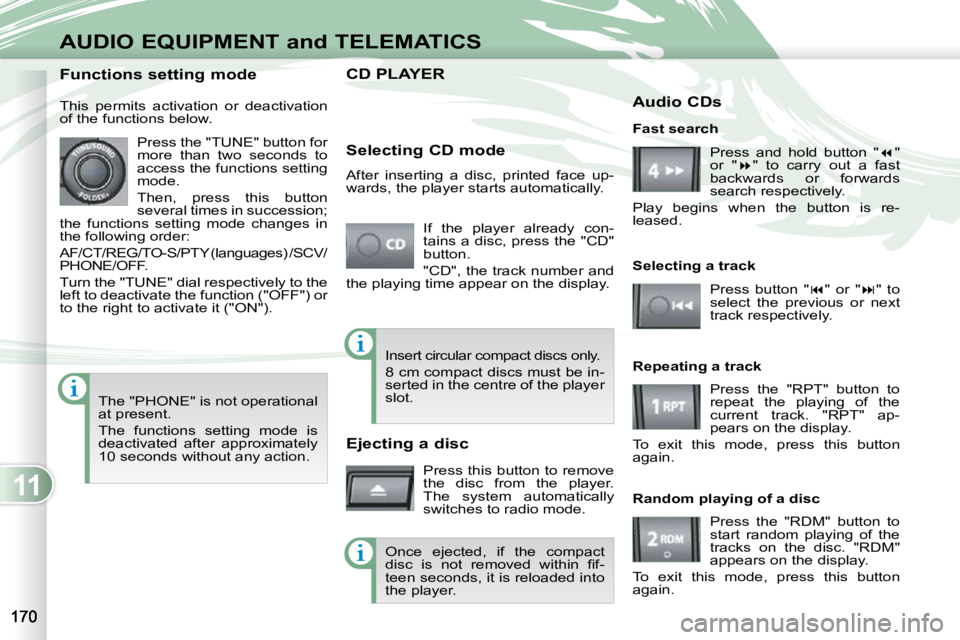
If the player already con-
tains a disc, press the "CD"
button.
"CD", the track number and
the playing time appear on the display.
Functions setting mode
This permits activation or deactivation
of the functions below.
Press the "TUNE" button for
more than two seconds to
access the functions setting
mode.
Then, press this button
several times in succession;
the functions setting mode changes in
the following order:
AF/CT/REG/TO-S/PTY (languages) /SCV/
PHONE/OFF.
Turn the "TUNE" dial respectively to the
left to deactivate the function ("OFF") or
to the right to activate it ("ON").
The "PHONE" is not operational
at present.
The functions setting mode is
deactivated after approximately
10 seconds without any action. Selecting CD mode
After inserting a disc, printed face up-
wards, the player starts automatically.
Ejecting a disc
Press this button to remove
the disc from the player.
The system automatically
switches to radio mode. Fast search
Press and hold button " "
or " " to carry out a fast
backwards or forwards
search respectively.
Play begins when the button is re-
leased.
Selecting a track
Press button " " or " " to
select the previous or next
track respectively.
Repeating a track Press the "RPT" button to
repeat the playing of the
current track. "RPT" ap-
pears on the display.
To exit this mode, press this button
again.
Random playing of a disc
Press the "RDM" button to
start random playing of the
tracks on the disc. "RDM"
appears on the display.
To exit this mode, press this button
again.
Insert circular compact discs only.
8 cm compact discs must be in-
serted in the centre of the player
slot.
Once ejected, if the compact
disc is not removed within fi f-
teen seconds, it is reloaded into
the player. Audio CDs
Page 182 of 230
11
AUDIO EQUIPMENT and TELEMATICS
MP3/TAG ID3 CD
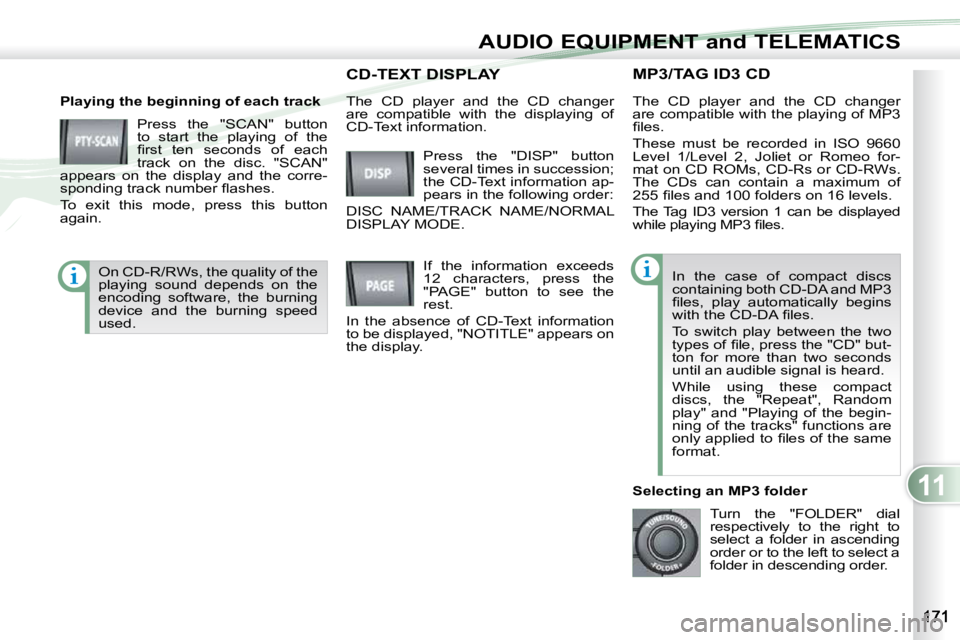
Playing the beginning of each track Press the "SCAN" button
to start the playing of the
fi rst ten seconds of each
track on the disc. "SCAN"
appears on the display and the corre-
sponding track number fl ashes.
To exit this mode, press this button
again. The CD player and the CD changer
are compatible with the playing of MP3
fi les.
These must be recorded in ISO 9660
Level 1/Level 2, Joliet or Romeo for-
mat on CD ROMs, CD-Rs or CD-RWs.
The CDs can contain a maximum of
255 fi les and 100 folders on 16 levels.
The Tag ID3 version 1 can be displayed
while playing MP3 fi les.
In the case of compact discs
containing both CD-DA and MP3
fi les, play automatically begins
with the CD-DA fi les.
To switch play between the two
types of fi le, press the "CD" but-
ton for more than two seconds
until an audible signal is heard.
While using these compact
discs, the "Repeat", Random
play" and "Playing of the begin-
ning of the tracks" functions are
only applied to fi les of the same
format.
Selecting an MP3 folder Turn the "FOLDER" dial
respectively to the right to
select a folder in ascending
order or to the left to select a
folder in descending order.
Press the "DISP" button
several times in succession;
the CD-Text information ap-
pears in the following order:
DISC NAME/TRACK NAME/NORMAL
DISPLAY MODE.
CD-TEXT DISPLAY CD-TEXT DISPLAY
If the information exceeds
12 characters, press the
"PAGE" button to see the
rest.
In the absence of CD-Text information
to be displayed, "NOTITLE" appears on
the display.
The CD player and the CD changer
are compatible with the displaying of
CD-Text information.
On CD-R/RWs, the quality of the
playing sound depends on the
encoding software, the burning
device and the burning speed
used.
Page 185 of 230
11
AUDIO EQUIPMENT and TELEMATICS
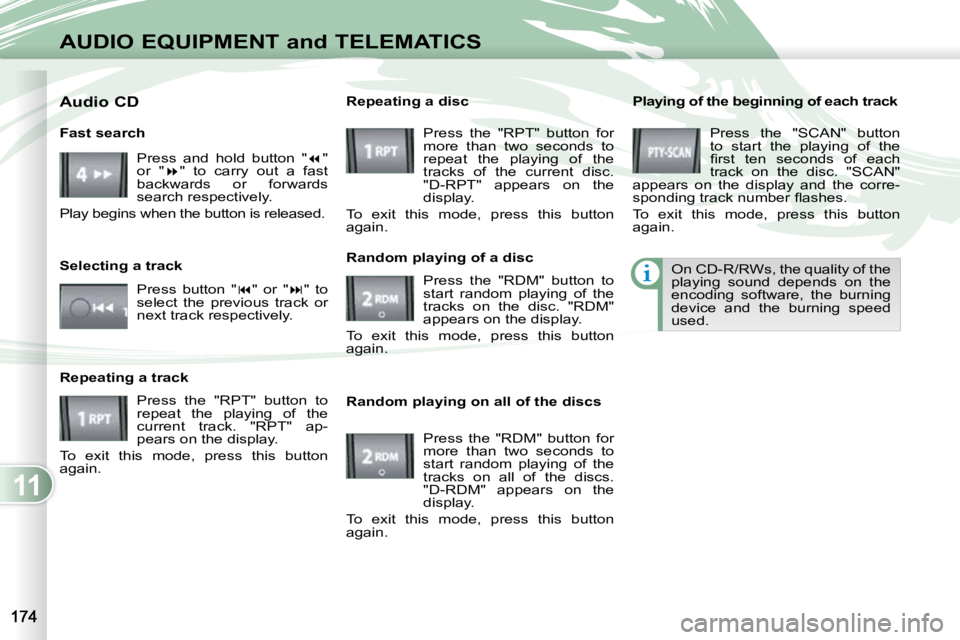
Playing of the beginning of each track Press the "SCAN" button
to start the playing of the
fi rst ten seconds of each
track on the disc. "SCAN"
appears on the display and the corre-
sponding track number fl ashes.
To exit this mode, press this button
again.
On CD-R/RWs, the quality of the
playing sound depends on the
encoding software, the burning
device and the burning speed
used.
Random playing on all of the discs Press the "RDM" button for
more than two seconds to
start random playing of the
tracks on all of the discs.
"D-RDM" appears on the
display.
To exit this mode, press this button
again.
Fast search
Press and hold button " "
or " " to carry out a fast
backwards or forwards
search respectively.
Play begins when the button is released.
Selecting a track
Press button " " or " " to
select the previous track or
next track respectively.
Repeating a track Press the "RPT" button to
repeat the playing of the
current track. "RPT" ap-
pears on the display.
To exit this mode, press this button
again. Random playing of a disc
Press the "RDM" button to
start random playing of the
tracks on the disc. "RDM"
appears on the display.
To exit this mode, press this button
again.
Repeating a disc
Press the "RPT" button for
more than two seconds to
repeat the playing of the
tracks of the current disc.
"D-RPT" appears on the
display.
To exit this mode, press this button
again.
Audio CD
Page 218 of 230
11
AUDIO EQUIPMENT and TELEMATICS
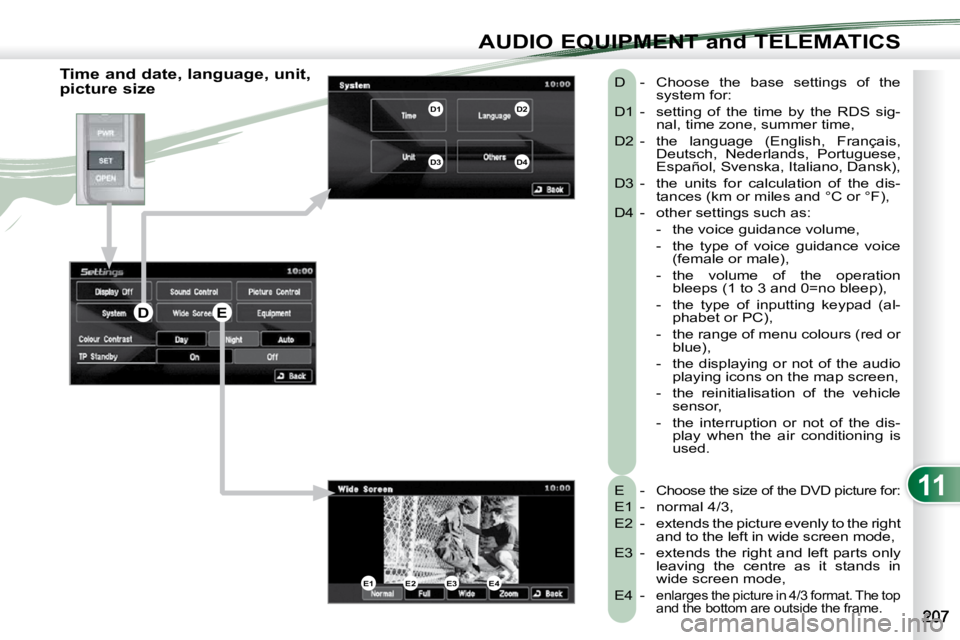
Time and date, language, unit,
picture size E -
Choose the size of the DVD picture for:
E1 - normal 4/3,
E2 - extends the picture evenly to the right and to the left in wide screen mode,
E3 - extends the right and left parts only leaving the centre as it stands in
wide screen mode,
E4 -
enlarges the picture in 4/3 format. The top
and the bottom are outside the frame.
D - Choose the base settings of the system for:
D1 - setting of the time by the RDS sig- nal, time zone, summer time,
D2 - the language (English, Français, Deutsch, Nederlands, Portuguese,
Español, Svenska, Italiano, Dansk),
D3 - the units for calculation of the dis- tances (km or miles and °C or °F),
D4 - other settings such as: - the voice guidance volume,
- the type of voice guidance voice (female or male),
- the volume of the operation bleeps (1 to 3 and 0=no bleep),
- the type of inputting keypad (al- phabet or PC),
- the range of menu colours (red or blue),
- the displaying or not of the audio playing icons on the map screen,
- the reinitialisation of the vehicle sensor,
- the interruption or not of the dis- play when the air conditioning is
used.
E1E2E3E4
D1D2
D3D4
DE
Page 227 of 230
11
AUDIO EQUIPMENT and TELEMATICS
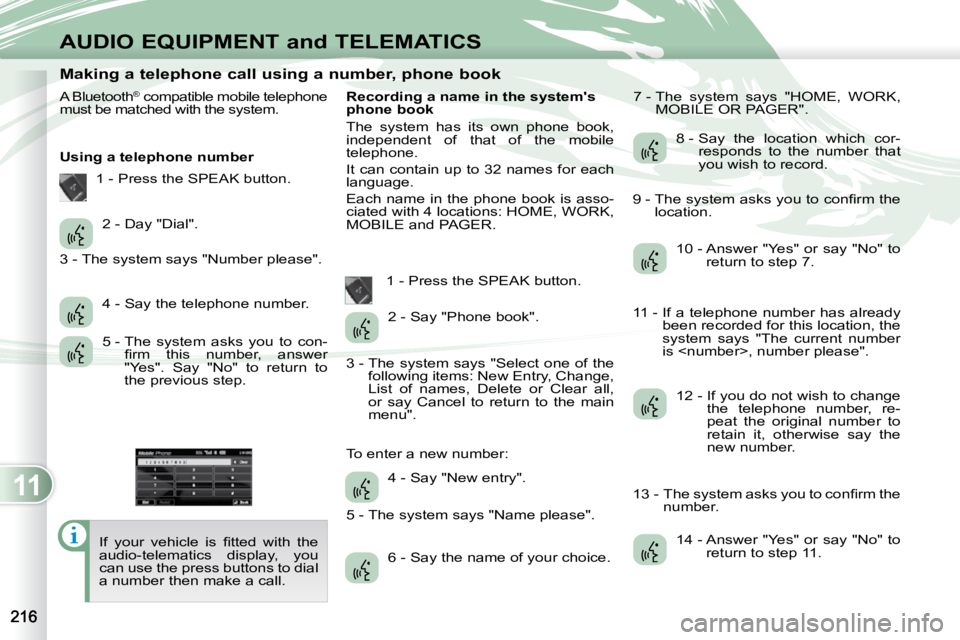
Making a telephone call using a number, phone book
A Bluetooth ®
compatible mobile telephone
must be matched with the system.
Using a telephone number
If your vehicle is fi tted with the
audio-telematics display, you
can use the press buttons to dial
a number then make a call. Recording a name in the system's
phone book
The system has its own phone book,
independent of that of the mobile
telephone.
It can contain up to 32 names for each
language.
Each name in the phone book is asso-
ciated with 4 locations: HOME, WORK,
MOBILE and PAGER.
1 - Press the SPEAK button. 7 - The system says "HOME, WORK,
MOBILE OR PAGER".
2 - Day "Dial".
4 - Say the telephone number.
5 - The system asks you to con- fi rm this number, answer
"Yes". Say "No" to return to
the previous step. 2 - Say "Phone book".
4 - Say "New entry".
6 - Say the name of your choice. 8 - Say the location which cor-
responds to the number that
you wish to record.
10 - Answer "Yes" or say "No" to return to step 7.
12 - If you do not wish to change the telephone number, re-
peat the original number to
retain it, otherwise say the
new number.
14 - Answer "Yes" or say "No" to return to step 11.
1 - Press the SPEAK button.
3 - The system says "Number please".
3 - The system says "Select one of the following items: New Entry, Change,
List of names, Delete or Clear all,
or say Cancel to return to the main
menu".
5 - The system says "Name please".
To enter a new number: 9 - The system asks you to confi rm the
location.
11 - If a telephone number has already been recorded for this location, the
system says "The current number
is
13 - The system asks you to confi rm the number.
Page 228 of 230
11
AUDIO EQUIPMENT and TELEMATICS
Making a telephone call using a name in the phone book, receiving a call
Using a name in the system's phone
book
The name must be recorded in the sys-
tem's phone book. 8 - Answer "Yes" or say "No" to
return to step 4.
Redialling the last number Receiving a call
The telephone ring is transmitted on the
speaker by the front passenger's seat.
If an audio source (CD, radio, ...) is in
operation when the call is received, it is
placed on mute and only the incoming
call is heard.
When the ignition switch is in the ACC
or ON position, the audio system is ac-
tivated automatically if an incoming call
is received, even if it was originally off.
1 - Press the PICK UP button.
At the end of the call, the audio system
returns to its previous status.
1 - Press the SPEAK button.
2 - Say "Call".
4 - Say the name of the person that you wish to call.
6 - Say the location correspond- ing to the number that you
wish to call. 1 - Press the SPEAK button.
2 - Say "Redial".
3 - The system says "Name please".
5 - If several telephone numbers have
been recorded for this person, the
system says "Do you wish to call
{pager}?"
7 - The system request confi rmation of the name. 9 - The system says "Call to