Page 98 of 284

92 Instruments, controls
Picture no: 18401s.tif
Speed warning
With the "Personalised key" function, P6,
3 39, 341, a particular top speed can be
assigned to each vehicle key. When this
speed is exceeded, a warning buzzer
sounds.
This function is programmed in the
kilometre display:
z ignition off, key in ignition switch,
z pull turn signal stalk and wiper stalk
simultaneously to the steering wheel
until you hear a confirmation signal
(approx. 3 seconds),
z the kilometre display shows P1,
z push down the turn signal stalk (left) until
P6 appears,
Picture no: 18402s.tif
zpush the wiper stalk (right) up until the
desired speed appears in increments
of 10,
z to reduce the speed or switch off ( OFF),
push the wiper stalk down,
z pull turn signal st alk and wiper stalk
simultaneously to the steering wheel
until you hear a confirmation signal
(approx. 3 seconds).
This function can be programmed
differently for each vehicle key.
Personalised key 339, cruise control 3160.
Picture no: 18406s.tif
Trip computer display in
instrument panel
3
The trip computer provides information on
driving data, which is continually recorded
and evaluated electronically.
After switching on the ignition, the last
function displayed appears. To select a
different function, rotate the rotary switch
on the wiper stalk briefly up i or down
h and then let go. The functions will be
called one after the other.
To reset a value or confirm a warning
message, press the button 0 on the wiper
stalk.
Back to overview
Page 99 of 284

93
Instruments, controls
Picture no: 18436s.tif
Functions:
zRange
z Instantaneous consumption
z Distance travelled
z Average speed
z Effective consumption
z Average consumption
z Stop watch
To select, rotate the rotary switch on the
wiper stalk briefly up i or down h for
each function and then let go. The
functions will be called one after the other. Range
Range is calculated fr
om current fuel tank
content and instantaneous consumption.
The display shows average values.
After refuelling, the vehicle updates the
range automatically after a brief delay.
When there is insufficient fuel in the tank
for more than 30 km, the warning REFILL
appears on the display.
Confirm the warning message by pressing 0
on the wiper stalk.
Instantaneous consumption
Display of current consumption. At low
speeds, consumption per hour is displayed.
Distance travelled
Display of distance travelled. The
measurement can be reset at any time.
Average speed
Display of aver age speed. The
measurement can be reset at any time.
Stoppages in the journey with the ignition
off are not included in the calculations. Effective consumption
Display of fuel consumed. The
measurement can be reset at any time.
Average consumption
Display of average
consumption. The
measurement can be reset at any time.
Restart trip computer information
Select the desired trip computer function:
rotate the rotary switch on the wiper stalk
briefly up i or down h for each function
and then let go. To reset a value to zero,
hold down the button 0 on the wiper stalk
for more than three seconds: this restarts
measurement. To reset all functions at the
same time, hold down the button 0 for
more than 6 seconds.
All trip computer information, apart from
range and instantaneous consumption,
can be reset.
Stop watch
Select function using rotary
switch iorh ,
push button 0: start/stop
for longer than
three seconds: reset to zero
Back to overview
Page 100 of 284

94 Instruments, controls
Picture no: 17913s.tif
Information display in the
centre console Triple information display
Display of time, outside temperature and
date/infotainment system (when it is on).
When the ignition is off, the time, date
and outside temperature can be presented
for 15 seconds by briefly pressing one of
the two buttons below the display.
Picture no: 17344t.tif
Graphical information display 3,
Colour information display 3
Display of time, outside temperature,
date/infotainment system (when it is on)
and climate control system 3.
The graphical information display presents
the information in monochrome. The colour
information display presents the
information in colour. The information that is displayed and the
format thereof depend on the vehicle
equipment and the setting of the
Infotainment system
3, the trip
computer 3 and the climate control
system 3.
Some information appears in the display in
an abbreviated form.
Infotainment system, see Infotainment
system instructions. Climate control
system 3128.
12:01 17
,0
°C
FM 3
90,6
MHz
REG AS RDSTP
Ü
Board Computer 19,5° 19:36
BC 1 All values
BC 2
257.0
km
Timer
Ø40
km/h
31.0
Ltr.
Ø
7.0
L/100km
1
8
Back to overview
Page 106 of 284
100 Instruments, controls
Picture no: 17343t.tif
Setting units of measure
Select menu item Units from the Settings
menu.
Select the desired unit.
Selections are indicated by a o in front of
the menu item.
Picture no: 17926t.tif
Adjusting contrast 3
(Graphical Information Display)
Select menu item Contrast from the
Settings menu.
Confirm the required setting. Setting display mode
3
Display brightness is independent of
vehicle lighting. Settings are made as
follows:
Select menu item Day / Night from the
Settings menu.
Automatic: adapted based on vehicle
lighting.
Always day design: black or coloured text
on light background.
Always night design: white or coloured
text on dark background.
Selections are indicated by a o in front of
the menu item.
Ignition logic 3
See infotainment sy stem instructions.
7 Settings 19,5° 19:36
Time, Date
Language
!
Europe-SI
Units
"
Japan
Contrast
"
Great Britain
Day / Night
"
USA
! Ign. logic
7 Contrast 19,5° 19:36
12
Back to overview
Page 108 of 284
102 Instruments, controlsInstantaneous consumption
Display of current consumption. At low
speeds, consumption per hour is displayed.
Distance travelled
Display of distance travelled. The
measurement can be reset at any time.
Average speed
Display of average speed. The
measurement can be reset at any time.
Stoppages in the journey with the ignition
off are not included in the calculations. Effective consumption
Display of fuel consumed. The
measurement can be reset at any time.
Average consumption
Display of average consumption. The
measurement can be reset at any time.
Picture no: 17344t.tif
Restart trip computer
The measurement or calculation of the
following trip computer information can be
restarted:
z
Distance.
z Average speed.
z Effective consumption.
z Average consumption.
Select BC 1 or BC 2 from the trip computer
menu.
Ü
Board Computer 19,5° 19:36
BC 1 All values
BC 2
257.0
km
Timer
Ø40
km/h
31.0
Ltr.
Ø
7.0
L/100km
1
8
Back to overview
Page 110 of 284

104 Instruments, controls
Picture no: 17348t.tif
Stop watch
Select menu item Timer from the Board
Computer menu.
To start, select menu item Start. To stop,
select menu item Stop.
To reset, select menu item Reset . The desired stop watch display can be
selected from the
Optionsmenu 3:
Driving Time excl. Stops
The time the vehicle is in motion is
recorded. Stationary time is not included.
Driving Time incl. Stops
The time the vehicle is in motion is
recorded. The time the vehicle is stationary
with the key in the ignition switch is
included.
Travel Time
Measurement of the time from manual
activation via Start to manual deactivation
via Reset .
Check control
3
Check control monitors the remote control
battery, the brake lamp switch, as well as
important exterior lamps, including the
cable and fuses.
Warning messages appear on the display.
If there are several warning messages, they
are displayed one after the other.
Some of the warning messages appear on
the display in an abbreviated form.
Ü
Board Computer 19,5° 19:36
BC 1
BC 2
00:00:00
Timer Start
Reset
Options
Back to overview
Page 111 of 284
105
Instruments, controls
Acknowledge warning messages as
described on page 96, confirm.
Unacknowledged warning messages can
be re-displayed later.
Warning messages:Remote Control
Battery
check
Remote control battery voltage too low
3 32.
Brakelight switch
check
Brake light does not come on during
braking. Have the cause of the fault
eliminated immediately by a workshop.
Picture no: 18435s.tif
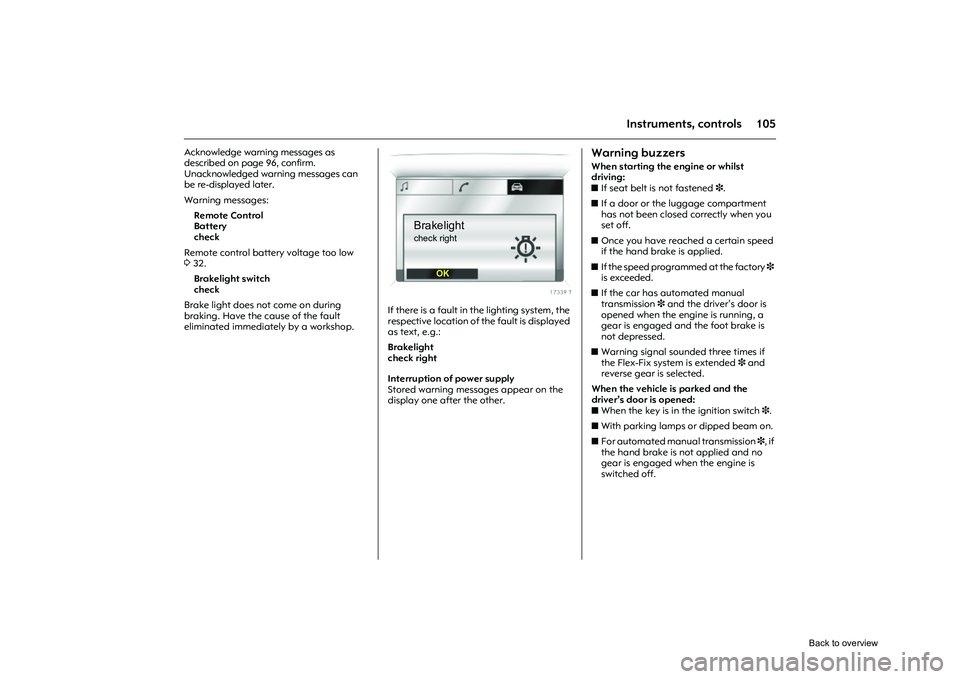
If there is a fault in the lighting system, the
respective location of the fault is displayed
as text, e.g.:
Brakelight
check right
Interruption of power supply
Stored warning messages appear on the
display one after the other.
Warning buzzersWhen starting the engine or whilst
driving:
z If seat belt is not fastened 3.
z If a door or the luggage compartment
has not been closed correctly when you
set off.
z Once you have reached a certain speed
if the hand brake is applied.
z If the speed programmed at the factory 3
is exceeded.
z If the car has automated manual
transmission 3 and the driver’s door is
opened when the engine is running, a
gear is engaged and the foot brake is
not depressed.
z Warning signal sounded three times if
the Flex-Fix system is extended 3 and
reverse gear is selected.
When the vehicle is parked and the
driver’s door is opened:
z When the key is in the ignition switch 3.
z With parking lamps or dipped beam on.
z For automated manual transmission 3, if
the hand brake is not applied and no
gear is engaged when the engine is
switched off.
Brakelightcheck right
OK
Back to overview
Page 112 of 284
106 Instruments, controls
Picture no: 18171s.tif
Windscreen wipers The lever always springs back to its home
position.
For a single swipe when the windscreen
wipers are off, press the stalk down.
Run through the windscreen wiper stages
by pushing the lever past the resistance
point and holding. An acoustic signal
sounds at §.
Do not use if the windscreen is icy.
Switch off in car washes.
Picture no: 18172s.tif
Adjustable wiper interval 3
Setting wiper interval to a value
between 2 and 15 seconds: switch
ignition on, move stalk from position §
downward, wait for required interval,
move stalk to $.
After switching on the ignition and
moving the stalk up, $ the interval is set
to 6 seconds.
Picture no: 18173s.tif
Automatic wiping with rain sensor 3
The rain sensor determines the quantity of
water on the windscreen and automatically
controls the windscreen wiper.
&
=Fast
% =Slow
$ = Adjustable timed interval wipe
§ =Off$= Automatic wiping with rain sensor
Back to overview


