Page 102 of 284

96 Instruments, controls
Picture no: 17914s.tif
Triple information display Set date and time
The infotainment system 3 must be off.
Activate setting mode by holding the Ö
button depressed for about 2 seconds. The
flashing value is adjusted using the ;
button. The Ö button is used to switch to
the next unit and to exit setting mode. Automatic time synchronisation
3
The RDS signal of most VHF transmitters
automatically sets the time. This can be
identified by } in the display.
Some transmitters do not send a correct
time signal. In such cases, we recommend
that you switch off automatic time
synchronisation.
Activate setting mode and set it to year
setting. Hold the Ö button depressed
about 3 seconds until } flashes in the
display and “RDS TIME" appears. The
function is activated (RDS TIME 1) or
deactivated (RDS TIME 0) with the ;
button. Exit setting mode using the Ö
button.
Picture no: 17331t.tif
Graphical information display
3
or Colour Information Display 3
Selecting functions
Functions and settings of the infotainment
system 3 and climate control system 3 are
accessed via the display.
Selections are made via the menus and
buttons, the multifunction button 3 of the
infotainment system or the left adjuster
wheel 3 of the steering wheel.
8:56
5
,5
°C
07.05.2008
FM AS [TP] REG CDin MP3
�
90.6
MHz
19,5° 19:36
Back to overview
Page 103 of 284
97
Instruments, controls
Picture no: 18612t.tif
To select with the infotainment system
buttons
Select menu items via the menus and using
the infotainment system buttons. The OK
button is used to select the marked item or
confirm a command.
To exit a menu, press the right or left arrow
button to execute Return or Main .
Picture no: 17013t.tif
To select using the multifunction button
Turn the multifunction button to highlight
menu items or commands and to select
function areas.
Press the multifunction button to select the
highlighted item or confirm a command.
To exit a menu, turn the multifunction
button to Return or Main and select.
Picture no: 18187s.tif
Select using the left adjusting wheel 3 on
the steering wheel
Turn to select a menu item.
Press the adjuster wheel to select the
highlighted item or confirm a command.
Back to overview
Page 104 of 284

98 Instruments, controls
Picture no: 17331t.tif
Function areas
For each functional area there is a main
page (Main), which is selected at the top
edge of the display (not with the
Infotainment system CD 30 or the Mobile
Phone Portal):
zAudio,
z Navigation 3,
z Telephone 3,
z Trip computer 3.
For Audio, Navigation 3 and Telephone 3
functions – see infotainment system
instructions.
Picture no: 17332t.tif
System settings
Press the Main button 3 of the
infotainment system.
Press the Settings button of the
infotainment system . On Infotainment
System CD 30, make sure no menu has
been selected.
Picture no: 17340t.tif
Setting date and time 3
Select menu item Time, Date, from the
Settings menu.
Select the required menu item and make
setting.
FM AS [TP] REG CDin MP3
�
90.6
MHz
19,5° 19:36
7
Settings19,5° 19:36
Time, Date 19:36
Language
Units 07.05.2008
Contrast
Day / Night
! Ign. logic
7 Time, Date 19,5° 19:36
Time 19:36
Date 07.05.2008! Synchron. clock automatical.
Back to overview
Page 105 of 284

99
Instruments, controls
Automatic time synchronisation 3
The RDS signal of most VHF transmitters
automatically sets the time.
Some transmitters do not send a correct
time signal. In such cases, we recommend
that you switch off automatic time
synchronisation.
On infotainment systems with navigation 3,
time and date are also harmonised upon
receipt of a GPS satellite signal.
The function is activated by ticking the field
in front of Synchron. clock automatical. in
the Time, Date menu.
Picture no: 17341t.tif
Language selection
You can select the display language for
some functions.
Select menu item Language from the
Settings menu.
Picture no: 17342t.tif
Select the desired language.
Selections are indicated by a 6 in front of
the menu item.
In systems with language version 3, when
the language setting of the display is
changed, the system will ask if the message
language should also be changed - see
infotainment system instructions.
7
Settings 19,5° 19:36
Time, Date
Language Deutsch
Units English
Contrast Español
Day / Night ....
! Ign. logic
7
13 Languages 19,5° 19:36!
Deutsch
English
Español
Nederlands
Français
Italiano
Back to overview
Page 106 of 284
100 Instruments, controls
Picture no: 17343t.tif
Setting units of measure
Select menu item Units from the Settings
menu.
Select the desired unit.
Selections are indicated by a o in front of
the menu item.
Picture no: 17926t.tif
Adjusting contrast 3
(Graphical Information Display)
Select menu item Contrast from the
Settings menu.
Confirm the required setting. Setting display mode
3
Display brightness is independent of
vehicle lighting. Settings are made as
follows:
Select menu item Day / Night from the
Settings menu.
Automatic: adapted based on vehicle
lighting.
Always day design: black or coloured text
on light background.
Always night design: white or coloured
text on dark background.
Selections are indicated by a o in front of
the menu item.
Ignition logic 3
See infotainment sy stem instructions.
7 Settings 19,5° 19:36
Time, Date
Language
!
Europe-SI
Units
"
Japan
Contrast
"
Great Britain
Day / Night
"
USA
! Ign. logic
7 Contrast 19,5° 19:36
12
Back to overview
Page 107 of 284

101
Instruments, controls
Picture no: 17344t.tif
Graphical Information Display
3
or Colour Information Display 3,
trip computer
3
The main trip computer display provides
information about the range, average
consumption 3 and current consumption
of BC 1 .
To display other trip computer data,
press the BC button on the infotainment
system 3, select the trip computer menu
Board Computer on the display or press
the left hand adjustment wheel 3 on the
steering wheel.
Select BC 1 or BC 2 from the trip computer
menu.
Picture no: 17329t.tif
Range
Range is calculated fr om current fuel tank
content and instantaneous consumption.
The display shows average values.
After refuelling, the vehicle updates the
range automatically after a brief delay.
Picture no: 17345t.tif
If the fuel in the tank will allow less
than 50 km of travel, the message
Range appears in the display.
If the fuel in the tank will allow less
than 30 km of travel, the message
Please refuel! 3 appears in the display.
Ü
Board Computer 19,5° 19:36
BC 1 All values
BC 2
257.0
km
Timer
Ø40
km/h
31.0
Ltr.
Ø
7.0
L/100km
1
8
Range
257
km
Aver. Consump.
7.0
L/100km
Inst. consumpt.
7.6
L/100km
19,5° 23° 5 Eco
x
19:36
Range33km
OK
Back to overview
Page 124 of 284
118 Infotainment systemInfotainment system
Radio reception
3
Radio reception may be disrupted by
static, noise, distortion or loss of reception
due to
zchanges in dist ance from the
transmitter,
z multi-path reception due to reflection
and
z shadowing. Infotainment system
3
The infotainment system is operated as
described in the operating instructions.
Picture no: 18188s.tif
Steering wheel remote control
3
The functions of the Infotainment system 3
and the information display can be
operated with the adjusting wheels and
buttons on the steering wheel.
Further information 397 and the
infotainment system instructions.
Radio reception
3................................ 118
Infotainment system 3........................ 118
Steering wheel remote control 3........ 118
AUX input 3......................................... 119
Mobile telephones and radio equipment 3...................................... 119
Back to overview
Page 125 of 284
119
Infotainment system
Picture no: 18471s.tif
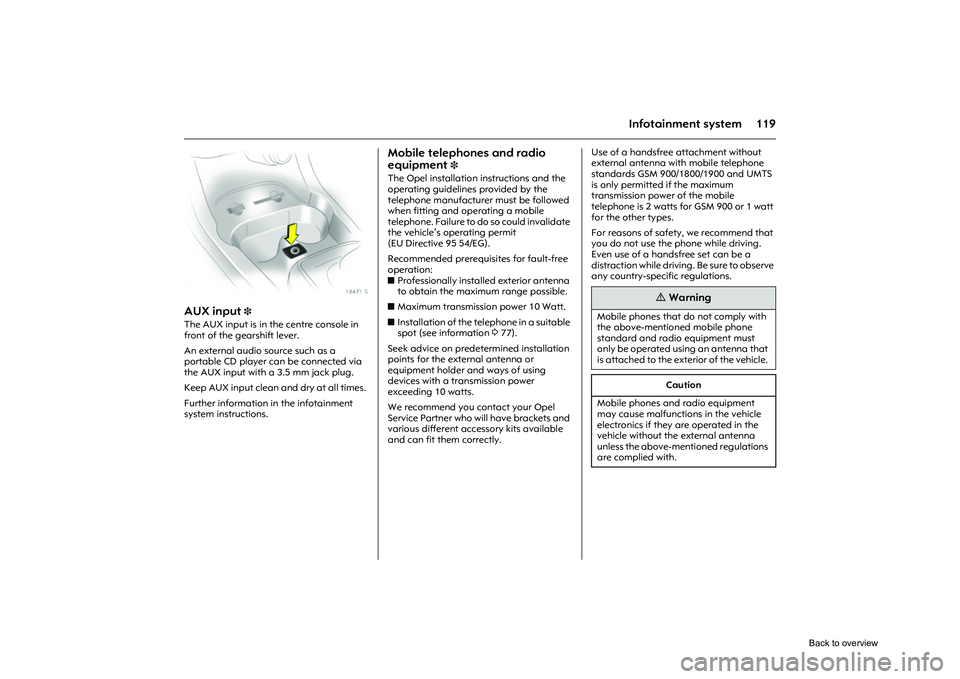
AUX input
3
The AUX input is in the centre console in
front of the gearshift lever.
An external audio source such as a
portable CD player can be connected via
the AUX input with a 3.5 mm jack plug.
Keep AUX input clean and dry at all times.
Further information in the infotainment
system instructions.
Mobile telephones and radio
equipment
3
The Opel installation instructions and the
operating guidelines provided by the
telephone manufacturer must be followed
when fitting and operating a mobile
telephone. Failure to do so could invalidate
the vehicle’s operating permit
(EU Directive 95 54/EG).
Recommended prerequisites for fault-free
operation:
z Professionally installed exterior antenna
to obtain the maximum range possible.
z Maximum transmission power 10 Watt.
z Installation of the te lephone in a suitable
spot (see information 377).
Seek advice on predetermined installation
points for the external antenna or
equipment holder and ways of using
devices with a transmission power
exceeding 10 watts.
We recommend you contact your Opel
Service Partner who will have brackets and
various different accessory kits available
and can fit them correctly. Use of a handsfree attachment without
external antenna with mobile telephone
standards GSM 900/1800/1900 and UMTS
is only permitted if the maximum
transmission power of the mobile
telephone is 2 watts for GSM 900 or 1 watt
for the other types.
For reasons of safety, we recommend that
you do not use the phone while driving.
Even use of a handsfree set can be a
distraction while
driving. Be sure to observe
any country-specific regulations.
9
Warning
Mobile phones that do not comply with
the above-mentioned mobile phone
standard and radio equipment must
only be operated using an antenna that
is attached to the exterior of the vehicle.
Caution
Mobile phones and radio equipment
may cause malfunctions in the vehicle
electronics if they are operated in the
vehicle without the external antenna
unless the above-mentioned regulations
are complied with.
Back to overview


