2009 OPEL AGILA ESP
[x] Cancel search: ESPPage 61 of 153

5-11Instruments and controls
If it stays lit or illuminates during
driving, there is a fault with ESP®.
The vehicle’s brake system remains
operational without ESP
® regulation.
Seek the assistance of a workshop to
have the cause of the fault remedied.
Further information 3 9-10.
W Engine coolant
temperature
Will illuminate briefly in red when
ignition is switched on.
If it illuminates or flashes when the
engine is running: stop vehicle and
switch off engine. Coolant
temperature is too high; danger of
engine damage. Check coolant level.
Further information 3 10-4.
N Preheating for diesel
engines 3
Will illuminate during engine
preheating.
Preheating system switches on only if
outside temperature is low.
If it illuminates during driving or if the
engine cannot be started, seek the
assistance of a workshop as soon as
possible.
Starting the engine 3 9-2.
Z Exhaust emissions
Will illuminate in yellow when ignition
is switched on. Extinguishes after
engine is started.
If it illuminates when the engine is
running: fault in emission control
system. The permitted emission
limits may be exceeded. Fuel
economy and vehicle driveability may
be impaired. Seek the assistance of a
workshop immediately.Diesel engines: The engine stops and
control indicator Z illuminates if the
fuel level is too low. If the tank has
been run dry, bleed the fuel system 3
10-7.
Vehicles with electric throttle body
system 3: If the battery has been
disconnected, the system must be
recalibrated upon reconnection of the
battery. Hold ignition key in ON
position for 5 seconds without
running the engine. Control indicator
Z remains illuminated after the
engine is started if the procedure is
not successful.
I Engine oil pressure
Will illuminate in red when ignition is
switched on. Extinguishes after
engine is started.
If it illuminates during driving; engine
oil pressure may be dangerously low,
interrupting engine lubrication and
resulting in damage to the engine
and/or locking of the drive wheels:
„Move out of the flow of traffic as
quickly as possible without
impeding other vehicles,
9 Warning
Allow engine to cool down before
removing coolant filler cap.
Page 63 of 153

5-13Instruments and controls
If it illuminates when the engine is
running; there may be a fault in the
engine electronics: interrupt your
journey and seek the assistance of a
workshop.
If regeneration of the diesel particle
filter is not successful or possible (3
5-13 “8 Diesel particle filter 3“), the
control indicator may illuminate and
the vehicle goes into limp home
mode: interrupt your journey and
seek the assistance of a workshop
immediately.
Further information 3 9-7.
Y Low fuel
If it illuminates during driving; fuel
level is low: fill up fuel tank as soon
as possible.
Never let the tank run dry!
Erratic fuel supply can cause catalytic
converter to overheat 3 9-8.
Diesel engines: The engine stops and
control indicator Z illuminates if the
fuel level is too low (3 5-11 “Z
Exhaust emissions”). If the tank has
been run dry, bleed the fuel system 3
10-7.Refuelling 3 9-12, fuel tank capacity
3 12-5.
8 Diesel particle filter 3
Will illuminate briefly in yellow when
the ignition is switched on.
If it illuminates during driving, the
diesel particle filter requires cleaning.
As soon as the road and traffic
situation permits it, increase speed to
more than 75 km/h (50 mph) for
approx. 30 minutes. The control
indicator extinguishes as soon as
cleaning is complete.
If regeneration of the diesel particle
filter is not successful or possible (3
5-12 “A Service vehicle soon 3“),
control indicator A may illuminate
and the vehicle goes into limp home
mode: interrupt your journey and
seek the assistance of a workshop
immediately.
Further information 3 9-7.
O Turn signal lamps
The appropriate control indicator will
flash in green when the turn signal is
on. Rapid flash; failure of a turn signal
bulb or the corresponding fuse.
Both control indicators flash when the
hazard warning lamps are active.
Turn signal lamps 3 6-2, bulb
replacement 3 10-7, fuses 3 10-11.
Warning chimes
While driving:
„when operating the turn signals.
„if driver’s seat belt is not engaged
and vehicle speed exceeds approx.
15 km/h (9 mph).
When the vehicle is parked and
driver’s door is opened:
„with exterior lamps switched on
(and ignition key removed).
„when the key is in the ignition
switch.
Seat belt warning chime 33-7.
Driving hints 3 9-1.
Page 73 of 153

7-3Infotainment system
To search for the next or previous
radio station:
Press and hold the hbutton (higher
frequency) or gbutton (lower
frequency).
To select the next or previous preset
station:
Briefly press the hbutton (next
stored station) or gbutton (previous
stored station).
With CD mode active, to select the
next or previous track:
Press the hbutton (next track) or
gbutton (previous track).
Theft-deterrent feature
The Infotainment system is fitted with
an electronic security system for anti-
theft protection, ensuring the system
is useless to a thief.
You can set up a 4-digit security ID to
prevent theft. Once the ID is set up,
the unit is inoperable without this ID
when the unit is removed or the
battery is disconnected.
The Infotainment system is
programmed with the default code
‘0000’ in the as-delivered state.Setting 4-digit security ID
To set a user ID, proceed as follows:
The user ID is now required when the
Infotainment system is switched on
after the unit has been removed or
the battery has been disconnected. 1. Briefly press the bVOLUME
rotary knobf to switch the
Infotainment system off.
2. Press and hold the numbered
button 30 and button 4d
simultaneously and press the
bVOLUME rotary knobf.
“SEC” appears in the display.
3. Press the h button j and
numbered button 1e
simultaneously.
“- - - -” appears in the display.4. Press numbered button 1e
repeatedly to increase the value
for the first user ID digit.
Likewise, numbered buttons
2b, 30 and 4d
correspond to the second, third
and fourth digits of the user ID.
Set each user ID digit by
pressing the corresponding
numbered button repeatedly
until your chosen user ID is
complete.
5. Press and hold the PTY
button8 for approx.
2 seconds to enter your chosen
user ID.
“SEC” appears again in the
display and the Infotainment
system is switched off
automatically.
Page 74 of 153

7-4 Infotainment system
Entering 4-digit security ID
When the Infotainment system is
switched on after the unit has been
removed or the battery has been
disconnected, the 4-digit security ID
must be entered, otherwise the unit is
inoperable.
“SEC” appears in the display when
the system is switched on. This will
not happen if the system is switched
off and back on again within
20 seconds.
To enter the user ID, proceed as
follows:Switch the Infotainment system back
on to operate: the system comes on
in radio mode.
If the wrong user ID is entered
10 times, “HELP” appears in the
display and the system cannot be
operated. Seek the assistance of a
workshop.
If you forget your user ID, seek the
assistance of a workshop.
Deleting 4-digit security ID
The stored user ID can be erased and
a new ID set at any time.To delete the existing user ID, repeat
steps 1 to 3 in “Setting 4-digit
security ID” then proceed as follows:
Set a new user ID as described in
“Setting 4-digit security ID”.
Operation
Switching on and off
Briefly press the bVOLUME rotary
knob f.
Setting the volume
Turn the bVOLUME rotary knob f. 1. Press the h button j and
numbered button 1e
simultaneously.
“- - - -” appears in the display.
2. Repeatedly press numbered
buttons 1e, 2b, 30 and
4d which correspond to the
digits of the user ID, until the
correct stored user ID is
displayed.3. Press and hold the PTY
button8 for approx.
2 seconds to enter the correct
stored user ID.
The Infotainment system is
switched off automatically.1. Repeatedly press numbered
buttons 1e, 2b, 30 and
4d which correspond to the
digits of the user ID, until the
correct stored user ID is
displayed.
2. Press and hold the PTY
button8 for approx.
2 seconds to enter the correct
stored user ID.
“- - - -” appears in the display
and the Infotainment system is
switched off automatically.
Page 77 of 153

7-7Infotainment system
If less than 6 stations with strong
signals can be received, the number
of preset stations may be less than 6.
If no stations with strong signals can
be received, previously stored
stations are reset.
When automatic storing is complete,
the radio station stored under preset
station memory location 1 is
received.
To exit automatic storing while storing
is in progress, press the AST
button4 again. Previously stored
stations are not overwritten.
Recalling stored stations
To recall a station stored under one of
the preset station memory locations
1-6, tune to the desired waveband
and press the relevant preset station
button (1-6). The station
corresponding to the preset station
button is received.
If a station is not stored on the
selected preset station button (1-6),
“- - -” will appear in the display.RDS (Radio Data System)
RDS is a European service provided
by broadcasting companies, which
makes finding the required FM station
much easier and aids good reception.
RDS stations transmit information
which is automatically evaluated by
the RDS radio.
In some areas, other functions
associated with RDS are available,
e.g. TA (Traffic Announcement) and
REG (Regionalisation).
AF (Alternative Frequency)
An RDS program is transmitted on
several frequencies simultaneously.
With AF on, during the journey the
Infotainment system automatically
searches for the strongest receivable
frequency.
REG (Regionalisation)
Some RDS stations transmit different
regional programs over different
frequencies at certain times.
With REG on, when searching for the
frequency of a radio program with the
strongest reception using AF (Alternative Frequency), the
Infotainment system always remains
tuned to the selected regional
program.
With REG off, when searching for the
frequency of a radio program with the
strongest reception using AF
(Alternative Frequency), the
Infotainment system does not
consider regional programs.
Switching AF and REG on and off
Settings appears in the following
order when the AF button 7 is
pressed repeatedly:
„AF on/REG off,
„AF on/REG on,
„AF off, REG off.
With AF and/or REG active, “AF” and
“REG” appear in the display
respectively.PTY (Program Type)
Many RDS stations transmit a PTY
code that indicates the type of
program being broadcast
Page 85 of 153

8-4Climate controls
Even with air conditioning on, if
temperature rotary knob is set to
warm, the vehicle will still produce
warm air in the passenger
compartment.
To improve efficiency of the air
conditioning, always close the
windows, to prevent chilled air from
escaping.
In very high temperatures, before
starting the engine, allow hot air to
escape from the vehicle by opening
the windows and switching on the
fan.
When the air conditioning system is
switched on, open adjustable side air
vents so that the evaporator does not
ice up due to lack of air movement.
When cooling (air conditioning
compressor) is switched on,
condensation forms, which is
expelled from the underside of the
vehicle.
To ensure continuously efficient
performance and prolong the life of
the air conditioning system, it must be switched on for a few minutes once a
week, irrespective of the weather and
time of year.
Malfunctions in the system must not
be rectified by the owner: seek the
assistance of a workshop.
Maximum cooling
Open windows briefly and switch fan
on so that warm air can escape
rapidly.
„Press button n (or A/C)
(to switch on air conditioning
system).
„Activate air recirculation mode 4.„Set air distribution rotary knob to M.
„Turn temperature rotary knob all
the way to blue area for cooling.
„Set fan to 4.
Air vents
Centre air vents
The air flow can be directed as
desired by tilting the slats up, down
and sideways using the central
adjuster.
The air supply is increased by
switching on the fan.
Page 97 of 153

9-10Driving and operating
Brake assist
Rapid powerful application of the
brake pedal automatically applies
maximum brake force amplification to
achieve the shortest possible braking
distance under full braking (brake
assist).
Maintain steady pressure on the
brake pedal for as long as full-on
braking is to continue. When the
brake pedal is released, the
maximum brake force amplification is
taken away.
Ride control systems
Electronic Stability Program
(ESP®) 3
The Electronic Stability Program
improves driving stability when
necessary, independently of the type
of road surface and the tyre grip. It
also prevents the drive wheels from
spinning.
The system monitors vehicle
movements. As soon as the vehicle
starts to swerve (understeers/
oversteers), engine output is reduced
(the sound of the engine changes)
and individual wheels are specifically
braked. This considerably improves
the driving stability of the vehicle on
snow and ice and on wet or slippery
road surfaces.
ESP
® is ready for operation as soon
as the ignition is switched on and the
control indicators
R, ESP and TCSS OFF extinguish.
When the ESP® comes into action,
control indicator
R flashes rapidly in
the instrument cluster. Some noise or
vibration may be apparent.ESP active control indicator 3 5-10.
Interruption of power supply
If the vehicle’s battery has been
disconnected and reconnected,
ESP
® is deactivated and control
indicator R flashes once per second.
Reactivate ESP® by driving in a
straight line at over 15 km/h (9 mph)
for a few seconds until flashing
ceases. Several seconds may lapse
before the control indicator
extinguishes, depending on road
conditions.
Caution
Do not let this special safety feature
tempt you into taking risks when
driving.
Traffic safety can only be achieved
by adopting a responsible driving
style.
Page 98 of 153
9-11 Driving and operating
Fault
Control indicator
ESP illuminates
during driving if there is a fault with
ESP
®. Seek the assistance of a
workshop to have the cause of the
fault remedied.
ESP fault control indicator 3 5-10.
Traction Control Support
System (TCSS) 3
TCSS is a component part of the
Electronic Stability Program (ESP®)
which helps to maintain driving
stability and prevents the drive
wheels from spinning.
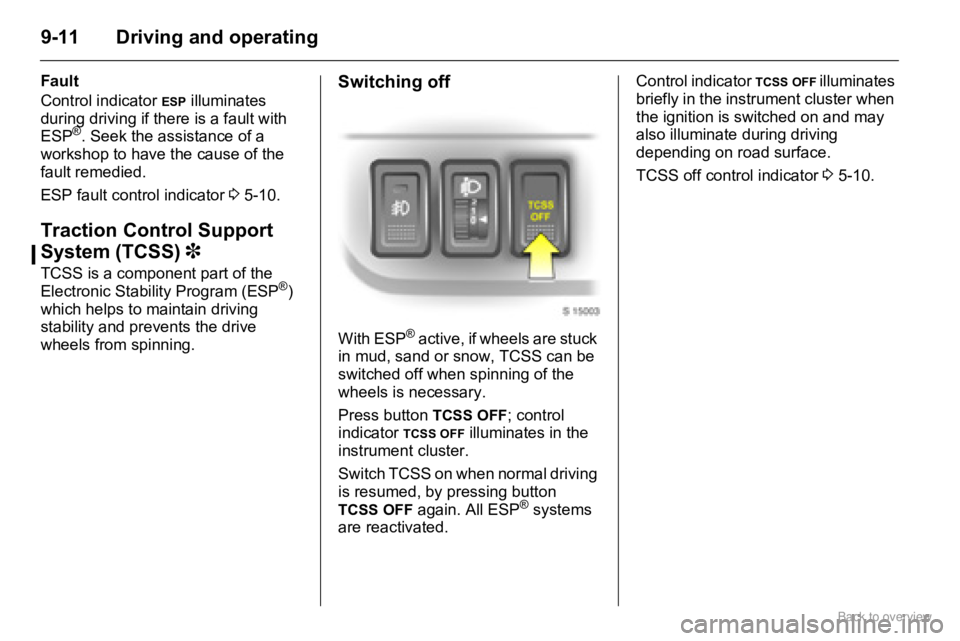
Switching off
With ESP® active, if wheels are stuck
in mud, sand or snow, TCSS can be
switched off when spinning of the
wheels is necessary.
Press button
TCSS OFF; control
indicator TCSS OFF illuminates in the
instrument cluster.
Switch TCSS on when normal driving
is resumed, by pressing button
TCSS OFF again. All ESP® systems
are reactivated.Control indicator
TCSS OFF illuminates
briefly in the instrument cluster when
the ignition is switched on and may
also illuminate during driving
depending on road surface.
TCSS off control indicator 3 5-10.