2009 NISSAN QASHQAI Computer
[x] Cancel search: ComputerPage 89 of 297
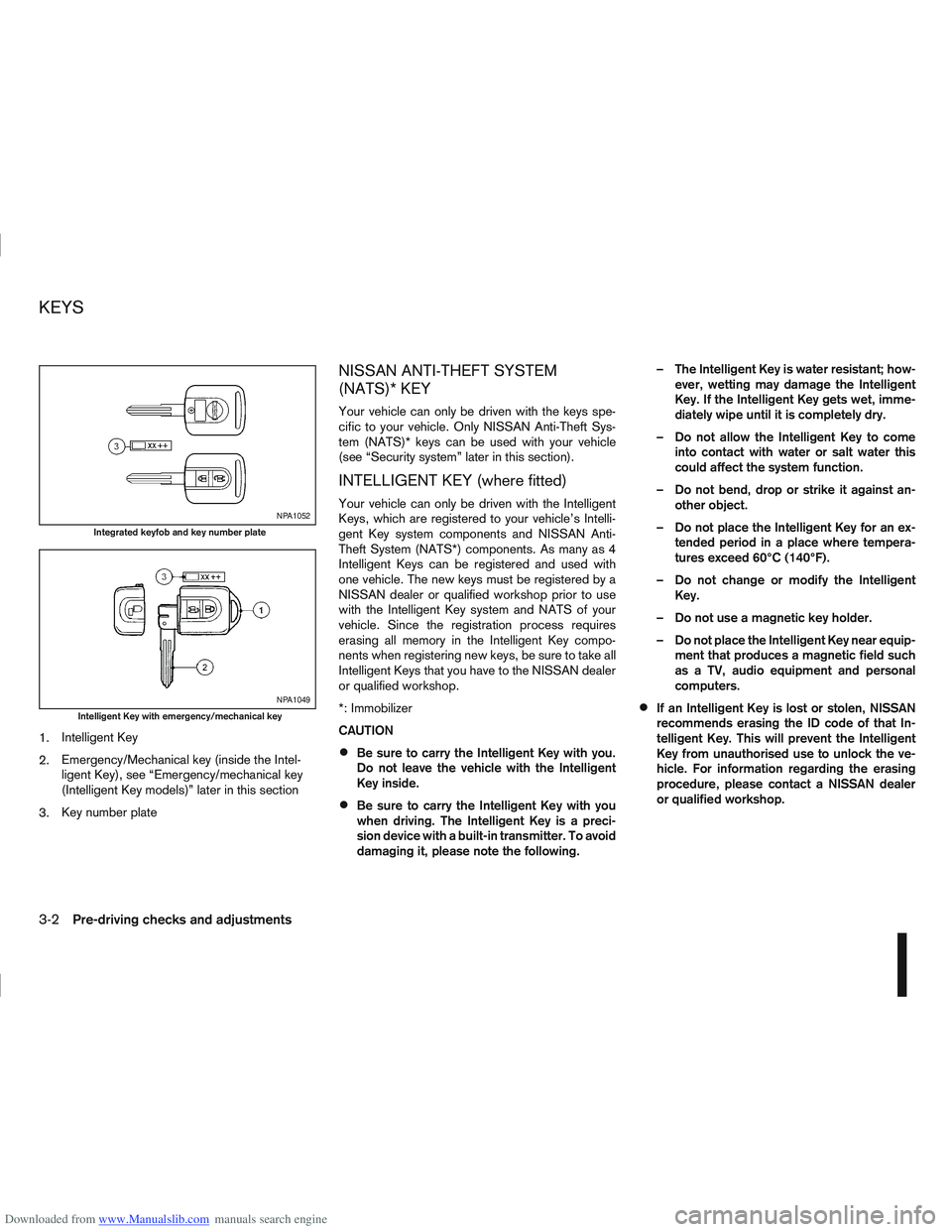
Downloaded from www.Manualslib.com manuals search engine 1.Intelligent Key
2. Emergency/Mechanical key (inside the Intel-
ligent Key), see “Emergency/mechanical key
(Intelligent Key models)” later in this section
3. Key number plate
NISSAN ANTI-THEFT SYSTEM
(NATS)* KEY
Your vehicle can only be driven with the keys spe-
cific to your vehicle. Only NISSAN Anti-Theft Sys-
tem (NATS)* keys can be used with your vehicle
(see “Security system” later in this section).
INTELLIGENT KEY (where fitted)
Your vehicle can only be driven with the Intelligent
Keys, which are registered to your vehicle’s Intelli-
gent Key system components and NISSAN Anti-
Theft System (NATS*) components. As many as 4
Intelligent Keys can be registered and used with
one vehicle. The new keys must be registered by a
NISSAN dealer or qualified workshop prior to use
with the Intelligent Key system and NATS of your
vehicle. Since the registration process requires
erasing all memory in the Intelligent Key compo-
nents when registering new keys, be sure to take all
Intelligent Keys that you have to the NISSAN dealer
or qualified workshop.
*: Immobilizer
CAUTION
Be sure to carry the Intelligent Key with you.
Do not leave the vehicle with the Intelligent
Key inside.
Be sure to carry the Intelligent Key with you
when driving. The Intelligent Key is a preci-
sion device with a built-in transmitter. To avoid
damaging it, please note the following. – The Intelligent Key is water resistant; how-
ever, wetting may damage the Intelligent
Key. If the Intelligent Key gets wet, imme-
diately wipe until it is completely dry.
– Do not allow the Intelligent Key to come into contact with water or salt water this
could affect the system function.
– Do not bend, drop or strike it against an- other object.
– Do not place the Intelligent Key for an ex- tended period in a place where tempera-
tures exceed 60°C (140°F).
– Do not change or modify the Intelligent Key.
– Do not use a magnetic key holder.
– Do not place the Intelligent Key near equip- ment that produces a magnetic field such
as a TV, audio equipment and personal
computers.
If an Intelligent Key is lost or stolen, NISSAN
recommends erasing the ID code of that In-
telligent Key. This will prevent the Intelligent
Key from unauthorised use to unlock the ve-
hicle. For information regarding the erasing
procedure, please contact a NISSAN dealer
or qualified workshop.
NPA1052
Integrated keyfob and key number plate
NPA1049
Intelligent Key with emergency/mechanical key
KEYS
3-2Pre-driving checks and adjustments
Page 95 of 297
Downloaded from www.Manualslib.com manuals search engine Locking the doors
1. Make sure you have the Intelligent Key with youwhen exiting the vehicle.
2. Close all doors.
3. Press any of the outside lock switches (front doors or back door).
– All the doors lock.
– The direction indicators flash once.
– Super Lock system equipped models: The Su-
per Lock system will be activated
CAUTION
Do not leave the duplicate Intelligent Key inside
the vehicle as the locking procedure logic will
not work.
NOTE
If the Intelligent Key is left in the vehicle and the
door/back door outside lock switch is pressed, a
buzzer will sound, warning the owner that the
Intelligent Key has been left inside the vehicle.
Unlocking the doors
For details on setting the unlock mode (anti-hijack or
convenience mode) see “Switching from Conve-
nience mode to Anti-hijack mode” earlier in this sec-
tion. Convenience mode:
Push the door/back door outside lock switch.
– All doors unlock.
– The direction indicators flash twice.
– The message [All door unlock] appears in the
vehicle information display.
Anti-hijack mode:
1. Push the door/back door outside lock switch.
– The corresponding door unlocks
– The direction indicators flash twice quickly
– The message [Single door unlock] appears in the vehicle information display.
2. Push the door/back door outside lock switch again within 5 seconds.
– All doors unlock.
– The direction indicators flash twice, slowly.
NOTE
External interference may impair the Intelligent
Key’s operation. In this case, use the emergency
key located in the Intelligent Key integrated key-
fob. See “Door locks” later in this section for fur-
ther details.
CAUTION
Make sure the Intelligent Key battery is in good
condition. Note that battery life may vary de-
pending on condition, amount of use, ambi-
ent temperature, etc.
The Intelligent Key contains a miniature radio
transmitter that may be affected when placed
near metal objects.
Keep the Intelligent Key away from mobile
phones, laptop computers and other metal
objects or electronics.
STARTING THE ENGINE WITH THE
INTELLIGENT KEY
See “Ignition knob (where fitted)” in the “5. Starting
and driving” section.
CAUTION
Make sure you carry the Intelligent Key with
you when starting and driving the vehicle.
If the Intelligent Key is too far away from the
passenger compartment, the vehicle may not
start. See “Intelligent Key operating range” in
the “3. Pre-driving checks and adjustments”
section
3-8Pre-driving checks and adjustments
Page 149 of 297
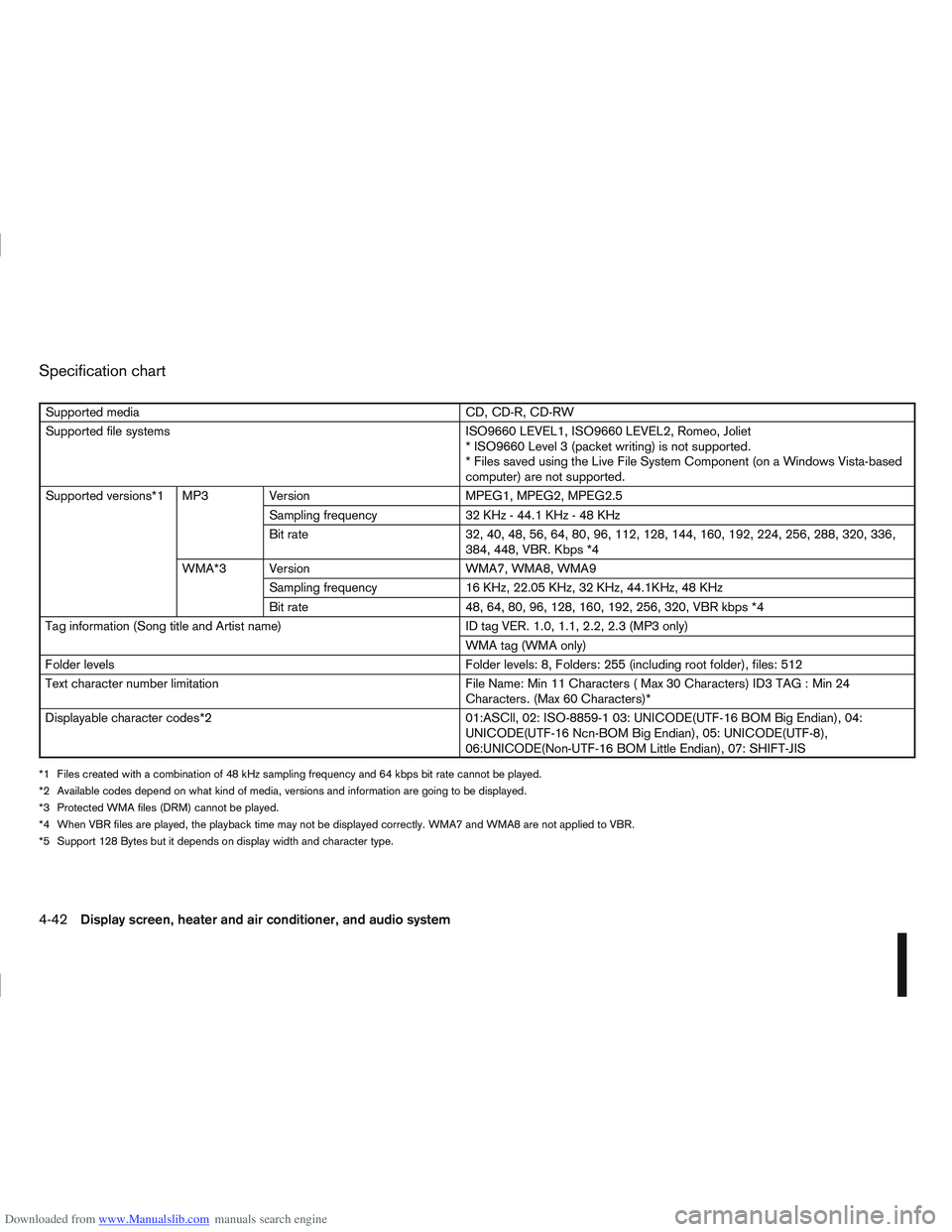
Downloaded from www.Manualslib.com manuals search engine Specification chart
Supported mediaCD, CD-R, CD-RW
Supported file systems ISO9660 LEVEL1, ISO9660 LEVEL2, Romeo, Joliet
* ISO9660 Level 3 (packet writing) is not supported.
* Files saved using the Live File System Component (on a Windows Vista-based
computer) are not supported.
Supported versions*1 MP3 Version MPEG1, MPEG2, MPEG2.5
Sampling frequency 32 KHz - 44.1 KHz - 48 KHz
Bit rate 32, 40, 48, 56, 64, 80, 96, 112, 128, 144, 160, 192, 224, 256, 288, 320, 336,
384, 448, VBR. Kbps *4
WMA*3 Version WMA7, WMA8, WMA9
Sampling frequency 16 KHz, 22.05 KHz, 32 KHz, 44.1KHz, 48 KHz
Bit rate 48, 64, 80, 96, 128, 160, 192, 256, 320, VBR kbps *4
Tag information (Song title and Artist name) ID tag VER. 1.0, 1.1, 2.2, 2.3 (MP3 only)
WMA tag (WMA only)
Folder levels Folder levels: 8, Folders: 255 (including root folder), files: 512
Text character number limitation File Name: Min 11 Characters ( Max 30 Characters) ID3 TAG : Min 24
Characters. (Max 60 Characters)*
Displayable character codes*2 01:ASCll, 02: ISO-8859-1 03: UNICODE(UTF-16 BOM Big Endian), 04:
UNICODE(UTF-16 Ncn-BOM Big Endian), 05: UNICODE(UTF-8),
06:UNICODE(Non-UTF-16 BOM Little Endian), 07: SHIFT-JIS
*1 Files created with a combination of 48 kHz sampling frequency and 64 kbps bit rate cannot be played.
*2 Available codes depend on what kind of media, versions and information are going to be displayed.
*3 Protected WMA files (DRM) cannot be played.
*4 When VBR files are played, the playback time may not be displayed correctly. WMA7 and WMA8 are not applied to VBR.
*5 Support 128 Bytes but it depends on display width and character type.
4-42Display screen, heater and air conditioner, and audio system
Page 185 of 297
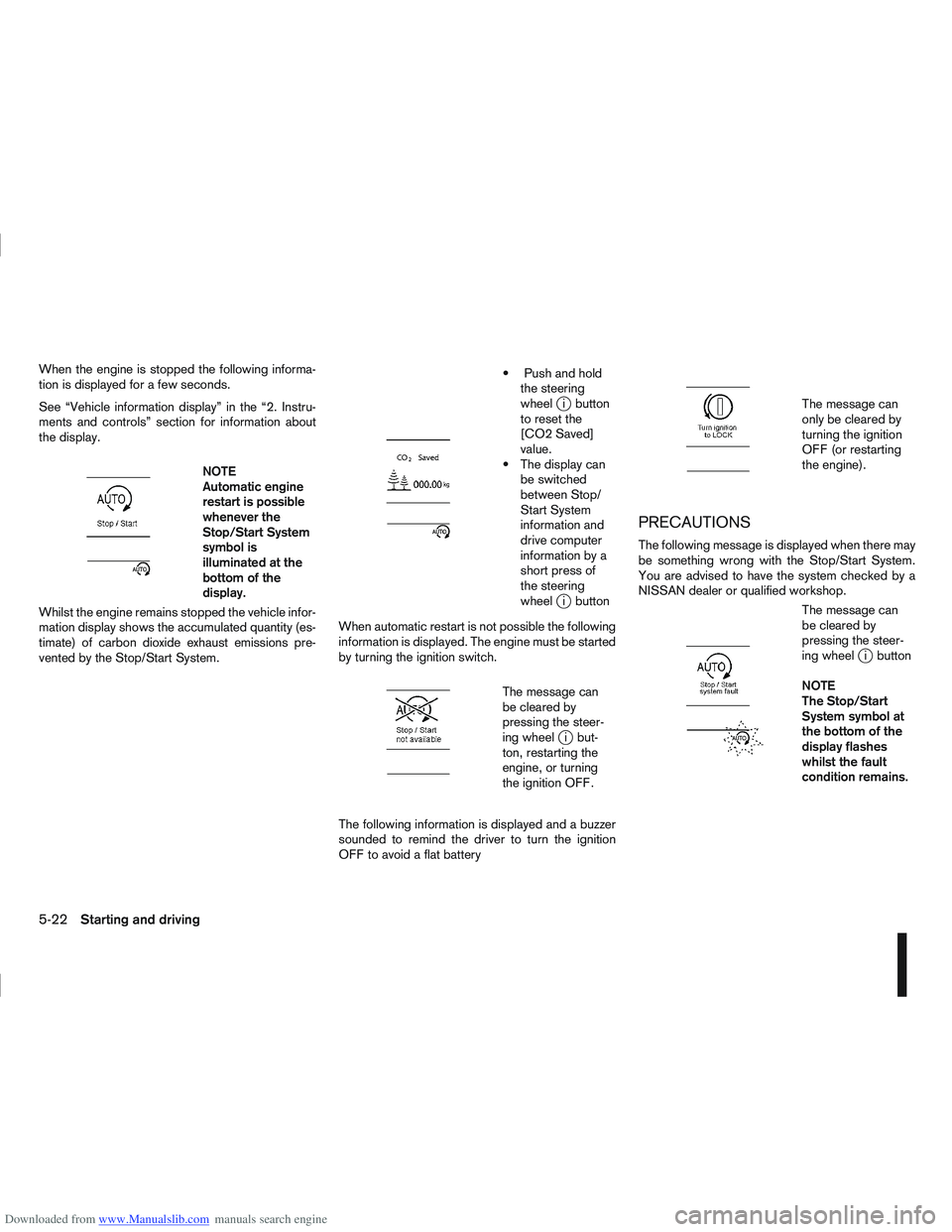
Downloaded from www.Manualslib.com manuals search engine When the engine is stopped the following informa-
tion is displayed for a few seconds.
See “Vehicle information display” in the “2. Instru-
ments and controls” section for information about
the display.
m
NOTE
Automatic engine
restart is possible
whenever the
Stop/Start System
symbol is
illuminated at the
bottomofthe
display.
Whilst the engine remains stopped the vehicle infor-
mation display shows the accumulated quantity (es-
timate) of carbon dioxide exhaust emissions pre-
vented by the Stop/Start System.
m
Push and hold the steering
wheel
ji button
to reset the
[CO2 Saved]
value.
The display can be switched
between Stop/
Start System
information and
drive computer
information by a
short press of
the steering
wheel
ji button
When automatic restart is not possible the following
information is displayed. The engine must be started
by turning the ignition switch.
m
The message can
be cleared by
pressing the steer-
ing wheel
ji but-
ton, restarting the
engine, or turning
the ignition OFF.
The following information is displayed and a buzzer
sounded to remind the driver to turn the ignition
OFF to avoid a flat battery
m
The message can
only be cleared by
turning the ignition
OFF (or restarting
the engine).
PRECAUTIONS
The following message is displayed when there may
be something wrong with the Stop/Start System.
You are advised to have the system checked by a
NISSAN dealer or qualified workshop.
m
The message can
be cleared by
pressing the steer-
ing wheel
ji button
NOTE
The Stop/Start
System symbol at
the bottom of the
display flashes
whilst the fault
condition remains.
5-22Starting and driving
Page 203 of 297

Downloaded from www.Manualslib.com manuals search engine and varies the brake fluid pressure to prevent each
wheel from locking and sliding. By preventing each
wheel from locking, the system helps the driver to
maintain steering control and helps to minimise
swerving and spinning on slippery surfaces.
Using the system
Depress the brake pedal and hold it down. Depress
the brake pedal with firm steady pressure, but do
not pump the brakes. The ABS will operate to pre-
vent the wheels from locking up. Steer the vehicle to
avoid obstacles.
WARNING
Do not pump the brake pedal. Doing so may in-
crease the stopping distance.
Self-test feature
The ABS includes electronic sensors, electric
pumps, hydraulic solenoids and a computer. The
computer has a built-in diagnostic feature that tests
the system each time you start the engine and move
thevehicleatalowspeedinforwardorreverse.
When the self-test occurs, you may hear a “clunk”
noise and/or feel a pulsation in the brake pedal. This
is normal and does not indicate a malfunction. If the
computer senses a malfunction, it switches the ABS
off and illuminates the ABS warning light on the
instrument panel. The brake system then operates
normally, but without anti-lock assistance.
If the ABS warning light illuminates during the self-
test or while driving, have the vehicle checked by a
NISSAN dealer or qualified workshop.
Normal operation
The ABS will not initiate at speeds below 5 to 10
km/h (3 to 6 MPH). The speeds will vary according
to road conditions.
When the ABS senses that one or more wheels are
close to locking up, the actuator rapidly applies and
releases hydraulic pressure. This action is similar to
pumping the brakes very quickly. You may feel a
pulsation in the brake pedal and hear a noise from
the actuator under the bonnet when it is operating.
This is normal and indicates that the ABS is working
properly. However, the pulsation may indicate that
road conditions are hazardous and extra care is re-
quired while driving. When accelerating, driving on slippery surfaces or
suddenly avoiding obstacles on roads, the vehicle
might swerve or slip. The Electronic Stability Pro-
gramme (ESP) system continuously monitors and
compares the driver’s intended speed and the travel
direction. The system adjusts wheel brake pressure
and engine torque to assist in improving vehicle sta-
bility.
When the ESP system is operating, the “SLIP”
indicator light () in the combination meter
blinks.
When only the traction control (TCS) system in
the ESP system is operating, the “SLIP” indica-
tor light (
) in the combination meter will also
blink.
If the “SLIP” indicator light () blinks, the
road conditions are slippery. Be sure to drive
carefully. See “Warning/indicator lights and au-
dible reminders” in the “2. Instruments and
controls” section.
Indicator light
If a malfunction occurs in the system, the “SLIP”
indicator light (
) and the ESP indicator light
() come on in the combination meter.
As long as these indicator lights are on, the trac-
tion control function is cancelled.
The ESP system uses Active Brake Limited Slip
(ABLS) system to improve vehicle traction. The Ac-
tive Brake Limited Slip (ABLS) system works when
one of the driving wheels is spinning on a slippery
ELECTRONIC STABILITY
PROGRAMME (ESP) SYSTEM
(where fitted)
5-40Starting and driving
Page 204 of 297

Downloaded from www.Manualslib.com manuals search engine surface. The Active Brake Limited Slip (ABLS) sys-
tem, brakes the spinning wheel to distribute the driv-
ing power to the other driving wheel.
If the vehicle is operated with the ESP system turned
off, all ESP and TCS functions will be turned off.
The Active Brake Limited Slip (ABLS) system and
ABS will still operate with the ESP system off. If the
Active Brake Limited Slip (ABLS) system or the ABS
is activated, the “SLIP” indicator light (
) will
blink and you may hear a clunk noise and/or feel a
pulsation in the brake pedal. This is normal and does
not indicate a malfunction.
While the ESP system is operating, you may feel a
pulsation in the brake pedal and hear a noise or
vibration from under the bonnet. This is normal and
indicates that the ESP system is working properly.
The ESP computer has a built in diagnostic feature
that tests the system each time the engine is started
and the vehicle moves forwards or reverses at a
slow speed. When the self-test occurs, you may
hear a clunk noise and/or feel a pulsation in the
brake pedal. This is normal and is not an indication
of a malfunction.
WARNING
The ESP system is designed to help improve
driving stability but does not prevent accidents
caused by abrupt steering operation at high
speeds, or careless or dangerous driving
techniques. Reduce vehicle speed and be es-
pecially careful when driving and cornering on
slippery surfaces. Always drive carefully.
If engine related parts, such as a muffler, are
not standard equipment or are extremely de-
teriorated, the ESP OFF indicator light (
)
and/or the “SLIP” indicator light () may
illuminate.
If brake related parts, such as brake pads,
rotors and callipers, are not standard equip-
ment or are extremely deteriorated, the ESP
system may not operate properly and the ESP
OFF indicator light (
) and/or the “SLIP”
indicator light () may illuminate.
Do not modify the vehicle’s suspension. If
suspension parts, such as shock absorbers,
struts, springs, stabiliser bars and bushings,
are not NISSAN-approved or are extremely
deteriorated, the ESP system may not oper-
ate properly. This could adversely affect ve-
hicle handling performance and the ESP OFF
indicator light (
) and/or the “SLIP” indi-
cator light () may illuminate.
When driving on extremely inclined surfaces,
such as higher banked corners, the ESP sys-
tem may not operate properly and the ESP
OFF indicator light (
) and/or the “SLIP”
indicator light () may illuminate. Do not
drive on these types of roads. If ESP OFF indi-
cator light
does illuminate after driving
on extreme surfaces, restart the engine to re-
set the ESP system.
If wheels or tyres other than the
recommended ones are used, the ESP sys-
tem may not operate properly and the ESP OFF indicator light (
) and/or the “SLIP”
indicator light () may illuminate.
The ESP system is not a substitute for winter
tyres or snow chains on a snow covered road.
NOTE
The ESP system should be switched on under
normal circumstances although it may be ad-
vantageous to switch off the ESP system to
allow wheelspin under the following condi-
tions:
– When driving in deep snow or mud.
– When trying to rock a vehicle free that is stuck in snow.
– When driving with snow chains.
If the ESP system has been switched off, drive
carefully with reduced speed. When road con-
ditions allow, ESP should be switched back
on.
Starting and driving5-41
Page 290 of 297

Downloaded from www.Manualslib.com manuals search engine – Driving with automatic transmission ...................... 5-14, 5-17
– Driving with continuously variable transmission (Models withmanual shift) .................................................................. 5-14
– Driving with continuously variable transmission (Models without manual shift) .................................................................. 5-17
– Driving with manual transmission ................................... 5-12
– Manual transmission (ignition knob) ................................. 5-8
– Manual transmission (ignition switch) ............................... 5-6
Travelling or transferring your registration to another country .. 9-8
Trip computer ...................................................................... 2-16
Turbocharger system (Diesel engine models) ......................... 5-5
Turn signal switch ............................................................... 2-26
Twin trip odometer .............................................................. 2-16
Tyre
– Changing tyres and wheels ........................................... 8-33
– Emergency tyre puncture repair kit ......................... 6-7, 8-34
– Flat tyre ........................................................................\
... 6-2
– Repairing flat tyre ............................................................ 6-7
– Spare tyre ..................................................................... 8-33
– Temporary-use spare tyre ................................................ 6-2
– Types of tyres ................................................................ 8-31
– Tyre age ........................................................................\
8-33
– Tyre equipment .............................................................. 5-43
– Tyre inflation pressure ................................................... 8-31
– Tyre placard .................................................................... 9-9
– Tyre pressure (Trailer) ................................................... 5-36
– Tyre rotation .................................................................. 8-32
– Tyre wear and damage .................................................. 8-33
– Wheels and tyres ................................................... 8-31, 9-7
U
Ultrasonic sensor
– Alarm sensor ................................................................. 3-13
– Parking sensor .............................................................. 5-24
USB Memory operation ....................................................... 4-37 Using Intelligent Key system .................................................. 3-7
V
Vehicle identification .............................................................. 9-8
– Vehicle identification number (VIN) (chassis number) ....... 9-8
– Vehicle identification plate ................................................ 9-8
Vehicle information display .................................................. 2-11
Vehicle security .......................................................... 3-13, 5-38
– Alarm system ................................................................. 3-13
Vents ........................................................................\
.......... 4-12W
Warning/indicator lights and audible reminders ...................... 2-3
Warnings and alerts (Vehicle information display) ................ 2-12
Washing ........................................................................\
....... 7-2
Waxing ........................................................................\
.......... 7-2
Wheel
– Blocking the wheels ........................................................ 6-3
– Care of wheels ................................................................ 7-3
– Changing tyres and wheels ........................................... 8-33
– Getting the tools and spare wheel .................................... 6-3
– Installing the wheel .......................................................... 6-6
– Removing the wheel ........................................................ 6-4
– Removing the wheel cover ............................................... 6-4
– Stowing the wheel and tools ............................................ 6-6
– Wheel balance .............................................................. 8-33
– Wheel lock key code ....................................................... 6-7
– Wheel lock nuts ....................................................... 6-4, 6-7
– Wheels and tyres ................................................... 8-31, 9-7
Wheel lock nuts .................................................................... 6-7
Windows
– Power window — Driver’s side (Reinitialisationprocedure) .................................................................... 2-35
Index10-9