2009 NISSAN MURANO KEY
[x] Cancel search: KEYPage 188 of 443
Black plate (186,1)
Model "Z51-D" EDITED: 2007/ 10/ 2
SAA1923
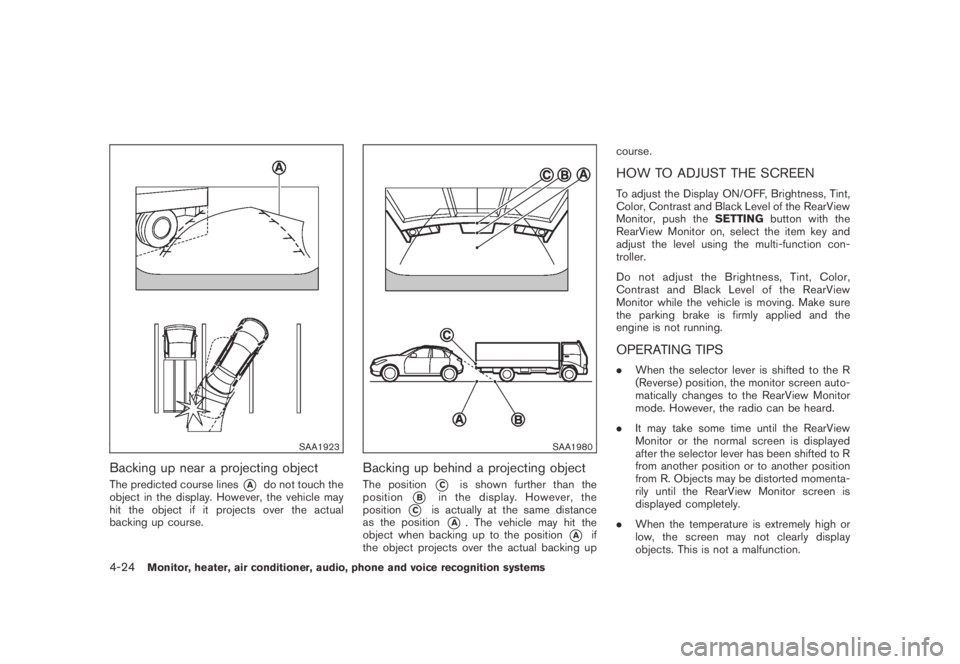
Backing up near a projecting object
The predicted course lines*Ado not touch the
object in the display. However, the vehicle may
hit the object if it projects over the actual
backing up course.
SAA1980
Backing up behind a projecting object
The position*Cis shown further than the
position
*Bin the display. However, the
position
*Cis actually at the same distance
as the position
*A. The vehicle may hit the
object when backing up to the position
*Aif
the object projects over the actual backing upcourse.
HOW TO ADJUST THE SCREEN
To adjust the Display ON/OFF, Brightness, Tint,
Color, Contrast and Black Level of the RearView
Monitor, push theSETTINGbutton with the
RearView Monitor on, select the item key and
adjust the level using the multi-function con-
troller.
Do not adjust the Brightness, Tint, Color,
Contrast and Black Level of the RearView
Monitor while the vehicle is moving. Make sure
the parking brake is firmly applied and the
engine is not running.
OPERATING TIPS
.When the selector lever is shifted to the R
(Reverse) position, the monitor screen auto-
matically changes to the RearView Monitor
mode. However, the radio can be heard.
.It may take some time until the RearView
Monitor or the normal screen is displayed
after the selector lever has been shifted to R
from another position or to another position
from R. Objects may be distorted momenta-
rily until the RearView Monitor screen is
displayed completely.
.When the temperature is extremely high or
low, the screen may not clearly display
objects. This is not a malfunction.
4-24Monitor, heater, air conditioner, audio, phone and voice recognition systems
Page 210 of 443
Black plate (208,1)
Model "Z51-D" EDITED: 2007/ 10/ 2
low frequencies and to stop at the next
broadcasting station.
.For XM satellite radio
Push the SEEK·CAT or TRACK button
orto tune to the first channel of the
next or previous category.
During satellite radio reception, the following
notices will be displayed under certain condi-
tions.
.NO SIGNAL (No signal is received while the
SAT tuner is connected.)
.OFF AIR (Broadcasting signed off)
.ANTENNA ERROR (Antenna connection
error)
.LOADING (When the initial setting is
performed)
.UPDATING (When the satellite radio sub-
scription is not active)
.INVALID CH (Invalid channel is received.)
SCAN tuning:
Push the SCAN tuning button to tune from low
to high frequencies and stops at each broad-
casting station for 5 seconds. Pushing the
button again during this 5 seconds period will
stop SCAN tuning and the radio will remaintuned to that station.
If the SCAN tuning button is not pushed within 5
seconds, SCAN tuning moves to the next
station.
*1to*6Station memory operations:
Twelve stations/channels can be set for the FM
band (6 for FM1, 6 for FM2) and the SAT radio
(6 for SAT1, 6 for SAT2) , and 6 stations can be
set for the AM band.
1. Choose the radio band using the radio band
select button.
2. Tune to the desired station using the SEEK,
SCAN or TUNE button.
3. Select the desired station/channel and keep
pushing any of the desired station preset
buttons
*1to*6until a beep sound is
heard. (The radio mutes when the select
button is pushed.)
4. The channel indicator will then come on and
the sound will resume. Memorizing is now
complete.
5. Other buttons can be set in the same
manner.
If the battery cable is disconnected, or if the fuse
blows, the radio memory will be erased. In that
case, reset the desired stations.Text:
When the “Text” key is selected with the multi-
function controller on the display and then the
ENTER button is pushed while the satellite radio
is being played, the text information will be
displayed on the screen.
.CH Name
.Category
.Name
.Title
.Other
Compact Disc (CD) player/changer op-
eration
Push the ignition switch to the ACC or ON
position, push the LOAD button (if so equipped)
and insert the compact disc into the slot with the
label side facing up. The compact disc will be
guided automatically into the slot and start
playing.
After loading the disc, the number of tracks on
the disc and the play time will appear on the
display.
If the radio is already operating, it will auto-
matically turn off and the compact disc will play.
If the system has been turned off while the
compact disc was playing, pushing the ON·-
4-46Monitor, heater, air conditioner, audio, phone and voice recognition systems
Page 211 of 443
Black plate (209,1)
Model "Z51-D" EDITED: 2007/ 10/ 2
OFF/VOL control knob will start the compact
disc.
CD LOAD (if so equipped):
To insert a CD in the CD changer, push the
LOAD button for less than 1.5 seconds. Select
the loading position by pushing the CD insert
select button
*1to*6, then insert the CD.
To insert 6 CDs to the CD changer in
succession, push the LOAD button for more
than 1.5 seconds.
The inserted slot numbers will illuminate on the
display.
orPLAY:
When the DISC (CD play) button is pushed with
the system off and the compact disc loaded, the
system will turn on and the compact disc will
start to play.
When the DISC button is pushed with the
compact disc loaded and the radio playing, the
radio will automatically be turned off and the
compact disc will start to play.
When the DISC button is pushed while a CD is
loaded and a medium is played using the
auxiliary input jacks, you can toggle back and
forth between CD and medium.Text:
When the “Text” key is selected in the screen
using the multi-function controller and then the
ENTER button is pushed while the CD is being
played, the music information below will be
displayed on the screen.
CD:
.Disc title
.Track title
CD with MP3 or WMA:
.Folder title
.File title
.Song title
.Album title
.Artist
FF (Fast Forward) , REW (Re-
wind)/APS (Automatic Pro-
gram Search) FF, APS REW:
When the
(fast forward) or(rewind)
button is pushed for more than 1.5 seconds
while the compact disc is being played, the
compact disc will play while fast forwarding or
rewinding. When the button is released, the
compact disc will return to normal play speed.When the
orbutton is pushed for less
than 1.5 seconds while the compact disc is
being played, the next track or the beginning of
the current track on the CD will be played.
The multi-function controller can also be used to
select tracks when a CD is being played.
CD PLAY selection (if so equipped) :
To change to another CD already loaded into the
player, push the CD play select buttons
*1to
*6or choose a disc displayed on the screen
using the multi-function controller.
REPEAT (RPT) , RANDOM (RDM):
When the RPT button is pushed while the
compact disc is played, the play pattern can be
changed as follows:
(CD)
(CD with MP3 or WMA)
Monitor, heater, air conditioner, audio, phone and voice recognition systems4-47
Page 213 of 443
Black plate (211,1)
Model "Z51-D" EDITED: 2007/ 10/ 2
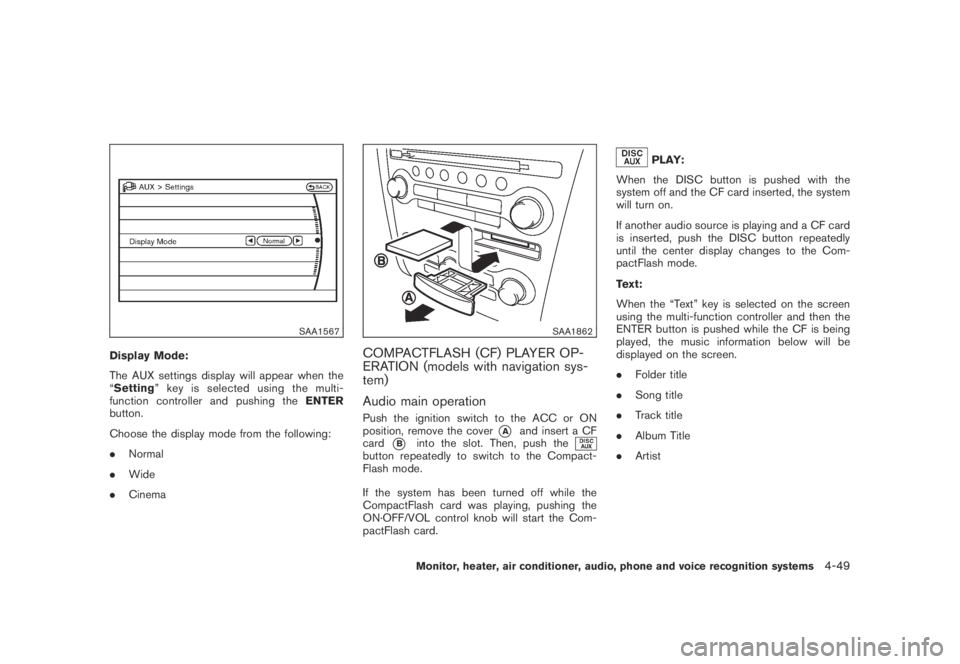
SAA1567
Display Mode:
The AUX settings display will appear when the
“Setting” key is selected using the multi-
function controller and pushing theENTER
button.
Choose the display mode from the following:
.Normal
.Wide
.Cinema
SAA1862
COMPACTFLASH (CF) PLAYER OP-
ERATION (models with navigation sys-
tem)
Audio main operation
Push the ignition switch to the ACC or ON
position, remove the cover
*Aand insert a CF
card
*Binto the slot. Then, push thebutton repeatedly to switch to the Compact-
Flash mode.
If the system has been turned off while the
CompactFlash card was playing, pushing the
ON·OFF/VOL control knob will start the Com-
pactFlash card.
PLAY:
When the DISC button is pushed with the
system off and the CF card inserted, the system
will turn on.
If another audio source is playing and a CF card
is inserted, push the DISC button repeatedly
until the center display changes to the Com-
pactFlash mode.
Text:
When the “Text” key is selected on the screen
using the multi-function controller and then the
ENTER button is pushed while the CF is being
played, the music information below will be
displayed on the screen.
.Folder title
.Song title
.Track title
.Album Title
.Artist
Monitor, heater, air conditioner, audio, phone and voice recognition systems4-49
Page 216 of 443
Black plate (214,1)
Model "Z51-D" EDITED: 2007/ 10/ 2
FF (Fast Forward) , REW (Rewind)/APS
(Automatic Program Search) FF, APS REW:
When the
orbutton is pushed for
more than 1.5 seconds while the iPod®is
playing, the iPod®will play while fast forwarding
or rewinding. When the button is released, the
iPod
®will return to the normal play speed.
When the
orbutton is pushed for less
than 1.5 seconds while the iPod®is playing, the
next track or the beginning of the current track
on the iPod
®will be played.
The multi-function controller can also be used to
select tracks when the iPod
®is playing.
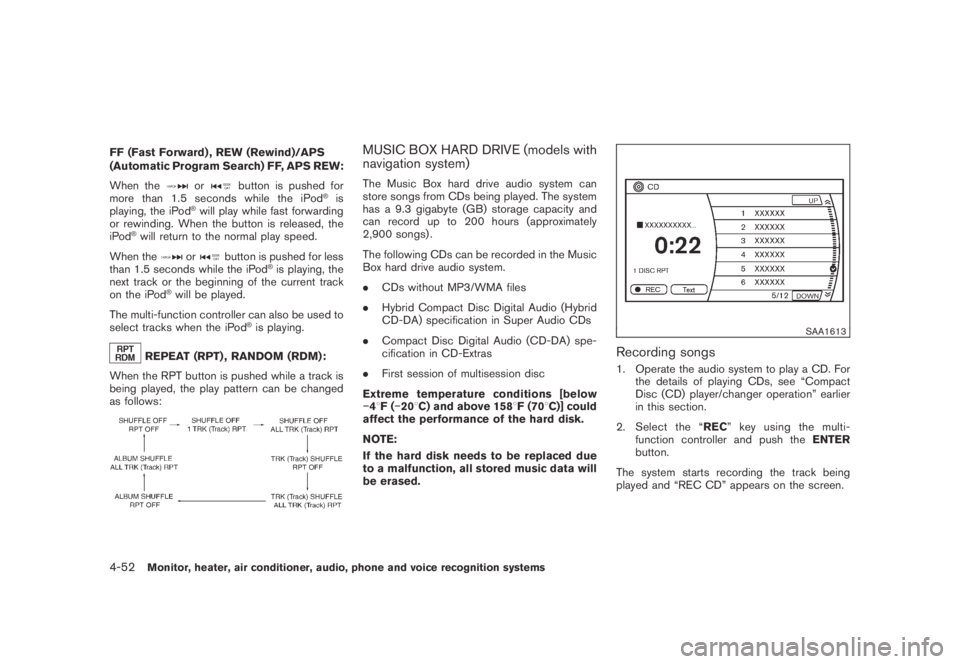
REPEAT (RPT) , RANDOM (RDM):
When the RPT button is pushed while a track is
being played, the play pattern can be changed
as follows:
MUSIC BOX HARD DRIVE (models with
navigation system)
The Music Box hard drive audio system can
store songs from CDs being played. The system
has a 9.3 gigabyte (GB) storage capacity and
can record up to 200 hours (approximately
2,900 songs) .
The following CDs can be recorded in the Music
Box hard drive audio system.
.CDs without MP3/WMA files
.Hybrid Compact Disc Digital Audio (Hybrid
CD-DA) specification in Super Audio CDs
.Compact Disc Digital Audio (CD-DA) spe-
cification in CD-Extras
.First session of multisession disc
Extreme temperature conditions [below
−48F(−208C) and above 1588F (708C)] could
affect the performance of the hard disk.
NOTE:
If the hard disk needs to be replaced due
to a malfunction, all stored music data will
be erased.
SAA1613
Recording songs
1. Operate the audio system to play a CD. For
the details of playing CDs, see “Compact
Disc (CD) player/changer operation” earlier
in this section.
2. Select the “REC” key using the multi-
function controller and push theENTER
button.
The system starts recording the track being
played and “REC CD” appears on the screen.
4-52Monitor, heater, air conditioner, audio, phone and voice recognition systems
Page 217 of 443
Black plate (215,1)
Model "Z51-D" EDITED: 2007/ 10/ 2
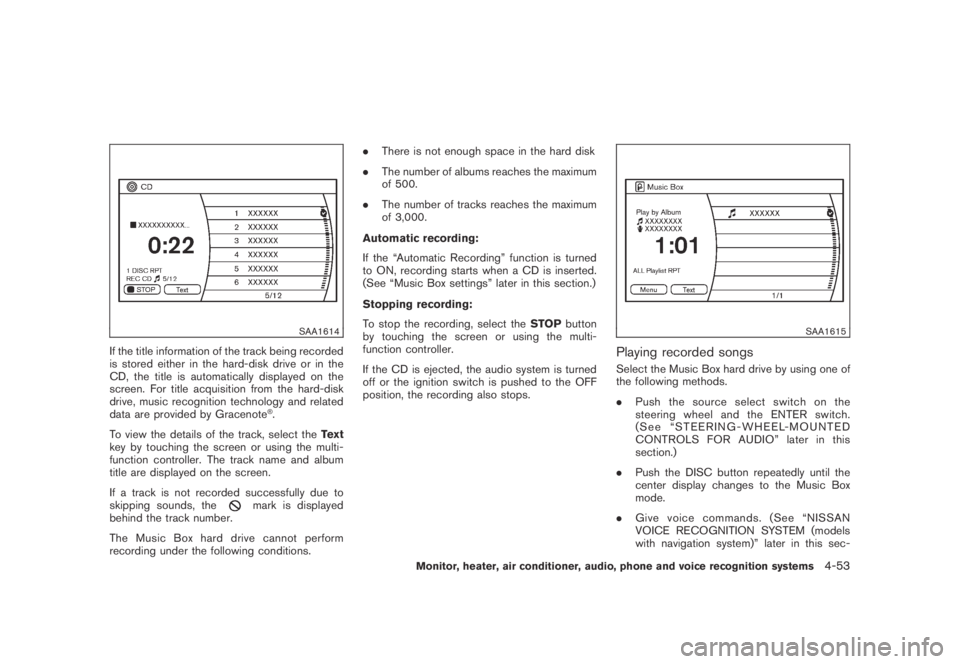
SAA1614
If the title information of the track being recorded
is stored either in the hard-disk drive or in the
CD, the title is automatically displayed on the
screen. For title acquisition from the hard-disk
drive, music recognition technology and related
data are provided by Gracenote
®.
To view the details of the track, select theText
key by touching the screen or using the multi-
function controller. The track name and album
title are displayed on the screen.
If a track is not recorded successfully due to
skipping sounds, the
mark is displayed
behind the track number.
The Music Box hard drive cannot perform
recording under the following conditions..There is not enough space in the hard disk
.The number of albums reaches the maximum
of 500.
.The number of tracks reaches the maximum
of 3,000.
Automatic recording:
If the “Automatic Recording” function is turned
to ON, recording starts when a CD is inserted.
(See “Music Box settings” later in this section.)
Stopping recording:
To stop the recording, select theSTOPbutton
by touching the screen or using the multi-
function controller.
If the CD is ejected, the audio system is turned
off or the ignition switch is pushed to the OFF
position, the recording also stops.
SAA1615
Playing recorded songs
Select the Music Box hard drive by using one of
the following methods.
.Push the source select switch on the
steering wheel and the ENTER switch.
(See “STEERING-WHEEL-MOUNTED
CONTROLS FOR AUDIO” later in this
section.)
.Push the DISC button repeatedly until the
center display changes to the Music Box
mode.
.Give voice commands. (See “NISSAN
VOICE RECOGNITION SYSTEM (models
with navigation system)” later in this sec-
Monitor, heater, air conditioner, audio, phone and voice recognition systems4-53
Page 219 of 443
Black plate (217,1)
Model "Z51-D" EDITED: 2007/ 10/ 2
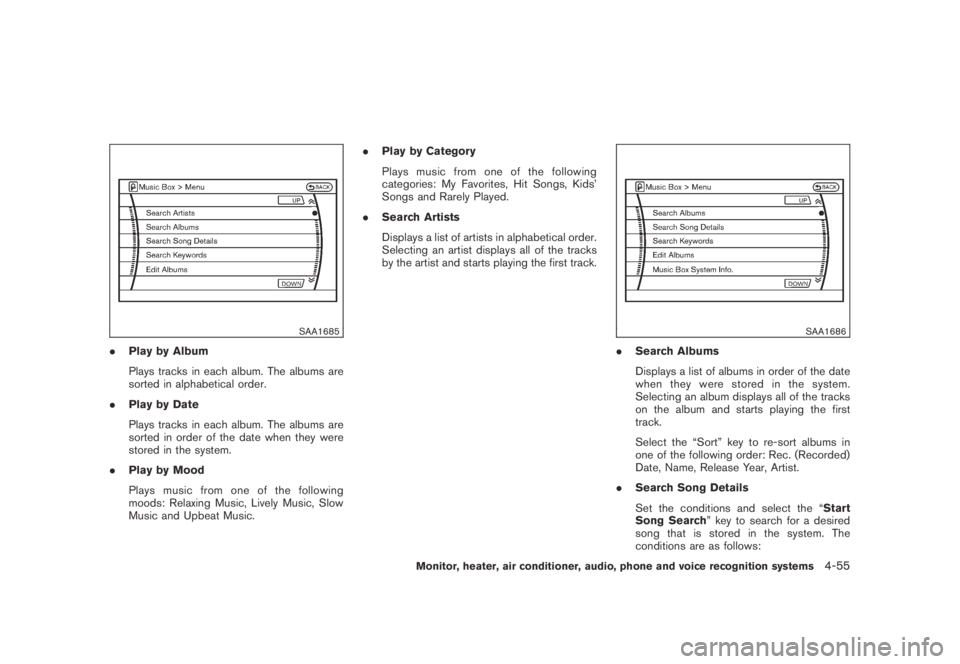
SAA1685
.Play by Album
Plays tracks in each album. The albums are
sorted in alphabetical order.
.Play by Date
Plays tracks in each album. The albums are
sorted in order of the date when they were
stored in the system.
.Play by Mood
Plays music from one of the following
moods: Relaxing Music, Lively Music, Slow
Music and Upbeat Music..Play by Category
Plays music from one of the following
categories: My Favorites, Hit Songs, Kids’
Songs and Rarely Played.
.Search Artists
Displays a list of artists in alphabetical order.
Selecting an artist displays all of the tracks
by the artist and starts playing the first track.
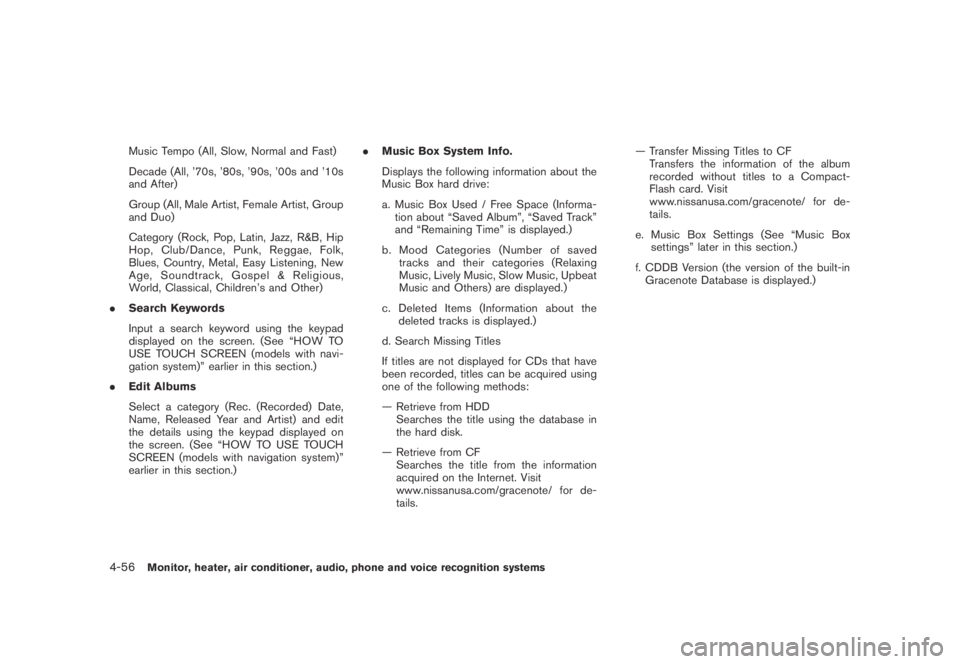
SAA1686
.Search Albums
Displays a list of albums in order of the date
when they were stored in the system.
Selecting an album displays all of the tracks
on the album and starts playing the first
track.
Select the “Sort” key to re-sort albums in
one of the following order: Rec. (Recorded)
Date, Name, Release Year, Artist.
.Search Song Details
Set the conditions and select the “Start
Song Search” key to search for a desired
song that is stored in the system. The
conditions are as follows:
Monitor, heater, air conditioner, audio, phone and voice recognition systems4-55
Page 220 of 443
Black plate (218,1)
Model "Z51-D" EDITED: 2007/ 10/ 2
Music Tempo (All, Slow, Normal and Fast)
Decade (All, ’70s, ’80s, ’90s, ’00s and ’10s
and After)
Group (All, Male Artist, Female Artist, Group
and Duo)
Category (Rock, Pop, Latin, Jazz, R&B, Hip
Hop, Club/Dance, Punk, Reggae, Folk,
Blues, Country, Metal, Easy Listening, New
Age, Soundtrack, Gospel & Religious,
World, Classical, Children’s and Other)
.Search Keywords
Input a search keyword using the keypad
displayed on the screen. (See “HOW TO
USE TOUCH SCREEN (models with navi-
gation system)” earlier in this section.)
.Edit Albums
Select a category (Rec. (Recorded) Date,
Name, Released Year and Artist) and edit
the details using the keypad displayed on
the screen. (See “HOW TO USE TOUCH
SCREEN (models with navigation system)”
earlier in this section.).Music Box System Info.
Displays the following information about the
Music Box hard drive:
a. Music Box Used / Free Space (Informa-
tion about “Saved Album”, “Saved Track”
and “Remaining Time” is displayed.)
b. Mood Categories (Number of saved
tracks and their categories (Relaxing
Music, Lively Music, Slow Music, Upbeat
Music and Others) are displayed.)
c. Deleted Items (Information about the
deleted tracks is displayed.)
d. Search Missing Titles
If titles are not displayed for CDs that have
been recorded, titles can be acquired using
one of the following methods:
— Retrieve from HDD
Searches the title using the database in
the hard disk.
— Retrieve from CF
Searches the title from the information
acquired on the Internet. Visit
www.nissanusa.com/gracenote/ for de-
tails.— Transfer Missing Titles to CF
Transfers the information of the album
recorded without titles to a Compact-
Flash card. Visit
www.nissanusa.com/gracenote/ for de-
tails.
e. Music Box Settings (See “Music Box
settings” later in this section.)
f. CDDB Version (the version of the built-in
Gracenote Database is displayed.)
4-56Monitor, heater, air conditioner, audio, phone and voice recognition systems