2009 NISSAN CUBE lock
[x] Cancel search: lockPage 101 of 321

Black plate (99,1)
Model "Z12-D" EDITED: 2009/ 1/ 28
SIC4131
Type A
ADJUSTING THE TIME
Type APush the CLOCK button
*1
to turn the clock on
or off.
1. Push and hold the CLOCK button
*1
until
the clock display starts to flash.
2. Push the SEEK/TRACK button
*2
to adjust
the hours.
3. Push the TUNE/FF·REW button*3
to
adjust the minutes.
4. Push the CLOCK button
*1
again to exit
the clock set mode.The display will return to the regular clock
display after 10 seconds.
SIC4146
Type B
Type BPush the MENU button
*1
until the CLOCK
mode appears. Then push the TUNE
*2
or
SEEK
*3
button to select “CLK-ON” or “CLK-
OFF” to turn the clock on or off.
“CLK-ON” needs to be selected before adjust-
ing the clock display.
1. Push the MENU button
*1.
2. Push the MENU button
*1
again. The clock
display starts to flash.
3. Push the TUNE
*2
or SEEK
*3
button to
adjust the hours.
4. Push the MENU button
*1
again. The
Instruments and controls
2-29
ProCarManuals.com
Page 102 of 321

Black plate (100,1)
Model "Z12-D" EDITED: 2009/ 1/ 28
display will switch to the minute adjustment
mode.
5. Push the TUNE or SEEK button to adjust the
minutes.
6. Push the MENU button again to exit the
clock mode.
The display will return to the regular clock
display after 10 seconds.
RESETTING THE TIMEBy holding down the CLOCK (type A) or MENU
(type B) button and then pushing the TUNE or
SEEK button, the time will be reset as follows.
.In case the displayed minute is in the range
of 00 - 29, the hour will stay the same and
the minute will be reset to 00.
.In case the displayed minute is in the range
of 30 - 59, the hour will be advanced by one
hour and the minute will be reset to 00.
For example, if the CLOCK or MENU and TUNE
buttons are pushed while the time is between
“8:00” and “8:29”, the display will be reset to
“8:00”. If pushed while the time is between
“8:30” and “8:59”, the display will be reset to
“9:00”. At the same time the display will return to
the previous audio mode.
SIC4132
The power outlet is located in the instrument
panel.
CAUTION
.The outlet and plug may be hot
during or immediately after use.
.Do not use with accessories that
exceed a 12 volt, 120W (10A) power
draw. Do not use double adapters or
more than one electrical accessory.
.Use power outlet with the engine
running to avoid discharging the
vehicle battery..Avoid using power outlet when the
air conditioner, headlights or rear
window defroster is on.
.This power outlet is not designed
for use with a cigarette lighter unit.
.Push the plug in as far as it will go.
If good contact is not made, the plug
may overheat or the internal tem-
perature fuse may open.
.Before inserting or disconnecting a
plug, be sure the electrical acces-
sory being used is turned OFF.
.When not in use, be sure to close
the cap. Do not allow water to
contact the outlet.POWER OUTLET
2-30
Instruments and controls
ProCarManuals.com
Page 105 of 321

Black plate (103,1)
Model "Z12-D" EDITED: 2009/ 1/ 28
SIC4138
GLOVE BOX
WARNING
Keep glove box lid closed while driving
to help prevent injury in an accident or a
sudden stop.
To open the glove box, pull the handle.
To close, push the lid in until the lock latches.
SIC4165
WARNING
Do not store objects on the horizontal
surface just above the glove box or on
top of the instrument panel. Objects
can become projectiles and/or interfere
with passenger air bag deployment
causing serious personal injury.
SIC4147
REAR PILLAR POCKET
CAUTION
Do not keep heavy or long objects in
the pocket.
Instruments and controls
2-33
ProCarManuals.com
Page 108 of 321
Black plate (106,1)
Model "Z12-D" EDITED: 2009/ 1/ 28
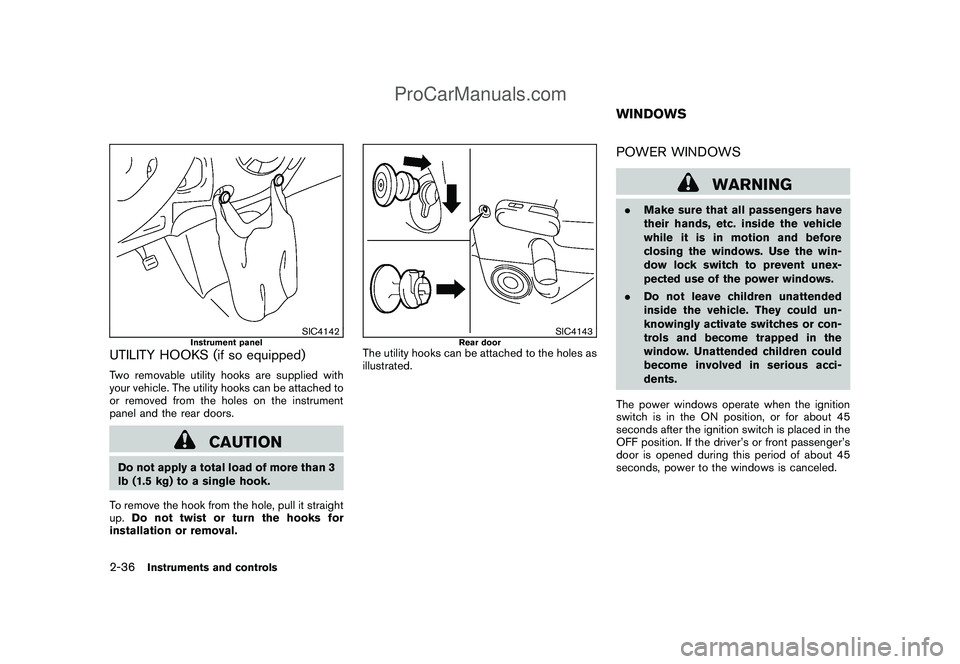
SIC4142
Instrument panel
UTILITY HOOKS (if so equipped)Two removable utility hooks are supplied with
your vehicle. The utility hooks can be attached to
or removed from the holes on the instrument
panel and the rear doors.
CAUTION
Do not apply a total load of more than 3
lb (1.5 kg) to a single hook.
To remove the hook from the hole, pull it straight
up.Do not twist or turn the hooks for
installation or removal.
SIC4143
Rear door
The utility hooks can be attached to the holes as
illustrated.
POWER WINDOWS
WARNING
.Make sure that all passengers have
their hands, etc. inside the vehicle
while it is in motion and before
closing the windows. Use the win-
dow lock switch to prevent unex-
pected use of the power windows.
.Do not leave children unattended
inside the vehicle. They could un-
knowingly activate switches or con-
trols and become trapped in the
window. Unattended children could
become involved in serious acci-
dents.
The power windows operate when the ignition
switch is in the ON position, or for about 45
seconds after the ignition switch is placed in the
OFF position. If the driver’s or front passenger’s
door is opened during this period of about 45
seconds, power to the windows is canceled.WINDOWS
2-36
Instruments and controls
ProCarManuals.com
Page 109 of 321

Black plate (107,1)
Model "Z12-D" EDITED: 2009/ 1/ 28
SIC3507
Main power window switch (driver’s
side)1. Window lock button
2. Driver side window
3. Rear left passenger side window
4. Front passenger side window
5. Rear right passenger side windowTo open or close the window, push down
*A
or
pull up
*B
the switch and hold it. The main
switch (driver side switches) will open or close
all the windows.
Locking passengers’ windowsWhen the lock button
*C
is pushed in, only the
driver side window can be opened or closed.Push it in again to cancel.
SIC3508
Passenger side power window switchThe passenger side switch will open or close
only the corresponding window. To open or
close the window, push down or pull up the
switch and hold it.
Instruments and controls
2-37
ProCarManuals.com
Page 112 of 321

Black plate (110,1)
Model "Z12-D" EDITED: 2009/ 1/ 28
the map lights will illuminate under the following
conditions:
.ignition switch is placed in the OFF position
(models with Intelligent Key system)
— remain on for about 15 seconds.
.the key is removed from the ignition switch
(models without Intelligent Key system)
— remain on for about 15 seconds.
.doors are unlocked by pushing the UN-
LOCK
button (on the keyfob or
Intelligent Key) or the request switch (In-
telligent Key system equipped model) , with
the ignition switch in the LOCK position
— remain on for about 15 seconds.
.any door is opened and then closed with the
ignition switch in the LOCK position
— remain on for about 15 seconds.
.any door is opened with the ignition switch
in the ACC or ON position
— remain on while the door is opened.
When the door is closed, the lights go off.
The lights will turn off after 30 minutes
when the lights remain illuminated to
prevent the battery from becoming dis-
charged.
SIC4148
CEILING LIGHTThe ceiling light switch has three positions: ON*1, center
*2
and OFF
*3.
ON positionWhen the switch is in the ON position
*1, the
ceiling light will illuminate.
Center positionWhen the switch is in the center
position
*2, the ceiling light will illuminate under the
following conditions:
.ignition switch is placed in the OFF position
(models with Intelligent Key system)
— remain on for about 15 seconds..the key is removed from the ignition switch
(models without Intelligent Key system)
— remain on for about 15 seconds.
.doors are unlocked by pushing the UN-
LOCK
button (on the keyfob or
Intelligent Key) or the request switch (In-
telligent Key system equipped model) , with
the ignition switch in the LOCK position
— remain on for about 15 seconds.
.any door is opened and then closed with the
ignition switch in the LOCK position
— remain on for about 15 seconds.
.any door is opened with the ignition switch
in the ACC or ON position
— remain on while the door is opened.
When the door is closed, the lights go off.
The light will turn off after 30 minutes
when the lights remain illuminated to
prevent the battery from becoming dis-
charged.
OFF positionWhen the switch is in the OFF position
*3, the
ceiling light will not illuminate, regardless of the
condition.
2-40
Instruments and controls
ProCarManuals.com
Page 115 of 321

Black plate (10,1)
3 Pre-driving checks and adjustments
Model "Z12-D" EDITED: 2009/ 1/ 28
Keys ............................................................... 3-2
NISSAN Vehicle Immobilizer System keys............ 3-2
Intelligent Keys (if so equipped)......................... 3-3
Doors.............................................................. 3-4
Locking with key............................................ 3-4
Locking with inside lock knob........................... 3-5
Locking with power door lock switch.................. 3-5
Automatic door locks...................................... 3-5
Child safety rear door lock............................... 3-6
Remote keyless entry system (if so equipped)........... 3-7
How to use remote keyless entry system............. 3-8
Intelligent Key system (if so equipped).................. 3-10
Intelligent Key operating range........................ 3-12
Door locks/unlocks precaution........................ 3-12
Intelligent Key operation................................. 3-13
Battery saver system..................................... 3-14Warning lights and audible reminders............... 3-14
Troubleshooting guide................................... 3-15
How to use remote keyless entry function.......... 3-17
Hood............................................................ 3-21
Back door...................................................... 3-22
Bumpers and side sill extensions (Kro¯
m models) ..... 3-23
Fuel-filler door................................................. 3-24
Opening the fuel-filler door............................. 3-24
Fuel-filler cap.............................................. 3-24
Tilt steering column.......................................... 3-25
Tilt operation............................................... 3-26
Sun visors...................................................... 3-26
Mirrors........................................................... 3-26
Inside mirror................................................ 3-26
Outside mirrors............................................ 3-27
ProCarManuals.com
Page 117 of 321

Black plate (115,1)
Model "Z12-D" EDITED: 2009/ 1/ 28
SPA2406
1. Intelligent Key (2 sets)
2. Mechanical key (inside Intelligent Key) (2 sets)
3. Key number plateINTELLIGENT KEYS (if so equipped)Your vehicle can only be driven with the
Intelligent Keys which are registered to your
vehicle’s Intelligent Key system components and
NISSAN Vehicle Immobilizer System compo-
nents. As many as 4 Intelligent Keys can be
registered and used with one vehicle. The new
keys must be registered by a NISSAN dealer
prior to use with the Intelligent Key system and
NISSAN Vehicle Immobilizer System of your
vehicle. Since the registration process requires
erasing all memory in the Intelligent Key compo-nents when registering new keys, be sure to take
all Intelligent Keys that you have to the NISSAN
dealer.
CAUTION
.Be sure to carry the Intelligent Key
with you when driving. The Intelli-
gent Key is a precision device with a
built-in transmitter. To avoid dama-
ging it, please note the following.
— The Intelligent Key is water
resistant; however, wetting may
damage the Intelligent Key. If
the Intelligent Key gets wet,
immediately wipe until it is com-
pletely dry.
— Do not bend, drop or strike it
against another object.
— Do not place the Intelligent Key
foranextendedperiodina
place where temperatures ex-
ceed 1408F (608C) .
— Do not change or modify the
Intelligent Key.
— Do not use a magnet key holder.
— Do not place the Intelligent Key
near an electric appliance such
as a television set, personalcomputer or cellular phone.
— Do not allow the Intelligent Key
to come into contact with water
or salt water, and do not wash it
in a washing machine. This
could affect the system function.
.If an Intelligent Key is lost or stolen,
NISSAN recommends erasing the ID
code of that Intelligent Key. This will
prevent the Intelligent Key from
unauthorized use to unlock the
vehicle. For information regarding
the erasing procedure, please con-
tact a NISSAN dealer.
Pre-driving checks and adjustments
3-3
ProCarManuals.com