2009 NISSAN CUBE air condition
[x] Cancel search: air conditionPage 69 of 321

Black plate (67,1)
Model "Z12-D" EDITED: 2009/ 1/ 28
SSS0362
SUPPLEMENTAL AIR BAG WARNING
LABELSWarning labels about the supplemental front-
impact air bag and front seat-mounted side-
impact supplemental air bag systems are placed
in the vehicle as shown in the illustration.*1
SRS air bag
The warning labels are located on the surface of
the sun visors.*2
SRS side air bags
The warning label is located on the side of the
passenger’s side center pillar.
SPA1097
SUPPLEMENTAL AIR BAG WARNING
LIGHTThe supplemental air bag warning light, display-
ing
in the instrument panel, monitors the
circuits of the supplemental front-impact air bag,
front seat-mounted side-impact supplemental
air bag, roof-mounted curtain side-impact sup-
plemental air bag and seat belt pretensioner
systems. The monitored circuits include Air bag
Control Unit (ACU) , crash zone sensor, satellite
sensors, occupant classification system, front air
bag modules, side air bag modules, curtain air
bag modules, pretensioners and all related
wiring.
When the ignition switch is in the ON position,the supplemental air bag warning light illumi-
nates for about 7 seconds and then turns off.
This means the system is operational.
If any of the following conditions occur, the front
air bag, side air bag, curtain air bag and
pretensioner systems need servicing:
.The supplemental air bag warning light
remains on after approximately 7 seconds.
.The supplemental air bag warning light
flashes intermittently.
.The supplemental air bag warning light does
not come on at all.
Under these conditions, the front air bag, side air
bag, curtain air bag and pretensioner systems
may not operate properly. They must be checked
and repaired. Take your vehicle to the nearest
NISSAN dealer.
Safety — Seats, seat belts and supplemental restraint system
1-53
ProCarManuals.com
Page 75 of 321
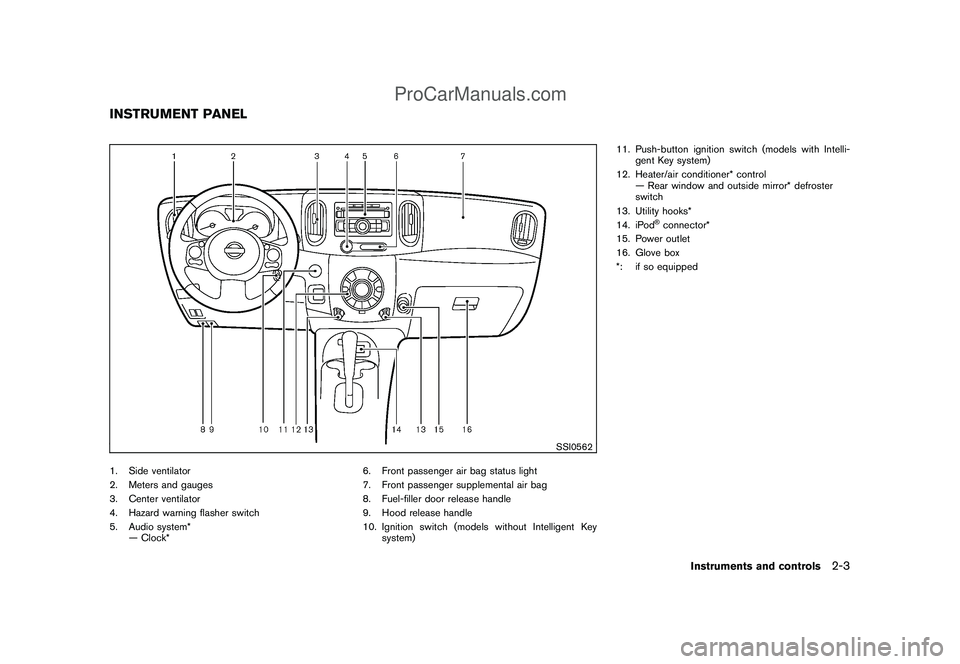
Black plate (73,1)
Model "Z12-D" EDITED: 2009/ 1/ 28
SSI0562
1. Side ventilator
2. Meters and gauges
3. Center ventilator
4. Hazard warning flasher switch
5. Audio system*
— Clock*6. Front passenger air bag status light
7. Front passenger supplemental air bag
8. Fuel-filler door release handle
9. Hood release handle
10. Ignition switch (models without Intelligent Key
system)11. Push-button ignition switch (models with Intelli-
gent Key system)
12. Heater/air conditioner* control
— Rear window and outside mirror* defroster
switch
13. Utility hooks*
14. iPod
®connector*
15. Power outlet
16. Glove box
*: if so equipped
INSTRUMENT PANEL
Instruments and controls
2-3
ProCarManuals.com
Page 78 of 321

Black plate (76,1)
Model "Z12-D" EDITED: 2009/ 1/ 28
SIC4122
TACHOMETERThe tachometer indicates engine speed in
revolutions per minute (RPM) .Do not rev the
engine into the red zone
*1.
CAUTION
When engine speed approaches the red
zone, shift to a higher gear or reduce
engine speed. Operating the engine in
the red zone may cause serious engine
damage.
SIC4123
ENGINE COOLANT TEMPERATURE
GAUGEThe gauge
*1
indicates the engine coolant
temperature.
The engine coolant temperature is within the
normal range when the gauge is within the zone
*2
shown in the illustration.
The engine coolant temperature varies with the
outside air temperature and driving conditions.
CAUTION
If the gauge indicates engine coolant
temperature near the hot (H) end of the
normal range, reduce vehicle speed to
decrease temperature. If gauge is over
the normal range, stop the vehicle as
soon as safely possible. If the engine is
overheated, continued operation of the
vehicle may seriously damage the en-
gine. See “IF YOUR VEHICLE OVER-
HEATS” in the “6. In case of emergency”
section for immediate action required.
2-6
Instruments and controls
ProCarManuals.com
Page 86 of 321
Black plate (84,1)
Model "Z12-D" EDITED: 2009/ 1/ 28
CAUTION
.The TPMS is not a substitute for the
regular tire pressure check. Be sure
to check the tire pressure regularly.
.If the vehicle is being driven at
speeds of less than 16 MPH (25
km/h) , the TPMS may not operate
correctly.
.Be sure to install the specified size
of tires to the four wheels correctly.
Low washer fluid warning light
(Canada only)
This light illuminates when the washer fluid is at
a low level. Add washer fluid as necessary. (See
“WINDOW WASHER FLUID” in the “8. Main-
tenance and do-it-yourself” section.)
P position selecting warning light
(if so equipped)
The warning light blinks in red when the ignition
switch is pushed to stop the engine with the
selector lever in any position except the P (Park)
position.
If this warning appears, move the selector leverto the P (Park) position or push the ignition
switch to the ON position.
An inside warning chime will also sound.
See “INTELLIGENT KEY SYSTEM” in the “3.
Pre-driving checks and adjustments” section.
Seat belt warning light
The light and chime remind you to fasten seat
belts. The light illuminates whenever the ignition
switch is placed in the ON position, and will
remain illuminated until the driver’s seat belt is
fastened. At the same time, the chime will sound
for about 6 seconds unless the driver’s seat belt
is securely fastened.
The seat belt warning light for the front
passenger will illuminate if the seat belt is not
fastened when the front passenger’s seat is
occupied. For 5 seconds after the ignition
switch is in the ON position, the system does
not activate the warning light for the front
passenger.
See “SEAT BELTS” in the “1. Safety — Seats,
seat belts and supplemental restraint system”
section for precautions on seat belt usage.
Supplemental air bag warning light
After turning the ignition switch to the ON
position, the supplemental air bag warning light
will illuminate. The supplemental air bag warning
light will turn off after about 7 seconds if the
supplemental front air bag and supplemental
side air bag, curtain side-impact air bag systems
and/or pretensioner seat belt are operational.
If any of the following conditions occur, the front
air bag, side air bag, curtain air bag and
pretensioner systems need servicing and your
vehicle must be taken to your nearest NISSAN
dealer.
.The supplemental air bag warning light
remains on after approximately 7 seconds.
.The supplemental air bag warning light
flashes intermittently.
.The supplemental air bag warning light does
not illuminate at all.
Unless checked and repaired, the Supplemental
Restraint Systems and/or the pretensioners may
not function properly.
For additional information, see “SUPPLEMEN-
TAL RESTRAINT SYSTEM” in the “1. Safety —
Seats, seat belts and supplemental restraint
system” section.
2-14
Instruments and controls
ProCarManuals.com
Page 100 of 321

Black plate (98,1)
Model "Z12-D" EDITED: 2009/ 1/ 28
SIC4130
To sound the horn, push the center pad area of
the steering wheel.
WARNING
Do not disassemble the horn. Doing so
could affect proper operation of the
supplemental front air bag system.
Tampering with the supplemental front
air bag system may result in serious
personal injury.
SIC1881
The vehicle should be driven with the Vehicle
Dynamic Control (VDC) system on for most
driving conditions.
If the vehicle is stuck in mud or snow, the VDC
system reduces the engine output to reduce
wheel spin. The engine speed will be reduced
even if the accelerator is depressed to the floor.
If maximum engine power is needed to free a
stuck vehicle, turn the VDC system off.
To turn off the VDC system, push the VDC OFF
switch. The
indicator will illuminate.
Push the VDC OFF switch again or restart the
engine to turn on the system. (See “VEHICLE
DYNAMIC CONTROL (VDC) SYSTEM” in the
“5. Starting and driving” section.)The digital clock (in the audio unit) displays time
when the ignition switch is in the ACC or ON
position.
The clock ON or OFF mode can be selected.
If the power supply is disconnected, the
clock will not indicate the correct time.
Readjust the time.
HORNVEHICLE DYNAMIC CONTROL (VDC)
OFF SWITCHCLOCK (if so equipped)2-28
Instruments and controls
ProCarManuals.com
Page 102 of 321

Black plate (100,1)
Model "Z12-D" EDITED: 2009/ 1/ 28
display will switch to the minute adjustment
mode.
5. Push the TUNE or SEEK button to adjust the
minutes.
6. Push the MENU button again to exit the
clock mode.
The display will return to the regular clock
display after 10 seconds.
RESETTING THE TIMEBy holding down the CLOCK (type A) or MENU
(type B) button and then pushing the TUNE or
SEEK button, the time will be reset as follows.
.In case the displayed minute is in the range
of 00 - 29, the hour will stay the same and
the minute will be reset to 00.
.In case the displayed minute is in the range
of 30 - 59, the hour will be advanced by one
hour and the minute will be reset to 00.
For example, if the CLOCK or MENU and TUNE
buttons are pushed while the time is between
“8:00” and “8:29”, the display will be reset to
“8:00”. If pushed while the time is between
“8:30” and “8:59”, the display will be reset to
“9:00”. At the same time the display will return to
the previous audio mode.
SIC4132
The power outlet is located in the instrument
panel.
CAUTION
.The outlet and plug may be hot
during or immediately after use.
.Do not use with accessories that
exceed a 12 volt, 120W (10A) power
draw. Do not use double adapters or
more than one electrical accessory.
.Use power outlet with the engine
running to avoid discharging the
vehicle battery..Avoid using power outlet when the
air conditioner, headlights or rear
window defroster is on.
.This power outlet is not designed
for use with a cigarette lighter unit.
.Push the plug in as far as it will go.
If good contact is not made, the plug
may overheat or the internal tem-
perature fuse may open.
.Before inserting or disconnecting a
plug, be sure the electrical acces-
sory being used is turned OFF.
.When not in use, be sure to close
the cap. Do not allow water to
contact the outlet.POWER OUTLET
2-30
Instruments and controls
ProCarManuals.com
Page 121 of 321

Black plate (119,1)
Model "Z12-D" EDITED: 2009/ 1/ 28
It is possible to lock/unlock all doors (including
the back door) , and activate the panic alarm by
using the keyfob from outside the vehicle.
Before locking the doors, make sure the
key is not left in the vehicle.
The keyfob can operate at a distance of
approximately 33 ft (10 m) from the vehicle.
(The effective distance depends upon the
conditions around the vehicle.)
As many as 5 keyfobs can be used with one
vehicle. For information concerning the pur-
chase and use of additional keyfobs, contact a
NISSAN dealer.
The keyfob will not function:
.When the keyfob is not within the opera-
tional range.
.When the doors are open or not closed
securely.
.When the key is in the ignition switch.
.When the battery is discharged.
WARNING
The remote keyless entry keyfob trans-
mits radio waves when the buttons are
pushed. The FAA advises that the radio
waves may affect aircraft navigation
and communication systems. Do not
operate the keyfob while on an air-plane. Make sure the buttons are not
operated unintentionally when the unit
is stored during a flight.
CAUTION
The following conditions or occur-
rences will damage the keyfob.
.Do not allow the keyfob to become
wet.
.Do not drop the keyfob.
.Do not strike the keyfob sharply
against another object.
.Do not place the keyfob for an
extended period in an area where
temperatures exceed 1408F (608C) .
If a keyfob is lost or stolen, NISSAN
recommends erasing the ID code of that
keyfob. This will prevent the keyfob
from unauthorized use to unlock the
vehicle. For information regarding the
erasing procedure, please contact a
NISSAN dealer.
If the indicator light on the keyfob does not
illuminate when pushing the buttons, the keyfob
battery may be discharged.
For information regarding the replacement of abattery, see “KEY BATTERY REPLACEMENT”
in the “8. Maintenance and do-it-yourself”
section.
REMOTE KEYLESS ENTRY SYSTEM
(if so equipped)
Pre-driving checks and adjustments
3-7
ProCarManuals.com
Page 124 of 321

Black plate (122,1)
Model "Z12-D" EDITED: 2009/ 1/ 28
Switching procedure:
To switch the hazard indicator and horn opera-
tion, push the LOCK
*1
and UNLOCK
*2
buttons on the keyfob simultaneously
for more than 2 seconds.
.When the hazard indicator mode is set, the
hazard indicator flashes 3 times.
.When the hazard indicator and horn mode is
set, the hazard indicator flashes once and
the horn chirps once.
WARNING
.Radio waves could adversely affect
electric medical equipment. Those
who use a pacemaker should con-
tact the electric medical equipment
manufacturer for the possible influ-
ences before use.
.The Intelligent Key transmits radio
waves when the buttons are
pushed. The FAA advises that the
radio waves may affect aircraft na-
vigation and communication sys-
tems. Do not operate the
Intelligent Key while on an airplane.
Makesurethebuttonsarenot
operated unintentionally when the
unit is stored during a flight.
The Intelligent Key system can operate all the
door locks using the remote controller function
or pushing the request switch on the vehicle
without taking the key out from a pocket or
purse. The operating environment and/or condi-
tions may affect the Intelligent Key system
operation.
Be sure to read the following before using the
Intelligent Key system.
CAUTION
.Be sure to carry the Intelligent Key
with you when operating the vehi-
cle.
.Never leave the Intelligent Key in
the vehicle when you leave the
vehicle.
The Intelligent Key is always communicating with
the vehicle as it receives radio waves. The
Intelligent Key system transmits weak radio
waves. Environmental conditions may interfere
with the operation of the Intelligent Key system
under the following operating conditions.
.When operating near a location where
strong radio waves are transmitted, such
as a TV tower, power station and broad-
casting station.
.When in possession of wireless equipment,
such as a cellular phone, transceiver, and
CB radio.
.When the Intelligent Key is in contact with or
covered by metallic materials.
.When any type of radio wave remote control
is used nearby.
.When the Intelligent Key is placed near an
electric appliance such as a personal
INTELLIGENT KEY SYSTEM (if so
equipped)
3-10
Pre-driving checks and adjustments
ProCarManuals.com