2009 NISSAN ALTIMA HYBRID CD changer
[x] Cancel search: CD changerPage 159 of 353

4 Monitor, climate, audio, phone and voice
recognition systems
Control panel buttons (if so equipped)...............4-2
Setting up the start-up screen...................4-3
How to use the SETUP button...................4-3
button...................................4-7
RearView Monitor (if so equipped)...................4-8
How to read the displayed lines..................4-8
Adjusting the screen............................4-9
Operating tips..................................4-9
Vents...........................................4-10
Heater and air conditioner (automatic)..............4-11
Automatic operation...........................4-11
Manual operation..............................4-12
Operating tips.................................4-13
Servicing air conditioner...........................4-13
Audio system....................................4-14
Radio........................................4-14
FM radio reception............................4-14
AM radio reception............................4-14
Satellite radio reception (if so equipped).........4-15
Audio operation precautions....................4-15
FM/AM radio with compact disc (CD) player......4-20
FM/AM/SAT radio with compact disc (CD)
changer (if so equipped).......................4-24FM/AM/SAT radio with compact disc (CD)
changer (if so equipped).......................4-31
CD care and cleaning..........................4-36
Steering wheel switch for audio control
(if so equipped)...............................4-37
Antenna......................................4-38
Car phone or CB radio............................4-39
BluetoothTHands-Free Phone System without
Navigation System (if so equipped).................4-39
Regulatory Information.........................4-41
Using the system..............................4-41
Control buttons...............................4-43
Getting started................................4-44
List of voice commands........................4-46
Speaker adaptation (SA) mode..................4-51
Troubleshooting guide.........................4-53
BluetoothTHands-Free Phone System with
Navigation System (if so equipped).................4-54
Regulatory Information.........................4-55
Voice commands..............................4-56
Pairing procedure.............................4-56
Phone download..............................4-57
Making a call..................................4-59
ZREVIEW COPYÐ2009 Altima Hybrid Electric
(ahv)
Owners ManualÐCanadian_French(fr_can)
06/16/08Ðdebbie
X
Page 174 of 353
SATELLITE RADIO RECEPTION (if so
equipped)
When the satellite radio is first installed or the
battery has been replaced, the satellite radio may
not work properly. This is not a malfunction. Wait
more than 10 minutes with satellite radio ON and
the vehicle outside of any metal or large building
for satellite radio to receive all of the necessary
data.
No satellite radio reception is available and “NO
SAT” is displayed when the SAT band option is
selected unless optional satellite receiver and
antenna are installed and an XMTsatellite radio
service subscription is active. Satellite radio is
not available in Alaska, Hawaii and Guam.
Satellite radio performance may be affected if
cargo carried on the roof blocks the satellite radio
signal.
If possible, do not put cargo over the satellite
antenna.
A build up of ice on the satellite radio antenna can
affect satellite radio performance. Remove the
ice to restore satellite radio reception
AUDIO OPERATION PRECAUTIONSCompact disc (CD) player
CAUTION
cDo not force a compact disc into the CD
insert slot. This could damage the CD
and/or CD changer/player.
cTrying to load a CD with the CD door
closed could damage the CD and/or CD
changer.
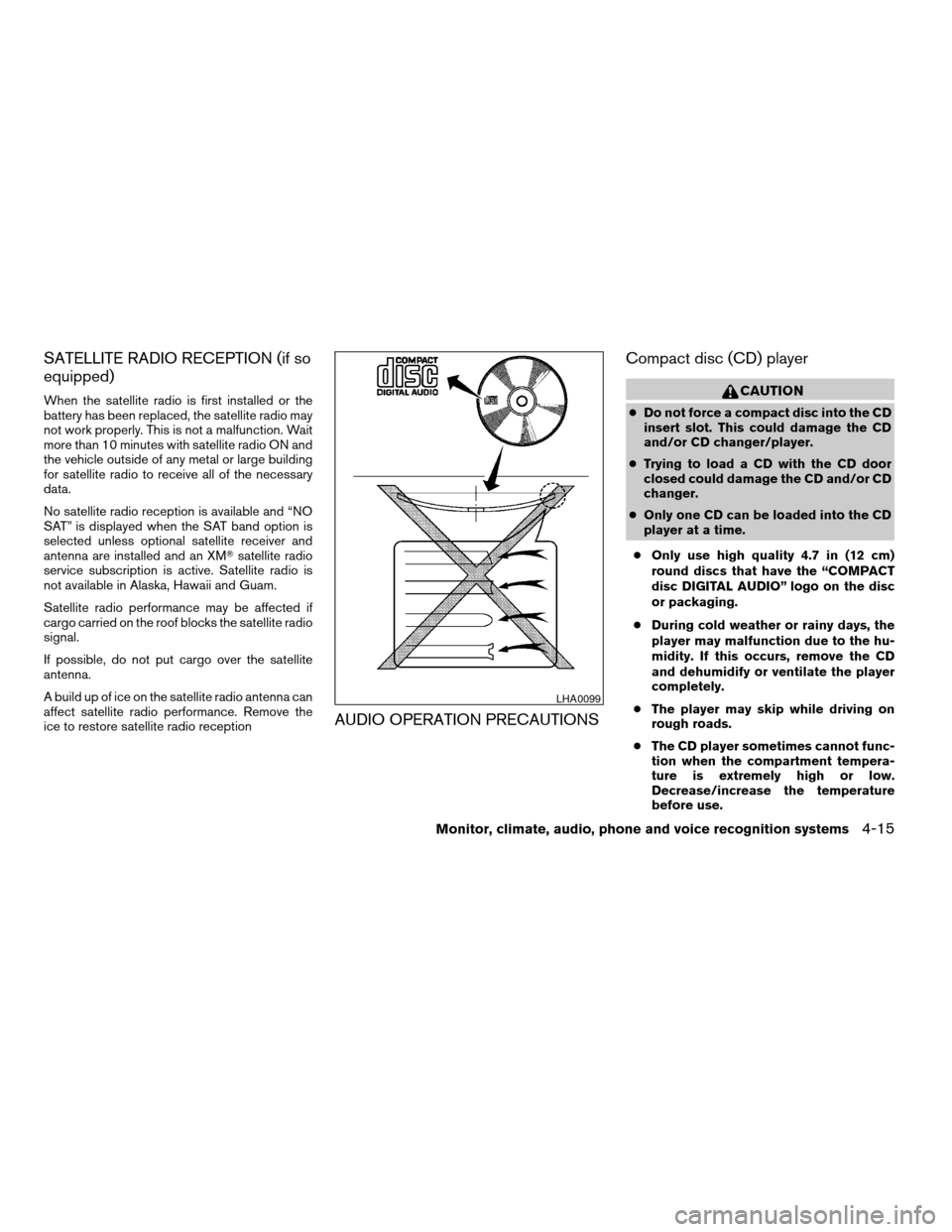
cOnly one CD can be loaded into the CD
player at a time.
cOnly use high quality 4.7 in (12 cm)
round discs that have the “COMPACT
disc DIGITAL AUDIO” logo on the disc
or packaging.
cDuring cold weather or rainy days, the
player may malfunction due to the hu-
midity. If this occurs, remove the CD
and dehumidify or ventilate the player
completely.
cThe player may skip while driving on
rough roads.
cThe CD player sometimes cannot func-
tion when the compartment tempera-
ture is extremely high or low.
Decrease/increase the temperature
before use.
LHA0099
Monitor, climate, audio, phone and voice recognition systems4-15
ZREVIEW COPYÐ2009 Altima Hybrid Electric
(ahv)
Owners ManualÐCanadian_French(fr_can)
06/16/08Ðdebbie
X
Page 175 of 353

cDo not expose the CD to direct sun-
light.
cCDs that are in poor condition or are
dirty, scratched or covered with finger-
prints may not work properly.
cThe following CDs may not work prop-
erly:
cCopy control compact discs (CCCD)
cRecordable compact discs (CD-R)
cRewritable compact discs (CD-RW)
cDo not use the following CDs as they
may cause the CD player to malfunc-
tion:
c3.1 in (8 cm) discs with an adapter
cCDs that are not round
cCDs with a paper label
cCDs that are warped, scratched, or
have abnormal edges
cThis audio system can only play pre-
recorded CDs. It has no capability to
record or burn CDs.
cIf the CD cannot be played, one of the
following messages will be displayed.1. MP3 or WMA file not supported!“UN-
PLAYABLE TRACK”!Go to next track
2. CD ROM!“No Audio Track”!Eject disc
and go to the last mode (CD player only) /
Go to next disc (CD changer only)
3. TEMP/MECH ERROR!“PRESS EJECT”
4. READ/FOCUS ERROR!“CHECK DISC”
CHECK DISC:
cConfirm that the CD is inserted cor-
rectly (the label side is facing up,
etc.) .
cConfirm that the CD is not bent or
warped and it is free of scratches.
PRESS EJECT:
This is an error due to excessive tem-
perature inside the player. Remove the
CD by pressing the EJECT button. After
a short time, reinsert the CD. The CD
can be played when the temperature of
the player returns to normal.
UNPLAYABLE:
The file is unplayable in this audio sys-
tem (only MP3 or WMA CD) .Compact Disc with MP3 or WMA
Terms:
cMP3 — MP3 is short for Moving Pictures
Experts Group Audio Layer 3. MP3 is the
most well-known compressed digital audio
file format. This format allows for near “CD
quality” sound, but at a fraction of the size of
normal audio files. MP3 conversion of an
audio track from CD-ROM can reduce the
file size by approximately a 10:1 ratio with
virtually no perceptible loss in quality. MP3
compression removes the redundant and
irrelevant parts of a sound signal that the
human ear doesn’t hear.
cWMA — Windows Media Audio (WMA)* is a
compressed audio format created by Mi-
crosoft as an alternative to MP3. The WMA
codec offers greater file compression than
the MP3 codec, enabling storage of more
digital audio tracks in the same amount of
space when compared to MP3s at the same
level of quality.
cBit rate — Bit rate denotes the number of
bits per second used by a digital music file.
The size and quality of a compressed digital
audio file is determined by the bit rate used
when encoding the file.
4-16Monitor, climate, audio, phone and voice recognition systems
ZREVIEW COPYÐ2009 Altima Hybrid Electric
(ahv)
Owners ManualÐCanadian_French(fr_can)
06/16/08Ðdebbie
X
Page 183 of 353

1. SEEK/TRACK button
2. CD insert slot
3. TUNE/FF·REW button
4.
CD eject button5. AUDIO button (BASS, TREBLE, FADE,
SSV, BALANCE and BEEPS)
6. CLOCK button
7. AUX IN jack
8. SCAN button9. RDM/RPT button
10. PWR/VOL control knob
11. AUX button
12. RADIO* button
13. CD button
14. DISP button
15. PRESET A·B·C button
16. Station and CD select (1 - 6) buttons
17.
CD load button
*No satellite radio reception is available
unless there is an active XMTsatellite
radio service subscription. Satellite ra-
dio is not available in Alaska, Hawaii
and Guam. If satellite radio is not opera-
tional then pressing the RADIO button
will switch between FM and AM bands.
FM/AM/SAT RADIO WITH
COMPACT DISC (CD) CHANGER (if
so equipped)
For all operation precautions, see “Audio opera-
tion precautions” earlier in this section.
No satellite radio reception is available unless
there is an active XMTsatellite radio service
subscription. Satellite radio is not available in
Alaska, Hawaii and Guam. If satellite radio is notType A
LHA0729
4-24Monitor, climate, audio, phone and voice recognition systems
ZREVIEW COPYÐ2009 Altima Hybrid Electric
(ahv)
Owners ManualÐCanadian_French(fr_can)
06/16/08Ðdebbie
X
Page 186 of 353

TUNE/FF·REW (tuning)
button:
Press the TUNE/FF·REW button
orfor manual tuning. To move quickly through the
channels, hold the tuning buttons down.
SEEK (tuning) button:
Press the SEEK/TRACK button
orto tune from high to low or low to high frequen-
cies and stop at the next broadcasting station.
SCAN (tuning) button:
Press the SCAN button. SCAN illuminates in the
display window. Scan tuning begins from low to
high frequencies. Scan tuning stops for 5 sec-
onds at each broadcasting station that has suffi-
cient signal strength. When scanning, SCAN
blinks in the display. Pressing the SCAN button
again during this 5 second period stops scan
tuning and the radio remains tuned to that station.
Station memory operations:
18 stations can be set for the FM and AM radio to
the A, B and C preset button in any combination
of AM or FM stations.
1. Press the PRESET A·B·C button to change
between storage banks. The radio displaysthe icon A, B or C to indicate which set of
presets are active.
2. Tune to the desired station using manual
TUNE or SEEK tuning. Press and hold any of
the desired station memory buttons (1 – 6)
until a beep sound is heard. (The radio mutes
when the select button is pressed.)
3. The channel indicator will then come on and
the sound will resume. Programming is now
complete.
4. Other buttons can be set in the same man-
ner.
If the battery cable is disconnected, or if the fuse
opens, the radio memory will be canceled. In that
case, reset the desired stations.
Radio data system (RDS):
RDS stands for Radio Data System, and is a data
information service transmitted by some radio
stations on the FM band (not AM band) . Cur-
rently, most RDS stations are in large cities, but
many stations are now considering broadcasting
RDS data.
RDS can display:
cStation call sign, such as “WHFR 98.3”.
cStation name, such as “The Groove”.cMusic or programming type such as “Clas-
sical”, “Country”, or “Rock”.
If the station broadcasts RDS information, the
RDS icon is displayed.
Compact disc (CD) changer operation
Place the ignition switch in the ACC or ON
position and insert the compact disc into the slot
with the label side facing up. The compact disc
will be guided automatically into the slot and start
playing. To insert the disc, first press the
button.
If the radio is already operating, it will automati-
cally turn off and the compact disc will play.
If the system has been turned off while the com-
pact disc was playing, pressing the PWR button
will start the compact disc.
Do not use 3.1 in (8 cm) diameter compact discs
in the CD changer.
CD load button:
To insert a CD in the CD changer, press
the
load button for less than 1.5 seconds.
Select the loading slot by pressing the CD insert
select button (1 – 6) , then insert the CD.
To insert 6 CDs to the CD changer, press
the
load button for more than 1.5 seconds.
Monitor, climate, audio, phone and voice recognition systems4-27
ZREVIEW COPYÐ2009 Altima Hybrid Electric
(ahv)
Owners ManualÐCanadian_French(fr_can)
06/16/08Ðdebbie
X
Page 187 of 353

The slot numbers (1 – 6) will illuminate on the
display when CDs are loaded into the changer.
CD button:
When the CD button is pressed with the system
off and the compact disc loaded, the system will
turn on and the compact disc will start to play.
When the CD button is pressed with the com-
pact disc loaded but the radio playing, the radio
will automatically be turned off and the compact
disc will start to play.
TUNE/FF·REW (fast
forward, rewind) button:
When the TUNE/FF·REW
orbutton
is pressed while the compact disc is playing, the
compact disc plays at an increased speed while
fast forwarding or rewinding. When the button is
released, the CD returns to normal play speed.
MP3 TUNE/FF·REW
button:
While playing an MP3, press the
TUNE/FF·REW
orbutton to scan
forward or backward through available folders.
To fast forward or rewind through an MP3 audio
track, press the TUNE/FF·REW
orbutton for more than 1.5 seconds.
SEEK/TRACK button:
When
is pressed while the compact disc
is playing, the track following the present one
starts to play from the beginning. Press
several times to skip several tracks. Each time the
button is pressed, the CD advances 1 additional
track. The track number appears in the display
window. (When the last track on the compact
disc is skipped, the first track is played.)
When
is pressed, the track being played
returns to the beginning. Press
several
times to skip back several tracks. Each time the
button is pressed, the CD moves back 1 track.
CD select buttons:
To play another CD that has been loaded, press a
CD select button (1 – 6) .
RDM/RPT button:
When the RDM/RPT button is pressed while a
compact disc is being played, the play pattern
can be changed as follows:
Random All Discs*!Random Disc!Repeat
Disc!Repeat Track!normal!Random All
Discs
Random All Discs: The loaded discs will be
played randomly, not in sequence of how they are
loaded.Random Disc: The tracks on the current selected
disc will be played randomly.
Repeat Disc: The disc that is currently playing will
be repeated.
Repeat Track: The current track will be repeated.
*This mode is only available when multiple CDs
are loaded into the CD changer.
MP3 RDM/RPT button:
When the RDM/RPT button is pressed while an
MP3 compact disc is being played, the play
pattern can be changed as follows:
Random All Discs*!Random Disc!Repeat
Disc!Random Folder!Repeat Folder!
Repeat Track!normal!Random All Discs
Random All Discs: The loaded discs will be
played randomly, not in sequence of how they are
loaded.
Random Disc: The tracks on the current selected
disc will be played randomly.
Repeat Disc: The disc that is currently playing will
be repeated.
Random Folder: The folders on the current MP3
disc will be played randomly.
Repeat Folder: The current folder being played
will be repeated.
Repeat Track: The current track will be repeated.
*This mode is only available when multiple CDs
are loaded into the CD changer.
4-28Monitor, climate, audio, phone and voice recognition systems
ZREVIEW COPYÐ2009 Altima Hybrid Electric
(ahv)
Owners ManualÐCanadian_French(fr_can)
06/16/08Ðdebbie
X
Page 188 of 353

SCAN button:
1 Disc, All Tracks
While listening to a CD, press the SCAN button
to preview the first 10 seconds of each track on
the CD playing. Pressing the SCAN button again
during this 10 second period stops the scan and
the CD remains on that track.
All Discs, 1 Track
While listening to a CD with other CDs loaded
into the CD changer, press and hold the SCAN
button for approximately 2 seconds, to preview
the first 10 seconds of the first track on the CDs
loaded. Pressing the SCAN button again during
this 10 second period stops the scan and the
current loaded CD will remain playing.
MP3 SCAN mode:
1 Disc All Folders
While listening to an MP3 CD, press the SCAN
button to preview the first 10 seconds of each
track in each folder on the MP3 CD playing.
Pressing the SCAN button again during this 10
second period stops the scan and the CD re-
mains on that track and folder.All Discs, 1 Track, 1 Folder
While listening to an MP3 CD with other CDs
loaded into the CD changer, press and hold the
SCAN button for approximately 2 seconds, to
preview the first 10 seconds of the first track in
the first folder on the MP3 CDs loaded. Pressing
the SCAN button again during this 10 second
period stops the scan and the current loaded CD
will remain playing.
CD Eject:
Current/Selected disc:
cPress the
button, then press the slot
number (1 – 6) for the desired disc. The
compact disc will be ejected. If no slot num-
ber (1 – 6) is pressed the current loaded
disc will be ejected. Also, if the ejected disc
is not removed within 15 seconds, the disc
will reload.All discs:
cPress and hold the
button for more
than 1.5 seconds. The compact discs will be
ejected one by one. If a disc is not removed
within 15 seconds, or the button is pressed
again during the eject sequence, the entire
disc eject sequence will be canceled. When
this button is pressed while the compact
disc is being played, the compact disc will
eject and the last source will be played.
CD IN indicator:
A CD icon indicator appears on the display when
a CD is loaded with the system on.
AUX (Auxiliary) button:
The AUX IN jack is located on the CD player. The
AUX IN audio input jack accepts any standard
analog audio input such as from a portable cas-
sette tape/CD player, MP3 player or laptop com-
puters.
Press the AUX button to play a compatible device
when it is plugged into the AUX IN jack.
Monitor, climate, audio, phone and voice recognition systems4-29
ZREVIEW COPYÐ2009 Altima Hybrid Electric
(ahv)
Owners ManualÐCanadian_French(fr_can)
06/16/08Ðdebbie
X
Page 189 of 353

1. RADIO* button
2. Touch-screen keys (vary depending on
what function is selected)
3. SEEK/TRACK button
4. TUNE·FOLDER and AUDIO control
knob (BASS, TREBLE, BALANCE,
FADE and SSV (if so equipped))
5. Station and CD select (1 - 6) buttons
6. CD insert slot
7. CD changer select (1 - 6) buttons
8.
CD eject button
9. AUX jack
10. A·B·C button
11. ON·OFF/VOL control knob
12. CD/AUX button
*No satellite radio reception is available
unless there is an active XMTsatellite
radio service subscription. Satellite ra-
dio is not available in Alaska, Hawaii
and Guam. If satellite radio is not opera-
tional then pressing the RADIO button
will switch between FM and AM bands.
Type BLHA0730
4-30Monitor, climate, audio, phone and voice recognition systems
ZREVIEW COPYÐ2009 Altima Hybrid Electric
(ahv)
Owners ManualÐCanadian_French(fr_can)
06/16/08Ðdebbie
X