2009 MITSUBISHI ASX battery
[x] Cancel search: batteryPage 42 of 368

Each time the door and tailgate unlock function is
set,
a chime will sound to tell you the condition of
the door and tailgate unlock function. Number of
chimes Condition
One chime All doors and the tailgate unlock
Two chimes Driver’s door unlock only 1. Put the operation mode in OFF.
2. Place
the combination headlamps and dipper
switch in the “OFF” position, and leave the
driver’s door open.
3. Press and hold the LOCK switch (1) for 4 to 10 seconds and then also press the UNLOCK
switch (2) during this time.
4. Release in sequence the LOCK and UN- LOCK switches within 10 seconds of press-
ing the LOCK switch in step 3.
NOTE l On vehicles equipped with MITSUBISHI
Multi-Communication System (MMCS),
screen operations can be used to make the ad-
justment. Refer to the separate owner’s man-
ual for details.
Procedure for replacing the remote control switch
battery E00309600061
1. With
the MITSUBISHI mark facing you, in-
sert the cloth-covered tip of a straight blade (or minus) screwdriver into the notch in the
case and use it to open the case.
NOTE
l Be
sure to perform the procedure with the
MITSUBISHI mark facing you. If the
MITSUBISHI mark is not facing you when
you open the case, the transmitter may come
out.
2. Remove the old battery.
3. Install a new battery with the + side (A) up.
+ side
- side
Coin type battery
CR2032 4. Close the case firmly.
5. Check
the keyless operation function to see
that it works.
NOTE l You may purchase a replacement battery at
an electric appliance store.
l A MITSUBISHI MOTORS Authorized Serv-
ice Point can replace the battery for you if
you prefer. CAUTION
l
When
the remote control switch case is
opened, be careful to keep water, dust,
etc. out. Also, do not touch the internal
components. Locking and unlocking
1-20
1
Page 49 of 368
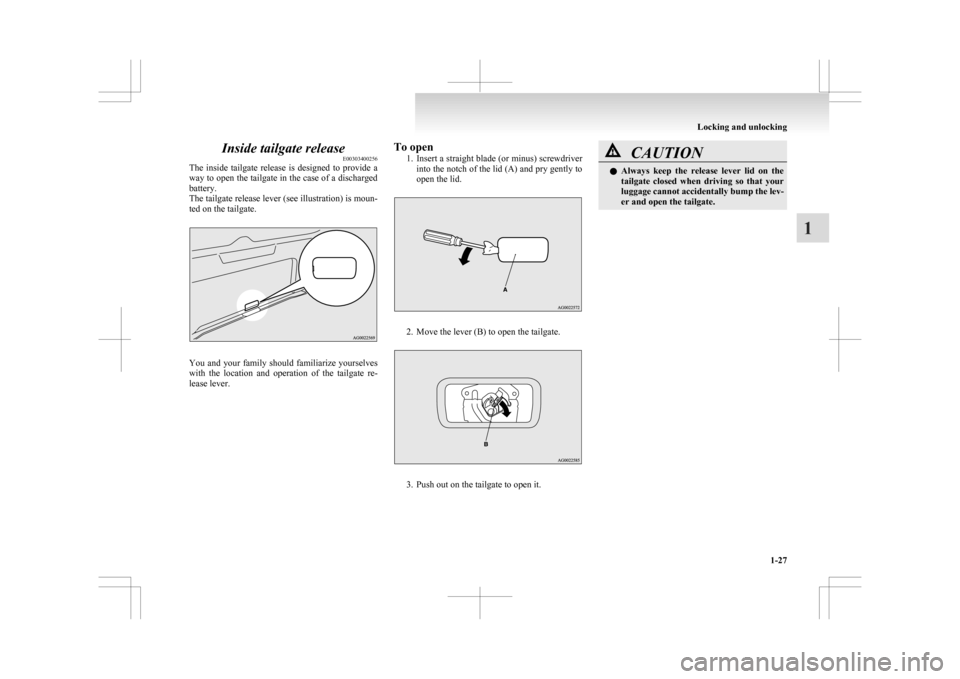
Inside tailgate release
E00303400256
The
inside tailgate release is designed to provide a
way to open the tailgate in the case of a discharged
battery.
The tailgate release lever (see illustration) is moun-
ted on the tailgate. You and your family should familiarize yourselves
with
the location and operation of the tailgate re-
lease lever. To open
1. Insert
a straight blade (or minus) screwdriver
into the notch of the lid (A) and pry gently to
open the lid. 2. Move the lever (B) to open the tailgate.
3. Push out on the tailgate to open it. CAUTION
l
Always
keep the release lever lid on the
tailgate closed when driving so that your
luggage cannot accidentally bump the lev-
er and open the tailgate. Locking and unlocking
1-27 1
Page 50 of 368
Security alarm system*
E00301500569
The
security alarm system is for alerting the sur-
rounding area of suspicious behaviour to prevent un-
lawful entry into the vehicle by operating an alarm
if a door, the tailgate or the bonnet is opened when
the vehicle has not been unlocked using the keyless
entry system or the keyless operation function.
Also, the alarm will be activated if any of the fol-
lowing occur.
l Attempt an unlawful moving of the vehicle.
(the vehicle inclination detection function)
l Detect a motion in the vehicle. (the interior
intrusion detection function)
l Disconnect the battery terminal.
The security alarm system is set to “active”.
When making changes to the settings, please fol-
low the procedure listed in the section titled “Chang-
ing the security alarm settings” on page 1-29.
On vehicles equipped with MITSUBISHI Multi-
Communication System (MMCS), screen opera-
tions can be used to make the adjustment. Refer to
the separate owner’s manual for details. CAUTION
l
Do
not modify or add parts to the securi-
ty alarm system.
Doing so could cause the security alarm
to malfunction. NOTE
l The
alarm system will not be activated if the
doors and the tailgate have been locked using
a key, the inside lock knob or the central
door lock switch (instead of the keyless entry
system or the keyless operation function).
l If the turn-signal lamps do not blink after the
locking and unlocking operation using the
keyless entry system or the keyless operation
function, the security alarm system may be
malfunctioning.
Have the vehicle inspected at a
MITSUBISHI MOTORS Authorized Service
Point.
If the confirmation function (blinking of the
turn-signal lamps by locking and unlocking
the doors and the tailgate) is deactivated, the
turn-signal lamps do not blink after the lock-
ing and unlocking operation.
For information on the confirmation func-
tion, refer to “Keyless entry system” on pa-
ges 1-04, 1-18 and “To operate using the key-
less operation function” on page 1-09.
l The security alarm system could be activated
in the following situations.
• Using a car wash
• Taking the vehicle on a ferry
• Parking in an automated car park
• Leaving someone or a pet in the vehicle
• Leaving a window open
• Leaving an unstable object such as a stuf-fed toy or accessory in the vehicle
• Suffering a continuous impact or vibra- tion by hail, thunder, etc.
According to the situations, deactivate the ve-
hicle inclination detection function and the in-
terior intrusion detection function. Refer to “To
deactivate the vehicle inclina-
tion detection function and the interior intru-
sion detection function” on page 1-31.
l The sensitivity of the interior intrusion detec-
tion function can be adjusted. For details,
please contact a MITSUBISHI MOTORS Au-
thorized Service Point.
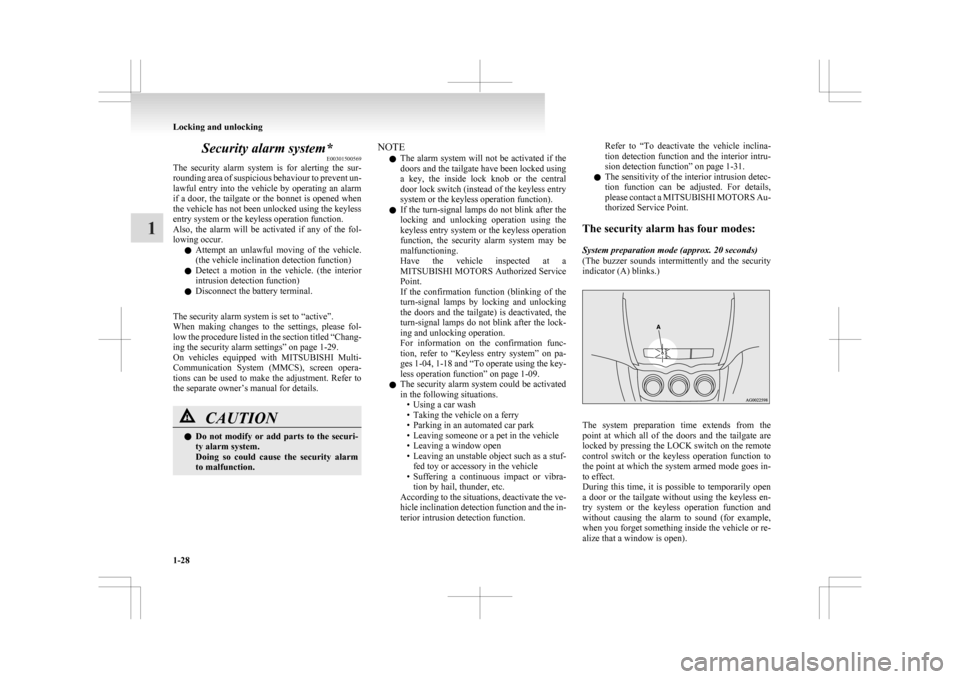
The security alarm has four modes:
System preparation mode (approx. 20 seconds)
(The buzzer sounds intermittently and the security
indicator (A) blinks.) The system preparation time extends from the
point
at which all of the doors and the tailgate are
locked by pressing the LOCK switch on the remote
control switch or the keyless operation function to
the point at which the system armed mode goes in-
to effect.
During this time, it is possible to temporarily open
a door or the tailgate without using the keyless en-
try system or the keyless operation function and
without causing the alarm to sound (for example,
when you forget something inside the vehicle or re-
alize that a window is open). Locking and unlocking
1-28
1
Page 54 of 368
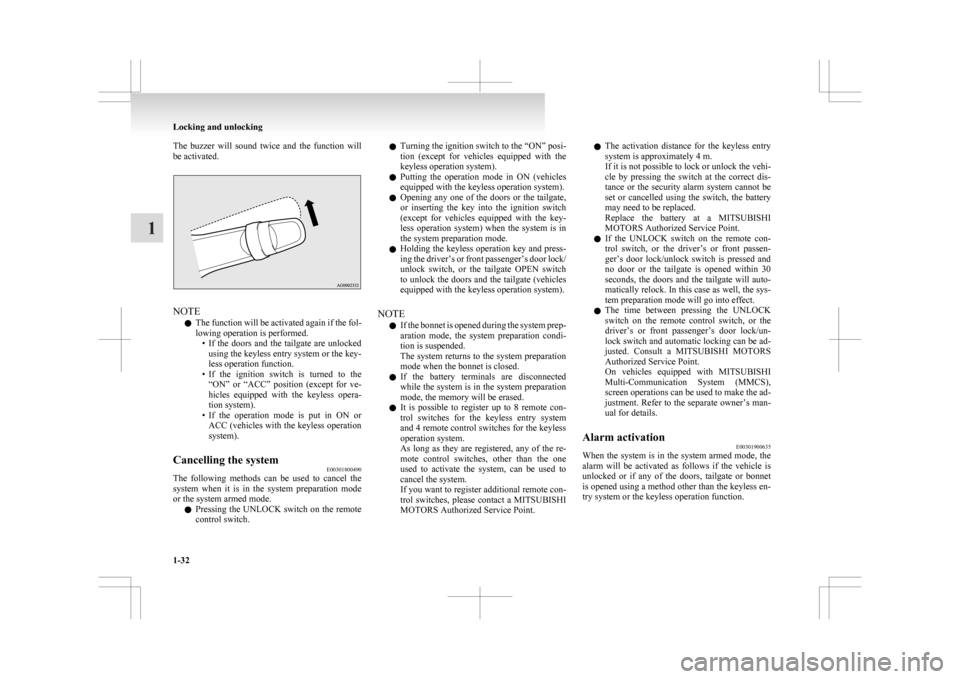
The buzzer will sound twice and the function will
be activated.
NOTE
l The
function will be activated again if the fol-
lowing operation is performed. • If the doors and the tailgate are unlockedusing the keyless entry system or the key-
less operation function.
• If the ignition switch is turned to the “ON” or “ACC” position (except for ve-
hicles equipped with the keyless opera-
tion system).
• If the operation mode is put in ON or ACC (vehicles with the keyless operation
system).
Cancelling the system E00301800490
The following methods can be used to cancel the
system
when it is in the system preparation mode
or the system armed mode.
l Pressing the UNLOCK switch on the remote
control switch. l
Turning
the ignition switch to the “ON” posi-
tion (except for vehicles equipped with the
keyless operation system).
l Putting the operation mode in ON (vehicles
equipped with the keyless operation system).
l Opening any one of the doors or the tailgate,
or inserting the key into the ignition switch
(except for vehicles equipped with the key-
less operation system) when the system is in
the system preparation mode.
l Holding the keyless operation key and press-
ing the driver’s or front passenger’s door lock/
unlock switch, or the tailgate OPEN switch
to unlock the doors and the tailgate (vehicles
equipped with the keyless operation system).
NOTE l If the bonnet is opened during the system prep-
aration mode, the system preparation condi-
tion is suspended.
The system returns to the system preparation
mode when the bonnet is closed.
l If the battery terminals are disconnected
while the system is in the system preparation
mode, the memory will be erased.
l It is possible to register up to 8 remote con-
trol switches for the keyless entry system
and 4 remote control switches for the keyless
operation system.
As long as they are registered, any of the re-
mote control switches, other than the one
used to activate the system, can be used to
cancel the system.
If you want to register additional remote con-
trol switches, please contact a MITSUBISHI
MOTORS Authorized Service Point. l
The activation distance for the keyless entry
system is approximately 4 m.
If it is not possible to lock or unlock the vehi-
cle by pressing the switch at the correct dis-
tance or the security alarm system cannot be
set or cancelled using the switch, the battery
may need to be replaced.
Replace the battery at a MITSUBISHI
MOTORS Authorized Service Point.
l If the UNLOCK switch on the remote con-
trol switch, or the driver’s or front passen-
ger’s door lock/unlock switch is pressed and
no door or the tailgate is opened within 30
seconds, the doors and the tailgate will auto-
matically relock. In this case as well, the sys-
tem preparation mode will go into effect.
l The time between pressing the UNLOCK
switch on the remote control switch, or the
driver’s or front passenger’s door lock/un-
lock switch and automatic locking can be ad-
justed. Consult a MITSUBISHI MOTORS
Authorized Service Point.
On vehicles equipped with MITSUBISHI
Multi-Communication System (MMCS),
screen operations can be used to make the ad-
justment. Refer to the separate owner’s man-
ual for details.
Alarm activation E00301900635
When the system is in the system armed mode, the
alarm
will be activated as follows if the vehicle is
unlocked or if any of the doors, tailgate or bonnet
is opened using a method other than the keyless en-
try system or the keyless operation function. Locking and unlocking
1-32
1
Page 55 of 368
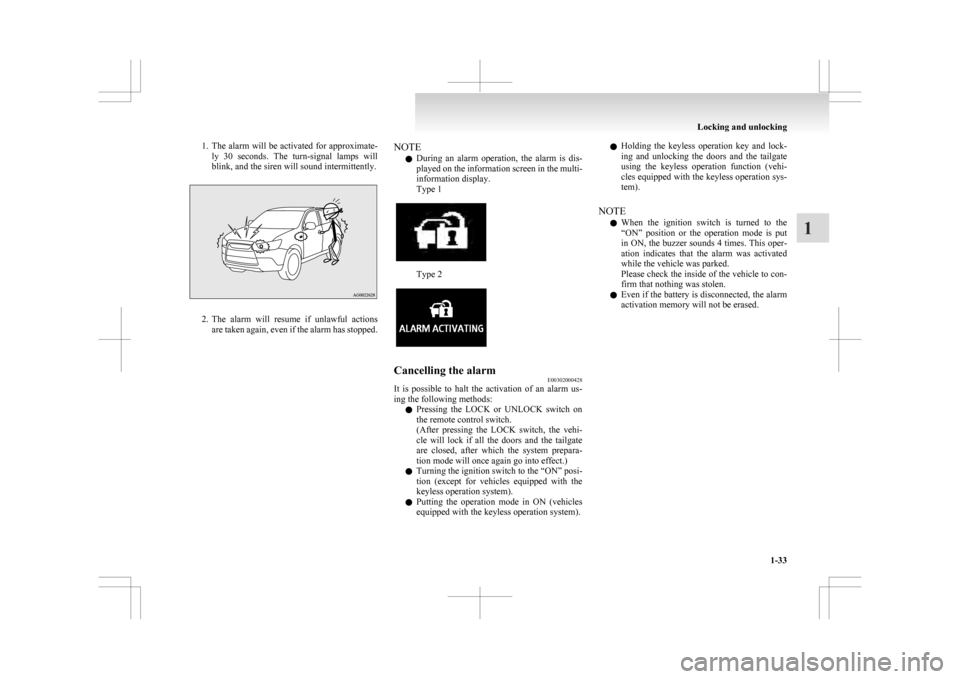
1. The alarm will be activated for approximate-
ly 30 seconds. The turn-signal lamps will
blink, and the siren will sound intermittently. 2. The
alarm will resume if unlawful actions
are taken again, even if the alarm has stopped. NOTE
l During
an alarm operation, the alarm is dis-
played on the information screen in the multi-
information display.
Type 1 Type 2
Cancelling the alarm
E00302000428
It is possible to halt the activation of an alarm us-
ing the following methods:
l Pressing
the LOCK or UNLOCK switch on
the remote control switch.
(After pressing the LOCK switch, the vehi-
cle will lock if all the doors and the tailgate
are closed, after which the system prepara-
tion mode will once again go into effect.)
l Turning the ignition switch to the “ON” posi-
tion (except for vehicles equipped with the
keyless operation system).
l Putting the operation mode in ON (vehicles
equipped with the keyless operation system). l
Holding
the keyless operation key and lock-
ing and unlocking the doors and the tailgate
using the keyless operation function (vehi-
cles equipped with the keyless operation sys-
tem).
NOTE l When the ignition switch is turned to the
“ON” position or the operation mode is put
in ON, the buzzer sounds 4 times. This oper-
ation indicates that the alarm was activated
while the vehicle was parked.
Please check the inside of the vehicle to con-
firm that nothing was stolen.
l Even if the battery is disconnected, the alarm
activation memory will not be erased. Locking and unlocking
1-33 1
Page 56 of 368
Electric window control
E00302200521
The electric windows can only be operated with the
ignition
switch in the “ON” position or the opera-
tion mode in ON. WARNING
l Before
operating the electric window con-
trol, make sure that nothing can get trap-
ped (head, hand, finger, etc.).
l Never leave the vehicle without removing
the key.
l Never leave a child (or other person who
might not be capable of safe operation of
the electric window control) in the vehicle
alone.
l The child may tamper with the switch at
the risk of its hands or head being trap-
ped in the window.
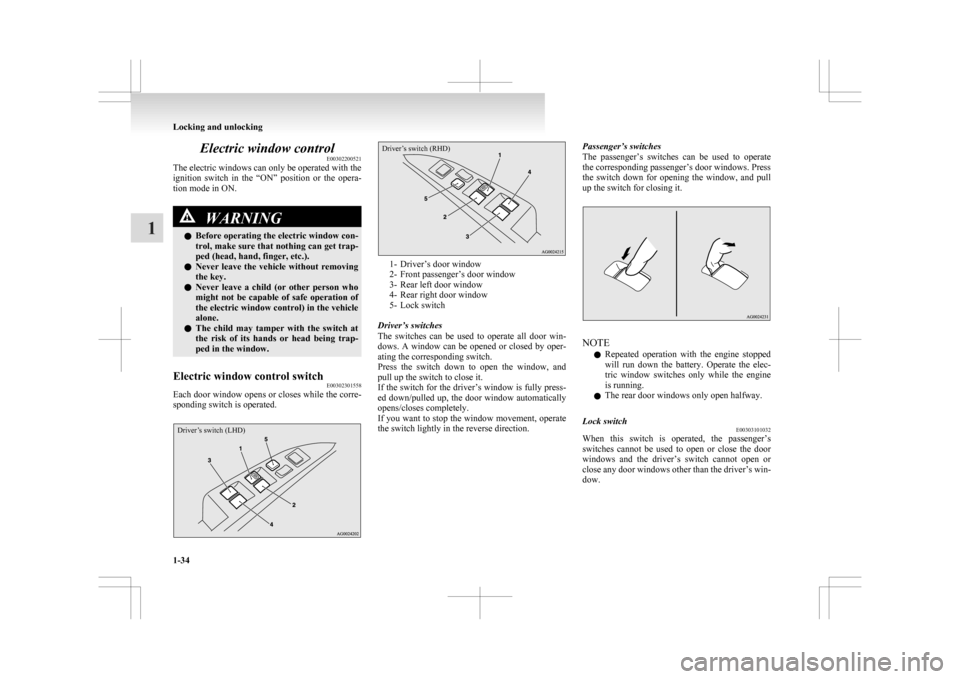
Electric window control switch E00302301558
Each door window opens or closes while the corre-
sponding switch is operated.
Driver’s switch (LHD)
Driver’s switch (RHD) 1- Driver’s door window
2-
Front passenger’s door window
3- Rear left door window
4- Rear right door window
5- Lock switch
Driver’s switches
The switches can be used to operate all door win-
dows. A window can be opened or closed by oper-
ating the corresponding switch.
Press the switch down to open the window, and
pull up the switch to close it.
If the switch for the driver’s window is fully press-
ed down/pulled up, the door window automatically
opens/closes completely.
If you want to stop the window movement, operate
the switch lightly in the reverse direction. Passenger’s switches
The
passenger’s switches can be used to operate
the corresponding passenger’s door windows. Press
the switch down for opening the window, and pull
up the switch for closing it. NOTE
l Repeated
operation with the engine stopped
will run down the battery. Operate the elec-
tric window switches only while the engine
is running.
l The rear door windows only open halfway.
Lock switch E00303101032
When this switch is operated, the passenger’s
switches
cannot be used to open or close the door
windows and the driver’s switch cannot open or
close any door windows other than the driver’s win-
dow. Locking and unlocking
1-34
1
Page 58 of 368

Sunshade*
E00302800279WARNING
l Never leave a child (or other person who
might not be capable of safe operation of
the sunshade switch) in the vehicle alone.
l Before operating the sunshade, make
sure that nothing can be trapped (head,
hand, finger, etc.).
l Do not bring your head, hand, finger, etc.
near the opening edge of the sunshade re-
ceptacle while the vehicle is in motion.
It may cause injury to your head, hand,
finger, etc. in the event of sudden braking. CAUTION
l
Do
not place heavy luggage on the panor-
amic glass roof. Doing so could damage
the glass roof.
l Do not hang heavy luggage from, allow a
person to hang onto, or apply any other
strong force to the opening of the sun-
shade receptacle or the parts between the
ceiling and the sunshade opening on ei-
ther side. Doing so could damage the sun-
shade.
NOTE l Release
the switch as soon as the sunshade
reaches the fully open or fully closed position. l
If
the sunshade does not operate when the sun-
shade switch is operated, release the switch
and check whether something is trapped by
the sunshade. If nothing is trapped, we recom-
mend you to have the sunshade checked.
l Operating the sunshade repeatedly with the
engine stationary will run down the battery.
Operate the sunshade while the engine is run-
ning.
l Close the sunshade when parking the vehicle
for a long time. Parking in the hot sun with
the sunshade open will make the vehicle in-
side extremely hot.
The sunshade can only be operated with the igni-
tion switch or the operation mode in ON. 1- Open
2-
Close
3- Stop
To open, press the switch (1).
Press and hold the switch (1), the sunshade automat-
ically opens. Release the switch once the sunshade
starts moving automatically.
To stop the moving sunshade, press the switch (1),
(2) or (3).
To close, press the switch (2).
Press
and hold the switch (2), the sunshade automat-
ically closes. Release the switch once the sunshade
starts moving automatically.
To stop the moving sunshade, press the switch (1),
(2) or (3).
Safety mechanism
If a hand or head is trapped in the closing sun-
shade, it will reopen automatically.
Nonetheless, make sure that nobody brings their
head or hand near the sunshade when opening or
closing.
The opened sunshade will become operational after
a few seconds. CAUTION
l
The
safety mechanism is cancelled just be-
fore the sunshade is fully closed. This al-
lows the sunshade to close completely.
Therefore be especially careful that no fin-
gers are trapped in the sunshade.
NOTE l The
safety mechanism can be activated if the
driving conditions or other circumstances
cause the sunshade to be subjected to a phys-
ical shock similar to that caused by a trapped
hand or head. Locking and unlocking
1-36
1
Page 62 of 368
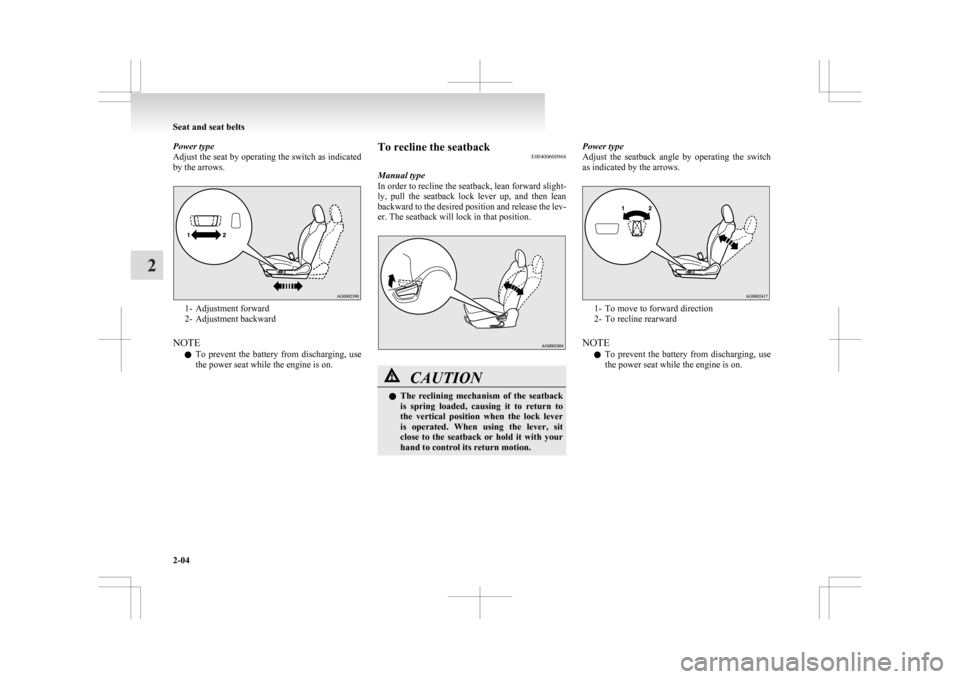
Power type
Adjust
the seat by operating the switch as indicated
by the arrows. 1- Adjustment forward
2-
Adjustment backward
NOTE l To prevent the battery from discharging, use
the power seat while the engine is on. To recline the seatback
E00400600968
Manual type
In
order to recline the seatback, lean forward slight-
ly, pull the seatback lock lever up, and then lean
backward to the desired position and release the lev-
er. The seatback will lock in that position. CAUTION
l
The
reclining mechanism of the seatback
is spring loaded, causing it to return to
the vertical position when the lock lever
is operated. When using the lever, sit
close to the seatback or hold it with your
hand to control its return motion. Power type
Adjust
the seatback angle by operating the switch
as indicated by the arrows. 1- To move to forward direction
2-
To recline rearward
NOTE l To prevent the battery from discharging, use
the power seat while the engine is on. Seat and seat belts
2-04
2