2009 MITSUBISHI ASX lock
[x] Cancel search: lockPage 204 of 368

NOTE
l It
is possible to set the display language of
the screen to English, Spanish, French, Ger-
man, Italian, Swedish, Dutch, Danish or Por-
tuguese.
For details, please refer to the separate own-
er’s manual for “MITSUBISHI Multi Com-
munication System (MMCS)”.
l When the vehicle is tilting because of the num-
ber of people in the vehicle, the weight and
positioning of luggage, and/or the condition
of the road surface, the lines in the view
from the rear-view camera may not be accu-
rately positioned relative to the actual road.
l The lines in the view from the rear-view cam-
era are based on a level, flat road surface. Do
not use them as a guide for distances to solid
objects.
l Because the rear-view camera has a special
lens, the lines on the ground between parking
spaces may not look parallel on the screen.
l In the following situations, the screen indica-
tion may be difficult to see. There is no ab-
normality.
• Low light (nighttime)
• When the light of the sun or the lightfrom a vehicle’s headlamps shines direct-
ly into the lens
→ When an extremely bright spot is
shown on the screen, colour smearing* (a
characteristic of CCD cameras) can occur.
*: Colour smearing: When an extremely
bright spot (for example, sunlight that has re-
flected off the bumper) is shown on the
screen, it appears to leave a vertical trail.
l If the camera is hot and is then cooled by
rain or a car wash, the lens can mist up. This
phenomenon does not indicate a malfunction. l
It is not possible to fully see obstacles when
the lens is dirty. If the lens becomes contami-
nated by water droplets, snow, mud or oil,
wipe off the contamination, taking care not
to scratch the lens.
l Please observe the following cautions. Ignor-
ing them could lead to a camera malfunction.
• Do not subject the camera to physicalshock.
• Do not apply wax to the camera.
• Do not splash the camera with boiling wa- ter.
• Do not disassemble the camera. Cargo loads
E00609901383
Cargo loads precautions CAUTION
l
Do
not load cargo or luggage higher than
the top of the seatback. Be sure that your
cargo or luggage cannot move once your
vehicle is moving. Having the driver’s vi-
sion blocked, and your cargo being
thrown inside the cabin if you suddenly
have to brake can cause a serious acci-
dent or injury.
l Load heavy cargo or luggage in the front
of the vehicle. If the load in the back of
the vehicle is too heavy, steering may be-
come unstable.
Loading a roof carrier CAUTION
l
Use
a roof carrier that properly fits your
vehicle. Do not load luggage directly onto
the roof. For installation, refer to the in-
struction manual accompanying the roof
carrier.
l When attaching/removing the roof carri-
er and loading/removing luggage, do not
apply excessive pressure on a single point.
Depending on how and where the force is
applied, this may cause dents on the vehi-
cle roof. Starting and driving
4-52
4
Page 207 of 368

1
830.5 mm
2 461 mm
3 68.5 mm
4 75 mm
5 310 mm
6 13.5 mm
7 66.5 mm
8 50 mm
9 52 mm
10 464 mm
(at kerb weight condi- tion)
370 mm to 384 mm (at laden condition)
11 447 mm
12 487 mm
13 495 mm
14 525.5 mmNOTE
l The
values under item 12 can be varied de-
pending on the loading condition of cargo or
luggage.
Operating hints l To prevent the clutch from slipping (Vehicle
with a M/T only), do not rev the engine more
than is required when starting off. l
Be
sure that the driving speed does not ex-
ceed 100 km/h (62 mph) for trailer operation.
It is also recommended that you obey the lo-
cal regulations in case driving speed with a
trailer is limited to less than 100 km/h
(62 mph).
l To prevent shocks from the overrun brake, de-
press the brake pedal lightly at first and then
more strongly.
l To make full use of engine braking, change
to a lower shift point before descending a
slope.
Additional precautions for vehicles equipped with
a CVT
It is recommended the “D” position on slopes or at
low speed.
Use the sports mode in mountainous areas in order
to make better use of engine braking and to assist
the brake system.
However, be sure that the speed does not exceed
the maximum speed limit for the selected shift posi-
tion.
Overheating
This will normally occur as a result of some me-
chanical failure. If your vehicle should overheat,
stop and check for a loose or broken water pump/
alternator drive belt, a blocked radiator air intake
or a low coolant level. If these items are satisfacto-
ry the overheating could be caused by a number of
mechanical causes that would have to be checked
at a competent service centre. CAUTION
l
If the engine overheats, please refer to the
“Engine
overheating” section of “For
emergencies” prior to taking any correc-
tive action.
l On vehicles equipped with CVT, if the warning display is showing, the tempera-
ture of the CVT fluid is high.
Read
the reference page and take the re-
quired measures.
Refer to “When a malfunction occurs in
the CVT” on page 4-27. Starting and driving
4-55 4
Page 209 of 368

Ventilators
.................................................................................... 5-02
Heater/Air conditioning ................................................................ 5-03
Important operation tips for the air conditioning
..........................5-09
Air purifier.................................................................................... 5-10
Audio system*.............................................................................. 5-10
To play tracks from USB device* ................................................5-22
To play tracks from a Bluetooth ®
device (vehicles with
Bluetooth ®
2.0 interface)..........................................................5-30
To use the external audio input function* ....................................5-32
Steering wheel audio remote control switches* ...........................5-33
Error codes.................................................................................... 5-35
Error codes (iPod)......................................................................... 5-36
Error codes (USB memory device) ..............................................5-37
Handling of compact discs ........................................................... 5-38
Antenna......................................................................................... 5-39
Digital clock* ............................................................................... 5-39
Link System* ................................................................................ 5-41
Bluetooth ®
2.0 interface* ............................................................. 5-41
USB input terminal* ..................................................................... 5-57
Sun visors..................................................................................... 5-59
Ashtray*........................................................................................5-60
Cigarette lighter* .......................................................................... 5-60
Accessory socket.......................................................................... 5-61
Interior lamps ................................................................................ 5-62
Storage spaces...............................................................................5-65
Cup holder.................................................................................... 5-68
Bottle holder ................................................................................. 5-69
Rear shelf panel* .......................................................................... 5-69
Assist grips................................................................................... 5-70
Coat hook*.................................................................................... 5-70 Luggage hooks..............................................................................
5-70For pleasant driving
5
Page 211 of 368

Foot/demister position
Air flows to the leg area, the windscreen and the
door windows. Demister position
Air
flows mainly to the windscreen and the door
windows. CAUTION
l
When
using the mode selection dial be-
tween the “ ” and “ ” positions, pre-
vent fogging by pressing the air selection
switch to select outside air.
(Refer to “Air selection switch” on page
5-04.)
NOTE l With
the mode selection dial between the
“ ”
and “ ” positions, the air flows main-
ly to the upper part of the passenger compart-
ment. With the mode selection dial between
the “ ”
and “ ” positions, the air flows
mainly to the leg area.
l With the mode selection dial in the “ ”
po-
sition, a small amount of air flows to the wind-
screen and the door windows.
l With the mode selection dial between the
“ ”
and “ ” positions, the air flows main-
ly to the leg area. With the mode selection di-
al between the “ ”
and “ ” positions, the
air flows mainly to the windscreen and door
windows. Heater/Air conditioning
E00700500449
The
heater/air conditioning can only be used while
the engine is running.
Control panel E00700600541
Heater/Manual air conditioning
Automatic air conditioning A- Temperature control dial
B-
Air selection switch
C- Blower speed selection dial
D- Air conditioning switch E- Mode selection dialF- Rear window demister switch ® p. 3-57
NOTE l On vehicles with the heater, button (D) is not
available for use. The indicator below the but-
ton doesn’t come on even if it is pushed. l
On
vehicles with automatic air conditioning,
there is an interior air temperature sensor (G)
in the illustrated position.
Never place anything over the sensor, since
doing so will prevent it from functioning prop-
erly. Blower speed selection dial
E00700700249
Select the blower speed by turning the blower
speed selection dial clockwise or anticlockwise.
Turn
the dial clockwise to increase the air flow and
anticlockwise to decrease the air flow.
Heater/
Manual air conditioning Automatic air conditioning For pleasant driving
5-03 5
Page 212 of 368
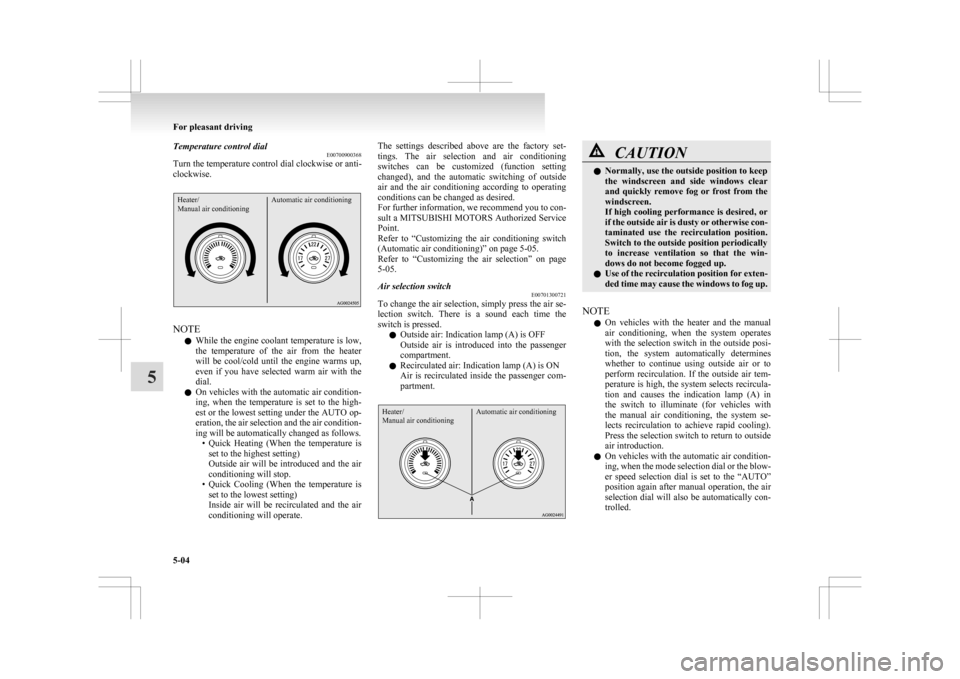
Temperature control dial
E00700900368
Turn the temperature control dial clockwise or anti-
clockwise.Heater/
Manual air conditioning Automatic air conditioningNOTE
l While
the engine coolant temperature is low,
the temperature of the air from the heater
will be cool/cold until the engine warms up,
even if you have selected warm air with the
dial.
l On vehicles with the automatic air condition-
ing, when the temperature is set to the high-
est or the lowest setting under the AUTO op-
eration, the air selection and the air condition-
ing will be automatically changed as follows.
• Quick Heating (When the temperature isset to the highest setting)
Outside air will be introduced and the air
conditioning will stop.
• Quick Cooling (When the temperature is set to the lowest setting)
Inside air will be recirculated and the air
conditioning will operate. The settings described above are the factory set-
tings.
The air selection and air conditioning
switches can be customized (function setting
changed), and the automatic switching of outside
air and the air conditioning according to operating
conditions can be changed as desired.
For further information, we recommend you to con-
sult a MITSUBISHI MOTORS Authorized Service
Point.
Refer to “Customizing the air conditioning switch
(Automatic air conditioning)” on page 5-05.
Refer to “Customizing the air selection” on page
5-05.
Air selection switch E00701300721
To change the air selection, simply press the air se-
lection
switch. There is a sound each time the
switch is pressed.
l Outside air: Indication lamp (A) is OFF
Outside air is introduced into the passenger
compartment.
l Recirculated air: Indication lamp (A) is ON
Air is recirculated inside the passenger com-
partment.
Heater/
Manual air conditioning Automatic air conditioning CAUTION
l
Normally, use the outside position to keep
the
windscreen and side windows clear
and quickly remove fog or frost from the
windscreen.
If high cooling performance is desired, or
if the outside air is dusty or otherwise con-
taminated use the recirculation position.
Switch to the outside position periodically
to increase ventilation so that the win-
dows do not become fogged up.
l Use of the recirculation position for exten-
ded time may cause the windows to fog up.
NOTE l On
vehicles with the heater and the manual
air conditioning, when the system operates
with the selection switch in the outside posi-
tion, the system automatically determines
whether to continue using outside air or to
perform recirculation. If the outside air tem-
perature is high, the system selects recircula-
tion and causes the indication lamp (A) in
the switch to illuminate (for vehicles with
the manual air conditioning, the system se-
lects recirculation to achieve rapid cooling).
Press the selection switch to return to outside
air introduction.
l On vehicles with the automatic air condition-
ing, when the mode selection dial or the blow-
er speed selection dial is set to the “AUTO”
position again after manual operation, the air
selection dial will also be automatically con-
trolled. For pleasant driving
5-04
5
Page 214 of 368
l
Enable automatic air conditioning control:
If the mode selection dial or blower speed se-
lection
dial is turned to the “AUTO” posi-
tion, or the temperature control dial is set to
the minimum temperature, the air condition-
ing switch is controlled automatically.
l Disable automatic air conditioning control:
The air conditioning switch is not controlled
automatically as long as the air conditioning
switch is not operated.
l Setting change method
Hold down the air conditioning switch for
about 10 seconds or more.
When the setting is changed, a sound is emit-
ted and the indication lamp flashes.
• When the setting is changed from enableto disable 3 sounds are emitted and the in-
dication lamp flashes 3 times.
• When the setting is changed from disable to enable 2 sounds are emitted and the in-
dication lamp flashes 3 times.
NOTE l The factory setting is “Enable automatic air
conditioning control”.
l When you turn the mode selection dial to
“ ”,
in order to prevent misting of the win-
dows the air conditioning operates automati-
cally even if “Disable automatic air condition-
ing control” is set.
Operating the air conditioning system E00701800436
Heating (Heater/Manual air conditioning)
Set
the mode selection dial to the “ ”
position
and set the air selection switch (A) to the outside po-
sition. Turn the temperature control dial clockwise or anti-
clockwise
to the desired temperature. Select the de-
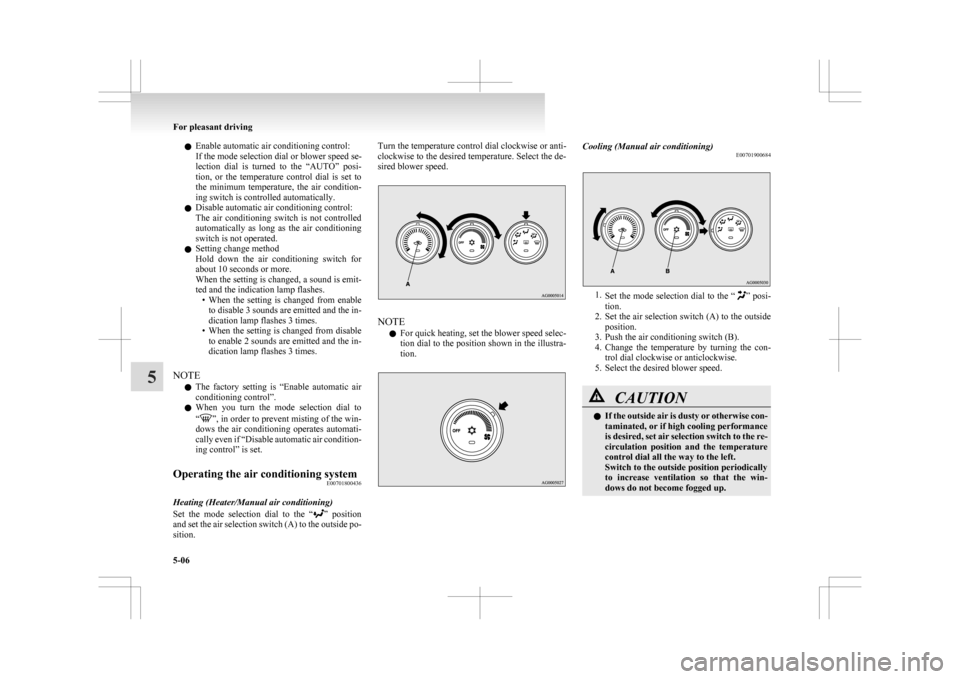
sired blower speed. NOTE
l For
quick heating, set the blower speed selec-
tion dial to the position shown in the illustra-
tion. Cooling (Manual air conditioning)
E00701900684 1.
Set
the mode selection dial to the “ ” posi-
tion.
2. Set the air selection switch (A) to the outside position.
3. Push the air conditioning switch (B).
4. Change the temperature by turning the con- trol dial clockwise or anticlockwise.
5. Select the desired blower speed. CAUTION
l
If
the outside air is dusty or otherwise con-
taminated, or if high cooling performance
is desired, set air selection switch to the re-
circulation position and the temperature
control dial all the way to the left.
Switch to the outside position periodically
to increase ventilation so that the win-
dows do not become fogged up. For pleasant driving
5-06
5
Page 217 of 368
l
For vehicles with the Auto Stop & Go
(AS&G) system, if the mode selection dial is
set to the demister position shown in the illus-
tration, the Auto Stop & Go (AS&G) system
will not operate and the engine will not stop
automatically even if the vehicle is stopped.
This is to ensure that good visibility is main-
tained.
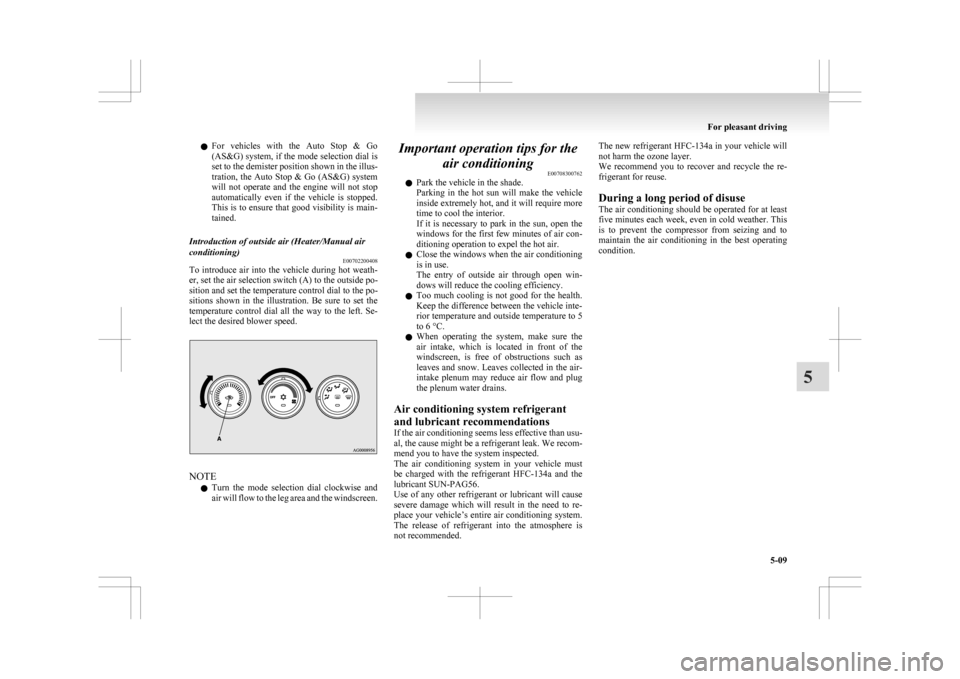
Introduction of outside air (Heater/Manual air
conditioning) E00702200408
To introduce air into the vehicle during hot weath-
er, set the air selection switch (A) to the outside po-
sition and set the temperature control dial to the po-
sitions
shown in the illustration. Be sure to set the
temperature control dial all the way to the left. Se-
lect the desired blower speed. NOTE
l Turn
the mode selection dial clockwise and
air will flow to the leg area and the windscreen. Important operation tips for the
air conditioning E00708300762
l Park the vehicle in the shade.
Parking
in the hot sun will make the vehicle
inside extremely hot, and it will require more
time to cool the interior.
If it is necessary to park in the sun, open the
windows for the first few minutes of air con-
ditioning operation to expel the hot air.
l Close the windows when the air conditioning
is in use.
The entry of outside air through open win-
dows will reduce the cooling efficiency.
l Too much cooling is not good for the health.
Keep the difference between the vehicle inte-
rior temperature and outside temperature to 5
to 6 °C.
l When operating the system, make sure the
air intake, which is located in front of the
windscreen, is free of obstructions such as
leaves and snow. Leaves collected in the air-
intake plenum may reduce air flow and plug
the plenum water drains.
Air conditioning system refrigerant
and lubricant recommendations
If the air conditioning seems less effective than usu-
al, the cause might be a refrigerant leak. We recom-
mend you to have the system inspected.
The air conditioning system in your vehicle must
be charged with the refrigerant HFC-134a and the
lubricant SUN-PAG56.
Use of any other refrigerant or lubricant will cause
severe damage which will result in the need to re-
place your vehicle’s entire air conditioning system.
The release of refrigerant into the atmosphere is
not recommended. The new refrigerant HFC-134a
in your vehicle will
not harm the ozone layer.
We recommend you to recover and recycle the re-
frigerant for reuse.
During a long period of disuse
The air conditioning should be operated for at least
five minutes each week, even in cold weather. This
is to prevent the compressor from seizing and to
maintain the air conditioning in the best operating
condition. For pleasant driving
5-09 5
Page 219 of 368
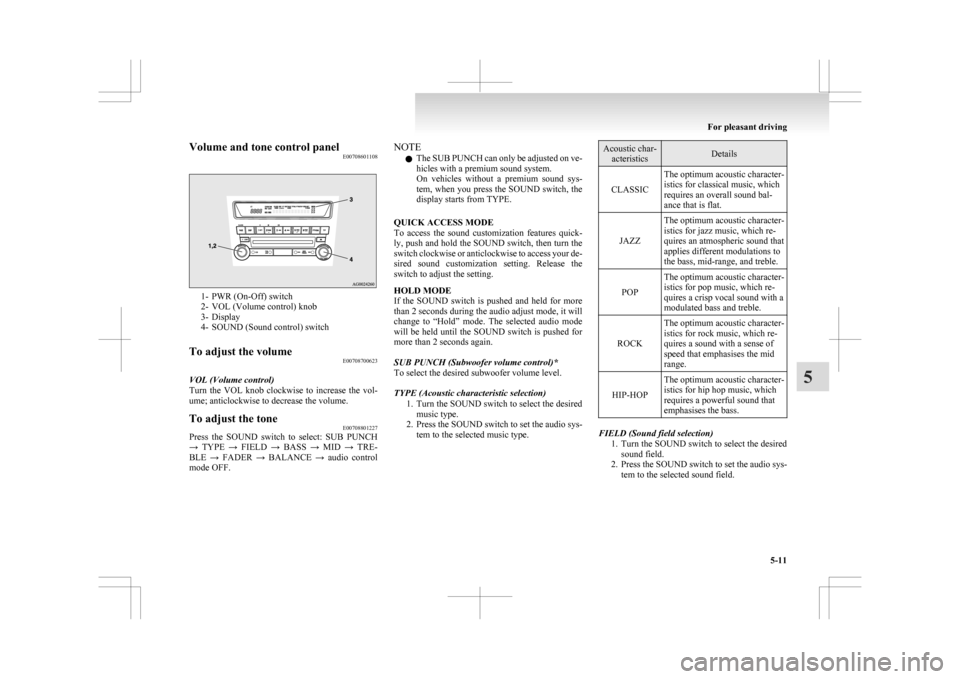
Volume and tone control panel
E007086011081- PWR (On-Off) switch
2-
VOL (Volume control) knob
3- Display
4- SOUND (Sound control) switch
To adjust the volume E00708700623
VOL (Volume control)
Turn
the VOL knob clockwise to increase the vol-
ume; anticlockwise to decrease the volume.
To adjust the tone E00708801227
Press the SOUND switch to select: SUB PUNCH
→
TYPE → FIELD → BASS → MID → TRE-
BLE → FADER → BALANCE → audio control
mode OFF. NOTE
l The
SUB PUNCH can only be adjusted on ve-
hicles with a premium sound system.
On vehicles without a premium sound sys-
tem, when you press the SOUND switch, the
display starts from TYPE.
QUICK ACCESS MODE
To access the sound customization features quick-
ly, push and hold the SOUND switch, then turn the
switch clockwise or anticlockwise to access your de-
sired sound customization setting. Release the
switch to adjust the setting.
HOLD MODE
If the SOUND switch is pushed and held for more
than 2 seconds during the audio adjust mode, it will
change to “Hold” mode. The selected audio mode
will be held until the SOUND switch is pushed for
more than 2 seconds again.
SUB PUNCH (Subwoofer volume control)*
To select the desired subwoofer volume level.
TYPE (Acoustic characteristic selection) 1. Turn the SOUND switch to select the desiredmusic type.
2. Press the SOUND switch to set the audio sys- tem to the selected music type. Acoustic char-
acteristics Details
CLASSIC The optimum acoustic character-
istics for classical music, which
requires an overall sound bal-
ance that is flat.
JAZZ The optimum acoustic character-
istics for jazz music, which re-
quires an atmospheric sound that
applies different modulations to
the bass, mid-range, and treble.
POP The optimum acoustic character-
istics for pop music, which re-
quires a crisp vocal sound with a
modulated bass and treble.
ROCK The optimum acoustic character-
istics for rock music, which re-
quires a sound with a sense of
speed that emphasises the mid
range.
HIP-HOP The optimum acoustic character-
istics for hip hop music, which
requires a powerful sound that
emphasises the bass. FIELD (Sound field selection)
1. Turn
the SOUND switch to select the desired
sound field.
2. Press the SOUND switch to set the audio sys- tem to the selected sound field. For pleasant driving
5-11 5