2009 MINI COOPER CONVERTIBLE tailgate
[x] Cancel search: tailgatePage 94 of 172

Things to remember when driving
92
With convenient access and automatic
transmission
Insert the key into the ignition lock.
The engine can be switched off when the selec-
tor lever is in position N. Refer also to page27.
Cargo loading
To avoid loading the tires beyond their
approved carrying capacity, never over-
load the vehicle. Overloading can lead to over-
heating and increases the rate at which damage
develops inside the tires. The ultimate result can
assume the form of a sudden blow-out.<
Avoid fluid spills in the cargo bay as they
could damage the vehicle.<
MINI: Cargo bay
Cargo bay cover
Do not place any objects on the cover,
otherwise they could endanger the car's
occupants, e.g. in the case of braking or sudden
swerving, or they may damage the cover.<
When you open the tailgate, the cargo bay cover
is raised.
To load bulky luggage, the cover can be
removed.
1.Unhook the lift straps from the tailgate.
2.Pull the cover out of the holders toward the
rear.
Expanding the cargo bay
The rear set backrest is split. Both sides can be
folded separately to expand the cargo bay.
1.Pull the lever.
2.Fold rear seat backrests forward.
When folding the backrest back up, make
sure that the seat's locking mechanisms
engage properly. Otherwise, cargo could be
thrown around in the event of sharp braking or
swerving and endanger the occupants.<
Adjusting rear seat backrest*
Expand the cargo bay by raising the split rear
seat backrests to a steeper angle.
1.Pull the lever, arrow1, and fold the rear seat
backrest forward.
2.Fold up the lever of the backrest lock until it
audibly engages, arrow2.
3.Fold back the backrest until it engages.
If the rear seat backrests are positioned at
a steeper angle, do not install child-
restraint systems in the rear of the vehicle as
their protective features may be ineffective.<
Page 97 of 172

REFERENCEAT A GLANCE CONTROLS DRIVING TIPS MOBILITY
95
MINI Convertible
Securing cargo
>Secure smaller and lighter items using
retaining or draw straps
*.
>Heavy-duty cargo straps
* for securing larger
and heavier objects are available at your
MINI Dealer. Four lashing eyes are provided
for attaching the cargo straps. Two of them
are located on the forward wall of the cargo
bay.
Comply with the information enclosed with
the load-securing devices.
Always position and secure the cargo as
described above, so that it cannot endan-
ger the car's occupants, for example if sudden
braking or swerves are necessary.
Do not exceed the approved gross weight and
axle loads, page 155; otherwise the vehicle's
operating safety is no longer assured and it will
not be in compliance with the certification regu-
lations.
Heavy or hard objects should not be carried
loose inside the car, since they could be thrown
around, for example as a result of heavy braking,
sudden swerves, etc., and endanger the occu-
pants. Do not secure cargo using the fastening
points for the tether strap, page41; they may
become damaged.<
MINI: Roof-mounted
luggage rack*
A special rack system is available as an option for
your MINI. Your MINI Dealer will be glad to
advise you. Comply with the installation instruc-
tions supplied with the rack system.
Mounting points
Remove the cover panel.
Loading roof-mounted luggage rack
Because roof racks raise the vehicle's center of
gravity when loaded, they have a major effect
on vehicle handling and steering response.
You should therefore always remember not to
exceed the approved roof load capacity, the
approved gross vehicle weight or the axle loads
when loading the rack.
You can find the applicable data under Weights
on page 155.
The roof load must be distributed uniformly and
should not be too large in area. Heavy items
should always be placed at the bottom.
When loading, make sure that there is sufficient
space for the movement of the glass sunroof
and that no objects protrude into the swiveling
area of the tailgate; otherwise damage can
occur.
Fasten roof-mounted cargo correctly and
securely to prevent it from shifting or falling off
during the trip.
Drive smoothly. Avoid sudden acceleration and
braking maneuvers, and take corners gently.
Page 136 of 172
Giving and receiving assistance
134
Giving and receiving assistance
Roadside Assistance
The Roadside Assistance service is there to assist
you around the clock in the event of a break-
down, including on weekends and public holi-
days.
The phone numbers of the Roadside Assistance
in your home country can be found in the Con-
tact brochure.
First aid pouch*
Some of the articles contained in the first aid
pouch have a limited service life. Therefore,
check the expiration dates of the contents regu-
larly and replace any items in good time, if nec-
essary.
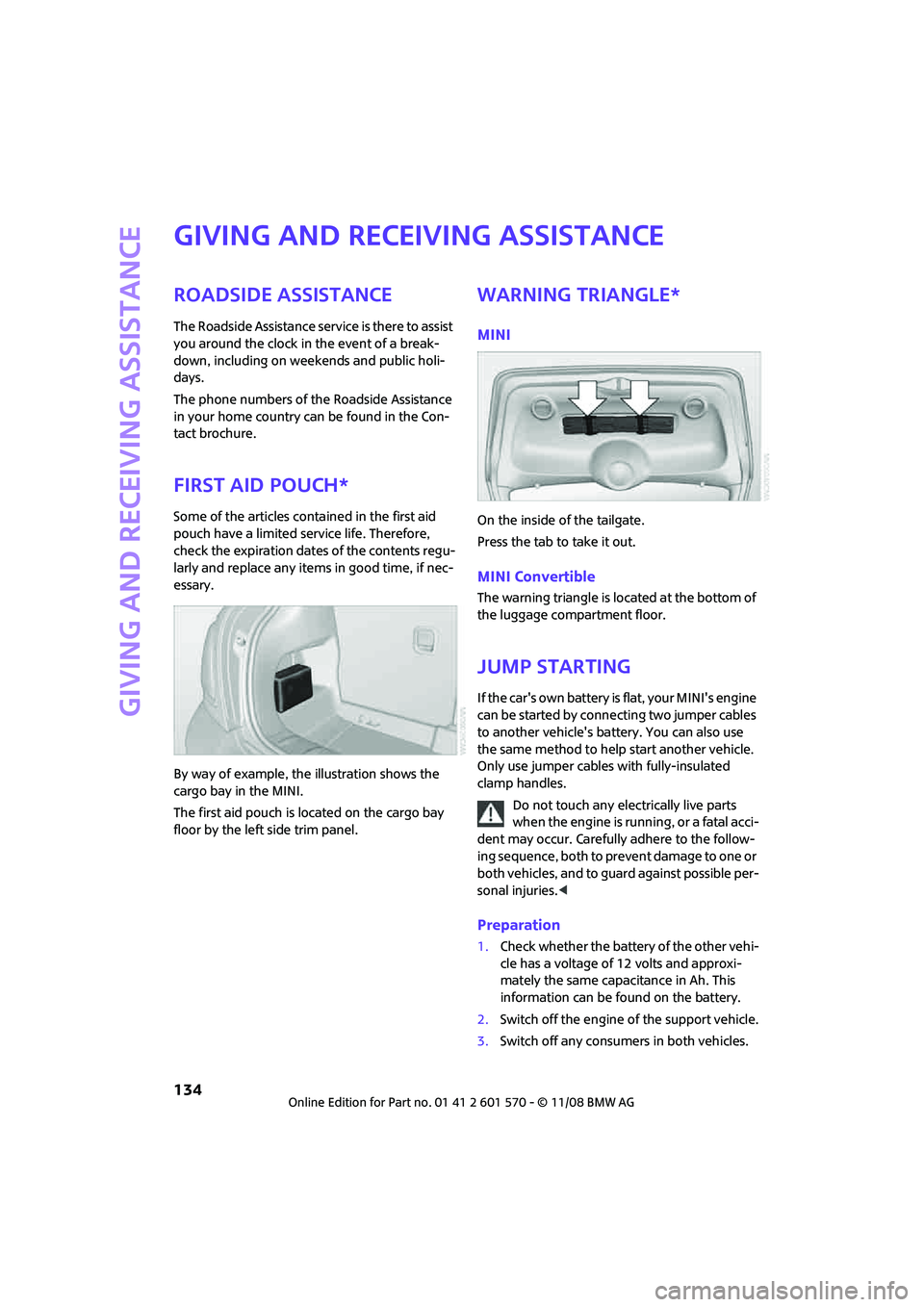
By way of example, the illustration shows the
cargo bay in the MINI.
The first aid pouch is located on the cargo bay
floor by the left side trim panel.
Warning triangle*
MINI
On the inside of the tailgate.
Press the tab to take it out.
MINI Convertible
The warning triangle is located at the bottom of
the luggage compartment floor.
Jump starting
If the car's own battery is flat, your MINI's engine
can be started by connecting two jumper cables
to another vehicle's battery. You can also use
the same method to help start another vehicle.
Only use jumper cables with fully-insulated
clamp handles.
Do not touch any electrically live parts
when the engine is running, or a fatal acci-
dent may occur. Carefully adhere to the follow-
ing sequence, both to prevent damage to one or
both vehicles, and to guard against possible per-
sonal injuries.<
Preparation
1.Check whether the battery of the other vehi-
cle has a voltage of 12 volts and approxi-
mately the same capacitance in Ah. This
information can be found on the battery.
2.Switch off the engine of the support vehicle.
3.Switch off any consumers in both vehicles.
Page 141 of 172
REFERENCEAT A GLANCE CONTROLS DRIVING TIPS MOBILITY
139
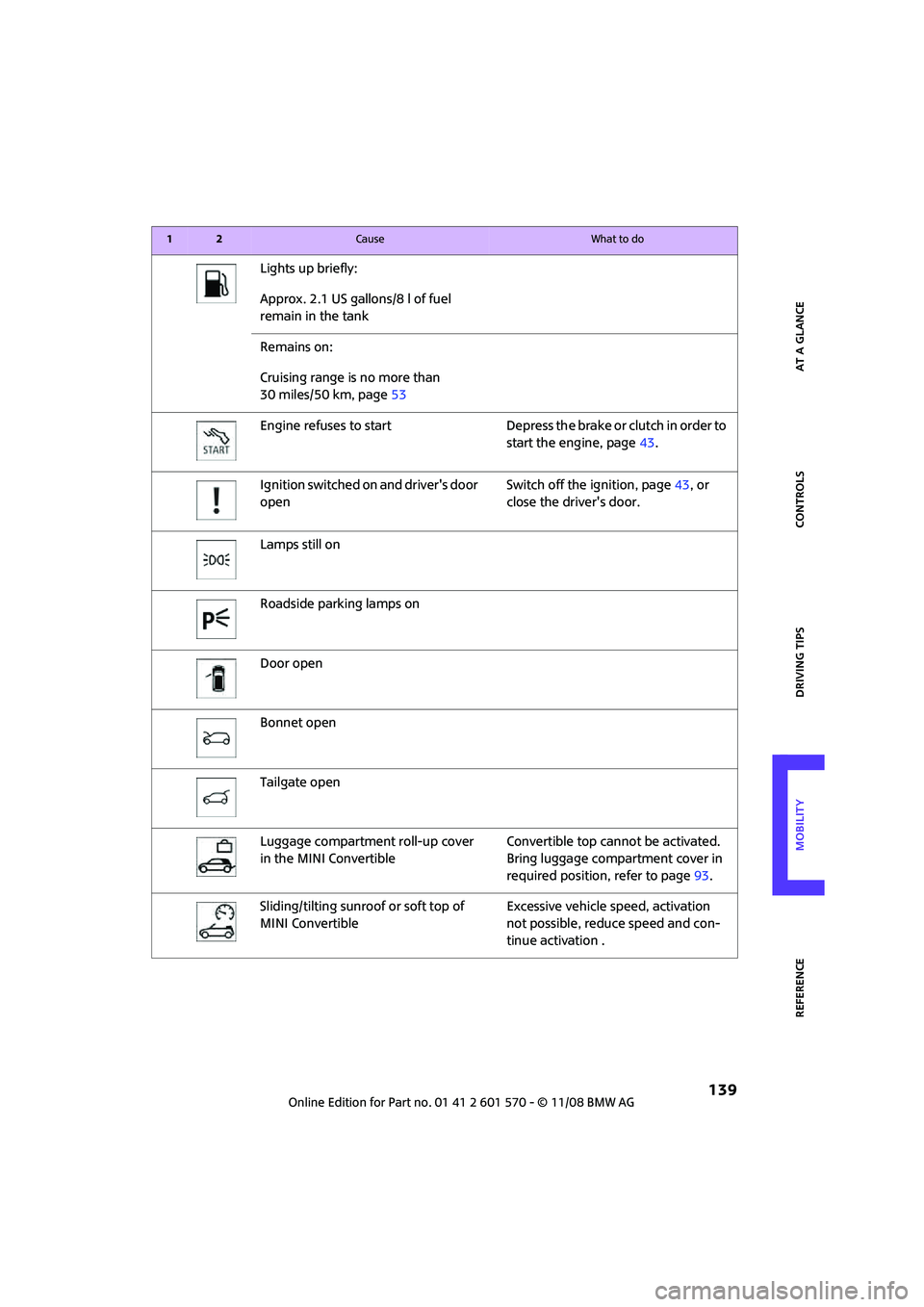
Lights up briefly:
Approx. 2.1 US gallons/8 l of fuel
remain in the tank
Remains on:
Cruising range is no more than
30 miles/50 km, page53
Engine refuses to start Depress the brake or clutch in order to
start the engine, page43.
Ignition switched on and driver's door
openSwitch off the ignition, page43, or
close the driver's door.
Lamps still on
Roadside parking lamps on
Door open
Bonnet open
Tailgate open
Luggage compartment roll-up cover
in the MINI ConvertibleConvertible top cannot be activated.
Bring luggage compartment cover in
required position, refer to page93.
Sliding/tilting sunroof or soft top of
MINI ConvertibleExcessive vehicle speed, activation
not possible, reduce speed and con-
tinue activation .
12Cause What to do
Page 142 of 172

Indicator and warning lamps
140
Lights up in red:
Control system for convertible top
failed!Position of convertible top and locking
mechanism not recognized. If con-
vertible top securely locked, drive
may be continued.Manually close
convertible top/sliding roof, refer to
page32. Have your MINI Service
inspect the system.
Lights up in yellow:
Drive of convertible top overheated! Let drive of convertible top cool down,
refer to page31.
Sliding/tilting sunroof or soft top of
MINI ConvertibleControl system of convertible top/tilt
roof malfunctioning. Close convertible
top/tilt roof manually, refer to
page32. Contact your MINI Service.
Tailgate of MINI Convertible not
closedClose tailgate.
Gas cap missing or loose Make sure that the gas cap is correctly
positioned and close it until it audibly
clicks. Do not jam the strap between
the gas cap and the vehicle.
Window washer fluid level too low Add washer fluid as soon as possible,
page50.
Lights up in yellow:
The engine will start the next time the
start/stop button is touched, possibly
without the brake or clutch being
depressed
Remote control malfunctioning or, in
cars with convenient access, not
detectedThe engine cannot be started. Have
the remote control checked, if neces-
sary.
Battery in remote control discharged Use the remote control for a longer
journey or, in cars with convenient
access, replace the battery.
12Cause What to do
Page 161 of 172

REFERENCEAT A GLANCE CONTROLS DRIVING TIPS MOBILITY
159
Bottle holders, refer to Cup
holders87
Brake Assist63
Brake fluid, refer to Service
requirements57
Brake lamps
– replacing bulbs127
Brake pads, breaking in90
Brake rotors91
– brakes90
– breaking in90
Brake system90
– breaking in90
– disc brakes91
– MINI Maintenance
System117
Brakes
– ABS63
– breaking in90
– MINI Maintenance
System117
– parking brake45
– service requirements57
Brakes, refer to Braking
safely91
Breakdown service, refer to
Roadside Assistance134
Break-in period90
Breaking in the clutch90
Bulb changing, refer to Lamps
and bulbs123
Button for starting the
engine43
Buttons on the steering
wheel11
C
California Proposition 65
warning5
Can holders, refer to Cup
holders87
Capacities156
Car battery, refer to Vehicle
battery132
Car care119
Car key, refer to Keys/remote
controls18Car phone
– installation location, refer to
Center armrest85
– refer to separate Owner's
Manual
Car wash91
Car wash, care119
Car washes119
Care119
– Car washes119
– Car-care products119
– CD/DVD drives122
– High-pressure washers120
– internal121
– Leather121
– Manual washing120
– Upholstery and fabrics121
– Windows120
– Wiper blades120
Cargo area
– capacity155
Cargo bay92
– convenient access26
– cover92
– lamp76
– opening from outside23
Cargo bay, expanding92
Cargo bay lamp76
Cargo bay lid, refer to
Tailgate23
Cargo loading94
– securing cargo95
– stowing cargo94
– vehicle92
Cargo, securing95
Carpets, care121
Catalytic converter, refer to
Hot exhaust system90
Center armrest85
Center brake lamp127
Center console, refer to
Around the center
console14
Central locking system19
– convenient access26
– from inside22
– from outside19
Changing bulbs
123
Changing wheels129Chassis number, refer to
Engine compartment114
Check Control60
Child's seats40
Child-restraint fixing system
LATCH41
Child-restraint systems40
Chock, folding
– space-saver spare tire130
Chrome parts, care121
Chrome parts, refer to
Care119
Cigarette lighter87
Cleaning headlamps49
– washer fluid50
Clock52
– 12h/24h mode56
– setting time59
Closing
– from inside22
– from outside19
Clothes hooks87
Cockpit10
Cold start, refer to Starting the
engine44
Comfort access
– what to observe before
entering a car wash27
Comfort access, refer to
Convenient access26
Comfort area, refer to Around
the center console14
Compartment for remote
control, refer to Ignition
lock43
Computer53
Condensation, refer to When
the vehicle is parked91
Condition Based Service
CBS117
Configuring settings, refer to
Personal Profile18
Confirmation signals for
vehicle locking/unlocking20
Connecting vacuum cleaner,
refer to Connecting electrical
appliances87
Consumption indicator
– average fuel consumption53
Page 165 of 172

REFERENCEAT A GLANCE CONTROLS DRIVING TIPS MOBILITY
163
License plate lamp, bulb
replacement127
Light switch73
Light-alloy wheels, care121
Light-emitting diodes
LEDs124
Lighter87
– socket87
Lighting
– lamps and bulbs123
– of the instruments76
– of vehicle, refer to Lamps73
Limit149
Load94
Load securing equipment,
refer to Securing cargo95
Lock buttons of doors, refer to
Locking22
Locking
– adjusting confirmation
signal20
– from inside22
– from outside20
– without remote control, refer
to Convenient access26
Locking and unlocking doors
– confirmation signals20
– from inside22
– from outside19
Low beams73
– automatic73
– replacing bulb124
Lower back support, refer to
Lumbar support35
Luggage compartment
– emergency operation, refer
to Manual release24
– Increasing the capacity93
– opening from the inside24
Luggage compartment lid
– emergency operation, refer
to Manual release24
Luggage compartment lid,
refer to Tailgate23
Luggage compartment, refer
to Cargo bay23
Luggage rack, refer to Roof-
mounted luggage rack95
Lumbar support35M
M+S tires, refer to Winter
tires112
Maintenance, refer to Service
Booklet
Maintenance system117
Malfunction
– convertible top32
– trunk lid24
Malfunction warnings, refer to
Check Control60
Manual air distribution80
Manual mode
– automatic transmission with
Steptronic46
Manual operation
– door lock22
– fuel filler door100
– power convertible top32
– transmission lock, automatic
transmission47
– trunk lid24
Manual transmission45
Manual washing120
Master key, refer to Integrated
key/remote control18
Maximum cooling81
Maximum speed
– with winter tires112
Medical assistance, refer to
First aid pouch134
Microfilter
– for air conditioner80
– for automatic climate
control82
– MINI Maintenance
System117
Microfilter/activated-charcoal
filter
– MINI Maintenance
System117
Microphone for telephone14
MINI Internet page4
MINI Maintenance System117
Mirror dimming feature38Mirrors38
– exterior mirrors38
– heating38
– interior rearview mirror38
Mobile phone
– installation location, refer to
Center armrest85
– refer to separate Owner's
Manual
Mobile phone, installation
location, refer to Center
armrest85
Mobile phone, refer to the
separate Owner's Manual
Mobility System128
Modifications, technical, refer
to For your own safety4
Monitoring system for tire
pressures, refer to Flat Tire
Monitor65
Multifunction switch
– refer to Turn signals/
headlamp flasher47
– refer to Wiper system48
Multifunctional steering
wheel, refer to Buttons on
the steering wheel11
N
Neck support, refer to Head
restraints36
Nets, refer to Storage
compartments86
New tires111
Number of cylinders, refer to
Engine data152
Nylon rope, refer to Tow
rope136
O
OBD socket, refer to Socket for
Onboard Diagnosis117
Octane ratings, refer to Fuel
specifications101
Odometer52
Oil consumption114
Oil level114
Page 166 of 172

From A to Z
164
Oil, refer to Engine oil114
Old batteries, refer to
Disposal132
Onboard tool kit123
Opening and closing
– convenient access26
– from inside22
– from outside19
– using the door lock22
– via the remote control19
Opening and unlocking
– from inside22
Outlets
– refer to Ventilation82
Outlets, refer to Air vents78
Output, refer to Engine
data152
Outside temperature
display52
– changing unit of measure56
– on onboard computer56
Outside-air mode
– automatic climate control81
Overheated engine, refer to
Coolant temperature52
P
Paintwork, care120
Park Distance Control PDC62
Parking
– vehicle44
Parking aid, refer to Park
Distance Control PDC62
Parking brake45
Parking lamps, replacing
bulb125
Parking lamps/low beams73
Parts and accessories, refer to
Your individual vehicle4
Pathway lighting73
Personal Profile18
Pinch protection system
– windows29
Plastic parts, care122Pollen
– refer to Microfilter for air
conditioner80
– refer to Microfilter/activated-
charcoal filter for automatic
climate control82
Power convertible top30
Power failure132
Power windows28
Power windows, refer to
Windows28
Pressure monitoring of tires,
refer to Tire Pressure Monitor
TPM66
Pressure monitoring, tires65
– Flat Tire Monitor65
Pressure, tires102
Protective function, refer to
Pinch protection system
– windows29
Puncture
– Flat Tire Monitor65
R
Radio key, refer to Integrated
key/remote control18
Radio position, refer to Radio
readiness43
Radio readiness43
– switched off43
– switched on43
Rain sensor49
Range, refer to Cruising
range53
Reading lamps77
Rear fog lamp76
– indicator lamp138
– replacing bulb127
Rear lamps
– bulb replacement127
Rear lamps, refer to Tail
lamps126
Rear luggage rack*96
Rear seat backrest, folding92
Rear seats
– folding the backrests92
Rear window heating79,82Rearview mirror, refer to
Mirrors38
Recirculated-air mode79,81
Recirculation of air, refer to
Recirculated-air
mode79,81
Reclining seat, refer to
Backrest35
Refueling100
Releasing
– bonnet113
Remote control18
– battery renewal27
– convenient access26
– garage door opener83
– malfunctions21,27
– service data117
– tailgate21
Replacement remote
control18
Replacing bulbs, refer to
Lamps and bulbs123
Replacing tires, refer to New
wheels and tires111
Reporting safety defects6
Reserve warning, refer to Fuel
gauge53
Reservoir for washer
systems50
Restraint systems
– for children40
– refer to Safety belts37
Reverse gear
– automatic transmission with
Steptronic46
– manual transmission45
Roadside Assistance134
Roadside parking lamps75
– replacing bulb125
Roadworthiness test, refer to
Service requirements57
Roof load capacity155
Roof-mounted luggage
rack95
Rope, refer to Tow-starting,
towing away136
RSC Runflat System
Component, refer to Run-
Flat Tires111