2009 MERCEDES-BENZ GL SUV instrument cluster
[x] Cancel search: instrument clusterPage 187 of 309

board computer refer to those measured at
sea level. At high altitudes, the tyre pres-
sure values indicated by a pressure gauge
are higher than those shown by the on-
board computer. In this case, do not reduce
the tyre pressures.
i After a teach-in period, the tyre pressure
monitor automatically recognises new
wheels or new sensors. As long as a clear
allocation of the tyre pressure values to the
individual wheels is not possible, the dis-
play message Tyre pressure monitor
active is shown instead of the tyre pres-
sure display. The tyre pressures are already
being monitored.
Restarting the tyre pressure monitor When you restart the tyre pressure monitor,
all existing warning messages are deleted and
the warning lamps go out. The monitor uses
the currently set tyre pressures as the speci-
fied values for monitoring.
In most cases, the tyre pressure monitor will
automatically detect the new reference val-
ues, e.g. if you have:
R changed the tyre pressure
R changed the wheels or tyres
R fitted new wheels or tyres
i You will find the menu overview on
(Y page 99).
If you wish to define the new reference values
manually:
X Use the table on the inside of the fuel filler
flap to ensure that the tyre pressure is set
correctly in all four tyres for the current
operating conditions.
Also observe the notes in the section on
tyre pressures (Y page 180).
X Make sure that the key is in position 2in
the ignition lock.
X Press the &or* button to select the
Tyre pressure function or wait until the
following message appears: X
Press the reset button on the instrument
cluster (Y page 25).
The multi-function display shows the mes-
sage:
Restart tyre pressure monitor?
Yes Cancel
X Press the Wbutton.
The multi-function display shows the mes-
sage:
Tyre pressure monitor restarted
The tyre pressure monitor has stored the
pressure of the tyres as a new reference
value.
Cancelling the restart X
Press the Xbutton.
Other messages in the multi-function
display If in multi-function display the following mes-
sage appears:
Please correct tyre pressures
X
Check the tyre pressure on all four wheels
and correct it if necessary.
i If the wheel positions on the vehicle are
interchanged, the tyre pressures may be
displayed for the wrong positions for a
short time. This is rectified after a few
minutes of driving, and the tyre pressures
are displayed for the correct positions. Interchanging the wheels
G
Risk of accident
Interchange the front and rear wheels only if
they have the same dimensions: for example
size, offset, etc.
After a wheel is changed, have the tightening
torque checked at a specialist workshop that
has the necessary specialist knowledge and
tools to carry out the work required.
Mercedes-Benz recommends that you use a 184
Tyres and wheelsOperation
X164_AKB; 2; 3, en-GB
wobuchh,
Version: 2.11.8.1 2009-03-31T14:14:58+02:00 - Seite 184
Dateiname: 6515431202_buchblock.pdf; erzeugt am 01. Apr 2009 00:17:48; WK
Page 214 of 309
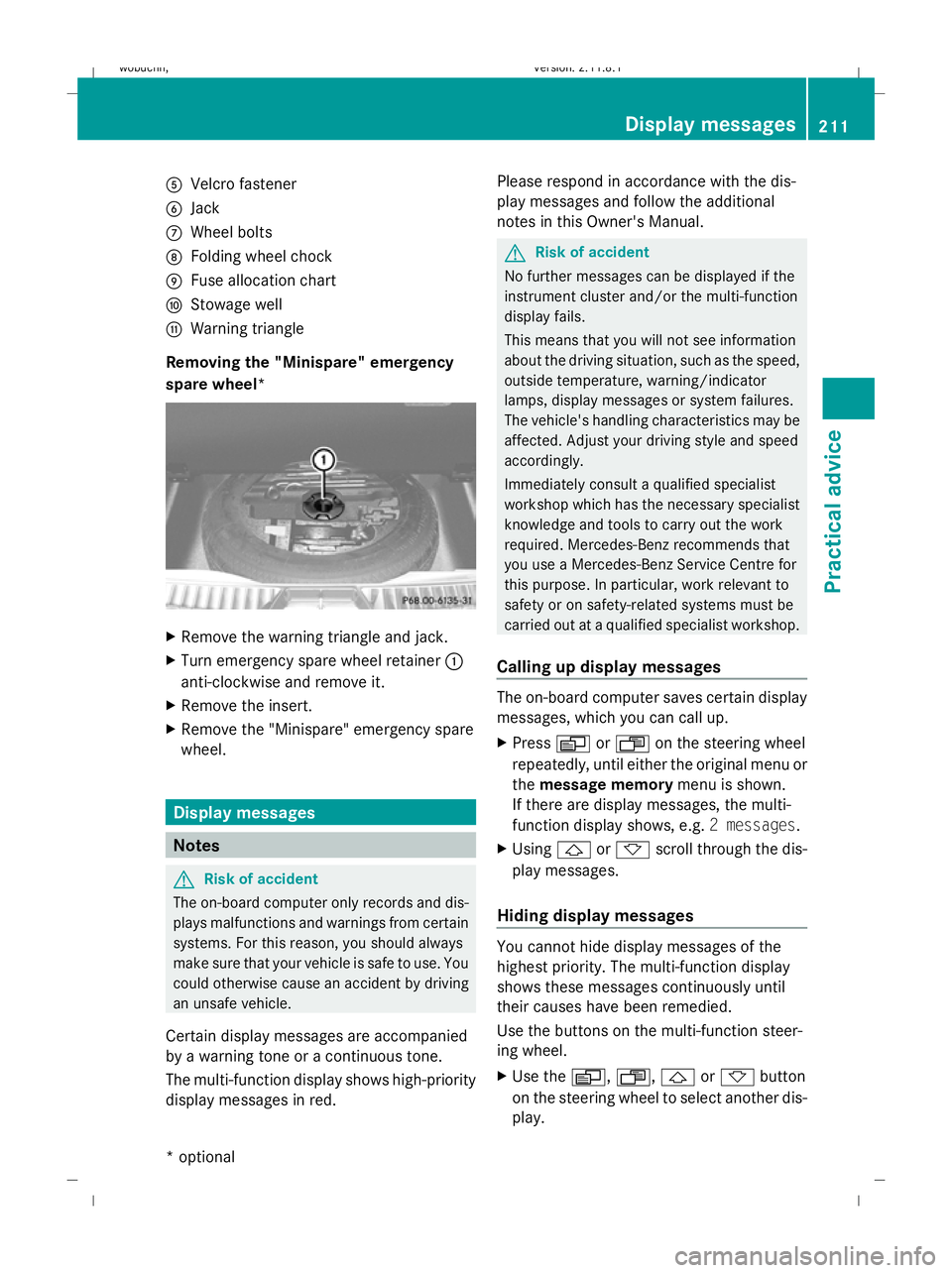
A
Velcro fastener
B Jack
C Wheel bolts
D Folding wheel chock
E Fuse allocation chart
F Stowage well
G Warning triangle
Removing the "Minispare" emergency
spare wheel* X
Remove the warning triangle and jack.
X Turn emergency spare wheel retainer :
anti-clockwise and remove it.
X Remove the insert.
X Remove the "Minispare" emergency spare
wheel. Display messages
Notes
G
Risk of accident
The on-board computer only records and dis-
plays malfunctions and warnings from certain
systems. For this reason, you should always
make sure that your vehicle is safe to use. You
could otherwise cause an accident by driving
an unsafe vehicle.
Certain display messages are accompanied
by a warning tone or a continuous tone.
The multi-function display shows high-priority
display messages in red. Please respond in accordance with the dis-
play messages and follow the additional
notes in this Owner's Manual. G
Risk of accident
No further messages can be displayed if the
instrument cluster and/or the multi-function
display fails.
This means that you will not see information
about the driving situation, such as the speed,
outside temperature, warning/indicator
lamps, display messages or system failures.
The vehicle's handling characteristics may be
affected. Adjust your driving style and speed
accordingly.
Immediately consult a qualified specialist
workshop which has the necessary specialist
knowledge and tools to carry out the work
required. Mercedes-Benz recommends that
you use a Mercedes-Benz Service Centre for
this purpose. In particular, work relevant to
safety or on safety-related systems must be
carried out at a qualified specialist workshop.
Calling up display messages The on-board computer saves certain display
messages, which you can call up.
X
Press VorU on the steering wheel
repeatedly, until either the original menu or
the message memory menu is shown.
If there are display messages, the multi-
function display shows, e.g. 2 messages.
X Using &or* scroll through the dis-
play messages.
Hiding display messages You cannot hide display messages of the
highest priority. The multi-function display
shows these messages continuously until
their causes have been remedied.
Use the buttons on the multi-function steer-
ing wheel.
X
Use the V,U,&or* button
on the steering wheel to select another dis-
play. Display messages
211Practical advice
* optional
X164_AKB; 2; 3, en-GB
wobuchh,
Version: 2.11.8.1 2009-03-31T14:14:58+02:00 - Seite 211 Z
Dateiname: 6515431202_buchblock.pdf; erzeugt am 01. Apr 2009 00:17:58; WK
Page 218 of 309
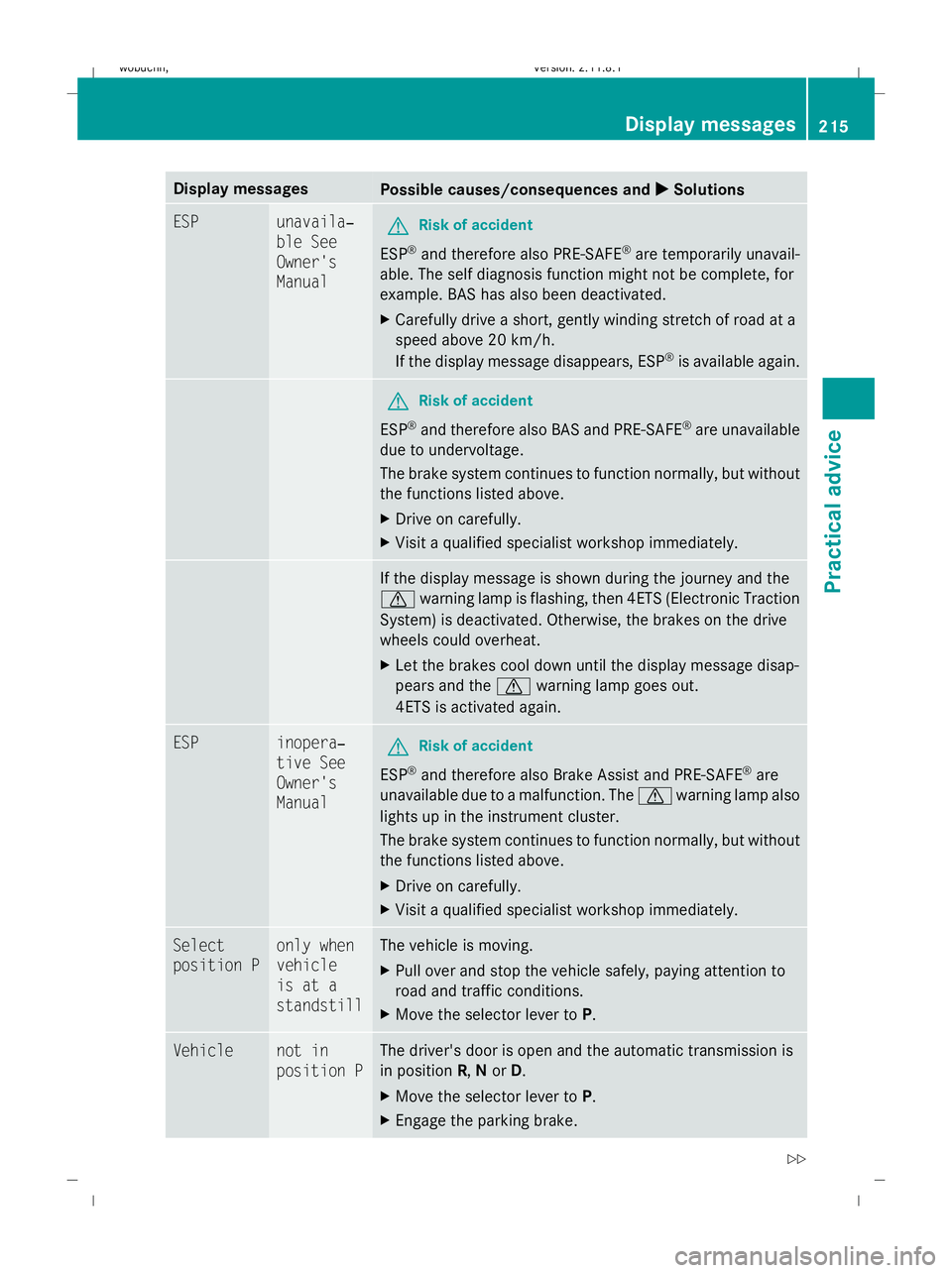
Display messages
Possible causes/consequences and
X
X Solutions ESP unavaila‐
ble See
Owner's
Manual
G
Risk of accident
ESP ®
and therefore also PRE-SAFE ®
are temporarily unavail-
able. The self diagnosis function might not be complete, for
example. BAS has also been deactivated.
X Carefully drive a short, gently winding stretch of road at a
speed above 20 km/h.
If the display message disappears, ESP ®
is available again. G
Risk of accident
ESP ®
and therefore also BAS and PRE-SAFE ®
are unavailable
due to undervoltage.
The brake system continues to function normally, but without
the functions listed above.
X Drive on carefully.
X Visit a qualified specialist workshop immediately. If the display message is shown during the journey and the
d
warning lamp is flashing, then 4ETS (Electronic Traction
System) is deactivated. Otherwise, the brakes on the drive
wheels could overheat.
X Let the brakes cool down until the display message disap-
pears and the dwarning lamp goes out.
4ETS is activated again. ESP inopera‐
tive See
Owner's
Manual
G
Risk of accident
ESP ®
and therefore also Brake Assist and PRE-SAFE ®
are
unavailable due to a malfunction. The dwarning lamp also
lights up in the instrument cluster.
The brake system continues to function normally, but without
the functions listed above.
X Drive on carefully.
X Visit a qualified specialist workshop immediately. Select
position P only when
vehicle
is at a
standstill The vehicle is moving.
X
Pull over and stop the vehicle safely, paying attention to
road and traffic conditions.
X Move the selector lever to P.Vehicle not in
position P The driver's door is open and the automatic transmission is
in position R,Nor D.
X Move the selector lever to P.
X Engage the parking brake. Display
messages
215Practical advice
X164_AKB; 2; 3, en-GB
wobuchh,V ersion: 2.11.8.1
2009-03-31T14:14:58+02:00 - Seite 215 Z
Dateiname: 6515431202_buchblock.pdf; erzeugt am 01. Apr 2009 00:17:59; WK
Page 238 of 309
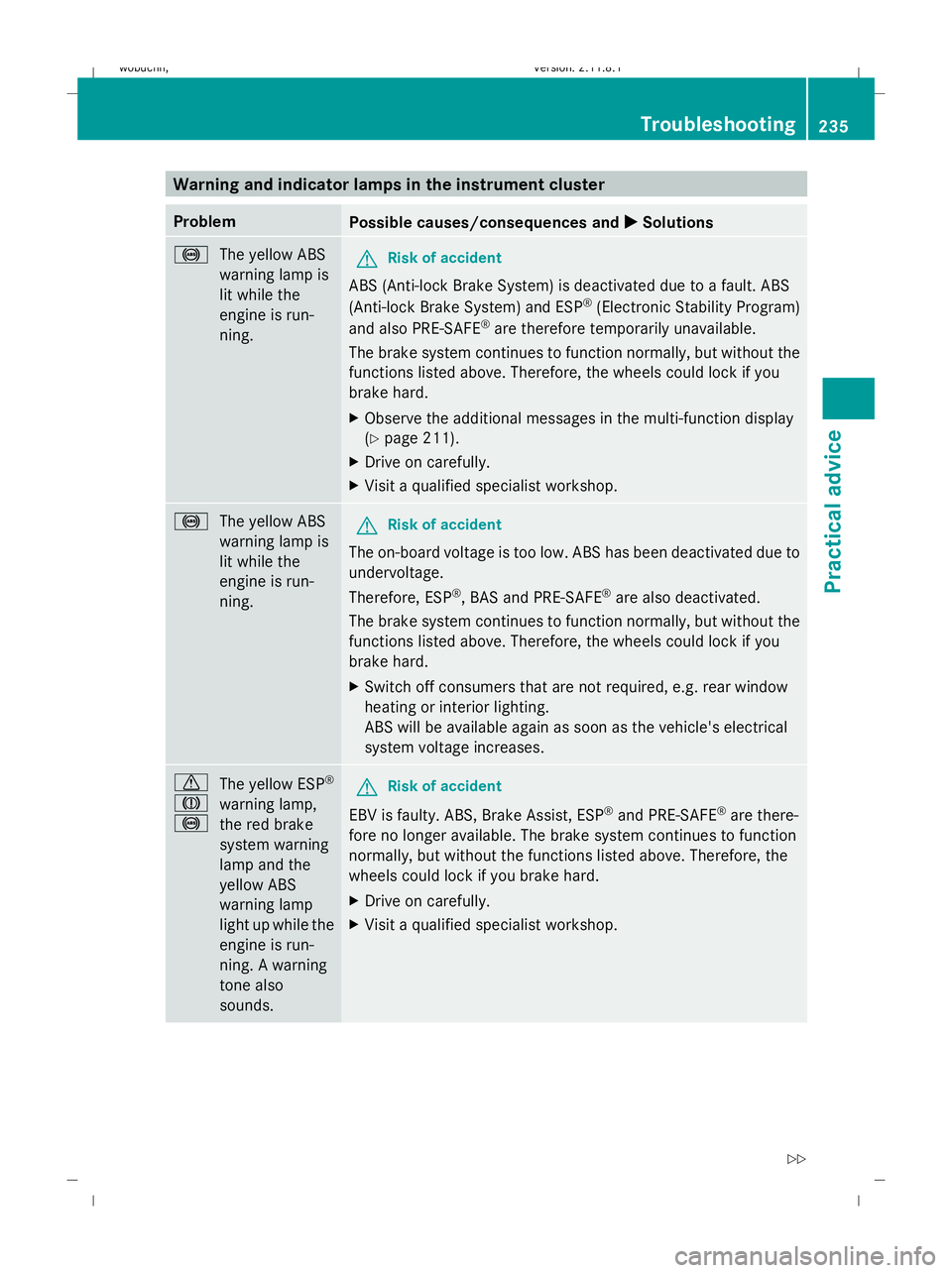
Warning and indicator lamps in the instrument cluster
Problem
Possible causes/consequences and
X
X Solutions !
The yellow ABS
warning lamp is
lit while the
engine is run-
ning. G
Risk of accident
ABS (Anti-lock Brake System) is deactivated due to a fault. ABS
(Anti-lock Brake System) and ESP ®
(Electronic Stability Program)
and also PRE-SAFE ®
are therefore temporarily unavailable.
The brake system continues to function normally, but without the
functions listed above. Therefore, the wheels could lock if you
brake hard.
X Observe the additional messages in the multi-function display
(Y page 211).
X Drive on carefully.
X Visit a qualified specialist workshop. !
The yellow ABS
warning lamp is
lit while the
engine is run-
ning. G
Risk of accident
The on-board voltage is too low. ABS has been deactivated due to
undervoltage.
Therefore, ESP ®
, BAS and PRE-SAFE ®
are also deactivated.
The brake system continues to function normally, but without the
functions listed above. Therefore, the wheels could lock if you
brake hard.
X Switch off consumers that are not required, e.g. rear window
heating or interior lighting.
ABS will be available again as soon as the vehicle's electrical
system voltage increases. d
J
!
The yellow ESP
®
warning lamp,
the red brake
system warning
lamp and the
yellow ABS
warning lamp
light up while the
engine is run-
ning. A warning
tone also
sounds. G
Risk of accident
EBV is faulty. ABS, Brake Assist, ESP ®
and PRE-SAFE ®
are there-
fore no longer available. The brake system continues to function
normally, but without the functions listed above. Therefore, the
wheels could lock if you brake hard.
X Drive on carefully.
X Visit a qualified specialist workshop. Troubleshooting
235Practical advice
X164_AKB; 2; 3, en-GB
wobuchh, Version: 2.11.8.1 2009-03-31T14:14:58+02:00 - Seite 235 Z
Dateiname: 6515431202_buchblock.pdf; erzeugt am 01. Apr 2009 00:18:01; WK
Page 245 of 309
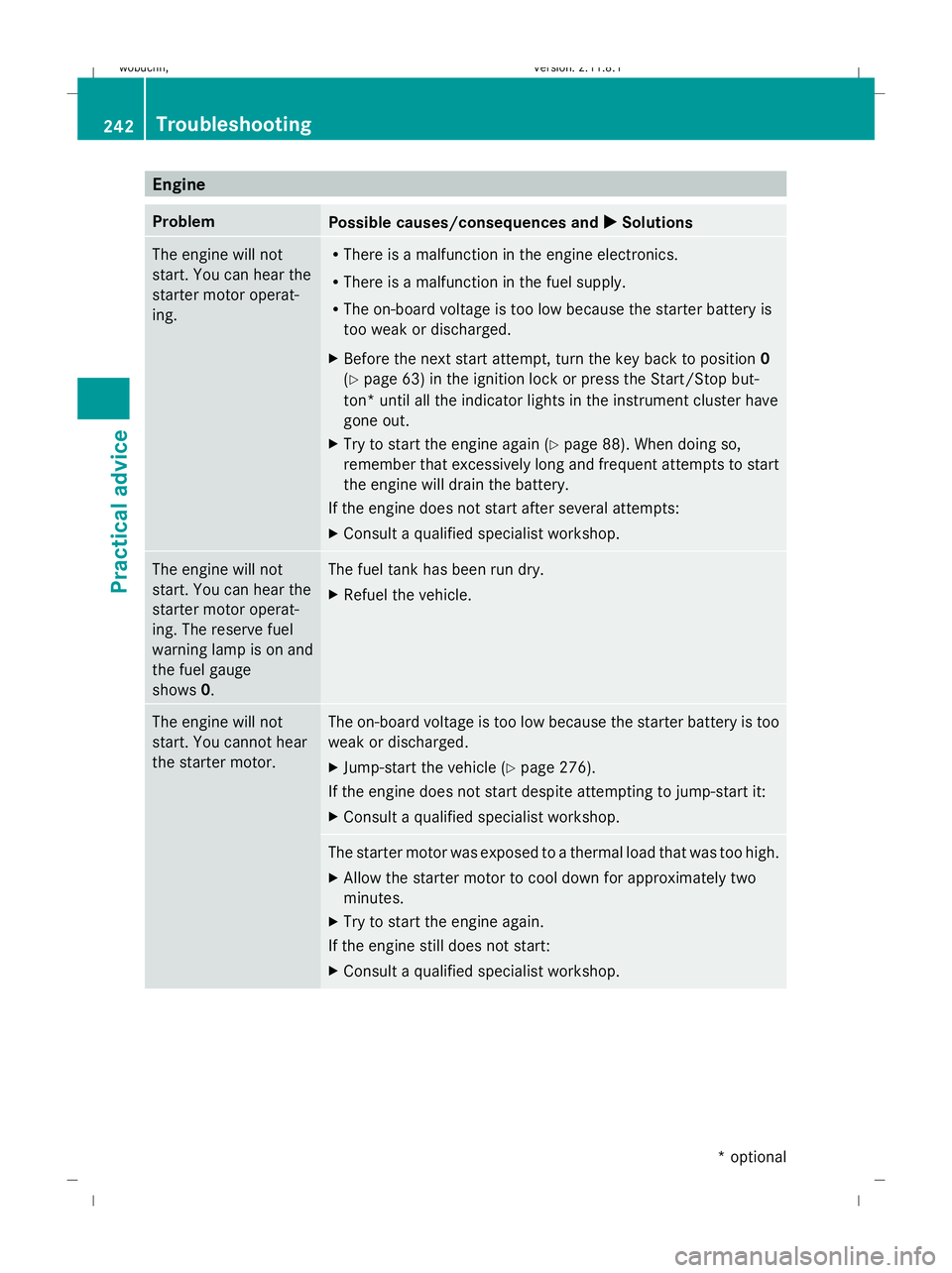
Engine
Problem
Possible causes/consequences and
X
X Solutions The engine will not
start. You can hear the
starter motor operat-
ing. R
There is a malfunction in the engine electronics.
R There is a malfunction in the fuel supply.
R The on-board voltage is too low because the starter battery is
too weak or discharged.
X Before the next start attempt, turn the key back to position 0
(Y page 63) in the ignition lock or press the Start/Stop but-
ton* until all the indicator lights in the instrument cluster have
gone out.
X Try to start the engine again (Y page 88). When doing so,
remember that excessively long and frequent attempts to start
the engine will drain the battery.
If the engine does not start after several attempts:
X Consult a qualified specialist workshop. The engine will not
start. You can hear the
starter motor operat-
ing. The reserve fuel
warning lamp is on and
the fuel gauge
shows
0. The fuel tank has been run dry.
X
Refuel the vehicle. The engine will not
start. You cannot hear
the starter motor. The on-board voltage is too low because the starter battery is too
weak or discharged.
X
Jump-start the vehicle (Y page 276).
If the engine does not start despite attempting to jump-start it:
X Consult a qualified specialist workshop. The starter motor was exposed to a thermal load that was too high.
X
Allow the starter motor to cool down for approximately two
minutes.
X Try to start the engine again.
If the engine still does not start:
X Consult a qualified specialist workshop. 242
TroubleshootingPractical advice
* optional
X164_AKB; 2; 3, en-GB
wobuchh,
Version: 2.11.8.1 2009-03-31T14:14:58+02:00 - Seite 242
Dateiname: 6515431202_buchblock.pdf; erzeugt am 01. Apr 2009 00:18:02; WK
Page 247 of 309
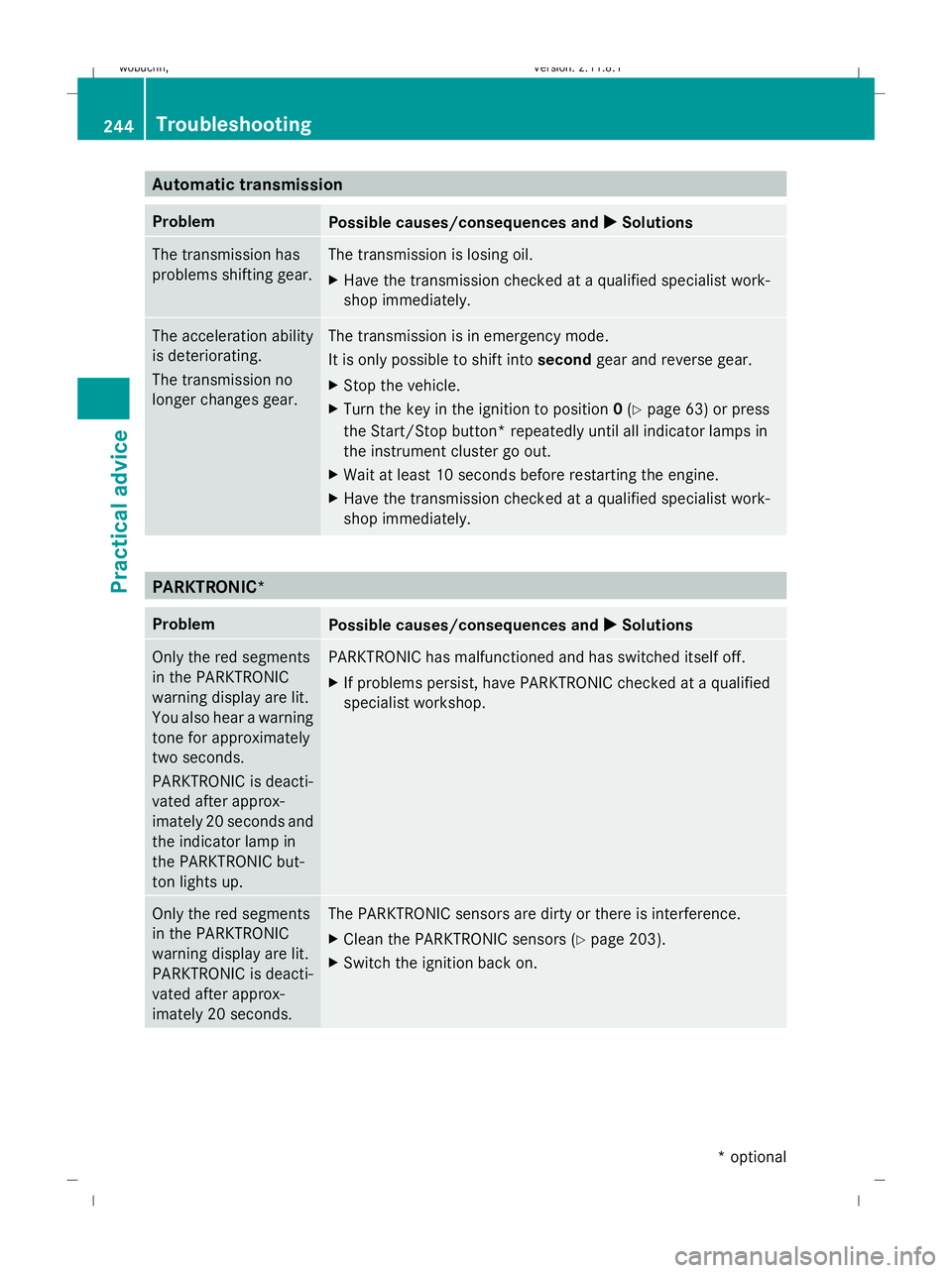
Automatic transmission
Problem
Possible causes/consequences and
X XSolutions The transmission has
problems shifting gear. The transmission is losing oil.
X
Have the transmission checked at a qualified specialist work-
shop immediately. The acceleration ability
is deteriorating.
The transmission no
longer changes gear. The transmission is in emergency mode.
It is only possible to shift into
secondgear and reverse gear.
X Stop the vehicle.
X Turn the key in the ignition to position 0(Y page 63) or press
the Start/Stop button* repeatedly until all indicator lamps in
the instrument cluster go out.
X Wait at least 10 seconds before restarting the engine.
X Have the transmission checked at a qualified specialist work-
shop immediately. PARKTRONIC*
Problem
Possible causes/consequences and
X XSolutions Only the red segments
in the PARKTRONIC
warning display are lit.
You also hear a warning
tone for approximately
two seconds.
PARKTRONIC is deacti-
vated after approx-
imately 20 seconds and
the indicator lamp in
the PARKTRONIC but-
ton lights up. PARKTRONIC has malfunctioned and has switched itself off.
X
If problems persist, have PARKTRONIC checked at a qualified
specialist workshop. Only the red segments
in the PARKTRONIC
warning display are lit.
PARKTRONIC is deacti-
vated after approx-
imately 20 seconds. The PARKTRONIC sensors are dirty or there is interference.
X
Clean the PARKTRONIC sensors (Y page 203).
X Switch the ignition back on. 244
TroubleshootingPractical advice
* optional
X164_AKB; 2; 3, en-GB
wobuchh,
Version: 2.11.8.1 2009-03-31T14:14:58+02:00 - Seite 244
Dateiname: 6515431202_buchblock.pdf; erzeugt am 01. Apr 2009 00:18:02; WK
Page 276 of 309
R
never touch the battery first. To discharge
a possible electrostatic charge, step out of
the vehicle first and touch the bodywork.
R do not wipe the battery using a cloth. The
battery may explode as a result of electro-
static charge or due to flying sparks.
! Before loosening the terminal clamps of
the battery, switch off the engine and
remove the key or, on vehicles with KEY-
LESS GO*, make sure that the ignition is
not switched on. In the instrument cluster,
all of the indicator lamps must be out. Oth-
erwise, you may destroy electronic compo-
nents, such as the alternator.
i Mercedes-Benz recommends that you
have work involving the battery, e.g.
removal, charging and replacement, car-
ried out at a qualified specialist workshop,
e.g. a Mercedes-Benz Service Centre.
The battery is located under the front seat on
the right-hand side when viewed in the direc-
tion of travel. Disconnecting the battery
G
Risk of accident
If the battery is disconnected:
R the brake boosting effect will not be avail-
able. Greater braking force will then be
required and brake pedal travel will be lon-
ger. If necessary, depress the brake pedal
with maximum force.
R the transmission is locked in position P
! Always disconnect the battery in
the order described below. Never swap the
battery terminals. You may otherwise dam-
age the vehicle electronics. X
Firmly depress the parking brake and move
the transmission to position P.
X Position the right-hand front seat as far for-
wards as possible.
X Switch off all electrical consumers (e.g.
radio, blower, etc.). X
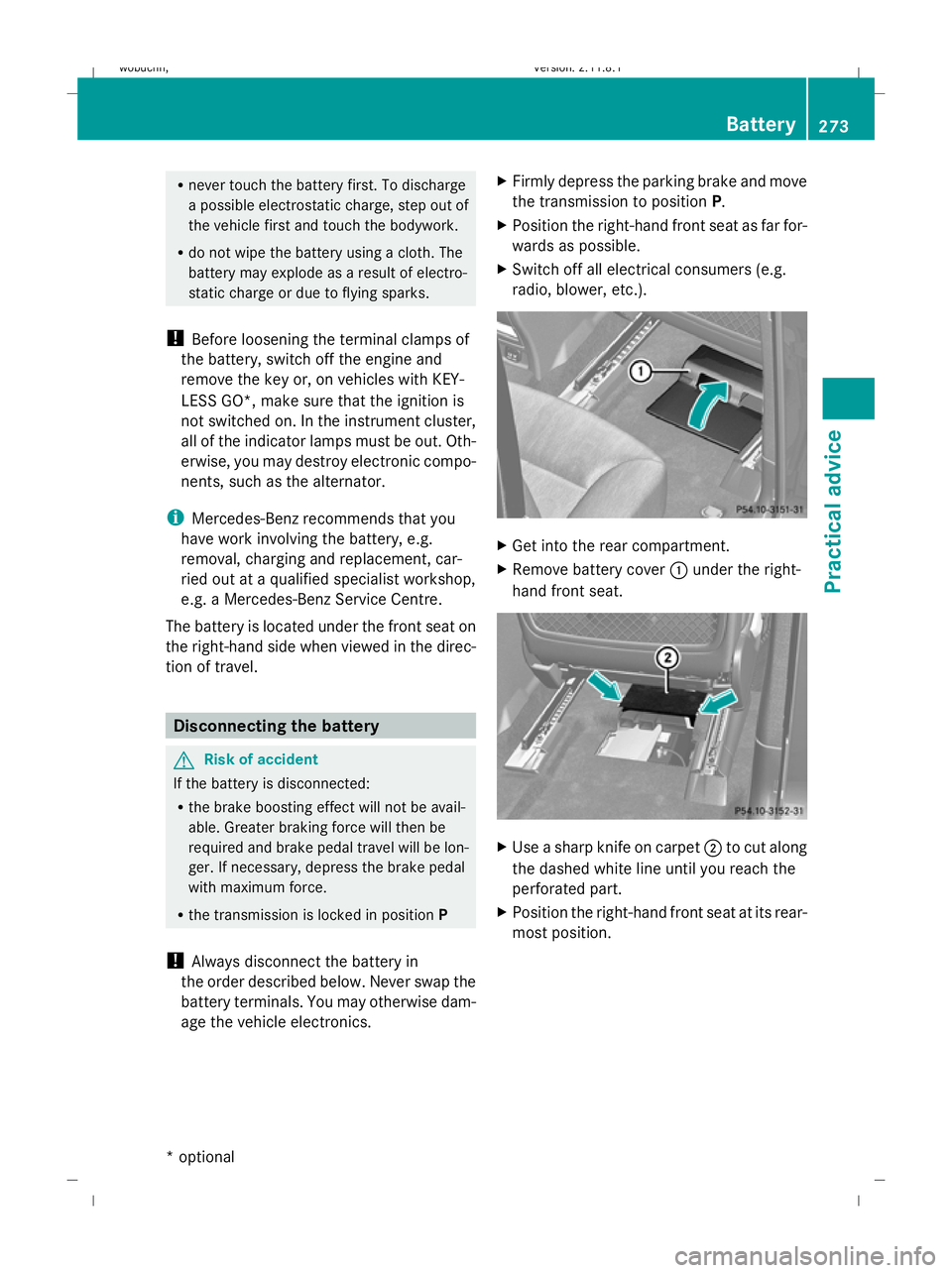
Get into the rear compartment.
X Remove battery cover :under the right-
hand front seat. X
Use a sharp knife on carpet ;to cut along
the dashed white line until you reach the
perforated part.
X Position the right-hand front seat at its rear-
most position. Battery
273Practical advice
* optional
X164_AKB; 2; 3, en-GB
wobuchh,
Version: 2.11.8.1 2009-03-31T14:14:58+02:00 - Seite 273 Z
Dateiname: 6515431202_buchblock.pdf; erzeugt am 01. Apr 2009 00:18:14; WK
Page 277 of 309
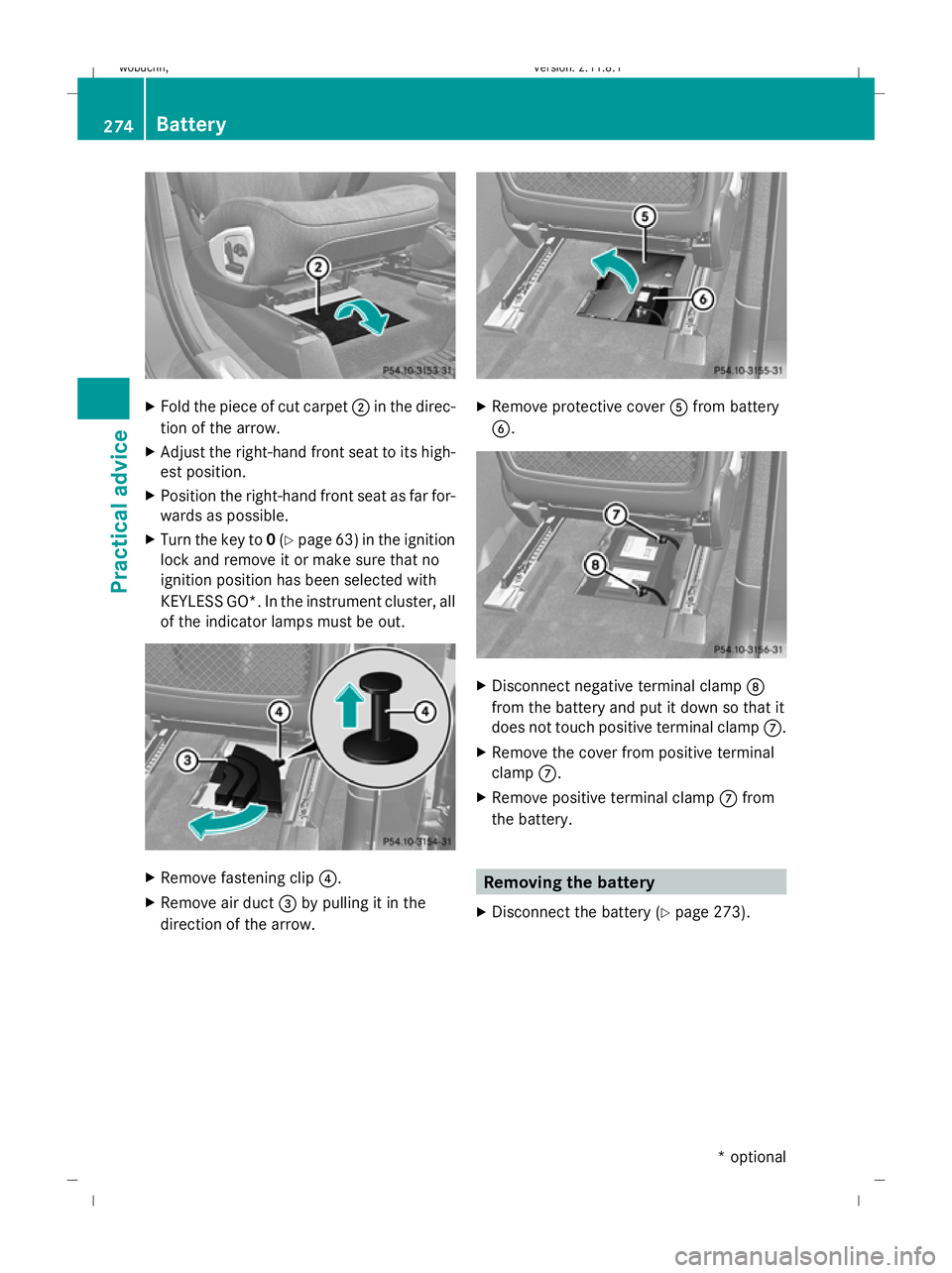
X
Fold the piece of cut carpet ;in the direc-
tion of the arrow.
X Adjust the right-hand front seat to its high-
est position.
X Position the right-hand front seat as far for-
wards as possible.
X Turn the key to 0(Y page 63) in the ignition
lock and remove it or make sure that no
ignition position has been selected with
KEYLESS GO*. In the instrument cluster, all
of the indicator lamps must be out. X
Remove fastening clip ?.
X Remove air duct =by pulling it in the
direction of the arrow. X
Remove protective cover Afrom battery
B. X
Disconnect negative terminal clamp D
from the battery and put it down so that it
does not touch positive terminal clamp C.
X Remove the cover from positive terminal
clamp C.
X Remove positive terminal clamp Cfrom
the battery. Removing the battery
X Disconnect the battery ( Ypage 273). 274
BatteryPractical advice
* optional
X164_AKB; 2; 3, en-GB
wobuchh
,V ersion: 2.11.8.1
2009-03-31T14:14:58+02:00 - Seite 274
Dateiname: 6515431202_buchblock.pdf; erzeugt am 01. Apr 2009 00:18:16; WK