2009 MERCEDES-BENZ G-Class key
[x] Cancel search: keyPage 132 of 264

XRemoving: Roll up cargo compartment
cover blind =.
XOpen latch ; on the right and left side of
cargo compartment cover blind = in
direction of the arrow.
XPull cargo compartment cover blind = out
upwards.
XInstalling: Open latch ; on the right and
left side.
XPlace cargo compartment cover blind =
into recesses.
XPress the right and left side of cargo
compartment cover blind = down until it
locks into place.
XClose latch ; on the right and left side.XMake sure the blind is securely fastened.
Storage compartments
GWarning!
To help avoid personal injury during a collision
or sudden maneuver, exercise care when
storing objects in the vehicle. Put luggage or
cargo in the cargo compartment if possible.
Do not pile luggage or cargo higher than the
seat backrests.
Parcel nets cannot secure hard or heavy
objects.
Keep compartment lids closed. This will help
to prevent stored objects from being thrown
about and injuring vehicle occupants during
Rbraking
Rvehicle maneuvers
Ran accident
GWarning!
Do not load items on the roof. It may cause
instability during some maneuvers which
could result in an accident.
Front storage compartments
Glove box
An media interface is located in the glove box.
For information on media interface, see
separate COMAND system operating
instructions.
XOpening: Pull glove box lid release :.XClosing: Push glove box lid ; upwards
until it engages.
Locking and unlocking the glove box
You can lock the glove box, e.g. when the
vehicle is in the shop for service.
The glove box can only be locked or unlocked
with the mechanical key.
130Loading and storingControls in detail
463_AKB; 2; 52, en-USd2ureepe,Version: 2.11.7.12008-12-02T10:52:11+01:00 - Seite 130
Page 136 of 264

XReinstalling ashtray insert: Position
ashtray insert =.
XClosing: Push at top of cover ;.
Cigarette lighter
GObserve Safety notes, see page 44.GWarning!
Never touch the heating element or sides of
the cigarette lighter; they are extremely hot.
Hold the knob only.
Make sure that any children traveling with you
do not injure themselves or start a fire with
the hot cigarette lighter.
When leaving the vehicle, always remove the
SmartKey from the starter switch, take it with
you, and lock the vehicle. Do not leave
children unattended in the vehicle, or with
access to an unlocked vehicle. A child’s
unsupervised access to a vehicle could result
in an accident and/or serious personal injury.
If the engine is off and the cigarette lighter is
being used extensively, the vehicle battery
may become discharged.
XSwitch on the ignition.XOpen the ashtray (Y page 133).XPush in cigarette lighter :.
Cigarette lighter : will pop out
automatically when hot.
! The lighter socket can be used to
accommodate 12V DC electrical
accessories (up to a maximum of 180 W)
designed for use with the standard
“cigarette lighter” plug type. Keep in mind,
however, that connecting accessories to
the lighter socket (for example extensive
connecting and disconnecting, or using
plugs that do not fit properly) can damage
the lighter socket. With the socket
damaged, the lighter may not function
properly any longer.
Power outlets
The power outlets can be used to
accommodate 12V DC electrical accessories
(e.g. auxiliary lamps, mobile phone chargers)
up to a maximum of 15 A (180 W).
XSwitch on the ignition.
Power outlet in front passenger
footwell
Power outlet in rear center console
134Useful featuresControls in detail
463_AKB; 2; 52, en-USd2ureepe,Version: 2.11.7.12008-12-02T10:52:11+01:00 - Seite 134
Page 149 of 264

switch on the ignition. Otherwise the
incorrect or non-approved fuel will get into
the fuel lines. The fuel system must be
drained completely. Contact an authorized
Mercedes-Benz Center to have the fuel
system drained completely.
! To prevent damage to the catalytic
converters, only use premium unleaded
gasoline in this vehicle.
Any noticeable irregularities in engine
operation should be repaired promptly.
Otherwise, excessive unburned fuel may
reach the catalytic converter, causing it to
overheat and potentially start a fire.
i Only use premium unleaded gasoline with
a minimum Posted Octane Rating of 91
(average of 96 RON/86 MON).
Information on gasoline quality can
normally be found on the fuel pump. Please
contact gas station personnel in case
labels on the pump cannot be found.
For more information on gasoline, see
“Premium unleaded gasoline”
(Y page 254), see “Fuel requirements”
(Y page 255), or contact an authorized
Mercedes-Benz Center, or visit
www.mbusa.com (USA only).
The fuel filler flap is located on the right-hand
side of the vehicle towards the rear.
Locking/unlocking the vehicle with the
SmartKey automatically locks/unlocks the
fuel filler flap.
iIn case the central locking system does
not release the fuel filler flap, see “Fuel filler
flap” (Y page 223).
XTurn off the engine.
iLeaving the engine running and the fuel
filler cap open can cause the yellow fuel
tank reserve warning lamp to flash and the
malfunction indicator lamp = (USA
only) or ; (Canada only) to illuminate.
For more information, see also “Practical
hints” (Y page 218).
XRemove the SmartKey from the starter
switch.
XOpening: Press fuel filler flap : at the
point indicated by the arrow.
XTurn fuel filler cap ; counterclockwise.XTake off fuel filler cap ;.
! The fuel filler cap is tethered to the fuel
filler neck. Do not drop the cap. It could
damage the vehicle paint finish.
XPlace fuel filler cap ; in direction of arrow
into the holder.
XFully insert filler nozzle unit and refuel.XOnly fill your tank until the filler nozzle unit
cuts out – do not top off or overfill.
! When refueling the vehicle, make certain
that no gasoline comes into contact with
the rear side marker to prevent damaging
the lens.
XClosing: Turn fuel filler cap ; clockwise
until it audibly engages.
iMake sure to close the fuel filler flap
before locking your vehicle as the flap
At the gas station147Operation463_AKB; 2; 52, en-USd2ureepe,Version: 2.11.7.12008-12-02T10:52:11+01:00 - Seite 147Z
Page 192 of 264
a chrome cleaner. If in doubt whether an
ornamental molding is chrome-plated,
contact an authorized Mercedes-Benz
Center.
Headlamps, brake lamps, tail lamps,
side markers, turn signal lenses
XUse a mild vehicle wash detergent, such as
Mercedes-Benz approved Car Shampoo,
with plenty of water.
! Only use window cleaning solutions that
are suitable for plastic lamp lenses.
Window cleaning solutions which are not
suitable may damage the plastic lamp
lenses of the headlamps. Therefore, do not
use abrasives, solvents or cleaners that
contain solvents.
Cleaning the Rear Parking Assist
system sensors
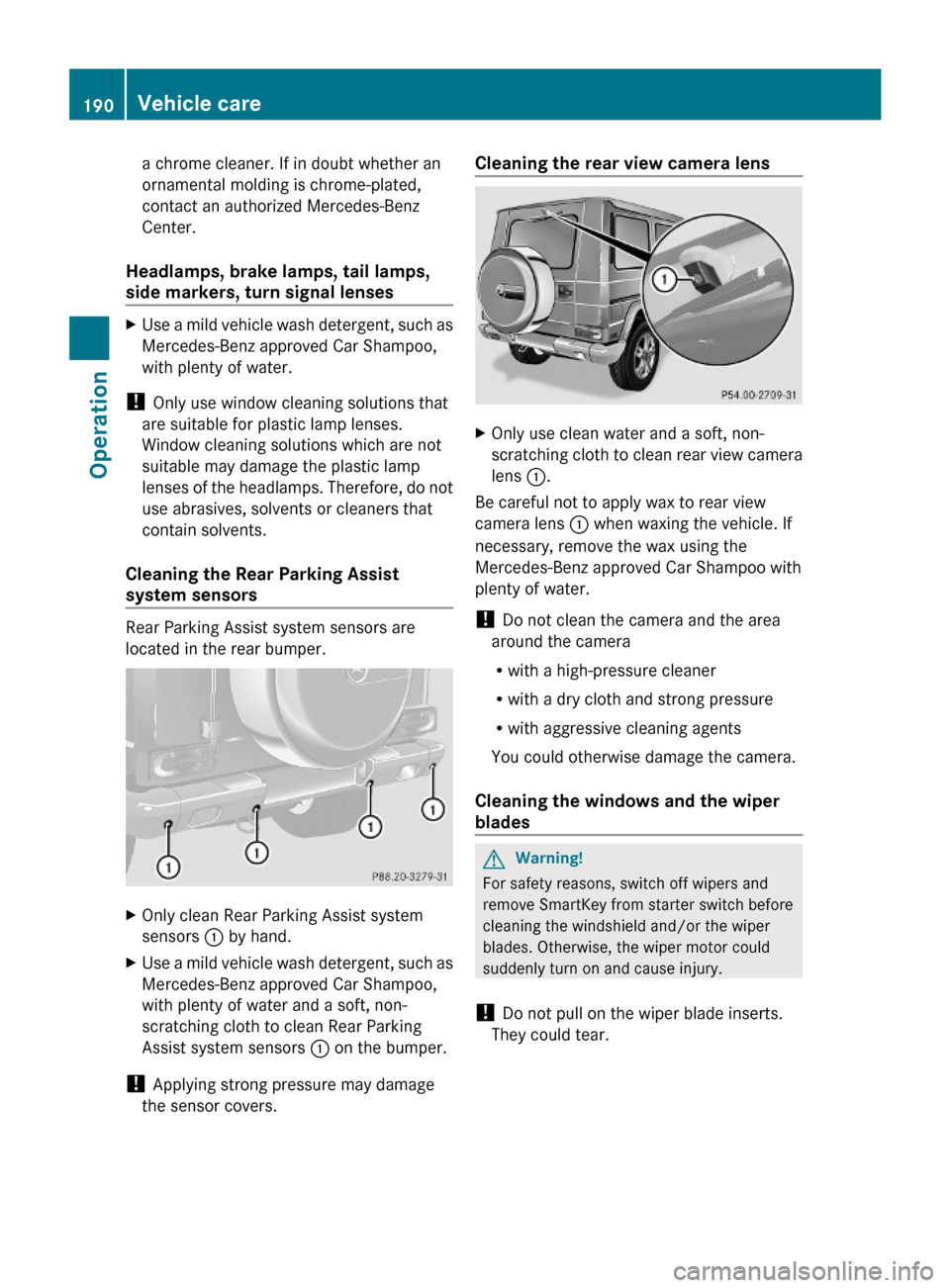
Rear Parking Assist system sensors are
located in the rear bumper.
XOnly clean Rear Parking Assist system
sensors : by hand.
XUse a mild vehicle wash detergent, such as
Mercedes-Benz approved Car Shampoo,
with plenty of water and a soft, non-
scratching cloth to clean Rear Parking
Assist system sensors : on the bumper.
! Applying strong pressure may damage
the sensor covers.
Cleaning the rear view camera lensXOnly use clean water and a soft, non-
scratching cloth to clean rear view camera
lens :.
Be careful not to apply wax to rear view
camera lens : when waxing the vehicle. If
necessary, remove the wax using the
Mercedes-Benz approved Car Shampoo with
plenty of water.
! Do not clean the camera and the area
around the camera
Rwith a high-pressure cleaner
Rwith a dry cloth and strong pressure
Rwith aggressive cleaning agents
You could otherwise damage the camera.
Cleaning the windows and the wiper
blades
GWarning!
For safety reasons, switch off wipers and
remove SmartKey from starter switch before
cleaning the windshield and/or the wiper
blades. Otherwise, the wiper motor could
suddenly turn on and cause injury.
! Do not pull on the wiper blade inserts.
They could tear.
190Vehicle careOperation
463_AKB; 2; 52, en-USd2ureepe,Version: 2.11.7.12008-12-02T10:52:11+01:00 - Seite 190
Page 195 of 264
Vehicle equipment ............................194
Where will I find ...? ..........................194
Vehicle status messages in the
multifunction display .......................196
What to do if … ..................................213
Unlocking/locking manually ...........221
Opening/closing manually ..............223
Brush guard .......................................224
Replacing SmartKey batteries .........225
Replacing bulbs .................................226
Replacing wiper blades ....................231
Flat tire ..............................................232
Battery ...............................................236
Jump starting ....................................237
Towing the vehicle ............................239
Fuses ..................................................242
193Practical hints463_AKB; 2; 52, en-USd2ureepe,Version: 2.11.7.12008-12-02T10:52:11+01:00 - Seite 193
Page 223 of 264

Unlocking/locking manually
Unlocking the vehicle
If you cannot unlock the vehicle with the
SmartKey, unlock the driver’s door and the
tailgate using the mechanical key.
iUnlocking and opening the driver’s door
or the tailgate with the mechanical key will
trigger the anti-theft alarm system.
To cancel the alarm, insert the SmartKey in
the starter switch.
Removing the mechanical key
XMove locking tab : in direction of arrow.XSlide mechanical key ; out of the housing.
Unlocking the driver’s door
XInsert mechanical key ; into the lock
cylinder.
XTurn mechanical key ; counterclockwise
to position 1 until the locking knob moves
up.
The driver’s door is unlocked.
XRemove mechanical key ;.XPress lock cylinder and pull on door handle
to open the driver’s door.
Unlocking the tailgate
GWarning!
The tailgate swings open to one side. Always
make sure there is sufficient clearance for the
tailgate.
Make sure the tailgate is closed when the
engine is running and while driving. Among
other dangers, deadly carbon monoxide (CO)
gases may enter vehicle interior resulting in
unconsciousness and death.
XInsert mechanical key = into the lock
cylinder.
XTurn mechanical key = counterclockwise
to position 2.
XRemove mechanical key =.XPress lock cylinder and pull on door
handle : to open the tailgate.
Unlocking/locking manually221Practical hints463_AKB; 2; 52, en-USd2ureepe,Version: 2.11.7.12008-12-02T10:52:11+01:00 - Seite 221Z
Page 224 of 264

Locking the vehicle
If you cannot lock the vehicle with the
SmartKey, lock it as follows:
XClose the front passenger door, the rear
doors, and the tailgate.
XOpen the driver’s door.XPress the central locking switch
(Y page 60).
The locking knobs of the front passenger
door, the rear doors, and the tailgate move
down.
XIf the vehicle battery is disconnected or
drained: Press down the locking knobs on
the front passenger door, the rear doors,
and the tailgate.
XExit the vehicle.XClose the driver’s door.XRemove mechanical key ; from the
SmartKey (Y page 221).
XInsert mechanical key ; into the lock
cylinder.
XTurn mechanical key ; clockwise to
position 1.
The vehicle is locked.
XTurn mechanical key ; back and remove
it from the lock cylinder.
XCheck if the tailgate is locked.XIf necessary, lock the tailgate with the
mechanical key (Y page 61).
iThis procedure does not arm the anti-
theft alarm system, nor does it lock the fuel
filler flap.
Manually unlocking the gear selector
lever
If the vehicle’s electrical system is
malfunctioning, the gear selector lever could
remain locked in park position P. In this case
the gear selector lever can be unlocked
manually, e.g. to tow the vehicle.
XEngage the parking brake.XInsert suitable tool : (e.g. a ball point pen)
into the covered opening.
XSimultaneously push tool : downward
and move the gear selector lever out of
park position P.
XRemove tool :.
The gear selector lever is unlocked.
The cover returns to its closed position after
moving the gear selector lever to the
positions D+ and D-.
iThe gear selector lever is locked again as
soon as you move it back to park position
P.
222Unlocking/locking manuallyPractical hints
463_AKB; 2; 52, en-USd2ureepe,Version: 2.11.7.12008-12-02T10:52:11+01:00 - Seite 222
Page 227 of 264

XLowering: While holding brush guard
firmly, open quick lock ; using locking and
unlocking handle :.
XGently lower brush guard until it reaches its
fully lowered position.
XRaising and securing: Flip up brush guard
until it contacts end stop joint ?.
Quick lock stop pin must engage the cross
slot recess in lock =.
XNow turn quick lock ; so that quick
lock ; makes contact with end stop
joint ?.
XLock quick lock ; on both sides of brush
guard using locking and unlocking
handle :.
! Make sure both quick stop pins are
seated fully in lock.
Replacing SmartKey batteries
If the batteries in the SmartKey are
discharged, the vehicle can no longer be
locked or unlocked. It is recommended to
have the batteries replaced at an authorized
Mercedes-Benz Center.
GWarning!
Batteries contain poisonous and corrosive
substances. Therefore, keep the batteries out
of reach of children.
If a battery is swallowed, seek medical help
immediately.
GWarning!
SmartKey batteries contain perchlorate
material, which may require special handling
and regard for the environment. Check with
your local government’s disposal guidelines.
California residents, see www.dtsc.ca.gov/
HazardousWaste/Perchlorate/
index.cfm.
Batteries contain materials that can harm the
environment if disposed of improperly.
Recycling of batteries is the preferred method
of disposal. Many states/provinces require
sellers of batteries to accept old batteries for
recycling.
When inserting the batteries, make sure they
are clean and free of lint.
When replacing batteries, always replace
both batteries.
iThe required replacement batteries are
available at any authorized Mercedes-Benz
Center.
Replacement batteries: Lithium, type
CR 2025 or equivalent.
XRemove the mechanical key from the
SmartKey (Y page 221).
XInsert mechanical key : in direction of
arrow in side opening.
XUsing mechanical key :, push slide ; to
unlatch battery compartment =.
XPull battery compartment = out of the
SmartKey housing in direction of arrow.
Replacing SmartKey batteries225Practical hints463_AKB; 2; 52, en-USd2ureepe,Version: 2.11.7.12008-12-02T10:52:11+01:00 - Seite 225Z