2009 MAZDA MODEL 6 AUX
[x] Cancel search: AUXPage 127 of 464

Black plate (127,1)
NOTElThe system will disarm if one of the
following operations takes place within 20
seconds after closing the trunk lid and
locking all the doors:
lPressing the unlock button on the
transmitter.
lAny door or the trunk lid is opened.lUnlocking a door with the inside door-
lock knob.
lThe hood is opened.lThe key is inserted in the ignition switch.lThe auxiliary key inserted into the key
slot (with advanced key).
l(With advanced key)
The push button start is pressed or a
door is unlocked using the sensor on the
inside of the door handle.
lThe ignition is switched on.
To rearm the system, do the arming
procedure again.
lWhen the doors are locked by pressing the
lock button on the transmitter or using the
key while the theft-deterrent system is
armed, the hazard warning lights will flash
once to indicate that the system is armed.
lThere is nothing to sense that a window or
moonroof is open in the system, you must
confirm the windows and moonroof before
you activate the system, and be careful with
the advanced key not to open the windows
and moonroof unintentionally when
unlocking the vehicle.
q To Turn Off an Armed System
An armed system can be turned off by any
one of the following methods:
lUnlock a door with the key.lPress the unlock button on the keyless
entry system transmitter.
lInsert the key into the ignition switch
(key slot) and switch the ignition to
ON.
l(With advanced key)lUnlock a door using the sensor on
the inside of the door handle.
lThe ignition is switched on.
The hazard warning lights will flash twice
to indicate that the system is turned off.
NOTE
When the doors are unlocked by pressing the
unlock button on the transmitter or using the
key while the theft-deterrent system is turned
off, the hazard warning lights will flash twice
to indicate that the system is turned off.
q To Stop the Alarm
A triggered alarm can be turned off by
any one of the following methods:
lUnlock a door with the key.lPress the unlock button or press and
hold the trunk button on the keyless
entry system transmitter.
lThe engine is started with the ignition
key or the start knob.
l(With advanced key)lPress the unlock button or press and
hold the trunk button on the
transmitter.
lUnlock a door using the sensor on
the inside of the door handle.
lThe engine is started with the push
button start.
NOTE
If you have any problem with the theft-
deterrent system, consult an Authorized Mazda
Dealer.
Knowing Your Mazda
Security System
3-57
Mazda6_8Z64-EA-08H_Edition1 Page127
Wednesday, June 25 2008 10:3 AM
Form No.8Z64-EA-08H
Page 198 of 464

Black plate (198,1)
WARNING
Do not drive the vehicle with the KEY
warning light illuminated:If the KEY warning light remains
illuminated, do not continue to drive
using the advanced key system. Park
the vehicle in a safe place and use
the auxiliary key to continue driving
the vehicle. Have the vehicle
inspected at an Authorized Mazda
Dealer as soon as possible.
When flashing
lUnder the following conditions, the
KEY warning light (red) flashes to
inform the driver that the push button
start will not switch to ACC even if it
is pressed from off.
lThe advanced key battery is dead.lThe advanced key is not within
operational range.
lThe advanced key is placed in areas
where it is difficult for the system to
detect the signal (page 3-7).
lA key from another manufacturer
similar to the advanced key is in the
operational range.
lUnder the following conditions, the
KEY warning light (red) will flash
continuously when the push button
start has not been pressed off to notify
the driver that the advanced key has
been removed. The KEY warning light
(red) will stop flashing when the
advanced key is back inside the
vehicle:
lThe push button start has not been
pressed off, the driver's door is
open, and the advanced key is
removed from the vehicle.
lThe push button start has not been
pressed off and all the doors are
closed after removing the advanced
key from the vehicle.
NOTE
Because the advanced key utilizes low-intensity
radio waves, the Advanced Key Removed From
Vehicle Warning may activate if the advanced
key is carried together with a metal object or it
is placed in a poor signal reception area.
KEY Indicator Light (Green)
When illuminated
When the brake pedal is depressed with
an automatic transaxle or the clutch pedal
is depressed with a manual transaxle, the
system confirms that the correct advanced
key is inside the vehicle, the KEY
indicator light (green) illuminates, and the
push button start can be pressed to ACC
(page 3-10).
When flashing
When the push button start is pressed off
from ON, the KEY indicator light (green)
flashes for approximately 30 seconds
indicating that the remaining battery
power is low. Replace with a new battery
before the advanced key becomes
unusable.
5-54
Driving Your Mazda
Warning/Indicator Lights and Beep Sounds
Mazda6_8Z64-EA-08H_Edition1 Page198
Wednesday, June 25 2008 10:4 AM
Form No.8Z64-EA-08H
Page 219 of 464

Black plate (219,1)
6Interior Comfort
Use of various features for drive comfort, including air-conditioning and audio
system.
Climate Control System ............................................................... 6-2Operating Tips ........................................................................... 6-2
Vent Operation .......................................................................... 6-3
Types of the Climate Control System ....................................... 6-5
Manual Type ............................................................................. 6-6
Fully Automatic Type ............................................................. 6-11
Audio System ............................................................................... 6-16 Antenna ................................................................................... 6-16
Operating Tips for Audio System ........................................... 6-16
Audio Set ................................................................................ 6-27
Audio Control Switch Operation
í......................................... 6-56
AUX Mode (Auxiliary input)í............................................... 6-59
Safety Certification ................................................................. 6-62
Bluetooth Audio .......................................................................... 6-63 Bluetooth Audio
í................................................................... 6-63
Bluetooth Hands-Free ................................................................. 6-72 Bluetooth Hands-Free
í.......................................................... 6-72
Basic Bluetooth Hands-Free Operation ................................... 6-76
Convenient Use of the Hands-Free System ............................. 6-79
Hands-Free Setting .................................................................. 6-85
When Bluetooth Hands-Free Cannot be Used ........................ 6-91
Safety Certification ................................................................. 6-92
Mazda Bluetooth Hands-Free Customer Service .................... 6-92
Interior Equipment ..................................................................... 6-93 Sunvisors ................................................................................. 6-93
Interior Lights ......................................................................... 6-94
Information Display ................................................................ 6-96
Cup Holder ............................................................................ 6-100
Bottle Holder ......................................................................... 6-101
Storage Compartments .......................................................... 6-102
Accessory Sockets ................................................................ 6-105
6-1íSome models.
Mazda6_8Z64-EA-08H_Edition1 Page219
Wednesday, June 25 2008 10:4 AM
Form No.8Z64-EA-08H
Page 245 of 464
Black plate (245,1)
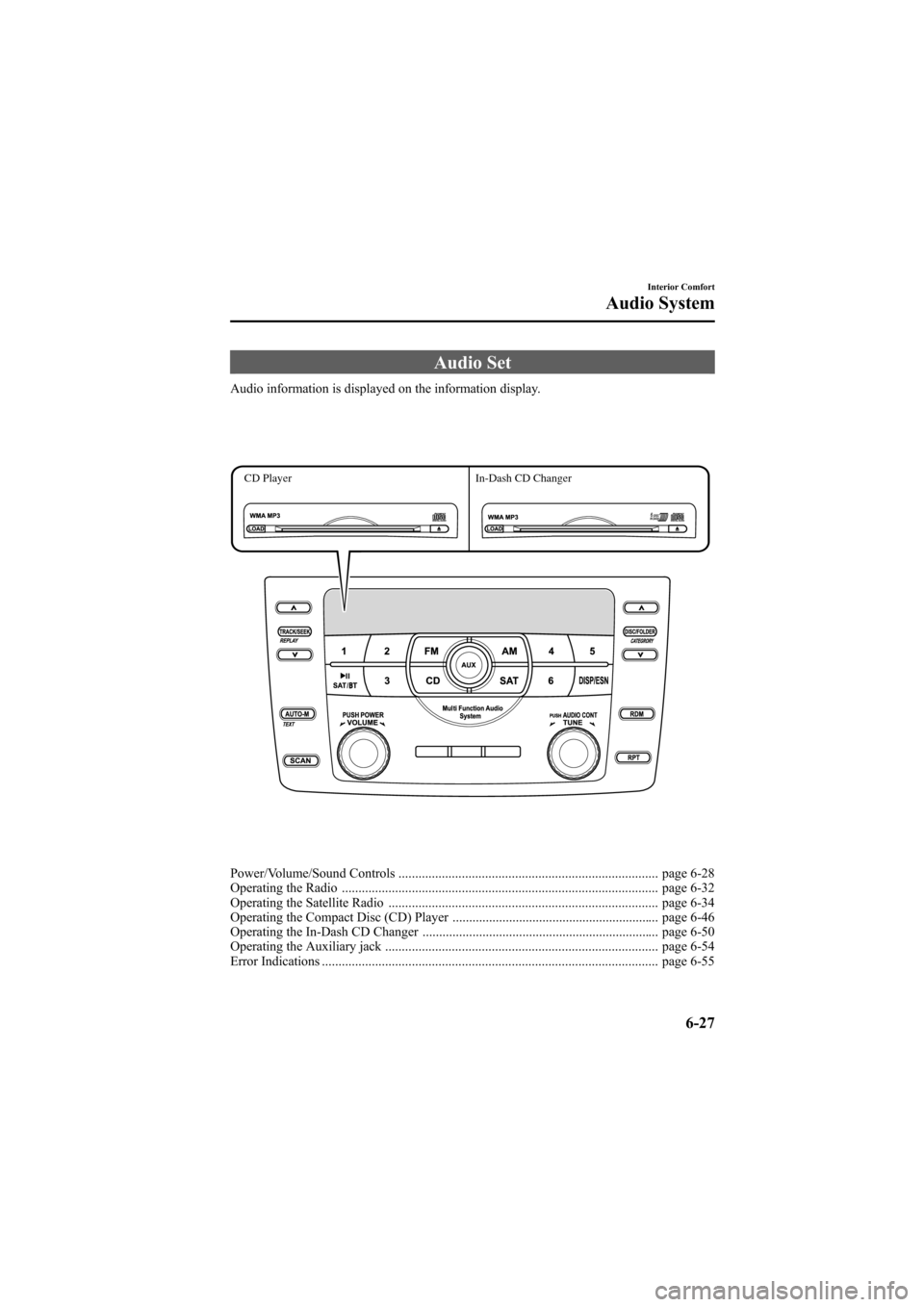
Audio Set
Audio information is displayed on the information display.
CD PlayerIn-Dash CD Changer
Power/Volume/Sound Controls .............................................................................. page 6-28
Operating the Radio ............................................................................................... page 6-32
Operating the Satellite Radio ................................................................................. page 6-34
Operating the Compact Disc (CD) Player .............................................................. page 6-46
Operating the In-Dash CD Changer ....................................................................... page 6-50
Operating the Auxiliary jack .................................................................................. page 6-54
Error Indications ..................................................................................................... page 6-55
Interior Comfort
Audio System
6-27
Mazda6_8Z64-EA-08H_Edition1 Page245
Wednesday, June 25 2008 10:4 AM
Form No.8Z64-EA-08H
Page 249 of 464

Black plate (249,1)
*AUDIOPILOT®(Bose®SoundSystem-equipped model)
AUDIOPILOT®automatically adjusts
audio volume and sound quality in
accordance with the level of noise
entering the vehicle interior while driving.
When AUDIOPILOT
®is turned on, the
system automatically calculates the
conditions for optimum hearing of sound
which may be difficult to hear depending
on exterior noise.
* AUDIOPILOT
®is a registered
trademark of Bose Corporation.
*Centerpoint®(Bose®Sound System-equipped model)
Centerpoint®offers you the experience of
5.1-channel surround sound in your
vehicle even with your conventional 2-
channel stereo CDs.
Centerpoint
®can be set on or off.
NOTE
lCenterpoint®operates optimally with a 2-
channel stereo CD. MP3 audio files can be
played, however, MP3 audio files encoded
with high compression may result in poor
sound quality.
lCenterpoint®is available for 2-channel
stereo audio except for AM radio/FM radio/
SIRIUS digital satellite radio/AUX/BT
audio.
* Centerpoint®is a registered trademark
of Bose Corporation.
BEEP setting
The beep-sound when operating the audio
system can be set on or off.
ILLM EFT setting (Illumination settingduring operation)
The audio system illumination during
operation can be set on or off.
Welcome modeí
The welcome mode provides the
following presentation:
lSound is heard when the ignition is
turned on.
lIllumination turns on when a door is
opened after unlocking the doors.
Only the sound effect can be switched on
or off.
BT SETUP modeí
Music and other audio such as voice data
recorded on portable audio devices and
mobile phones available on the market
which are equipped with the Bluetooth
transmission function can be listened to
via wireless transmission over the
vehicle's speakers. Using the BT SETUP
mode, these devices can be programmed
to the Bluetooth unit or changed. For
details, refer to Bluetooth audio (page
6-63).
Interior Comfort
Audio System
6-31íSome models.
Mazda6_8Z64-EA-08H_Edition1 Page249
Wednesday, June 25 2008 10:4 AM
Form No.8Z64-EA-08H
Page 259 of 464

Black plate (259,1)
When the seek tuning button ()is
pressed (about 1.5 seconds), playback
starts from the beginning of the current
program.
When the seek tuning button (
)is
pressed twice, playback starts from the
beginning of the previous program.
When the seek tuning button (
)is
pressed for about 1.5 seconds or longer,
the program is reversed while the button
is being pressed.
When the seek tuning button (
)is
pressed (about 1.5 seconds), playback
starts from the beginning of the next
program. When the seek tuning button
(
) is pressed (about 1.5 seconds) while
the last program is being played, the
instant replay mode is cancelled.
When the seek tuning button (
)is
pressed for 1.5 seconds or longer, the
program is fast-forwarded while the
button is being pressed. When pressing
and holding the button until the end of the
program, the instant replay mode is
cancelled.
When the instant replay button is pressed
again, playback is paused, or playback
starts if it has been paused.
Instant replay (PAUSE)
If the instant replay button is pressed
while the instant replay mode is off,
instant replay mode is turned on in a
paused condition (PAUSE). Press the
instant replay button again to resume
playback from the point at which it was
paused.
NOTE
lIf the channel is changed, the instant replay
buffer data is deleted.
lAfter turning on the power and switching to
SIRIUS digital satellite radio mode, the
instant replay mode is not available for
several seconds after changing channels.
(How to cancel the instant replay)lTurn off the ACC or POWER.lPress any one of the following buttons:
FM/AM, CD, AUX, SAT,
CATEGORY, or a channel preset
button.
lShort-press the seek tuning button ()
to the last track while tracking up.
lTo fast-forward to the end of the track
long-press the seek tuning button ().lHold the scan button, then press
channel preset button 4, 5, or 6.
lTurn the manual tuning dial.lPress the up/down switch on the audio
control switch.
lInsert or play a CD.
Displaying the SIRIUS ID (ESN)
When the ESN button is pressed for 1.5
seconds or longer, a 12-digit Electronic
Serial Number (ESN) for the SIRIUS
tuner is displayed.
(How to clear the message)
lTurn off the ACC.lTurn off the POWER.lPress any one of the following buttons:
FM/AM, CD, AUX, SAT, ESN/DISP,
CAT, SCAN, Instant replay, seek
tuning button (
), or a channel preset
button.
lTurn the manual tuning dial.lInsert or play a CD.
(If the SIRIUS ID (ESN) for the tuner
does not display)
If “ESN + FAIL ”is displayed after
pressing the ESN button for 1.5 seconds
or longer, contact an Authorized Mazda
Dealer.
Interior Comfort
Audio System
6-41
Mazda6_8Z64-EA-08H_Edition1 Page259
Wednesday, June 25 2008 10:4 AM
Form No.8Z64-EA-08H
Page 260 of 464
![MAZDA MODEL 6 2009 Owners Manual (in English) Black plate (260,1)
Initialization of ID code
If the registered ID code is forgotten,
return the ID code to the default [0000] by
performing the following steps:
Setting condition: SAT mode
(Master co](/manual-img/28/13572/w960_13572-259.png "MAZDA MODEL 6 2009 Owners Manual (in English) Black plate (260,1)
Initialization of ID code
If the registered ID code is forgotten,
return the ID code to the default [0000] by
performing the following steps:
Setting condition: SAT mode
(Master co")
Black plate (260,1)
Initialization of ID code
If the registered ID code is forgotten,
return the ID code to the default [0000] by
performing the following steps:
Setting condition: SAT mode
(Master code input preparation)
1. Hold the scan button, then presschannel preset button 4, hold both
buttons together for 1.5 seconds.
2. “ENTER PIN ”appears for 3 seconds
which indicates that it is in code input
mode.
3. “SR1 - - - - ”appears, which indicates
that it is ready for code input.
(Master code input)
4. Input the master code using the channel preset buttons 1-4.
Press the scan button inputting the
code.
(The master code is already set at the
time of factory shipment.)
(Master code input determination)
5. Determine the master code which has been input by pressing the scan button.
6. “PIN CLEARED ”appears which
indicates that the master code input has
been completed.
7. The ID code is set to the default [0000] and the initialization process is
completed. NOTEMaster code:
The Master Code is used to initialize or re-
initialize the ID code in the event that the code
is not set to [0000] and/or the personalized ID
code is not known. The initialization process
resets the ID code to [0000]. The master code
can potentially defeat the intent of the security
of the parental lock if it is located by persons
not authorized by the owner to access certain
channels.
SIRIUS Satellite Radio Master Code: [0913]
(How to clear the message)lPress any of the following FM/AM,
SAT, CD, AUX, LOAD, EJECT,
POWER buttons.
lTurn the ACC off or insert a CD.
NOTE
lWhen a numeric value other than the
master code is input and the scan button is
pressed, “SR1 Err ”is displayed and then it
returns to the “SR1---- ”display again.
lIf an ID code is not input for 10 seconds,
“Err ”is displayed and it returns to the
former display.
lChannel preset buttons 1, 2, 3, 4 and the
scan button are used for inputting the ID
code. Buttons 5 and 6 cannot be used.
Change of ID code
Setting condition: SAT mode
When changing the ID code, the new ID
code is input after the previous one is
input first.
(Registered ID code input)
1. Hold the scan button, then press channel preset button 5, hold both
buttons together for 1.5 seconds.
6-42
Interior Comfort
Audio System
Mazda6_8Z64-EA-08H_Edition1 Page260
Wednesday, June 25 2008 10:4 AM
Form No.8Z64-EA-08H
Page 261 of 464

Black plate (261,1)
2.“ENTER PIN ”appears for 3 seconds
which indicates that it is in code input
mode.
3. “SR1 - - - - ”appears, which indicates
that it is ready for code input.
4. Input the registered ID code using channel preset buttons 1-4. Then press
the scan button.
Example: When the registered ID code
is“2323 ”, input “2323 ”. At this time
“ SR1 2323 ”is displayed.
Press 1 for the first digit, 2 for the
second, 3 for the third, and 4 for the
last digit. For example, if your number
is 2323, press 1 three times, 2 four
times, 3 three, and 4 four times. If the
display goes off while inputting, begin
from Step 1.
NOTE
The registered ID code is the default [0000] at
the time of factory shipment. If [0000] results
in “Err ”on the display, go to the
“ INITIALIZATION OF ID CODE” section to
reset to [0000].
(Verification with the registered ID
code)
5. Determine the input code by pressing the scan button.
6. If it does not match with the previously registered code, “SR1 Err ”is displayed
and then it returns to “SR1 - - - - ”.
7. If it matches with the previously registered code, “ENTER PIN ”appears
again and it switches to code input
mode.
8. “SR1 - - - - ”appears, and it is ready for
input of the new ID code. (New ID code input)
9. Input the new ID code using channel
preset buttons 1-4.
Example: If “1234 ”is input as the new
code, “SR1 1234 ”is displayed.
Press the scan button after the code is
input.
(New ID code input determination)
10. Determine the new ID code which has been input by pressing the scan
button.
11. “PIN CHANGED” appears for 3
seconds which indicates that the new
ID code input has been completed.
12. It returns to the former display.
(How to clear the message)
lPress any of the following FM/AM,
SAT, CD, AUX, LOAD, EJECT,
POWER buttons.
lTurn the ACC off or insert a CD.
NOTE
lIf an ID code is not input for 10 seconds,
“ Err ”is displayed and it returns to the
former display.
lChannel preset buttons 1, 2, 3, 4 and the
scan button are used for input of the ID
code. Buttons 5 and 6 cannot be used.
Individual channel locking
If a channel is locked, the channel is
muted.
NOTE
If the registered ID code is forgotten, return
the ID code to the default [0000]. (See
“ INTIALIZATION OF ID CODE” section)
Interior Comfort
Audio System
6-43
Mazda6_8Z64-EA-08H_Edition1 Page261
Wednesday, June 25 2008 10:4 AM
Form No.8Z64-EA-08H