2009 MAZDA MODEL 6 phone
[x] Cancel search: phonePage 284 of 464
Black plate (284,1)
NOTElAlways perform Bluetooth audio device
programming while the vehicle is stopped.
lIf a Bluetooth device has already been
programmed to the vehicle as a hands-free
mobile phone, it does not need to be
programmed again when using the device
as a Bluetooth audio device. Conversely, it
does not need to be programmed again as a
hands-free mobile phone if it has already
been programmed as a Bluetooth audio
device.
lThe transmission range of a Bluetooth
audio device is about 10 m (32 ft).
Therefore, if there is another Bluetooth
audio device within a 10 m (32 ft) radius of
the vehicle, the device may be identified
and programmed instead.
lDevice registration can also be done using
voice recognition (page 6-76).
Concerning the operation of a Bluetooth
audio device itself, refer to its instruction
manual.
Some Bluetooth audio devices have PIN
codes (four digits). Refer to the audio
device's instruction manual because the
programming procedure differs depending
on whether it has a PIN code or not.
Programming a Bluetooth audio devicewhich has a PIN code (4 digits)
1. Using the audio control dial, select thepairing program mode
“PAIR DEVICE ”in the “BT SETUP”
mode. (Refer to
“ Bluetooth audio device set-up ”for
details.)
2. Press the audio control dial to determine the mode.
After “ENTER PIN ”is displayed on
the information display for 3 seconds,
“ PIN 0000 ”is displayed and the PIN
code can be input. 3. Input the PIN code of your Bluetooth
audio device by pressing channel
preset buttons 1 to 4 while “PIN 0000 ”
is displayed.
Press channel preset button 1 to input
the first digit, 2 for the second, 3 for
the third, and 4 for the forth. For
example, if the PIN code were “4213 ”,
press channel preset button 1 four
times (1, 2, 3, 4), button 2 twice (1, 2),
button 3 once (1), and button 4 three
times (1, 2, 3). If the “PIN 0000 ”
display disappears before finishing the
PIN code input, repeat the procedure
from Step 1.
4. Press the audio control dial while the input PIN code is displayed.
“PAIRING ”flashes on the display.
5. Operate the Bluetooth audio device and set it to the program mode while
“PAIRING ”is flashing.
6. When the programming is completed, “
”and “PAIR SUCCESS” are
displayed after about 10-30 seconds,
after which “PAIR SUCCESS”
continues to be displayed for three
seconds, and then the unit returns to the
normal display.
6-66
Interior Comfort
Bluetooth Audio
Mazda6_8Z64-EA-08H_Edition1 Page284
Wednesday, June 25 2008 10:4 AM
Form No.8Z64-EA-08H
Page 286 of 464
Black plate (286,1)
3. The name of the currently linkedBluetooth audio device is displayed.
If no Bluetooth audio device is
currently linked, the name of the first
device among the programmed devices
is displayed.
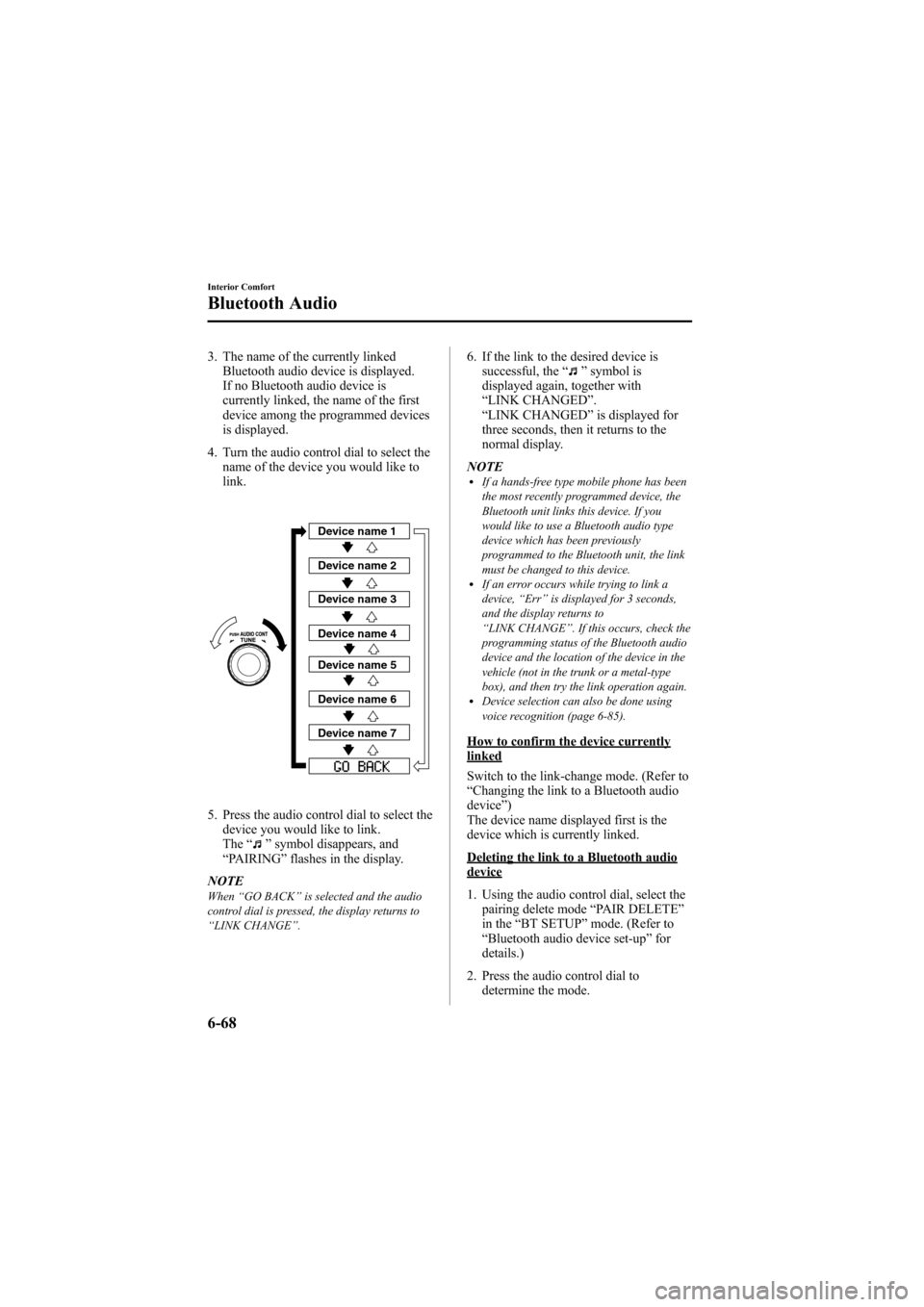
4. Turn the audio control dial to select the name of the device you would like to
link.
Device name 1
Device name 2
Device name 3
Device name 4
Device name 5
Device name 6
Device name 7
5. Press the audio control dial to select thedevice you would like to link.
The “
”symbol disappears, and
“ PAIRING ”flashes in the display.
NOTE
When “GO BACK ”is selected and the audio
control dial is pressed, the display returns to
“ LINK CHANGE ”.
6. If the link to the desired device is
successful, the “”symbol is
displayed again, together with
“ LINK CHANGED ”.
“ LINK CHANGED ”is displayed for
three seconds, then it returns to the
normal display.
NOTE
lIf a hands-free type mobile phone has been
the most recently programmed device, the
Bluetooth unit links this device. If you
would like to use a Bluetooth audio type
device which has been previously
programmed to the Bluetooth unit, the link
must be changed to this device.
lIf an error occurs while trying to link a
device, “Err ”is displayed for 3 seconds,
and the display returns to
“ LINK CHANGE ”. If this occurs, check the
programming status of the Bluetooth audio
device and the location of the device in the
vehicle (not in the trunk or a metal-type
box), and then try the link operation again.
lDevice selection can also be done using
voice recognition (page 6-85).
How to confirm the device currentlylinked
Switch to the link-change mode. (Refer to
“ Changing the link to a Bluetooth audio
device ”)
The device name displayed first is the
device which is currently linked.
Deleting the link to a Bluetooth audiodevice
1. Using the audio control dial, select the pairing delete mode “PAIR DELETE”
in the “BT SETUP” mode. (Refer to
“ Bluetooth audio device set-up ”for
details.)
2. Press the audio control dial to determine the mode.
6-68
Interior Comfort
Bluetooth Audio
Mazda6_8Z64-EA-08H_Edition1 Page286
Wednesday, June 25 2008 10:4 AM
Form No.8Z64-EA-08H
Page 288 of 464

Black plate (288,1)
4. Rotate the audio control dial to selectthe information for the Bluetooth unit
which you would like to view.
Device name
BT address
NOTEWhen “GO BACK ”is selected, the display
returns to “DEVICE INFO ”.
5. When the audio control dial is pressed
the information is displayed.
qHow to use the Bluetooth Audio
system
Switching to Bluetooth audio mode
To listen music or voice audio recorded to
a Bluetooth audio device, switch to the
Bluetooth audio mode to operate the
audio device using the audio system or
navigation system control panels.
Any Bluetooth audio device must be
programmed to the vehicle's Bluetooth
unit before it can be used. (Refer to
“Bluetooth audio device programming ”)
1. Switch the ignition to ACC or ON. 2. Turn on the Bluetooth audio device's
power.
Make sure that the “
”symbol is
displayed in the information display.
The symbol is not displayed if an
unprogrammed Bluetooth audio device
is being used or the vehicle's Bluetooth
unit has a malfunction.
3. Press the AUX button to switch the Bluetooth audio mode to “BT ”.
4. The audio recorded to the Bluetooth audio device begins playback.
NOTE
lIf the mode is switched from Bluetooth
audio mode to another mode (radio mode),
audio playback from the Bluetooth audio
device stops.
lIf a call is received on a hands-free mobile
phone during playback from the Bluetooth
audio device, the playback is stopped.
Playback from the Bluetooth audio device
resumes after the call ends.
Playback
1. To listen to a Bluetooth audio device over the vehicle's speaker system,
switch the mode to Bluetooth audio
mode. (Refer to
“Switching to Bluetooth audio mode ”)
2. To stop playback, press the Play/Pause (
) button.
3. Press the button again to resume playback.
Selecting a file (track)
During playback
Short-press the track down button (
):
Selects the beginning of the current file
(track).
Short-press the track up button (
):
Selects the next file (track).
6-70
Interior Comfort
Bluetooth Audio
Mazda6_8Z64-EA-08H_Edition1 Page288
Wednesday, June 25 2008 10:4 AM
Form No.8Z64-EA-08H
Page 290 of 464

Black plate (290,1)
Bluetooth Hands-Freeí
qWhat is Bluetooth Hands-Free?
Bluetooth Hands-Free Outline
By connecting a Bluetooth equipped
device (Mobile phone) to the hands-free
unit equipped on the vehicle, making and
receiving calls are possible using the talk
button, pick-up button and hang-up button
located on the steering wheel, and saying
the voice commands.
WARNING
Perform phonebook registration related
operations while the vehicle is parked:
Performing phonebook registration
while driving the vehicle could be a
distraction to your driving and result
in an accident. In addition, a mistake
in performing the phonebook
operation could result in the loss of
important data.
Bluetooth equipped device (Mobilephone)
A Bluetooth equipped device (Mobile
phone) communicates with the hands-free
unit equipped on the vehicle using radio
transmission (Bluetooth).
For example, if the device (Mobile phone)
is placed in a coat pocket, the phone calls
can be made through your mobile service
without direct use of the device (Mobile
phone).
CAUTION
The types of devices (Mobile phone)
which can be connected to the
hands-free unit are limited, so before
purchasing or changing your device
(Mobile phone) model, consult an
Authorized Mazda Dealer.
Devices (Mobile phone) which can be
connected to the hands-free system
need to be compliant with Bluetooth
specifications and the appropriate
profile, however, even among these
Bluetooth devices (Mobile phone) are
some which will not connect with
your Mazda or will have limited
function. Therefore, consult Mazda
Bluetooth Hands-Free Customer
Service for information regarding
device (Mobile phone) compatibility:
Phone: 800-430-0153
Web: www.MazdaUSA.com/
bluetooth
Applicable Bluetooth specification
Ver. 2.0 or higher
Response profile
lHFP (Hands Free Profile) Ver. 1.5lDUN (Dial-up Networking Profile)
Ver. 1.1
lPBAP (Phone Book Access Profile)
Ver. 1.0
lA2DP (Advanced Audio Distribution
Profile) Ver. 1.0
lAVRCP (Audio/Video Remote Control
Profile) Ver. 1.0
6-72
Interior Comfort
íSome models.
Bluetooth Hands-Free
Mazda6_8Z64-EA-08H_Edition1 Page290
Wednesday, June 25 2008 10:4 AM
Form No.8Z64-EA-08H
Page 291 of 464

Black plate (291,1)
Bluetooth is the registered trademark of
Bluetooth SIG. Inc.
NOTE
lIf the ignition is turned off (LOCK) during
a hands-free call, the line is transferred to
the device (Mobile phone) automatically.
lIf the device (Mobile phone) is in a location
where radio reception is difficult such as a
metal container or in the trunk, the call may
not be connected using Bluetooth. If
communication is not possible, change the
location of the device (Mobile phone).
qComponent Parts
Bluetooth Hands-Free consists of the
following parts:
lTalk buttonlPick-up buttonlHang-up buttonlInformation displaylMicrophonelAudio unit/Navigation system
Talk button, Pick-Up button and Hang-Up button
Basic functions of Bluetooth Hands-Free
can be used such as making calls or
hanging up using the talk button, pick-up
button and hang-up button on the steering
wheel.
Talk button
Hang-up button
Pick-up button
Talk button operations
A short press or a long press of the talk
button is used depending on the operation
status as follows:
lShort press (Press the button less than
0.7 sec.)
lLong press (Press the button 0.7 sec. or
more.)
Information display
Telephone numbers, Bluetooth Hands-
Free messages, and operation status are
displayed.
Microphone
The microphone is used for speaking
voice commands or exchanging
conversation.
Microphone
Interior Comfort
Bluetooth Hands-Free
6-73
Mazda6_8Z64-EA-08H_Edition1 Page291
Wednesday, June 25 2008 10:4 AM
Form No.8Z64-EA-08H
Page 292 of 464

Black plate (292,1)
Audio unit/Navigation system
The audio unit or navigation system is
used for adjusting the volume.
qVoice
To prevent the deterioration in voice
recognition rate and voice quality, the
following points must be observed:
lIt is not necessary to face the
microphone or approach it. Speak the
voice commands while maintaining a
safe driving position.
lClose the windows and/or the
moonroof to reduce loud noises from
outside the vehicle, or turn down the
airflow of the climate control system
while Bluetooth Hands-Free is being
used. Voice recognition may not
function correctly or voice quality may
deteriorate under the following
conditions.
lA passenger is speaking.lDriving with the window and/or the
moonroof open.
lDriving on bumpy roads.lNoise outside of the vehicle is loud.
(Construction sites, inside tunnels,
excess oncoming traffic, or heavy
rain.)
lOperation noise from turn signals,
wipers, or the horn is heard.
lA/C airflow is strong or wind is
blowing on the microphone.
lThere is noise coming from cargo
loaded in the vehicle.
lVoice commands may not be
recognized depending on the voice. If
the voice commands are not recognized
correctly, repeat the commands in a
louder voice, at a natural pace, as if
speaking to another person.
lDialects or different wording other than
hands-free prompts cannot be
recognized by voice recognition. Speak
in the wording specified by the voice
commands.
Please be aware that the voice recognition
may error despite following the above
points.
q Function Restrictions While
Using Bluetooth Hands-Free
Functions are limited as follows while
Bluetooth Hands-Free is being used.
lBeep sound and voice guidance related
to the audio unit and navigation system
are not heard.
lBeep sound related to the A/C
operation is not heard.
lThe navigation system's voice
recognition command does not
function.
qHow to Use This Section
Descriptions in the text are as follows:
Say : Voice commands to be spoken by
you.
Prompt : Voice guidance output from the
speaker.
A beep sound [Beep] is output from the
speaker. Speak after the beep sound is
heard.
Example)
Say : [Beep] “Dial ”
Prompt :“Number, please ”
Say : [Beep] “XXXXXXXXXXX (Ex.
“ 555-1234 ”) (Telephone number) ”
Bluetooth Hands-Free ActivationMethod
Without the navigation system
Press the pick-up button or talk button
(Short press).
6-74
Interior Comfort
Bluetooth Hands-Free
Mazda6_8Z64-EA-08H_Edition1 Page292
Wednesday, June 25 2008 10:4 AM
Form No.8Z64-EA-08H
Page 293 of 464
![MAZDA MODEL 6 2009 Owners Manual (in English) Black plate (293,1)
With the navigation system
Method 1
Press the pick-up button.
Method 2
1. Press the talk button (Short press).
2.Say : [Beep] “Telephone ”or “Phone ”
The hands-free system](/manual-img/28/13572/w960_13572-292.png "MAZDA MODEL 6 2009 Owners Manual (in English) Black plate (293,1)
With the navigation system
Method 1
Press the pick-up button.
Method 2
1. Press the talk button (Short press).
2.Say : [Beep] “Telephone ”or “Phone ”
The hands-free system")
Black plate (293,1)
With the navigation system
Method 1
Press the pick-up button.
Method 2
1. Press the talk button (Short press).
2.Say : [Beep] “Telephone ”or “Phone ”
The hands-free system is activated.
Functions of the hands-free telephone,
such as making and receiving calls, can be
used after the activation. (For details on
the telephone functions, refer to “Basic
Bluetooth Hands-Free Operation ”or
“ Convenient Use of the Hands-Free
System ”.)
NOTE
(With the navigation system)
When the talk button is pressed with a long
press, the hands-free system is activated
without having to speak “Telephone ”or
“ Phone ”.
For vehicles with a navigation system, the
navigation system is activated by speaking the
voice recognition command of the navigation
system after pressing the talk button (Short
press). For voice recognition details with the
navigation system, refer to the separate
“ NAVIGATION SYSTEM MANUAL ”.
Tutorial
The tutorial explains how to use
Bluetooth Hands-Free.
To activate the tutorial, do the following:
1. Activate Bluetooth Hands-Free (page
6-74).
2. Say : [Beep] “Tutorial ”
3. Follow the prompts to receive the appropriate voice guidance
instructions.
Cancel
The Bluetooth Hands-Free system
transitions to idling status if the following
operation is performed while the system is
activating.
Press the hang-up button, or the talk
button (Long press).
Interior Comfort
Bluetooth Hands-Free
6-75
Mazda6_8Z64-EA-08H_Edition1 Page293
Wednesday, June 25 2008 10:4 AM
Form No.8Z64-EA-08H
Page 294 of 464

Black plate (294,1)
Basic Bluetooth Hands-
Free Operation
qBluetooth Hands-Free Preparation
Language setting
English, Spanish, and Canadian French
are available. If the language setting is
changed, all of the voice guidance and
voice input commands are done in the
selected language.
NOTE
If the language setting is changed, device
registration is maintained.
Phonebook records are not cleared, but each
language has a separate phonebook.
Therefore, entries created in one language will
need to be re-entered in the phonebook of the
new language.
Method 1
1. Activate Bluetooth Hands-Free (page6-74).
2. Say : [Beep] “Setup ”
3. Prompt :“Select one of the following:
Pairing options, confirmation prompts,
language, passcode, select phone or
select music player.”
4. Say : [Beep] “Language ”
5. Prompt :“Select a language: English,
French, or Spanish. ”
6. Say : [Beep] “French ”(Speak the
desired language: “English ”, “French ”
or “Spanish ”)
7. Prompt :“French (Desired language)
selected. Is this correct? ”
8. Say : [Beep] “Ye s ” 9.
Prompt :“French (Desired language)
selected, returning to main menu”
(Spoken in the newly selected
language).
Method 2
1. Activate Bluetooth Hands-Free (page 6-74).
2. Say: [Beep] “French ”(Say the desired
language: “English ”, “French ”,or
“ Spanish ”.) (Change the desired
language by saying the language
name.)
3. Prompt: “Would you like to change
the language to French (Desired
language) ? ”
4. Say: [Beep] “Ye s ”
5. Prompt: “Please wait. Switching to
French phonebook. French selected,
returning to main menu ”(Spoken in
the newly selected language).
Device programming (Pairing)
To use Bluetooth Hands-Free, the device
has to be programmed to the hands-free
unit using the following procedure.
A maximum of seven devices including
hands-free mobile phones and Bluetooth
audio devices can be programmed to one
vehicle.
6-76
Interior Comfort
Bluetooth Hands-Free
Mazda6_8Z64-EA-08H_Edition1 Page294
Wednesday, June 25 2008 10:4 AM
Form No.8Z64-EA-08H