2009 LINCOLN NAVIGATOR engine
[x] Cancel search: enginePage 113 of 375

•Autounlock
•Air Suspension (if equipped)
•Running Boards (if equipped)
•Power Liftgate
•Rear park aid (if equipped)
•Front park aid (if equipped)
•Language
•Units (English/Metric)
•Reset for zone setting (if equipped)
•Reset for Calibration (if equipped)
•System Check
Reset to English (if in another language)
When entering the SETUP MENU
and a non-English language has
been selected, “PRESS RESET FOR
ENGLISH” will be displayed to
change back to English.
Press and hold the RESET control to set the language choice.
Oil life
An oil change is required whenever indicated by the message center and
according to the recommended maintenance schedule. USE ONLY
RECOMMENDED ENGINE OILS.
To reset the oil monitoring system to 100% after each oil change
(approximately 7,500 miles [12,000 km] or six months) perform the
following:
1. Press and release the SETUP
control to display “OIL LIFE XXX%
HOLD RESET = NEW”.
2009 Navigator(nav)
Owners Guide, 1st Printing
USA(fus)
Driver Controls
113
Page 118 of 375
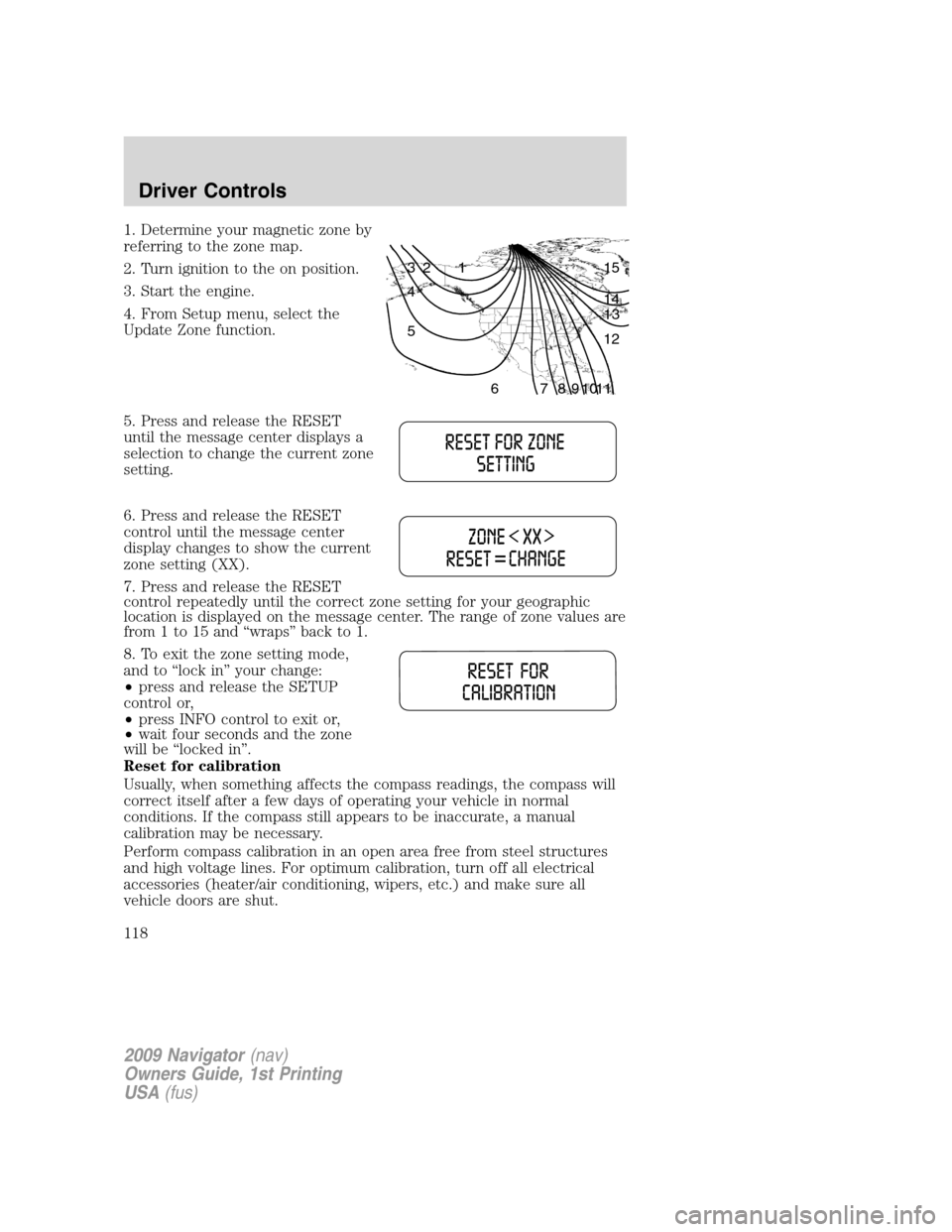
1. Determine your magnetic zone by
referring to the zone map.
2. Turn ignition to the on position.
3. Start the engine.
4. From Setup menu, select the
Update Zone function.
5. Press and release the RESET
until the message center displays a
selection to change the current zone
setting.
6. Press and release the RESET
control until the message center
display changes to show the current
zone setting (XX).
7. Press and release the RESET
control repeatedly until the correct zone setting for your geographic
location is displayed on the message center. The range of zone values are
from 1 to 15 and “wraps” back to 1.
8. To exit the zone setting mode,
and to “lock in” your change:
•press and release the SETUP
control or,
•press INFO control to exit or,
•wait four seconds and the zone
will be “locked in”.
Reset for calibration
Usually, when something affects the compass readings, the compass will
correct itself after a few days of operating your vehicle in normal
conditions. If the compass still appears to be inaccurate, a manual
calibration may be necessary.
Perform compass calibration in an open area free from steel structures
and high voltage lines. For optimum calibration, turn off all electrical
accessories (heater/air conditioning, wipers, etc.) and make sure all
vehicle doors are shut.
1 2 3
4
5
6 7 8 9 101112 13 14 15
2009 Navigator(nav)
Owners Guide, 1st Printing
USA(fus)
Driver Controls
118
Page 121 of 375

Warning display Status
Check brake system Warning can be reset. Will return after
10 minutes. If within the 10 minutes,
the condition is cleared and set again,
it will not return until the initial
10 minutes is up. Will return on
ignition cycle. XXX miles to E fuel level low
Park brake engaged Warning can be reset. Will return after
10 minutes. If within the 10 minutes,
the condition is cleared and set again,
it will return immediately. Will return
on ignition cycle.
Press reset to clear This can be reset, it will remain on
the display for four seconds.
DRIVER DOOR AJAR— Displayed when the driver door is not
completely closed.
PASSENGER DOOR AJAR— Displayed when the passenger door is
not completely closed.
REAR LEFT DOOR AJAR— Displayed when the rear left door is not
completely closed.
REAR RIGHT DOOR AJAR— Displayed when the rear right door is
not completely closed.
LIFTGATE / GLASS AJAR— Displayed when the liftgate or liftgate
glass is not completely closed.
CHECK CHARGING SYSTEM— Displayed when the electrical system
is not maintaining proper voltage. If you are operating electrical
accessories when the engine is idling at a low speed, turn off as many of
the electrical loads as soon as possible. If the warning stays on or comes
on when the engine is operating at normal speeds, have the electrical
system checked as soon as possible.
LOW TIRE PRESSURE— Displayed when one or more tires on your
vehicle have low tire pressure. Refer toInflating Your Tiresin the
Tires, Wheels and Loadingchapter.
TIRE PRESSURE MONITOR FAULT— Displayed when the Tire
Pressure Monitoring System is malfunctioning. If the warning stays on or
continues to come on, have the system inspected by your authorized
dealer.
2009 Navigator(nav)
Owners Guide, 1st Printing
USA(fus)
Driver Controls
121
Page 122 of 375

TIRE PRESSURE SENSOR FAULT— Displayed when a tire pressure
sensor is malfunctioning, or your spare tire is in use. For more
information on how the system operates under these conditions, refer to
Understanding Your Tire Pressure Monitoring System (TPMS)in the
Tires, Wheels and Loadingchapter. If the warning stays on or
continues to come on, have the system inspected by your authorized
dealer.
4X4 SHIFT IN PROGRESS— Displayed on 4x4 vehicles only when
4x4 High or 4x4 Auto Range is selected. For further information, refer to
Control Trac four-wheel drive (4x4) operationin theDrivingchapter.
CHECK FUEL FILL INLET— Displayed when the fuel fill inlet may
not be properly closed. Refer toEasy Fuel™ “no cap” fuel systemin
theMaintenance and Specificationschapter.
XXX MILES TO E FUEL LEVEL LOW— Displayed as an early
reminder of a low fuel condition.
BRAKE FLUID LEVEL LOW— Indicates the brake fluid level is low
and the brake system should be inspected immediately. Refer toBrake
fluidin theMaintenance and Specificationschapter.
CHECK PARK BRAKE— Displayed when the park brake is engaged. If
the warning stays on after the park brake is off, contact your authorized
dealer as soon as possible.
WASHER FLUID LEVEL LOW— Indicates the washer fluid reservoir
is less than one quarter full. Check the washer fluid level. Refer to
Windshield washer fluidin theMaintenance and Specifications
chapter.
AIR SUSPENSION OFF— Displayed when the air suspension is off.
For more information, refer toAir suspension systemin theDriving
chapter.
CHECK AIR SUSPENSION— Displayed when the air suspension
system is not operating properly. If this message is displayed while
driving, pull off the road as soon as safely possible. For more
information, refer toAir suspensionin theDrivingchapter.
CHECK BRAKE SYSTEM— Displayed when the braking system is not
operating properly. If the warning stays on or continues to come on,
contact your authorized dealer as soon as possible.
PARK BRAKE ENGAGED— Displayed when the manual park brake is
set, the engine is running and the vehicle is driven more than 3 mph
(5 km). If the warning stays on after the park brake is released, contact
your authorized dealer as soon as possible.
2009 Navigator(nav)
Owners Guide, 1st Printing
USA(fus)
Driver Controls
122
Page 123 of 375

OIL LIFE CHANGE SOON— Displayed when the engine oil life
remaining is 10% or less. When oil life left is between 10% and 0%, the
XX% OIL LIFE CHANGE SOON message will be displayed.
OIL CHANGE REQUIRED— Displayed when the oil life left reaches
0%, the OIL CHANGE REQUIRED message will be displayed.
An oil change is required whenever indicated by the message center and
according to the recommended maintenance schedule. USE ONLY
RECOMMENDED ENGINE OILS.
To reset the oil monitoring system to 100% after each oil change
(approximately 7,500 miles [12,000 km] or six months) perform the
following:
POSITIVE RETENTION FLOOR MAT
WARNING:Do not install additional floor mats on top of the
factory installed floor mats as they may interfere with the
accelerator or the brake pedals.
Position the driver floor mat so that
the eyelet is over the pointed end of
the retention post and rotate
forward to lock in. Make sure that
the mat does not interfere with the
operation of the accelerator or the
brake pedal. To remove the floor
mat, reverse the installation
procedure.
POWER LIFTGATE
The liftgate can be operated by the following:
•instrument panel control button
•key fob button
•outside control button
•control button in the rear cargo area
Note:The liftgate can be reversed with a second press on a control
button or key fob and can be manually closed at any time.
2009 Navigator(nav)
Owners Guide, 1st Printing
USA(fus)
Driver Controls
123
Page 124 of 375

Opening and Closing the power liftgate:
WARNING:Make sure all persons are clear of the power liftgate
area before using the power liftgate control.
WARNING:Keep keys out of reach of children. Do not allow
children to play near an open or moving power liftgate.
The liftgate will only operate with the vehicle in P (Park). The chime will
beep once if conditions are not correct to start an operation. These
conditions include:
•or the ignition is in on and the transmission is not in P (Park)
•or the battery voltage is below the minimum operating voltage
•the vehicle speed is at or above 3 mph (5 km/h)
If the liftgate reverses and starts to close after a open request, a fast
continuous chime indicates excessive load on the gate or a possible strut
failure. If any excessive load is removed and you still have a faster
chime, have the system serviced immediately by your authorized dealer.
Do not attempt to manually force the liftgate to travel faster than the
power system will permit. This will activate the obstacle detection
feature.
Note:Cycling the ignition prior to completely latching the liftgate could
result in damage to the liftgate and/or its power components. Make sure
the liftgate is fully latched before operating the vehicle.
Care should be exercised in starting the engine before the liftgate is fully
closed (latched). If the ignition is cycled during a Liftgate Power Close
cycle and the liftgate is 6-10 inches (15–24 cm) from being latched, the
liftgate may reverse to the full open position. Verify that the gate is
closed before operating or moving the vehicle, especially in an enclosure,
like a garage or a parking structure. The liftgate or it components could
be damaged in an enclosure, if the liftgate is open.
When power operating the liftgate at temperatures below 32° F (0° C),
the liftgate may stop about 5 inches (12.7 cm) from the full open
position. The liftgate can be fully opened by pushing it upward to the
maximum open position.
2009 Navigator(nav)
Owners Guide, 1st Printing
USA(fus)
Driver Controls
124
Page 146 of 375

SECURILOCK™ PASSIVE ANTI-THEFT SYSTEM
SecuriLock™ passive anti-theft system is an engine immobilization
system. This system is designed to help prevent the engine from being
started unless acoded Integrated Keyhead Transmitter (IKT)
programmed to your vehicleis used. The use of the wrong type of
coded key may lead to a “no-start” condition.
Your vehicle comes with two coded Integrated Keyhead Transmitters;
additional coded IKTs may be purchased from your authorized dealer.
Standard SecuriLock™ keys without remote entry transmitter
functionality can also be purchased from your authorized dealer if
desired. The authorized dealer can program your spare IKTs to your
vehicle or you can program the IKTs yourself. Refer toProgramming
spare keysfor instructions on how to program the coded key.
Note:The SecuriLock™ passive anti-theft system is not compatible with
non-Ford aftermarket remote start systems. Use of these systems may
result in vehicle starting problems and a loss of security protection.
Note:Large metallic objects, electronic devices that are used to
purchase gasoline or similar items, or a second coded key on the same
key chain may cause vehicle starting issues. You need to prevent these
objects from touching the coded IKT while starting the engine. These
objects will not cause damage to the coded IKT, but may cause a
momentary issue if they are too close to the IKT when starting the
engine. If a problem occurs, turn the ignition off, remove all objects on
the key chain away from the coded IKT and restart the engine.
Note: Do not leave a duplicate coded key in the vehicle. Always
take your keys and lock all doors when leaving the vehicle.
2009 Navigator(nav)
Owners Guide, 1st Printing
USA(fus)
Locks and Security
146
Page 148 of 375
If your IKTs or standard SecuriLock™ coded keys are lost or stolen and
you don’t have an extra coded key, you will need to have your vehicle
towed to an authorized dealer. The key codes need to be erased from
your vehicle and new coded keys will need to be programmed.
Replacing coded keys can be very costly. Store an extra programmed key
away from the vehicle in a safe place to help prevent any
inconveniences. Please visit an authorized dealer to purchase additional
spare or replacement keys.
Programming spare keys
You can program your own Integrated Keyhead Transmitters or standard
SecuriLock™ coded keys to your vehicle. This procedure will program
both the engine immobilizer keycode and the remote entry transmitter
portion of the IKT to your vehicle.Note:A maximum of eight coded
keys can be programmed to your vehicle; only four of these eight can be
IKTs with remote entry functionality.
Tips:
•Only use Integrated Keyhead Transmitters (IKTs) or standard
SecuriLock™ keys.
•You must have two previously programmed coded keys (keys that
already operate your vehicle’s engine) and the new unprogrammed
key(s) readily accessible.
•If two previously programmed coded keys are not available, you must
take your vehicle to your authorized dealer to have the spare key(s)
programmed.
Please read and understand the
entire procedure before you begin.
1. Insert the first previously
programmedcoded keyinto the
ignition.
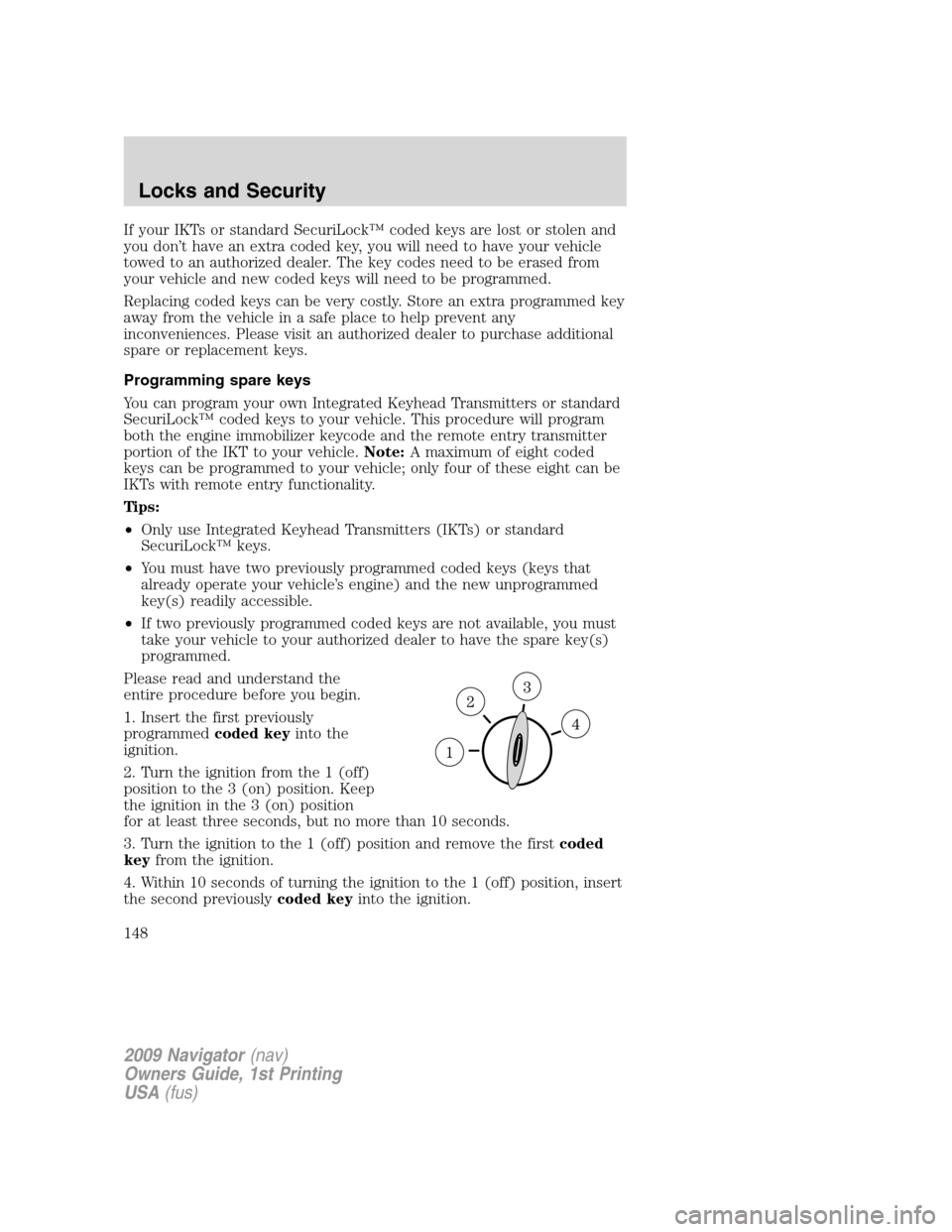
2. Turn the ignition from the 1 (off)
position to the 3 (on) position. Keep
the ignition in the 3 (on) position
for at least three seconds, but no more than 10 seconds.
3. Turn the ignition to the 1 (off) position and remove the firstcoded
keyfrom the ignition.
4. Within 10 seconds of turning the ignition to the 1 (off) position, insert
the second previouslycoded keyinto the ignition.
2009 Navigator(nav)
Owners Guide, 1st Printing
USA(fus)
Locks and Security
148