2009 LINCOLN MKS service
[x] Cancel search: servicePage 30 of 323

Radio Display Condition Action Required
ACQUIRING Radio requires more
than two seconds to
produce audio for the
selected channel.No action required. This
message should
disappear shortly.
SAT FAULT Internal module or
system failure
present.If this message does not
clear within a short
period of time, or with
an ignition key cycle,
your receiver may have a
fault. See your
authorized dealer for
service.
INVALID CHNL Channel no longer
available.This previously available
channel is no longer
available. Tune to
another channel. If the
channel was one of your
presets, you may choose
another channel for that
preset button.
UNSUBSCRIBED Subscription not
available for this
channel.Contact SIRIUS at
1–888–539–7474 to
subscribe to the channel
or tune to another
channel.
NO TEXT Artist information
not available.Artist information not
available at this time on
this channel. The system
is working properly.
NO TEXT Song title information
not available.Song title information
not available at this time
on this channel. The
system is working
properly.
2009 MKS(mks)
Owners Guide (post-2002-fmt)
USA(fus)
Entertainment Systems
30
Page 31 of 323

Radio Display Condition Action Required
NO TEXT Category information
not available.Category information not
available at this time on
this channel. The system
is working properly.
NO SIGNAL Loss of signal from
the SIRIUS satellite
or SIRIUS tower to
the vehicle antenna.You are in a location that
is blocking the SIRIUS
signal (i.e., tunnel, under
an overpass, dense
foliage, etc). The system
is working properly.
When you move into an
open area, the signal
should return.
UPDATING Update of channel
programming in
progress.No action required. The
process may take up to
three minutes.
CALL SIRIUS
1–888–539–7474Satellite service has
been deactivated by
SIRIUS Satellite
Radio.Call SIRIUS at
1–888–539–7474 to
re-activate or resolve
subscription issues.
NAVIGATION SYSTEM (IF EQUIPPED)
Your vehicle may be equipped with a navigation system. Refer to the
Navigation systemsupplement for further information.
SYNC
Your vehicle is equipped with SYNC, a hands-free communications and
entertainment system with special phone and media features. For more
information, please refer to theSYNCsupplement or to theSYNC
section in theNavigation systemsupplement (if equipped).
2009 MKS(mks)
Owners Guide (post-2002-fmt)
USA(fus)
Entertainment Systems
31
Page 80 of 323

Average fuel economy (AFE)
Select this function from the INFO
menu to display your average fuel
economy in miles/gallon or
liters/100 km.
If you calculate your average fuel
economy by dividing 100 miles traveled by gallons of fuel used
(kilometers traveled by liters used), your figure may be different than
displayed for the following reasons:
•Your vehicle was not perfectly level during fill-up
•Differences in the automatic shut-off points on the fuel pumps at
service stations
•Variations in top-off procedure from one fill-up to another
•Rounding of the displayed values to the nearest 0.1 gallon (liter)
1. Drive the vehicle at least 5 miles (8 km) with the speed control
system engaged to display a stabilized average.
2. Record the highway fuel economy for future reference.
It is important to press the RESET control (press and hold RESET for
two seconds in order to reset the function) after setting the speed
control to get accurate highway fuel economy readings.
Instantaneous fuel economy
Select this function from the INFO
menu to display your instantaneous
fuel economy. This will display your
fuel economy as a bar graph ranging
from
poor economy to
excellent economy.
Your vehicle must be moving to calculate instantaneous fuel economy.
When your vehicle is not moving, this function shows
, one or no bars
illuminated. Instantaneous fuel economy cannot be reset.
Timer
Select this function from the INFO
menu to display a timer.
To operate the timer perform the
following:
1. Press and release RESET to start or stop the timer.
2009 MKS(mks)
Owners Guide (post-2002-fmt)
USA(fus)
Driver Controls
80
Page 89 of 323

PRESS BRAKE TO START (if equipped)— Displayed when the
start/stop button is pressed without the brake pedal being applied. This
is a reminder that the brake pedal must be applied when the start/stop
button is pressed in order to start the engine.
NO FOB DETECTED (if equipped)— Displayed if the Intelligent
Access Key is not detected by the system in the following three
scenarios:
•When the start/stop button is pressed in an attempt to either start the
engine or cycle through the ignition states.
•When the engine is running and a door is opened then closed.
•When the vehicle’s speed exceeds 10 mph (16 km/h) for the first time
after starting. Refer toPush button start systemin theDrivingchapter
for more information.
SHIFT TO PARK (if equipped)— Displayed when the start/stop
button is pressed to shut off the engine with the shift select lever in any
position other than P (Park) . Refer toFast restart featureinPush
button start systemin theDrivingchapter for more information.
RESTART NOW OR FOB IS NEEDED (if equipped)— Displayed
when the start/stop button is pressed to shut off the engine and a
Intelligent Access Key is not detected inside the vehicle. Refer toPush
button start systemin theDrivingchapter for more information.
ACCESSORY POWER ACTIVE (if equipped)— Displayed when the
vehicle is in the accessory ignition state.
STARTING SYSTEM FAULT (if equipped)— Displayed to indicate
that there is a potential issue with your engine immobilizer system. Your
vehicle may not start when this message is displayed, and it is
recommended that you take the vehicle to your authorized dealer for
service.
FOB PROGRAMMED 3 FOBS TOTAL (if equipped)— Displayed
during spare key programming, when a third Intelligent Access Key is
programmed to the system.
FOB PROGRAMMED 4 FOBS TOTAL (if equipped)— Displayed
during spare key programming, when a fourth Intelligent Access Key is
programmed to the system.
MAX # OF FOBS LEARNED (if equipped)— Displayed during spare
key programming, after a fourth Intelligent Access Key is programmed or
upon entering spare key programming mode with four Intelligent Access
Keys already programmed to the vehicle.
2009 MKS(mks)
Owners Guide (post-2002-fmt)
USA(fus)
Driver Controls
89
Page 109 of 323

•thecontrol on the transmitter is pressed, or
•the vehicle is locked using the keyless entry keypad, or
•the vehicle is locked using the key in the driver door cylinder, or
•after 25 seconds of illumination.
The inside lights will not turn off if:
•they have been turned on with the dimmer control, or
•any door is open.
Perimeter lamps illuminated entry
With the remote entry system, the following items will illuminate when
the
control on the transmitter is pressed:
•Headlamps
•Park lamps
•Tail lamps
The lamps will automatically turn off:
•if the ignition switch is turned on, or
•the
control on the transmitter is pressed, or
•the vehicle is locked using the keyless entry keypad, or
•the vehicle is locked using the key in the driver door cylinder, or
•after 25 seconds of illumination.
Note:On some vehicles, the perimeter lamps illuminated entry feature
will not activate in daylight conditions.
Deactivating/activating perimeter lamps illuminated entry
You may enable/disable this feature by having your vehicle serviced by
your authorized dealer.
You may also perform the following power door lock sequence to
enable/disable the perimeter lamps feature.Note:Before starting, ensure
the ignition is off and all vehicle doors are closed. You must complete
Steps 1–5 within 30 seconds or the procedure will have to be repeated. If
the procedure needs to be repeated, wait a minimum of 30 seconds
before beginning again.
2009 MKS(mks)
Owners Guide (post-2002-fmt)
USA(fus)
Locks and Security
109
Page 114 of 323

Anti-theft indicator (If equipped)
The anti-theft indicator is located in the instrument panel cluster.
•When the ignition is off, the
indicator will flash once every two
seconds to indicate the
SecuriLock™ system is
functioning as a theft deterrent.
•When the ignition is on, the indicator will glow for three seconds to
indicate normal system functionality (IKT equipped vehicles only).
If a problem occurs with the SecuriLock™ system, the indicator will flash
rapidly or glow steadily when the ignition is on. If this occurs, the vehicle
will not start and should be taken to an authorized dealer for service
(IKT equipped vehicles only).
Automatic arming
The vehicle is armed immediately after turning the ignition off.
The theft indicator (if equipped)
will flash every two seconds to act
as a theft deterrent when the
vehicle is armed.
Automatic disarming
The vehicle is disarmed immediately after the ignition is turned on.
If equipped with IKTs, the theft indicator (if equipped) will illuminate for
three seconds and then go out. If the theft indicator stays on for an
extended period of time or flashes rapidly, have the system serviced by
your authorized dealer.
Replacement Integrated Keyhead Transmitters (IKT) and coded
keys or Intelligent Access Keys
Note:Your vehicle comes equipped with two Integrated Keyhead
Transmitters (IKTs) or two Intelligent Access Keys.
TheIntegrated Keyhead Transmitter (IKT)functions as both a
programmed ignition key that operates all the locks and starts the
vehicle, as well as a remote keyless entry transmitter. A maximum of
eight coded keys can be programmed to your vehicle; only four of these
eight coded keys can be IKTs with remote entry functionality.
TheIntelligent Access Keyfunctions as both a programmed key that
operates the driver door lock, activates Intelligent Access with Push
2009 MKS(mks)
Owners Guide (post-2002-fmt)
USA(fus)
Locks and Security
114
Page 135 of 323
If any of these things happen, even intermittently, have the Personal
Safety System™ serviced at an authorized dealer immediately. Unless
serviced, the system may not function properly in the event of a
collision.
Safety belt precautions
WARNING:Always drive and ride with your seatback upright
and the lap belt snug and low across the hips.
WARNING:To reduce the risk of injury, make sure children sit
where they can be properly restrained.
WARNING:Never let a passenger hold a child on his or her lap
while the vehicle is moving. The passenger cannot protect the
child from injury in a collision.
WARNING:All occupants of the vehicle, including the driver,
should always properly wear their safety belts, even when an air
bag supplemental restraint system (SRS) is provided.
WARNING:It is extremely dangerous to ride in a cargo area,
inside or outside of a vehicle. In a collision, people riding in
these areas are more likely to be seriously injured or killed. Do not
allow people to ride in any area of your vehicle that is not equipped
with seats and safety belts. Be sure everyone in your vehicle is in a
seat and using a safety belt properly.
WARNING:In a rollover crash, an unbelted person is
significantly more likely to die than a person wearing a seat belt.
WARNING:Each seating position in your vehicle has a specific
safety belt assembly which is made up of one buckle and one
tongue that are designed to be used as a pair. 1) Use the shoulder belt
on the outside shoulder only. Never wear the shoulder belt under the
arm. 2) Never swing the safety belt around your neck over the inside
shoulder. 3) Never use a single belt for more than one person.
2009 MKS(mks)
Owners Guide (post-2002-fmt)
USA(fus)
Seating and Safety Restraints
135
Page 146 of 323
WARNING:Do not put anything on or over the airbag module.
Placing objects on or over the airbag inflation area may cause
those objects to be propelled by the airbag into your face and torso
causing serious injury.
WARNING:Do not attempt to service, repair, or modify the
airbag supplemental restraint system (SRS) or its fuses. See your
authorized dealer.
WARNING:Modifying or adding equipment to the front end of
the vehicle (including frame, bumper, front end body structure
and tow hooks) may affect the performance of the airbag system,
increasing the risk of injury. Do not modify the front end of the
vehicle.
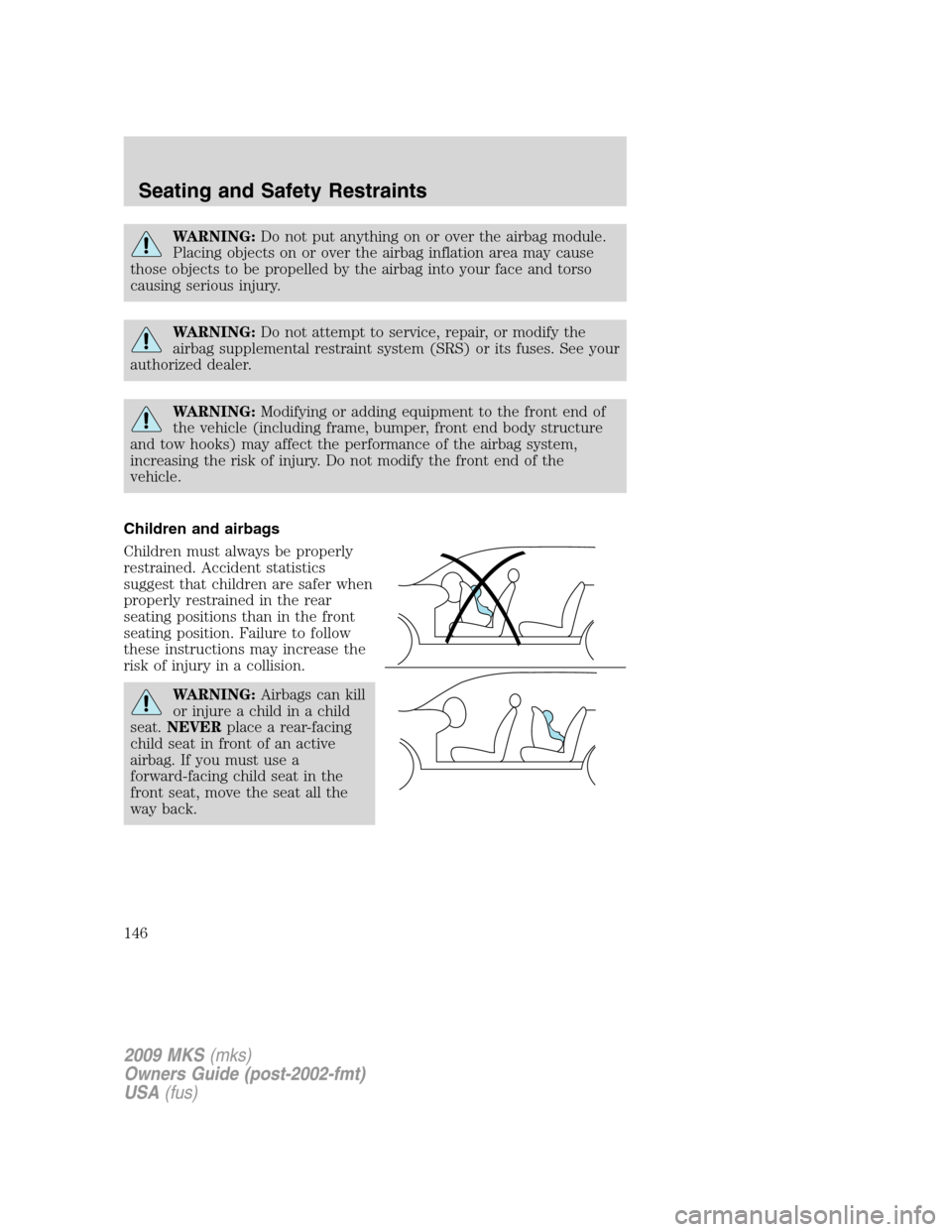
Children and airbags
Children must always be properly
restrained. Accident statistics
suggest that children are safer when
properly restrained in the rear
seating positions than in the front
seating position. Failure to follow
these instructions may increase the
risk of injury in a collision.
WARNING:Airbags can kill
or injure a child in a child
seat.NEVERplace a rear-facing
child seat in front of an active
airbag. If you must use a
forward-facing child seat in the
front seat, move the seat all the
way back.
2009 MKS(mks)
Owners Guide (post-2002-fmt)
USA(fus)
Seating and Safety Restraints
146