2009 LINCOLN MKS Mph
[x] Cancel search: MphPage 67 of 323
Disengaging adaptive cruise control
To disengage the adaptive cruise control:
•Depress the brake pedal. CRUISE CANCELLED will be displayed in
the message center.
Disengaging the adaptive cruise control will not erase your previous set
speed.
Overriding adaptive cruise control
WARNING:Whenever the driver is overriding the ACC by
depressing the accelerator pedal, the ACC will not automatically
apply the brakes to maintain separation from any vehicle ahead.
The set speed and gap distance can be overridden by pressing the
accelerator pedal.
When the driver is overriding ACC, the green
cruise indicator light
is illuminated, and CRUISE OVERRIDE is displayed in the message
center. When the accelerator is released, the ACC function will operate
again and vehicle speed will decrease to the set speed, or a lower speed
if following a slower vehicle.
Changing the set speed
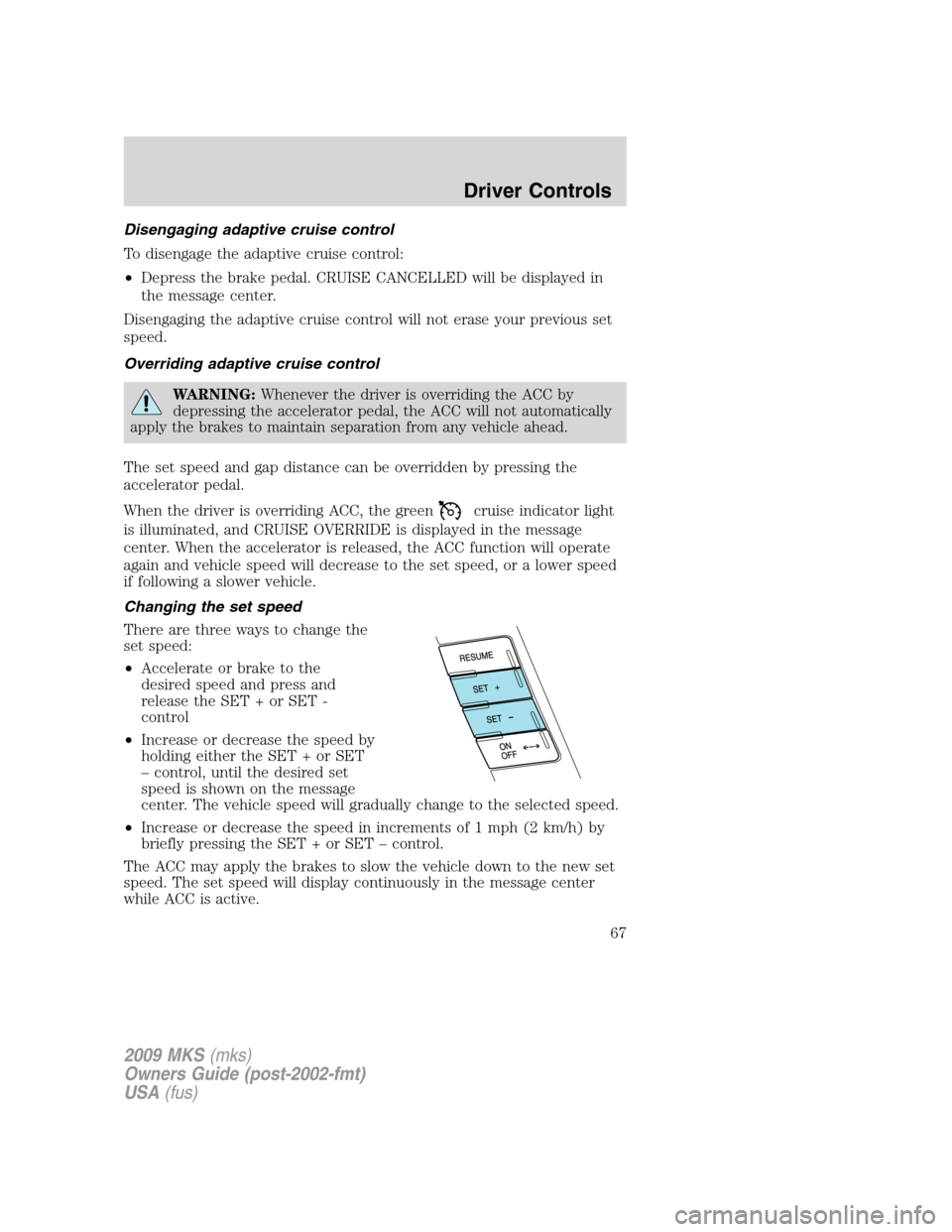
There are three ways to change the
set speed:
•Accelerate or brake to the
desired speed and press and
release the SET + or SET -
control
•Increase or decrease the speed by
holding either the SET + or SET
– control, until the desired set
speed is shown on the message
center. The vehicle speed will gradually change to the selected speed.
•Increase or decrease the speed in increments of 1 mph (2 km/h) by
briefly pressing the SET + or SET – control.
The ACC may apply the brakes to slow the vehicle down to the new set
speed. The set speed will display continuously in the message center
while ACC is active.
2009 MKS(mks)
Owners Guide (post-2002-fmt)
USA(fus)
Driver Controls
67
Page 68 of 323
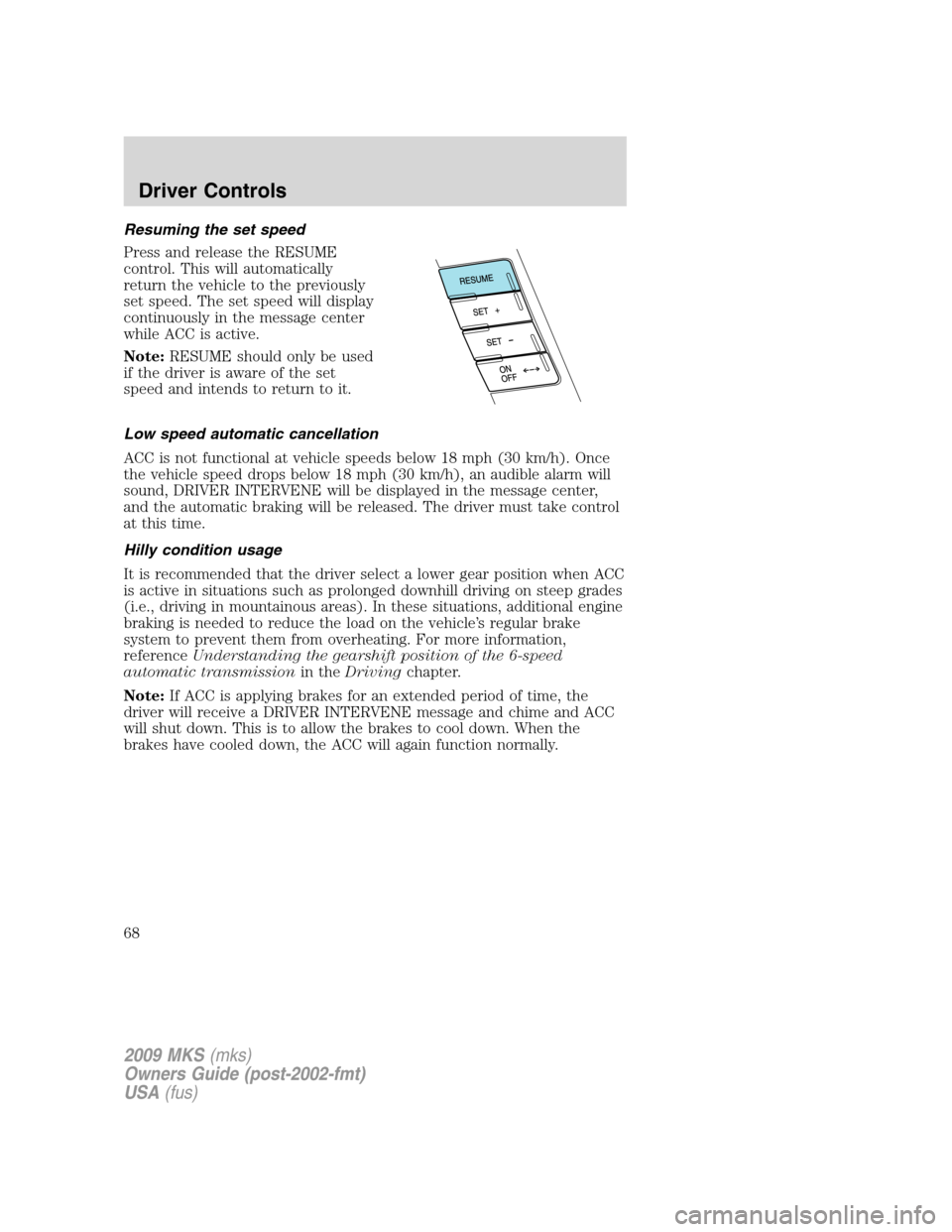
Resuming the set speed
Press and release the RESUME
control. This will automatically
return the vehicle to the previously
set speed. The set speed will display
continuously in the message center
while ACC is active.
Note:RESUME should only be used
if the driver is aware of the set
speed and intends to return to it.
Low speed automatic cancellation
ACC is not functional at vehicle speeds below 18 mph (30 km/h). Once
the vehicle speed drops below 18 mph (30 km/h), an audible alarm will
sound, DRIVER INTERVENE will be displayed in the message center,
and the automatic braking will be released. The driver must take control
at this time.
Hilly condition usage
It is recommended that the driver select a lower gear position when ACC
is active in situations such as prolonged downhill driving on steep grades
(i.e., driving in mountainous areas). In these situations, additional engine
braking is needed to reduce the load on the vehicle’s regular brake
system to prevent them from overheating. For more information,
referenceUnderstanding the gearshift position of the 6-speed
automatic transmissionin theDrivingchapter.
Note:If ACC is applying brakes for an extended period of time, the
driver will receive a DRIVER INTERVENE message and chime and ACC
will shut down. This is to allow the brakes to cool down. When the
brakes have cooled down, the ACC will again function normally.
2009 MKS(mks)
Owners Guide (post-2002-fmt)
USA(fus)
Driver Controls
68
Page 87 of 323

REAR LEFT DOOR AJAR— Displayed when the rear left door is not
completely closed.
REAR RIGHT DOOR AJAR— Displayed when the rear right door is
not completely closed.
PARK BRAKE ENGAGED— Displayed when the manual park brake is
set, the engine is running and the vehicle is driven more than 3 mph
(5 km/h). If the warning stays on after the park brake is released,
contact your authorized dealer as soon as possible.
FUEL LEVEL LOW— Displayed as an early reminder of a low fuel
condition.
CHECK FUEL FILL INLET— Displayed when the fuel fill inlet may
not be properly closed. Refer toEasy Fuel™ “no cap” fuel systemin
theMaintenance and Specificationschapter.
CHECK BRAKE SYSTEM— Displayed when the brake system needs
servicing. If the warning stays on or continues to come on, contact your
authorized dealer as soon as possible.
BRAKE FLUID LEVEL LOW— Indicates the brake fluid level is low
and the brake system should be inspected immediately. Refer toBrake
fluidin theMaintenance and Specificationschapter.
WASHER FLUID LEVEL LOW— Indicates the washer fluid reservoir
is less than one quarter full. Check the washer fluid level. Refer to
Windshield washer fluidin theMaintenance and Specifications
chapter.
CHECK PARK AID— Displayed when the transmission is in R
(Reverse) and the Reverse sensing system (park aid) is disabled. Refer
toReverse sensing system (park aid)in this section to enable.
LOW TIRE PRESSURE— Displayed when one or more tires on your
vehicle have low tire pressure. Refer toInflating your tiresin theTires,
Wheels and Loadingchapter.
TIRE PRESSURE MONITOR FAULT— Displayed when the Tire
Pressure Monitoring System is malfunctioning. If the warning stays on or
continues to come on, have the system inspected by your authorized
dealer.
TIRE PRESSURE SENSOR FAULT— Displayed when a tire pressure
sensor is malfunctioning, or your spare tire is in use. For more
information on how the system operates under these conditions, refer to
Tire Pressure Monitoring System (TPMS)in theTires, Wheels and
Loadingchapter. If the warning stays on or continues to come on, have
the system inspected by your authorized dealer.
2009 MKS(mks)
Owners Guide (post-2002-fmt)
USA(fus)
Driver Controls
87
Page 88 of 323

TRUNK AJAR— Displayed when the trunk is not completely closed.
REMOVE OBJECTS NEAR PASS SEAT— Displayed when objects
are by the passenger seat. After the objects are moved away from the
seat, if the warning stays on or continues to come on contact your
authorized dealer.
AWD OFF (if equipped)— Displayed when the AWD system has been
automatically disabled to protect itself. This is caused by operating the
vehicle with the compact spare tire installed or if the system is
overheating. The AWD system will resume normal function and clear this
message after driving a short distance with the road tire re-installed or
after the system is allowed to cool.
CHECK AWD (if equipped)— Displayed in conjunction with the
Throttle Control/Transmission/AWD
light when the AWD system is
not operating properly. If the warning stays on or continues to come on,
contact your authorized dealer as soon as possible.
INTKEY COULD NOT PROGRAM— Displayed when an attempt is
made to program a fifth integrated key to the Remote keyless entry
system. For more information on integrated key, refer to theLocks and
Securitychapter.
CRUISE ON RADAR READY (if equipped)— Displayed when the
driver pressed the cruise On/Off control and ACC was off.
CRUISE OFF (if equipped)— Displayed when the driver pressed the
Cruise On/Off control and ACC was on.
SET XXX MPH GAP ACC GAP (if equipped)— Displayed when
ACC is active and driver has selected a GAP setting using the steering
wheel control <---> button.
CRUISE OVERRIDE (if equipped)— Displayed when the accelerator
pedal is being pressed while ACC is active.
DRIVER INTERVENE (if equipped)— Refer toAdaptive Cruise
Controlin this chapter.
CRUISE NOT AVAILABLE (if equipped)— Displayed when a system
malfunction is preventing ACC from engaging.
CRUISE MALFUNCTION (if equipped)— Displayed when a radar
malfunction is preventing the ACC from engaging.
CRUISE RADAR BLOCKED (if equipped)— Displayed when the
radar is blocked because of poor radar visibility due to bad weather or
ice/mud/water in front of radar. Driver can typically clean the sensor to
resolve.
2009 MKS(mks)
Owners Guide (post-2002-fmt)
USA(fus)
Driver Controls
88
Page 89 of 323

PRESS BRAKE TO START (if equipped)— Displayed when the
start/stop button is pressed without the brake pedal being applied. This
is a reminder that the brake pedal must be applied when the start/stop
button is pressed in order to start the engine.
NO FOB DETECTED (if equipped)— Displayed if the Intelligent
Access Key is not detected by the system in the following three
scenarios:
•When the start/stop button is pressed in an attempt to either start the
engine or cycle through the ignition states.
•When the engine is running and a door is opened then closed.
•When the vehicle’s speed exceeds 10 mph (16 km/h) for the first time
after starting. Refer toPush button start systemin theDrivingchapter
for more information.
SHIFT TO PARK (if equipped)— Displayed when the start/stop
button is pressed to shut off the engine with the shift select lever in any
position other than P (Park) . Refer toFast restart featureinPush
button start systemin theDrivingchapter for more information.
RESTART NOW OR FOB IS NEEDED (if equipped)— Displayed
when the start/stop button is pressed to shut off the engine and a
Intelligent Access Key is not detected inside the vehicle. Refer toPush
button start systemin theDrivingchapter for more information.
ACCESSORY POWER ACTIVE (if equipped)— Displayed when the
vehicle is in the accessory ignition state.
STARTING SYSTEM FAULT (if equipped)— Displayed to indicate
that there is a potential issue with your engine immobilizer system. Your
vehicle may not start when this message is displayed, and it is
recommended that you take the vehicle to your authorized dealer for
service.
FOB PROGRAMMED 3 FOBS TOTAL (if equipped)— Displayed
during spare key programming, when a third Intelligent Access Key is
programmed to the system.
FOB PROGRAMMED 4 FOBS TOTAL (if equipped)— Displayed
during spare key programming, when a fourth Intelligent Access Key is
programmed to the system.
MAX # OF FOBS LEARNED (if equipped)— Displayed during spare
key programming, after a fourth Intelligent Access Key is programmed or
upon entering spare key programming mode with four Intelligent Access
Keys already programmed to the vehicle.
2009 MKS(mks)
Owners Guide (post-2002-fmt)
USA(fus)
Driver Controls
89
Page 96 of 323
WARNING:Before operating power windows and moon roofs,
you should verify that they are free of obstructions and ensure
that children and/or pets are not in the proximity of window openings.
Central locking/Two stage unlocking
When unlocking the driver door with the key, turn it once toward the
rear of the vehicle to unlock that door only, if the two-stage unlocking is
enabled. Turn the key a second time to unlock all doors. When locking,
turn the key toward the front of the vehicle to lock all doors.
Two stage unlocking may be disabled and re-enabled (to allow all vehicle
doors to unlock simultaneously) by simultaneously pressing
the
andcontrols on the transmitter for four seconds.
Note:The turn lamps will flash twice to confirm that a change to the
feature has occurred.
Autolock feature
The autolock feature will lock all the doors when:
•all the doors are closed,
•the ignition is on,
•you shift into any gear putting the vehicle in motion, and
•the vehicle attains a speed greater than 12 mph (20 km/h).
The autolock feature repeats when:
•any door is opened then closed while the ignition is on and the vehicle
speed is 9 mph (15 km/h) or lower, and
•the vehicle then attains a speed greater than 12 mph (20 km/h).
Deactivating/activating autolock feature
Your vehicle comes with the autolock features activated; there are four
methods to enable/disable this feature:
•Through your authorized dealer,
•by using a power door unlock/lock procedure,
•using a keypad procedure, or
•or by using the instrument cluster message center. Refer toMessage
centerin theDriver Controlschapter.
Note:The autolock feature can be activated/deactivated independently
of the autounlock feature.
2009 MKS(mks)
Owners Guide (post-2002-fmt)
USA(fus)
Locks and Security
96
Page 98 of 323

Autounlock feature
The autounlock feature will unlock all the doors when:
•the ignition is on, all the doors are closed, and the vehicle has been in
motion at a speed greater than 12 mph (20 km/h);
•the vehicle has then come to a stop and the ignition is turned off or to
accessory; and
•the driver door is opened within 10 minutes of the ignition being
turned off or to accessory.
Note:The doors will not autounlock if the vehicle has been
electronically locked before the driver door is opened.
Deactivating/activating autounlock feature
Your vehicle comes with the autounlock features activated; there are four
methods to enable/disable this feature:
•Through your authorized dealer,
•by using a power door unlock/lock sequence,
•using a keypad procedure, or
•or by using the instrument cluster message center. Refer toMessage
centerin theDriver Controlschapter.
Note:The autounlock feature can be activated/deactivated
independently of the autolock feature.
Power door lock switch autounlock enable/disable procedure
Before starting, ensure the ignition is off and all vehicle doors are closed.
You must complete Steps 1–5 within 30 seconds or the procedure will
have to be repeated. If the procedure needs to be repeated, wait a
minimum of 30 seconds before beginning again.
1. Turn the ignition on.
2. Press the power door unlock
control on the door panel three
times.
3. Turn the ignition off.
4. Press the power door unlock
control on the door panel three
times.
5. Turn the ignition back on. The horn will chirp one time to confirm
programming mode has been entered and is active.
2009 MKS(mks)
Owners Guide (post-2002-fmt)
USA(fus)
Locks and Security
98
Page 105 of 323

The battery saver feature will turn off the interior lamps 10 minutes after
the ignition is turned off.
Two stage unlocking may be disabled or re-enabled by simultaneously
pressing the
andcontrols on the transmitter for four seconds
(disabling two stage unlock allows all vehicle doors to unlock
simultaneously). The turn lamps will flash twice to indicate that
two-stage unlock was enabled or disabled.
If equipped with Intelligent Access Key, when two stage unlocking is
disabled, Intelligent Access at the driver’s door results in an unlock of all
doors (not just the driver door).
Locking the doors
1. Pressand release to lock all the doors. The turn lamps will flash.
2. Press
and release again within three seconds to confirm that all
the doors are closed.Note:The doors will lock again, the horn will chirp
and the turn lamps will flash once if all the doors and trunk are closed.
Note:If any door or the trunk is not closed, the horn will chirp twice
and the lamps will not flash.
Car finder
Press
twice within three seconds. The horn will chirp and the turn
lamps will flash. It is recommended that this method be used to locate
your vehicle, rather than using the panic alarm.
Sounding a panic alarm
Press
to activate the alarm. The horn will sound and the turn lamps
will flash for a maximum of three minutes. Press again or turn the
ignition on to deactivate, or wait for the alarm to time out in three
minutes.
Note:The panic alarm will only operate when the ignition is off.
Opening the trunk
Press
twice within three seconds to open the trunk.
•Ensure that the trunk is closed and latched before driving your
vehicle. Failure to properly latch the trunk may cause objects to fall
out or block the driver’s rear view.
The remote entry system allows you to open the trunk while the ignition
is in any position. However, if the ignition is on and the gearshift is in D
(Drive), the trunk will only open if the vehicle is moving 3 mph (5 km/h)
or slower.
2009 MKS(mks)
Owners Guide (post-2002-fmt)
USA(fus)
Locks and Security
105