2009 KIA Borrego audio
[x] Cancel search: audioPage 12 of 425

23
Your vehicle at a glance
INSTRUMENT PANEL OVERVIEWB020000AHM-EE
1. Instrument cluster.............................4-48
2. Steering wheel audio controls* ......4-124
3. Light control / Turn signals ...............4-72
4. Horn .................................................4-38
5. Auto cruise controls* ........................5-39
6. Wiper/Washer switch ........................4-36
7. Driver’s front air bag .........................3-49
8. Driver’s knee air bag* .......................3-49
9. Ignition switch* orENGINE START/STOP button* ..........5-4
10. Hazard warning flasher ....................6-2
11. Audio* or Navigation* ...................4-128
12. Digital clock ..................................4-118
13. Climate control system* .................4-84
14. Power outlet* ................................4-115
15. Multi box .......................................4-112
16. Shift lever .......................................5-12
17. Aux, USB and iPod port*..............4-125
18. Seat warmer switch* ........................3-8
19. AC inverter switch* .......................4-116
20. Rear parking assist system OFF switch* ....................................4-67
21. Parking brake pedal .......................5-28
22. Brake pedal ....................................5-27
23. Accelerator pedal .............................5-9
24. Passenger’s front air bag* ..............3-50
25. Glove box .....................................4-111
* : if equipped
OHM018002N
Page 79 of 425

Features of your vehicle
4
Manual climate control system / 4-84
Automatic climate control system / 4-97
Windshield defrosting and defogging / 4-108 Storage compartment / 4-111Interior features / 4-114Exterior feature / 4-121 Audio system / 4-123
Rear seat entertainment system (RSE) / 4-153
Page 193 of 425

Features of your vehicle116
4D280500AENPower outletThe power outlet is designed to provide
power for mobile telephones or other
devices designed to operate with vehicle
electrical systems. The devices should
draw less than 10 amps with the engine
running.
D281300AHMAC inverter (if equipped)The AC inverter supplies 115VAC/150W
electric power to operate electric acces-
sories or equipment when the ignition
switch is in the ON position or engine is
running.
CAUTION
Use the power outlet only when
the engine is running and removethe accessory plug after use.Using the accessory plug for pro-longed periods of time with the engine off could cause the bat-tery to discharge.
Only use 12V electric accessories which are less than 10A in elec-tric capacity.
Adjust the air-conditioner or heater to the lowest operatinglevel when using the power outlet.
Close the cover when not in use.
(Continued)
(Continued) Some electronic devices can cause electronic interferencewhen plugged into a vehicle’spower outlet. These devices may cause excessive audio static andmalfunctions in other electronicsystems or devices used in yourvehicle.
WARNING
Do not put a finger or a foreign ele-
ment (pin, etc.) into a power outlet
and do not touch with a wet hand.
You may get an electric shock.
OHM048227NOHM048228N
Page 194 of 425

4 117
Features of your vehicle
The AC inverter is turned on by pushing
in the switch. To turn the AC inverter off,
push the switch a second time.✽ ✽NOTICEWhen pushing the AC inverter switch,
the switch indicator illumination is
delayed momentarily while the system
conducts a self-check.
WARNING
The AC inverter can be dangerous!
When using the AC inverter, care-
fully observe the following precau-
tions to avoid serious injuries.
Do not use heated electric prod-
ucts (coffeepot, toaster, heater,
iron, etc.).
Do not insert foreign objects into or touch the AC inverter; you may
get shocked.
Do not let children operate or touch the AC inverter.
When not using the AC inverter, close the cover.
CAUTION
When not using the AC inverter, make sure that the switch isturned off, and is closed the AC inverter cover.
Only use the AC inverter when the engine is running, and removethe plug from the AC inverter afterusing the accessory. Using whenthe engine is not running or leav- ing the accessory plugged in for along time may cause the battery to discharge.
Do not use electric accessories or equipment with maximum elec-tric power consumption greaterthan 150W (115VAC).
(Continued)
(Continued) Some electronic devices can cause electronic interferencewhen plugged into the AC invert-er. These devices may cause excessive audio noise and mal-functions in other electronic sys-tems or devices used in yourvehicle.
Do not use broken electric acces- sories or equipment, as they maydamage the AC inverter and vehi- cle's electrical system.
Do not use two or more electric accessories or equipment at thesame time.
When input voltage is under 11V, the outlet LED and indicator willblink, and will automatically turn off.
Page 200 of 425
4123
Features of your vehicle
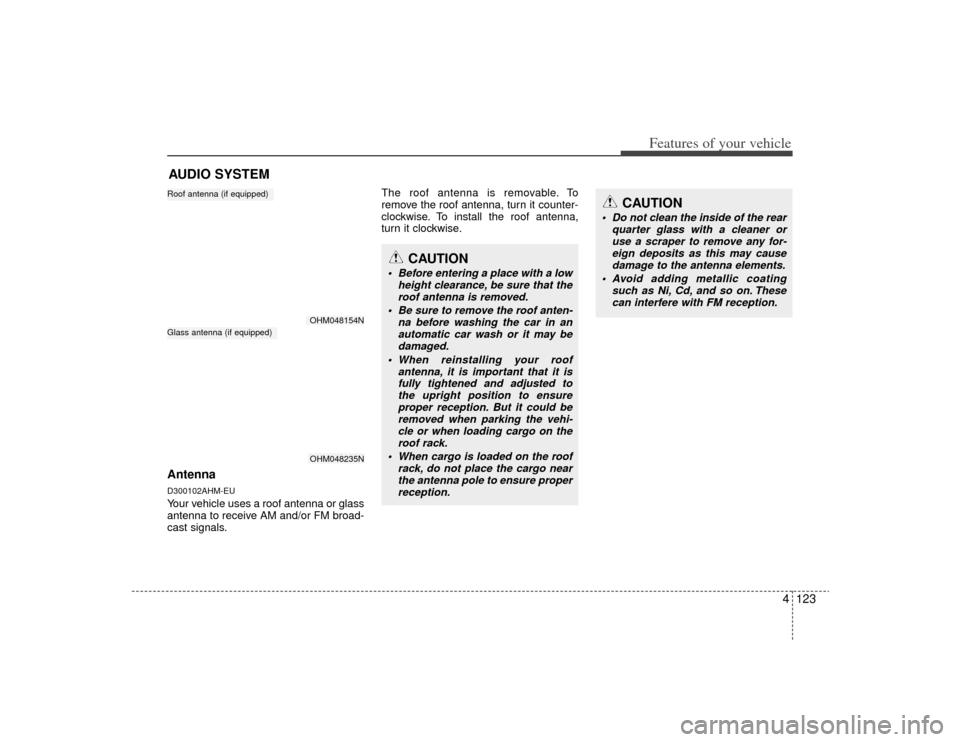
AntennaD300102AHM-EUYour vehicle uses a roof antenna or glass
antenna to receive AM and/or FM broad-
cast signals.The roof antenna is removable. To
remove the roof antenna, turn it counter-
clockwise. To install the roof antenna,
turn it clockwise.AUDIO SYSTEM
OHM048154NOHM048235N
Roof antenna (if equipped)Glass antenna (if equipped)
CAUTION
• Before entering a place with a low
height clearance, be sure that theroof antenna is removed.
Be sure to remove the roof anten- na before washing the car in anautomatic car wash or it may be damaged.
When reinstalling your roof antenna, it is important that it isfully tightened and adjusted tothe upright position to ensure proper reception. But it could beremoved when parking the vehi-cle or when loading cargo on the roof rack.
When cargo is loaded on the roof rack, do not place the cargo nearthe antenna pole to ensure proper reception.
CAUTION
Do not clean the inside of the rear quarter glass with a cleaner oruse a scraper to remove any for-eign deposits as this may cause damage to the antenna elements.
Avoid adding metallic coating such as Ni, Cd, and so on. Thesecan interfere with FM reception.
Page 201 of 425

Features of your vehicle124
4D300200AENSteering wheel audio control
(if equipped) The steering wheel audio control button
is installed to promote safe driving.
D300204AHMVOLUME (VOL / ) (1)• Pull the up button ( ) to increase the
volume.
Pull the down button ( ) to decrease the volume.D300203AHMSEEK/PRESET ( / ) (2)The SEEK/PRESET button has different
functions based on the system mode. For
the following functions the button should
be pressed for 0.8 second or more.
RADIO mode
It will function as the AUTO SEEK select
button.
CDP mode
It will function as the FF/REW button.
CDC mode
It will function as the DISC UP/DOWN
button.
If the SEEK/PRESET button is pressed
for less than 0.8 second, it will work as
follows in each mode. RADIO mode
It will function as the PRESET STATION
select buttons.
CDP mode
It will function as the TRACK UP/DOWN
button.
CDC mode
It will function as the TRACK UP/DOWN
button.
D300202AENMODE (3)Press the button to select Radio or CD
(compact disc).D300205AHMMUTE (4) Pull the MUTE button to cancel the
sound.
Pull the MUTE button again to activate the sound.
Detailed information for audio control
buttons is described in the following
pages in this section.
OHM048146N
CAUTION
Do not operate audio remote con- trol buttons simultaneously.
Page 202 of 425

4125
Features of your vehicle
D300600AHM-EEAux, USB and iPod port
(if equipped)If your vehicle has an aux and/or USB
(universal serial bus) port or iPod port,
you can use an aux port to connect audio
devices and an USB port to plug in an
USB and also an iPod port to plug in an
iPod.✽ ✽NOTICEWhen using a portable audio device
connected to the power outlet, noise may
occur during playback. If this happens,
use the power source of the portable
audio device.
D300800AHMHow vehicle audio worksAM(MW, LW) and FM radio signals are
broadcast from transmitter towers locat-
ed around your city. They are intercept-
ed by the radio antenna on your vehicle.
This signal is then received by the radio
and sent to your vehicle speakers.
When a strong radio signal has reached
your vehicle, the precise engineering of
your audio system ensures the best pos-
sible quality reproduction. However, in
some cases the signal coming to your
vehicle may not be strong and clear. This
can be due to factors such as the dis-
tance from the radio station, closeness of
other strong radio stations or the pres-
ence of buildings, bridges or other large
obstructions in the area. AM(MW, LW) broadcasts can be
received at greater distances than FM
broadcasts. This is because AM(MW,
LW) radio waves are transmitted at low
frequencies. These long, low frequency
radio waves can follow the curvature of
the earth rather than travelling straight
out into the atmosphere. In addition, they
curve around obstructions so that they
can provide better signal coverage.
¢¢¢
¢¢¢JBM002
AM(MW, LW) reception
¢¢¢
JBM001
FM reception
OHM048151
Page 204 of 425

4127
Features of your vehicle
Using a cellular phone or a two-wayradioWhen a cellular phone is used inside the
vehicle, noise may be produced from the
audio equipment. This does not mean
that something is wrong with the audio
equipment. In such a case, use the cellu-
lar phone at a place as far as possible
from the audio equipment.
Care of discs If the temperature inside the vehicle is too high, open the vehicle windows for
ventilation before using your vehicle
audio.
It is illegal to copy and use MP3/WMA files without permission. Use CDs that
are created only by lawful means.
Do not apply volatile agents such as benzene and thinner, normal cleaners
and magnetic sprays made for ana-
logue disc onto CDs.
To prevent the disc surface from get- ting damaged. Hold and carry CDs by
the edges or the edges of the center
hole only.
Clean the disc surface with a piece of soft cloth before playback (wipe it from
the center to the outside edge).
Do not damage the disc surface or attach pieces of sticky tape or paper
onto it.
Make sure objects other than CDs are not inserted into the CD player (Do not
insert more than one CD at a time). Keep CDs in their cases after use to
protect them from scratches or dirt.
Depending on the type of CD-R/CD- RW CDs, certain CDs may not operate
normally according to manufacturing
companies or making and recording
methods. In such circumstances, if you
still continue to use those CDs, they
may cause the malfunction of your
vehicle audio system.
✽ ✽ NOTICE
- Playing an
Incompatible Copy
Protected Audio CD
Some copy protected CDs, which do not
comply with the international audio CD
standards (Red Book), may not play on
your vehicle audio. Please note that if
you try to play copy protected CDs and
the CD player does not perform correct-
ly the CDs maybe defective, not the CD
player.
CAUTION
When using a communication sys-
tem such a cellular phone or a radioset inside the vehicle, a separateexternal antenna must be fitted.When a cellular phone or a radio set is used with an internal antennaalone, it may interfere with the vehi-cle's electrical system and adverse- ly affect safe operation of the vehi-cle.
WARNING
Don't use a cellular phone when
you are driving. You should stop at
a safe place to use a cellular phone.