2009 KIA AMANTI clock
[x] Cancel search: clockPage 129 of 321
![KIA AMANTI 2009 Owners Manual 3117
Knowing your vehicle
1. iPod Selection ButtonIf iPod is connected, it turns to iPod mode.2. Automatic Track Selection Button Press the [TRACK ] button for lessthan 0.8 seconds to play from the
be](/manual-img/2/57931/w960_57931-128.png "KIA AMANTI 2009 Owners Manual 3117
Knowing your vehicle
1. iPod Selection ButtonIf iPod is connected, it turns to iPod mode.2. Automatic Track Selection Button Press the [TRACK ] button for lessthan 0.8 seconds to play from the
be")
3117
Knowing your vehicle
1. iPod Selection ButtonIf iPod is connected, it turns to iPod mode.2. Automatic Track Selection Button Press the [TRACK ] button for lessthan 0.8 seconds to play from the
beginning of the song currently played.
Press the button for less than 0.8 sec-
onds and press it again within 1 sec-
onds to move and play the previous
track. Press the button for 0.8 seconds
or longer to play the song in reverse
direction in fast speed.
Press the [SEEK ] button for less than 0.8 seconds to move to the next
track. Press the button for 0.8 seconds
or longer to play the song in forward
direction in fast speed.3. RANDOM Play Button Press this button for less than 0.8 sec-
onds to activate 'RDM ' mode and more
than 0.8 seconds to activate 'ALBUM
RDM 'mode.
RDM : All songs in the current catego-ry are played back at random.
ALBUM RDM: An album in the iPod is selected at random and is played back
in the album song order.
4. REPEAT Play ButtonA single song is repeatedly played back.5. INFORMATION ButtonDisplays the information of the file cur-
rently played back as below when the
button is pressed each time.
TITLE
➟ARTIST
➟ALBUM
➟...
6. Category Search ButtonMoves to the upper category from current-
ly played category of the iPod. To move to
the category displayed, press [File Search
/ENTER] Button. You will be able to search
through the lower category of the selected
category. The order of iPod’s category is
PLAYLISTS, COMPOSERS, SONGS, AL-
BUMES, ARTISTS, GENRES.
7. File Search/ENTER Button When you turn the button clockwise, itwill display the songs(category) next to
the song currently played(category in
the same level). Also, when you turn
the button counterclockwise, it will dis-
play the songs(category) before the
song currently played(category in the
same level).
If you want to listen to the song dis-
played in the song category, press the
button, then it will skip to the selected
song and play.
When you turn the button, it will display the categorys next to the categorys
currently displayed. you can narrow
down your search as shown in the
table below.
1 STEP 2 STEP 3 STEP 4 STEP 5 STEPPlaylist Playlists Songs --
Artist Artists Albums Songs -
Album Albums Songs --
Song Songs -- -
Genre Genres Artists Albums Songs
Composer Composers Albums Songs -
Page 134 of 321
![KIA AMANTI 2009 Owners Manual Knowing your vehicle122
37. CAT/FOLDER Button Press [CAT ] or [FLDR ] button to
enter the Category list Mode, it dis-
plays cateogry items and highlights the
category that currently tuned channel
belo](/manual-img/2/57931/w960_57931-133.png "KIA AMANTI 2009 Owners Manual Knowing your vehicle122
37. CAT/FOLDER Button Press [CAT ] or [FLDR ] button to
enter the Category list Mode, it dis-
plays cateogry items and highlights the
category that currently tuned channel
belo")
Knowing your vehicle122
37. CAT/FOLDER Button Press [CAT ] or [FLDR ] button to
enter the Category list Mode, it dis-
plays cateogry items and highlights the
category that currently tuned channel
belongs to.
On Category List Mode, press these buttons to navigate category list.
Press [ENTER] Button to select the lowest channel in highlighted category.
If channel is selected by selecting cat- egory CATEGORY Icon is displayed at
the top of the screen.8. Tune Knob and Enter Button Rotate clockwise to increase the chan-nel number or to down the category in
the category list.
Rotate counterclockwise to decrease the channel number or to up the cate-
gory in the category list.
Press this button to make selection of channels or items.
❈ ❈ Troubleshooting1. Antenna Error
If this message is displayed, the antenna
or antenna cable is broken or unplugged.
Please consult with your Kia dealership.
2. Acquiring Signal
If this message is displayed, it means that
the antenna is covered and that the SIR-
IUS Satellite Radio signal is not available.
Ensure the antenna is uncovered and has
a clear view of the sky.
Page 135 of 321

3123
Knowing your vehicle
1. DISPLAY ON/OFF
2. CLOCK Function
3. Time/Date Increase/Reduce Function
4. RESET Function
5. DATE Function
KEY BOARD
A-300GHU
Page 136 of 321
![KIA AMANTI 2009 Owners Manual Knowing your vehicle124
31. DISPLAY ON/OFF This is the display window ON/OFF
function.
Each time the [DISP] button is pressed, the display window will be turned
ON/OFF.2. CLOCK Function This is the](/manual-img/2/57931/w960_57931-135.png "KIA AMANTI 2009 Owners Manual Knowing your vehicle124
31. DISPLAY ON/OFF This is the display window ON/OFF
function.
Each time the [DISP] button is pressed, the display window will be turned
ON/OFF.2. CLOCK Function This is the")
Knowing your vehicle124
31. DISPLAY ON/OFF This is the display window ON/OFF
function.
Each time the [DISP] button is pressed, the display window will be turned
ON/OFF.2. CLOCK Function This is the clock adjustment function.
Each time [CLOCK] is pressed, thesecond
➟minute will blink once every
0.5 seconds and switch modes.
Pressing the [CLOCK] again while the "minute" mode is blinking or waiting 10
seconds will turn off time adjustment
mode and save the set time.
The clock can be set in 12 hour or 24 hour modes. The 12 hour system is the
default and can be changed to 24 hour
system within the SET-UP menu.
3. Time/Date Increase/Decrease Function While in Time/Date mode, pressing the
[ ], [ ] buttons will increase/
decrease the time/date.
This function will operate only after pressing the time/date button and the
hour/minute/month/day is blinking.
4. RESET Function The RESET function can be usedwhen adjusting the time.
If the [RESET] is pressed while adjust- ing the "hour", the hour will display
"AM12" when using 12 hour clock
mode and "00" when using 24 hour
clock mode.
If the RESET is pressed while adjust- ing the "min", the minute display will be
changed to "00".
The RESET function can be used while adjusting the date.
If the [RESET] is pressed while adjust- ing the "month/day", the corresponding
display will be changed to "01month/
01day".
5. DATE Function This is used to adjust the date.
Each time [DATE] is pressed, the mon-th
➟day will blink once every 0.5 sec-
onds and switch modes.
Pressing the [DATE] again while the "day" is blinking or waiting 10 seconds
will turn off date adjustment mode and
save the set date.
❈Slight differences with actual time may
occur. Please readjust the time upon
the occurrence of such differences.
Page 235 of 321

In case of an emergency12
6
Power connectorYour vehicle is equipped with a power connector to prevent bat-
tery discharge if your vehicle is parked without being operated
for prolonged periods. Use the following procedures before
parking the vehicle for prolonged period.
1. Turn off the engine.
2. Turn off the headlights and tail lights.
3. Open the driver-side knee bolster cover and pull up the
“POWER/CONN”.✽ ✽NOTICE• If the power connector is pulled up from the fuse panel, the
warning chime, AV system, clock and intetrior lamps, etc.,
will not operate. Some items must be reset after replace-
ment.
• Even though the power connector is pulled up, the battery can still be discharged by operation of the headlights or
other electrical devices.
Description Fuse rating Protected component
A/CON 10A Air-conditioning system
P/WDW(LH) 20A Power window (left)
TAIL LP(RH) 10A Taillight (right)
BACK WARN’G 10A Back warning
DR LP 10A Door courtesy lamp
MIRROR HTD 15A Outside review mirror defroster
ENG SNSR 10A
Power train control system sensors
T/REDUCER10A Seat belt tension reducer
CLOCK 10A Clock
WIPER(FR) 25A Wiper (front)
EPS 10A Electronic power steering
TAIL LP(LH) 10A Tail light (left)
ROOM LP 10A Room lamp
AV, CLOCK 15A Audio, Clock
LAN UNIT 10A Lan unit
TPMS 15A Tire pressure monitoring system
H/LP WASHER 20A Headlight washer
SHUNT CONN - Switch illumination
POWER/CONN - Power connector
1GHA403
Power
connector
Page 245 of 321
In case of an emergency22
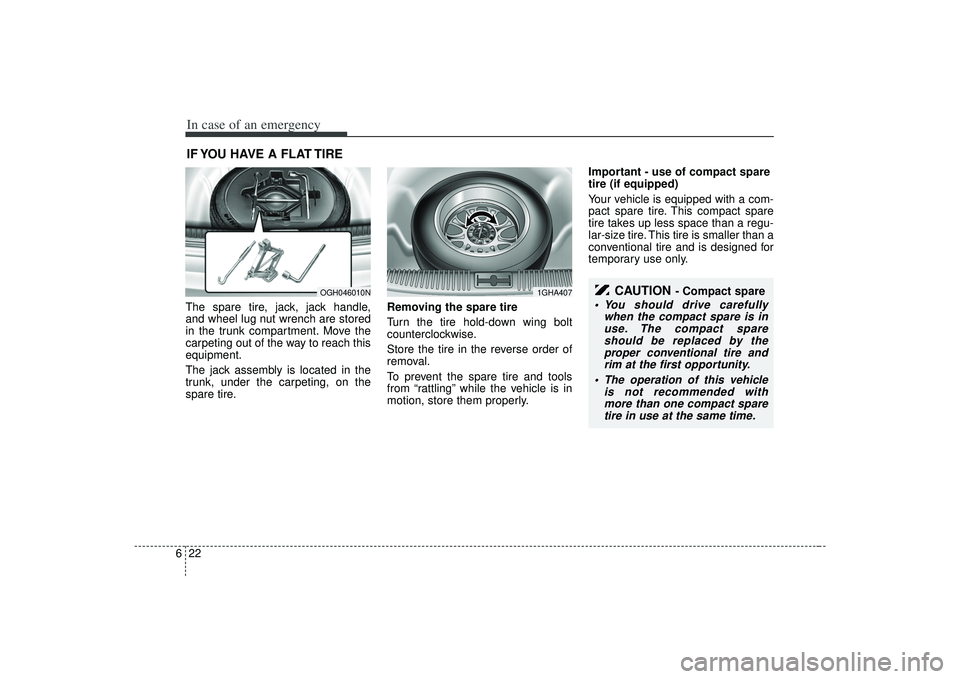
6IF YOU HAVE A FLAT TIRE The spare tire, jack, jack handle,
and wheel lug nut wrench are stored
in the trunk compartment. Move the
carpeting out of the way to reach this
equipment.
The jack assembly is located in the
trunk, under the carpeting, on the
spare tire. Removing the spare tire
Turn the tire hold-down wing bolt
counterclockwise.
Store the tire in the reverse order of
removal.
To prevent the spare tire and tools
from “rattling” while the vehicle is in
motion, store them properly.Important - use of compact spare
tire (if equipped)
Your vehicle is equipped with a com-
pact spare tire. This compact spare
tire takes up less space than a regu-
lar-size tire. This tire is smaller than a
conventional tire and is designed for
temporary use only.
OGH046010N
1GHA407
CAUTION
- Compact spare
You should drive carefully
when the compact spare is inuse. The compact spareshould be replaced by theproper conventional tire andrim at the first opportunity.
The operation of this vehicle is not recommended withmore than one compact sparetire in use at the same time.
Page 249 of 321
In case of an emergency26
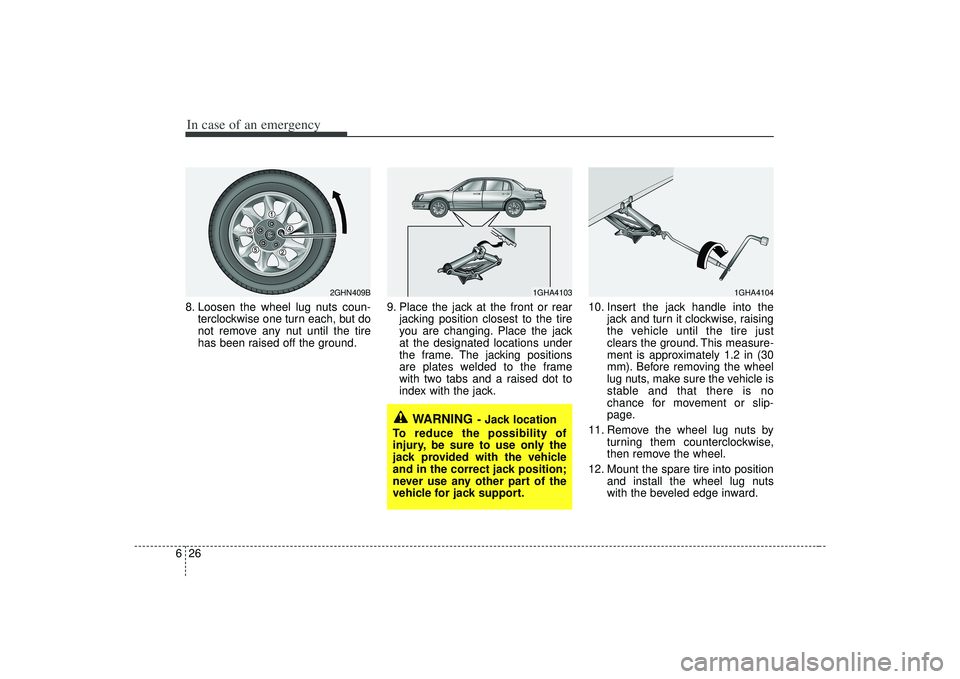
68. Loosen the wheel lug nuts coun-
terclockwise one turn each, but do
not remove any nut until the tire
has been raised off the ground. 9. Place the jack at the front or rear
jacking position closest to the tire
you are changing. Place the jack
at the designated locations under
the frame. The jacking positions
are plates welded to the frame
with two tabs and a raised dot to
index with the jack. 10. Insert the jack handle into the
jack and turn it clockwise, raising
the vehicle until the tire just
clears the ground. This measure-
ment is approximately 1.2 in (30
mm). Before removing the wheel
lug nuts, make sure the vehicle is
stable and that there is no
chance for movement or slip-
page.
11. Remove the wheel lug nuts by turning them counterclockwise,
then remove the wheel.
12. Mount the spare tire into position and install the wheel lug nuts
with the beveled edge inward.
WARNING
- Jack location
To reduce the possibility of
injury, be sure to use only the
jack provided with the vehicle
and in the correct jack position;
never use any other part of the
vehicle for jack support.
1GHA4104
1GHA4103
2GHN409B
Page 264 of 321
Maintenance14
7ENGINE COOLING SYSTEM The high-pressure cooling system has a
reservoir filled with year-round antifreeze
coolant. The reservoir is filled at the fac-
tory.
Check the antifreeze protection and
coolant level at least once a year, at the
beginning of the winter season, and
before traveling to a colder climate.Checking the coolant level
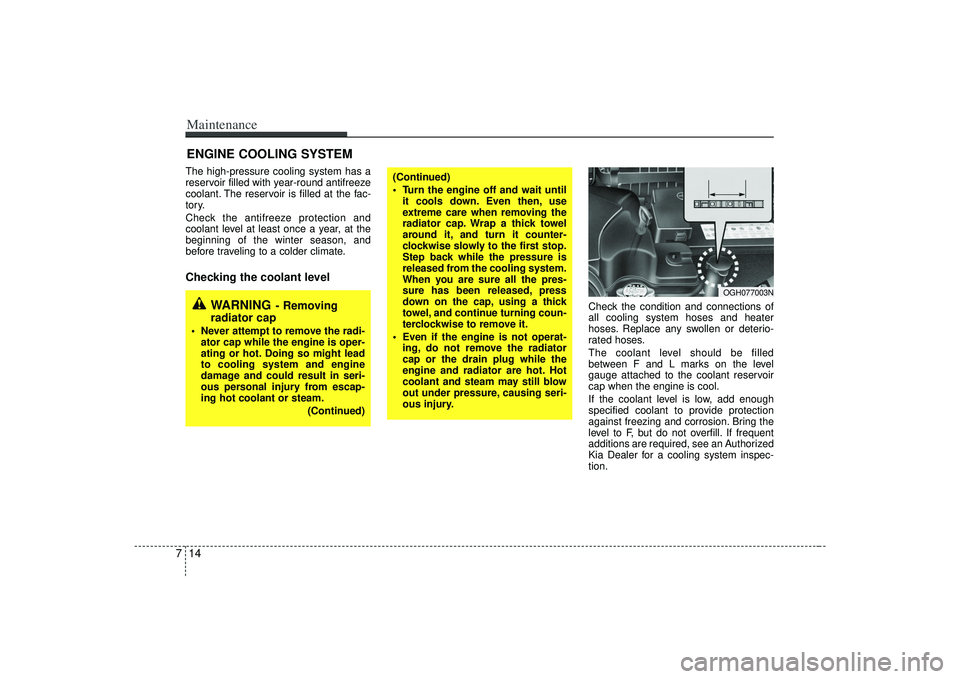
Check the condition and connections of
all cooling system hoses and heater
hoses. Replace any swollen or deterio-
rated hoses.
The coolant level should be filled
between F and L marks on the level
gauge attached to the coolant reservoir
cap when the engine is cool.
If the coolant level is low, add enough
specified coolant to provide protection
against freezing and corrosion. Bring the
level to F, but do not overfill. If frequent
additions are required, see an Authorized
Kia Dealer for a cooling system inspec-
tion.
WARNING
- Removing
radiator cap
Never attempt to remove the radi-
ator cap while the engine is oper-
ating or hot. Doing so might lead
to cooling system and engine
damage and could result in seri-
ous personal injury from escap-
ing hot coolant or steam.
(Continued)
(Continued)
Turn the engine off and wait untilit cools down. Even then, use
extreme care when removing the
radiator cap. Wrap a thick towel
around it, and turn it counter-
clockwise slowly to the first stop.
Step back while the pressure is
released from the cooling system.
When you are sure all the pres-
sure has been released, press
down on the cap, using a thick
towel, and continue turning coun-
terclockwise to remove it.
Even if the engine is not operat- ing, do not remove the radiator
cap or the drain plug while the
engine and radiator are hot. Hot
coolant and steam may still blow
out under pressure, causing seri-
ous injury.
OGH077003N