Page 61 of 457

upon request. General data that does not identify par-
ticular vehicles or crashes may be released for incorpo-
ration in aggregate crash databases, such as those main-
tained by the U.S. government and various states. Data of
a potentially sensitive nature, such as would identify a
particular driver, vehicle, or crash, will be treated confi-
dentially. Confidential data will not be disclosed by
Chrysler LLC to any third party except when:
1. Used for research purposes, such as to match data
with a particular crash record in an aggregate database,
provided confidentiality of personal data is thereafter
preserved
2. Used in defense of litigation involving a Chrysler LLC
product
3. Requested by police under a legal warrant
4. Otherwise required by lawData parameters that may be recorded:
•Diagnostic trouble code(s) and warning light status for
electronically-controlled safety systems, including the
airbag system
•Airbag disable light status (if equipped)
•�Time�of airbag deployment (in terms of ignition
cycles and vehicle mileage)
•Airbag deployment level (if applicable)
•Impact acceleration and angle
•Seat belt status
•Brake status (service and parking brakes)
•Accelerator status (including vehicle speed)
•Engine control status (including engine speed)
•Transmission gear selection
THINGS TO KNOW BEFORE STARTING YOUR VEHICLE 59
2
Page 72 of 457

Airbag Warning Light
The light should come on and remain on for six to eight
seconds as a bulb check when the ignition switch is first
turned ON. If the LED is not lit during starting, have it
checked. If the light stays on, flickers, or comes on while
driving, have the system checked by an authorized
dealer.
Defroster
Check operation by selecting the defrost mode and place
the blower control on high speed. You should be able to
feel the air directed against the windshield. See your
authorized dealer for service if your defroster is
inoperable.
Periodic Safety Checks You Should Make Outside
The Vehicle
Tires
Examine tires for excessive tread wear or uneven wear
patterns. Check for stones, nails, glass, or other objects
lodged in the tread. Inspect tread and sidewall for cuts or
cracks. Check the wheel nuts for tightness. Check the
tires (including spare) for proper pressure.
Lights
Have someone observe the operation of exterior lights
while you work the controls. Check turn signal and high
beam indicator lights on the instrument panel.
Fluid Leaks
Check the area under the vehicle after overnight parking
for fuel, engine coolant, oil or other fluid leaks. Also, if
gasoline fumes are detected or fuel, power steering fluid,
transmission fluid or brake fluid leaks are suspected, the
cause should be located and corrected immediately.
70 THINGS TO KNOW BEFORE STARTING YOUR VEHICLE
Page 76 of 457

▫Closing The Sunroof.................. 144
▫Pinch Protect Feature.................. 144
▫Pinch Protect Override................. 145
▫Venting Sunroof — Express............. 145
▫Sunshade Operation................... 145
▫Wind Buffeting...................... 145
▫Sunroof Maintenance.................. 146
▫Ignition Off Operation................. 146
�Electrical Power Outlets................. 146
�Power Inverter — If Equipped............ 148
�Cupholders.......................... 150
�Storage............................. 151
▫Glove Compartment And Storage Bin...... 151▫Door Storage — If Equipped............. 152
�Console Features...................... 153
�Cargo Area Features.................... 154
▫Cargo Light/Removable Self-Recharging
Flashlight — If Equipped............... 154
▫Cargo Cover — If Equipped............. 155
▫Removable Load Floor................. 156
▫Cargo Tie-Down Loops................ 156
▫Fold Down Speakers — If Equipped....... 157
�Rear Window Features.................. 157
▫Rear Window Wiper/Washer............ 157
▫Rear Window Defroster................ 158
�Roof Luggage Rack — If Equipped......... 159
74 UNDERSTANDING THE FEATURES OF YOUR VEHICLE
Page 95 of 457
Call Termination
To end a call in progress, momentarily press the PHONE
button. Only the active call(s) will be terminated and if
there is a call on hold, it will become the new active call.
If the active call is terminated by the far end, a call on
hold may not become active automatically. This is cell
phone-dependent. To bring the call back from hold, press
and hold the PHONE button until you hear a single beep.
Redial
•
Press the PHONE button to begin.
•After the�Ready�prompt and the following beep, say
�Redial.�
•The UConnect�system will call the last number that
was dialed from your cellular phone.
NOTE:This may not be the last number dialed from the
UConnect�system.
Call Continuation
Call continuation is the progression of a phone call on the
UConnect�system after the vehicle ignition key has been
switched to OFF. Call continuation functionality avail-
able on the vehicle can be any one of three types:
•After the ignition key is switched to OFF, a call can
continue on the UConnect�system either until the call
ends, or until the vehicle battery condition dictates
cessation of the call on the UConnect�system and
transfer of the call to the mobile phone.
•After the ignition key is switched to OFF, a call can
continue on the UConnect�system for a certain dura-
tion, after which the call is automatically transferred
from the UConnect�system to the mobile phone.
•An active call is automatically transferred to the
mobile phone after the ignition key is switched to OFF.
UNDERSTANDING THE FEATURES OF YOUR VEHICLE 93
3
Page 105 of 457
•low road noise,
•smooth road surface,
•fully closed windows,
•dry weather conditions, and
•operation from the driver’s seat.
•Performance, such as audio clarity, echo, and loudness
to a large degree rely on the phone and network, and
not the UConnect�system.
•Echo at the far end can sometimes be reduced by
lowering the in-vehicle audio volume.
•In a convertible vehicle, system performance may be
compromised with the convertible top down.
Bluetooth�Communication Link
Cellular phones have been found to lose connection to
the UConnect�system. When this happens, the connec-
tion can generally be re-established by switching the
phone off/on. Your cellular phone is recommended to
remain in Bluetooth�ON mode.
Power-Up
After switching the ignition key from OFF to either the
ON or ACC position, or after a language change, you
must wait at least five seconds prior to using the system.
UNDERSTANDING THE FEATURES OF YOUR VEHICLE 103
3
Page 120 of 457

After turning the ignition ON, you can choose from High,
Low, or Off heat settings. Amber indicator lights in each
switch indicate the level of heat in use. Two indicator
lights will illuminate for High, one for Low, and none for
Off.
Press the switch once to select High-level heat-
ing. Press the switch a second time to select
Low-level heating. Press the switch a third time
to shut Off the heating elements.
If High-level heating is selected, the system automatically
switches to Low-level heating and turns one indicator
light Off after 30 minutes of continuous operation. It will
turn the heater and the remaining indicator light off after
an additional 30 minutes of continuous operation. If
Low-level heating is selected, the system automatically
turns the heater and the indicator light Off after 30 min-
utes of continuous operation.NOTE:Once a heat setting is selected, heat will be felt
within two to five minutes.
WARNING!
•Persons who are unable to feel pain to the skin
because of advanced age, chronic illness, diabetes,
spinal cord injury, medication, alcohol use, ex-
haustion or other physical condition must exercise
care when using the seat heater. It may cause burns
even at low temperatures, especially if used for
long periods of time.
•Do not place anything on the seat that insulates
against heat, such as a blanket or cushion. This
may cause the seat heater to overheat.
118 UNDERSTANDING THE FEATURES OF YOUR VEHICLE
Page 126 of 457
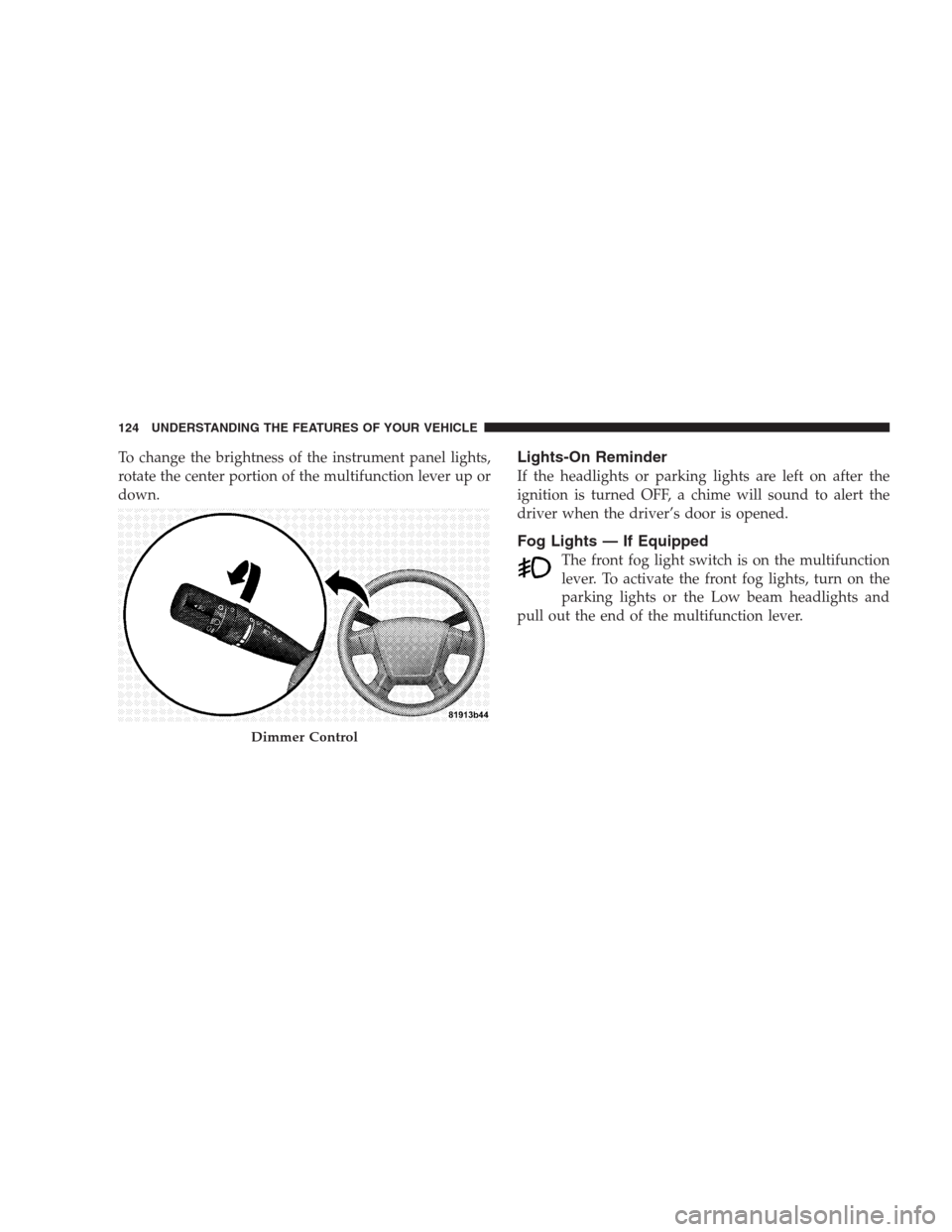
To change the brightness of the instrument panel lights,
rotate the center portion of the multifunction lever up or
down.Lights-On Reminder
If the headlights or parking lights are left on after the
ignition is turned OFF, a chime will sound to alert the
driver when the driver’s door is opened.
Fog Lights — If Equipped
The front fog light switch is on the multifunction
lever. To activate the front fog lights, turn on the
parking lights or the Low beam headlights and
pull out the end of the multifunction lever.
Dimmer Control
124 UNDERSTANDING THE FEATURES OF YOUR VEHICLE
Page 127 of 457
NOTE:The fog lights will only operate with the head-
lights on Low beam. Selecting High beam headlights will
turn off the fog lights.
Daytime Running Lights (DRL) — If Equipped
The High beam lights will come on as Daytime Running
Lights (DRL) at DRL intensity (lower), whenever the
ignition is ON, the engine is running, the headlight
switch is off, the parking brake is off, the turn signal is
off, and the shift lever is in any position except PARK.
Front Fog Lights Control
UNDERSTANDING THE FEATURES OF YOUR VEHICLE 125
3