Page 178 of 457
replacement, be sure to keep a record of the reading
before and after the service so that the correct mileage can
be determined.
CHAngE OIL Message
Your vehicle is equipped with an engine oil change
indicator system. The “CHAngE OIL” message will flash
in the instrument cluster odometer for approximately
12 seconds after a single chime has sounded to indicate
the next scheduled oil change interval. The engine oil
change indicator system is duty cycle based, which
means the engine oil change interval may fluctuate
dependent upon your personal driving style. Unless
reset, this message will continue to display each time you
turn the ignition switch to the ON/RUN position. To turn
off the message temporarily, press and release the Trip
Odometer button on the instrument cluster. To reset the
oil change indicator system (after performing the sched-
uled maintenance) refer to the following procedure.1. Turn the ignition switch to the ON position.Do not
start the engine.
2. Fully depress the accelerator pedal slowly three
times within 10 seconds.
3. Turn the ignition switch to the OFF/LOCK position.
NOTE:If the indicator message illuminates when you
start the vehicle, the oil change indicator system did not
reset. If necessary repeat this procedure.
25. OFF ROAD Indicator — If Equipped
The symbol illuminates (is armed) when the 4WD lock
switch is activated and the transmission range indicator
is in LOW or REVERSE position.
26. Malfunction Indicator Light (MIL)
The Malfunction Indicator Light (MIL) is part of
an Onboard Diagnostic system called OBD II that
monitors emissions, engine, and automatic trans-
mission control systems. The light will illuminate when
176 UNDERSTANDING YOUR INSTRUMENT PANEL
Page 183 of 457
Unless reset, this message will continue to display each
time you turn the ignition switch to the ON/RUN
position. To turn off the message temporarily, press and
release the Trip Odometer button on the instrument
cluster. To reset the oil change indicator system (after
performing the scheduled maintenance) refer to the fol-
lowing procedure.
1. Turn the ignition switch to the ON position.Do not
start the engine.
2. Fully depress the accelerator pedal, slowly, three times
within 10 seconds.
3. Turn the ignition switch to the OFF/LOCK position.
NOTE:If the indicator message illuminates when you
start the vehicle, the oil change indicator system did not
reset. If necessary repeat this procedure.EVIC Functions
Press the EVIC button until one of the following func-
tions is displayed on the EVIC:
•Compass/Temperature/Audio
•Average Fuel Economy
EVIC Button
UNDERSTANDING YOUR INSTRUMENT PANEL 181
4
Page 185 of 457

Distance To Empty (DTE)
Shows the estimated distance that can be traveled with
the fuel remaining in the tank. This estimated distance is
determined by a weighted average of the instantaneous
and average fuel economy, according to the current fuel
tank level. This is not resettable.
NOTE:Significant changes in driving style or vehicle
loading will greatly affect the actual drivable distance of
the vehicle, regardless of the DTE displayed value.
When the DTE value is less than 30 miles (48.3 km)
estimated driving distance, the DTE display will change
to a text display of�LOW FUEL�. This display will
continue until the vehicle runs out of fuel. Adding a
significant amount of fuel to the vehicle will turn off the
�LOW FUEL�text and a new DTE value will be dis-
played, based on the current values in the DTE calcula-
tion and the current fuel tank level.
Elapsed Time
Shows the total elapsed time of travel since the last reset
when the ignition switch is in the ACC position. Elapsed
time will increment when the ignition switch is in the ON
or START position.
Tire Pressure Monitor (TPM)
Refer to Section 5, “Tire Pressure Monitoring System
(TPMS)” for system operation.
Personal Settings (Customer-Programmable
Features)
This allows the driver to set and recall features when the
transmission is in PARK (automatic transmission) or the
vehicle is stopped (manual transmissions).
Press and release the EVIC button until “Personal Set-
tings” is displayed in the EVIC.
UNDERSTANDING YOUR INSTRUMENT PANEL 183
4
Page 189 of 457
NOTE:Magnetic and battery powered devices, (such as
cell phones, iPod’s, radar detectors, PDA’s and laptops)
should be kept away from the top of the instrument
panel. This is where the compass module is located and
such devices may interfere and cause false compass
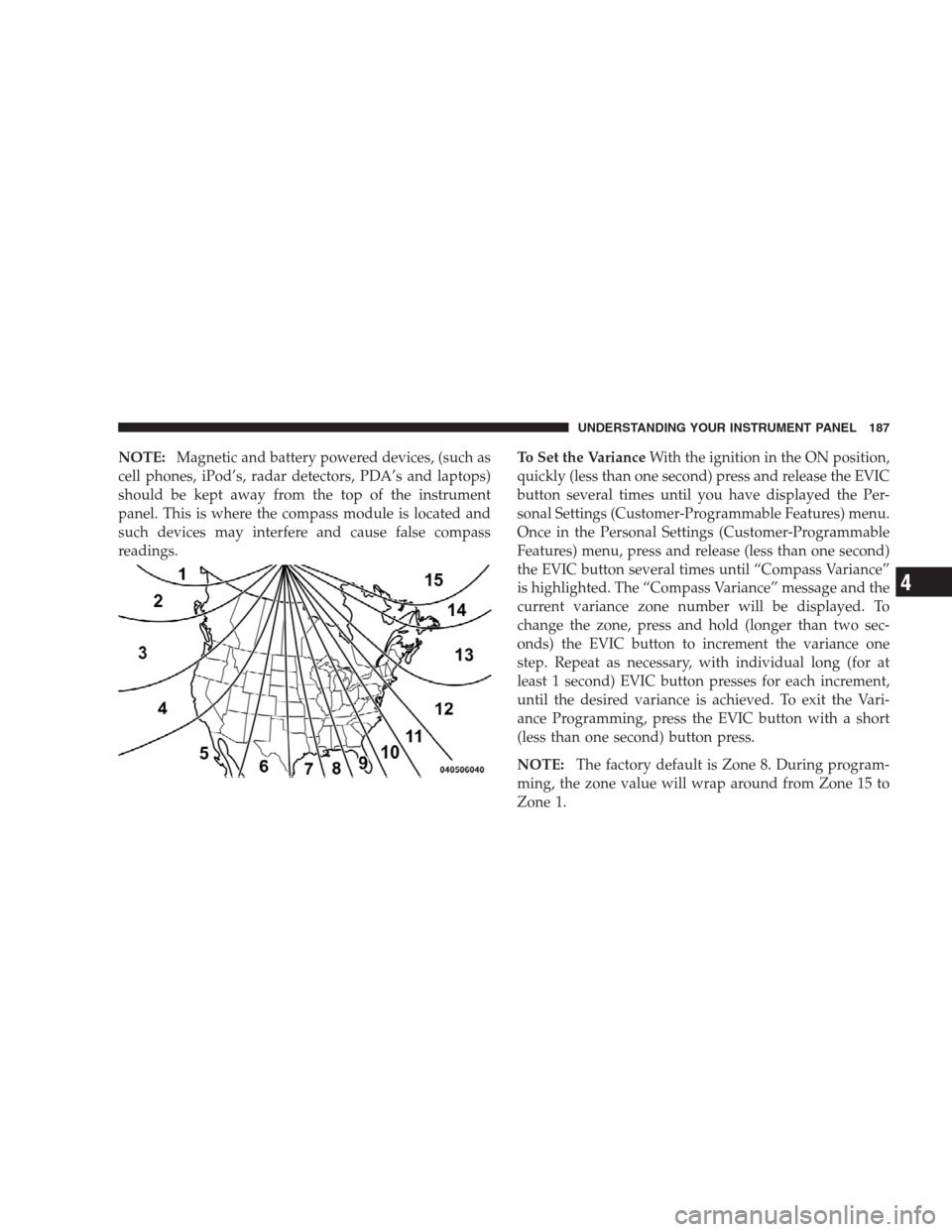
readings.To Set the VarianceWith the ignition in the ON position,
quickly (less than one second) press and release the EVIC
button several times until you have displayed the Per-
sonal Settings (Customer-Programmable Features) menu.
Once in the Personal Settings (Customer-Programmable
Features) menu, press and release (less than one second)
the EVIC button several times until “Compass Variance”
is highlighted. The “Compass Variance” message and the
current variance zone number will be displayed. To
change the zone, press and hold (longer than two sec-
onds) the EVIC button to increment the variance one
step. Repeat as necessary, with individual long (for at
least 1 second) EVIC button presses for each increment,
until the desired variance is achieved. To exit the Vari-
ance Programming, press the EVIC button with a short
(less than one second) button press.
NOTE:The factory default is Zone 8. During program-
ming, the zone value will wrap around from Zone 15 to
Zone 1.
UNDERSTANDING YOUR INSTRUMENT PANEL 187
4
Page 192 of 457
SALES CODE REQ — AM/FM STEREO RADIO
AND 6–DISC CD/DVD CHANGER (MP3/WMA AUX
JACK)
NOTE:The radio sales code is located on the lower right
side of the radio faceplate.
Operating Instructions - Radio Mode
NOTE:The ignition switch must be in the ON or ACC
position to operate the radio.
Power Switch/Volume Control (Rotary)
Push the ON/VOLUME control knob to turn on the
radio. Press the ON/VOLUME control knob a second
time to turn off the radio.
Electronic Volume Control
The electronic volume control turns continuously (360
degrees) in either direction without stopping. Turning the
ON/VOLUME control knob to the right increases the
volume and to the left decreases it.
When the audio system is turned ON, the sound will be
set at the same volume level as last played.
REQ Radio
190 UNDERSTANDING YOUR INSTRUMENT PANEL
Page 194 of 457

Clock Setting Procedure
1. Press and hold the TIME button until the hours blink.
2. Adjust the hours by turning the right side TUNE/
SCROLL control knob.
3. After adjusting the hours, press the right side TUNE/
SCROLL control knob to set the minutes. The minutes
will begin to blink.
4. Adjust the minutes using the right side TUNE/
SCROLL control knob. Press the TUNE/SCROLL control
knob to save the time change.
5. To exit, press any button/knob or wait five seconds.
The clock can also be set by pressing the SETUP button
and selecting the “SET HOME CLOCK” entry. Once in
this display follow the above procedure, starting at
step 2.
INFO Button
Press the INFO button for an RDS station (one with call
letters displayed). The radio will return a Radio Text
message broadcast from an FM station (FM mode only).
RW/FF
Pressing the RW (Rewind) or FF (Fast Forward) buttons
causes the tuner to search for the next frequency in the
direction of the arrows. This feature operates in AM, FM
or Satellite (if equipped) frequencies.
TUNE Control
Turn the rotary TUNE/SCROLL control knob clockwise
to increase or counterclockwise to decrease the frequency.
Setting the Tone, Balance, and Fade
Push the rotary TUNE/SCROLL control knob and BASS
will display. Turn the TUNE/SCROLL control knob to
the right or left to increase or decrease the bass tones.
192 UNDERSTANDING YOUR INSTRUMENT PANEL
Page 200 of 457

and press and release that button. If a button is not
selected within five seconds after pressing the SET but-
ton, the station will continue to play but will not be
stored into pushbutton memory.
You may add a second station to each pushbutton by
repeating the above procedure with this exception: Press
the SET button twice and SET 2 will show in the display
window. Each button can be set for SET 1 and SET 2 in
both AM and FM. This allows a total of 12 AM, 12 FM,
and 12 Satellite (if equipped) stations to be stored into
pushbutton memory. The stations stored in SET 2
memory can be selected by pressing the pushbutton
twice.
Every time a preset button is used, a corresponding
button number will display.Buttons1-6
These buttons tune the radio to the stations that you
commit to pushbutton memory {12 AM, 12 FM, and 12
Satellite (if equipped) stations}.
DISC Button
Pressing the DISC button will allow you to switch from
AM/FM modes to Disc modes.
Operation Instructions - (DISC MODE for CD and
MP3/WMA Audio Play, DVD-VIDEO)
The radio DVD player and many DVD discs are coded by
geographic region. These region codes must match in
order for the disc to play. If the region code for the DVD
disc does not match the region code for the radio DVD
player, it will not play the disc. Customers may take their
vehicle to an authorized dealer to change the region code
of the player a maximum of five times.
198 UNDERSTANDING YOUR INSTRUMENT PANEL
Page 202 of 457
Press and hold the EJECT button for five seconds and all
CDs will be ejected from the radio.
The disc can be ejected with the radio and ignition OFF.
SEEK Button (CD MODE)
Press the right SEEK button for the next selection on the
CD. Press the left SEEK button to return to the beginning
of the current selection, or return to the beginning of the
previous selection if the CD is within the first second of
the current selection. Pressing and holding the SEEK
button will allow you to scroll through the tracks faster in
CD and MP3/MWA modes.
SCAN Button (CD MODE)
Press the SCAN button to scan through each track on the
CD currently playing.
TIME Button (CD MODE)
Press this button to change the display from a large CD
playing time display to a small CD playing time display.
RW/FF (CD MODE)
Press and hold FF (Fast Forward) and the CD player will
begin to fast forward until FF is released, or RW or
another CD button is pressed. The RW (Rewind) button
works in a similar manner.
AM or FM Button (CD MODE)
Switches the radio into the AM or FM radio mode.
Notes On Playing MP3/WMA Files
The radio can play MP3/WMA files; however, acceptable
MP3/WMA file recording media and formats are limited.
When writing MP3/WMA files, pay attention to the
following restrictions.
Supported Media (Disc Types)
The MP3/WMA file recording media supported by the
radio are CDDA, CD-R, CD-RW, MP3,WMA, DVD Video,
DVD-R, DVD-RW, DVD+R, DVD+RW, and CDDA+MP3.
200 UNDERSTANDING YOUR INSTRUMENT PANEL

