2009 JEEP LIBERTY ECO mode
[x] Cancel search: ECO modePage 303 of 506
Transmission Limp Home Mode
Transmission function is monitored for abnormal condi-
tions. If a condition is detected that could result in
transmission damage, the Transmission Limp Home
Mode will be engaged. In this mode, the transmission
will remain in second gear in any forward driving range.
To reset the transmission, use the following procedure:
1. Stop the vehicle.
2. Move the shift lever to the PARK position.
3. Turn OFF the engine and be sure to turn the key to the
LOCK position.
4. Wait approximately 10 seconds, then restart the en-
gine.
5. Move the shift lever to the desired gear range.If the problem is no longer detected, the transmission will
return to normal operation. If the problem persists,
PARK, REVERSE, and NEUTRAL will continue to oper-
ate. Only second gear range will operate in the DRIVE
position. Have the transmission checked at your autho-
rized dealer as soon as possible.
Torque Converter Clutch
A feature designed to improve fuel economy has been
added to the automatic transmission of this vehicle. A
clutch within the torque converter engages automatically
at calibrated speeds. This may result in a slightly differ-
ent feeling or response during normal operation in high
gear. When the vehicle speed drops or during accelera-
tion, the clutch automatically and smoothly disengages.
STARTING AND OPERATING 301
5
Page 329 of 506

WARNING!
Many factors, such as vehicle loading, road condi-
tions, and driving conditions, influence the chance
that wheel lift or rollover may occur. Electronic Roll
Mitigation (ERM) cannot prevent all wheel lift or
rollovers, especially those that involve leaving the
roadway or striking objects or other vehicles. Only a
safe, attentive, and skillful driver can prevent acci-
dents. The capabilities of an ERM-equipped vehicle
must never be exploited in a reckless or dangerous
manner, which could jeopardize the user’s safety or
the safety of others.
Trailer Sway Control (TSC) — If Equipped
TSC uses sensors in the vehicle to recognize an exces-
sively swaying trailer. TSC activates automatically once
the excessively swaying trailer is recognized. When TSC
is functioning, the “ESP/TCS Indicator Light” will flash,the engine power will be reduced, and you will feel the
brake being applied to individual wheels in an attempt to
stop the trailer from swaying.
NOTE:
The TSC is disabled when the ESP system is in
the “Partial Off” mode and “Full Off” mode.
WARNING!
•Trailer Sway Control (TSC) cannot stop all trailers
from swaying. Always use caution when towing a
trailer and follow the tongue weight recommenda-
tions. Refer to ”Vehicle Loading” and “Trailer
Towing” in this section for more information be-
fore towing a trailer with your vehicle.
•If TSC activates while towing a trailer, stop the
vehicle at the nearest safe location and adjust the
trailer load to eliminate the trailer sway.
(Continued)
STARTING AND OPERATING 327
5
Page 337 of 506
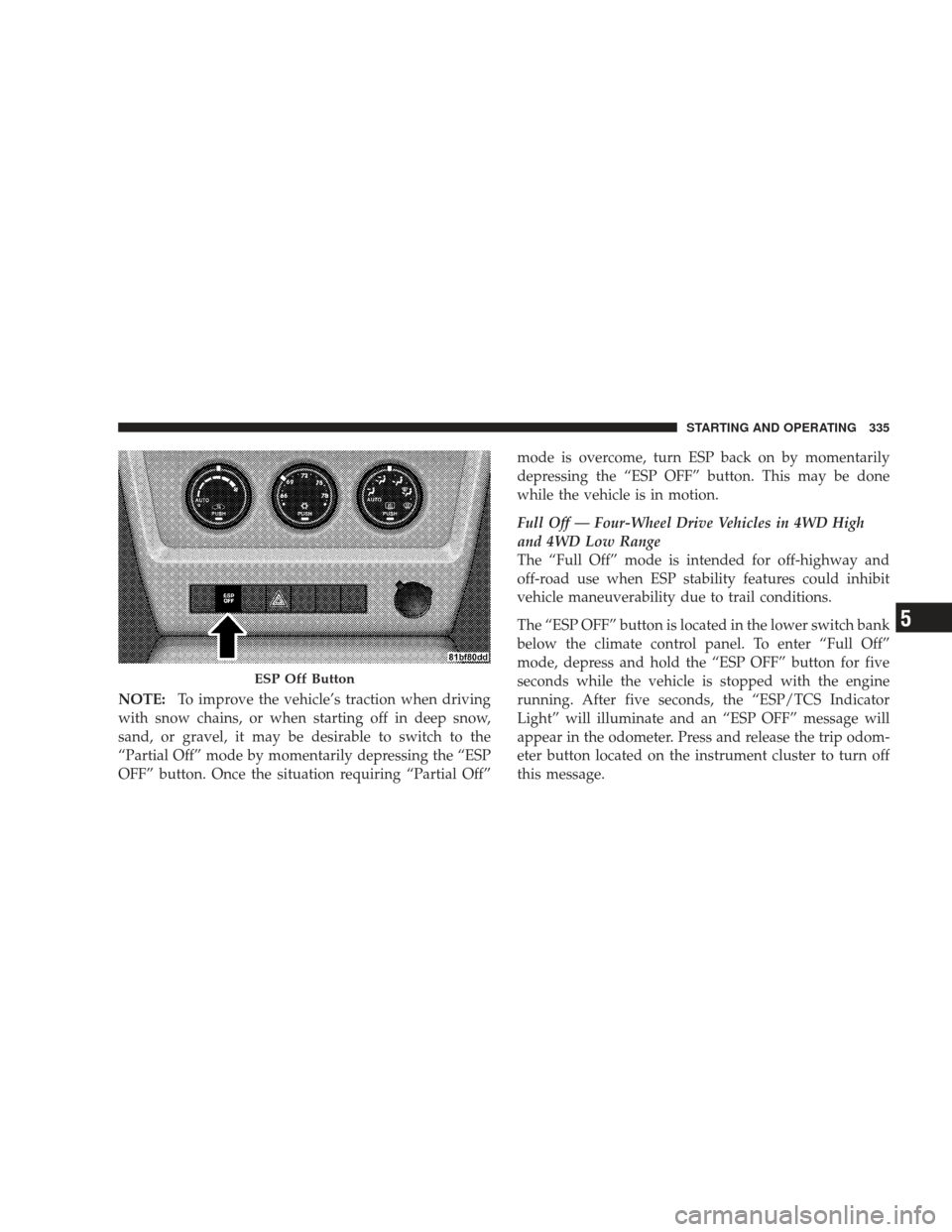
NOTE:To improve the vehicle’s traction when driving
with snow chains, or when starting off in deep snow,
sand, or gravel, it may be desirable to switch to the
“Partial Off” mode by momentarily depressing the “ESP
OFF” button. Once the situation requiring “Partial Off” mode is overcome, turn ESP back on by momentarily
depressing the “ESP OFF” button. This may be done
while the vehicle is in motion.
Full Off — Four-Wheel Drive Vehicles in 4WD High
and 4WD Low Range
The “Full Off” mode is intended for off-highway and
off-road use when ESP stability features could inhibit
vehicle maneuverability due to trail conditions.
The “ESP OFF” button is located in the lower switch bank
below the climate control panel. To enter “Full Off”
mode, depress and hold the “ESP OFF” button for five
seconds while the vehicle is stopped with the engine
running. After five seconds, the “ESP/TCS Indicator
Light” will illuminate and an “ESP OFF” message will
appear in the odometer. Press and release the trip odom-
eter button located on the instrument cluster to turn off
this message.
ESP Off Button
STARTING AND OPERATING 335
5
Page 369 of 506
Problems that result from using methanol/gasoline or
E85 Ethanol blends are not the responsibility of the
manufacturer. While MTBE is an oxygenate made from
Methanol, it does not have the negative effects of
Methanol.
E-85 Usage In Non-Flex Fuel Vehicles
Non-FFV vehicles are compatible with gasoline contain-
ing 10% ethanol (E10). Gasoline with higher ethanol
content may void the vehicle’s warranty.
If a Non-FFV vehicle is inadvertently fueled with E-85
fuel, the engine will have some or all of these symptoms:
•operate in a lean mode
•OBD II “Malfunction Indicator Light” on
•poor engine performance
•poor cold start and cold drivability
•increased risk for fuel system component corrosionTo fix a Non-FFV vehicle inadvertently fueled once with
E-85 perform the following:
•drain the fuel tank (see your authorized dealer)
•change the engine oil and oil filter
•disconnect and reconnect the battery to reset the
engine controller memory
More extensive repairs will be required for prolonged
exposure to E-85 fuel.
MMT In Gasoline
MMT is a manganese containing metallic additive that is
blended into some gasoline to increase octane. Gasoline
blended with MMT provides no performance advantage
beyond gasoline of the same octane number without
MMT. Gasoline blended with MMT reduces spark plug
life and reduces emission system performance in some
vehicles. The manufacturer recommends that gasoline
without MMT be used in your vehicle. The MMT content
STARTING AND OPERATING 367
5
Page 394 of 506
2. Reconnect the battery negative cable.
3. Place the ignition switch in the LOCK position (if it
has been moved or the engine has been started).
4. Turn the ignition switch to the ON position, but do not
start the engine.
5. Press the brake pedal.
6. Shift the transmission into NEUTRAL.
7. Use the point of a ballpoint pen or similar object to
press the recessed transfer case NEUTRAL button. Re-
lease the NEUTRAL button after the NEUTRAL indicator
light turns off (approximately one second). After the
NEUTRAL button is released, the transfer case will shift
to the position identified by the selector switch.
8. Start the engine.
9. Shift the transmission into DRIVE.10. Set the parking brake.
11. Shift the transmission into PARK.
NOTE:
Steps 1 through 6 are requirements for shifting
the transfer case. If these requirements are not met prior
to depressing the NEUTRAL selection button or while
the shift attempt is in process, then all of the mode
position indicator lights will flash continuously until all
requirements are met or until the NEUTRAL button is
released.
The ignition switch must be in the ON position for a shift
to take place and for the position indicator lights to be
operable. If the ignition switch in not in the ON position,
the shift will not take place and no position indicator
lights will be on or flashing.
Flashing NEUTRAL position indicator light indicates
that shift requirements have not been met.
392 STARTING AND OPERATING
Page 407 of 506
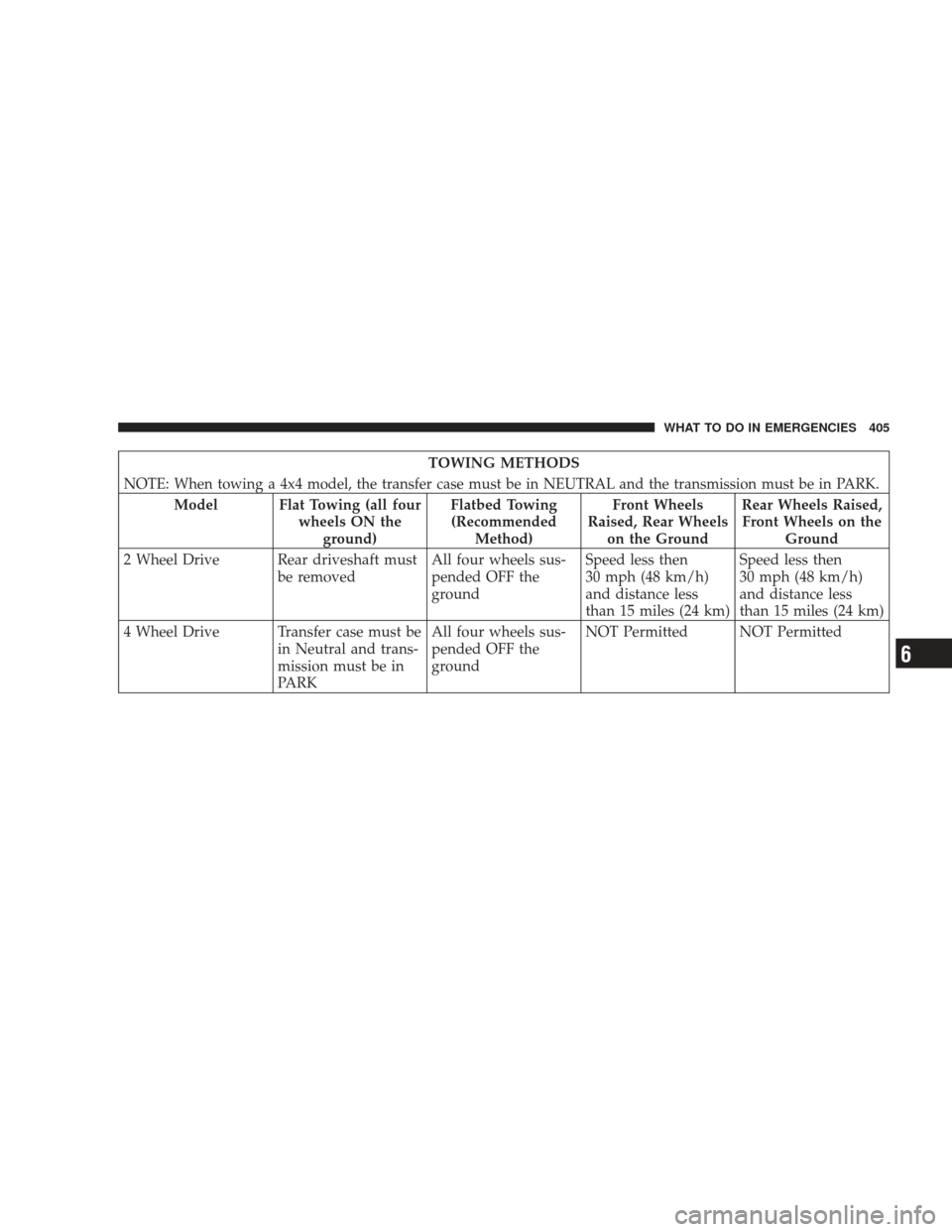
TOWING METHODS
NOTE:
When towing a 4x4 model, the transfer case must be in NEUTRAL and the transmission must be in PARK.
Model Flat Towing (all four wheels ON theground) Flatbed Towing
(Recommended Method) Front Wheels
Raised, Rear Wheels on the Ground Rear Wheels Raised,
Front Wheels on the Ground
2 Wheel Drive Rear driveshaft must be removedAll four wheels sus-
pended OFF the
groundSpeed less then
30 mph (48 km/h)
and distance less
than 15 miles (24 km)Speed less then
30 mph (48 km/h)
and distance less
than 15 miles (24 km)
4 Wheel Drive Transfer case must be in Neutral and trans-
mission must be in
PARKAll four wheels sus-
pended OFF the
ground
NOT Permitted NOT Permitted
WHAT TO DO IN EMERGENCIES 405
6
Page 504 of 506

INTRODUCTION INTRODUCTION ROLLOVER WARNING HOW TO USE THIS MANUAL WARNINGS AND CAUTIONS VEHICLE IDENTIFICATION NUMBER VEHICLE MODIFICATIONS/ALTERATIONS THINGS TO KNOW BEFORE STARTING YOUR VEHICLE A WORD
ABOUT YOUR KEYS Ignition Key RemovalKey-In-Ignition ReminderSENTRY KEY Replacement KeysCustomer Key ProgrammingGeneral InformationVEHICLE SECURITY ALARM - IF EQUIPPED Rearming of the SystemTo Arm the SystemTo Disarm the System
ILLUMINATED ENTRY SYSTEM REMOTE KEYLESS ENTRY (RKE) To Unlock the Doors and LiftgateTo Lock the Doors and LiftgateTo Unlatch the Liftgate Flip-Up WindowExpress Down Window Feature - If EquippedUsing the PANIC AlarmProgramming Additional
TransmittersBattery ReplacementGeneral InformationREMOTE STARTING SYSTEM - IF EQUIPPED How To Use Remote StartDOOR LOCKS Manual Door LocksPower Door LocksChild-Protection Door Lock System (Rear Doors)WINDOWS Power WindowsWind Buffeting
LIFTGATE Liftgate Flipper GlassOCCUPANT RESTRAINTS Lap/Shoulder BeltsLap/Shoulder Belt Untwisting ProcedureSeat Belt Pretensioner - If EquippedEnhanced Seat Belt Use Reminder System (BeltAlert)Automatic Locking Mode - If EquippedEnergy Management
FeatureSeat Belts and Pregnant WomenSeat Belt ExtenderDriver and Front Passenger Supplemental Restraint System (SRS) - AirbagsChild RestraintENGINE BREAK-IN RECOMMENDATIONS SAFETY TIPS Transporting PassengersExhaust GasSafety Checks You Should
Make Inside the VehiclePeriodic Safety Checks You Should Make Outside the VehicleUNDERSTANDING THE FEATURES OF YOUR VEHICLE MIRRORS Inside Day/Night MirrorAutomatic Dimming Mirror - If EquippedOutside MirrorsPower MirrorsHeated Mirrors - If
EquippedIlluminated Vanity Mirrors - If EquippedSun Visor Slide-On Rod Feature - If Equippeduconnect phone - IF EQUIPPED OperationPhone Call Featuresuconnect phone FeaturesAdvanced Phone ConnectivityThings You Should Know About Your uconnect phoneGeneral
InformationVOICE RECOGNITION (VR) SYSTEM - IF EQUIPPED Voice Recognition (VR) System OperationCommandsVoice TrainingSEATS Manual Front Seat AdjustmentsRecliner AdjustmentLumbar Support - If EquippedFold-Flat Front Passenger Seat - If Equipped
Power Seat - If EquippedHead RestraintsHeated Seats - If Equipped60/40 Split Folding Rear Seat with Fold-Flat FeatureDRIVER MEMORY SEAT - IF EQUIPPED Programming the Memory FeatureLinking and Unlinking the Remote Keyless Entry Transmitter to Memory
Memory Position RecallEasy Entry/Exit Seat (Available with Memory Seat Only)TO OPEN AND CLOSE THE HOOD LIGHTS Exterior and Interior Lighting ControlHeadlights and Parking LightsAutomatic Headlights - If EquippedHeadlights with Wipers (Available with Auto
Headlights Only)Headlight Time Delay - If EquippedDaytime Running Lights (DRL) - If EquippedLights-On ReminderFog Lights - If EquippedTurn SignalsHigh Beam/Low Beam Select SwitchFlash-To-PassInterior LightsWINDSHIELD WIPERS AND WASHERS Intermittent
Wiper SystemMist FeatureHeadlights with Wipers (Available with Auto Headlights Only)Rain Sensing Wipers - If EquippedWindshield WashersTILT STEERING COLUMN ELECTRONIC SPEED CONTROL - IF EQUIPPED To ActivateTo Set a Desired SpeedTo Deactivate
To Resume SpeedTo Vary the Speed SettingTo Accelerate for PassingREAR PARK ASSIST SYSTEM - IF EQUIPPED System Usage PrecautionsEnabling and Disabling the SystemSystem OperationGARAGE DOOR OPENER - IF EQUIPPED Programming HomeLinkGate
Operator/Canadian ProgrammingUsing HomeLinkReprogramming A Single HomeLink ButtonSecurityTroubleshooting TipsGeneral InformationPOWER SUNROOF - IF EQUIPPED Opening Sunroof - ExpressOpening Sunroof - Manual ModeClosing Sunroof - ExpressClosing
Sunroof - Manual ModePinch Protect FeaturePinch Protect OverrideVenting Sunroof - ExpressSunshade OperationWind BuffetingSunroof MaintenanceIgnition Off OperationSKY SLIDER FULL LENGTH OPEN ROOF Sky Slider Usage PrecautionsSky Slider ControlOpening
the Sky SliderClosing the Sky SliderAnti-Pinch Protect FeatureWind BuffetingSky Slider MaintenanceELECTRICAL POWER OUTLET POWER INVERTER - IF EQUIPPED CUPHOLDERS STORAGE Front Storage CompartmentConsole Storage CompartmentCARGO AREA
FEATURES Cargo Load FloorREAR WINDOW FEATURES Rear Window Wiper/Washer - If EquippedRear Window DefrosterROOF LUGGAGE RACK - IF EQUIPPED UNDERSTANDING YOUR INSTRUMENT PANEL INSTRUMENT PANEL FEATURES INSTRUMENT
CLUSTER INSTRUMENT CLUSTER DESCRIPTIONS ELECTRONIC VEHICLE INFORMATION CENTER (EVIC) - IF EQUIPPED Electronic Vehicle Information Center (EVIC) DisplaysOil Change RequiredTrip FunctionsCompass DisplayPersonal Settings
(Customer-Programmable Features)SALES CODE REQ - AM/FM STEREO RADIO AND 6-DISC CD/DVD CHANGER
(MP3/WMA AUX JACK) Operating Instructions - Radio ModeOperation Instructions - (DISC MODE for CD and MP3/WMA Audio Play, DVD-VIDEO)Notes On Playing MP3/WMA FilesLIST Button (DISC Mode for MP3/WMA Play)INFO Button (DISC Mode for MP3/WMA Play)
AM/FM/CD/DVD RADIO (RER/REN) - IF EQUIPPED Operating Instructions - Voice Recognition System (VR) - If EquippedOperating Instructions - uconnect phone - If EquippedClock Setting ProcedureSALES CODE RES - AM/FM STEREO RADIO WITH CD PLAYER (MP3
AUX JACK) Operating Instructions - Radio ModeOperation Instructions - CD MODE For CD And MP3 Audio PlayNotes on Playing MP3 FilesOperation Instructions - Auxiliary ModeSALES CODE RES/RSC - AM/FM STEREO RADIO WITH CD PLAYER (MP3 AUX JACK)
AND SIRIUS RADIO Operating Instructions - Radio ModeOperation Instructions - CD MODE for CD and MP3 Audio PlayNotes On Playing MP3 FilesLIST Button (CD Mode for MP3 Play)INFO Button (CD Mode for MP3 Play)uconnect studios (SATELLITE RADIO) - IF
EQUIPPED (REN/REQ/RER/RES/REU RADIOS ONLY) System ActivationElectronic Serial Number/Sirius Identification Number (ESN/SID)Selecting uconnect studios (Satellite) ModeSatellite AntennaReception QualityOperating Instructions - uconnect studios (Satellite)
ModeOperating Instructions - uconnect phone (If Equipped)Operating Instructions - Video Entertainment System (VES) (If Equipped)REMOTE SOUND SYSTEM CONTROLS - IF EQUIPPED Right-Hand Switch FunctionsLeft-Hand Switch Functions for Radio Operation
Left-Hand Switch Functions for Media (i.e., CD) OperationCD/DVD MAINTENANCE CLIMATE CONTROLS Manual Air Conditioning and Heating System Automatic Temperature Control (ATC) - If Equipped Operating TipsSTARTING AND OPERATING STARTING
PROCEDURES Normal StartingExtreme Cold Weather (below -20 degrees F or -29 degrees C)If Engine Fails to StartAfter StartingENGINE BLOCK HEATER - IF EQUIPPED AUTOMATIC TRANSMISSION Brake/Transmission Shift Interlock SystemBrake/Transmission
Interlock Manual Override4-Speed Automatic TransmissionFOUR-WHEEL DRIVE OPERATION MP1522 Command-Trac Transfer Case - If EquippedMP3022 Selec-Trac II Transfer Case - If EquippedON-ROAD DRIVING TIPS OFF-ROAD DRIVING TIPS When To Use 4WD
LOW RangeDriving Through WaterDriving In Snow, Mud and SandHill ClimbingTraction DownhillAfter Driving Off-RoadPOWER STEERING Power Steering Fluid CheckPARKING BRAKE ANTI-LOCK BRAKE SYSTEM ELECTRONIC BRAKE CONTROL SYSTEM Anti-Lock
Brake System (ABS)Traction Control System (TCS)Brake Assist System (BAS)Electronic Roll Mitigation (ERM)Trailer Sway Control (TSC) - If EquippedHill Start Assist (HSA)Hill Descent Control (HDC) - If EquippedElectronic Stability Program (ESP)ESP/BAS Warning Light
and ESP/TCS Indicator LightTIRE SAFETY INFORMATION Tire Markings Tire Identification Number (TIN)Tire Loading and Tire PressureTIRES - GENERAL INFORMATION Tire PressureTire Inflation PressuresTire Pressures For High Speed OperationRadial-Ply Tires
Compact Spare Tire - If EquippedTire SpinningTread Wear IndicatorsLife Of TireReplacement TiresTIRE CHAINS TIRE ROTATION RECOMMENDATIONS TIRE PRESSURE MONITOR SYSTEM (TPMS) Base SystemPremium System - If EquippedGeneral InformationFUEL
REQUIREMENTS Reformulated GasolineGasoline/Oxygenate BlendsE-85 Usage In Non-Flex Fuel VehiclesMMT In GasolineMaterials Added To FuelFuel System CautionsCarbon Monoxide WarningsADDING FUEL Fuel Filler Cap (Gas Cap)Loose Fuel Filler Cap Message
VEHICLE LOADING Certification LabelTRAILER TOWING Common Towing DefinitionsTrailer Hitch ClassificationTrailer Towing Weights (Maximum Trailer Weight Ratings)Trailer and Tongue WeightTowing RequirementsTowing TipsRECREATIONAL TOWING (BEHIND
MOTORHOME, ETC.) Towing - Two-Wheel Drive ModelsTowing - Four-Wheel Drive ModelsWHAT TO DO IN EMERGENCIES HAZARD WARNING FLASHER IF YOUR ENGINE OVERHEATS JACKING AND TIRE CHANGING Jack LocationSpare Tire StowageSpare Tire
RemovalPreparations For JackingJacking InstructionsJUMP-STARTING TOWING A DISABLED VEHICLE MAINTAINING YOUR VEHICLE ENGINE COMPARTMENT - 3.7L ONBOARD DIAGNOSTIC SYSTEM - OBD II Loose Fuel Filler Cap MessageEMISSIONS
INSPECTION AND MAINTENANCE PROGRAMS REPLACEMENT PARTS DEALER SERVICE MAINTENANCE PROCEDURES Engine OilEngine Oil FilterEngine Air Cleaner FilterMaintenance-Free BatteryAir Conditioner MaintenanceA/C Air Filter - If EquippedBody
LubricationWindshield Wiper BladesAdding Washer FluidExhaust SystemCooling SystemBrake SystemAutomatic TransmissionTransfer CaseFront/Rear Axle FluidSky SliderTop CareAppearance Care and Protection from CorrosionFUSES Totally Integrated Power Module
(TIPM)REPLACEMENT LIGHT BULBS BULB REPLACEMENT HeadlightFront Turn Signal and Front Side Marker LightsFront Fog LightRear Tail/Stop, Turn Signal, and Back-Up LightsFLUID CAPACITIES FLUIDS, LUBRICANTS, AND GENUINE PARTS EngineChassis
MAINTENANCE SCHEDULES EMISSIONS CONTROL SYSTEM MAINTENANCE MAINTENANCE SCHEDULE Required Maintenance IntervalsIF YOU NEED CONSUMER ASSISTANCE SUGGESTIONS FOR OBTAINING SERVICE FOR YOUR VEHICLE Prepare For
The AppointmentPrepare A ListBe Reasonable With RequestsIF YOU NEED ASSISTANCE Chrysler LLC Customer CenterChrysler Canada Inc. Customer CenterIn Mexico contactCustomer Assistance For The Hearing Or Speech Impaired (TDD/TTY)Service Contract
WARRANTY INFORMATION (U.S. Vehicles Only) MOPAR PARTS REPORTING SAFETY DEFECTS In The 50 United States And Washington, D.CIn CanadaPUBLICATION ORDER FORMS DEPARTMENT OF TRANSPORTATION UNIFORM TIRE QUALITY GRADES
TreadwearTraction GradesTemperature GradesINDEX