Page 302 of 506
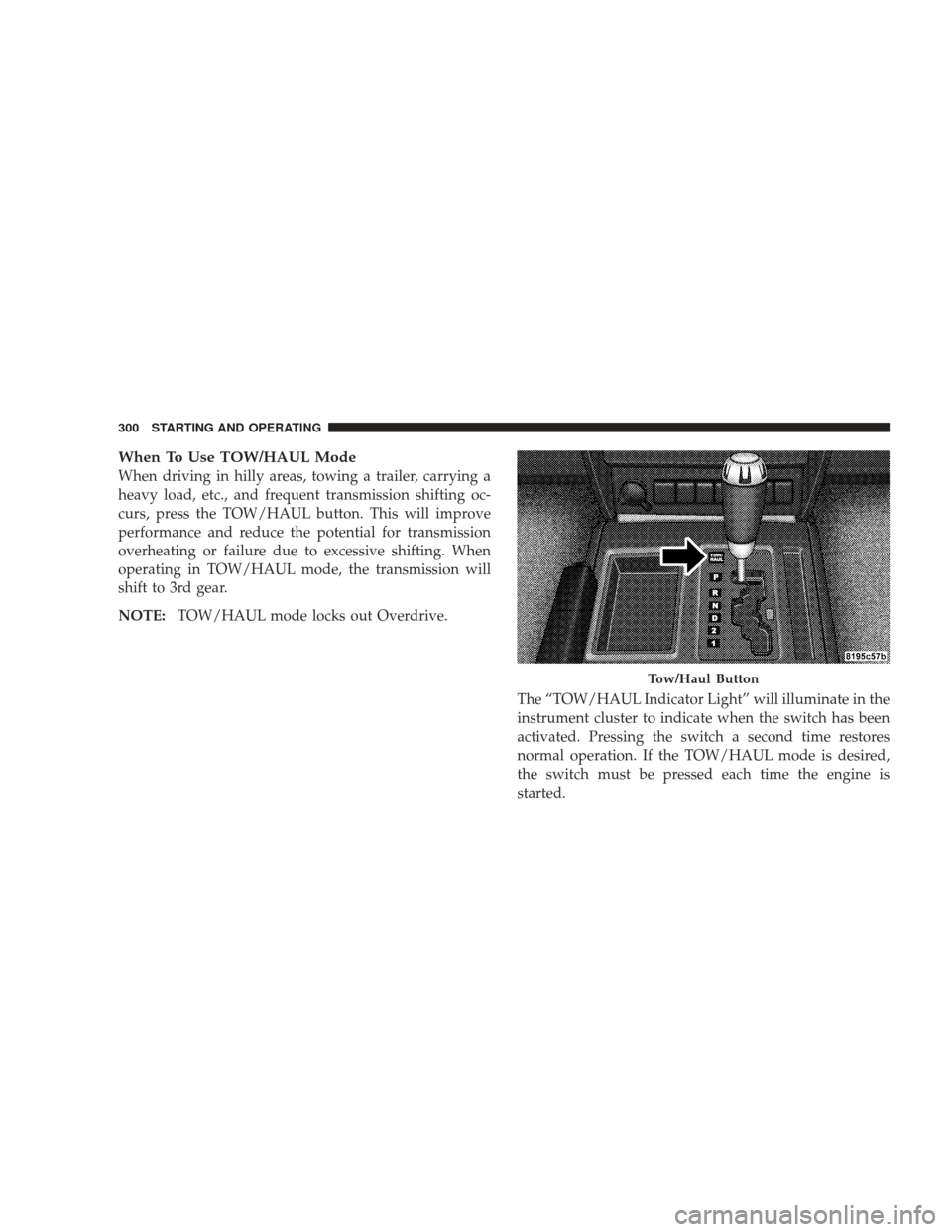
When To Use TOW/HAUL Mode
When driving in hilly areas, towing a trailer, carrying a
heavy load, etc., and frequent transmission shifting oc-
curs, press the TOW/HAUL button. This will improve
performance and reduce the potential for transmission
overheating or failure due to excessive shifting. When
operating in TOW/HAUL mode, the transmission will
shift to 3rd gear.
NOTE:TOW/HAUL mode locks out Overdrive.
The “TOW/HAUL Indicator Light” will illuminate in the
instrument cluster to indicate when the switch has been
activated. Pressing the switch a second time restores
normal operation. If the TOW/HAUL mode is desired,
the switch must be pressed each time the engine is
started.
Tow/Haul Button
300 STARTING AND OPERATING
Page 304 of 506
FOUR-WHEEL DRIVE OPERATION
MP1522 Command-Trac�Transfer Case — If
Equipped
Operating Information and Precautions
The Command-Trac� transfer case provides four posi-
tions:
•Two–wheel drive (2WD) high range
•Four-wheel drive (4WD LOCK) high range
•Four-wheel drive (4WD LOW) low range
•Neutral (N)
This transfer case is intended to be driven in the two-
wheel drive position (2WD) for normal street and high-
way conditions such as dry hard-surfaced roads.
When additional traction is required, select the transfer
case 4WD LOCK position or 4WD LOW position. This position locks the front driveshaft and rear driveshaft
together and forces the front and rear wheels to rotate at
the same speed.
Use the transfer case NEUTRAL position for recreational
towing only. Refer to “Recreational Towing” in this
section for specific procedures on shifting into and out of
NEUTRAL.
CAUTION!
•Do not attempt to make a shift while only the front
wheels or rear wheels are spinning. The MP1522
Command-Trac�
transfer case is not equipped
with a synchronizer and therefore the speed of the
front driveshaft and rear driveshaft must be equal
for the shift to take place. Shifting while only the
front wheels or rear wheels are spinning can cause
damage to the transfer case.
(Continued)
302 STARTING AND OPERATING
Page 307 of 506
4WD Lock
4-Wheel Drive High Range - This range locks the front
driveshaft and rear driveshaft together forcing the front
and rear wheels to rotate at the same speed. Additional
traction for loose or slippery road surfaces only.
4WD Low
4-Wheel Drive Low Range - This range provides low
speed four-wheel drive. Locks the front driveshaft and
rear driveshaft together forcing the front and rear wheels
to rotate at the same speed. Additional traction and
maximum pulling power for loose or slippery road
surfaces only. Do not exceed 25 mph (40 km/h).
N
Neutral - This range disengages both the front driveshaft
and rear driveshaft from the powertrain. To be used for
flat towing behind another vehicle. Refer to “Recreational
Towing” in this section for more information.Transfer Case Position Indicator Lights
The four-wheel drive indicator lights (4WD and 4 LOW)
are located in the instrument cluster. The NEUTRAL
indicator light is located on the 4WD Control Switch. If
there is no indicator light on or flashing, the transfer case
position is two-wheel drive (2WD). If the indicator light
is on, the desired position (4WD LOCK, 4WD LOW, or
NEUTRAL) has been obtained.
If one or more shift requirements are not met:
•An indicator light will flash.
•The transfer casewill notshift.
NOTE: The “SERV 4WD Warning Light” monitors the
electric shift four-wheel drive system. If this light re-
mains on after engine start up, or it illuminates during
driving, it means that the four-wheel drive system is not
functioning properly and that service is required.
STARTING AND OPERATING 305
5
Page 310 of 506
operable. If the ignition switch is not in the ON position,
then the shift will not take place and no position indicator
lights will be on or flashing.
MP3022 Selec-Trac II�Transfer Case — If
Equipped
Operating Information and Precautions
The Selec-Trac II� active on-demand transfer case pro-
vides four positions:
•Two-wheel drive (2WD) high range
•Four-wheel drive Auto (4WD AUTO) high range
•Neutral (N)
•Four-wheel drive (4WD) low range
This transfer case is intended to be driven in either the
two-wheel drive position (2WD) or the four-wheel drive
Auto position (4WD AUTO) for normal street and high-
way conditions such as dry hard-surfaced roads. For added capability when traversing steep grades,
rough terrain, or extremely poor traction surfaces, select
the transfer case 4WD LOW position. This position locks
the front driveshaft and rear driveshaft together and
forces the front and rear wheels to rotate at the same
speed while multiplying engine torque.
Use the transfer case NEUTRAL position for recreational
towing only. Refer to “Recreational Towing” in this
section for specific procedures on shifting into and out of
NEUTRAL.
CAUTION!
•The 4WD LOW position is intended for loose or
slippery road surfaces only. Driving in this posi-
tion on dry hard-surfaced roads may cause in-
creased tire wear and damage to the driveline
components.
(Continued)
308 STARTING AND OPERATING
Page 313 of 506
wide range of conditions, while maximizing driver con-
venience. This position is always in four-wheel drive
mode, with a normal 42% front axle, 58% rear axle torque
split. The system also anticipates and prevents slip by
redirecting torque as necessary, up to 100% to the front or
rear axle, if needed.
4WD Low
Four-Wheel Drive Low Range - This range is for low
speed four-wheel drive. Locks the front driveshaft and
rear driveshaft together forcing the front and rear wheels
to rotate at the same speed. Additional traction and
maximum pulling power for loose or slippery road
surfaces only. Do not exceed 25 mph (40 km/h).
N
Neutral - This range disengages both the front driveshaft
and rear driveshaft from the powertrain. To be used for
flat towing behind another vehicle. Refer to “Recreational
Towing” in this section for more information.Transfer Case Position Indicator Lights
The four-wheel drive indicator lights (4WD, 4 LOW) are
located in the instrument cluster. The NEUTRAL indica-
tor light is located on the 4WD Control Switch. If there is
no indicator light on or flashing, the transfer case posi-
tion is two-wheel drive (2WD). If the indicator light is on,
the desired position (4WD AUTO, 4WD LOW, or NEU-
TRAL) has been obtained.
If one or more shift requirements are not met:
•An indicator light will flash.
•The transfer casewill notshift.
NOTE: The “SERV 4WD Warning Light” monitors the
electric shift four-wheel drive system. If this light re-
mains on after engine start up, or it illuminates during
driving, it means that the four-wheel drive system is not
functioning properly and that service is required.
STARTING AND OPERATING 311
5
Page 329 of 506

WARNING!
Many factors, such as vehicle loading, road condi-
tions, and driving conditions, influence the chance
that wheel lift or rollover may occur. Electronic Roll
Mitigation (ERM) cannot prevent all wheel lift or
rollovers, especially those that involve leaving the
roadway or striking objects or other vehicles. Only a
safe, attentive, and skillful driver can prevent acci-
dents. The capabilities of an ERM-equipped vehicle
must never be exploited in a reckless or dangerous
manner, which could jeopardize the user’s safety or
the safety of others.
Trailer Sway Control (TSC) — If Equipped
TSC uses sensors in the vehicle to recognize an exces-
sively swaying trailer. TSC activates automatically once
the excessively swaying trailer is recognized. When TSC
is functioning, the “ESP/TCS Indicator Light” will flash,the engine power will be reduced, and you will feel the
brake being applied to individual wheels in an attempt to
stop the trailer from swaying.
NOTE:
The TSC is disabled when the ESP system is in
the “Partial Off” mode and “Full Off” mode.
WARNING!
•Trailer Sway Control (TSC) cannot stop all trailers
from swaying. Always use caution when towing a
trailer and follow the tongue weight recommenda-
tions. Refer to ”Vehicle Loading” and “Trailer
Towing” in this section for more information be-
fore towing a trailer with your vehicle.
•If TSC activates while towing a trailer, stop the
vehicle at the nearest safe location and adjust the
trailer load to eliminate the trailer sway.
(Continued)
STARTING AND OPERATING 327
5
Page 331 of 506
WARNING!
There may be situations where the Hill Start Assist
(HSA) will not activate and slight rolling may occur,
such as on minor hills (i.e., less than 7%), or with a
loaded vehicle, or while pulling a trailer. HSA is not
a substitute for active driving involvement. It is
always the driver ’s responsibility to be attentive to
distance to other vehicles, people, and objects, and
most importantly brake operation to ensure safe
operation of the vehicle under all road conditions.
Your complete attention is always required while
driving to maintain safe control of your vehicle.
Failure to follow these warnings can result in an
accident or serious personal injury.
Towing with HSA
HSA will provide assistance during acceleration on an
incline while towing a trailer.
WARNING!
•If you use a trailer brake controller with your
trailer, the trailer brakes may be activated and
deactivated with the brake switch. If so, there may
not be enough brake pressure to hold both the
vehicle and the trailer on a hill when the brake
pedal is released. In order to avoid rolling down
an incline while resuming acceleration, manually
activate the trailer brake or apply more vehicle
brake pressure prior to releasing the brake pedal.
•HSA is not a parking brake. Always apply the
parking brake fully when leaving your vehicle.
Also, be certain to leave the transmission in PARK.
•Failure to follow these warnings can result in an
accident or serious personal injury.
STARTING AND OPERATING 329
5
Page 345 of 506
NOTE:Under a maximum loaded vehicle condition,
gross axle weight ratings (GAWRs) for the front and rear
axles must not be exceeded. For further information on
GAWRs, vehicle loading, and trailer towing, refer to
“Vehicle Loading” in this section.
To determine the maximum loading conditions of your
vehicle, locate the statement “The combined weight of
occupants and cargo should never exceed XXX lbs or
XXX kg” on the Tire and Loading Information placard.
The combined weight of occupants, cargo/luggage and
trailer tongue weight (if applicable) should never exceed
the weight referenced here. Steps for Determining Correct Load Limit
1. Locate the statement “The combined weight of occu-
pants and cargo should never exceed XXX lbs or XXX kg”
on your vehicle’s placard.
2. Determine the combined weight of the driver and
passengers that will be riding in your vehicle.
3. Subtract the combined weight of the driver and pas-
sengers from XXX lbs or XXX kg.
4. The resulting figure equals the available amount of
cargo and luggage load capacity. For example, if “XXX”
amount equals 1,400 lbs (635 kg) and there will be five
150 lb (68 kg) passengers in your vehicle, the amount of
available cargo and luggage load capacity is 650 lbs
(295 kg) (since 5 x 150 = 750, and 1400 – 750 = 650 lbs
[295 kg]).
STARTING AND OPERATING 343
5