2009 JAGUAR XF Safety
[x] Cancel search: SafetyPage 230 of 391
Wheels and tyres
230
Jaguar tyre repair kit safety information
WARNINGS
Some tyre damage may only be
partially sealed, or may not seal at all,
depending on the amount and type of
damage. Any loss of tyre pressure can
seriously affect vehicle safety.
Do not use the tyre repair kit if the tyre
has been damaged by driving while
under-inflated.
Only use the tyre repair kit to seal
damage located within the tyre tread
area.
Do not use the tyre repair kit to seal
damage to the tyre sidewall.
Do not exceed 80 km/h (50 mph)
when a repaired tyre is fitted to the
vehicle.
The maximum distan ce that should
be driven when a repaired tyre is
fitted, is 200 km (125 miles).
When a repaired tyre is fitted, drive
with caution and avoid sudden
braking or steering manoeuvres.
Only use the tyre repair kit for the
vehicle with which it was supplied.
Do not use the tyre repair kit for any
other purpose than tyre repair.
Never leave the tyre repair kit
unattended when in use.
Only use the tyre repair kit within the
-30 °C to +70 °C temperature range.
Always keep children and animals at a
safe distance from the tyre repair kit
when in use.
Do not stand dire ctly beside the
compressor when it is operating.Check the tyre sidewall prior to
inflation. If any cracks, damage or
deformities are apparent, do not
inflate the tyre.
Watch the tyre sidewall during
inflation. If any cracks, bumps or
similar damage, or deformities
appear, switch off the compressor and deflate
the tyre.
WARNINGS
Page 251 of 391

251
Status after a collision
DRIVING AFTER A COLLISION
Before starting or driving
If the vehicle has been involved in an accident
it should be checked thoroughly before
attempting to start the engine or drive the
vehicle.
Check for:-
• Fuel leaks.
• Fluid leaks.
• Battery damage.
• Damage to wiring.
• Damage to lights.
• Damage to steering, suspension, wheels
or tyres.
• Sharp or protruding bodywork.
• Operation of doors and locks.
• Condition and operation of seat belts and
SRS components.
• Activation of the pe destrian protection
system.
• Condition of chil d seats and their
mounting/attach ment points.
Note: This list is not exhaustive.
Resetting the fuel cut-off
The fuel system cut-off forms part of the Safety
and Restraint System (SRS) fitted to your
vehicle. Following an impact, and depending on
the severity, the fuel pump may be switched
off.
1.Switch the ignition off, and wait for 10
seconds.
2. Without pressing the brake pedal, press
the engine START/STOP button, to switch
the electrical circuits on. Wait for 30
seconds.
3. Check the vehicle thoroughly for fuel leaks.
If a leak is detected switch the ignition off
immediately.
•The vehicle must not be started if a leak
is present. Seek qualified advice, and
have the vehicle recovered.
4. If no leaks are detected, start the engine.
WARNING
If the vehicle is involved in a collision
it should be checked by a Dealer/
Authorised repairer, or suitably
qualified personnel, before starting or driving.
WARNING
The fuel cut-off should never be reset
if you can smell fuel, or a leak can be
seen. Doing so can lead to a fire
which may cause personal injury or death.
Page 252 of 391
Status after a collision
252
When driving
When driving a vehicle which has been
involved in a collision use caution and pay extra
attention to the operation of the vehicle. If any
changes in vehicle operation after the collision
are noted when compared to it's operation
before the collision, do not continue to drive
the vehicle. Stop the vehi cle as soon as it is
safe to do so, and have the vehicle recovered.
Pay particular attent ion to changes in:-
• Steering.
• Braking.
• Unusual noises.
• Warning lights or messages displayed.
• Problems with electrical systems.
INSPECTING SAFETY SYSTEM
COMPONENTS
Following a collision the seat belt and
Supplementary Restrain t System components
should be inspected for damage and/or
deformity. The inspection and any subsequent
repair work should only be carried out by a
Dealer/Authorised Repair er, or other suitably
qualified personnel.
Components which require inspection
include:-
• Seat belt webbing and mechanisms.
• Seat belt pre-tensioners.
• Airbag covers and modules.
• Seat frames a nd mounting points.
• Child seats.
• Child seat anchor points.
• Pedestrian prot ection system.
Note: This list is not exhaustive.
In addition to the physical items checked, the
electronic control system and its associated
wiring should also be checked thoroughly. This
process will include a diagnostic check which
can only be carried out by a Dealer/Authorised
repairer or suitably qualified and equipped
persons.
WARNING
It is not recommended that the
vehicle be driven or used until all of
the occupant protection systems
have been checked.
Page 283 of 391
283
Digital audio broadcasting
DISPLAY OPTIONS
Touch-screen information panel
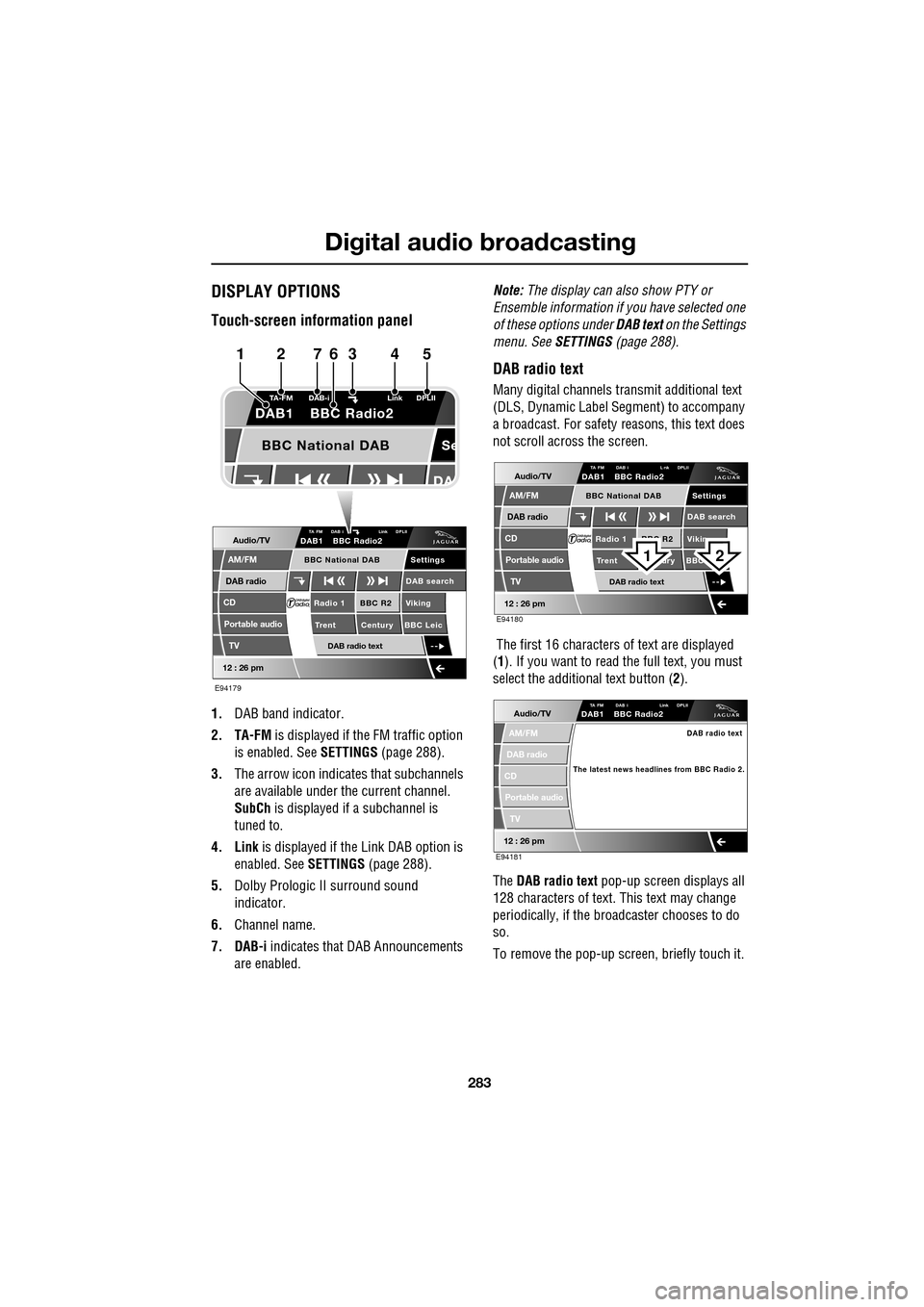
1.DAB band indicator.
2. TA-FM is displayed if the FM traffic option
is enabled. See SETTINGS (page 288).
3. The arrow icon indicates that subchannels
are available under the current channel.
SubCh is displayed if a subchannel is
tuned to.
4. Link is displayed if th e Link DAB option is
enabled. See SETTINGS (page 288).
5. Dolby Prologic II surround sound
indicator.
6. Channel name.
7. DAB-i indicates that DAB Announcements
are enabled. Note:
The display can also show PTY or
Ensemble information if you have selected one
of these options under DAB text on the Settings
menu. See SETTINGS (page 288).
DAB radio text
Many digital channels tr ansmit additional text
(DLS, Dynamic Label Segment) to accompany
a broadcast. For safety reasons, this text does
not scroll across the screen.
The first 16 characters of text are displayed
(1 ). If you want to read the full text, you must
select the additional text button ( 2).
The DAB radio text pop-up screen displays all
128 characters of text. This text may change
periodically, if the broadcaster chooses to do
so.
To remove the pop-up screen, briefly touch it.
Audio/TV
DAB radio
CD
AM/FM
12 : 26 pm
BBC R2 Viking
Trent Century BBC LeicRadio 1
Settings
DAB search
TA FM DAB i Link DPLIIDAB1 BBC Radio2
Portable audio
TV
DAB radio text
BBC National DAB
Se
TA-FM DAB-i
Link DPLII
DAB1 BBC Radio2
BBC National DAB
E94179
1234567
Audio/TV
DAB radio
CD
AM/FM
12 : 26 pm
BBC R2 Vikin
Trent ury BBC Radio 1
Settings
DAB search
TA FM DAB i L nk DPLIIDAB1 BBC Radio2
Portable audio
TV
DAB radio text
BBC National DAB
E94180
21
Audio/TV
DAB radio
CD
AM/FM
12 : 26 pm
TA FM DAB i Link DPLIIDAB1 BBC Radio2
Portable audio
TV
DAB radio text
The latest news headlines from BBC Radio 2.
E94181
Page 309 of 391

309
Telephone
Safety
Driving
Check local regulations covering the use of
in-car telephones in the areas that you intend to
use your telephone, and always obey them.
Observe the following guidelines if you are
using the phone when driving.
• Give full attention to driving - safe driving
is your prime responsibility.
• Always use hands-free operation when
driving.
• When receiving a call, if driving conditions
demand, pull off the road and park.
Electronic devices
Most modern electronic equipment is shielded
from Radio Frequency (R F) signals. However,
certain equipment may not be shielded against
RF signals from your phone.
Pacemakers
The Health Industry Manufacturers'
Association recommends that a minimum
separation of 15 centimetres (six inches) is
maintained between a wireless phone antenna
and a pacemaker, to avoid potential
interference with the pacemaker. These
recommendations are consistent with the
independent research by, and
recommendations of, Wireless Technology
Research.
TELEPHONE PAIRING AND DOCKING
Before use, your mobile phone must be paired
and docked with the vehicle’s Bluetooth
system. This is done via your mobile phone or
the touch-screen.
Pairing and docking using your mobile
phone
Follow the steps below, to pair and dock your
phone with the vehicle using your mobile
phone.
Note: The process of pairing and docking your
phone with the vehicle using the mobile phone,
will vary depending on the type of mobile
phone used.
3. Ensure that the ignition is on and the
touch-screen is active.
4. Ensure that there is no mobile phone
currently docked with the vehicle's
Bluetooth system. If a mobile phone is
docked with the system, you will not be
able pair and dock another phone until the
current phone has been undocked. To
undock a phone, select Phone or Comms
on the home screen, then Settings and
then Undock .
5. Using the mobile phone, search for
Bluetooth devices. See your phone's
operating instructions for further
information.
WARNING
Read the following information
thoroughly before using your
telephone.
nametag
Register
Voice mail
Answer options
Phone options
Change phone
E96911
Comms
Add phone
Search new
Docked phone: Nokia 6230i
Undock
Page 328 of 391
Television
328
GENERAL INFORMATION
Introduction
TV viewing is possible when the vehicle is
stationary with the transmission in the P (Park)
position. The TV pictur e can be viewed in
preview mode or full-screen.
If the vehicle is moving when TV is selected or
if the vehicle is driven off when the TV is
operating, a warning message will display, the
TV picture will cease and only audio reception
is available.
Note: Japan market: The TV will operate
normally up to speeds of 5 km/h (3 mph), after
which the TV picture will cease and only audio
reception is available.
TV sound is provided through the audio system
speakers.
TV reception
Repositioning the vehicle may improve the
picture whereas in diffic ult locations (distant
transmitter, hills etc.), reception may not be
possible at all. Sound quality may also be
affected to a lesser degree by loss of signal,
which can give rise to variable quality over
short distances while on the move.
Note: Television systems re quire consistent
and strong signals for go od quality reception.
These signals are affected by transmitter
coverage and surrounding features (hills, high
buildings, trees etc.) which will reduce the
signal, thus redu cing picture quality.
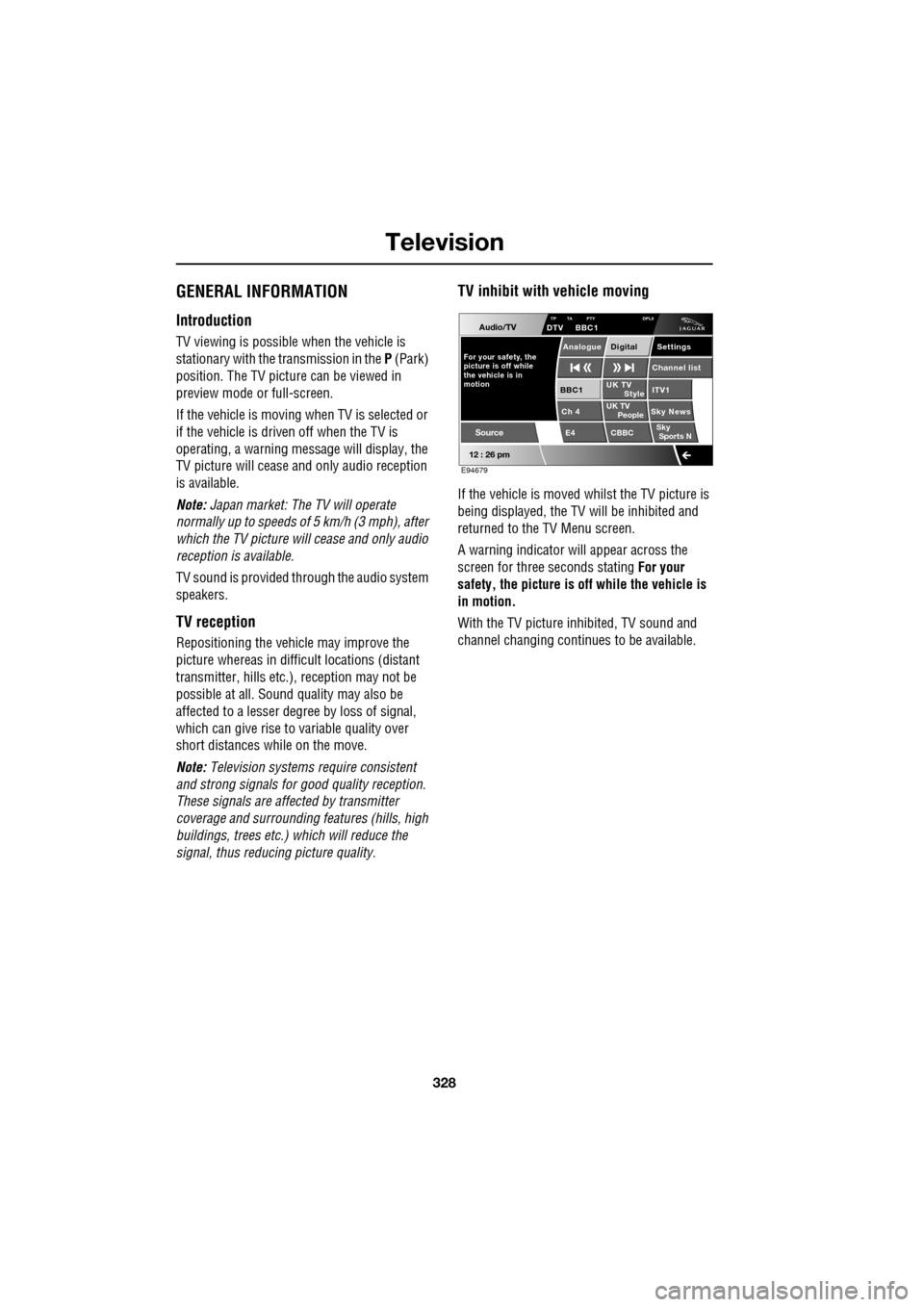
TV inhibit with vehicle moving
If the vehicle is moved whilst the TV picture is
being displayed, the TV will be inhibited and
returned to the TV Menu screen.
A warning indicator will appear across the
screen for three seconds stating For your
safety, the picture is of f while the vehicle is
in motion.
With the TV picture inhibited, TV sound and
channel changing contin ues to be available.
Audio/TV
12 : 26 pm
UK TV
ITV1
Ch 4 Sky News E4 CBBCBBC1
Settings
Channel list
TP TA PTY DPLIIDTV BBC1
Style
UK TV People
SkySports N
Source
For your safety, the
picture is off while
motion the vehicle is inAnalogue Digital
E94679
Page 334 of 391

Navigation system
334
THE NAVIGATION SYSTEM
Loading the navigation DVD
Note: Before use, ensure that the navigation
DVD player is loaded with the correct mapping
DVD for your country. The navigation DV
D player is located behind an
access panel on the left-hand side of the
luggage compartment. The trim panel will need
to be removed (as shown) to access the DVD
player.
• Turn on the vehicle ignition.
• Move the lock/unlock button to the unlock
position ( 1).
• Press the unload button ( 2) to eject a DVD,
if one is installed in the DVD player.
• Load the correct Navigation System DVD
with the printed side upwards.
• Move the lock/unlock button to the locked
position. Replace the access cover.
SATELLITE SIGNALS
The system uses signa ls from the Global
Positioning Syst em (GPS) satellites, which
allow the approximate posi tion of the vehicle to
be calculated. This is combined with
information from vehi cle sensors and data
from the Navigation DVD, to establish the true
vehicle position.
The navigation computer then integrates this
data with the information stored on the DVD,
enabling you to plan and follow a route to your
desired destination.
WARNING
In the interests of road safety, only
operate, adjust or view the system
when it is safe to do so.
JAG0840
CAUTION
Do not allow moisture, dirt or foreign
objects to enter the slot.
Page 380 of 391

Navigation system
380
THE DISCLAIMER OF WARRANTY AND
LIMITATION OF LIABILITY, SET FORTH IN
THIS AGREEMENT, DO NOT AFFECT OR
PREJUDICE YOUR STATUTORY RIGHTS
WHERE YOU HAVE ACQUIRED THE
DATABASE OTHERWISE THAN IN THE
COURSE OF A BUSINESS. Some states and
laws do not allow the exclusion of implied
warranties, so the abov e disclaimer may not
apply to you.
Government end users
If the DATABASE is for a region of North
America and is being acqui red by or on behalf
of the United States government or any other
entity seeking or applyi ng rights similar to
those customarily claimed by the United States
government, the DATABASE is licensed with
‘limited rights’. Utilization of the DATA
BASE is subject to the
restrictions specified in the ‘Rights in Technical
Data and Computer Database’ clause at DFARS
252.227–7013, or the equivalent clause for
non-defence agencies. Manufacturer of the
DATABASE of North America is NAVTEQ
Corporation, 10400 W. Higgins Road, Suite
400, Rosemont, Illinois 60018, USA.
EUROPEAN DECLARATION OF
CONFORMITY
Hereby, DENSO CORPORATION
declares that this DN-NS-019 is in
compliance with the essential
requirements and other relevant
provisions of Directive 1999/5/EC.WARNING
The DATABASE reflects reality as
existing before you received the
DATABASE and it comprises data and
information from government and other
sources, which may contain errors and
omissions. Accordingly, the DATABASE may
contain inaccurate or incomplete information
due to the passage of time, changing
circumstances, and due to the nature of the
sources used. The DATABASE does not
include or reflect inform ation on - inter alia -
neighbourhood safety; law enforcement;
emergency assistance; construction work;
road or lane closures; vehicle or speed
restrictions; road slope or grade; bridge
height, weight or other limits; road or traffic
conditions; special even ts; traffic congestion;
or travel time.