2009 JAGUAR XF jaguar
[x] Cancel search: jaguarPage 43 of 391

43
Seats
1.Cushion length adjustment.
2. Bolster adjustment:
A. Bolster inflate.
B. Bolster deflate.
3. Lumbar support adjustment.
4. Seat back angle adjustment.
5. Head restraint height adjustment.
6. Height adjustment.
7. Fore and aft adjustment.
8. Cushion front tilt adjustment.
To adjust the seats, the Jaguar Smart Key must
be in the vehicle and the ignition turned on.Driving position memory
1. Memory preset 1.
2. Memory preset 2.
3. Memory Set button.
4. Indicator light.
Once you have adjusted the driver's seat,
steering column and exte rior mirrors for your
ideal driving position, the vehicle can
memorise these settings for future use.
1. Press the memory set button to activate
the memory function.
2. Press one of the preset buttons within five
seconds to memorise the current settings.
An audible chime will sound and MEMORY
1 (or 2) SETTINGS SAVED is displayed in
the message centre, to confirm the
settings have been memorised.
A seat position can onl y be memorised during
the five second active period.
Any existing settings for a memory preset will
be over-written when programming a memory
position.
Recalling a memorised position
Press the appropriate memory preset button (1
or 2), MEMORY 1 (or 2) SETTINGS RECALLED
will be displayed in the message centre.
WARNINGS
Do not adjust a seat while the vehicle
is moving. Failure to follow this
instruction could potentially cause
personal injury or loss of vehicle control.
Before making rearward, height or
reclining seat adjustments, check that
the rear passenger has adequate leg
room.
The driver and front passenger must
not ride with the seat fully reclined.
E93239
4
3
2
1
Page 55 of 391

55
Supplementary restraints system
Note: The general location of airbags fitted to
the vehicle are marked by the word AIRBAG.
Always contact your Dealer/Authorised
repairer if:-
• An airbag inflates.
• The front or sides of the vehicle are
damaged.
• Any part of the SRS shows signs of
cracking or damage, including trim
covering airbags.
Airbag operation
Airbags cannot deploy co rrectly if they are
obstructed. Examples of obstructions are:-
• Any part of an occu pants body in contact
with, or close to, an airbag covering.
• Objects placed on, or close to, an airbag
cover.
• Clothing, sun screens, or other material
hanging from grab handles.
• Clothing, cushions, or other material,
covering seat mounted airbags.
• Seat covers which are not approved by
Jaguar, or specifical ly designed for use
with seat mounted airbags.
• Luggage that intrudes into the area that
will be occupied by a deploying airbag
system.
This list is not exhausti ve and it remains the
responsibility of the driv er and passengers to
ensure that the airbags are not obstructed in
any way.
Deployment and deflation
In the event of a collisi on, the restraints control
system monitors the rate and direction of
deceleration. If required to supplement the seat
belts, airbags will be deployed as appropriate.
After operation, frontal airbags do not retain
pressure.
Front airbags
The front passenger’s and driver’s airbags are
able to deploy in two stages, depending on the
severity of the frontal impact. In a severe
impact, the airbags inflate fully to offer
maximum protection. In a lower severity
impact, less inflation ma y be required, so the
airbags inflate in a different manner.
WARNINGS
Phone systems should only be
installed by qualified persons familiar
with the operation of, and
requirements for, vehicles fitted with SRS. If
you are in any doubt, seek advice from your
Jaguar Dealer/Authorised repairer.
WARNINGS
For the airbags to operate correctly
the roof lining and door post trims
must be in good condition, correctly
fitted, and free from obstruction. Any damage,
wear, or incorrect fitmen t should be referred to
your Dealer/Authorised repairer as soon as
possible for examination and repair.
Do not allow passe ngers to obstruct
the operation of the airbags by
placing any part of their person, or
any objects, in contact with, or close to, an
airbag module. Airbags deploy at very high
speeds and can cause se rious injury or death
if objects or occupants are within the area of
deployment.
Page 56 of 391
Supplementary restraints system
56
Side and curtain airbags
To ensure that the side and curtain airbags are
fully effective:
Side and curtain airbags are designed to offer
increased protection for the torso and head in
a side impact. The curtain airbags may deflate
at a slower rate than the front or side airbags,
to afford prolonged protection.
Airbag deployment effects
WARNINGS
Do not allow passe ngers to obstruct
the operation of the airbags by
placing any part of their person, or
any objects, in contact with, or close to, an
airbag module. Airbags deploy at very high
speeds and can cause se rious injury or death
if objects or occupants are within the area of
deployment.
Do not sit too close to, lean or
sleep against the door trim. The
side and curtain airbags could
injure you as they deploy.
Do not lean out of the window.
Only use approved accessories (e.g.
seat covers).
Due to the function of the curtain
airbag deployment, consult your
Jaguar Dealer/Autho rised Repairer,
prior to installing any accessories in the upper
environment/pillar trim area (e.g. hands-free
telephone kits).
WARNINGS
When an airbag inflates, a by-product
of the gas generation may be released
as small particles. It is possible that
this may cause irritation and should be
thoroughly flushed from th e eyes and any cuts
or abrasions.
After inflation, some airbag
components are at high
temperatures. To prevent injury, do
no touch the airbag components until they
have cooled.
In order to react with sufficient speed,
airbags are deployed by a pyrotechnic
device. Consequently, airbag
deployment is accomp anied by a very loud
noise which may caus e discomfort and
temporary loss of hearing.
Page 59 of 391
59
Child safety
CHILD SEATS
The seat belts fitted to your vehicle are
designed for adults and larger children. For
their safety, it is very important for all infants
and children under 12 years of age to be
restrained in a suitable child safety seat
appropriate to their age and size.
Children are always safest when seated in a
rear seating position.
If it is essential that a child travels in the front
passenger seat, Jaguar recommends that the
following preparations are made before fitting
the child restraint.
• Adjust the front passenger seat fully
rearwards.
• Adjust the lumbar support to its minimum
support position.
• Adjust the seat cushion to its highest
position. If cushion front tilt adjustment is
possible, adjust it to its lowest position.
• Adjust the seat back to the fully upright
position.
• Adjust the seat be lt adjustable upper
anchorage to its lowest position.
In some countries, legislation prohibits
children travelling in the front of a vehicle.
Ensure that you are familiar with the legislation
in force where the vehicle is being used and are
in full compliance.
WARNINGS
Do not use a child restraint on a seat
protected by an airbag in front of it.
There is a risk of death or serious
injury when the airbag deploys.
Crash statistics show that children
are safest when properly restrained in
a child or infant restraint system that
is secured in a rear seating position.
For optimum safety , children should
travel in the rear of the vehicle at all
times; front passenge r seat travel is
not recommended. However, if it is
essential that a child travels in the front, set the
vehicle seat fully rearward and seat the child in
an approved forward-facing child seat. Do not
use a rear-facing child seat - an inflating airbag
could impact with the seat and cause serious
injury.
Do not use a forward facing child seat
until the child using it is above the
minimum weight of 9 kg (20 lb.) and
able to sit up unaided. Up to the age of two, a
child's spine and neck are not sufficiently
developed to avoid injury in a frontal impact.
Do not allow a baby or infant to be
held or carried on the lap. The force of
a crash can increase effective body
weight by as much as thirty times, making it
impossible to hold onto the child.
Children typically require the use of a
booster seat appropriate to their age
and size, thereby enabling the seat
belts to be properly fitted, reducing the risk of
injury in a crash. Children could be
endangered in a crash if their child restraints
are not properly secured in the vehicle.Do not use a chil d seat that hooks
over the seat back. This type of seat
cannot be satisfacto rily secured and
is unlikely to be safe for your child.
WARNINGS
Page 61 of 391
61
Child safety
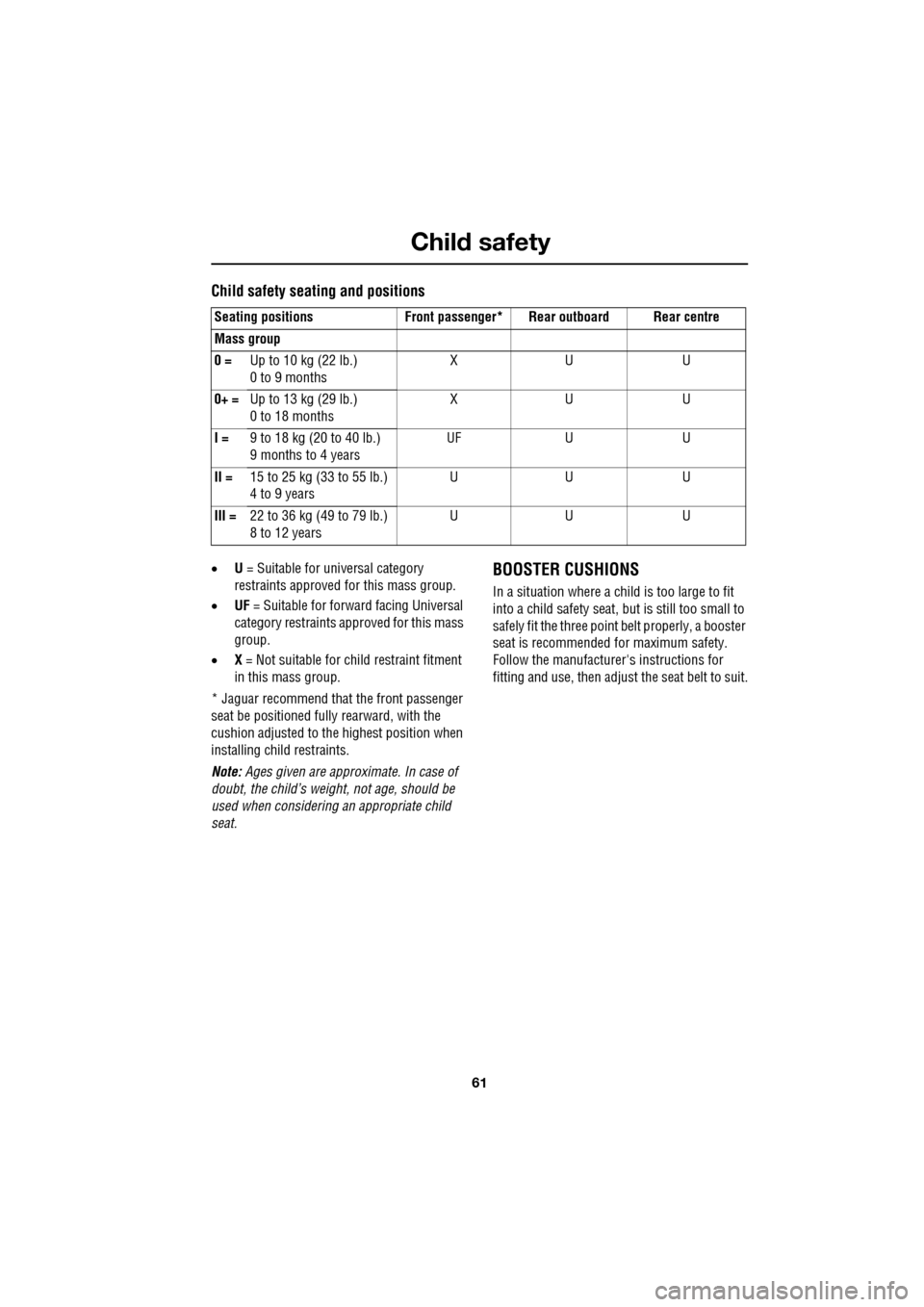
Child safety seating and positions
•U = Suitable for universal category
restraints approved for this mass group.
• UF = Suitable for forward facing Universal
category restraints approved for this mass
group.
• X = Not suitable for child restraint fitment
in this mass group.
* Jaguar recommend that the front passenger
seat be positioned fully rearward, with the
cushion adjusted to the highest position when
installing child restraints.
Note: Ages given are approximate. In case of
doubt, the child’s weight, not age, should be
used when considering an appropriate child
seat.BOOSTER CUSHIONS
In a situation where a child is too large to fit
into a child safety seat, but is still too small to
safely fit the three point belt properly, a booster
seat is recommended for maximum safety.
Follow the manufacturer's instructions for
fitting and use, then adjust the seat belt to suit.
Seating positions Front passen
ger* Rear outboard Rear centre
Mass group
0 = Up to 10 kg (22 lb.)
0 to 9 months XU U
0+ = Up to 13 kg (29 lb.)
0 to 18 months XU U
I = 9 to 18 kg (20 to 40 lb.)
9 months to 4 years UF
UU
II = 15 to 25 kg (33 to 55 lb.)
4 to 9 years UU U
III = 22 to 36 kg (49 to 79 lb.)
8 to 12 years UU U
Page 62 of 391
Child safety
62
CHILD SEAT ANCHOR POINTS
ISOFIX anchor points (not Australia)
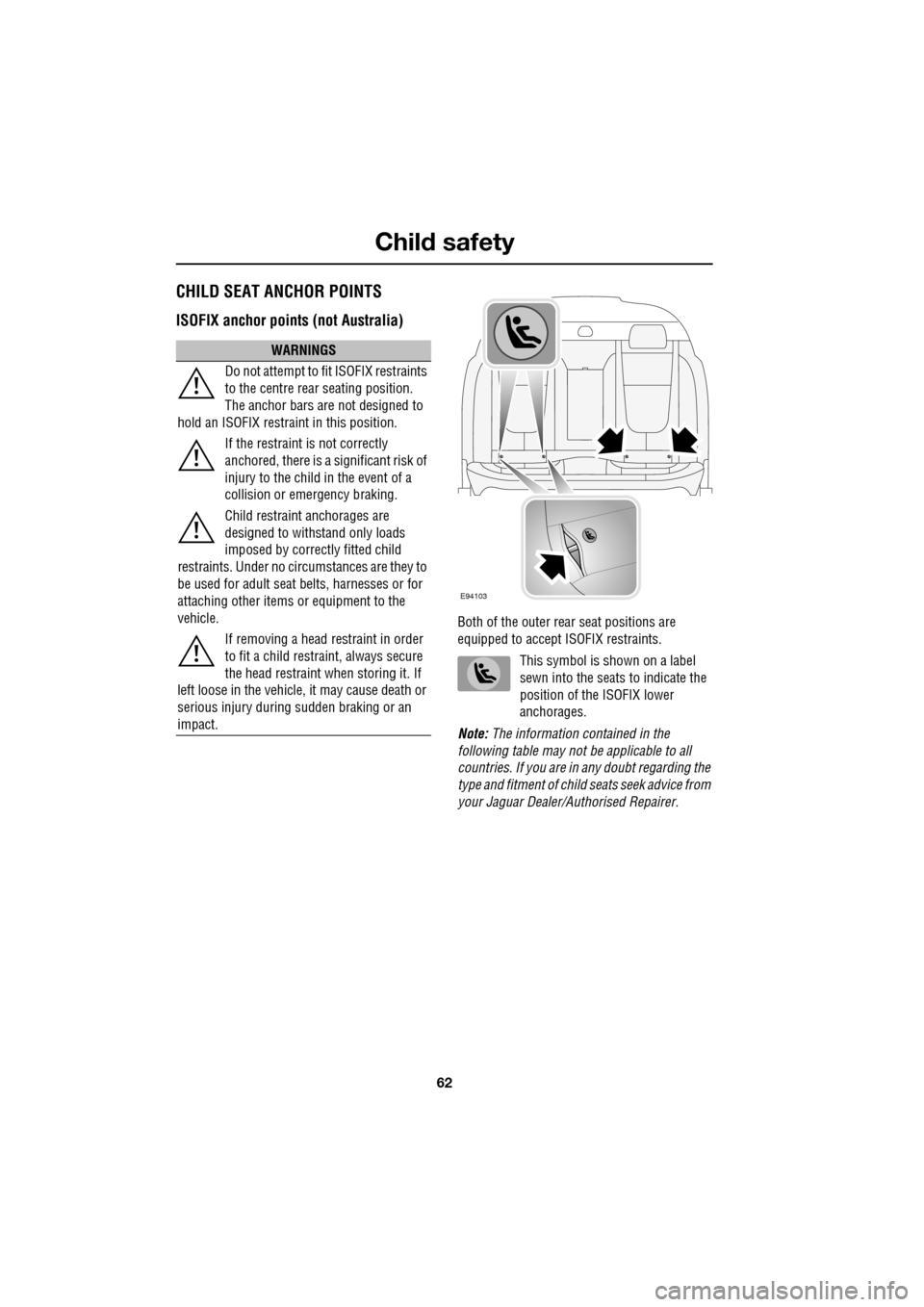
Both of the outer rear seat positions are
equipped to accept ISOFIX restraints.
This symbol is shown on a label
sewn into the seats to indicate the
position of the ISOFIX lower
anchorages.
Note: The information contained in the
following table may not be applicable to all
countries. If you are in any doubt regarding the
type and fitment of child seats seek advice from
your Jaguar Dealer/A uthorised Repairer.
WARNINGS
Do not attempt to fit ISOFIX restraints
to the centre rear seating position.
The anchor bars are not designed to
hold an ISOFIX restraint in this position.
If the restraint is not correctly
anchored, there is a significant risk of
injury to the child in the event of a
collision or emergency braking.
Child restraint anchorages are
designed to withstand only loads
imposed by correctly fitted child
restraints. Under no circumstances are they to
be used for adult seat belts, harnesses or for
attaching other items or equipment to the
vehicle.
If removing a head restraint in order
to fit a child restraint, always secure
the head restraint when storing it. If
left loose in the vehicle, it may cause death or
serious injury during sudden braking or an
impact.
E94103
Page 69 of 391

69
Steering wheel
AUDIO CONTROL
1.Rotate (up or down) to increase or
decrease volume.
2. Rotate (up or down) a nd release, to scroll
up or down through preset radio stations
or CD tracks.
Rotate and hold (for two seconds) to select
the next or previous radio station on the
waveband, or to select the next or previous
loaded CD (on multi-disc CD players).
3. Press repeatedly to scroll through the
audio source options, comprising: FM1,
FM2, AM, CD, DAB radi o, Auxiliary input,
Portable Audio Interface and TV options.
Press and hold (for two seconds) to select
Phonebook view (when a phone is
connected to the system).
4. Press to mute the audio unit.
Press to dial, answer or end a phone call.
VOICE CONTROL
JaguarVoice control pr ovides a safe and
convenient way of operating certain vehicle
systems, without the need to operate the
controls manually.
Voice commands are av ailable for the phone,
navigation and touch-scre en display systems,
and a notepad facility is provided, to allow
voice notes to be recorded. Help and tutorial
functions provide advi ce on operating the
system. Information on JaguarVoice operation
of the telephone and navigation systems is
detailed later in this handbook.
See TELEPHONE VOICE CONTROL (page 323).
See USING VOICE CONTROL (page 373).
The system is controlle d using the voice button
on the steering wheel (arrowed). Voice
commands are picked up by a dedicated
microphone and audible fee dback will be heard
through the audio system speakers.12
43E91129
E95902
Page 71 of 391

71
Steering wheel
Cancelling voice control
To cancel a voice command, press and hold the
Voice button on the steering wheel until a
double tone is heard.
Note: If a phone call is received during a voice
session, voice control is cancelled.
Voice system tutorial
To listen to a tutorial on how to use
JaguarVoice, press and release the voice
button and, after the tone, say VOICE
TUTORIAL .
The tutorial is divided into four lessons and has
a total duration of approximately four minutes.
The tutorial can only be undertaken with the
vehicle stationary and parked.
The tutorial can also be accessed via the
touch-screen.
1. Select Comms from the Home menu.
2. From the Comms menu, select Voice.
3. From the Voice menu, select Operating
guide and then select Tutorial. To cancel the tutorial, press and release the
Voice button and say
CANCEL. To skip to the
previous or next lesson of the tutorial, press
and release the Voice button and say
PREVIOUS or NEXT .
Command help
For a list of the most commonly used voice
commands, press and release the Voice button
and, after the tone, say the appropriate
command from the following list:
• VOICE HELP
• NAVIGATION HELP
• PHONE HELP
• DISPLAY HELP
• NOTEPAD HELP
Voice
12 : 26 pm
Add phone nametags
Comm Operating guide
Settings
E96025
Voice
12 : 26 pm
To give a voice command briefly press
the voice button and speak normally
after the tone
Tutorial will help you start to use your
voice control system
Tutorial