Page 318 of 391
Telephone
318
NAMES
Directory name search
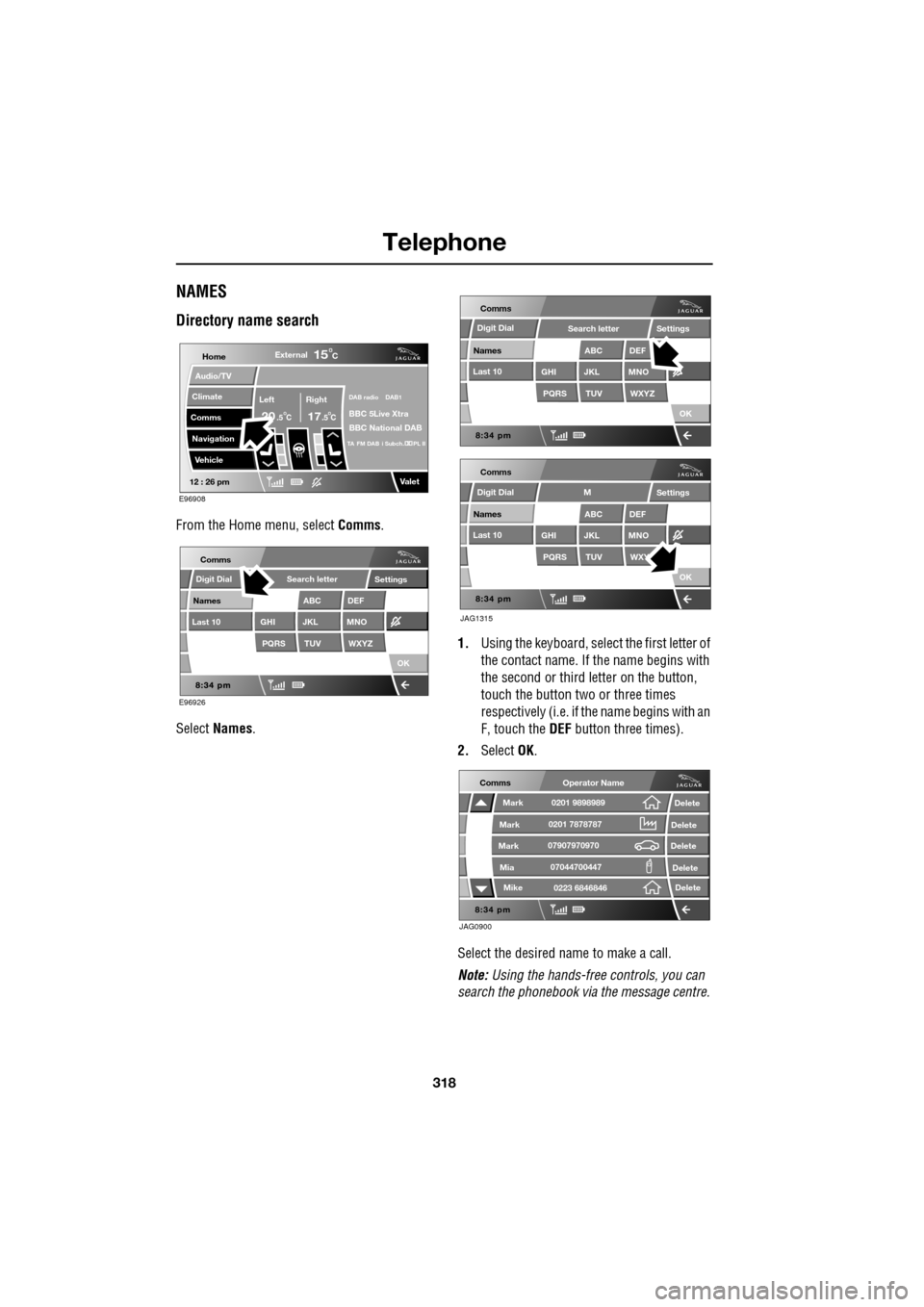
From the Home menu, select Comms.
Select Names . 1.
Using the keyboard, select the first letter of
the contact name. If th e name begins with
the second or third letter on the button,
touch the button two or three times
respectively (i.e. if th e name begins with an
F, touch the DEF button three times).
2. Select OK.
Select the desired name to make a call.
Note: Using the hands-free controls, you can
search the phonebook via the message centre.
Home
Audio/TV
Climate
Comms
Navigation
VehicleExternal
Left Right
20 17CC
15C
.5 .5
DAB radio DAB1
BBC 5Live Xtra
BBC National DAB
TA FM DAB i Subch. PL II
Valet12 : 26 pm
E96908
E96926
Comms
Digit Dial
Names
Last 10
Settings
PQRS
GHITUV
ABC
JKL
WXYZ
DEF
MNO
Search letter
OK
Comms
Comms
Names
Last 10
Settings
PQRS
GHITUV
ABC
JKL
WXYZ
DEF
MNO
Search letter
OK
Names
Last 10
Settings
PQRS
GHITUV
ABC
JKL
WXY
DEF
MNO
M
OK
JAG1315
Digit Dial
Digit Dial
JAG0900
Comms
Delete
Delete
Delete
Delete
Delete
Mark
Mark
Mark
Mike
Mia0201 9898989
0201 7878787
0223 6846846
07907970970
07044700447
Operator Name
Page 319 of 391
319
Telephone
Directory contact types
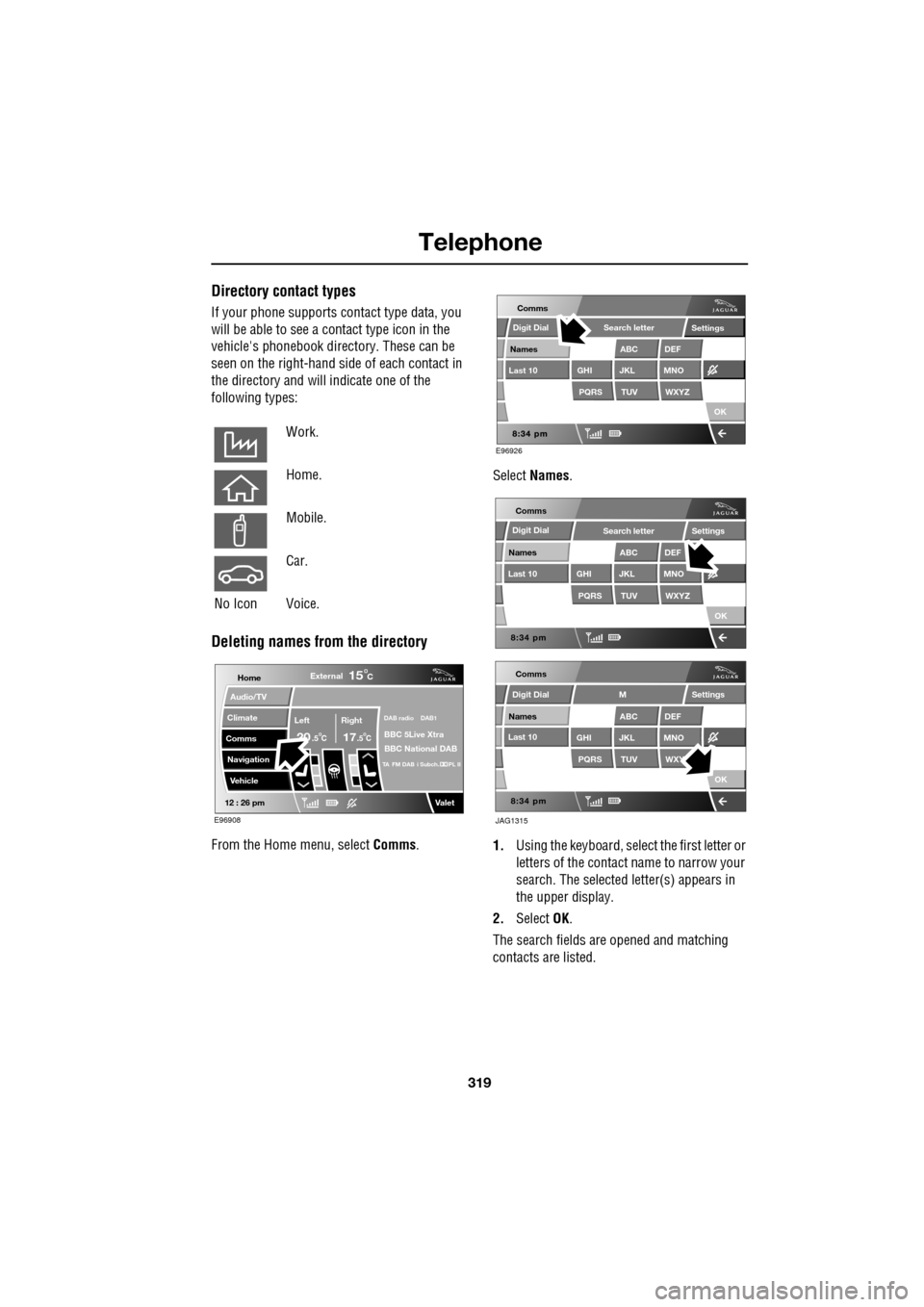
If your phone supports contact type data, you
will be able to see a contact type icon in the
vehicle's phonebook dire ctory. These can be
seen on the right-hand side of each contact in
the directory and will indicate one of the
following types:
Deleting names from the directory
From the Home menu, select Comms. Select
Names .
1. Using the keyboard, select the first letter or
letters of the contact name to narrow your
search. The selected letter(s) appears in
the upper display.
2. Select OK.
The search fields ar e opened and matching
contacts are listed.
Work.
Home.
Mobile.
Car.
No Icon Voice.
Home
Audio/TV
Climate
Comms
Navigation
VehicleExternal
Left Right
20 17CC
15C
.5 .5
DAB radio DAB1
BBC 5Live Xtra
BBC National DAB
TA FM DAB i Subch. PL II
Valet12 : 26 pm
E96908
E96926
Comms
Digit Dial
Names
Last 10
Settings
PQRS
GHITUV
ABC
JKL
WXYZ
DEF
MNO
Search letter
OK
Comms
Comms
Names
Last 10
Settings
PQRS
GHITUV
ABC
JKL
WXYZ
DEF
MNO
Search letter
OK
Names
Last 10
Settings
PQRS
GHITUV
ABC
JKL
WXY
DEF
MNO
M
OK
JAG1315
Digit Dial
Digit Dial
Page 323 of 391
323
Telephone
TELEPHONE VOICE CONTROL
Voice control allows many of the telephone
features to be activa ted by voice commands.
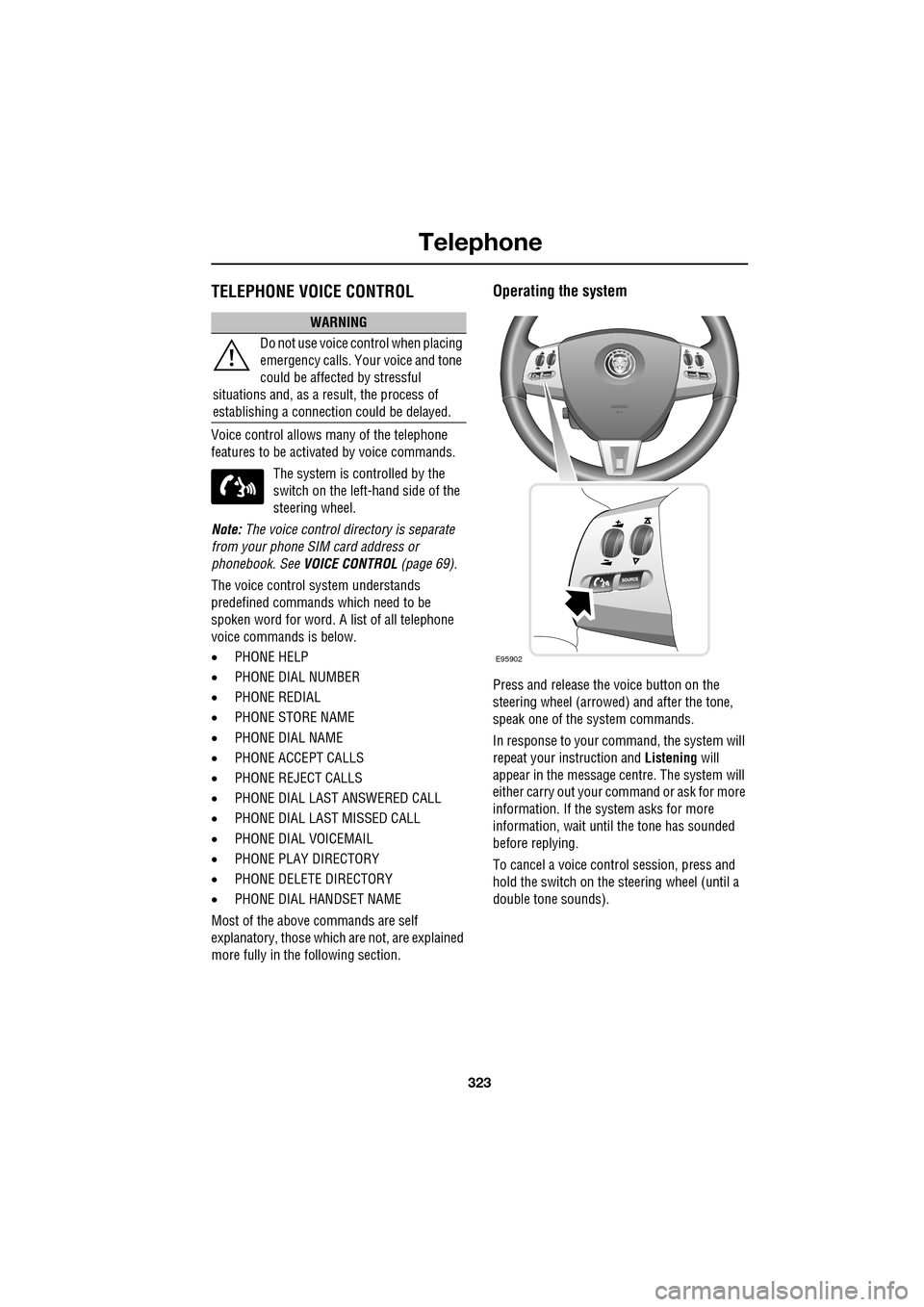
The system is controlled by the
switch on the left -hand side of the
steering wheel.
Note: The voice control dire ctory is separate
from your phone SIM card address or
phonebook. See VOICE CONTROL (page 69).
The voice control sy stem understands
predefined commands which need to be
spoken word for word. A list of all telephone
voice commands is below.
• PHONE HELP
• PHONE DIAL NUMBER
• PHONE REDIAL
• PHONE STORE NAME
• PHONE DIAL NAME
• PHONE ACCEPT CALLS
• PHONE REJECT CALLS
• PHONE DIAL LAST ANSWERED CALL
• PHONE DIAL LAST MISSED CALL
• PHONE DIAL VOICEMAIL
• PHONE PLAY DIRECTORY
• PHONE DELETE DIRECTORY
• PHONE DIAL HANDSET NAME
Most of the above commands are self
explanatory, those whic h are not, are explained
more fully in the following section.
Operating the system
Press and release the voice button on the
steering wheel (arrowed) and after the tone,
speak one of the system commands.
In response to your command, the system will
repeat your instruction and Listening will
appear in the message centre. The system will
either carry out your command or ask for more
information. If the system asks for more
information, wait until the tone has sounded
before replying.
To cancel a voice control session, press and
hold the switch on the steering wheel (until a
double tone sounds).
WARNING
Do not use voice control when placing
emergency calls. Your voice and tone
could be affected by stressful
situations and, as a result, the process of
establishing a connecti on could be delayed.
E95902
Page 332 of 391
Television
332
Channel list
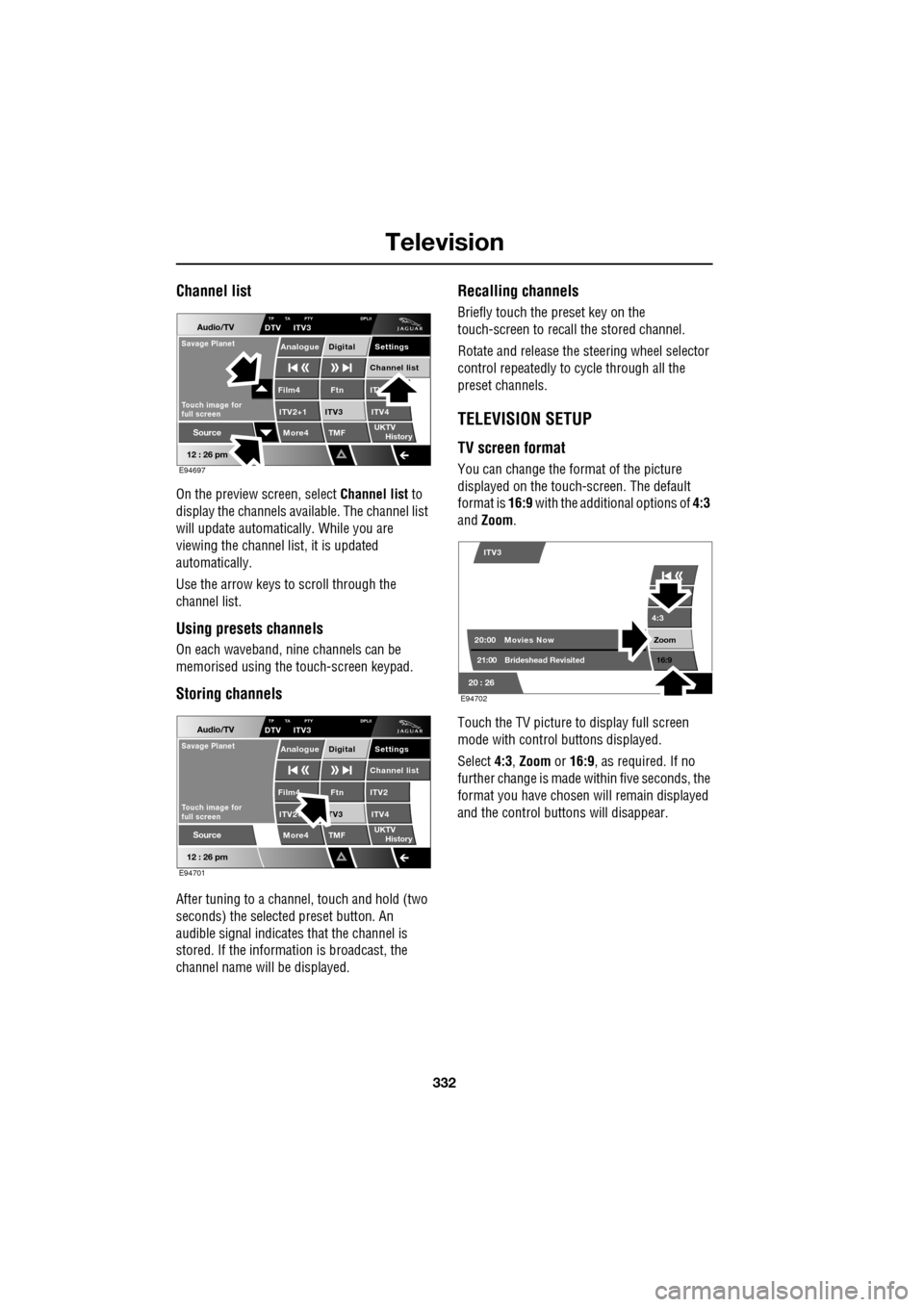
On the preview screen, select Channel list to
display the channels available. The channel list
will update automatically. While you are
viewing the channel list, it is updated
automatically.
Use the arrow keys to scroll through the
channel list.
Using presets channels
On each waveband, ni ne channels can be
memorised using the touch-screen keypad.
Storing channels
After tuning to a channe l, touch and hold (two
seconds) the selected preset button. An
audible signal i ndicates that the channel is
stored. If the informat ion is broadcast, the
channel name wi ll be displayed.
Recalling channels
Briefly touch the preset key on the
touch-screen to recall the stored channel.
Rotate and release the steering wheel selector
control repeatedly to cycle through all the
preset channels.
TELEVISION SETUP
TV screen format
You can change the format of the picture
displayed on the touch-screen. The default
format is 16:9 with the additional options of 4:3
and Zoom .
Touch the TV picture to display full screen
mode with control buttons displayed.
Select 4:3, Zoom or 16:9 , as required. If no
further change is made within five seconds, the
format you have chosen will remain displayed
and the control butt ons will disappear.
Audio/TV
12 : 26 pm
More4 TMF
TP TA PTY DPLIIDTV ITV3
UKTV
HistorySource
ITV
ITV2+1 ITV4Film4
Settings
Channel listAnalogue Digital
Ftn
ITV3
Touch image for
full screen
Savage Planet
E94697
Audio/TV
12 : 26 pm
More4 TMF
TP TA PTY DPLIIDTV ITV3
UKTV
HistorySource
ITV2
ITV2+ ITV4Film4
Settings
Channel listAnalogue Digital
Ftn
TV3
Touch image for
full screen
Savage Planet
E94701
4:3
Zoom 16:9
ITV3
20:0021:00 Movies Now
Brideshead Revisited
20 : 26 E94702
Page 337 of 391
337
Navigation system
MENU STRUCTURE
The following menu outlines the touch-screen Navigation system menu structure.
Navigation Setup User Settings
Quick POI Selection
Calibration
Restore Defaults
RDS-TMC
Language Selection
Stored Locations Memory Add
Destination/waypointEdit
Previous Delete
Avoid Points
Home
Destination Entry AddressHouse
Street
Town
Intersection
Display Map
Search
Save
POI POI Name
POI
Phone
Postcode
Map
Coordinates
Route Options Route Preferences
Destination/Waypoint
Detour
Search Condition
Route Preview
Display Route
Calculate
Cancel Guidance
Route Trace
Auto voice guidance off
Page 338 of 391

Navigation system
338
MAIN MENU
After selecting navigation, the main menu is
displayed showing ava ilable functions. For
detailed information on these items:
See DESTINATION ENTRY (page 356).
See ROUTE PREFERENCES (page 347).
See USER SETTINGS (page 338).
There are additional sections in this handbook
specifically showing Points of Interest (POIs)
and End User Licence Agreements.
Select the menu item required.
Note: To view the map without the buttons
showing, touch anywhere on the map display.
To display the buttons, touch Menu .
USER SETTINGS
From the main navigation menu select
Navigation Setup.
A number of user settings can be made from
this menu.
Select those which you require then touch OK .
Note: Touch a dark blue band to deselect that
feature or a light band to select it.
The individual details must be firstly set in the
navigation setup menu.
LUTON
Menu
Stored
Destination
Auto Voice
Entry
Guidance Off
LUTON
LUTON
RD
FORD
M 4 0mi
Menu
2mi
12 : 26 pm
12 : 26 pm
Locations
Navigation SetupRoute Options
JOL4506ENG
Guidance screen
User Settings
Motorway Information
Border guidance
Congestion Charge guidance
OK
Default
Navigation Setup
Low Fuel Warning
User Settings
Display Petrol Station POI
Text Size on the MAP
iy traffic restriction
Auto voice guidance
Medium
OK
Default
Selection
Calibration
Restore
User
Settings
Defaults Quick POI
12 : 26 pm
12 : 26 pm
12 : 26 pm
RDS-TMC
Language
Selection
JOL4547ENG
Page 339 of 391

339
Navigation system
Saving user preferences to memory
Use the scroll arrows (1) to see the options.
Most of these selections are either on or off,
light blue band is not selected, dark blue band
is selected.
Touch the line of your choice then OK (2).
TURN-BY-TURN NAVIGATION
(Message centre guidance)
Turn-by-turn navigation guidance (displayed in
the message centre) can be turned on or off as
follows:
From the main navi gation menu, select
Navigation Setup , then select User Settings .
Scroll through the user settings list until the
Message centre guidance band is displayed.
Touch the band to select/d eselect the feature.
If the band is dark blue, then Message centre
guidance is acti ve. If the band is light blue,
Message centre guidance is turned off.
LANGUAGE SELECTION
From the initial navigation screen, select
Language and select your language.
If necessary, use the scroll arrows to the left of
the list to search up or down.
N
LUTON
Menu
Navigation Setup
Low Fuel Warning
User Settings
Display Petrol Station
Text Size on the MAP
y traffic restriction
Auto voice guidance
Medium
OK
Default
Selection
Calibration
Restore
User
Settings
Defaults Quick POI
12 : 26 pm 12 : 26 pm
12 : 26 pm
21
Stored
Destination
Auto Voice
Entry
Guidance Off
Locations
Navigation SetupRoute Options
RDS-TMC
Language
Selection
JOL4507ENG
German
French
Italian
English
Caution
Language Agree
English
Language
US English
12 : 26 pm
12 : 26 pm
JOL4501ENG
Distraction may cause accidents.
Never enter data whilst driving.
Always concentrate on driving
and obey traffic regulations.
See Owners Handbook.
Page 340 of 391

Navigation system
340
MEASUREMENT UNITS
Distances are shown on the screen and given in
voice guidance, either in metric units
(kilometres and metres) or in Imperial units
(miles and yards) and can only be changed
from the vehicle touch-screen menu, not from
the navigation system menu.
To change the measur ement units, select
Vehicle on the vehicle touch screen, then select
Unit Change .
To change the units: The unit choices are
selected by touching either km or Mls.
KEYBOARD LAYOUT
The keyboard layout ca n be changed from a
QWERTY type to ABC DEF type, from the User
Settings screen, accessible from the
Navigation Setup screen.
Touch the bar to change the keyboard layout,
then touch OK.
Display set
Preferences
Button audio
Mls. MPH MPG km km/h 1/100
VehicleF
C
0
0
Display language English UKVol. presetsChange
JOL4657ENG
Navigation Setup
Selection
Calibration
RestoreUser
Settings
Defaults Quick POI
12 : 26 pm
RDS-TMC
Language
Selection
12 : 26 pm
Low Fuel Warning
User Settings
Display Petrol Station POI
Text Size on the MAP
Key board layout
Medium
OK
Default
ABC
JOL4658ENG
LUTON
LUTON
Menu
12 : 26 pm
Stored
Destination
Auto Voice
Entry
Guidance Off
Locations
Navigation SetupRoute Options
